Razer Kaira Pro Wireless  Headphones Review

Reviewed Dec 21, 2020 at 07:54am
Writing modified Aug 06, 2024 at 11:54am
Tested using Methodology v1.5 
Razer Kaira Pro Wireless
6.6
Neutral Sound 
6.6
Commute/Travel 
6.8
Sports/Fitness 
6.8
Office 
7.3
Wireless Gaming 
5.7
Wired Gaming 
7.3
Phone Calls 
 3

The Razer Kaira Pro Wireless are wireless gaming headphones that come in Xbox and PlayStation variants. They're comfortable, well-built, and have low audio latency. They're also Bluetooth-compatible and have a companion app with plenty of configuration options, including a graphic EQ to fine-tune their boomy, somewhat imbalanced default sound profile, and a customizable RGB lighting scheme. Unfortunately, they block out very little ambient noise and are quite bulky. Still, if you're looking for versatile wireless gaming headphones that can also cope with day-to-day use, these are a good choice.

Our Verdict

6.6
Neutral Sound 

The Razer Kaira Pro are fair for neutral sound. These headphones struggle to deliver audio consistently. Their out-of-the-box sound profile is also somewhat unbalanced, with a boomy bass range, cluttered and muddy mids, and an underemphasized, uneven treble range. Thankfully, their companion app has audio presets as well as a graphic EQ to help you adjust their sound profile to your liking.

Pros
  • Companion app with many configuration features.
Cons
  • Middling frequency response consistency.
6.6
Commute/Travel 

The Razer Kaira Pro are alright for commuting and traveling. While they're bulky and do little to filter out the rumble of bus engines, they're Bluetooth-compatible, which should allow you to connect to your phone without the use of a dongle. They have low Bluetooth latency with mobile iOS devices, which is good if you like to watch videos on your way into the office. They're also comfortable enough to wear for extended periods and have a near 20-hour battery life, so they should last throughout long trips.

Pros
  • Great build quality.
  • Low Bluetooth latency with iOS devices.
Cons
  • Bulky design.
  • Sub-par noise isolation capability.
6.8
Sports/Fitness 

The Razer Kaira Pro are okay for sports and fitness, though this isn't their intended use. They're quite bulky and aren't likely to stay in place during intense workouts, but their wireless design eliminates the risk of an audio cable snagging on something and yanking the headphones from your head. They feel sturdy enough to take some minor drops and bumps and have a control scheme that places all essential functions within easy reach.

Pros
  • Great build quality.
Cons
  • Bulky design.
6.8
Office 

The Razer Kaira Pro are a fair choice for office use. They don't block out that much background chatter and leak some audio. On the upside, you can connect them to your PC via Bluetooth, their roughly 20 hours of battery life should easily get you through a couple of days at work, and they feel quite comfortable, even throughout extended listening sessions. You can also remove their boom mic to give them a more casual look.

Pros
  • Comfortable fit.
Cons
  • Sub-par noise isolation capability.
7.3
Wireless Gaming 

The Razer Kaira Pro are decent wireless gaming headphones that have low non-Bluetooth latency, so you shouldn't experience a noticeable audio delay while gaming. Their boom mic also yields excellent recording quality as well as a good noise handling capability, so teammates should understand you clearly even if you're in a loud environment. Their companion app also features a broad range of configuration features, including equalizers for their sound profile and microphone.

Pros
  • Companion app with many configuration features.
  • Great overall microphone performance.
  • Low non-Bluetooth latency with compatible devices.
Cons
  • Middling frequency response consistency.
5.7
Wired Gaming 

The Razer Kaira Pro are wireless-only and can't be used on a wired connection.

7.3
Phone Calls 

The Razer Kaira Pro are decent for making phone calls. Their boom mic makes recorded speech sound clear, full-bodied, and detailed. It also does an good job of isolating your voice from ambient noise, so people should understand you clearly even if you're in a loud environment. Unfortunately, they block out very little ambient noise, so you may have trouble hearing what's being said if you yourself are in a noisy setting.

Pros
  • Great overall microphone performance.
  • Comfortable fit.
Cons
  • Sub-par noise isolation capability.
  • 6.6
    Neutral Sound
  • 6.6
    Commute/Travel
  • 6.8
    Sports/Fitness
  • 6.8
    Office
  • 7.3
    Wireless Gaming
  • 5.7
    Wired Gaming
  • 7.3
    Phone Calls
  • Changelog

    1.  Updated Aug 06, 2024: The Turtle Beach Stealth 600 (Gen 3) Wireless was mentioned in the Battery section of the review.
    2.  Updated Feb 16, 2024: We've updated the name of this review and expanded information regarding console compatibility in Differences Between Sizes and Variants, PC Compatibility, Xbox Compatibility, and Xbox Compatibility.
    3.  Updated Oct 18, 2021: Retested 'Multi-Device Pairing'.
    4.  Updated Oct 14, 2021: Converted to Test Bench 1.5.

    Check Price

    BlackKaira Pro Wireless for Xbox
    SEE PRICE
    Amazon.com
    HALO Infinite EditionKaira Pro Wireless for Xbox
    SEE PRICE
    Amazon.com
    WhiteKaira Pro Wireless for Xbox
    Amazon.com
    White/BlackKaira Pro Wireless for Playstation
    SEE PRICE
    Amazon.com

    Differences Between Sizes And Variants

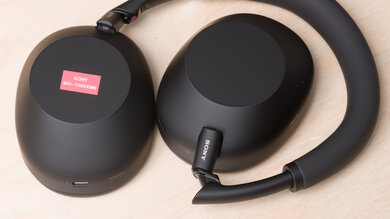
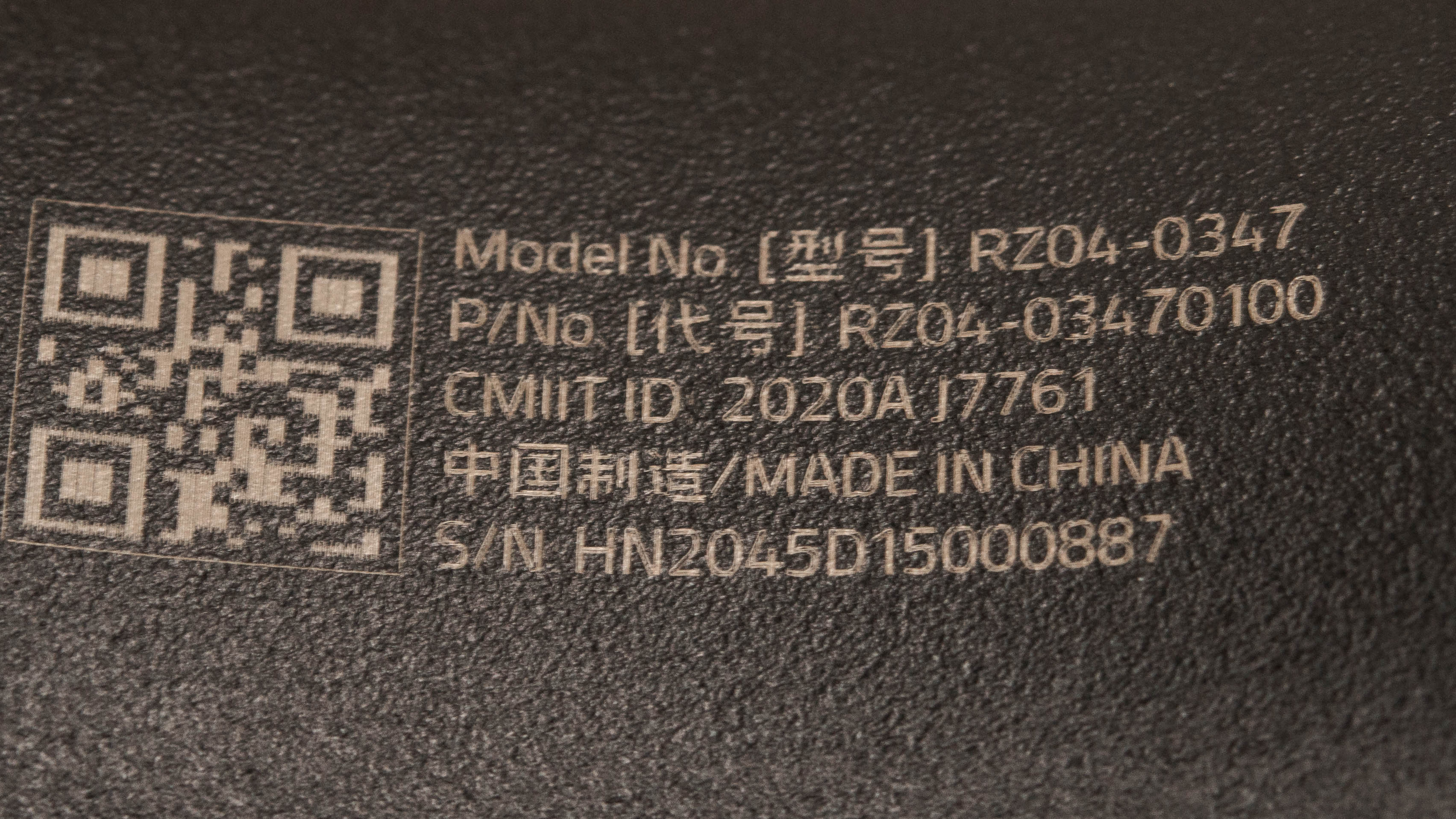
    The Razer Kaira Pro are only available in one color: 'Black'. That said, you can pick up these headphones with either PlayStation or Xbox compatibility. We tested the Xbox variant and you can see its label here. Another pair of headphones, simply designated the Razer Kaira, are similarly-designed to the Razer Kaira Pro, but don't have RGB lighting and aren't Bluetooth-compatible. We can't confirm if the headphones perform similarly overall.

    If you come across a differently-configured variant, let us know in the forums so we can update our review.

    Popular Headphones Comparisons

    The Razer Kaira Pro are Bluetooth-enabled wireless gaming headphones that you can pick up for either your Xbox or PlayStation console. They have low non-Bluetooth audio latency, an eye-catching RGB lighting feature, and are well-built and comfortable. They also have a boom microphone that makes your voice sound clear and detailed, even in noisy environments. Unfortunately, they have a fairly bulky design and aren't very portable. If you're looking for alternatives, take a look at our list of recommendations for the best wireless gaming headsets, the best Xbox One headsets, and the best gaming headsets.

    Razer Kaira X

    The Razer Kaira Pro Wireless and the Razer Kaira X have different strengths and depending on your usage, you may prefer either one. While both headphones are comfortable and have great mic performances, the Kaira Pro are wireless headphones that are better built and have companion software that offers a graphic EQ and presets. They also support Bluetooth. However, the Kaira X are wired headphones with a more neutral sound profile, which some users may prefer.

    Turtle Beach Stealth 600 (Gen 3)

    The Razer Kaira Pro Wireless and the Turtle Beach Stealth 600 (Gen 3) are comparable gaming headsets. The choice between them comes down to personal preference. While both headphones have Bluetooth and wireless dongle connections, only the Razer allows you to listen to audio from both sources simultaneously. The Razer also has a better build quality. That said, the Turtle Beach have a much longer battery life. If you plan to use the Razer on PC, your best bet is to purchase the PlayStation variant, but the Xbox version will work if your PC supports Xbox Wireless.

    SteelSeries Arctis 7X Wireless

    The SteelSeries Arctis 7X Wireless are more versatile than the Razer Kaira Pro Wireless. While both headphones are comfortable and well-built, the SteelSeries have a USB dongle that allows them to be used wirelessly with PlayStation and Xbox consoles. They also have lower wireless latency too, and have a better battery performance. However, the Razer support Bluetooth, which some users may prefer, and have a slightly better performing boom mic.

    SteelSeries Arctis 9X Wireless

    The Razer Kaira Pro Wireless and SteelSeries Arctis 9X Wireless each have their own strengths, so which you prefer comes down to your own needs and preferences. The Razer block out a little more ambient noise, have superior mic recording quality, and lower Bluetooth and Xbox Wireless latency. The SteelSeries can be used for passive audio playback with their included 1/8" TRS cable, have a better-balanced default sound profile, and last longer off of a single charge.

    Razer Nari Ultimate Wireless

    The Razer Kaira Pro Wireless are more versatile than the Razer Nari Ultimate Wireless. The Kaira Pro are Bluetooth-compatible, have a more stable fit, a more comprehensive control scheme, and are better-built. They also have almost four times the battery life and a superior boom microphone. That said, the Nari can be used on a wired connection via their 1/8" TRRS cable and have a slightly better-balanced sound profile out-of-the-box.

    Xbox Wireless Headset

    The Razer Kaira Pro Wireless are better wireless gaming headphones for Xbox consoles than the Xbox Wireless Headset. The Razer are better-built, have a better overall performing boom mic, and have significantly lower Xbox Wireless latency. However, the Xbox can also be used wired with their USB-A to USB-C cable for full audio and microphone compatibility.

    Bang & Olufsen Beoplay Portal

    The Bang & Olufsen Beoplay Portal are more versatile headphones than the Razer Kaira Pro Wireless. The Bang & Olufsen offer better noise isolation thanks to their ANC feature, and the included audio cables offer full audio and microphone compatibility when plugged into PlayStation and Xbox controllers, although the headphones need to be turned on in order to use their TRRS cable. However, the Razer have a better microphone performance and a longer continuous battery life.

    Turtle Beach Stealth 700 Gen 2 Wireless

    The Turtle Beach Stealth 700 Gen 2 Wireless and Razer Kaira Pro Wireless are very well-matched, so you may prefer one over the other depending on minor differences. The Turtle Beach have a tighter, more stable fit, deliver audio more consistently, take less time to charge, and have slightly lower Bluetooth latency, though at a shorter range. Meanwhile, the Razer are comfier, have a superior boom microphone, leak less audio, and have slightly longer battery life. They also have lower non-Bluetooth latency.
    Corsair HS75 XB WIRELESS

    The Razer Kaira Pro Wireless are better than the Corsair HS75 XB WIRELESS. The Razer are compatible with Bluetooth connections, block out more ambient noise, have better mic recording quality, and have a feature-rich companion app. They also have lower non-Bluetooth audio latency. Conversely, the Corsair have slightly longer battery life and deliver audio more consistently.

    Overhauling Our Audio Measurements And A New Multi-Curve Graphing Tool

    We've upgraded our Headphones Test Bench to 2.0! This update brings several key changes to our tests and usages, making it easier than ever to interpret our sound results based on your personal preferences. You'll also find a brand-new interactive graph tool featuring multiple targets (including our own!) for you to explore and compare.

    For a full breakdown, check out our changelog, which includes detailed commentary from our test designer explaining the rationale behind our update.

    We'd also love to hear your thoughts: your feedback helps us keep improving, so join us in the comments!

    Test Results

    perceptual testing image
    Sort:
    RATINGS
    Category:
    All
    Design
    Style
    TypeOver-ear
    EnclosureClosed-Back
    WirelessYes
    TransducerDynamic

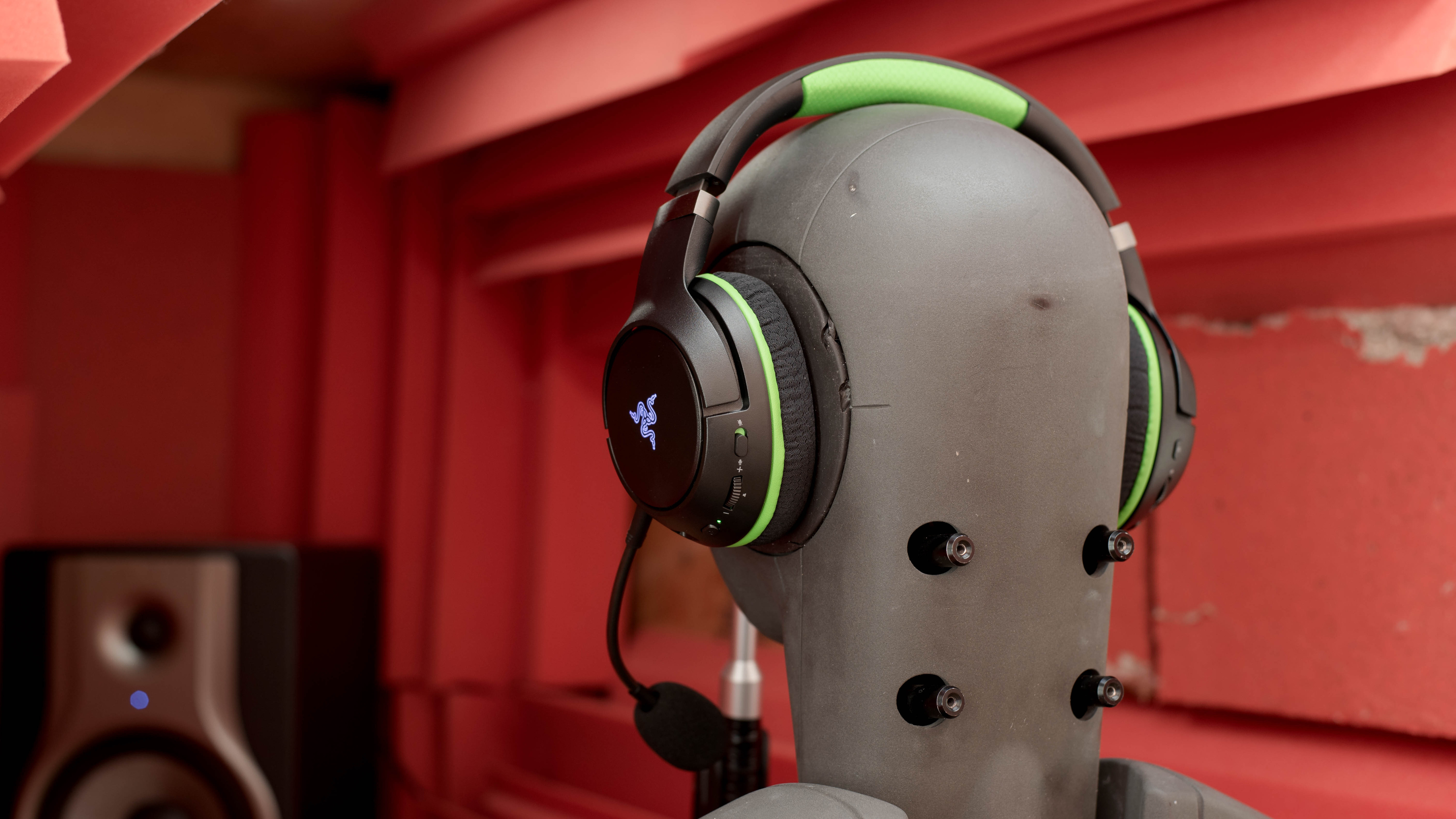
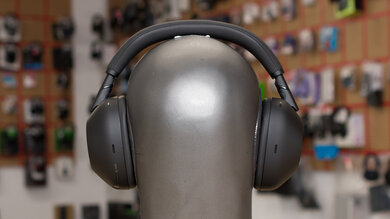
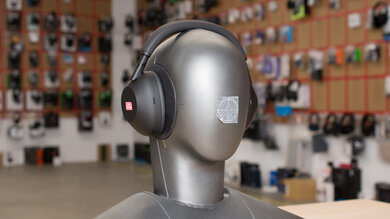
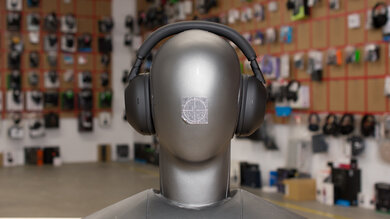
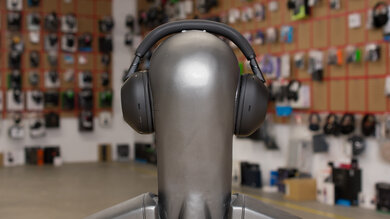
    The Razer Kaira Pro are fairly simple-looking as far as gaming headphones are concerned. Their oval-shaped ear cups and simple headband design are somewhat reminiscent of the non-gaming-oriented Razer Opus Wireless, especially when you detach their boom microphone to give them a more casual look. That said, these over-ears have eye-catching lime-green accents as well as a light-up RGB Razer logo on the ear cups, which can be customized in their companion app.

    7.5
    Comfort
    Weight0.73 lbs
    Clamping Force
    1 lbs

    These headphones are quite comfortable. They're relatively lightweight and don't clamp too tightly, with a comfortable headband and ear cups that offer a broad range of articulation for different ear shapes. Unfortunately, they're still quite bulky.

    7.6
    Controls
    OS Compatibility
    Not OS specific
    Ease Of UseGood
    FeedbackGood
    Call/Music ControlYes
    Volume ControlYes
    Microphone ControlMute/Unmute
    Channel Mixing
    Yes
    Noise Cancelling ControlNo
    Talk-Through
    No
    Additional ControlsBluetooth + Multi function

    The Razer Kaira Pro have a good control scheme. It's easy to use and quite comprehensive. The left ear cup features a mic mute/unmute switch, a volume scrolling wheel, and the power button. The right ear cup has a scrolling wheel for channel mixing, an Xbox pairing button that can also be double-tapped to switch between EQ presets, and a Bluetooth multifunction button. A single press of the latter turns the headphones on and off, pauses and plays media, and answers and ends calls. Double-tapping it turns on voice commands, rejects or swaps calls, enables or disables 'gaming mode', and skips tracks forward. Triple-tapping it skips backward while holding it down for five seconds turns on the Bluetooth-pairing mode. While there's audio feedback for changes to the volume and channel mixing settings, there's no indicator for mic muting and unmuting.

    5.3
    Breathability
    Avg.Temp.Difference8.5 °C
    5.4
    Portability
    L8.0" (20.3 cm)
    W7.0" (17.8 cm)
    H3.5" (8.9 cm)
    Volume196.00 in³ (3,211.85 cm³)
    Transmitter RequiredNo

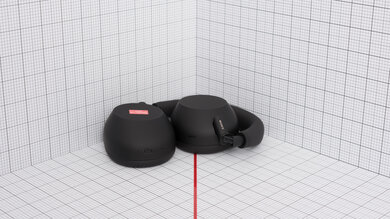
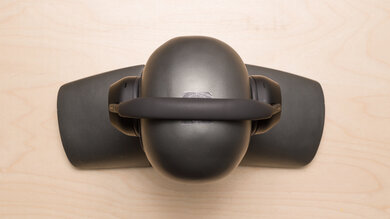
    These over-ears aren't very portable, which is normal for gaming headphones. They take up quite a bit of room, even when you detach their boom mic and swivel their ear cups to lay flat.

    0.0
    Case
    TypeNo case
    LN/A
    WN/A
    HN/A
    VolumeN/A

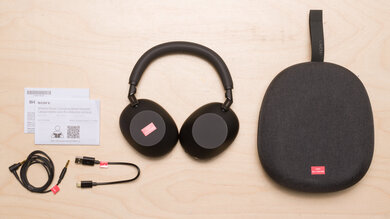
    The Razer Kaira Pro don't come with a case or pouch.

    8.0
    Build Quality

    The Razer Kaira Pro are very well-built. They have a high-grade plastic construction and metal ear cup hinges, so they should be able to endure a couple of bumps and drops without issue.

    7.0
    Stability

    The Razer Kaira Pro are decently stable. They shouldn't have any trouble staying in place during casual listening sessions, but they're likely to move around or even fall off during light to moderate workouts.

    Headshots 1
    Headshots 2
    Top
    In The Box

    • Razer Kaira Pro Wireless headphones
    • Boom mic
    • USB-C charging cable
    • Stickers
    • User guide
    Sound
    Sound Profile
    See details on graph tool
    Bass Amount
    -0.31 dB
    Treble Amount
    -2.21 dB

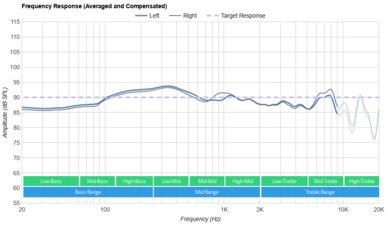
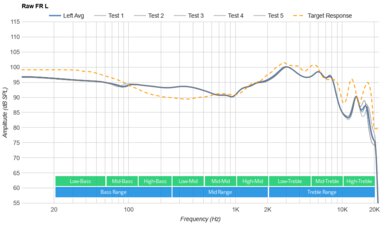
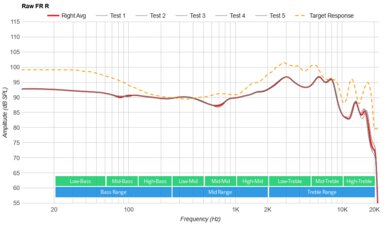
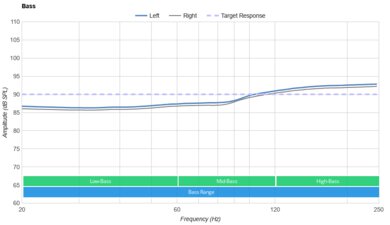
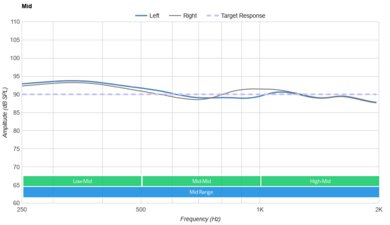
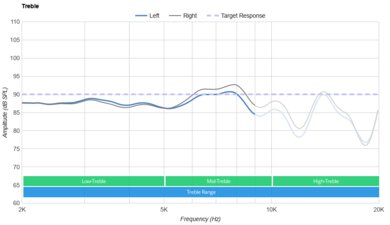
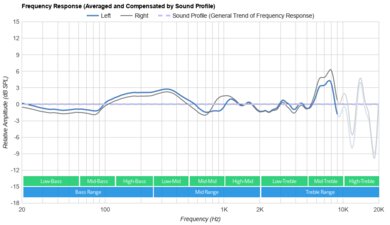
    The Razer Kaira Pro for Xbox have a warm but somewhat uneven sound profile. Their overemphasized bass range is well-suited for emphasizing the thump and rumble of sound effects or EDM music, but some listeners may find it boomy. Vocals and lead instruments may be a little muddy and harsh, while their uneven treble range can result in sibilants sounding alternatively dull and piercing. Thankfully, you can adjust their sound profile via audio presets or a five-band graphic EQ in their companion app.

    5.5
    Frequency Response Consistency
    See details on graph tool
    See details on graph tool
    Avg. Std. Deviation
    1.17 dB

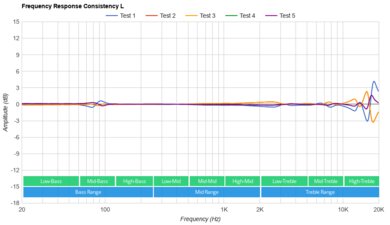
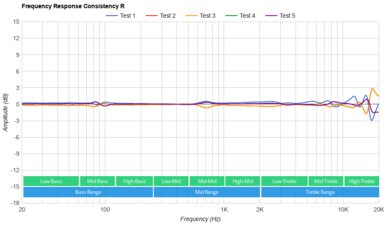
    The Razer Kaira Pro have sub-par frequency response consistency. You're likely to experience significant deviations in bass and treble delivery depending on their fit, seal, and positioning. This could be a bigger problem if you have thick hair or wear glasses.

    Raw Frequency Response
    See details on graph tool
    See details on graph tool
    7.2
    Bass Accuracy
    See details on graph tool
    Std. Err.
    4.18 dB
    Low-Frequency Extension
    12.78 Hz
    Low-Bass
    1.39 dB
    Mid-Bass
    3.52 dB
    High-Bass
    6.72 dB

    These headphones have decent bass accuracy. Their overemphasized high-bass range can bring out the thump and rumble of sound effects in action-heavy games, but also adds some a boomy quality to some mixes, and some users may find that they sound muddy. That said, since their bass delivery is heavily dependent on their fit, seal, and positioning, your experience may vary.

    6.7
    Mid Accuracy
    See details on graph tool
    Std. Err.
    4.4 dB
    Low-Mid
    3.58 dB
    Mid-Mid
    0.52 dB
    High-Mid
    6.04 dB

    The Razer Kaira Pro have okay mid accuracy. The bump from the high-bass range carries over into the low-mids, which can clutter and muddy vocals and lead instruments. The overemphasis in the high-mids can also result in a somewhat harsh, boxy quality.

    5.8
    Treble Accuracy
    See details on graph tool
    Std. Err.
    5.98 dB
    Low-Treble
    -1.45 dB
    Mid-Treble
    4.82 dB
    High-Treble
    -6.18 dB

    The Razer Kaira Pro have middling treble accuracy. The alternating bump and drop in the low treble range can veil finer details in vocals and lead instruments. The steep rise in the mid-treble range gives sibilants a piercing quality. Since their treble delivery is heavily dependent on their fit, seal, and positioning, your listening experience may vary.

    5.7
    Peaks/Dips
    See details on graph tool
    Peaks
    2.78 dB
    Dips
    2.79 dB

    The peaks and dips performance is sub-par. The extended bump from the high-bass to low-mid range gives a boomy quality to some mixes and muddies vocals and lead instruments. The drop in the mid-mids pushes vocals and lead instruments to the back of the mix while the following bump in the high-mids makes them sound harsh and boxy. The steep dip and rise in the treble range can make some vocals and lead instruments sound a little dull and give sibilants a piercing, painful quality.

    8.2
    Imaging
    See details on graph tool
    See details on graph tool
    Weighted Group Delay
    0.25
    Weighted Phase Mismatch
    7.87
    Weighted Amplitude Mismatch
    0.9
    Weighted Frequency Mismatch
    2

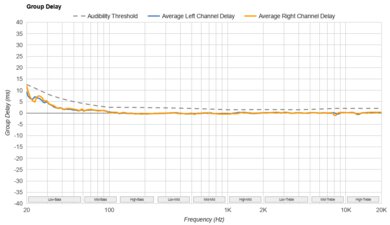
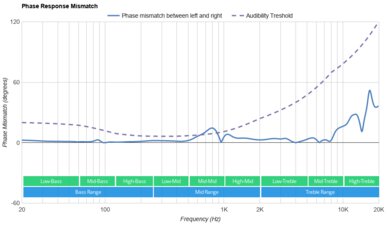
    The Razer Kaira Pro have great stereo imaging performance. Their weighted group delay falls beneath the audibility threshold, resulting in tight bass and transparent treble. The L/R drivers are also well-matched in regards to phase, amplitude, and frequency response, so objects like voices and footsteps should be accurately placed within the stereo image. However, these results are only valid for our test unit, and yours may perform differently.

    5.5
    Passive Soundstage
    See details on graph tool
    PRTF Accuracy (Std. Dev.)
    4.28 dB
    PRTF Size (Avg.)
    4.23 dB
    PRTF Distance
    9.64 dB
    Openness
    5.1
    Acoustic Space Excitation
    3.9

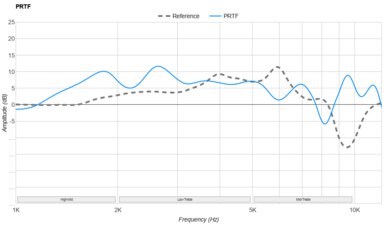
    These headphones have poor passive soundstage. Sound is likely to be perceived as coming from the inside of your head, rather than all around you, resulting in a somewhat unnatural listening experience.

    2.0
    Virtual Soundstage
    Head Modeling
    No
    Speaker Modeling
    On/Off
    Room Ambience
    No
    Head Tracking
    No
    Virtual Surround
    Windows Sonic Spatial Audio

    The Razer Kaira Pro are compatible with Windows Sonic Spatial Audio on Xbox, though we don't currently test this feature. You need an Xbox Wireless adapter to use this feature with PCs that don't have Xbox Wireless technology.

    7.8
    Weighted Harmonic Distortion
    See details on graph tool
    WHD @ 90
    0.305
    WHD @ 100
    0.112

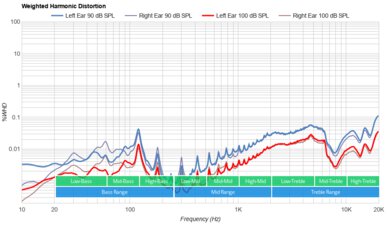
    The weighted harmonic distortion performance is very good. Aside from a slight bit of distortion in the low-treble range at moderate and high volumes, the rest of the frequency range stays within good limits. This results in mostly clean and pure audio reproduction.

    Test Settings
    Firmware
    Unknown
    Power
    On
    Connection
    Wireless (Proprietary)
    Codec
    PCM, 24-bit, 48kHz
    EQ
    Default
    ANC
    No ANC
    Tip/Pad
    Default
    Microphone
    Boom

    These are the settings used to test the Razer Kaira Pro. These headphones use Xbox Wireless technology to connect to compatible devices and don't come with a wireless USB dongle, so we used a Microsoft Wireless Adapter for Xbox One to pair it to our test PC for sound and microphone testing. Our results are only valid in this configuration.

    Isolation
    4.8
    Noise Isolation
    See details on graph tool
    Isolation Audio
    Overall Attenuation
    -13.61 dB
    Noise CancellingNo
    Bass
    -1.37 dB
    Mid
    -9.48 dB
    Treble
    -30.57 dB

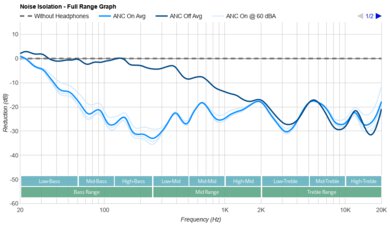
    The noise isolation performance is inadequate. They block out very little noise in both the bass and mid-range, so you're likely to hear passing buses and trucks as well as the chatter of people nearby. They do an excellent job of filtering out high-pitched ambient noise, so you shouldn't hear much of the hum of an AC unit.

    6.6
    Leakage
    See details on graph tool
    Leakage Audio
    Overall Leakage @ 1ft
    41.77 dB

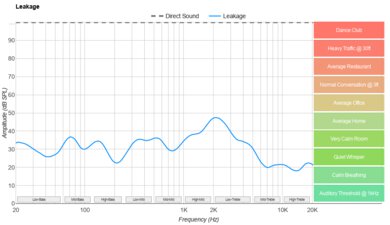
    The audio leakage performance is adequate. They leak some audio, so you may annoy people nearby if you listen to content at very high volumes in a moderately quiet environment.

    Microphone
    Microphone Style
    Integrated
    No
    In-Line
    No
    Boom
    Yes
    Detachable Boom
    Yes
    MicYes

    The Razer Kaira Pro have a detachable, flexible boom microphone.

    8.7
    Recording Quality
    See details on graph tool
    Recorded Speech
    LFE
    20 Hz
    FR Std. Dev.
    1.65 dB
    HFE
    8,010.97 Hz
    Weighted THD
    0.154
    Gain
    13.03 dB

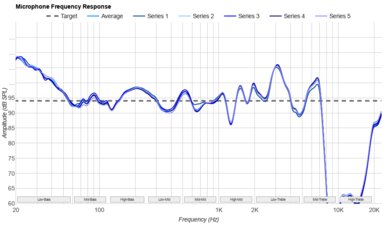
    The boom microphone has amazing recording quality. Recorded speech sounds full-bodied, clear, and natural.

    7.5
    Noise Handling
    See details on graph tool
    SpNR
    34.38 dB
    Noise Gate
    Always On
    Speech + Pink Noise Handling
    7.5
    Speech + Pink Noise Audio Sample
    Speech + Subway Noise Handling
    7.5
    Speech + Subway Noise Audio Sample

    Update 10/22/2021: These headphones have been updated to test bench 1.5. In this update, we made changes to the way we test noise handling. We now use a subjective evaluation of our audio clips. This new method has resulted in different results than what we had reported in our previous test bench. As a result, the scoring of this box has changed, and we have updated our results.

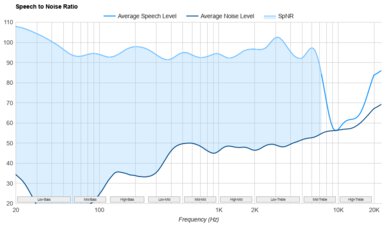
    The boom microphone does a good job isolating speech from background noise and it performs very similarly to the Razer Kaira X. People on the other end of the line or online teammates should understand you fairly clearly, even if you're in a loud and noisy environment.

    Active Features
    8.1
    Battery
    Battery Type
    Rechargable
    Continuous Battery Life
    19.3 hrs
    Additional Charges
    0.0
    Total Battery Life
    19.3 hrs
    Charge Time
    3.7 hrs
    Power-Saving Feature
    Auto-Off Timer
    Audio While Charging
    Yes
    Passive Playback
    No
    Charging PortUSB-C

    The Razer Kaira Pro have impressive battery performance. They supply just under 20 hours of continuous playback time with their RGB lights turned on, which outlasts the advertised claim of 15 hours, and have an auto-off timer to help conserve the charge when they're not in use. You can also turn off their RGB lights to slightly extend their battery life or use these headphones as they charge via their USB cable. If you like to game for long periods of time but would rather not have to plug in the charging cable to do so, consider the Turtle Beach Stealth 600 (Gen 3) Wireless, which we tested as having a continuous battery life of over 85 hours. That's more than enough for several marathon gaming sessions.

    8.0
    App Support
    App NameRazer Headset Setup for Xbox
    iOSNo
    AndroidNo
    macOSNo
    WindowsNo
    Equalizer
    Graphic + Presets
    ANC Control
    No
    Mic ControlAdjustable Level
    Room Effects
    No
    Playback Control
    No
    Button MappingNo
    Surround Support
    Yes

    The Razer Headset Setup for Xbox is a great companion app. It features a five-band graphic EQ, audio presets, a five-band microphone equalizer, microphone responsiveness adjustment, and configuration options for their RGB lighting scheme. You can also change the length of their auto-off timer and check the remaining battery life. To use this app on PCs that don't have Xbox Wireless technology, you need to buy an Xbox Wireless Adapter.

    Connectivity
    8.4
    Bluetooth
    Bluetooth Version
    5.0
    Multi-Device Pairing
    Bluetooth + Console/Non-BT Wireless
    NFC Pairing
    No
    Line Of Sight Range
    325.00 ft (99.06 m)
    PC Latency (SBC)
    267 ms
    PC Latency (aptX)
    N/A
    PC Latency (aptX HD)
    N/A
    PC Latency (aptX-LL)
    N/A
    iOS Latency
    114 ms
    Android Latency
    165 ms

    Update 10/22/2021: These headphones were updated to Test Bench 1.5 and their latency values have changed. Our previous Test Bench 1.4 measurements reported 'PC latency' at 266 ms, 'iOS latency' at 58 ms, and 'Android Latency' at 89 ms. However, our new test bench uses an average of three measurements instead of one, resulting in different values. As a result, we have updated our text to better reflect test bench 1.5 measurements.

    Update 10/18/2021: We've changed Multi-Device Pairing from 'No' to 'Bluetooth + Console/Non-BT Wireless' as these headphones can connect to an Xbox console and a Bluetooth device at the same time. You have to first pair the headphones to your console and then press the headphones' Bluetooth pairing button to connect them to your mobile device. Once paired to both devices, you can hear audio from both devices simultaneously. As a result, we have updated our review, and the scoring of this box has changed.

    The Razer Kaira Pro have great Bluetooth connectivity. They support Bluetooth 5.0, and you can stream music from your phone over Bluetooth while remaining connected to your Xbox. While their Bluetooth latency on PC is quite high, they perform quite well in this regard with iOS devices, so you can watch movies on your phone or play mobile games with little in the way of annoying latency. However, their latency on Android devices could cause some slight syncing issues between your audio and visuals. Note that some apps and devices compensate for latency differently, so your real-life experience may differ.

    8.4
    Non-Bluetooth Wireless
    Non-BT Line Of Sight Range
    154.00 ft (46.94 m)
    Non-BT Latency
    41 ms

    The Razer Kaira Pro offer excellent non-Bluetooth connectivity. There's very little audio latency, so you can game without experiencing a noticeable audio delay.

    Note: The Xbox variant of these headphones over-ears use Xbox Wireless technology to connect to their respective console family. To test latency, we used a Microsoft Wireless Adapter for Xbox One to connect the headphones to our test laptop, which doesn't have Xbox Wireless technology. We can't confirm that the measured latency is similar to when connected to Xbox One, Xbox One S, or Xbox Series S|X consoles.

    0.0
    Wired
    Analog Audio
    No
    USB Audio
    No
    DetachableNo
    LengthN/A
    Connection
    No Wired Option
    Analog/USB Audio Latency
    N/A

    These over-ears aren't compatible with any wired connections. The included USB-C cable is used for charging the headphones.

    PC Compatibility
    Analog
    No
    Wired USB
    No
    Non-BT Wireless
    No

    You can easily use these headphones on PC if you have the PlayStation variant. You'll get full audio and mic support. If you have the Xbox variant, you'll need to check if your PC supports Xbox Wireless; otherwise, you won't be able to connect these headphones.

    PlayStation Compatibility
    PS4 Analog
    No
    PS4 Wired USB
    No
    PS4 Non-BT Wireless
    No
    PS5 Analog
    No
    PS5 Wired USB
    No
    PS5 Non-BT Wireless
    No

    Only the PlayStation variant of these headphones support a wireless connection with PlayStation consoles. You'll have full audio and mic support, though.

    Xbox Compatibility
    Xbox One Analog
    No
    Xbox One Wired USB
    No
    Xbox One Non-BT Wireless
    Audio + Microphone
    Xbox Series X|S Analog
    No
    Xbox Series X|S Wired USB
    No
    Xbox Series X|S Non-BT Wireless
    Audio + Microphone

    The Xbox variant of these headphones supports full audio and microphone compatibility with Xbox One consoles when connected via Xbox Wireless technology. Much like an Xbox controller, they can be paired to the console. If you're looking for a dedicated Xbox headset that's fully compatible using either Xbox Wireless or a wired USB connection, check out the Xbox Wireless Headset.

    You can't use the PlayStation variant of these headphones on Xbox.

    0.0
    Base/Dock
    Type
    Wireless Built-In
    USB Input
    No
    Line In
    No
    Line Out
    No
    Optical Input
    No
    RCA Input
    No
    Dock Charging
    No
    Power Supply
    No Base/Dock

    The Razer Kaira Pro don't have a base or dock, though they are compatible with an Xbox Wireless Adapter, which can be purchased separately.