Razer Opus Wireless 2020  Headphones Review

Reviewed Jun 18, 2020 at 09:00am
Retest Apr 23, 2025 at 04:30pm
Tested using Methodology v1.5 
Razer Opus Wireless 2020
8.0
Neutral Sound 
8.2
Commute/Travel 
7.4
Sports/Fitness 
7.8
Office 
6.0
Wireless Gaming 
7.6
Wired Gaming 
7.0
Phone Calls 
 9
Notice: These headphones were replaced by Razer Opus Wireless 2021

The Razer Opus Wireless 2020 are very good over-ear ANC headphones that offer an excellent price-to-performance ratio. Unlike most of Razer's products that are designed with gaming in mind, these are casual ANC headphones meant for day-to-day use. They feel very comfortable and well-built and are even stable enough for light workouts. They last almost 33 hours off a single charge, which is great, and we tested low latency when watching YouTube videos on an Android device. Their sound profile is very accurate and well-balanced, making them versatile enough for most genres and content, and you can change their sound profile via EQ presets within their companion app. Their ANC is outstanding, and they do a remarkable job of blocking out all background noises, including the low rumble of bus or plane engines.

Update 05/10/2021: Razer has released an updated variant of these headphones called the Razer Opus Wireless 2021. There have been user discussions regarding the new changes, which include moving the physical controls to the right ear cup, upgrading Bluetooth from 4.2 to 5.0, and improving their continuous battery life performance. We've tested these headphones and you can see our review here.

Our Verdict

8.0
Neutral Sound 

The Razer Opus are great headphones for neutral sound listening. They have a very well-balanced and accurate sound profile out-of-the-box that's versatile enough for all genres or content. You can also customize the way they sound via EQ presets within their companion app. They're decently consistent among various users or reseats, though you may have to adjust them slightly to experience their treble the same every time you use them.

Pros
  • Well-balanced and versatile sound profile.
  • Dedicated companion app gives access to EQ presets.
Cons
  • Slightly uneven treble range may be piercing to some listeners.
8.2
Commute/Travel 

The Razer Opus are great for commuting and travel. Their ANC works exceptionally well and does a remarkable job of blocking out the low rumble of bus or plane engines. They're comfortable, last nearly 33 hours off a single charge, and have easy-to-use physical buttons to control your music.

Pros
  • Outstanding ANC.
  • Comfortable and well-built design.
  • Easy-to-use physical buttons.
Cons
  • Mediocre microphone performance.
  • No multi-device pairing.
7.4
Sports/Fitness 

The Razer Opus are decent headphones for sports. While they'll likely fall off during more intense workouts, they feel stable enough to use while jogging or running. They're comfortable to wear during long runs, though their over-ear design will cause your ears to get warm after a while.

Pros
  • Comfortable and well-built design.
Cons
  • Over-ear design may cause you to sweat more than usual.
7.8
Office 

The Razer Opus are very good headphones for the office. They do an outstanding job of blocking out background chatter and don't leak very much audio. They last nearly 33 hours off a single charge, which should get you through almost an entire workweek, and they're comfortable enough to wear all day without causing fatigue.

Pros
  • Outstanding ANC.
  • Comfortable and well-built design.
Cons
  • No multi-device pairing.
6.0
Wireless Gaming 

The Razer Opus can only connect wirelessly via Bluetooth and therefore, aren't compatible with PS4 or Xbox One. They're compatible with Bluetooth-enabled PCs or mobile devices, but their latency is likely too high for competitive gaming.

7.6
Wired Gaming 

The Razer Opus are good headphones for wired gaming. Thanks to their TRRS audio cable, their integrated microphone works while wired, making them compatible with both Xbox One and PS4. They're comfortable enough for long gaming sessions, and last a long time off a single charge. Unfortunately, their integrated microphone doesn't perform as well as most boom mics found on dedicated gaming headphones, though your voice still sounds decently full-bodied and clear.

Pros
  • Comfortable and well-built design.
  • Integrated microphone can be used wired.
  • Fully compatible with both PS4 and Xbox One.
Cons
  • Mediocre microphone performance.
7.0
Phone Calls 

The Razer Opus are satisfactory headphones for phone calls. Their integrated mic and good controls mean you can easily answer a phone call while on-the-go, but your voice only sounds decently full-bodied and clear. Your voice also gets drowned out in most noisy environments, like a subway station.

Pros
  • Outstanding ANC.
  • Easy-to-use physical buttons.
Cons
  • Mediocre microphone performance.
  • No multi-device pairing.
  • 8.0
    Neutral Sound
  • 8.2
    Commute/Travel
  • 7.4
    Sports/Fitness
  • 7.8
    Office
  • 6.0
    Wireless Gaming
  • 7.6
    Wired Gaming
  • 7.0
    Phone Calls
  • Changelog

    1.  Updated Apr 23, 2025: 

      We previously said that these headphones couldn't deliver audio while charging, but after a reader pointed out that was incorrect, we retested them and found they can deliver audio while charging. We've updated the Battery box accordingly.

    2.  Updated May 15, 2023: We've updated Test Settings to reflect that we tested these headphones using the 'Default (THX)' EQ preset. However, the scores haven't changed.
    3.  Updated Jul 11, 2022: We've retested 'Virtual Soundstage'. They have a THX feature available in the companion app, but we don't consider this a virtual soundstage feature as it acts more as an EQ preset. We have updated the text and the scoring of this box has changed.
    4.  Updated Apr 12, 2022: After comparing these headphones with the Razer Opus Wireless 2021, we have lowered their comfort score from '8.0' to '7.5' as the inside of the ear cups are small and squish the ears, which can be a bit uncomfortable.

    Check Price

    Classic Black
    Amazon.com
    Midnight Blue
    SEE PRICE
    Amazon.com

    Differences Between Sizes And Variants

    The Razer Opus Wireless come in two color variants: 'Black' and 'Midnight Blue'. There's also a limited edition variant with Razer-green graphics designed by A Bathing Ape. We tested the 'Black' variant, but we expect all color variants to perform similarly to our model.

    Razer has also released an updated variant with a few different changes. These headphones only have physical controls on their right ear cup and no longer have a dedicated ANC control button. They also support Bluetooth 5.0, come with a low-latency 'Gaming Mode' instead of support for the aptX codec, and are advertised to have a longer continuous battery life. However, we don't know how this variant performs compared to our model. That said, if you want to know which version you have, Razer has put out instructions on how to check their serial number via their support page, in the 'FAQs' tab.

    If you come across another variant of these headphones, please let us know in the comments below, and we'll update our review. 

    Popular Headphones Comparisons

    The Razer Opus offer an excellent price-to-performance ratio when compared to similar models from other brands. Unlike most Razer products, the Opus aren't designed with gaming in mind and are meant to be day-to-day, casual-use headphones. They perform very similarly to the Sony WH-1000XM3 Wireless and the Bose QuietComfort 35 II/QC35 II Wireless 2018 and perform much better than most other ANC headphones in the same price range. Check out our recommendations for the best noise cancelling headphones, the best noise cancelling headphones under $200, and the best over-ear headphones.

    Sony WH-1000XM4 Wireless

    The Razer Opus Wireless 2020 are better headphones for a balanced sound than the Sony WH-1000XM4 Wireless. The Razer's default sound profile is flatter than the Sony, though some listeners may prefer the Sony's more bass-heavy sound. The Razer headphones have a more stable fit, and they leak less noise. On the other hand, the Sony headphones have a somewhat better noise isolation performance, and their integrated mic performs better in noisier environments.
    Razer Opus Wireless 2021

    The Razer Opus Wireless 2021 are the stealth update of the Razer Opus Wireless 2020 and there have been some downgrades in performance. While both headphones have a similarly comfortable and well-built design, the 2020 variant have a much more neutral sound profile, which some users may prefer, and their noise isolation performance is better. They also support aptX codec, which is nice if you're looking for better audio quality via Bluetooth. That said, the 2021 have a 'Gaming Mode' for a lower latency audio experience. 

    Razer Opus X Wireless

    The Razer Opus X Wireless are the more wallet-friendly sibling of the Razer Opus Wireless 2020, but the original Opus still perform better overall. The Opus are better-built, have a more neutral default sound profile, which some users may prefer, and they're able to block out significantly more ambient noise around you. However, the Opus X are designed for mobile gaming and have a Gaming Mode, which helps reduce their audio latency on iOS and Android devices.

    Bose QuietComfort 35 II/QC35 II Wireless 2018

    The Razer Opus Wireless 2020 and the Bose QuietComfort 35 II/QC35 II Wireless 2018 are both good over-ear headphones for most uses. The Bose are more comfortable, have a better microphone, and support multi-device pairing so you can easily switch between two devices. On the other hand, the Razer have a better ANC feature, a better-balanced default sound profile, a better companion app with EQ settings, and easier-to-use controls.

    Show more 
    Overhauling Our Audio Measurements And A New Multi-Curve Graphing Tool

    We've upgraded our Headphones Test Bench to 2.0! This update brings several key changes to our tests and usages, making it easier than ever to interpret our sound results based on your personal preferences. You'll also find a brand-new interactive graph tool featuring multiple targets (including our own!) for you to explore and compare.

    For a full breakdown, check out our changelog, which includes detailed commentary from our test designer explaining the rationale behind our update.

    We'd also love to hear your thoughts: your feedback helps us keep improving, so join us in the comments!

    Test Results

    perceptual testing image
    Sort:
    RATINGS
    Category:
    All
    Design
    Style
    TypeOver-ear
    EnclosureClosed-Back
    WirelessYes
    TransducerDynamic

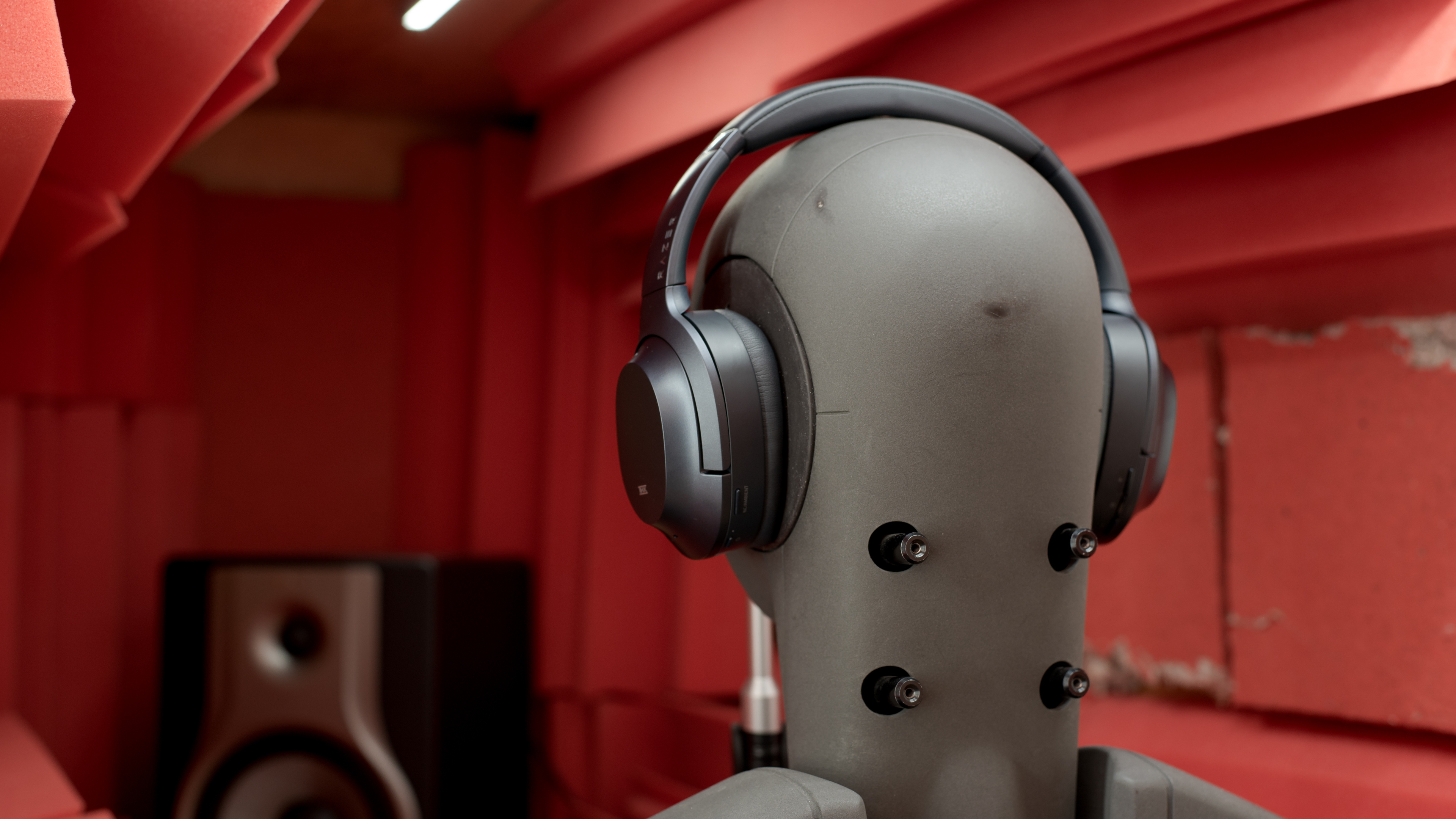
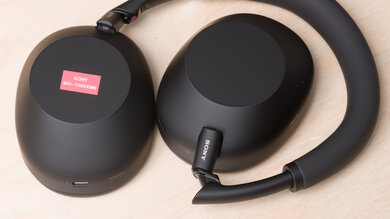
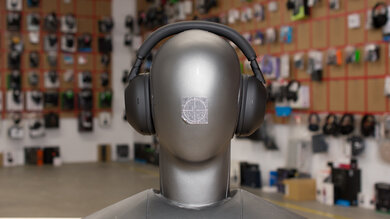
    The Razer Opus have a sleek and straightforward design that looks very similar to the Sony WH-1000XM3 Wireless, but with oval-shaped ear cups. Unlike most Razer gaming products such as the Razer Opus X Wireless, they aren't too flashy and don't feature Razer's usual logo or any RGB lighting. We tested the Midnight Blue version which is a very dark and subtle blue color, but they're also available in black.

    7.5
    Comfort
    Weight0.59 lbs
    Clamping Force
    1.1 lbs

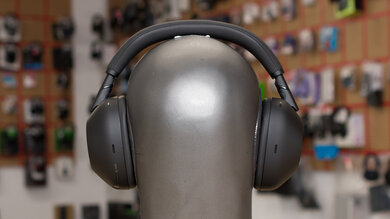
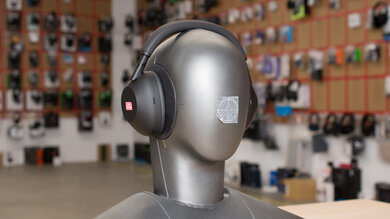
    The Razer Opus are comfortable headphones. They feel almost identical to the Sony WH-1000XM3 Wireless, and while they clamp the head a bit tighter, it's not too noticeable. That said, like the Razer Opus X Wireless, they have similarly shallow ear cups, so if you have large ears, they may feel squished.

    7.5
    Controls
    OS Compatibility
    Not OS specific
    Ease Of UseGood
    FeedbackOkay
    Call/Music ControlYes
    Volume ControlYes
    Microphone ControlNo
    Channel Mixing
    No
    Noise Cancelling ControlOn/Off
    Talk-Through
    Adjustable
    Additional ControlsVoice Assistant

    The Razer Opus have a good control scheme with physical buttons that are easy to use. Unfortunately, there's no audio feedback for most controls, and you only hear beeps when pairing the headphones, turning them on/off, or turning ANC on/off. On the bright side, the physical buttons are clicky and it's easy to tell when you've pressed them.

    6.8
    Breathability
    Avg.Temp.Difference4.9 °C
    6.0
    Portability
    L6.2" (15.7 cm)
    W5.5" (13.9 cm)
    H3.2" (8.2 cm)
    Volume109.23 in³ (1,790.00 cm³)
    Transmitter RequiredNo

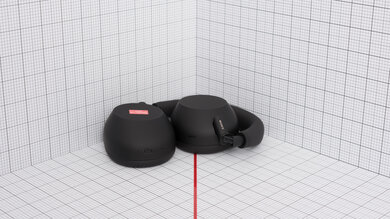
    The Razer Opus are similar in size to most popular over-ear headphones and are fairly bulky overall. On the bright side, the ear cups fold into a more compact shape, and they come with a hard carrying case so you can easily toss them into most larger bags.

    8.0
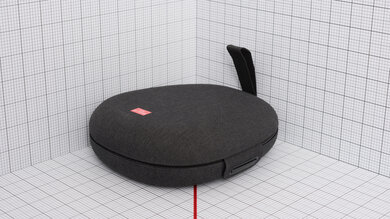
    Case
    TypeHard case
    L8.1" (20.5 cm)
    W7.2" (18.3 cm)
    H2.4" (6.2 cm)
    Volume141.94 in³ (2,326.00 cm³)

    The Razer Opus come with a good hard carrying case that should easily protect the headphones from scratches, water damage, and most minor drops or bumps. It's somewhat bulky but should fit into most larger bags or luggage.

    8.0
    Build Quality

    The Razer Opus look and feel very durable and well-built. They feel slightly cheaper than the Sony WH-1000XM3 Wireless, but it's a minimal difference that likely won't be noticeable to most people. Overall they feel like they should be able to withstand most drops and bumps without sustaining too much damage.

    7.5
    Stability

    The Razer Opus feel quite stable on the head, and only move or fall off with larger head movements. Due to their tighter fit, they feel more secure and stable than the Sony WH-1000XM3 Wireless. They're a good choice if you want a pair of over-ear headphones for jogs or runs.

    Headshots 1
    Headshots 2
    Top
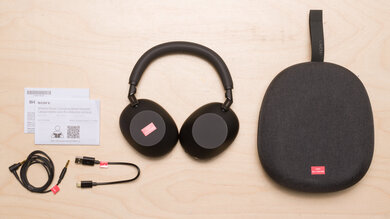
    In The Box

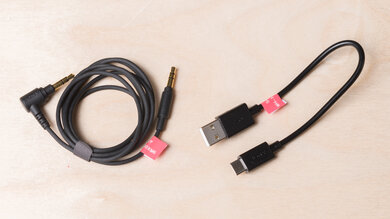
    • Razer Opus Wireless 2020 headphones
    • 1/8" TRRS audio cable
    • USB-C to USB-C cable
    • USB-C to USB-A adapter
    • Airline adapter
    • Manuals
    • Hard carrying case
    • Small soft pouch for cables
    Sound
    Sound Profile
    See details on graph tool
    Bass Amount
    -2.05 dB
    Treble Amount
    -0.8 dB

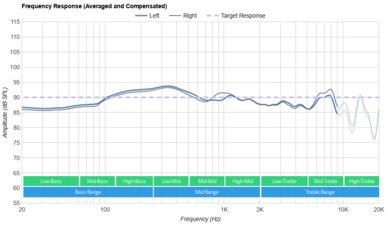
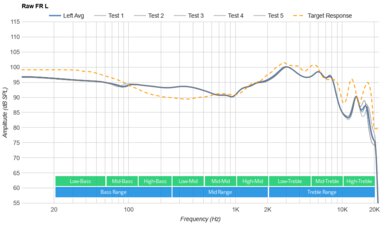
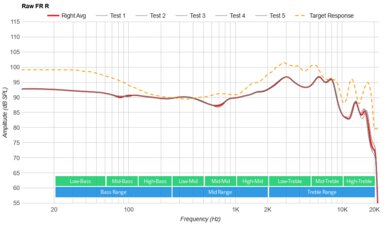
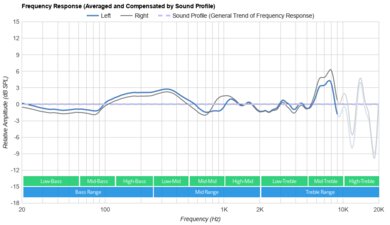
    Using the 'Default' (THX) EQ preset, the Razer Opus have a very well-balanced and accurate default sound profile that's versatile enough for all genres and content. However, fans of bass-heavy genres like EDM or hip-hop may find they lack a bit of bass compared to most popular headphones.

    7.4
    Frequency Response Consistency
    See details on graph tool
    See details on graph tool
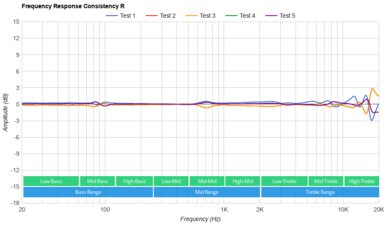
    Avg. Std. Deviation
    0.53 dB

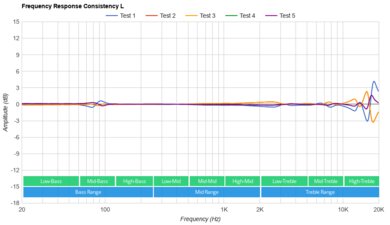
    The frequency response consistency of these headphones is decent. Different people may experience their bass response slightly differently, but it likely won't be too noticeable. However, you'll likely have to adjust them on your head to hear their treble reproduction the same every time you wear them.

    Raw Frequency Response
    See details on graph tool
    See details on graph tool
    8.8
    Bass Accuracy
    See details on graph tool
    Std. Err.
    1.78 dB
    Low-Frequency Extension
    20.29 Hz
    Low-Bass
    -2.29 dB
    Mid-Bass
    -2.45 dB
    High-Bass
    -0.52 dB

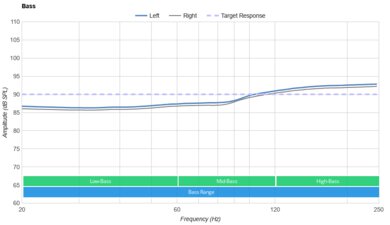
    The bass accuracy of the Razer Opus is excellent. They lack a tiny bit of thump and kick which may bother fans of bass-heavy genres like EDM, but the entire range is quite even and consistent.

    9.4
    Mid Accuracy
    See details on graph tool
    Std. Err.
    0.75 dB
    Low-Mid
    -0.08 dB
    Mid-Mid
    -0.18 dB
    High-Mid
    0.21 dB

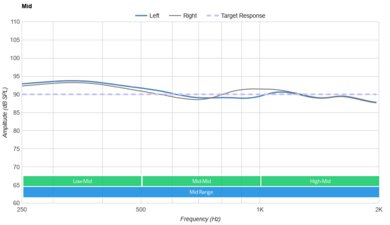
    These headphones have a remarkably accurate and well-balanced mid-range. The entire range follows our target curve almost perfectly, resulting in clear and present vocals and instruments that don't sound muddy, harsh, or dull.

    8.2
    Treble Accuracy
    See details on graph tool
    Std. Err.
    2.8 dB
    Low-Treble
    -0.92 dB
    Mid-Treble
    0.48 dB
    High-Treble
    -4.75 dB

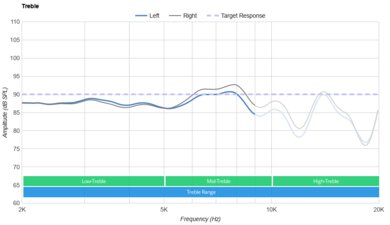
    The treble accuracy of these headphones is good. While some vocals or lead instruments may be slightly dull, it isn't too noticeable, and most of the range is quite even and consistent. Some higher frequency sounds may be slightly piercing and painful, though it's in a high enough range that most people likely won't notice.

    8.0
    Peaks/Dips
    See details on graph tool
    Peaks
    1.37 dB
    Dips
    0.83 dB

    The peaks and dips performance of the Razer Opus is great. The only large peak is in the mid/high treble range and may cause some sounds to be painful and piercing in comparison to the well-balanced low-treble range. That being said, this is at a high-enough frequency that it likely won't be noticeable to most people.

    9.1
    Imaging
    See details on graph tool
    See details on graph tool
    Weighted Group Delay
    0.16
    Weighted Phase Mismatch
    3
    Weighted Amplitude Mismatch
    0.23
    Weighted Frequency Mismatch
    1.41

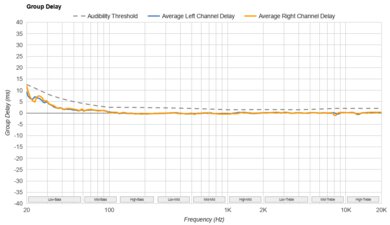
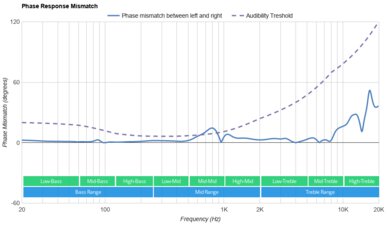
    The imaging performance of the Razer Opus is excellent. The entire group delay response is well within the audibility threshold, resulting in tight bass and transparent treble reproduction. Our test unit's L/R drivers are also extremely well-matched, creating a stereo image with accurate placement and localization of objects (such as voices, instruments, and video game effects). However, these results are only valid for our unit, and they may not be the same for every pair.

    4.2
    Passive Soundstage
    See details on graph tool
    PRTF Accuracy (Std. Dev.)
    2.85 dB
    PRTF Size (Avg.)
    7.26 dB
    PRTF Distance
    8.44 dB
    Openness
    0.5
    Acoustic Space Excitation
    2.4

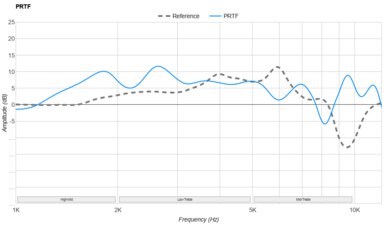
    Like with most closed-back, over-ear headphones, the soundstage of the Razer Opus is poor. Our tests show a good amount of pinna activation, suggesting a relatively large-sized soundstage. However, the low accuracy of the response also suggests that this soundstage is perceived as being located inside the head, resulting in a slightly unnatural feel.

    0.0
    Virtual Soundstage
    Head Modeling
    No
    Speaker Modeling
    No
    Room Ambience
    No
    Head Tracking
    No
    Virtual Surround
    No

    These headphones are THX-certified. They have a THX feature in their companion app, which can help create a more immersive sound. However, we don't consider it a virtual soundstage as it acts more like an EQ preset. This feature isn't THX Spatial Audio, a separate downloadable application you can purchase from the manufacturer directly.

    7.3
    Weighted Harmonic Distortion
    See details on graph tool
    WHD @ 90
    0.449
    WHD @ 100
    0.163

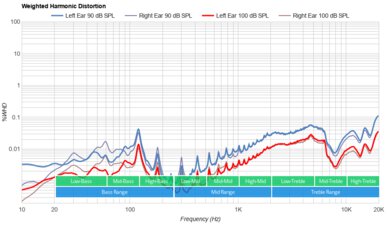
    The weighted harmonic distortion performance of the Razer Opus is decent. Overall, most frequencies fall within good limits, resulting in fairly clear and pure audio reproduction.

    Test Settings
    Firmware
    1.2.12.0
    Power
    On
    Connection
    Bluetooth 4.2
    Codec
    aptX, 16-bit, 48kHz
    EQ
    Default (THX)
    ANC
    On
    Tip/Pad
    Default
    Microphone
    Integrated

    These are the settings used to test these headphones, therefore our results are only valid when using these settings.

    Isolation
    9.5
    Noise Isolation
    See details on graph tool
    Isolation Audio
    Overall Attenuation
    -27.31 dB
    Noise CancellingYes
    Bass
    -23.12 dB
    Mid
    -23.31 dB
    Treble
    -35.33 dB

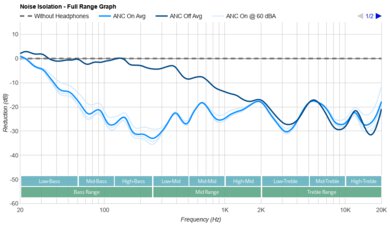
    The noise isolation performance of the Razer Opus is outstanding. Their ANC (active noise cancelling) works extremely well and it even performs better than that of the Razer Opus Wireless 2021, which are the next generation. These headphones do a remarkable job at blocking out the low rumble of bus or plane engines. They're also superb at blocking out background chatter, as well as the high-pitched sounds of an AC unit or fan. Overall, the ANC performs extremely well and is similar to the Sony WH-1000XM3 Wireless and the Bose QuietComfort 35 II/QC35 II Wireless 2018.

    7.9
    Leakage
    See details on graph tool
    Leakage Audio
    Overall Leakage @ 1ft
    34.31 dB

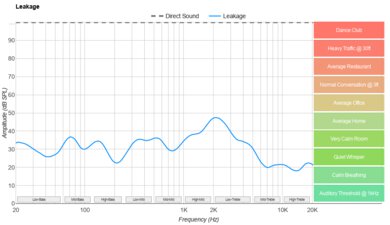
    The leakage of these headphones is good. Even at higher volumes, the amount of audio leakage is below the noise floor of an average office. This means you can listen to music fairly loudly without bothering your coworkers or people sitting nearby.

    Microphone
    Microphone Style
    Integrated
    Yes
    In-Line
    No
    Boom
    No
    Detachable Boom
    No
    MicYes

    The Razer Opus have an integrated microphone.

    6.7
    Recording Quality
    See details on graph tool
    Recorded Speech
    LFE
    195.85 Hz
    FR Std. Dev.
    3.35 dB
    HFE
    6,001.45 Hz
    Weighted THD
    4.29
    Gain
    -1.11 dB

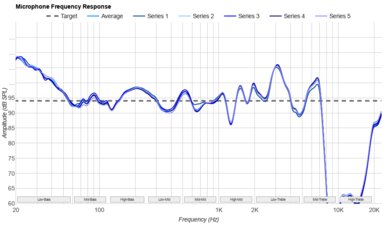
    The recording quality of the microphone is alright. Your voice sounds natural and decently full-bodied, without being too muffled or distorted.

    6.1
    Noise Handling
    See details on graph tool
    SpNR
    1.14 dB
    Noise Gate
    No
    Speech + Pink Noise Handling
    6.5
    Speech + Pink Noise Audio Sample
    Speech + Subway Noise Handling
    5.5
    Speech + Subway Noise Audio Sample

    Update 09/20/2021: These headphones have been updated to test bench 1.5. In this update, we made changes to the way we test noise handling. We now score noise handling by subjectively assessing two audio samples. This method has resulted in a different score than the '2.9' score we had originally reported in our previous test bench. However, the '6.1' score now better reflects real-life usage. We have updated our review to reflect these changes.

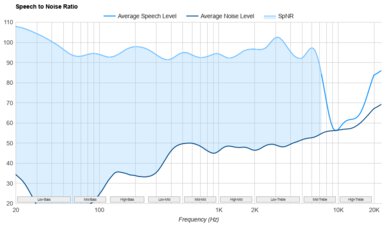
    The Razer Opus' adaptive mic has mediocre noise handling. It struggles to separate your voice from background noise in moderately loud environments. When listening to the audio clips, speech can still somewhat be heard, though it gets fairly drowned out in very noisy situations.

    Active Features
    9.0
    Battery
    Battery Type
    Rechargable
    Continuous Battery Life
    32.6 hrs
    Additional Charges
    0.0
    Total Battery Life
    32.6 hrs
    Charge Time
    3.4 hrs
    Power-Saving Feature
    Auto-Off Timer
    Audio While Charging
    Yes
    Passive Playback
    Yes
    Charging PortUSB-C

    The Razer Opus' battery performance is fantastic. Despite advertising 25 hours of battery life, our unit lasts nearly 33 hours from a single charge with ANC turned on, which is longer than that of the Wyze Noise-Cancelling Headphones Wireless. They also feature an auto-off timer to help conserve even more battery life. Unfortunately, while they charge faster than advertised, they still take around 3.5 hours, which is a long time, but you can listen to audio while they charge.

    7.0
    App Support
    App NameRazer Audio
    iOSYes
    AndroidYes
    macOSNo
    WindowsNo
    Equalizer
    Presets
    ANC Control
    No
    Mic ControlNo
    Room Effects
    No
    Playback Control
    No
    Button MappingNo
    Surround Support
    Yes

    The dedicated companion app for the Razer Opus is decent. The original Razer Opus app has been discontinued and replaced with the Razer Audio app. Unfortunately, this new app offers less functionality than its predecessor, and there's no longer a graphic EQ to help you fine-tune their sound. That said, you can access the following EQ presets to help customize their sound to your liking: 'Amplified', 'Enhanced Bass', 'Enhanced Clarity', and 'Vocal'. You can also turn on and off the 'auto pause' and 'resume' features as well as the THX preset and adjust the auto-off timer.

    Connectivity
    7.0
    Bluetooth
    Bluetooth Version
    4.2
    Multi-Device Pairing
    No
    NFC Pairing
    No
    Line Of Sight Range
    195.00 ft (59.44 m)
    PC Latency (SBC)
    230 ms
    PC Latency (aptX)
    172 ms
    PC Latency (aptX HD)
    N/A
    PC Latency (aptX-LL)
    N/A
    iOS Latency
    138 ms
    Android Latency
    41 ms

    Update 09/16/2021: Razer now retails a different version of these headphones. This version has the serial number starting with 'INXX', and they no longer support the aptX codec. Instead, they have 'Gaming Mode', advertised to offer lower latency. However, our model is the older version, with a serial number starting with 'TIXX', and still supports aptX codec. If you want to confirm which version you have, you can find instructions on how to find the serial number under the 'FAQs' section of this Razer support page. As a result, we haven't retested our headphones, and the results remain unchanged.

    The Bluetooth connectivity of these headphones is okay. Their PC latency is fairly low, and you shouldn't notice too much lag while watching videos, though they likely won't be a good choice for competitive gaming. While watching YouTube videos on Android, they have very low latency, and you shouldn't notice any sync issues. Unfortunately, their latency is much higher when watching YouTube videos on an iPhone. It's worth mentioning that apps and devices seem to compensate for latency differently, so your mileage may vary with real-life usage.

    0.0
    Non-Bluetooth Wireless
    Non-BT Line Of Sight Range
    N/A
    Non-BT Latency
    N/A

    The Razer Opus don't support any wireless connection other than Bluetooth.

    9.5
    Wired
    Analog Audio
    Yes
    USB Audio
    No
    DetachableYes
    Length4.30 ft (1.31 m)
    Connection
    1/8" TRRS
    Analog/USB Audio Latency
    0 ms

    These headphones come with a 1/8" TRRS audio cable, but unfortunately, they can't transfer audio via USB.

    PC Compatibility
    Analog
    Audio + Microphone
    Wired USB
    No
    Non-BT Wireless
    No
    PlayStation Compatibility
    PS4 Analog
    Audio + Microphone
    PS4 Wired USB
    No
    PS4 Non-BT Wireless
    No
    PS5 Analog
    Audio + Microphone
    PS5 Wired USB
    No
    PS5 Non-BT Wireless
    No
    Xbox Compatibility
    Xbox One Analog
    Audio + Microphone
    Xbox One Wired USB
    No
    Xbox One Non-BT Wireless
    No
    Xbox Series X|S Analog
    Audio + Microphone
    Xbox Series X|S Wired USB
    No
    Xbox Series X|S Non-BT Wireless
    No

    Because these headphones can be used with the included 1/8" TRRS cable, these headphones are fully compatible with Xbox One while wired.

    0.0
    Base/Dock
    Type
    No Base/Dock
    USB Input
    No
    Line In
    No
    Line Out
    No
    Optical Input
    No
    RCA Input
    No
    Dock Charging
    No
    Power Supply
    No Base/Dock

    These headphones don't have a base/dock.