Cooler Master MK730  Keyboard Review

Reviewed Aug 06, 2020 at 08:32am
Tested using Methodology v1.0 
Cooler Master MK730
8.5
Gaming 
3.9
Mobile/Tablet 
7.8
Office 
7.8
Programming 
4.9
Entertainment / HTPC 
 0

The Cooler Master MK730 is an excellent TenKeyLess (TKL) gaming keyboard with good extra features. It has full RGB backlighting with individually-lit keys and all keys are macro programmable. You can set macros and customize the backlighting directly on the keyboard or through dedicated software, which is only available on Windows. It's a well-built keyboard with an aluminum plate on top and even though it has doubleshot ABS keycaps, it comes with a few extra doubleshot PBT keycaps. The detachable wrist rest is comfortable, but it's on the smaller side, so you may have to detach it to properly use it while typing. Lastly, you can get this keyboard with Cherry MX Blue, Red, or Brown switches, although we tested the Blue switches.

Our Verdict

8.5
Gaming 

Excellent gaming keyboard. The Cooler Master MK730 we tested has Cherry MX Blue switches, which have a low pre-travel distance and offer good tactile feedback. All keys are macro-programmable and there's full RGB backlighting. Also, it's a fairly well-built keyboard that comes with a wrist rest, which is unfortunately on the smaller side.

Pros
  • Low pre-travel distance.
  • Full RGB backlighting.
  • All keys are macro-programmable.
  • Customization done directly on the keyboard.
Cons
  • Small wrist rest.
  • Dedicated software only available on Windows.
3.9
Mobile/Tablet 

The Cooler Master MK730 is wired-only and isn't designed for use with mobile devices.

7.8
Office 

The Cooler Master MK730 is decent for office use. It's available in three different types of Cherry MX switches, so you can get the ones you feel comfortable with and won't be too loud either. The keyboard has a wrist rest that's a bit small, so you may have to place it away from the keyboard to use it comfortably.

Pros
  • Great typing quality.
Cons
  • Small wrist rest.
7.8
Programming 

The Cooler Master MK730 is very good for programming. Every key is macro programmable either on the keyboard itself or through dedicated software. Sadly, the dedicated software is only available on Windows. It has full RGB backlighting and decent ergonomics, but the included wrist rest is small.

Pros
  • Full RGB backlighting.
  • All keys are macro-programmable.
  • Customization done directly on the keyboard.
Cons
  • Small wrist rest.
  • Dedicated software only available on Windows.
4.9
Entertainment / HTPC 

Pros
None
Cons
  • Small wrist rest.
  • 8.5
    Gaming
  • 3.9
    Mobile/Tablet
  • 7.8
    Office
  • 7.8
    Programming
  • 4.9
    Entertainment / HTPC
  • Changelog

    1.  Updated Jun 11, 2021: Converted to Test Bench 1.0.
    2.  Updated Aug 06, 2020: Review published.
    3.  Updated Jul 31, 2020: Early access published.
    4.  Updated Jul 21, 2020: Our testers have started testing this product.

    Check Price

    Gunmetal GrayMK730
    SEE PRICE
    Amazon.com
    Gunmetal GrayMK730
    SEE PRICE
    Walmart.com
    Gunmetal GrayMK730
    B&H
    Gunmetal GrayMK730
    BestBuy.com

    Differences Between Sizes And Variants

    We tested the Cooler Master MK730 with Cherry MX Blue switches, but it's also available with Cherry MX Brown and Red switches. There's a full-size variant of this keyboard, the Cooler Master MK750, which is also available with Cherry MX Brown, Red, and Blue switches, and has dedicated media keys. For the most part, we expect our results to be valid for the MK750 too.

    Popular Keyboard Comparisons

    The Cooler Master MK730 is an excellent gaming keyboard and it has features you expect to find in most modern gaming keyboards. It doesn't have the same features like an OLED screen and a volume wheel as the SteelSeries Apex 7 TKL. However, you can get it with different types of switches, unlike the Razer Huntsman Tournament Edition. Also see our recommendations for the best gaming keyboards, the best mechanical keyboards, and the best ergonomic keyboards.

    HyperX Alloy Origins

    The HyperX Alloy Origins is slightly better than the Cooler Master MK730. The HyperX is better built and it has proprietary linear HyperX Red switches, which require very little force to actuate, and the typing quality is better. However, the Cooler Master has a wrist rest and it's available with three different types of switches, so you can get the ones you prefer.

    Corsair K63 Wireless

    The Corsair K63 Wireless is better overall than the Cooler Master MK730, mainly because it can be used wirelessly. The Corsair has multi-device pairing with up to two devices, and the software is available on macOS. However, the Cooler Master is available with more switches, it has RGB backlighting, and it's better built.

    Razer Huntsman

    The Razer Huntsman and the Cooler Master MK730 are similar keyboards. The Razer is a full-sized keyboard that's available with optical or linear switches, which are light to press. However, the Cooler Master is available with three different types of Cherry MX switches and it has a wrist rest.

    SteelSeries Apex 7 TKL

    The SteelSeries Apex 7 TKL is better overall than the Cooler Master MK730. Both keyboards are available with tactile, clicky, and linear switches, and the SteelSeries is better built. It also has better ergonomics, and the SteelSeries software is available on macOS. However, the Cooler Master has a detachable cable if you ever need to replace it.

    Show more 

    Test Results

    perceptual testing image
    Sort:
    RATINGS
    Category:
    All
    Design
    Dimensions
    Size
    TenKeyLess (80%)
    Height
    1.7" (4.3 cm)
    Width14.1" (35.9 cm)
    Depth
    5.2" (13.3 cm)
    Depth With Wrist Rest
    7.6" (19.3 cm)
    Weight
    1.57 lbs (0.710 kg)

    The Cooler Master MK730 is a TKL keyboard, similar in size to the SteelSeries Apex 7 TKL. It doesn't take up much space, but it gets bigger if you choose to use the included wrist rest.

    8.0
    Build Quality
    Keycap MaterialABS

    Good build quality. The Cooler Master MK730 has a plastic back frame that feels rather cheap, but the aluminum plate on top feels more premium. The entire keyboard is solid, doesn't flex much, and even though it's a bit on the heavier side, it's still not too heavy to carry around. It comes with doubleshot ABS keycaps, and there are extra doubleshot PBT keycaps in the box, which are more stable. The detachable wrist rest is made from a plastic frame that feels a bit cheap, and there's PU leather on top, giving it a more plushy feel. Also, there are rubber feet underneath the wrist rest to keep it from sliding around.

    7.5
    Ergonomics
    Board Design
    Straight
    Minimum Incline
    Medium Incline
    N/A
    Maximum Incline
    10°
    Wrist RestDetachable

    Decent ergonomics. The Cooler Master MK730 has one incline setting and it comes with a comfortable wrist rest that attaches to the keyboard with a magnet. The wrist rest is on the shorter side, so if you have long fingers and it's attached to the keyboard, your fingers hang off the top edge of the keyboard. Instead, you may have to move it a few inches away from the keyboard so that your wrists are comfortable while typing. If you want a keyboard with better ergonomics, check out the Corsair K70 RAPIDFIRE.

    9.6
    Backlighting
    BacklightingYes
    Color
    RGB
    Individually Backlit Keys
    Yes
    Color Mixing
    Poor
    Effects
    Yes
    Programmable
    Yes

    Like most standard gaming keyboards, the Cooler Master MK730 has full RGB backlighting with individually-lit keys. There's also a strip of light where the wrist rest attaches to the keyboard, but you won't see the light when the wrist rest is attached. You can control the brightness and the LED settings directly on the keyboard or through the dedicated software.

    Cable & Connector
    ConnectivityWired
    Detachable
    Yes (Wired Only Keyboard)
    Length5.7 ft (1.7 m)
    Connector (Keyboard side)
    USB type-C

    The included braided cable is long and should be able to reach your desktop. It's removable, so you can change it in case it gets damaged.

    0.0
    Wireless Versatility
    Bluetooth
    No
    Bluetooth Multi-Device Pairing
    No
    Proprietary Receiver
    No
    Battery Type
    No Batteries

    This keyboard is wired-only and can't be used wirelessly.

    Extra Features
    Media Keys
    Hot Keys
    Macro Programmable Keys
    All
    Trackpad / TrackballNo
    WheelNo
    USB Passthrough
    No
    NumpadNo
    Windows Key Lock
    Yes
    Lock IndicatorCaps & Scroll Lock

    The Cooler Master MK730 has a few extra features to improve user experience. All keys are macro-programmable and you can set macros either through the dedicated software, or on the keyboard itself; there are instructions on how to do it, and they're fairly easy to do.

    In The Box

    • Cooler Master MK730 keyboard
    • Detachable wrist rest
    • Extra doubleshot PBT keycaps (Esc, W, A, S, D, and arrow keys)
    • Keycap puller
    • USB-C cable
    • Manual
    Typing Experience
    Keystrokes
    See details on graph tool
    Mechanical
    Yes
    Key Switches
    Cherry MX Blue
    Feel
    Clicky
    Operating Force
    67 gf
    Actuation Force
    54 gf
    Pre-Travel
    2.1 mm
    Total Travel
    3.8 mm

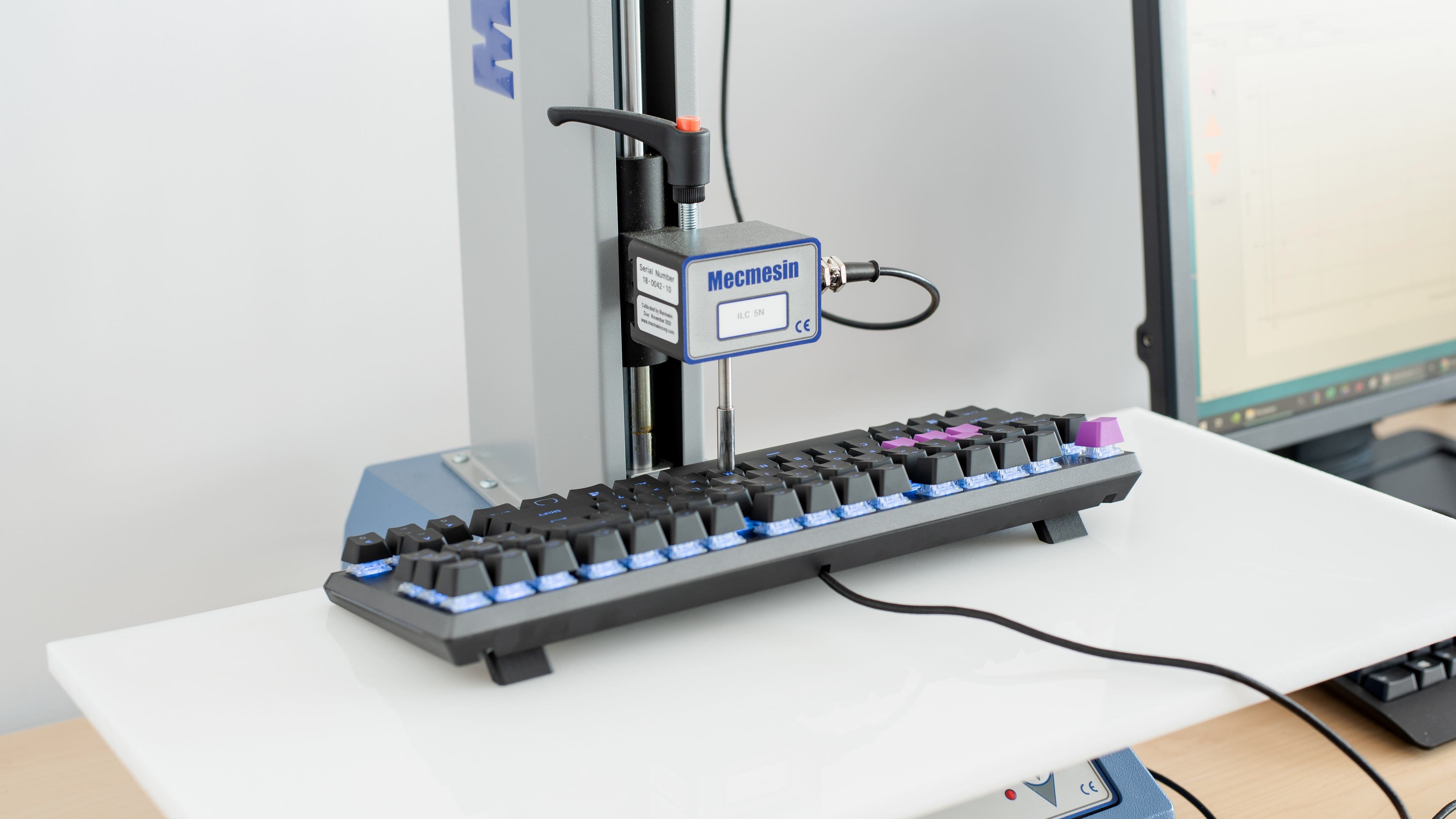
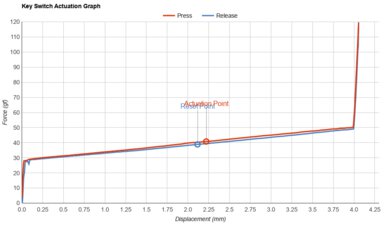
    The Cooler Master MK730 we tested has clicky Cherry MX Blue switches, but it's also available with Cherry MX Red (linear) and Brown (tactile) switches. They offer good tactile feedback and have a fairly short pre-travel distance, but require a high actuation force to press, similar to the Corsair K95 RGB PLATINUM XT.

    8.0
    Typing Quality

    The Cooler Master MK730 has great typing quality. The Cherry MX Blue switches offer good tactile feedback and the ABS keycaps feel good and are stable. The replacement PBT keycaps feel even better if you choose to use them. The compact size of the keyboard and the shape of the keys may take some time getting used to, and overall, typing on this keyboard doesn't get tiring.

    Typing Noise
    Noise
    Loud

    The Cherry MX Blue switches are clicky and loud to use in an open-office environment. However, if you get the Cherry MX Brown switches, they're fairly quiet and shouldn't bother others around you.

    8.9
    Latency
    Latency Wired
    6.0 ms
    Latency Receiver
    N/A
    Latency Bluetooth
    N/A
    Software and Operating System
    9.3
    Software & Programming
    Software NameCooler Master Portal
    Account Required
    No
    Profiles
    6+
    Onboard Memory
    Yes
    Cloud Sync
    No
    Macro Programming
    Software and Onboard
    Ease Of Use
    Easy
    Software Windows Compatible
    Yes
    Software macOS Compatible
    No

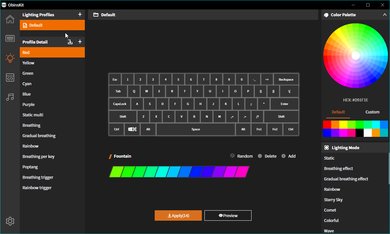
    There's optional software that you can download from Cooler Master's website. It's not completely necessary since you can set macros and customize the RGB backlighting directly on the keyboard itself. The software is only available on Windows. The keyboard has onboard memory to save up to four profiles, but you can save as many profiles as you like on your computer and import the files onto the keyboard when you want to use them.

    7.2
    Keyboard Compatibility
    WindowsFull
    macOSPartial
    LinuxPartial
    AndroidNo
    iOSNo
    iPadOSNo

    The Cooler Master MK730 is fully compatible with Windows and Linux, but there's no software available on Linux. The Scroll Lock, Pause Break, and Stop keys don't work on macOS, and there's no software available either.