ELECOM HUGE M-HT1DRBK  Mouse Review

Reviewed Dec 13, 2021 at 11:15am
Tested using Methodology v1.2 
ELECOM HUGE M-HT1DRBK
7.9
Office/Multimedia 
4.0
Video Games (FPS) 
6.8
Video Games (MMO) 
2.3
Ultra-Light Gaming 
5.3
Travel 
 3
  1. Recommended in:
  2. Trackball

The ELECOM HUGE M-HT1DRBK is a stationary, wireless trackball mouse designed for office and productivity tasks. It has an integrated leatherette palm rest, a side-mounted scroll wheel with L/R tilt inputs, and ten buttons, and you can reprogram nearly all of these buttons using the customization software compatible with Windows and macOS. Altogether, this mouse feels well-built, but there's a slight wobble in the scroll wheel and some buttons. It connects wirelessly with a USB receiver and uses a pair of AA batteries for power. Unfortunately, it doesn't support Bluetooth, and it's rather large and wide, so it isn't suitable for small hands.

Our Verdict

7.9
Office/Multimedia 

The ELECOM HUGE is a very good mouse for office and multimedia work. It connects wirelessly with its USB receiver, feels well-built, and has a comfortable, right-handed shape suitable for all but small hands. You can also reprogram nearly all its buttons using the customization software, compatible with Windows and macOS. Unfortunately, it doesn't support Bluetooth, and while its scroll wheel has L/R tilt inputs, it doesn't have a free-scrolling mode.

Pros
  • Feels well-built.
  • Comfortable right-handed shape suitable for most hand sizes.
  • Has a scroll wheel with L/R tilt inputs for horizontal scrolling.
Cons
  • No Bluetooth support.
4.0
Video Games (FPS) 

The ELECOM HUGE is a bad FPS gaming mouse and isn't designed for this use. On the bright side, it feels well built and has a comfortable right-handed shape suitable for most hand sizes. However, it has a very low maximum polling rate and high click latency compared to dedicated gaming mice. It's also heavy, though this isn't as problematic as it would be for a more conventional mouse as this mouse is designed to remain stationary.

Pros
  • Feels well-built.
Cons
  • High click latency.
  • Polling rate is fixed at 125Hz.
6.8
Video Games (MMO) 

The ELECOM HUGE is adequate for MMO gaming, despite not being designed for this use. It feels well-built and has a comfortable, ergonomic shape suitable for all but small-sized hands. It also has quite a few buttons, almost all of which you can reprogram using the customization software that's compatible with both Windows and macOS. Unfortunately, it has high click latency and a maximum polling rate of only 125Hz.

Pros
  • Feels well-built.
  • Comfortable right-handed shape suitable for most hand sizes.
Cons
  • High click latency.
  • Polling rate is fixed at 125Hz.
2.3
Ultra-Light Gaming 

The ELECOM HUGE is a terrible ultra-light gaming mouse, but it isn't designed for this use. It's very heavy, although, as a stationary mouse, its weight doesn't present the same problem as it does for more conventional mice. That said, the trackball doesn't move as smoothly in its housing as some of the other trackball mice we've tested. It also has high click latency, and its maximum polling rate is only 125Hz, making it a poor choice for any gaming.

Pros
  • Feels well-built.
Cons
  • High click latency.
  • Polling rate is fixed at 125Hz.
5.3
Travel 

The ELECOM HUGE is a poor travel mouse as it's bulky and likely won't fit in laptop cases. It connects wirelessly with a USB receiver, but it doesn't support Bluetooth. That said, it feels well-built and has a comfortable right-handed shape suitable for all but small hands. Also, because it's a stationary mouse, it doesn't require much space to use.

Pros
  • Feels well-built.
  • Has a storage compartment for its USB receiver.
Cons
  • No onboard memory.
  • No Bluetooth support.
  • Bulky design likely won't fit in laptop cases.
  • 7.9
    Office/Multimedia
  • 4.0
    Video Games (FPS)
  • 6.8
    Video Games (MMO)
  • 2.3
    Ultra-Light Gaming
  • 5.3
    Travel
  • Changelog

    1.  Updated Jun 28, 2024: We've added a link to the newly-reviewed Kensington SlimBlade Pro Trackball in the Comfort Of Use section of this review.
    2.  Updated Dec 09, 2022: We've converted this review to Test Bench 1.2. This update simplifies our Weight test and expands on our CPI test from Test Bench 1.1, resulting in changes to test results in both sections. For more details, you can see our complete changelog here.
    3.  Updated Nov 17, 2022: We've converted this review to Test Bench 1.1. This update revamps our Click Latency test and results in changes to test results. For more details, you can see our full changelog here.
    4.  Updated Dec 13, 2021: Review published.

    Check Price

    BlackHUGE M-HT1DRBK
    SEE PRICE
    Amazon.com
    BlackHUGE M-HT1DRBK
    SEE PRICE
    Walmart.com
    BlackHUGE M-HT1DRBK
    B&H
    BlackHUGE M-HT1DRBK
    BestBuy.com

    Differences Between Sizes And Variants

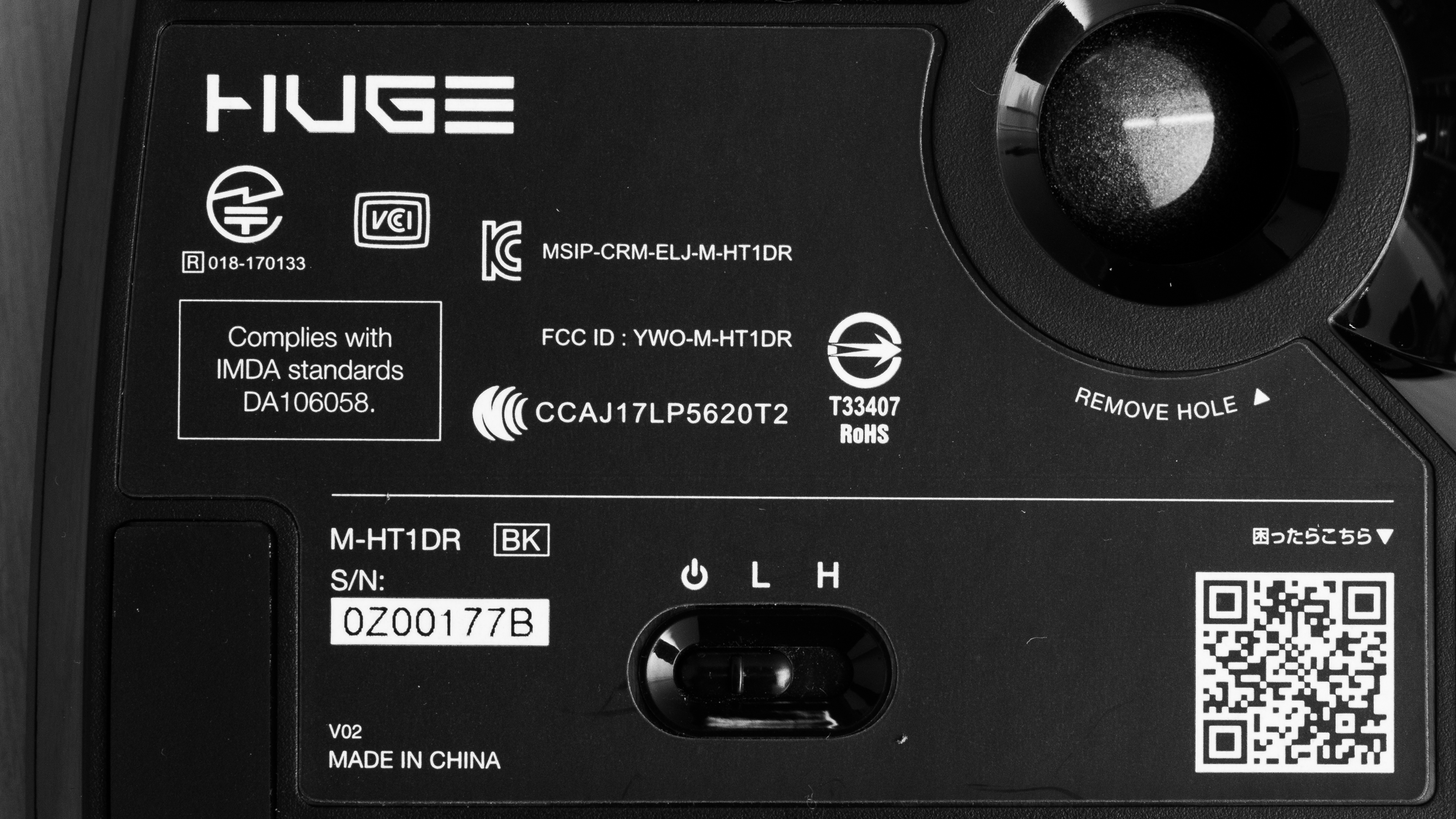
    The ELECOM HUGE trackball mouse we tested is black with a ruby red trackball. There are no other color variants. You can see the label for our unit here.

    Popular Mouse Comparisons

    The ELECOM HUGE is a very good, stationary trackball mouse with an ergonomic, right-handed shape. Like many other popular trackball designs, this mouse is quite bulky, though it also has an unusually wide grip width and isn't suitable for small hands. There's a dedicated CPI button on the thumb rest that lets you cycle through three CPI settings, which is an unusual feature for productivity-oriented mice as they usually only allow you adjustment options through the software. This mouse also incorporates a cushioned leatherette palm rest directly into the mouse, while many other trackballs have separate wrist rest attachments.

    For more options, see our recommendations for the best mouse, the best ergonomic mouse, and the best wireless mouse.

    Kensington SlimBlade Pro Trackball

    The Kensington SlimBlade Pro Trackball and the ELECOM HUGE M-HT1DRBK are wireless trackball mice designed for productivity. The Kensington has a minimal, ambidextrous design that allows for more flexibility in grip type. In contrast, the ELECOM has a right-handed design with more buttons and a dedicated scroll wheel. Both mice are on the large side and can be unwieldy for users with small hands.

    Kensington Expert Mouse Wireless Trackball

    The ELECOM HUGE M-HT1DRBK and the Kensington Expert Mouse Wireless Trackball are both wireless trackball mice, but the ELECOM has better overall performance. The ELECOM has a conventional scroll wheel, much lower click latency, six additional buttons, and three CPI settings. It also has an integrated cushioned wrist rest. On the other hand, the Kensington has a free-scrolling scroll ring around its trackball and a removable cushioned wrist rest. It also supports Bluetooth.

    Kensington Orbit Fusion Wireless Trackball

    The ELECOM HUGE M-HT1DRBK and the Kensington Orbit Fusion Wireless Trackball are wireless trackball mice with comparable performance. The ELECOM feels sturdier and has significantly lower click latency. It also has an integral cushioned palm rest, four additional buttons, and its scroll wheel has L/R tilt inputs. On the other hand, the Kensington has a free-scrolling scroll ring instead of the more conventional notched scroll wheel on the ELECOM. It also uses only a single AA battery, while the ELECOM uses two AA batteries.

    Kensington SlimBlade Trackball

    The ELECOM HUGE M-HT1DRBK is a better stationary trackball mouse than the Kensington SlimBlade Trackball. The ELECOM connects wirelessly with a USB receiver and feels sturdier. It has a thumb and pinky rest and an integrated cushion on the palm area. It also has three CPI presets, six additional buttons, and a conventional scroll wheel with L/R tilt inputs. On the other hand, the Kensington connects with a braided USB cable has a free-scrolling scroll ring.

    Show more 

    Test Results

    perceptual testing image
    Sort:
    RATINGS
    Category:
    All
    Design
    Style
    Type
    Trackball
    Lighting ColorNo Lighting

    The ELECOM HUGE trackball mouse is a large stationary mouse made mostly of matte black plastic. It has a cushioned black leatherette palm area, and a silver scroll wheel mounted on the left. There's also a strip of glossy black plastic around the base and a band of grooved black rubber surrounding the top-mounted, ruby red trackball.

    Shape
    Length7.2" (182 mm)
    Height2.4" (60 mm)
    Width4.5" (114 mm)
    Grip Width
    85 mm
    3.3
    Portability
    Volume
    76.22 in³ (1,249 cm³)
    Cable/Receiver Storing
    Yes
    8.0
    Build Quality

    The ELECOM HUGE trackball mouse feels well-built. There's no noticeable flex in the body, but there's a slight wobble in the scroll wheel and some buttons. That said, some degree of wobble is normal with scroll wheels with L/R tilt inputs like this one. There's also a very slight rattle if you shake the mouse. However, this is a stationary mouse, and this is very unlikely to be an issue when using the mouse as intended.

    1.7
    Weight
    Lowest Weight
    315.6 g
    Default Weight
    315.6 g
    Weight Distribution
    Front-heavy
    Extra Weights
    No

    The ELECOM HUGE is very heavy, but it's designed to remain stationary on your desk. It includes a pair of Tenerg Ultra Alkaline AA batteries, each weighing 23.46g. However, we performed our tests with two Amazon Basics rechargeable AA batteries, weighing 27.38g each. Although you can store the receiver in the mouse, it wasn't included in either our Minimum or Maximum Weight Without Wire measurements as it needs to be connected to your computer for the mouse to work.

    8.5
    Comfort Of Use
    Right-handed
    Yes
    Left-handed
    No
    Ambidextrous
    No
    Coating
    Matte
    Finger Rest
    Thumb and Pinky

    The ELECOM HUGE has an ergonomic shape and feels very comfortable to use. Since it's a stationary mouse, you don't need to move your wrist or arm to use it, making it more accessible for users with limited mobility. Otherwise, it's large and fairly wide but has good button placement for medium to extra-large-sized hands. It also has a non-removable, cushioned palm area for added comfort.

    If you're interested in an ambidextrous trackball mouse, check out the Kensington SlimBlade Pro Trackball.

    Palm Grip: Hand Size Recommendation
    Small Hand
    No
    Medium Hand
    Yes
    Large Hand
    Yes
    X.Large Hand
    Yes

    Small hands may find this mouse too large and wide to comfortably use a palm grip.

    Claw Grip: Hand Size Recommendation
    Small Hand
    No
    Medium Hand
    Yes
    Large Hand
    Yes
    X.Large Hand
    Yes

    Small hands may find the ELECOM HUGE too large and wide to comfortably use a claw grip.

    Fingertip Grip: Hand Size Recommendation
    Small Hand
    No
    Medium Hand
    No
    Large Hand
    No
    X.Large Hand
    No

    The ELECOM HUGE isn't designed for a fingertip grip, and the trackball would be hard to reach, regardless of hand size.

    5.8
    Wireless Versatility
    Bluetooth
    No
    Receiver
    Yes
    Battery Type
    2x AA
    Use When Charging
    No ( Single use batteries)
    On/Off Activation
    On/Off Switch
    Receiver Extender
    No
    Battery IndicatorNo

    Advertising material for the ELECOM HUGE claims a battery life of "about 534 days on low energy mode and about 325 days on high-speed mode."

    Note: There are low and high settings on the operation switch on the bottom of the mouse, but neither of these settings increases or decreases the polling rate, which is usually how other mice achieve different battery usage modes. Given this, we're unsure if changing the battery settings affects the battery life. If you have this mouse and have any information on its battery life or the battery modes, reach out to us in the discussions.

    0.0
    Cable
    ConnectivityWireless
    Cable LengthN/A
    Cable Type
    No Cable
    Permanent Kink
    No
    Port Type: Mouse End
    No Port
    Port Type: PC End
    No Port
    0.0
    Mouse Feet
    Gliding Experience
    Stationary
    Material
    Rubber
    Extra Included
    No

    The ELECOM HUGE is a stationary trackball mouse with four rubber feet on the underside. Unfortunately, they don't do a very good job keeping the mouse in place.

    In The Box

    • ELECOM HUGE
    • 2x Tenerg Ultra Alkaline AA batteries
    • USB wireless receiver
    • User documentation
    Control
    7.8
    Buttons
    Buttons Activation
    Mechanical
    Total Number Of Buttons
    10
    Number Of Side Buttons
    6
    Number Of Programmable Inputs
    10
    Profile Switching Button
    No
    CPI (DPI) Switching Button
    Yes
    Gesture Support
    No

    The ELECOM HUGE has a large number of buttons, most of which you can reprogram. By default, the left-click is the largest button in the button cluster on the left side, while the right-click is the button to the right of the trackball on top. All the function buttons are on the top of the mouse, the FN1 and FN2 buttons are on top to the left of the trackball, and the FN3 button is the furthest button on the right. The side-mounted scroll wheel has a middle click button, and while we don't consider them buttons according to our methodology, the scroll wheel also has L/R tilt inputs.

    Also, there's a CPI switch located on the thumb rest with a Low, Mid, and High setting. There's also an operation switch on the underside of the mouse with an Off, High, and Low setting. You can reprogram all inputs except for the CPI switch, power switch, and scroll up/down inputs.

    Note: The software has an option to assign gesture commands, but we weren't able to get this feature to work during our tests. We've found user reports that this is a known issue and that the feature used to work. We'll continue to monitor the situation in case a software or firmware update may fix the issue.

    3.4
    Click Latency
    See details on graph tool
    Expected Connection
    42.6 ms
    Wired
    N/A
    Receiver
    42.6 ms
    Bluetooth
    N/A
    6.3
    CPI
    See details on graph tool
    SRAV @ 1600 CPI
    -3.42%
    SRAV @ 800 CPI
    -5.95%
    SRAV @ 400 CPI
    -2.17%
    SRAV @ Fixed CPI
    N/A
    Precision Error Between Speeds
    5.04%
    Precision Error Between CPI
    4.84%
    Worst Tracking Error
    21.99%
    Minimum CPI
    500 CPI
    Maximum CPI
    1,500 CPI
    CPI Adjustment Steps
    N/A
    Sensor Specifications
    Sensor Technology
    Optical (LED)
    Sensor Model
    Not Specified
    Works On Glass
    Yes
    Minimum Lift Off Distance
    N/A
    Maximum Polling Rate
    125 Hz

    The ELECOM HUGE trackball mouse has a fixed polling rate of 125Hz. You can choose between three CPI presets using the dedicated CPI button on the thumb rest. The settings are 500, 1000, and 1500 and labeled Low, Mid, and High, respectively.

    Mouse Wheel
    Scroll Wheel
    Notched Wheel
    Scroll Wheel Steps
    24 Steps
    Scroll Wheel Tilt
    Yes
    Thumb Wheel
    No Additional Wheel
    Thumb Wheel Steps
    No Additional Wheel

    The ELECOM HUGE trackball mouse has a conventional scroll wheel mounted on the left side of the mouse for vertical scrolling. It feels responsive and precise and has smooth, subtle steps and a notched rubber grip.

    Note: Although it's designed for use with your thumb, the scroll wheel on the ELECOM HUGE doesn't technically fit our methodological definition of a thumb wheel, which we define as an additional scroll wheel typically used for horizontal scrolling.

    Noise
    Click Noise
    Quiet
    Operating System And Software
    7.0
    Compatible Software Option
    Software NameELECOM Mouse Assistant 5
    Software Windows Compatibility
    Yes
    Software macOS Compatibility
    Yes
    Account Needed
    No
    On-Board Memory
    No
    CPI (DPI) Adjustment
    No
    Polling Rate Adjustment
    No
    Profile Configuration
    Yes
    RGB On/Off
    No

    By default, the software for the ELECOM HUGE trackball mouse is in Japanese, so English language users will have to change it using a drop-down menu on the bottom left-hand side. The software is straightforward, and reprogramming buttons is easy. Unfortunately, we couldn't get the gesture support feature to work during our tests.

    10
    Mouse Compatibility
    Windows CompatibilityFully
    macOS CompatibilityFully

    The ELECOM HUGE trackball mouse is fully compatible with both Windows and macOS.