Logitech G PRO X SUPERLIGHT 2 DEX  Mouse Review

Reviewed Nov 11, 2024 at 01:35pm
Tested using Methodology v1.5.1 
Logitech G PRO X SUPERLIGHT 2 DEX
7.2
Work 
9.4
Video Games (FPS) 
8.1
Video Games (MMO) 
9.7
Raw Performance 
 11

The Logitech G PRO X SUPERLIGHT 2 DEX is a wireless gaming mouse in Logitech's G PRO X SUPERLIGHT lineup. It weighs virtually the same as the related Logitech G PRO X SUPERLIGHT 2, but the standout difference is that it has a larger, right-handed shape. Otherwise, it uses the same optical switches and Logitech's flagship HERO 2 sensor. It also supports a maximum wireless polling rate of 8000Hz.

Our Verdict

7.2
Work 

The Logitech G PRO X SUPERLIGHT 2 DEX is a decent mouse for work, despite not being explicitly designed for it. It has excellent build quality, a comfortable right-handed shape, and easily reprogrammable buttons. Unfortunately, it lacks Bluetooth connectivity, multi-device pairing, and handy productivity features like a free-scrolling mode or L/R tilt inputs on its scroll wheel.

Pros
  • Excellent build quality.

  • Comfortable and supportive right-handed shape.

Cons
  • Scroll wheel lacks left-right inputs and a free-scrolling mode.

  • No Bluetooth connectivity or multi-device pairing.

9.4
Video Games (FPS) 

The Logitech G PRO X SUPERLIGHT 2 DEX is an outstanding FPS gaming mouse. It has excellent build quality, is extremely lightweight, and has a comfortable right-handed shape. It has remarkably good all-around sensor performance and exceptionally low click latency, offering an extremely responsive-feeling gaming experience. Unfortunately, its mouse feet don't glide as smoothly as many competing gaming mice.

Pros
  • Extremely lightweight.

  • Outstanding raw performance

  • Excellent build quality.

  • Comfortable and supportive right-handed shape.

Cons
None
8.1
Video Games (MMO) 

While it has fewer side buttons than a dedicated MMO gaming mouse, the Logitech G PRO X SUPERLIGHT 2 DEX is great for playing MMO games. It has excellent build quality and a comfortable right-handed shape. It has remarkably good all-around sensor performance and exceptionally low click latency, delivering an extremely responsive-feeling gaming experience.

Pros
  • Outstanding raw performance

  • Excellent build quality.

  • Comfortable and supportive right-handed shape.

Cons
  • Not nearly as many side buttons as a dedicated MMO gaming mouse.

9.7
Raw Performance 

The Logitech G PRO X SUPERLIGHT 2 DEX delivers outstanding raw performance. It has exceptionally low and consistent click latency, outstanding sensor latency, and a maximum wireless polling rate of 8000Hz, making it suitable for gaming at any competitive level.

Pros
  • Remarkable click and sensor latency.

  • Maximum wireless polling rate of 8000Hz.

Cons
None
  • 7.2
    Work
  • 9.4
    Video Games (FPS)
  • 8.1
    Video Games (MMO)
  • 9.7
    Raw Performance
  • Changelog

    1.  Updated Aug 25, 2025: 

      We've added a link to the Razer DeathAdder V4 Pro in the Hand Size Recommendation section.

    2.  Updated Aug 19, 2025: We've converted this review to Test Bench 1.5.1. This update removes less relevant or redundant elements, including several videos. We've also adjusted our Sensor Latency testing, resulting in minor score changes. See our full 1.5.1 changelog for details.
    3.  Updated Jun 19, 2025: 

      We've added a link to the newly reviewed BenQ ZOWIE EC2-DW in the Configuration Software section of this review.

    4.  Updated Nov 11, 2024: Review published.

    Differences Between Sizes And Variants

    The Logitech G PRO X SUPERLIGHT 2 DEX is available in 'Black,' 'White,' or 'Pink' color options. Note that some online retailers may refer to 'Pink' as 'Magenta,' but they're the same color.

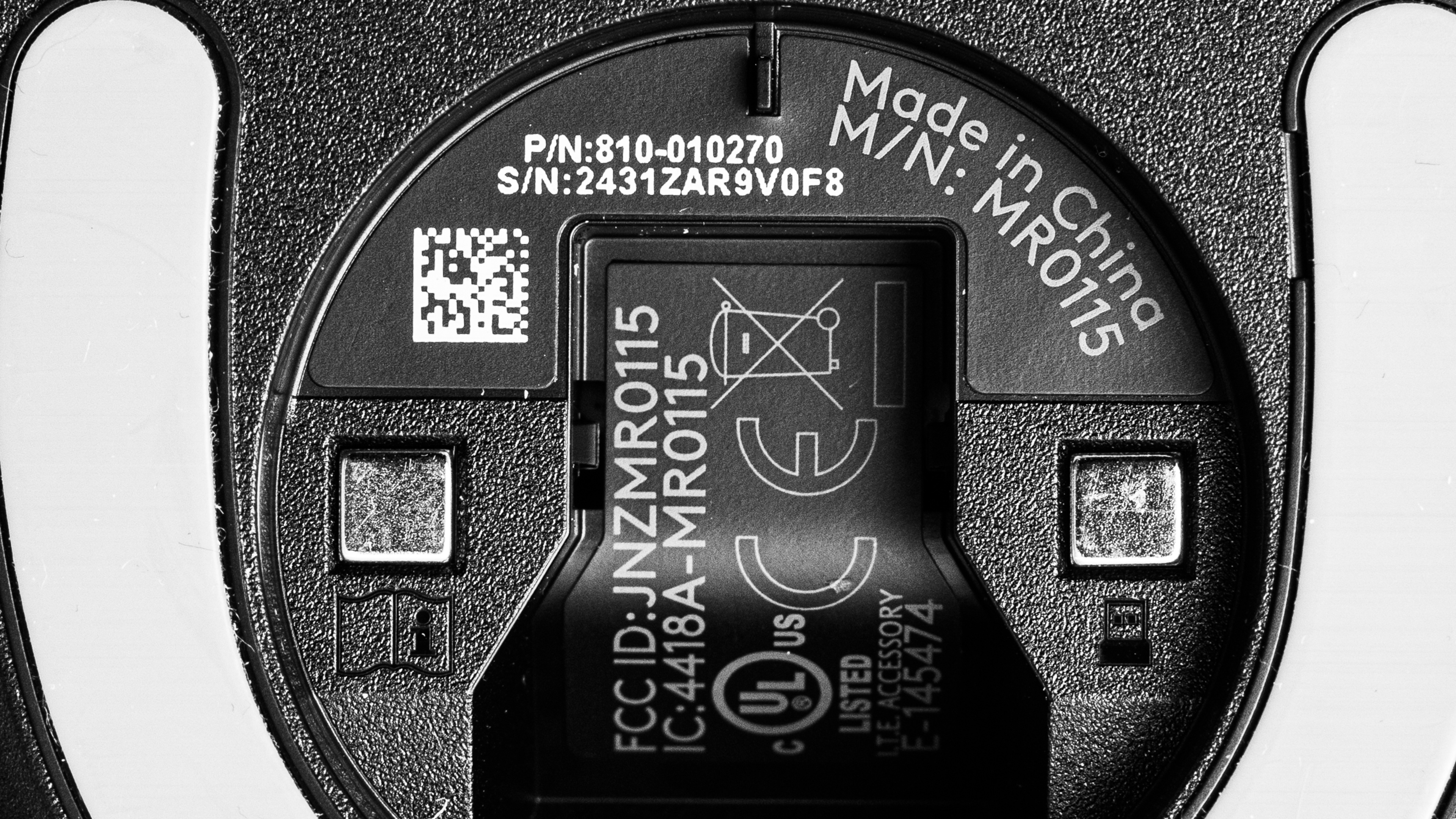
    We bought and tested the Pink model. Here's a photo of our unit's label.

    Popular Mouse Comparisons

    Internally, the Logitech G PRO X SUPERLIGHT 2 DEX has the same set of components as its sibling, the Logitech G PRO X SUPERLIGHT 2, including the same HERO 2 sensor and Logitech's LIGHTFORCE switches.

    The only standout difference is its shape. While the original SUPERLIGHT 2 has a symmetrical design, the SUPERLIGHT 2 DEX has a larger right-handed shape with a medium-sized hump and fairly wide back end, making it more supportive for palm or claw grip types. In all other respects, it delivers the same degree of high-end performance as the SUPERLIGHT 2 and competes directly with other flagship models like the Razer Viper V3 Pro, and the Razer DeathAdder V3 Pro.

    For more recommendations, see our picks for the best gaming mouse, the best wireless gaming mouse, and the best lightweight mouse.

    Logitech G PRO X SUPERLIGHT 2

    The Logitech G PRO X SUPERLIGHT 2 and the Logitech G PRO X SUPERLIGHT 2 DEX are both outstanding, lightweight, wireless gaming mice. They weigh nearly the same and use the same sensor with virtually identical performance, but the DEX has a larger, right-handed shape. 

    Razer Viper V3 Pro

    The Logitech G PRO X SUPERLIGHT 2 DEX and the Razer Viper V3 Pro are both lightweight wireless gaming mice. The Logitech has a larger right-handed shape, while the Razer has a symmetrical shape. The two perform very similarly, but the Razer has better stock mouse feet.

    Razer DeathAdder V4 Pro

    The Razer DeathAdder V4 Pro and the Logitech G PRO X SUPERLIGHT 2 DEX are both premium wireless gaming mice built for competitive play. They're about the same weight and share a right-handed ergo shape, but the Logitech feels more accommodating to a wider range of hand sizes and grip styles. Both deliver excellent performance and include 8k-capable wireless dongles. The Razer stands out with smoother-gliding feet and an optical scroll wheel encoder that should improve long-term durability compared to the Logitech's mechanical wheel. It also offers unique software features like Dynamic Sensitivity and a Sensor Rotation tool, which the Logitech lacks.

    Razer DeathAdder V3 Pro

    The Logitech G PRO X SUPERLIGHT 2 DEX and the Razer DeathAdder V3 Pro are lightweight wireless gaming mice with right-handed shapes. The Logitech's shape is more rounded, with a more supportive rear hump and lower front click buttons. The Razer's hump tapers off sooner than the Logitech's, and has sides that flare out more. The Razer is better suited for users with larger hands, while the Logitech is more acommodating overall. Performance-wise, the two are very similar, but the Logitech supports an 8000Hz polling rate out of the box, whereas you have to buy a separate dongle to achieve higher polling rates with the Razer.

    Logitech G PRO X SUPERLIGHT

    The Logitech G PRO X SUPERLIGHT 2 DEX and the Logitech G PRO X SUPERLIGHT are both lightweight wireless gaming mice. The SUPERLIGHT has a medium symmetrical shape while the DEX has a larger, right-handed shape. They both deliver outstanding gaming performance, but the DEX has a higher maximum polling rate of 8000Hz.

    BenQ ZOWIE EC2-DW

    The Logitech G PRO X SUPERLIGHT 2 DEX and the BenQ ZOWIE EC2-DW are wireless gaming mice with right-handed shapes. They have similar shapes, but the Logitech is slightly bigger and its hump has a different center hump with a more rounded curvature. The ZOWIE is available in small, medium, and large sizes, while the Logitech is only available in one size. While both mice have superb performance, the Logitech just edges out the ZOWIE with slightly better click latency and a higher 8000Hz polling rate.

    Pulsar X3

    The Logitech G PRO X SUPERLIGHT 2 DEX and the Pulsar X3 are lightweight wireless gaming mice with right-handed "ergo" shapes. The Logitech's shape is versatile but overall best suited for a palm grip. It also has better raw gaming performance and supports a maximum polling rate of 8Khz out of the box. Comparatively, the Pulsar's shape has a wider and more supportive rear that makes it suited for palm or claw grips. It supports a polling rate of 1000Hz out of the box, but you can buy a separate 8k dongle to increase the polling rate to 8000Hz.

    Video

    Test Results

    perceptual testing image
    Sort:
    RATINGS
    Category:
    All
    Design
    Style
    Type
    Standard
    Coating
    Matte
    Lighting ColorNo Lighting

    The Logitech G PRO X SUPERLIGHT 2 DEX has a minimal style and a smooth matte plastic coating. We bought the Pink version of this mouse, but it's also available in White or Black. The palm rest has a silver-colored Logitech Logo, and the word "SUPERLIGHT" is written on the right side.

    Shape
    Length5.0" (126 mm)
    Width2.6" (67 mm)
    Height1.7" (44 mm)
    Grip Width
    61 mm
    Ambidextrous
    No
    Left-Handed Friendly
    No
    Finger Rest
    No
    8.5
    Build Quality

    The Logitech G PRO X SUPERLIGHT 2 DEX has excellent build quality. The body is made of smooth, matte coated plastic that feels pleasant to the touch. There aren’t any creaking sounds when squeezing the mouse and no rattling pieces if you shake it. The main buttons have a crisp, satisfying actuation and don’t have any noticeable side-to-side play. Unfortunately, the side buttons feel a bit mushier. Lastly, while the shell feels very sturdy and exhibits very minimal flex, you can actuate the side buttons if you press forcefully into the side panels below the buttons. However, this is fairly typical and likely won’t present issues during normal usage unless you grip your mouse very forcefully.

    9.2
    Weight
    Lowest Weight
    57.0 g
    Default Weight
    58.4 g
    Weight Distribution
    Centered
    Extra Weights
    No

    The lowest weight measurement is achieved by removing the plastic puck that comes pre-installed on the mouse. This puck is also compatible with Logitech's G PowerPlay wireless charging mousepad.

    This mouse includes an alternate, slightly heavier puck (1.9g), which has a PTFE foot.

    Hand Size Recommendation
    Palm Grip Hand Recommendation
    Claw Grip Hand Recommendation
    Fingertip Grip Hand Recommendation

    Despite being fairly large and bulky, the Logitech G PRO X SUPERLIGHT 2 DEX is well-suited for most hand sizes and grip types. Its fuller shape and rear hump make it well-suited for a palm or claw grip.

    If you have very large hands, your fingers may hang over the front edge of the mouse, particularly when using a palm grip. For a similar shape that's a bit better for larger-sized hands, consider the Razer DeathAdder V4 Pro.

    The side buttons and scroll wheel are easy to reach. However, if you have extra small hands, you may have some difficulty reaching the side buttons using any grip type, and the overall size of the mouse may make the mouse difficult to control, particularly for a fingertip grip.

    7.2
    Wireless Versatility
    Maximum Of Paired Devices
    1
    Bluetooth
    No
    Receiver
    Yes
    Battery Type
    Rechargeable
    Use When Charging
    Yes
    On/Off Activation
    Auto Off And On/Off Switch
    Receiver Extender
    Yes
    Receiver Storing
    Yes
    Battery IndicatorYes

    This mouse has a maximum advertised battery life of up to 95 hours of constant motion. Note that Logitech doesn't indicate on their product page what settings they used to produce this estimate.

    Be aware that using the 'optical only' setting in the software for the LIGHTFORCE switches and using higher polling rates, in particular, will drain the battery much quicker.

    Cable
    ConnectivityWireless
    Cable Length
    6.2 ft (1.9 m)
    Cable Type
    Rubber
    Permanent Kink
    No
    Port Type: Mouse End
    USB-C
    Port Type: PC End
    USB-A

    This mouse comes with a rubber USB-A to USB-C cable. It's decently flexible and doesn't have any kinks from its packaging. However, like other rubber cables, it's prone to catch and drag on tables compared to higher-quality paracord-like cables.

    8.5
    Mouse Feet
    Gliding Experience
    Ok
    Material
    Virgin Grade PTFE
    Extra Included
    No

    The feet glide smoothly on hard and soft mousepads and directly on desks. They produce slightly scratchy sounds when used directly on a desk, but it doesn't impact the glide performance.

    The pre-installed plastic puck on the underside of the mouse doesn't have a PTFE foot. There's an extra plastic puck with a PTFE foot included in the box. It likely won't provide any noticeable gliding improvement for most people, but it can provide more gliding surface area if you have a very soft mousepad or press down fairly forcefully into your mouse while using it.

    In The Box

    • USB-A LIGHTSPEED wireless receiver
    • Receiver extender
    • USB-A to USB-C charging cable
    • Alternate PTFE foot puck covering
    • Set of adhesive grips
    • User documentation
    Control
    Main Button
    See details on graph tool
    See details on graph tool
    Switch Type
    Optical
    Switch Model
    LIGHTFORCE

    This mouse uses what Logitech calls their LIGHTFORCE optical-mechanical switches. They're the same model switches (Omron D2FP-FH1) used in both the Logitech G PRO X SUPERLIGHT 2 and the Logitech G502 X.

    In the configuration software, there's an option to toggle these switches between an 'optical only' mode and a 'hybrid' mode. The switches feel the same in both modes, but the hybrid mode consumes less battery at the cost of latency performance.

    7.1
    Additional Buttons
    Total Number Of Buttons
    5
    Number Of Side Buttons
    2
    Number Of Programmable Inputs
    9
    Profile Switching Button
    Yes
    Gesture Support
    No

    You can reprogram all of the buttons, including the left- and right-click buttons. You can also assign what Logitech calls a 'G-Shift' button that allows you to toggle to a secondary layer of programmable controls.

    9.8
    Click Latency
    See details on graph tool
    Expected Connection
    1.3 ms
    Wired
    1.3 ms
    Receiver
    1.3 ms
    Bluetooth
    N/A

    The Logitech G PRO X SUPERLIGHT 2 DEX has exceptionally low and extremely consistent click latency. It delivers a remarkably responsive-feeling experience for gaming in any genre and is well-suited for casual or competitive play.

    We conducted this test with the 'optical only' switch setting selected in the companion software, a 1000Hz wired polling rate, and an 8000Hz wireless polling rate.

    We also conducted this test at different wireless polling rates and achieved the following results

    • 1000Hz: 1.8 ms
    • 4000Hz: 1.4 ms
    9.6
    CPI
    See details on graph tool
    SRAV @ 1600 CPI
    0.06%
    SRAV @ 800 CPI
    -0.17%
    SRAV @ 400 CPI
    0.00%
    SRAV @ Fixed CPI
    N/A
    Precision Error Between Speeds
    0.55%
    Precision Error Between CPI
    0.56%
    Worst Tracking Error
    -7.75%
    Minimum CPI
    100 CPI
    Maximum CPI
    44,000 CPI
    CPI Adjustment Steps
    2 CPI

    The G PRO X SUPERLIGHT 2 DEX's sensor delivers remarkably accurate and consistent tracking during mouse movements based on your chosen CPI setting.

    9.5
    Sensor Latency
    See details on graph tool
    Delay To Start Of Movement
    10.2 ms
    Delay At Half Movement
    2.0 ms
    Delay To End Of Movement
    1.5 ms

    The Logitech G PRO X SUPERLIGHT 2 DEX has outstanding sensor latency. It reacts extremely quickly to your inputs, so you won't notice any delay.

    The above test results are achieved using the mouse's maximum polling rate of 8000Hz and with gaming surface mode turned off.

    We also conducted supplementary testing at 4000Hz and 1000Hz and found the following results:

    4000Hz:

    • Delay to start of movement: 11.1 ms
    • Delay at half movement: 1.8 ms
    • Delay to end of movement: 1.3 ms

    1000Hz:

    • Delay to start of movement: 12.2 ms
    • Delay at half movement: 3.0 ms
    • Delay to end of movement: 2.6 ms
    Sensor Specifications
    Sensor Technology
    Optical (LED)
    Sensor Model
    HERO 2
    Works On Glass
    No
    Minimum Lift Off Distance
    1.2 mm
    Maximum Polling Rate
    8000 Hz

    This mouse's wireless polling rate options are 125Hz, 250Hz, 500Hz, 1000Hz, 2000Hz, 4000Hz, and 8000Hz. The wired polling rate options are 125Hz, 250Hz, 500Hz, and 1000Hz.

    Mouse Wheel
    Scroll Wheel Type
    Notched Wheel
    Scroll Wheel Tilt
    No
    Thumb Wheel Type
    No

    The scroll wheel is made of plastic, and it has a rubberized strip with small ridges for added grip. Scrolling feels smooth and precise. The steps have slightly more definition than on the Logitech G PRO X SUPERLIGHT 2, and scrolling is slightly louder but still relatively quiet.

    The middle click button takes a moderate amount of force to actuate and feels the same as the original SUPERLIGHT 2.

    Noise
    Click Noise
    Loud

    The left- and right-click buttons are on the louder side and may irritate those around you in noise-sensitive environments. That said, the side buttons, scroll wheel, and middle click button are relatively quiet.

    Operating System And Software
    Configuration Software
    Software NameLogitech G HUB
    Software Windows Compatibility
    Yes
    Software macOS Compatibility
    Yes
    On-Board Memory
    Yes
    CPI (DPI) Adjustment
    Yes
    Polling Rate Adjustment
    Yes
    Profile Configuration
    Yes
    Profile Auto-Switching
    Yes
    RGB On/Off
    No RGB

    The software is well laid out and intuitive. It allows you to customize various expected options, including CPI, polling rate, sensor calibration, button assignments, and custom macros.

    Additionally, the software allows you to change how the left- and right-click switches operate. You can toggle the switches between a default 'optical only' mode which provides the best performance for gaming and a power-saving 'hybrid' setting.

    Like similar software options from other major manufacturers, Logitech's G HUB software is a source of frequent criticism from the broader community. While we didn't experience any issues during the testing of this mouse, many users online identify this software as requiring frequent updates and taking up disproportionate system resources, among other complaints. This software may be frustrating if you prefer more lightweight software options. Or, if you prefer no software at all, the BenQ ZOWIE EC2-DW is a compelling driverless alternative.

    10
    Mouse Compatibility
    Windows CompatibilityFully
    macOS CompatibilityFully