TVs with IPS panels have been around for a long time, but what is IPS? These TVs are usually associated with wide viewing angles and quick response times, and are also known for their low contrast. But if you're shopping for a new TV, should you consider buying one? In this article, we'll go over some of the performance metrics of IPS panels, so you have a better idea of what to expect if you're planning on buying one. This article is focused on the TV market, but we have a separate guide if you want to learn more about IPS monitors. If you're not sure where to start, check out our TV panel types guide for a breakdown of all the different TV types.
Test results
What is IPS?
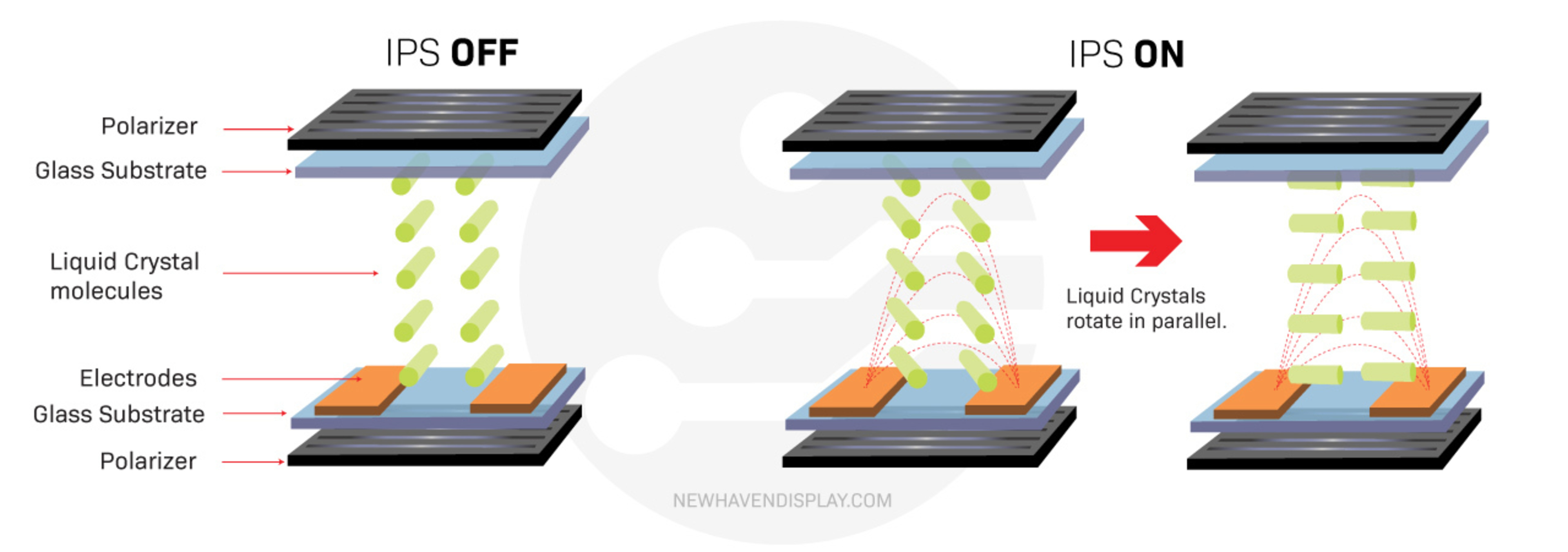
The term IPS stands for in-plane shifting, and it refers to the mechanism used to adjust the liquid crystals in your LCD TV to control the flow of light. The LCD layer is just one layer of many within a TV, and it sits between the LED backlights, polarizers, and glass substrates. With an IPS panel, the liquid crystals sit horizontally next to each other when there's no voltage applied to them, blocking most of the light coming through. When a voltage is applied, they rotate parallel to the glass substrate to let light through.
The rotation is what defines IPS panels versus other LCD panel types like VA, as the crystals are rotating within the plane of the glass substrates, whereas VA crystals rotate perpendicular to the substrate. While this may seem like a minor difference, it has a significant impact on a few important performance characteristics of the panel, which we'll get into later on in the article.
How Do IPS Panels Perform?
IPS panels aren't all that common on TVs. At the time of publishing, we've tested 218 LED TVs since 2020, and 57 of them use IPS panels. That doesn't mean that they're necessarily bad or that you should avoid them, but there are a few quirks that you need to be aware of before choosing one. Below, we'll break down some of the biggest aspects of a TV's performance that can be impacted by the type of panel used. We'll use the results of three recent TVs with IPS panels: the LG UA77, the Hisense 75U8N, and the Hisense U9N. These three TVs cover a wide range of the market, from the entry-level LG UA77 up to the premium Hisense U9N.
Contrast
| LG UA77 | Hisense 75U8N | Hisense U9N | |
|---|---|---|---|
| Native Black Uniformity |  |
 |
 |
| Contrast With Local Dimming Photo |  |
 |
 |
| Native Contrast | 992 : 1 | 1,643 : 1 | 1,634 : 1 |
| Contrast With Local Dimming | No local dimming | 110,600 : 1 | 344,300 : 1 |
When watching TV in the dark, there are a few different performance metrics that are important. Contrast, which is the ratio between black and white, and black uniformity, which tells us how even blacks are across the screen, are two of the most important. Unfortunately, IPS panels all have low native contrast. Thankfully, this doesn't mean that IPS TVs are automatically bad in dark rooms, as most modern TVs on the market also use a technology called local dimming to improve dark scene performance. This technology works by dimming the LEDs behind darker parts of the scene, so it doesn't matter as much that the IPS panel isn't able to block the light coming through from the backlight.
Above, you can see two examples of how the panel's capabilities directly impact dark scene performance. The first row shows the native black uniformity of each panel, with local dimming disabled. As you can see, all three TVs have disappointing black uniformity, with a patchy screen with brighter spots spread across the screen at random.
The second row shows the contrast test photo with local dimming enabled on both Hisense TVs. The LG doesn't support local dimming, so this is as good as it gets. As you can see, both Hisense TVs have incredibly deep blacks, and almost all of the cloudiness seen in the black uniformity photo is gone.
These results show that while IPS panels have low native contrast, new technologies like local dimming can significantly improve black levels, so you shouldn't necessarily reject an IPS TV if you care primarily about dark scene performance. The Hisense U9N, for example. has one of the highest contrast ratios we've ever measured on an LED TV. It's important to look at the performance of the specific model you're considering.
Colors
| LG UA77 | Hisense 75U8N | Hisense U9N | |
|---|---|---|---|
| Color Volume Chart | 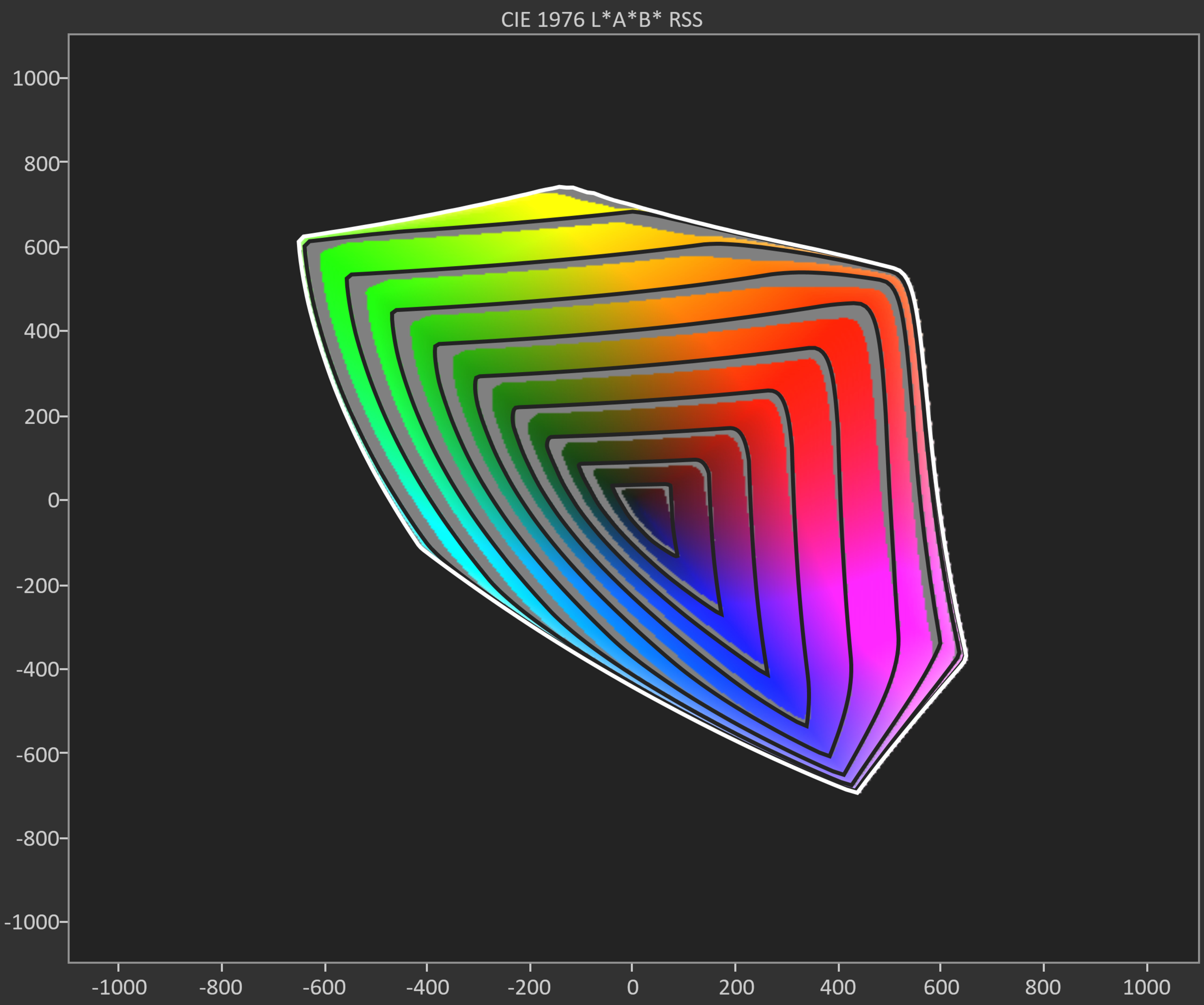 |
 |
 |
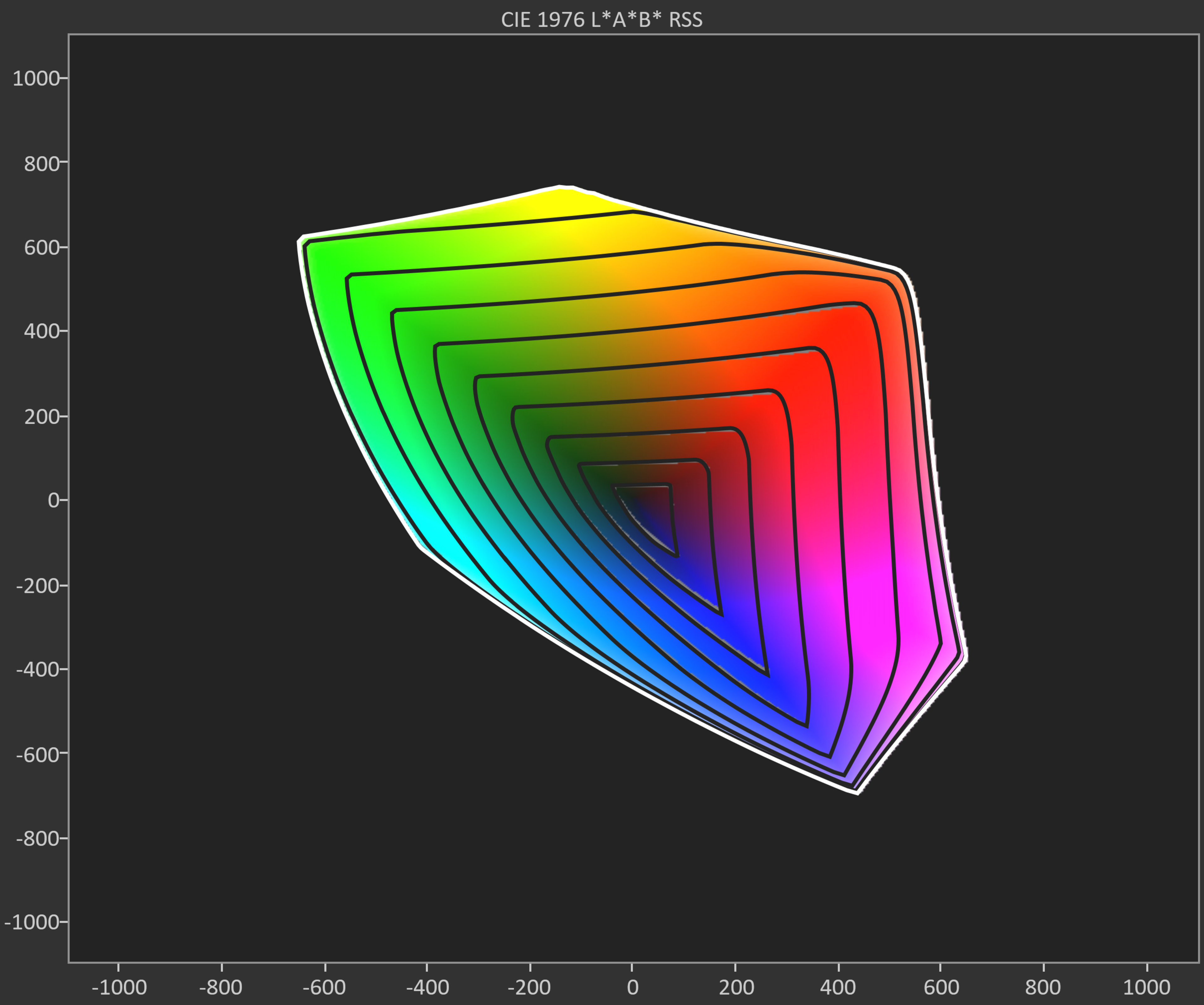
| CIELAB DCI-P3 Coverage | 72.75% | 98.16% | 98.63% |
| CIELAB BT.2020 Coverage | 49.13% | 70.28% | 76.54% |
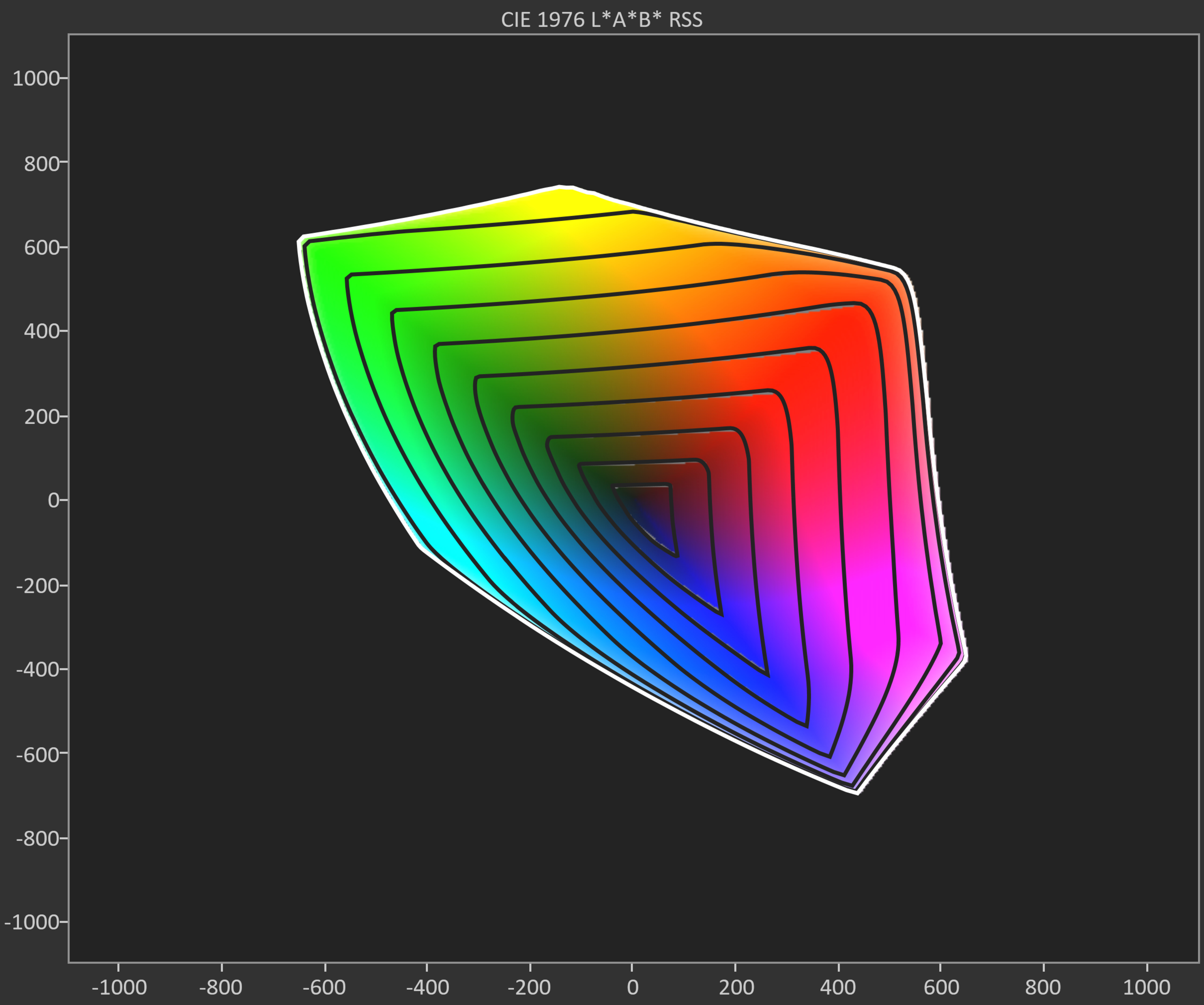
One tool we can use to evaluate a TV's color performance when displaying SDR content, which is most content on DVDs, Blu-rays, and cable TV, is the SDR color volume test. Ideally, you want a TV with large coverage of the DCI-P3 and BT.2020 color spaces so your SDR content is as colorful and accurate as possible. Our SDR color volume test shows us a display's capabilities with an easy-to-understand 2D image, which is broken down into slices called gamut rings. This is a lot easier to visualize than our HDR Color Volume test, which shows a TV's color volume performance using a 3D graphic.
A lot more than just the panel type impacts the colors on a TV. The specific backlight type and the presence of color-enhancing technologies like quantum dots or KSF phosphors have a greater impact than the panel. As you can see above, the two Hisense TVs have an incredibly wide color gamut, displaying nearly all of the DCI-P3 color space. The LG is a lot worse, though, and this TV barely displays a wide color gamut. If you care about vivid colors, look for TVs that use a wide color gamut technology. These TVs usually combine VA panels with quantum dot technology, and are often marketed as QLED, but there are IPS QLED models as well, like the two Hisense models we're comparing.
Viewing Angle
| LG UA77 | Hisense 75U8N | Hisense U9N |
|---|---|---|
Whether you've realized it or not, most TVs look a bit different when viewed from the side. This can be an issue if you have a wide seating arrangement or like to move around the room with the TV playing. Our viewing angle test measures how the TV's color saturation, black levels, and brightness shift as you move off-center, so we can see at what point an image starts to look inaccurate when viewing off-center. If you sit directly in front of the TV, viewing angles aren't as important to you.
A wide viewing angle is one of the key benefits of IPS panels. Looking at the three viewing angle videos above, the image remains consistent up to a moderate angle, but it still starts to wash out past that point. As you can see, they're not perfect, but they're a lot better than other LCD panel types like VA. This makes IPS panels a better choice for a wide seating arrangement, or if you like to move around the room while the TV is on.
Motion Handling
| LG UA77 | Hisense 75U8N | Hisense U9N | |
|---|---|---|---|
| 60Hz | 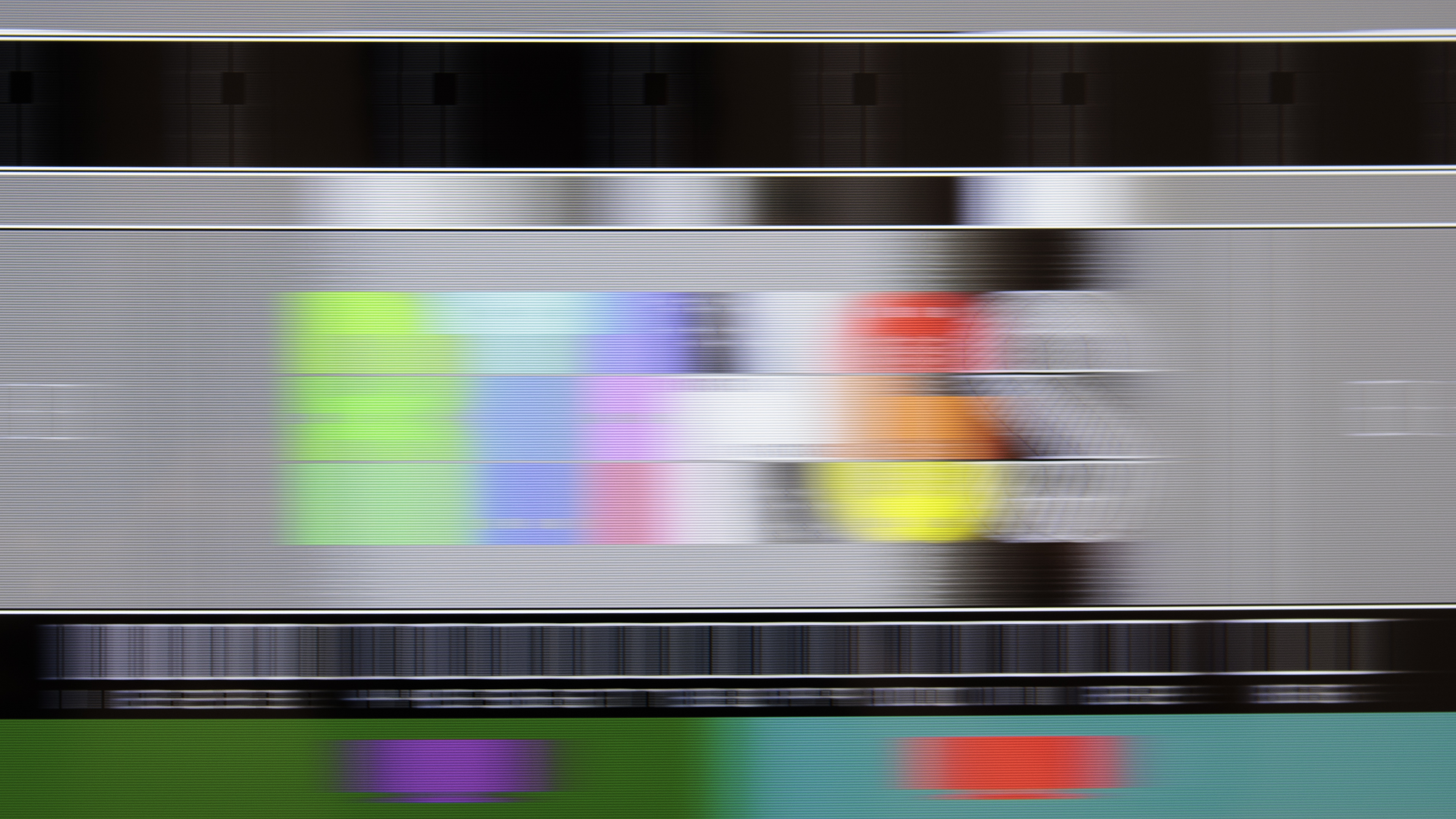 |
 |
 |
| 144Hz | Not Supported |  |
 |
A TV's response time tells us how quickly the screen can change from one shade to the next. A TV with a fast response time is important if you watch content with fast-moving objects, like in action movies or sports. A fast response time improves the clarity of motion by reducing artifacts like black smearing, overshoot, or ghosting. Having a fast response time isn't perfect, either, as it also causes stutter when watching low frame rate content. IPS TVs tend to have good motion handling, with smooth, consistent response times. VA panels tend to have slower response times in shadow details, but IPS panels don't usually have those issues, so they look slightly better in dark scenes. Other than that, there isn't really much difference between IPS and other LCD display types when it comes to motion handling.
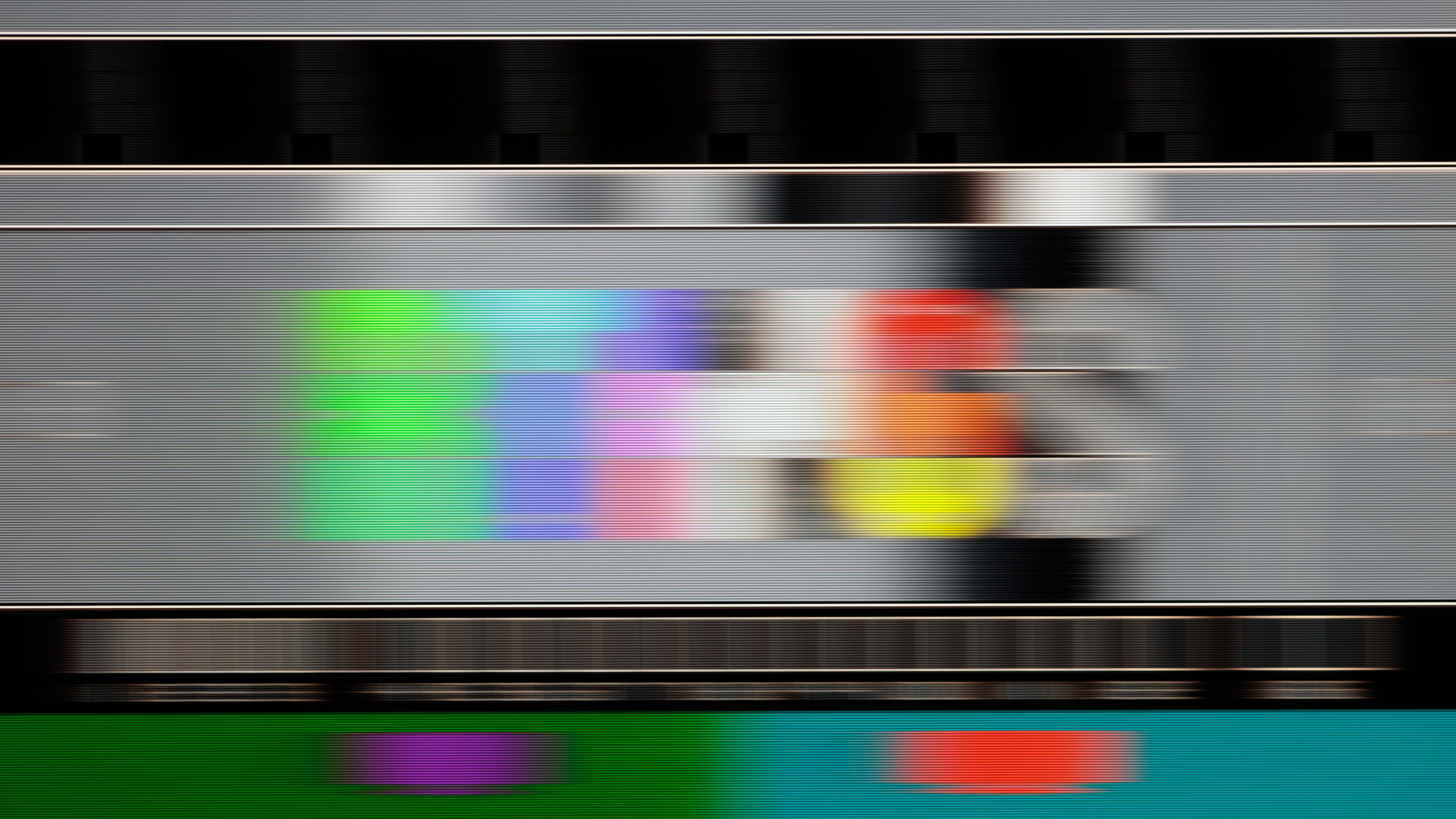
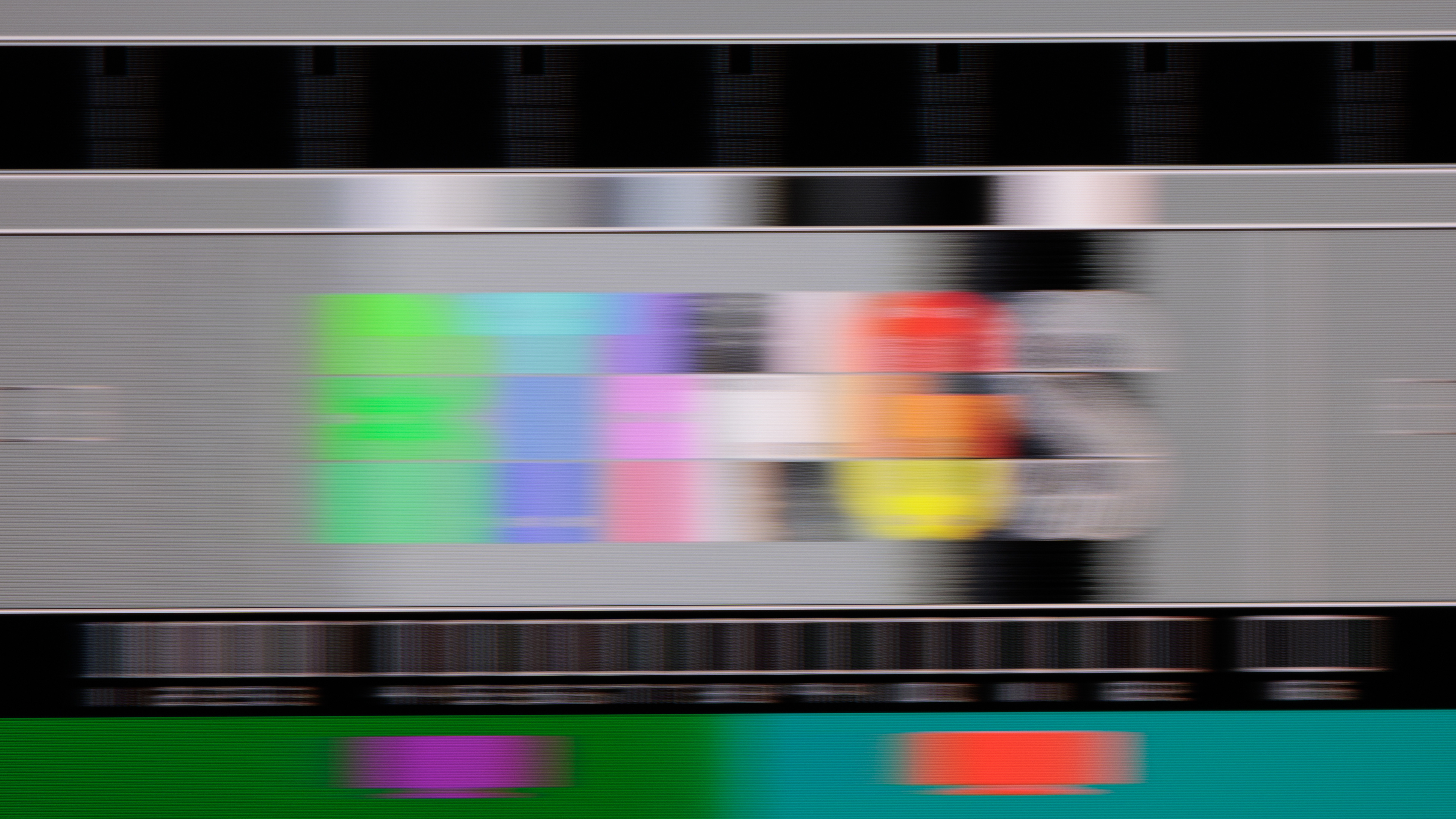
That's not to say that all IPS TVs perform well all the time. Looking at the three TVs above, there's not much difference between them at 60Hz; they all look pretty blurry. This is largely due to something called persistence blur. When running at 60Hz, the pixels are able to fully complete a transition well before the next frame starts to be drawn on the screen, so they stay static for a large portion of the time. The motion handling at 60Hz is roughly the same on the two Hisense TVs, but it's a bit worse on the entry-level LG. This is usually the case; cheaper TVs tend to have a slower response time, which leads to blurrier motion when watching movies or sports.
Where you'll see an even bigger difference is when you're looking at higher-end models. Most cheap TVs with IPS panels are limited to 60Hz, like the LG here, so motion doesn't get any better than the 60Hz image. Higher-end models like the two Hisense TVs often support 120Hz or even higher refresh rates. When running at those higher refresh rates, the screen refreshes more rapidly, and there's significantly less persistence blur. This results in much clearer motion handling, and here you'll see more of a difference between models depending on how the response time behavior was tuned by the manufacturer.
Compared to Other Display Technologies
How do IPS displays compare to other technologies, like VA or OLED?
IPS Vs. OLED
Compared to OLED displays, even the best IPS displays with advanced Mini LED backlights fall far short of the contrast levels OLEDs deliver. On the other hand, many IPS models can get a lot brighter than OLEDs, especially in very bright scenes like sports, so they're often the better choice for a very bright living room. OLEDs have gotten a lot brighter in recent years, though, so don't necessarily discount them even if you have a bright room. IPS panels also have worse viewing angles, especially compared to QD-OLED models, which retain a nearly perfect image even at an extremely wide angle. Finally, OLED panels have much faster response times, delivering crystal clear motion with no distracting motion blur in fast action.
IPS Vs. VA
Compared to VA models, IPS displays typically have much worse contrast, so they're not as good for a dark room. Some newer IPS models perform much better in that regard thanks to new technologies like Mini LED backlighting, which dims the backlight behind the dark parts of the scene to improve contrast. Some IPS models have even better contrast than competing VA models thanks to this new technology, and it's still improving. IPS panels typically have a wider viewing angle than VA models, making them the better choice for a wide seating arrangement or if you're sharing your screen with someone else. Read more about IPS vs VA.
Conclusion
IPS panels still perform roughly the same way they did 20 years ago, with low contrast but good viewing angles, but new technologies like Mini LED backlights are starting to change the game. Overall, IPS TVs are still worth considering, but like anything, it's important to look at the individual performance metrics that matter to you before buying, as there are good and bad models.
Identifying IPS Panels
If you're in a showroom and trying to identify which TVs use IPS panels, the easiest way is to look at how the image changes as you move around. If the colors or brightness of the TV remain mostly the same as you move to the side, there's a good chance it uses an IPS panel. You can also use the finger tap test, but be cautious when doing so to avoid applying too much pressure. Gently tap the screen with one finger; on a VA panel, you'll usually see a quick flash of light around the point of contact. If the screen barely reacts to your touch, it probably uses an IPS panel.
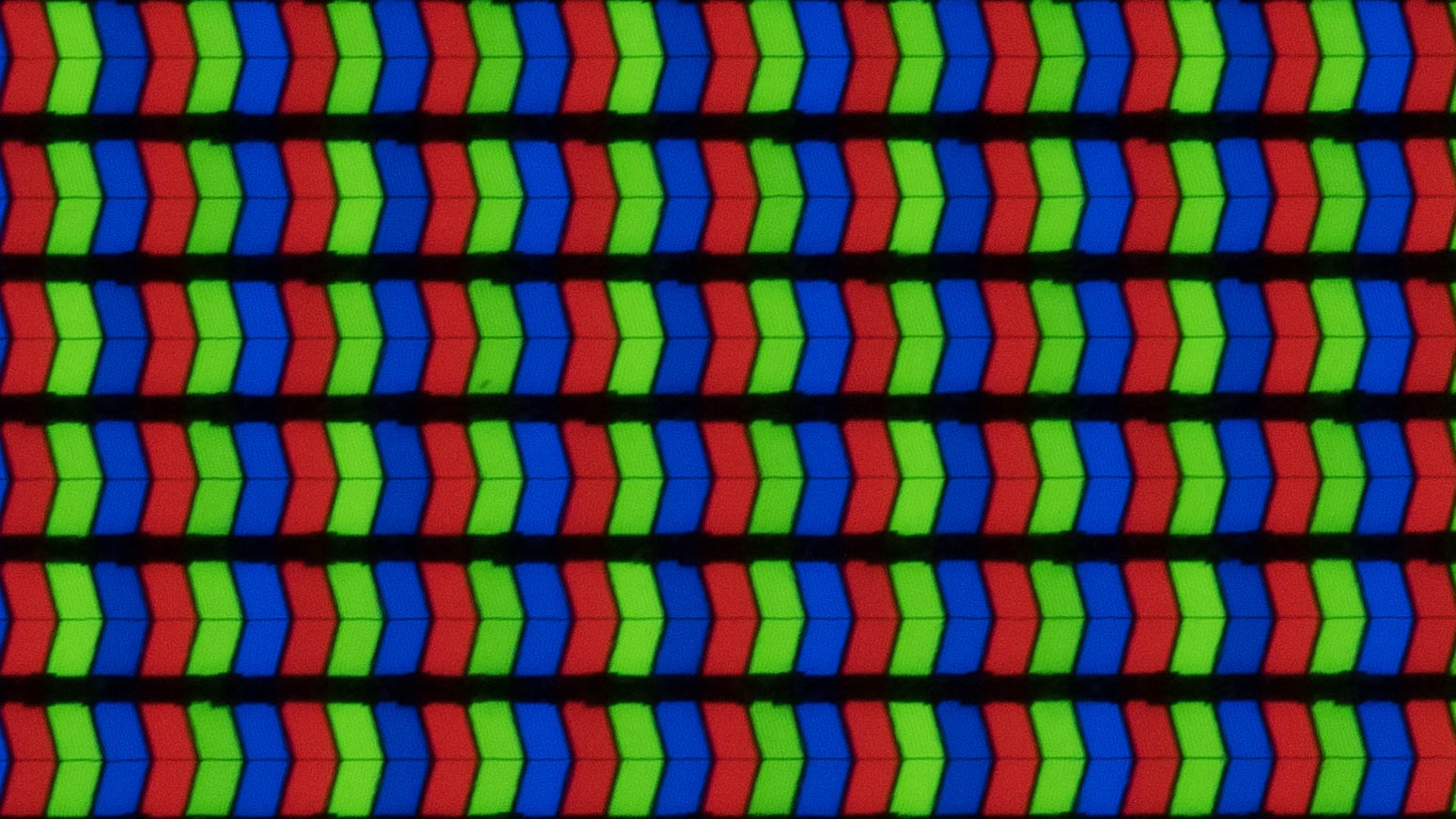
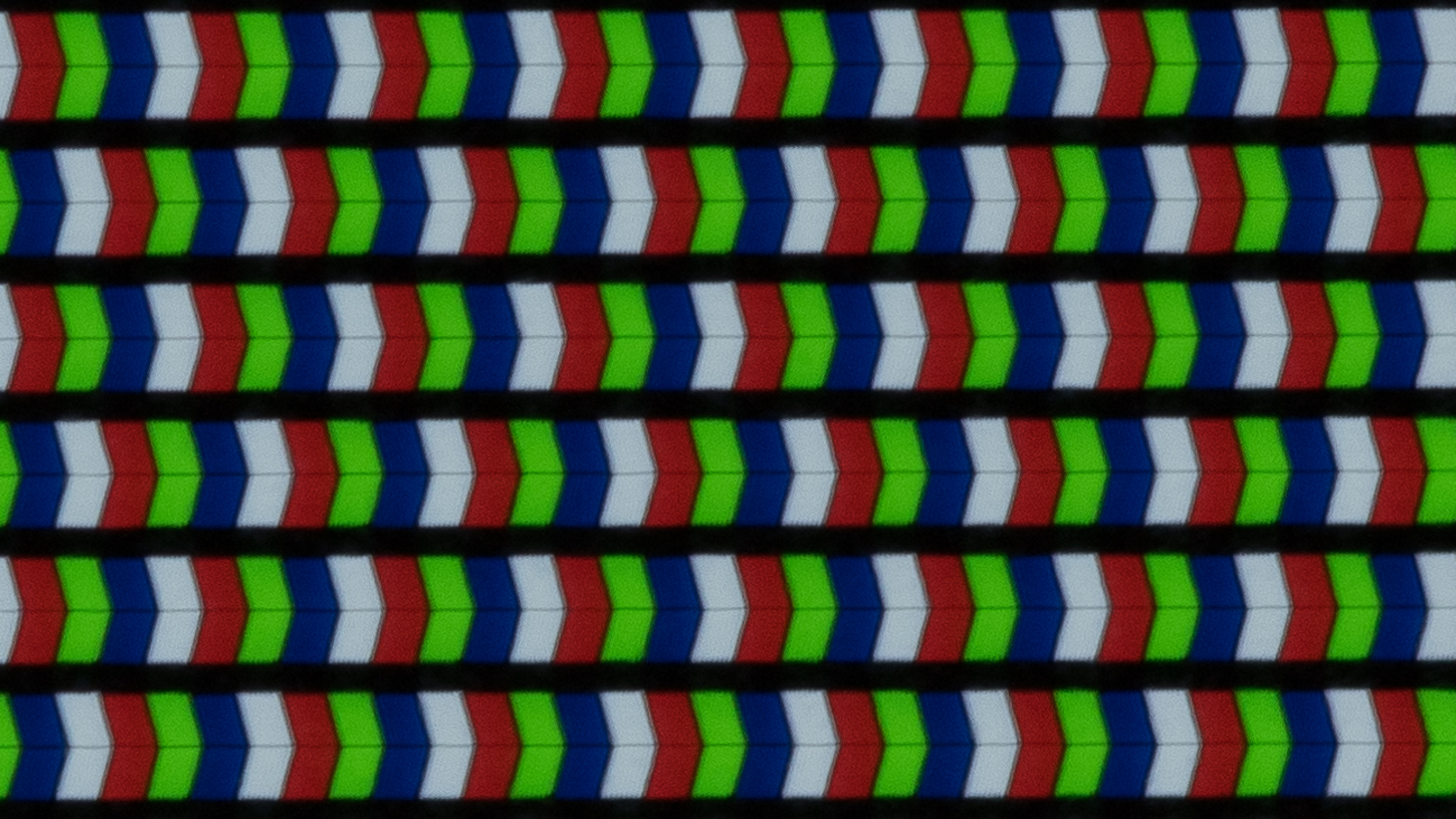
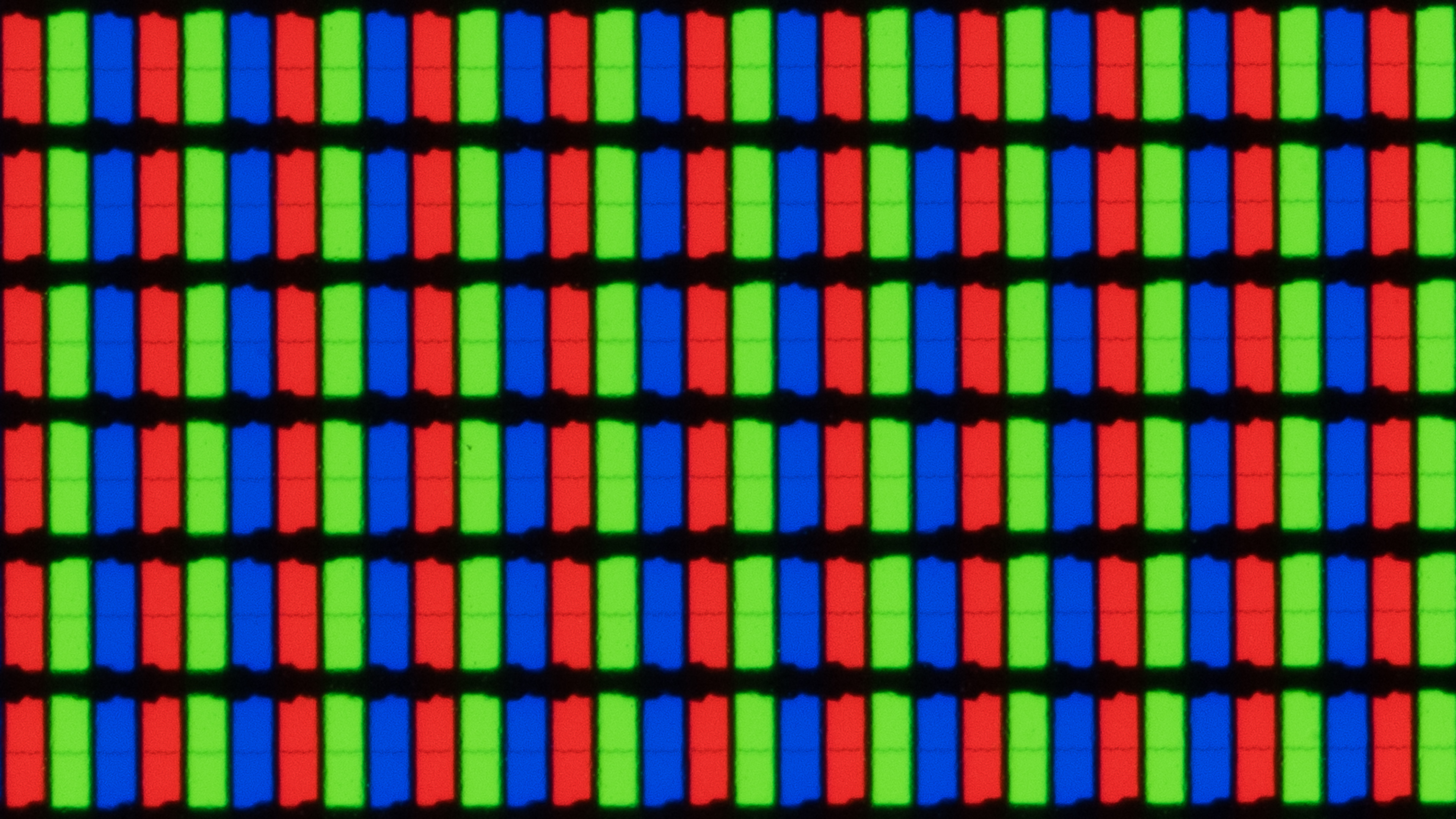
If you have a good phone, you can also try to take a photo of the pixels themselves. It takes practice, but if you lean one side of your phone gently on the screen and hold the camera side about an inch from the screen, you should be able to see the individual subpixels. While it'll be difficult to see the exact shape of the pixels to determine if they're IPS or not, you should be able to see the order of the pixels. This is important because IPS panels almost have a red-green-blue subpixel order, whereas most VA panels have a blue-green-red subpixel order.
Very few TVs in 2025 actually use IPS panels. Most of them use a variant of IPS known as advanced super dimension switching, or ADS, but there are other variants as well. For simplicity, our reviews group these all together as IPS, but there are physical differences between them, and it's usually pretty easy to spot the different types of IPS. Below you can see a few examples of these variants, so you know what to look for if you're able to get a clear shot of the pixels.
 |
 |
 |