Sony LinkBuds Truly Wireless  Headphones Review

Review updated Sep 19, 2023 at 03:50pm
Tested using Methodology v1.5 
Sony LinkBuds Truly Wireless
4.9
Neutral Sound 
5.7
Commute/Travel 
7.5
Sports/Fitness 
5.4
Office 
4.9
Wireless Gaming 
4.8
Wired Gaming 
5.8
Phone Calls 
 0

The Sony LinkBuds Truly Wireless are unusual earbuds designed to let you hear ambient sound. A plastic ring sits around your ear and has a hole to allow you to hear what's going on around you. Their unique design means that the LinkBuds were created with everyday functionality in mind. They'll be most useful for those who want to listen to audio to soundtrack their daily activities while still being able to hear their surroundings.

Our Verdict

4.9
Neutral Sound 

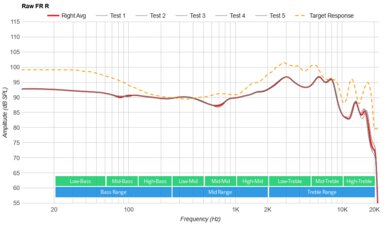
The Sony LinkBuds Truly Wireless are poor for neutral sound. Like most open headphones, their sound hardly has any bass, so your audio lacks thump, punch, and boom. The treble response is also underemphasized, hurting the detail of instruments and vocals and making sibilants like cymbals seem dull. Their very accurate mid-range response makes them best-suited for vocal-centric content like audiobooks and podcasts. Their app includes a graphic EQ and presets that you can use to customize the sound profile, but they aren't a good choice if you're looking for neutral sound.

Pros
  • EQ and presets in-app.
  • Great companion app.
Cons
  • Sound profile lacks bass.
  • Poor passive soundstage.
5.7
Commute/Travel 

The Sony LinkBuds Truly Wireless are disappointing for commute and travel if you want headphones with good noise isolation. By design, they block out virtually no noise, meaning it may be hard to hear your music over the sound of rumbling bus and plane engines. That said, they have a very small, portable design. If you walk to work, you may like that they let you hear ambient sound. They also work with Microsoft Soundscape, intended to help you navigate your surroundings with audio cues, which could be helpful in unfamiliar places. Unfortunately, whether or not you get a good fit depends on the shape of your ears, and they aren't comfortable or stable for everyone due to their unusual design. Their six-hour battery life is also a bit short for long flights, but they come with a case that holds a couple of extra charges.

Pros
  • Small, portable design.
  • Great companion app.
Cons
  • Relatively short battery life.
  • Aren't designed to block out commuter noise.
7.5
Sports/Fitness 

The Sony LinkBuds Truly Wireless are good for sports and fitness. Getting a good fit in both ears can be tricky, but they come with many different silicone wing tips to help. Once you find the right fit, they will stay firmly in place during workouts. Their open-back design makes them a good choice for runners who need to stay aware of their surroundings. They're also small, well-built, and rated IPX4 for water resistance. They have decent controls, so you can change the song or turn up the volume without pulling out your phone. They also support Spotify Tap, which lets you control your music or podcast in that app with the onboard controls.

Pros
  • IPX4 rating for water resistance.
  • Good build quality.
  • Great companion app.
Cons
  • Mediocre stability.
5.4
Office 

The Sony LinkBuds Truly Wireless are sub-par for office use if you want to focus on your work and audio. However, they can be a suitable choice if you want to stay aware of your surroundings, like if someone's speaking to you, without removing your buds or pausing your audio. They let you stay aware of your surroundings, so you can hear if someone's talking to you, which you may prefer to noise cancelling headphones at work. Unfortunately, getting a comfortable fit is hard, and the plastic rings can hurt your ears after a while. Their six-hour continuous battery life is too short to last through a 9-5 workday, although you can top up the battery with the case, which holds about two extra charges.

Pros
  • Support multi-device pairing.
  • Great companion app.
Cons
  • Relatively short battery life.
  • Control scheme lacks call-related functions.
4.9
Wireless Gaming 

The Sony LinkBuds Truly Wireless are Bluetooth earbuds and aren't compatible with Xbox or PlayStation consoles. You can use them with PCs via Bluetooth, but their latency is too high for them to be suitable for gaming, as you'll notice significant delays between audio and video.

4.8
Wired Gaming 

The Sony LinkBuds Truly Wireless are wireless-only headphones; you can't use them wired.

5.8
Phone Calls 

The Sony LinkBuds Truly Wireless are disappointing for phone calls. You'll be understandable if you use them for a phone call, but your voice will sound distorted and thin. While the mic has decent noise handling, ensuring your voice isn't drowned out even in a loud environment, the person you're talking to might hear a crackling noise when you speak. Since they don't isolate you from any noise, hearing your call may also be hard if you're in a noisy place. Their control scheme also doesn't include any call-related functions, so you need your phone to answer a call.

Pros
  • Decent noise handling performance.
  • Great companion app.
Cons
  • Recorded speech sounds a bit distorted.
  • Control scheme lacks call-related functions.
  • 4.9
    Neutral Sound
  • 5.7
    Commute/Travel
  • 7.5
    Sports/Fitness
  • 5.4
    Office
  • 4.9
    Wireless Gaming
  • 4.8
    Wired Gaming
  • 5.8
    Phone Calls
  • Changelog

    1.  Updated Sep 19, 2023: We've updated this review's text to ensure accuracy and clarity.
    2.  Updated Aug 21, 2023: Firmware update 2.2.0 added multi-device pairing. As a result, we've retested Bluetooth.
    3.  Updated Mar 16, 2022: Review published.
    4.  Updated Mar 08, 2022: Early access published.

    Differences Between Sizes And Variants

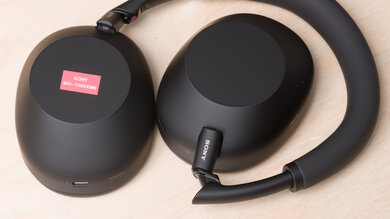
    The Sony LinkBuds come in two colors, 'Gray' or 'White'. Both versions have a speckled design. We tested them in 'Gray'; you can see the label for the unit we tested here.

    If you encounter another variant, please let us know in the discussions, and we'll update our review.

    Popular Headphones Comparisons

    The Sony LinkBuds have a very unconventional design, but similar to earbuds like the Bose Sport Open Earbuds Truly Wireless or the Shokz OpenRun Pro Bone Conduction; they're designed to keep your ears open so you can hear your surroundings. However, the manufacturer markets them more for everyday, office, and casual use than sports. They have a great app with many features like an EQ, virtual surround sound, and automatic volume adjustment. They also support Microsoft Soundscape, a feature that tracks your head position and can give you audio cues to help you find a destination. Unfortunately, it's hard to find a good fit, and depending on the shape of your ears, you may not be able to. If you're looking for open-back headphones that are more likely to be comfortable, the Apple AirPods (2nd generation) Truly Wireless or Apple AirPods (3rd generation) Truly Wireless are worth considering.

    If you want other options, check out our lists of the best earbuds and in-ear headphones, the best wireless Bluetooth earbuds, and the best wireless earbuds for Android.

    Sony LinkBuds S Truly Wireless

    The Sony LinkBuds S Truly Wireless are the upgraded variant of the Sony LinkBuds Truly Wireless. Both are designed for different purposes, meaning you may prefer one over the other. The original LinkBuds are open-ear, allowing you to easily monitor your surroundings without removing the buds. However, that means they won't block sound, and they leak audio. However, the S model are in-ears with ANC. They're able to block out a great amount of ambient noise. They're more comfortable, stable, and have a more neutral and flat sound profile, which some users may prefer. They also have longer continuous battery life.

    Sony WF-1000XM4 Truly Wireless

    The Sony WF-1000XM4 Truly Wireless are better than the Sony LinkΒuds Truly Wireless for most purposes. They have an ANC feature that blocks out a lot of noise, a better-balanced default sound profile, and a longer continuous battery life. On the other hand, the LinkΒuds are designed to let you hear your surroundings, so you may prefer them at the office or for a run outside.
    Bose Ultra Open Earbuds

    The Bose Ultra Open Earbuds and Sony LinkBuds Truly Wireless are unusual-looking earbuds designed to prioritize environmental awareness. Both have virtual surround sound and IPX4 ratings against water splashes. Neither pair has much bass on tap. The Bose feel more comfortable and stable. Their battery lasts longer, too. The Sony buds still sit in your ears, which can give you a slightly more consistent sound, especially if you have ear piercings. Their mic system sounds a bit better, but neither is pro quality. They use touch controls and include a handy Speak-to-Chat function to pause playback automatically if you're engaged in a conversation.

    Bose QuietComfort Earbuds Truly Wireless

    The Bose QuietComfort Earbuds Truly Wireless are better for most purposes than the Sony LinkBuds Truly Wireless. The Bose headphones have an ANC feature with great performance, a more neutral sound profile, and a longer continuous battery life. They're also much more comfortable and stable. However, the Sony headphones are designed to let you hear your surroundings while you wear them, which some may prefer.

    Show more 
    Overhauling Our Audio Measurements And A New Multi-Curve Graphing Tool

    We've upgraded our Headphones Test Bench to 2.0! This update brings several key changes to our tests and usages, making it easier than ever to interpret our sound results based on your personal preferences. You'll also find a brand-new interactive graph tool featuring multiple targets (including our own!) for you to explore and compare.

    For a full breakdown, check out our changelog, which includes detailed commentary from our test designer explaining the rationale behind our update.

    We'd also love to hear your thoughts: your feedback helps us keep improving, so join us in the comments!

    Test Results

    perceptual testing image
    Sort:
    RATINGS
    Category:
    All
    Design
    Style
    TypeEarbuds
    EnclosureOpen-Back
    WirelessTruly Wireless
    TransducerDynamic

    The Sony LinkBuds have a very unusual design. The buds are round, and instead of tips that go into your ears, there's a donut-shaped part that sits outside your ear canal. It has a hole in the middle, so it doesn't block your ear. The earbuds come in 'Gray' or 'White', and both variants have a subtle speckled design.

    6.5
    Comfort
    Weight0.02 lbs
    Clamping Force
    0 lbs

    The Sony LinkBuds are adequately comfortable. They come with a lot of silicone sleeves that you can use to customize their fit, but it's still hard to find a good fit in both ears. The round buds also protrude slightly, and the rigid plastic rings can put pressure on the outside of your ear. If you can find a good fit, you don't feel them too much, but you may still have an issue getting them to fit properly. On the plus side, they have a 'Wide Area Tap' feature that lets you tap the front of your ear to register commands instead of the earbuds, so you can avoid pressing them into your ears when you want to change the track or turn up the volume.

    7.1
    Controls
    OS Compatibility
    Not OS specific
    Ease Of UseDecent
    FeedbackGood
    Call/Music ControlYes
    Volume ControlYes
    Microphone ControlNo
    Channel Mixing
    No
    Noise Cancelling ControlNo
    Talk-Through
    On/Off
    Additional ControlsVoice Assistant

    The Sony LinkBuds have decent controls. The default control scheme is simple and easy to use, and you can remap the functions in the app. You can tap either the round part of the earbuds or the cartilage in front of your ear to register a command, and you can turn off this feature, which is called 'Wide Area Tap'. There are beeps each time a tap command is registered, but no voice prompts. You may need to tap several times to get to the volume you want, which is a bit inconvenient.

    There's an auto-pause feature that pauses your audio when you remove the earbuds from your ears, a 'Speak-to-Chat' feature that activates the Talk-Through function when your voice is detected, and automatic volume adjustment, which turns up your audio when more ambient noise is detected. All of these features can be turned off in the app. Unfortunately, the earbuds lack call-related controls, and the app doesn't give you the option of adding any.

    On the left earbud:

    • Double tap: Raises the volume.
    • Triple tap: Lowers the volume.

    On the right earbud:

    • Double tap: Plays and pauses audio.
    • Triple tap: Skips the track forward.
    9.6
    Portability
    L1.2" (3.0 cm)
    W1.3" (3.2 cm)
    H0.6" (1.5 cm)
    Volume0.88 in³ (14.40 cm³)
    Transmitter RequiredNo

    Like most earbuds, the Sony LinkBuds are very portable. They're extremely small and easily fit into most bags and pants pockets, even inside their case.

    7.5
    Case
    TypeHard case
    L1.9" (4.8 cm)
    W1.6" (4.1 cm)
    H1.2" (3.1 cm)
    Volume3.72 in³ (61.00 cm³)

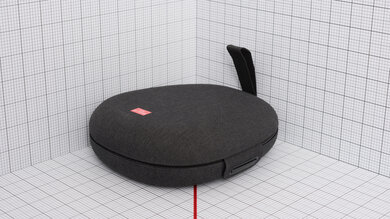
    The Sony LinkBuds have a good case. It's very compact and won't take up too much space in a bag or in pockets. There's a latch mechanism that keeps the lid closed and an LED light that displays the case's battery life when the case is open. It has a pairing button on the back and magnets inside to hold the earbuds in place. Unfortunately, it's made of plastic that feels thin and cheap.

    7.5
    Build Quality

    The Sony LinkBuds have a good build quality. They're made of plastic that feels mostly sturdy and can survive a few accidental drops and bumps without damage. They're also rated IPX4 for resistance against splashes of water. Unfortunately, the wing tips you can use to adjust their fit feel easy to rip.

    6.0
    Stability

    The Sony LinkBuds have mediocre stability. It isn't easy to find a good fit for both ears, and they can easily fall out if you bend over or move your head. If you can achieve a good fit with the included wing tips, they don't slip around at all and will be suitable for workouts. Overall, their stability greatly depends on the shape of your ears.

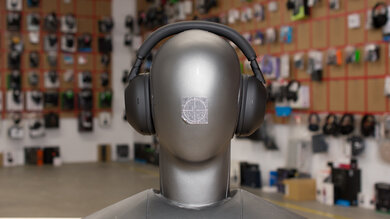
    Headshots 1
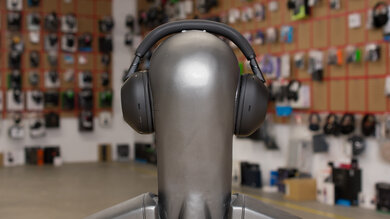
    Headshots 2
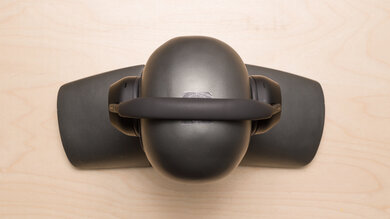
    Top
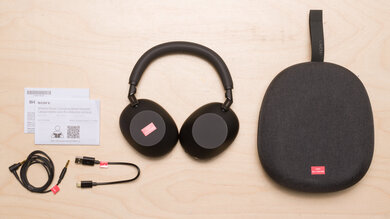
    In The Box

    • Sony LinkBuds
    • 5x wing tips
    • Charging case
    • USB-C to USB-A charging cable
    • Manuals
    Sound
    Sound Profile
    See details on graph tool
    Bass Amount
    -18.95 dB
    Treble Amount
    -3.45 dB

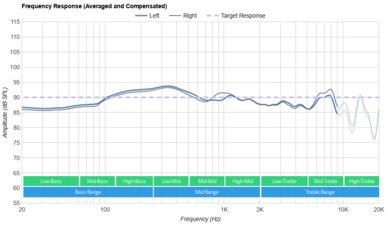
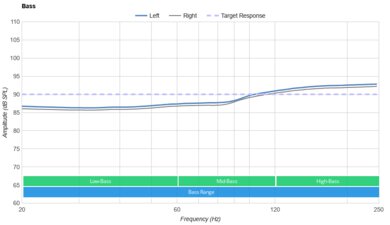
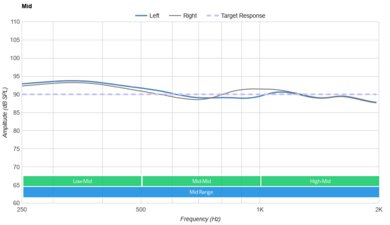
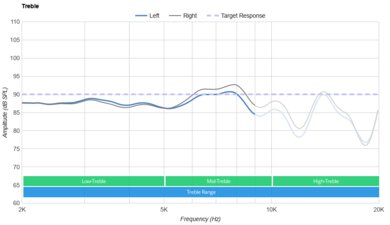
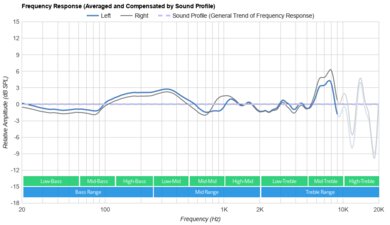
    Because of their open-ear design, the Sony LinkBuds hardly reproduce any bass. Their treble is also underemphasized, which helps avoid harsh-sounding instruments and vocals but also means your audio lacks brightness and a bit of detail. They have a well-balanced mid-range, so vocal-centric content like audiobooks and podcasts sound clear and accurate. Their companion app also offers a graphic EQ and presets that you can use to customize the sound.

    7.4
    Frequency Response Consistency
    See details on graph tool
    See details on graph tool
    Avg. Std. Deviation
    0.52 dB

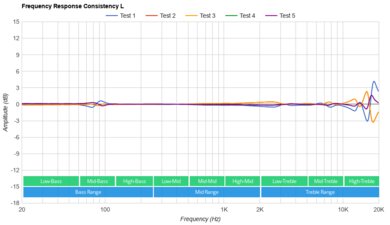
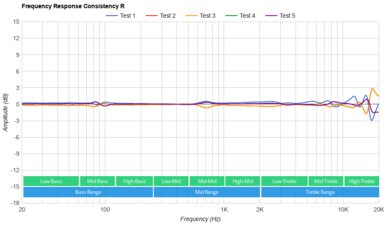
    The Sony LinkBuds have decent frequency response consistency. Their treble can vary a bit depending on their fit and positioning. Fortunately, they come with a variety of stability fins to help you get a good fit.

    Raw Frequency Response
    See details on graph tool
    See details on graph tool
    1.0
    Bass Accuracy
    See details on graph tool
    Std. Err.
    18.85 dB
    Low-Frequency Extension
    343.96 Hz
    Low-Bass
    -33.54 dB
    Mid-Bass
    -17.41 dB
    High-Bass
    -6.53 dB

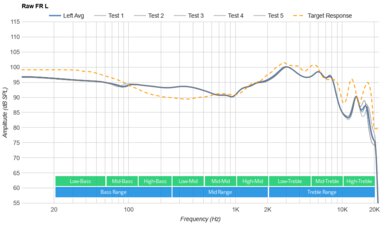
    The Sony LinkBuds have terrible bass accuracy, even compared to other open-ear headphones like the Shokz OpenFit True Wireless. The entire range is very underemphasized, so your audio lacks rumble, punch, and boom. Audio also lacks body compared to other open-ear options like the Bose Sport Open Earbuds Truly Wireless. Songs with a lot of low-bass, like Boom Boom Pow by the Black Eyed Peas, sound hollow instead of thumpy.

    8.2
    Mid Accuracy
    See details on graph tool
    Std. Err.
    2.44 dB
    Low-Mid
    -2.66 dB
    Mid-Mid
    0.29 dB
    High-Mid
    1.89 dB

    The Sony LinkBuds have great mid accuracy. The low-mids are underemphasized, so the low harmonics of instruments sound a bit thinned out. The response is still very neutral otherwise, so elements like voices and lead instruments are present, clear, and intense.

    4.9
    Treble Accuracy
    See details on graph tool
    Std. Err.
    7.22 dB
    Low-Treble
    -3.77 dB
    Mid-Treble
    -9.57 dB
    High-Treble
    -14.42 dB

    The Sony LinkBuds have poor treble accuracy. The entire range is underemphasized, which veils the upper harmonics of vocals and lead instruments. Sibilants like S and T sounds are dull as well.

    6.6
    Peaks/Dips
    See details on graph tool
    Peaks
    2.28 dB
    Dips
    1.68 dB

    The Sony LinkBuds have alright peaks and dips performance. A deep dip in the low-bass reduces thump and rumble in your audio, followed by a peak from the mid to high-bass that can replicate the higher frequencies of bass instruments like kick drums and bass guitars. A peak across the mid-range is present more in the left driver, making instruments sound slightly boxy or harsh. The low-treble is uneven, hurting the comprehensibility of vocals and lead instruments or making them sound harsh. The mid treble is also uneven in the left driver, so sibilant sounds like cymbals can be dull or bright.

    7.2
    Imaging
    See details on graph tool
    See details on graph tool
    Weighted Group Delay
    0.33
    Weighted Phase Mismatch
    22.86
    Weighted Amplitude Mismatch
    0.85
    Weighted Frequency Mismatch
    2.66

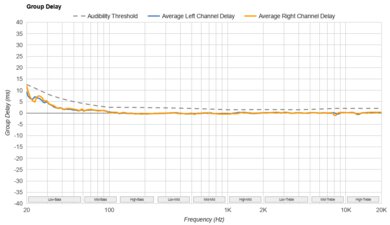
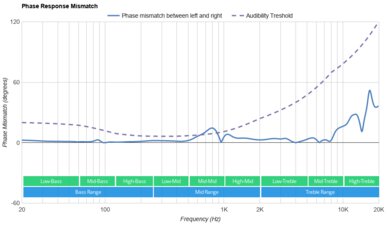
    The Sony LinkBuds have a decent imaging performance. Although there appears to be some deviation in the lower frequencies, the weighted group delay still falls below the audibility threshold for the entire range as these headphones struggle to reproduce these low frequencies. This overall results in tight bass and transparent treble reproduction. The L/R drivers are also well-matched in terms of amplitude. However, their phase response is mismatched in the mid range. There are also peaks in the low-bass and mid-treble. Some sounds in the mid-range seem louder in the right earbud, but it's hard to notice with regular content. Their frequency response is also slightly mismatched, which can create holes or inaccuracies in the stereo image. That said, imaging can vary between units and can indicate a manufacturer's quality control and ergonomics.

    3.0
    Passive Soundstage
    PRTF Accuracy (Std. Dev.)
    N/A
    PRTF Size (Avg.)
    N/A
    PRTF Distance
    N/A
    Openness
    9.6
    Acoustic Space Excitation
    3.6

    The Sony LinkBuds have a poor passive soundstage, like most earbuds. By design, their sound bypasses your outer ear, so audio seems to come from inside your head instead of from speakers in the room around you. That said, you'll perceive the soundstage as very wide due to the open-back design.

    4.1
    Virtual Soundstage
    Head Modeling
    On/Off
    Speaker Modeling
    On/Off
    Room Ambience
    No
    Head Tracking
    No
    Virtual Surround
    360 Reality Audio

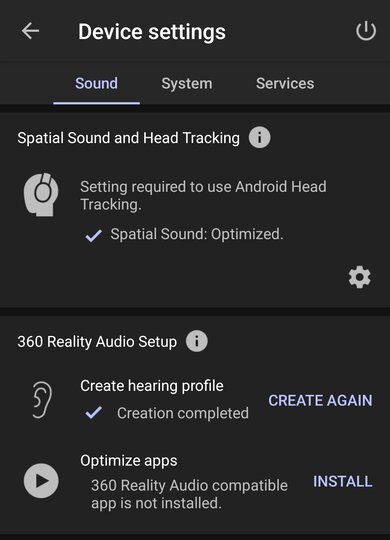
    The Sony LinkBuds support 360 Reality Audio, creating a more immersive, 3D feel. However, you need to subscribe to a compatible streaming service (like TIDAL, 360 by Deezer, or nugs.net) and listen to music mixed with 360 Reality Audio to take advantage of it. You can also use the app to take pictures of your ears to be analyzed by Sony to optimize this feature to your ear shape.

    7.1
    Weighted Harmonic Distortion
    See details on graph tool
    WHD @ 90
    0.384
    WHD @ 100
    0.342

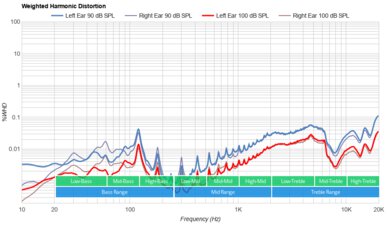
    The Sony LinkBuds have a decent weighted harmonic distortion performance. There is some distortion in the low-mids present in both earbuds when listening at high volumes. There's also a peak in the left earbud's mid-treble response at normal listening volumes. Most frequencies fall within good limits, so your audio is clean and pure at normal listening volumes.

    Test Settings
    Firmware
    1.0.4
    Power
    On
    Connection
    Bluetooth 5.0
    Codec
    SBC, 16-bit, 44.1kHz
    EQ
    Off
    ANC
    No ANC
    Tip/Pad
    Default
    Microphone
    Integrated

    These are the settings used to test the Sony LinkBuds. Our results are only valid with these settings.

    Isolation
    1.0
    Noise Isolation
    See details on graph tool
    Isolation Audio
    Overall Attenuation
    -1.9 dB
    Noise CancellingNo
    Bass
    0.12 dB
    Mid
    1.25 dB
    Treble
    -6.79 dB

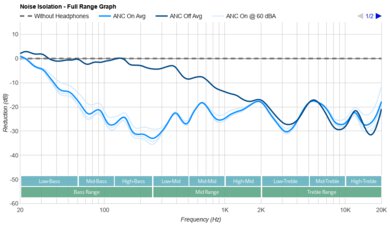
    The Sony LinkBuds block out virtually no noise, which is by design. They don't cover or block your ears, which allows you to hear ambient sound while you wear them. You can easily hear conversations around you at work and oncoming traffic when you're outside for a walk.

    6.9
    Leakage
    See details on graph tool
    Leakage Audio
    Overall Leakage @ 1ft
    39.88 dB

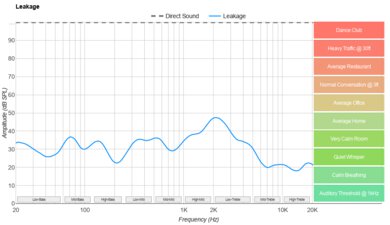
    The Sony LinkBuds have an okay leakage performance. They leak a decent amount of audio, so if you're listening to audio at high volumes at the office, people can hear it. They also mostly leak sound in the treble range, so the audio that escapes sounds thin and tinny.

    Microphone
    Microphone Style
    Integrated
    Yes
    In-Line
    No
    Boom
    No
    Detachable Boom
    No
    MicYes
    6.6
    Recording Quality
    See details on graph tool
    Recorded Speech
    LFE
    226.27 Hz
    FR Std. Dev.
    3 dB
    HFE
    6,088.74 Hz
    Weighted THD
    7.972
    Gain
    -9.86 dB

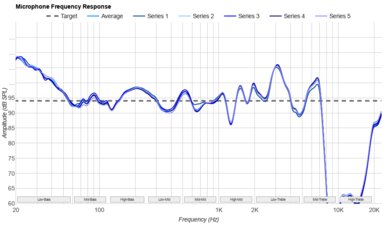
    The mic has an adequate recording quality. Speech lacks body, and there's some distortion present. However, your voice still sounds clear and understandable to whoever you're speaking to.

    7.1
    Noise Handling
    See details on graph tool
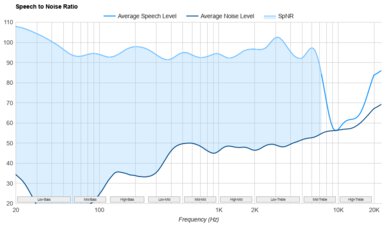
    SpNR
    9.56 dB
    Noise Gate
    Always On
    Speech + Pink Noise Handling
    7.5
    Speech + Pink Noise Audio Sample
    Speech + Subway Noise Handling
    6.5
    Speech + Subway Noise Audio Sample

    The mic has a decent noise handling performance. It can separate your voice from moderate background noise and even reduces the sound of loud noises like a passing train. Your voice will be easily understandable if you take a call from somewhere like a busy office. Unfortunately, a crackling sound is present when using the mic, which will distract some people.

    Active Features
    7.0
    Battery
    Battery Type
    Rechargable
    Continuous Battery Life
    6.1 hrs
    Additional Charges
    2.0
    Total Battery Life
    18.3 hrs
    Charge Time
    1.6 hrs
    Power-Saving Feature
    Auto-Off Timer
    Audio While Charging
    Yes
    Passive Playback
    No
    Charging PortUSB-C

    The Sony LinkBuds have a decent battery performance. They can last just over six hours off a single charge, slightly longer than the advertised 5.5 hours. While that won't get you through an entire 9-to-5 workday without recharging, they come with a case that holds about two extra charges. The manufacturer advertises them to provide 90 minutes of continuous use from 10 minutes of charging, and you can use one earbud while the other charges in the case. You can also use the app to set up an auto-off timer that switches off the earbuds when they're not in your ears for a certain amount of time.

    8.0
    App Support
    App NameSony| Headphones Connect
    iOSYes
    AndroidYes
    macOSNo
    WindowsNo
    Equalizer
    Graphic + Presets
    ANC Control
    No
    Mic ControlNo
    Room Effects
    No
    Playback Control
    Yes
    Button MappingYes
    Surround Support
    Yes

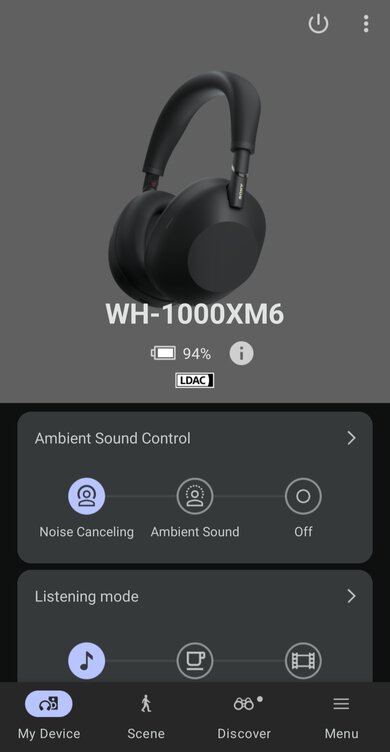
    The Sony LinkBuds have a great app. It has a graphic EQ and a few presets like 'Bass Boost' and 'Relaxed' that you can use to customize the sound profile. You can also set up head tracking for the 'Soundscape' feature, which the manufacturer advertises to help you navigate with audio cues that seem to "come from" a destination, based on the position of your head. It can also give you audio prompts to indicate points of interest, like an intersection or building name, as you walk by. You need to download the separate 'Microsoft Soundscape' app to use it, though.

    It's possible to remap the controls on both earbuds, but you lose some functions if you do. You can add a command to skip the track backward but lose the play/pause function. You can add commands to activate your device's voice assistant, Amazon Alexa, or choose 'Quick Access', which lets you use Spotify Tap to play music from that app.

    You can turn on or off some other features, including 'Automatic Power Off' (turns off the headphones when you're not wearing them), smart pause (pauses your audio when you're not wearing them), and 'Speak-to-Chat' (pauses your audio when the headphones detect your voice). You can also turn on automatic volume adjustment, which turns up the volume when there's ambient noise and lowers it again in a quieter environment. You can toggle 'Wide Area Tap' on or off, so you can decide if you want to tap your ear to register commands. You can also set up the 360 Reality Audio feature and perform a test to analyze your ear shape.

    Connectivity
    8.1
    Bluetooth
    Bluetooth Version
    5.2
    Multi-Device Pairing
    2 Devices
    NFC Pairing
    No
    Line Of Sight Range
    129.59 ft (39.50 m)
    PC Latency (SBC)
    222 ms
    PC Latency (aptX)
    N/A
    PC Latency (aptX HD)
    N/A
    PC Latency (aptX-LL)
    N/A
    iOS Latency
    70 ms
    Android Latency
    129 ms

    The Sony LinkBuds have great Bluetooth connectivity. With firmware update 2.2.0, they support multi-device pairing, allowing you to stay connected with up to two devices simultaneously. The headphones automatically switch connections when they detect that content plays off one device and not the other. You can also see a full list of paired devices in the companion app. Additionally, they support Google Fast Pair, so you can tap a prompt on your computer or tablet to pair them. Unfortunately, their latency with PCs is high, so you may notice audio syncing issues if you use them for a video call on your computer. They have lower latency with iOS and Android devices, making them more suitable for watching videos on your phone. Some devices and apps compensate for latency, so your experience can vary.

    0.0
    Non-Bluetooth Wireless
    Non-BT Line Of Sight Range
    N/A
    Non-BT Latency
    N/A
    0.0
    Wired
    Analog Audio
    No
    USB Audio
    No
    DetachableNo
    LengthN/A
    Connection
    No Wired Option
    Analog/USB Audio Latency
    N/A

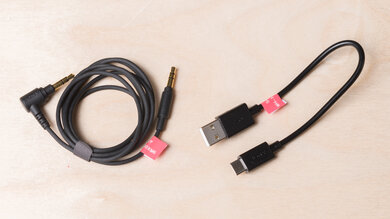
    You can't use the Sony LinkBuds wired. They only come with a USB-A to USB-C cable for charging the case.

    PC Compatibility
    Analog
    No
    Wired USB
    No
    Non-BT Wireless
    No

    The Sony LinkBuds can connect to PCs via Bluetooth but can't connect any other way.

    PlayStation Compatibility
    PS4 Analog
    No
    PS4 Wired USB
    No
    PS4 Non-BT Wireless
    No
    PS5 Analog
    No
    PS5 Wired USB
    No
    PS5 Non-BT Wireless
    No
    Xbox Compatibility
    Xbox One Analog
    No
    Xbox One Wired USB
    No
    Xbox One Non-BT Wireless
    No
    Xbox Series X|S Analog
    No
    Xbox Series X|S Wired USB
    No
    Xbox Series X|S Non-BT Wireless
    No
    2.2
    Base/Dock
    Type
    Charging Case
    USB Input
    No
    Line In
    No
    Line Out
    No
    Optical Input
    No
    RCA Input
    No
    Dock Charging
    Yes
    Power Supply
    USB-C

    The Sony LinkBuds come with a small portable case with a USB-C port for the charging cable. It doesn't have any other inputs and doesn't support wireless charging.