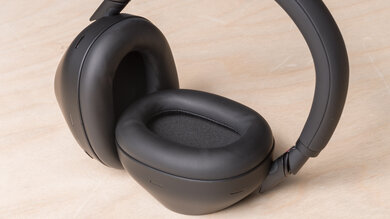
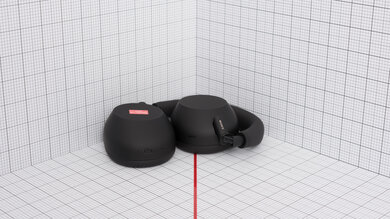
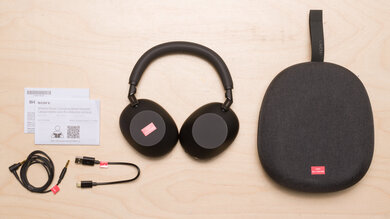
The Apple AirPods (3rd generation) have a slightly different look than previous generations of AirPods and come with a few more features. Unlike previous generations, they have an 'Adaptive EQ' feature that Apple says optimizes their sound delivery to the shape of your ears. If you're using a supported iOS device, you can also access 'Spatial Audio,' a virtual surround sound feature to help immerse you in your audio. The earbuds are bigger than the Apple AirPods (2nd generation), which is less comfortable for some people. Like previous AirPods, these open-back earbuds aren't designed to block out ambient sound.
Looking for Black Friday savings on your next pair of headphones? We've got you covered! Check out our Early Black Friday 2025 Deals article for what's worthwhile this year.
Our Verdict
The Apple AirPods 3rd generation are decent for sports and fitness. The earbuds and case are very light and small, and feel sturdy enough to withstand a few accidental drops and bumps. They're also rated IPX4 for resistance against being splashed with water. However, while they have adequate stability and have no problem staying in your ears during a light run, they can fall out with more intense movements. Their stability also depends on the shape of your ears since they have a one-size-fits-all design.
- IPX4 rating for water resistance.
- Great build quality.
- Case stores five extra charges.
- No stability fins or ear tip options.
- No volume controls.
- No multi-device pairing with non-Apple devices.
The Apple AirPods 3rd generation are disappointing for commuting and travel. Unlike most Bluetooth earbuds, they have an open-back design, which blocks out very little ambient sound. Also, while they're decently comfortable, the buds are bigger than previous generations of AirPods and can put pressure on your ears, especially if you wear them for a long time. On the plus side, they feel sturdy and come with a solid case small enough to fit into most pockets.
- IPX4 rating for water resistance.
- Case stores five extra charges.
- Βad noise isolation.
- No volume controls.
- No multi-device pairing with non-Apple devices.
The Apple AirPods 3rd generation are disappointing for office use. They have a decently comfortable fit but can put pressure on your ears during long days at work. They block out virtually no ambient noise, so they won't isolate you from distractions like chatting coworkers or traffic outside your window. Their mic is passable, but it doesn't do a great job separating your voice from the noise around you. Their 6.8-hour continuous battery life won't quite last through a 9-to-5 workday without recharging. They come with a case with about five extra charges, so you can always top up the battery.
- Great build quality.
- Case stores five extra charges.
- Mic's recording quality isn't bad.
- Βad noise isolation.
- Mic has sub-par noise handling.
- No volume controls.
- No multi-device pairing with non-Apple devices.
The Apple AirPods 3rd generation aren't suitable for wireless gaming. You can use them with Bluetooth-compatible PCs, but their latency is too high to be suitable for gaming. They also aren't compatible with Xbox or PlayStation consoles.
The Apple AirPods 3rd generation are truly wireless headphones, and you can't use them wired.
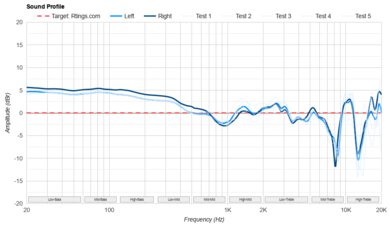
The Apple AirPods 3rd generation have okay audio reproduction accuracy. They have an always-on 'Adaptive EQ' feature advertised to adjust their sound depending on your ear shape, but they lack sound customization features like an EQ. Their sound still lacks thump and rumble due to their open-back design. While the rest of the range is very well-balanced, ensuring that instruments and lead vocals are present and detailed, the treble is generally a little recessed, which gives your audio a slightly warm sound but can also rob vocals of clarity. Still, the buds adhere to their own flat sound profile, and the left and right drivers are decently well-matched, so stereo panning is accurately reproduced. They also support Spatial Audio, though, which is a virtual surround sound feature that can make audio seem more immersive.
The Apple AirPods 3 have bad noise isolation. The buds sit outside your ear canal and don't form a seal with your inner ear, so they're unable to block out much noise at all. You'll hear everything from the rumble of train engines to chatty coworkers.
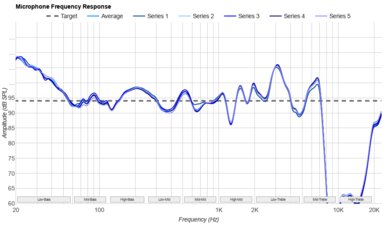
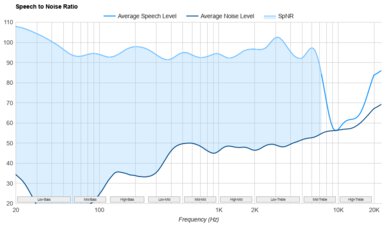
The Apple AirPods 3rd generation have a sub-par mic. It does an acceptable job rendering your voice with clarity, but doesn't do a good job separating your voice from background noise. Even the ambient sounds of an office will make their way into your audio, so the person on the other end of the line will hear them.
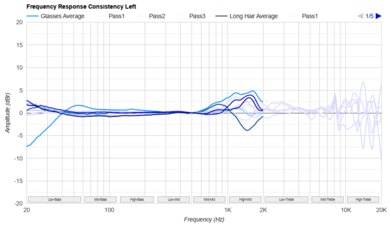
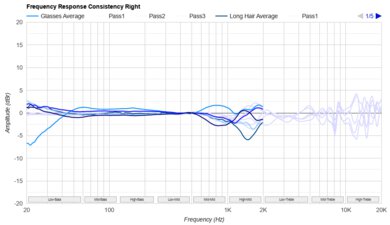
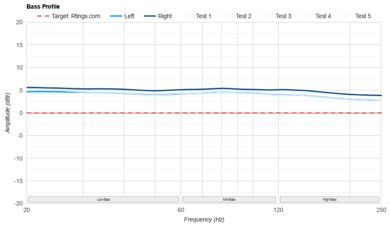
The Apple AirPods 3 have middling frequency response consistency. Since the buds don't form a seal with your inner ear, bass delivery is greatly affected by how they sit. You need to take time positioning them with each wear to get a consistent sound.
Performance Usages
Changelog
-
Updated Dec 01, 2025:
This review has been updated to Test Bench 2.0, which adds the following tests: Stereo Mismatch, Group Delay, Cumulative Spectral Decay, PRTF, Harmonic Distortion, and Electrical Aspects. We've added new performance usages and updated the text throughout the Sound tests and side-by-sides.
- Updated Nov 25, 2025: We've converted this review to Test Bench 2.0, which updates our sound tests and adds performance usages. You can read more about this in our changelog.
-
Updated Jan 17, 2025:
Text for the following test groups have been updated following Test Bench 1.7: Noise Isolation - Full Range and Noise Isolation - Common Scenarios, and ANC Wind Handling. Several Sound tests have also been updated following Test Bench 1.8. There have also been text changes made throughout the review, including to usages to match these results.
- Updated Jan 15, 2025: We've converted this review to Test Bench 1.8, which updates our target curve and Sound tests. You can read more about this in our changelog.
Check Price
Differences Between Sizes And Variants
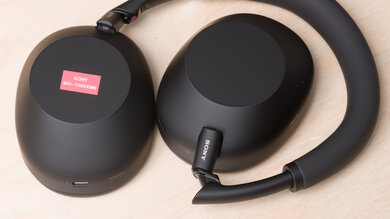
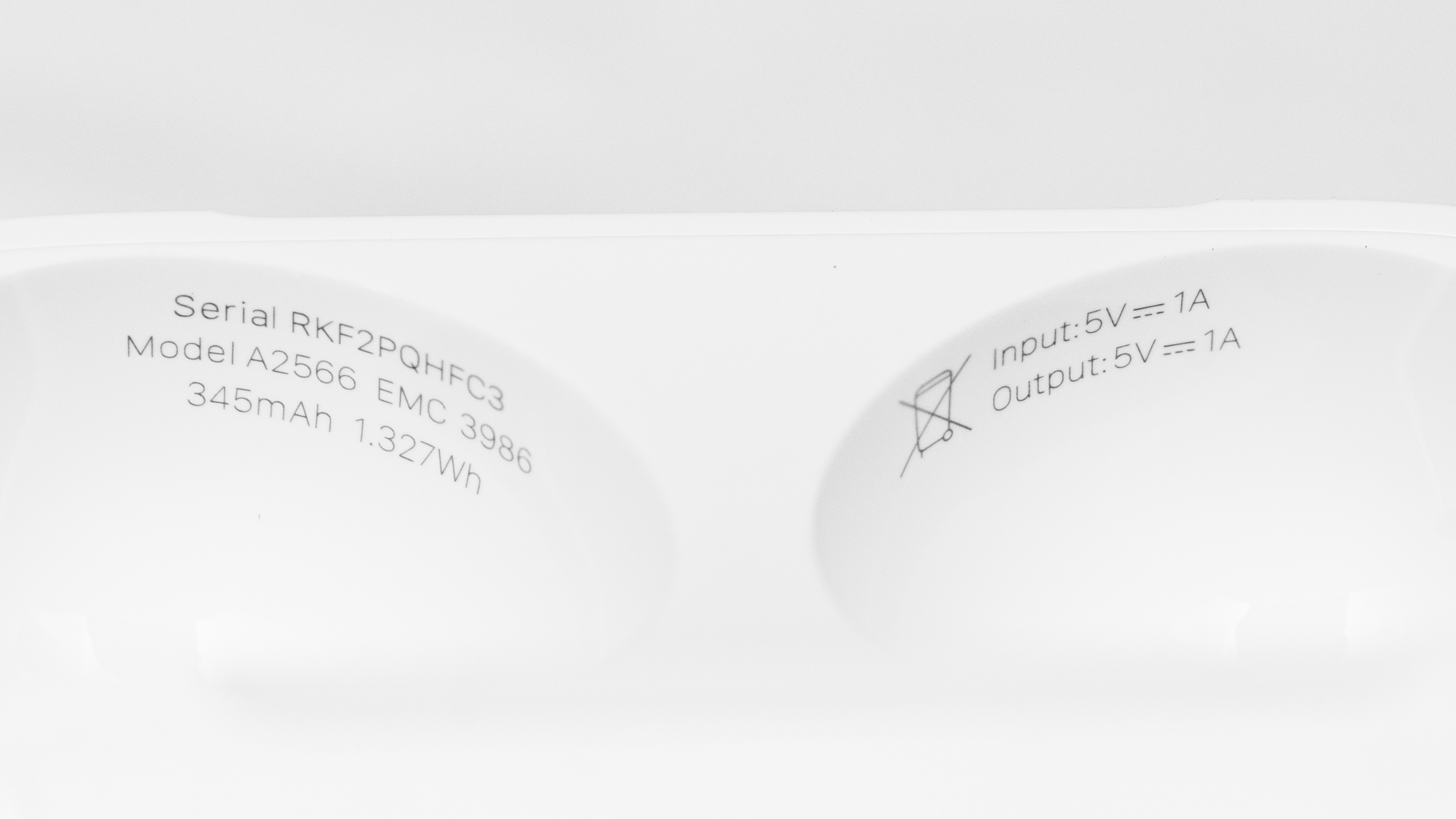
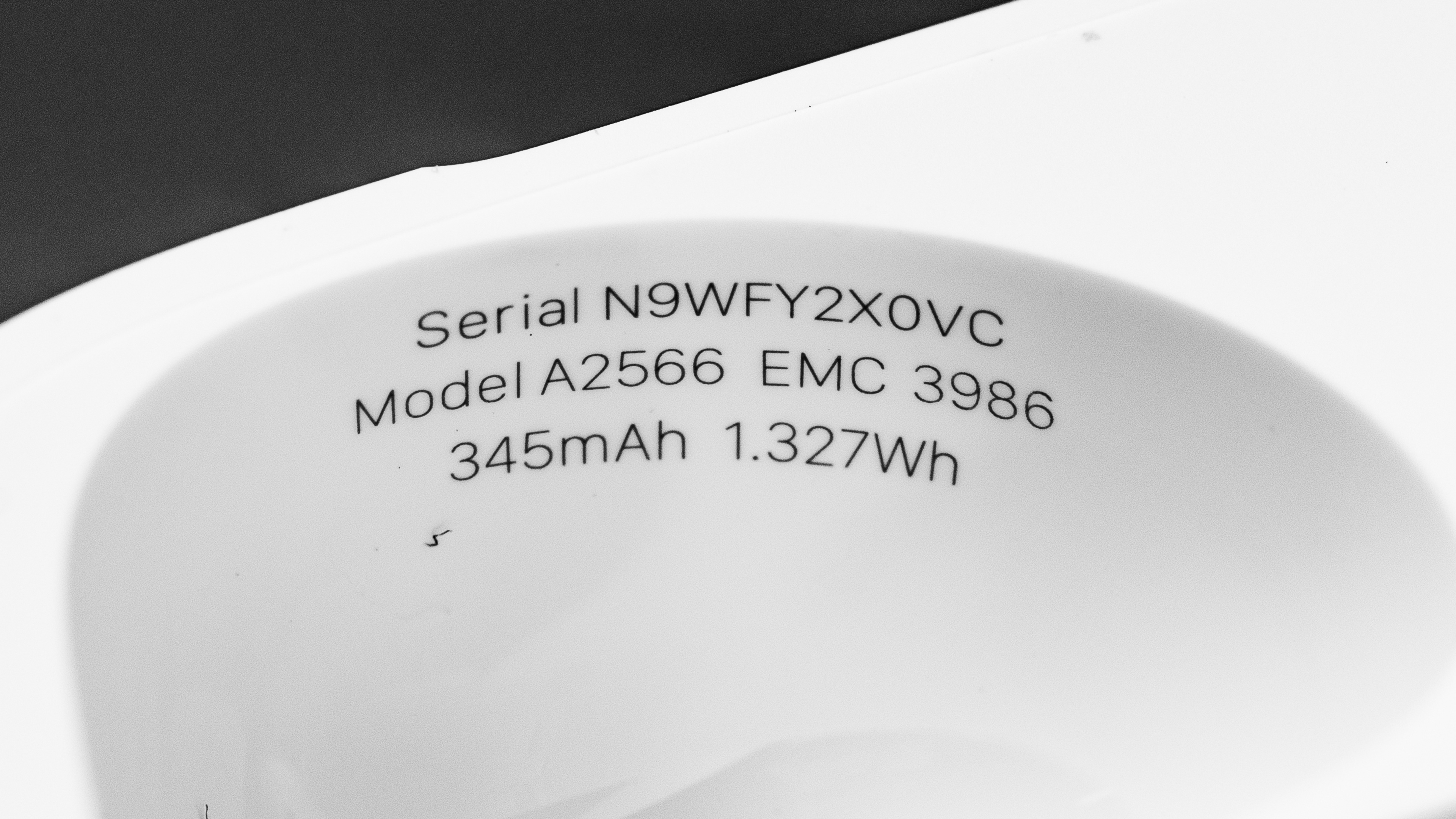
The Apple AirPods 3rd generation only come in white. You can see the label for the unit we tested here. This review currently reflects the performance of our original model, which we don't have anymore. That said, we've purchased a second model, which matches the performance of our first unit. If there's a difference in performance during future retests, we will update the review accordingly. You can see our new unit's label here.
If you encounter another variant, please let us know in the comments, and we'll update our review.
Popular Headphones Comparisons
The Apple AirPods 3 follow the Apple AirPods (2nd generation) and the Apple AirPods (1st generation) but come with more features, like Spatial Audio surround sound for Apple users and wireless MagSafe charging for the case. They also offer an improved continuous battery life of just under seven hours. Like the Apple AirPods Pro, they have shorter stems than the 1st and 2nd gen AirPods but retain the one-size-fits-all design without silicone tips. They have an open-back design and, as a result, block out very little background noise and don't reproduce much bass, similar to other open buds like the Sony LinkBuds Truly Wireless. The AirPods 3 have subsequently been replaced by the Apple AirPods 4, which ditch MagSafe charging but have a slightly more svelte carrying case and a fuller-sounding bass.
If you want different headphones, check out our lists of the best wireless Bluetooth earbuds, the best wireless earbuds for iPhone, and the best AirPods alternatives.
The Apple AirPods 4 are better than the Apple AirPods (3rd generation) by most measures. They supply a fuller-sounding bass response compared to previous open-backed AirPods, and their mic handles noise a bit better. Plus, their H2 chip makes switching between iCloud-registered devices a breeze, and they have an IP54 rating compared to the IPX4 of the last generation. On the other hand, the previous AirPods (3rd generation) store an extra battery charge in the case and can charge via MagSafe or wirelessly.
The Apple AirPods Pro are better for most purposes than the Apple AirPods (3rd generation). The Pro are able to put out more bass, and also have a great ANC feature. They come with differently-sized ear tips and are much more comfortable and stable once you find a good fit. On the other hand, the 3rd generation have a longer continuous battery life, and their mic has a better recording quality. They also block out very little ambient sound, which you may prefer if you want to hear your surroundings.
The Apple AirPods Pro 3 are better than the Apple AirPods (3rd generation). Despite sharing the number '3,' these earbuds are separated by generational differences and tiers. The AirPods Pro 3 have ear tips to create a better isolating fit that's more stable, too. They include updated iOS features like Live Translation, upgraded 'Find My' device tracking, and a fuller sound profile. The AirPods (3rd generation) are simpler, unsealed earbuds that still integrate well with iOS devices, but they don't give you the option of noise cancellation. Still, they're a less expensive way to access Siri and Spatial Audio.
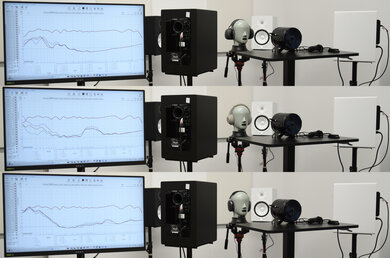
The Apple AirPods 4 with Active Noise Cancellation are the newer generation of the Apple AirPods (3rd generation), and they feature improvements across the board. Both buds have a similar, one-size-fits-all, open-back design and a decent build quality, but the AirPods 4 ANC form a more stable fit. The newer version also has a better bass extension and delivers audio more consistently, which is quite the feat for open-back buds. The biggest selling point of the AirPods 4 ANC is their ANC system, which does a solid job of isolating against common scenarios. That said, the 3rd generation have a longer continuous battery life and retail for a little less, so they're still an okay option if you're looking for budget buds and don't care about noise isolation.
Test Results
The Apple AirPods 3rd generation have an Adaptive EQ feature advertised to adjust the earbuds' sound to how they fit in your ears. There's no way to switch it off.
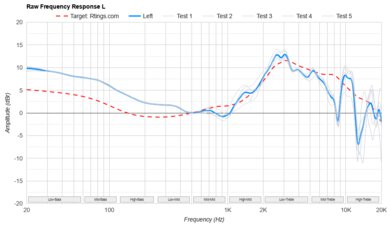
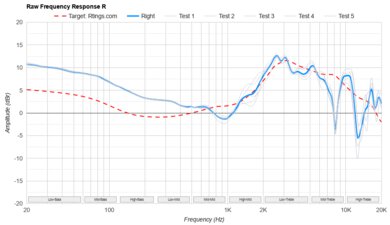
They have a generally flat sound, but because of their open-back design, they struggle to reproduce the thump and rumble of low bass. The rest of the range is well-balanced, with even mids for clear lead instruments and vocals. Much of the treble region is gently de-emphasized, which imparts a warm sound to voices that some may appreciate, but it can also hamper articulation and clarity.
You can always opt for the newer Apple AirPods 4 with Active Noise Cancellation if you want a similar-fitting bud with better bass extension. Like previous generations, the app doesn't include an EQ or presets. However, if you're using an iOS device, you can make some adjustments to the sound in the 'Accessibility' tab.
The Apple AirPods 3rd generation have middling frequency response consistency due to their looser, open fit. Their bass delivery depends on how they fit and position in your ears, and it's hard to get exactly the same seating with each wear. That said, if you take the time to adjust them, your audio will sound generally similar from wear to wear.
The Apple AirPods 3rd generation have mediocre bass target compliance. Their open design means they struggle to reproduce a thumpy and rumbly low bass. The mid-bass is also underemphasized, so in songs like David Bowie's 'Under Pressure,' the bassline lacks some rumble and thump. However, the high bass yields a more even amount of boom to the kicks. These buds also deliver bass somewhat inconsistently, so you may have a different experience depending on their fit, positioning, and seal in your ears.
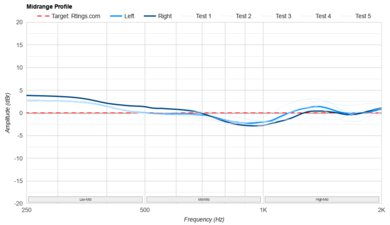
The Apple AirPods 3 have superb mid-range target compliance. The mid-range is fairly flat, with a gentle dip in the center that pushes down leads a bit in the mix to add excitement to the lows and highs. Vocals and lead instruments are present and clear.
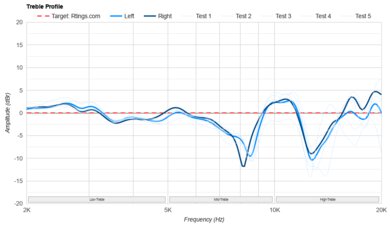
Their treble profile's target compliance is excellent. The majority of the response is underemphasized, leading to an overall warm tonality. However, because most of the sound profile trends towards de-emphasis across all ranges, vocals still sound reasonably articulate. The harmonic content of cymbal hits can sound detailed or dull, depending on the frequency. Whether you like this smooth sound or find it a little dull is ultimately a matter of taste.
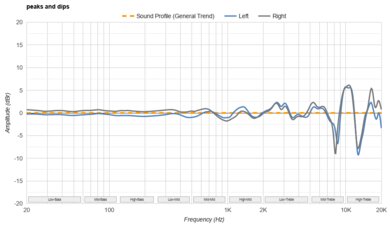
The Apple AirPods 3 have good peaks and dips performance, meaning they generally follow their own flat sound profile well. Besides deviations present in the L/R buds, the buds have a generally even response through the bass and mid-range, without drastic peaks or dips. The treble is a bit less controlled, with peaks and valleys that are alternatingly dull or highlight the clarity and details of elements like cymbals. At the highest frequencies (right at the edge of many people's hearing), the top end can sound somewhat closed-off or artificially airy.
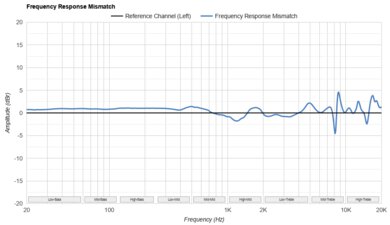
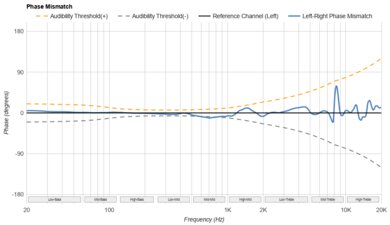
The Apple AirPods 3 have decently matched left and right drivers. Since they have an open, loose-fitting design, it's hard to get exactly the same fit in each wear, which can lead to subtle variations in amplitude and phase response between each driver. That said, if you adjust the fit manually while listening to audio, you'll be able to seat the buds so that centrally panned objects like vocals are correctly located in the stereo field.
Because these buds don't form a seal with your inner ear, they don't reproduce low-bass frequencies. As a result, their poor group delay score is inaudible with regular listening.
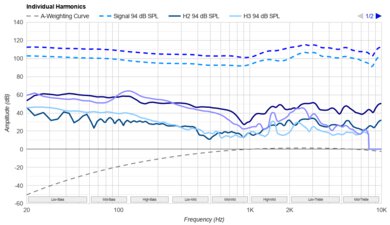
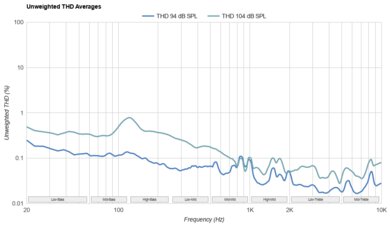
The Apple AirPods 3 have remarkably low harmonic distortion. Even if you listen at unsafe levels, you can expect clean and pure audio reproduction.
They have a 'Spatial Audio' virtual surround sound feature that can help give your audio a more immersive, 3D feel. However, it's only supported on iOS 15 or later and on certain Apple devices, including iPhone 7 or later. Enabling it also turns on head tracking, which reorients the virtual soundstage when you move your head or device. You can turn Spatial Audio on or off in your iPhone's Bluetooth settings.
These are the settings used to test the Apple AirPods 3. Our results are only valid when using these settings.
The Apple AirPods 3rd generation have a different shape from the Apple AirPods (2nd generation) and Apple AirPods (1st generation). Like the Apple AirPods Pro, the stems are shorter. The buds are also bigger and are angled downwards. Still, they have the same smooth plastic casing and brushed aluminum accents. They only come in white.
The Apple AirPods 3rd generation are decently comfortable for most people. The buds are bulkier than previous models, which can hurt your inner ear after a while. The stem also sits at more of an angle compared to the 2nd generation. However, like other one-size-fits-all earbuds like the Nothing Ear (stick), how comfortable you find them depends on the size and shape of your ears. There are mixed reports from users online, as you can see here and here. Still, they're light and don't enter your ear canal very deeply, so they avoid the plunger-like fit that you sometimes get with in-ears with silicone tips.
The Apple AirPods 3rd generation have a limited control scheme, but it's easy to use. Similar to the Apple AirPods Pro, each stem has a 'force sensor,' a small indented surface that you squeeze to register a command. Your audio pauses automatically when you take one earbud out and starts playing again when you put it back in. It also pauses when you take both earbuds out, and in that case, you have to squeeze one of the force sensors for it to start playing again. You can disable 'Ear Detection' in the Βluetooth settings if you're using an iOS device.
Every command works on either earbud, and you hear a clicking sound when you press either force sensor. There are also beeps when they connect with a device, but you don't hear any voice prompts, which is typical for Apple products. Unfortunately, there's no way to adjust the volume. While most of the controls work on iOS or Android phones, Apple only includes a way to answer and end calls if you're using an iOS device. The voice assistant function also only works with Siri.
On either stem's force sensor:
- Single press: Plays and pauses audio. If connected to an iOS device, it answers and ends a call.
- Double press: Skips the track forward. On iOS devices only, reject a call.
- Triple press: Skips the track backward.
- Press and hold: Activates Siri (doesn't work for other voice assistants).
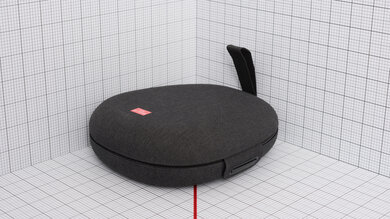
The Apple AirPods (3rd generation) have an excellent case. It's a bit bigger than the Apple AirPods (2nd generation)'s case and opens horizontally instead of vertically. It clicks shut securely and feels sturdy enough to protect the earbuds from being dropped or crushed, but it isn't rated for water resistance. There's a small battery indicator light on its front side, and it supports wireless charging via MagSafe and Qi charging. It also has a Lightning port for its charging cable.
They have a great build quality. The glossy plastic feels sturdy and durable, and they feel like they can withstand a few accidental bumps and drops without sustaining much damage. Like the Apple AirPods Pro, they're rated IPX4 for resistance against being splashed with water.
The Apple AirPods 3rd generation are adequately stable headphones. They'll easily stay in place when you're at your desk or out for a walk, but they can move or fall out of your ears during something like a dance workout. Since they have a one-size-fits-all design, they aren't as stable as earbuds that come with a selection of ear tips or stability fins, like the Jaybird Vista 2 Truly Wireless or Apple AirPods Pro.
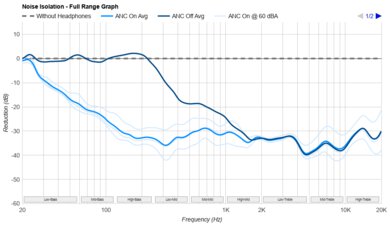
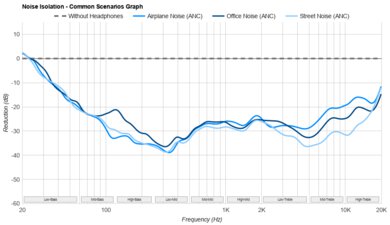
The Apple AirPods 3rd generation have a bad noise isolation performance. Because of their open-back design, they block out virtually no sound in the bass or mid ranges, so you aren't isolated from noises like rumbling bus and plane engines or background chatter. They also barely cut down high-pitched noises like clinking dishware. While they aren't ideal for blocking distractions, you may appreciate this performance if you like to stay aware of your surroundings while wearing headphones. If you like Apple's earbud-style design but want active noise cancelling included, the Samsung Galaxy Buds3 are worth considering.
Because the earbuds sit outside of your ear canals and lack meaningful passive isolation and active noise cancellation, their noise isolation is awful by design. As a result, common daily noises like the rumble of cars on the street, racket in the office like conversation, and keyboards clacking all reach your ears. The brightness of some of those sounds is tamed a little, but not enough to make a functional difference. You might prefer to consider the successor, the Apple AirPods 4 with Active Noise Cancellation instead if you need some quiet time.
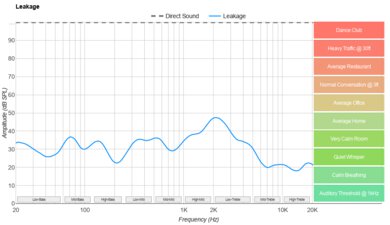
Their open-back design means they leak quite a bit of audio, so if you're listening to music at high volumes somewhere moderately noisy, like an office, people sitting nearby can hear a bit of it. However, the sound that escapes is mostly in the treble range, so it sounds thin.
The mic has a mediocre recording quality with the SBC codec. Recorded speech is clear and full-bodied but lacks brightness and sounds closed-off.
These results reflect the mic's performance with the SBC codec, which Bluetooth headphones use almost universally. However, we also retested the mic with the AAC Bluetooth codec, the license-free standard for Apple devices, to see if there was a difference in performance. Our testing PC doesn't support AAC, but we were able to conduct this microphone retest while the headphones were on our test head and connected to an iPhone 11, which supports AAC. To retest 'Recording Quality,' we played the same 'Recorded Speech' audio clip through our test head. While Bluetooth codecs aren't the sole factor in microphone performance, using the AAC codec, the voice sounds clearer than when connected to our test PC and using the SBC codec. You can hear our results here.
The microphone has a sub-par noise handling performance using the SBC codec. In moderately noisy environments, background noise is much more present and distracting than with the previous generation. With very loud background noise, like a train in a subway station, your voice is barely audible but not understandable.
They're advertised to have an acoustic mesh over the mic on each earbud to help reduce wind noise during calls. We tested it by standing near a fan and found that it blocks out most of the wind sound, but it's still audible when someone's talking. Someone talking nearby is still audible over the wind sound.
We also tested the mic's performance using the AAC codec. With the headphones placed on our test head and connected to an iPhone 11, we played the 'Speech + Pink Noise' and 'Speech + Subway Noise' audio clips. Using the AAC codec, there's a noticeable improvement when it comes to blocking out pink noise from speech. The mic can also block more loud noise in the subway recording when connected to an iPhone versus a PC.
They have a decent battery performance. They provide nearly seven hours of continuous use from a single charge with Spatial Audio (a virtual surround sound feature) on, which is better than the previous generation and longer than the manufacturer's advertised battery life of five hours with Spatial Audio on or six hours with it off. However, battery performance varies depending on use.
The case stores about five additional charges. The earbuds charge fully in under an hour, which is quick, and Apple says a five-minute charge in the case gives them enough power for 30 minutes of playback. They don't have an adjustable auto-off timer, but audio pauses automatically when you remove them from your ears. You can also use one earbud while the other charges in the case. If you're looking for in-ears with a longer continuous battery life, check out the Status Between Pro True Wireless.
The Apple AirPods 3rd Gen don't have a dedicated app, but if you're using an iOS device, you can access some settings in the Bluetooth menu. You can toggle ear detection and Spatial Audio on and off, choose which earbud's mic to use, and optimize battery charging. You can also enable battery optimization and turn on 'Find My Network', which offers features for finding your headphones if you misplace them. Some features, like the earbuds playing a sound when inside their case or marking them as lost so others can't use them, are only available for this generation when using this specific feature.
There are some additional settings in the Accessibility tab on iOS devices. You can choose to 'boost' certain sounds, like vocal frequencies, to make voices over the phone or dialogue in a movie easier to understand. However, this feature is also supported by the 2nd generation and the Apple AirPods Pro. You can also change how quickly you need to press the earbud stems to register a double or triple tap and adjust how long you need to hold the sensor down for a long press. However, we don't consider these 'Accessibility' settings part of the app.
They have decent Bluetooth connectivity. They have an H1 chip for very easy pairing with Apple products, and they can connect with two Apple devices at once. However, they don't support multi-device pairing with Android phones or other devices. They also have high latency with PCs via SBC codec, making them less than ideal for streaming video or gaming on your computer. It's worth mentioning that some apps and devices compensate for latency, though.
These headphones are fully compatible with Bluetooth-enabled PCs. However, they can't connect any other way.
The Apple AirPods 3rd generation come with a very small charging case that holds about five additional charges. It doesn't have any inputs other than a Lightning port for charging. It also supports wireless charging via Qi or MagSafe.