Corsair K55 RGB  Keyboard Review

Review updated Mar 08, 2021 at 03:35pm
Test bench update Jun 21, 2023 at 12:44pm
Tested using Methodology v1.2 
Corsair K55 RGB
7.4
Gaming 
1.4
Mobile/Tablet 
6.5
Office 
6.7
Programming 
3.5
Entertainment / HTPC 
 0

The Corsair K55 RGB is a decent full-sized gaming keyboard that uses rubber dome switches, which don't offer the same tactile feedback as mechanical switches found on most gaming keyboards. It has six extra macro keys, and since each key is macro programmable, you can customize it to your liking. The keys are stable, but they feel heavy to type on, and you may experience fatigue when typing for long periods. It has zone-lit RGB backlighting if you want to use it in the dark, but you can't change the lighting on a per-key basis. It should be fine enough for casual gamers, but it might disappoint some more serious or competitive gamers.

Our Verdict

7.4
Gaming 

The Corsair K55 is only decent for gaming as its rubber dome switches require a fair amount of force to operate, resulting in less responsive-feeling keys. On the other hand, it has very low latency, zone-lit RGB lighting, six dedicated macro keys, and all of its keys are programmable.

Pros
  • Very low latency.
  • Every key is macro-programmable.
  • Acceptable ergonomics.
Cons
  • Zone-lit RGB lighting.
  • Keys feel heavy to type on.
  • Only adequate build quality.
1.4
Mobile/Tablet 

The Corsair K55 keyboard can't be used wirelessly.

6.5
Office 

The Corsair K55 is alright for office use. The keys feel heavy to type on and could get tiring, but they feel stable, and there's decent space between each one which helps reduce typos. The Corsair K55 has acceptable ergonomics and comes with a comfortable wrist rest. It's also quiet to type on, which is great for an office environment.

Pros
  • Acceptable ergonomics.
  • Very quiet.
  • Fully compatible with Windows; partially compatible with macOS.
Cons
  • Zone-lit RGB lighting.
  • Keys feel heavy to type on.
  • Only adequate build quality.
6.7
Programming 

The Corsair K55 is passable for programming use. Each key is macro-programmable, and it has zone-lit backlighting, but the typing quality is mediocre, and you may experience fatigue when typing for long periods as the keys require a fair amount of force to operate. That said, it has acceptable ergonomics and comes with a comfortable wrist rest.

Pros
  • Every key is macro-programmable.
  • Acceptable ergonomics.
  • Fully compatible with Windows; partially compatible with macOS and Linux.
Cons
  • Zone-lit RGB lighting.
  • Keys feel heavy to type on.
  • Only adequate build quality.
3.5
Entertainment / HTPC 

The Corsair K55 is bad for entertainment or home theatre PC use. It's a full-sized keyboard that takes up a considerable amount of space, especially with the wrist rest attached, and it can't be used wirelessly. Thankfully, it does have media keys, but while it does have backlighting, it's zone-lit only. It also lacks a trackpad, so you'll need a dedicated mouse to move your cursor.

Pros
  • Every key is macro-programmable.
  • Acceptable ergonomics.
Cons
  • Zone-lit RGB lighting.
  • Keys feel heavy to type on.
  • Wired-only.
  • No trackpad or wheel.
  • 7.4
    Gaming
  • 1.4
    Mobile/Tablet
  • 6.5
    Office
  • 6.7
    Programming
  • 3.5
    Entertainment / HTPC
  • Changelog

    1.  Updated Jun 21, 2023: We've converted this review to Test Bench 1.2. This update introduces new Backlight Features and Backlight Clarity test boxes. We've also added a new Switches test box, added additional test comparisons to our Hardware Customizability test box that we introduced with our last Test Bench. For an in-depth look at our changes, you can see our full changelog here.
    2.  Updated May 26, 2023: We've converted this review to Test Bench 1.1. This update adds several new tests addressing Hardware Customization, Macro Keys And Programming, and Wireless Mobile Compatibility. We've also added new objective evaluations to the Typing Noise test, and we've simplified several tests and removed several others that were no longer relevant. For an in-depth look at all our changes, you can see our full changelog here.
    3.  Updated Dec 16, 2022: Updated review to change the name of the product to Corsair K55 RGB.
    4.  Updated Mar 08, 2021: Updated review for accuracy and clarity.

    Check Price

    BlackK55 RGB Gaming Keyboard
    SEE PRICE
    Amazon.com
    BlackK55 RGB Gaming Keyboard
    SEE PRICE
    BestBuy.com
    BlackK55 RGB Gaming Keyboard
    SEE PRICE
    Walmart.com
    BlackK55 RGB Gaming Keyboard
    B&H

    Differences Between Sizes And Variants

    The Corsair K55 RGB is only available in black with rubber dome switches. The Corsair K57 RGB WIRELESS is a wireless version of the Corsair K55 with individually-lit keys. If you come across a different variant of the K55, or if yours doesn't correspond to our review, let us know, and we'll update the review.

    Popular Keyboard Comparisons

    The Corsair K55 is an entry-level gaming keyboard that doesn't compare very well with higher-end mechanical gaming keyboards. That said, it may be a good choice if you're a casual gamer, and it performs similarly to some of its competitors, including the Razer Cynosa Chroma and the SteelSeries Apex 3. For more options, check out our recommendations for the best keyboards, the best gaming keyboards, and the best RGB keyboards.

    SteelSeries Apex 3

    The SteelSeries Apex 3 and the Corsair K55 RGB are both full-sized gaming keyboards with rubber dome switches. The SteelSeries has a sturdier-feeling build quality and keystrokes that require less operating force. The Corsair has substantially lower latency, and though its keystrokes require a higher operating force, they also have better tactile feedback, although that can tire your fingers more quickly.

    Corsair K68 RGB

    The Corsair K68 RGB is much better than the Corsair K55 RGB. It uses mechanical switches, providing better tactile feedback for an improved gaming experience and better typing quality. Each key on the K68 is individually lit, while the K55 is zone lit. That said, since the K55 uses rubber dome switches, it's quieter to use in office environments.

    Corsair K55 RGB PRO

    The Corsair K55 RGB PRO is an update of the Corsair K55 RGB. The PRO has five RGB zones compared to three on the original, and it has significantly improved latency. Its rubber dome switches also require less operating force, and it has onboard memory for saving customized settings, which the original lacks.

    Razer Cynosa V2

    The Corsair K55 RGB and the Razer Cynosa V2 are both full-sized keyboards with rubber dome switches. The Razer has individually-lit RGB backlighting, and its keys require much lower operation force, making its keystrokes feel lighter. The Corsair only has zone backlighting, but it has significantly lower latency, a detachable wrist rest, and companion software compatible with macOS.

    SteelSeries Apex 3 TKL

    The Corsair K55 RGB and the SteelSeries Apex 3 TKL are two decent gaming keyboards with rubber dome switches. While the Corsair has much lower latency for a more responsive gaming experience, the keys on the SteelSeries feel lighter to press and offer decent typing quality. They're similar in terms of gaming features, but the Corsair also comes with a wrist rest, which the SteelSeries doesn't, and it's bigger as it has a numpad.

    HyperX Alloy Core RGB

    The Corsair K55 RGB and the HyperX Alloy Core RGB are both non-mechanical gaming keyboards with rubber dome switches and similar typing qualities. That said, the Corsair has is a better overall keyboard with several additional features, including a wrist rest for better ergonomics, macro programmable keys, and companion software for customization.

    Corsair K57 RGB WIRELESS

    The Corsair K55 RGB and the Corsair K57 RGB WIRELESS are two very similar keyboards with rubber dome switches. The only differences between them are that the K57 is wireless and has individually-lit keys, while the K55 is wired and has zone lighting. 

    Logitech G910 Orion Spark

    The Logitech G910 Orion Spark is better than the Corsair K55 RGB for most uses, and the Logitech's Romer-G switches provide a much better typing experience than the rubber dome switches on the Corsair. The keys on the Logitech are also individually-lit rather than zone-lit, but the Corsair comes with a detachable wrist rest for added ergonomics, and its companion software offers a cloud sync option the Logitech lacks.

    Razer Cynosa Chroma

    The Corsair K55 RGB and the Razer Cynosa Chroma are both full-sized gaming keyboards that have rubber dome switches and keystrokes with very similar pre-travel distances. The Corsair has a detachable wrist rest for better ergonomics, while the Razer has individually-lit keys.

    Test Results

    perceptual testing image
    Sort:
    RATINGS
    Category:
    All
    Design
    Dimensions
    Size
    Full-size (100%)
    Height
    1.6" (4.0 cm)
    Width18.9" (48.0 cm)
    Depth
    6.5" (16.5 cm)
    Depth With Wrist Rest
    9.1" (23.0 cm)
    Weight
    1.67 lbs (0.757 kg)

    As a full-sized keyboard, it takes up a fair amount of desk space, but you can remove the wrist rest if you'd prefer it to take up less space.

    6.5
    Build Quality
    Keycap MaterialABS

    The build quality is only adequate and feels very similar to the Corsair K68 RGB. It's made entirely of plastic and has a decent amount of flex, but it still feels sturdy, and there are no obvious gaps. The keycaps are ABS with laser-etched legends, and though they feel mushy when typing, they're very stable.

    6.0
    Ergonomics
    Curved/Angled
    No
    Split Keyboard
    No
    Key Alignment
    Staggered
    Minimum Incline
    3.5°
    Medium Incline
    N/A
    Maximum Incline
    Home Row Height
    29.4 mm (1.2")

    This keyboard has acceptable ergonomics. There's one incline setting, and it comes with a detachable wrist rest.

    0.0
    Hardware Customizability
    Replaceable Cherry Stabilizers
    No
    Stabilizer Fixation
    Non-Customizable Design
    Spacebar Stabilizer Size
    Non-Customizable Design
    Size Of Right Mod Keys
    Non-Standard
    Hot-Swappable Switches
    No
    Switch Stem Shape
    Non-Customizable Design
    Switch PCB Socket
    Non-Customizable Design
    North-Facing Cherry MX Interference
    Non-Customizable Design
    8.0
    Backlight Features
    BacklightingYes
    RGB
    Yes
    Per-Key Backlighting
    No
    Effects
    Yes
    Software Controllable
    Yes

    This keyboard has impressive backlight features. However, unlike the Corsair K68 RGB, it has a zone-lit backlight, and you can't customize the RGB lighting on each key. That said, you can change the brightness settings between 'Off,' 'Low,' 'Medium,' and 'High' directly on the keyboard itself. If you want a keyboard with individually-lit keys and more customization options, check out the Razer Cynosa Chroma.

    9.0
    Backlight Clarity
    Cable & Connector
    ConnectivityWired
    Detachable
    No
    Length5.9 ft (1.8 m)
    Connector (Keyboard side)
    Not Detachable

    It comes with a long cable, so you shouldn't have any issues reaching your computer.

    0.0
    Wireless Versatility
    Bluetooth
    No
    Bluetooth Multi-Device Pairing
    No
    Proprietary Receiver
    No
    Battery Type
    No Batteries

    This keyboard can't be used wirelessly. If you're looking for a similar keyboard that can be used wirelessly, check out the Corsair K57 RGB WIRELESS.

    8.9
    Macro Keys And Programming
    Dedicated Macro Keys Count6
    Onboard Macro Programming
    Yes
    Macro Programming With Software
    Yes
    Extra Features
    Media Keys
    Dedicated
    Trackpad / TrackballNo
    Scroll Wheel
    No
    Control Knob
    No
    USB Passthrough
    No
    NumpadYes
    Windows Key Lock
    Yes
    Lock IndicatorCaps & Num Lock

    This keyboard has quite a few extra features. All keys are macro-programmable, excluding the Windows key lock, which can only be programmed to do one of four functions. There are also six dedicated macro keys on the left side.

    In The Box

    • Corsair K55 RGB
    • Detachable wrist rest
    • Manual
    • Warranty
    Typing Experience
    Switches
    Switch Name
    No Marketed Name
    Switch Type
    Rubber Dome
    Feel
    Tactile
    Keystrokes
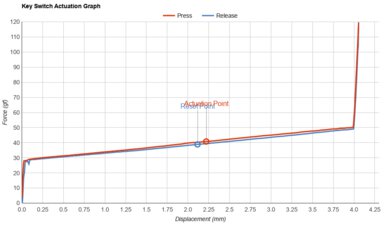
    See details on graph tool
    Operating Force
    74 gf
    Actuation Force
    35 gf
    Pre-Travel
    2.3 mm
    Total Travel
    4.0 mm

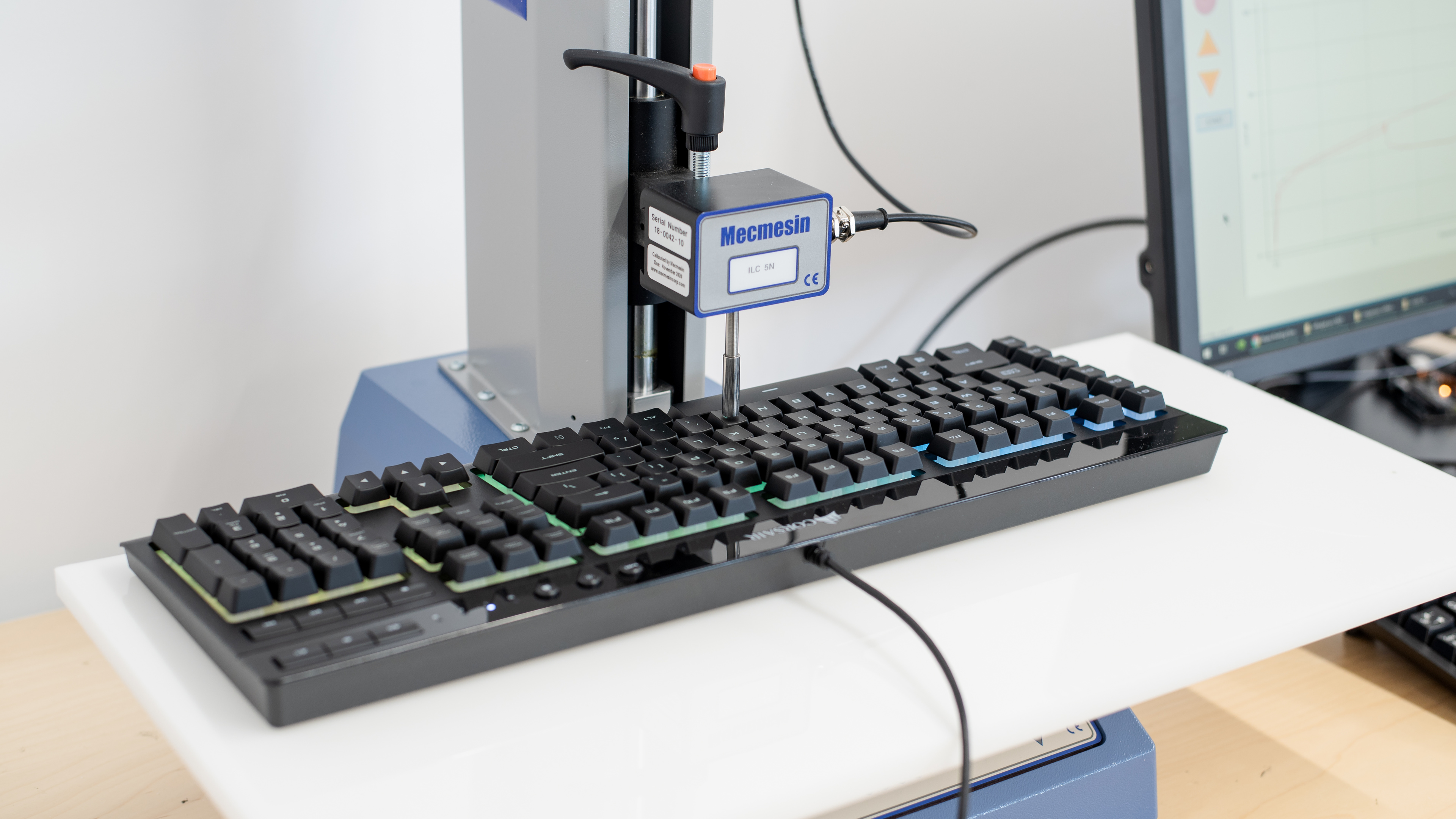
    Unlike the mechanical switches on the Corsair K68 RGB, this keyboard has rubber dome switches that feel a bit mushy. They require a very substantial amount of force to operate, and they have a very noticeable tactile bump to overcome before the actuation point.

    6.0
    Typing Quality

    The Corsair K55 has mediocre typing quality, and the keys feel soft and mushy. They also require a significant amount of force to operate, so you may experience fatigue when typing for long periods. Fortunately, the keys are fairly stable, and there's a good amount of space between them that may help you reduce typos. If you're looking for a gaming keyboard with much better typing quality, then check out the SteelSeries Apex 7 TKL.

    9.1
    Typing Noise
    Average Loudness
    44.1 dBA
    High Pitch Clicks
    No

    As is the case with most rubber dome switches, the Corsair K55 RGB Gaming Keyboard is very quiet and shouldn't bother people around you.

    9.4
    Latency
    Latency Wired
    4.8 ms
    Latency Receiver
    N/A
    Latency Bluetooth
    N/A

    This keyboard has remarkable latency. Even most competitive gamers are unlikely to notice any delays.

    Software and Operating System
    Configuration Software
    Software NameiCUE
    Software Windows Compatible
    Yes
    Software macOS Compatible
    Yes
    Onboard Memory
    No
    Profiles
    6+

    The Corsair iCue software offers a good amount of customization options for this keyboard. Each key is macro-programmable, and you can change the RGB zone lighting through the software. Corsair claims this keyboard has on-board memory, but it didn't work for us.

    10
    Computer Compatibility
    Windows
    Fully Compatible
    macOS
    Fully Compatible
    Linux (Ubuntu 22)
    Fully Compatible
    Media Key Compatibility
    Windows, MacOS & Linux

    This keyboard is fully compatible with Windows, and the Software is available for both Windows and macOS. On macOS, the Scroll Lock and Pause Break buttons adjust screen brightness while Print Screen acts as an F13 button. On Linux, all default keys work.

    0.0
    Wireless Mobile Compatibility
    Android
    Not Compatible
    iOS
    Not Compatible
    iPadOS
    Not Compatible
    Media Key Compatibility
    Not Compatible