WLmouse Beast X Max  Mouse Review

Reviewed Oct 08, 2024 at 03:17pm
Tested using Methodology v1.5.1 
WLmouse Beast X Max
7.0
Work 
9.4
Video Games (FPS) 
7.8
Video Games (MMO) 
9.5
Raw Performance 
 36

The WLmouse Beast X Max is an ultra-lightweight wireless gaming mouse. It has a magnesium alloy body with an exoskeleton-like construction with large cutouts. Its symmetrical shape is identical to that of the smaller WLmouse Beast X. It uses PixArt's flagship PAW3950 HS, which supports a maximum wireless polling rate of 8000Hz. The box also includes a variety of accessories, like two additional sets of PTFE mouse feet, an additional Nano wireless receiver, and a carrying case.

This mouse is part of a wider lineup of Beast X models. For more details, see the Differences Between Variants section.

Our Verdict

7.0
Work 

The WLmouse Beast X Max is decent for work but isn't designed specifically for this usage. It feels sturdy and exceptionally lightweight but lacks Bluetooth connectivity and multi-device pairing. Its scroll wheel also lacks useful productivity features like tilt inputs and free-scrolling. Also, its body has large holes that leave the inside open to collect dust and debris, and it could be uncomfortable, depending on how you hold the mouse.

Pros
  • Excellent build quality.

Cons
  • Open shell design could be uncomfortable and leaves the inside open to collecting dust and debris.

  • No Bluetooth connectivity.

  • Scroll wheel lacks free-scrolling and L/R tilt inputs.

9.4
Video Games (FPS) 

The WLmouse Beast X Max is an outstanding FPS gaming mouse. It has a magnesium alloy body that feels sturdy and is exceptionally lightweight, making it easy to move quickly and accurately. It has remarkable click latency and a superbly accurate and low-latency sensor, delivering performance suitable for gaming at any competitive level. That said, its exoskeleton-like shell has very large gaps that could be uncomfortable depending on your grip type.

Pros
  • Remarkably low and consistent click latency.

  • Outstanding all-around sensor performance.

  • Supports a maximum wireless polling rate of 8000Hz.

  • Excellent build quality.

  • Exceptionally lightweight.

Cons
  • Open shell design could be uncomfortable and leaves the inside open to collecting dust and debris.

7.8
Video Games (MMO) 

The WLmouse Beast X Max is good for MMO gaming despite not being explicitly designed for it. It doesn't have nearly as many side buttons as dedicated MMO mice, so you can't program as many macros to your mouse buttons. Also, its magnesium alloy shell has large holes that leave the inside exposed to dust and debris and could be uncomfortable depending on your grip type. That said, it delivers remarkable raw gaming performance overall.

Pros
  • Remarkably low and consistent click latency.

  • Outstanding all-around sensor performance.

  • Excellent build quality.

Cons
  • Significantly fewer side buttons compared to dedicated MMO gaming mice.

  • Open shell design could be uncomfortable and leaves the inside open to collecting dust and debris.

9.5
Raw Performance 

The WLmouse Beast X Max delivers superb raw performance, making it more than suitable for playing games in any genre at any competitive level. Its click latency is remarkably low, and its sensor supports a maximum wireless polling rate of 8000Hz. It provides exceptional motion and accuracy performance that closely translates the physical movements you make with your mouse into the cursor movements you see on screen.

Pros
  • Remarkably low and consistent click latency.

  • Outstanding all-around sensor performance.

  • Supports a maximum wireless polling rate of 8000Hz.

Cons
None
  • 7.0
    Work
  • 9.4
    Video Games (FPS)
  • 7.8
    Video Games (MMO)
  • 9.5
    Raw Performance
  • Changelog

    1.  Updated Aug 19, 2025: We've converted this review to Test Bench 1.5.1. This update removes less relevant or redundant elements, including several videos. We've also adjusted our Sensor Latency testing, resulting in minor score changes. See our full 1.5.1 changelog for details.
    2.  Updated Apr 18, 2025: 

      We've updated the Sensor Latency section with correct data at 8000Hz after several users pointed out that our previous update was incorrectly showing results at 1000Hz. As expected, the Delay to Start, Half, and End of Movement latency results are now slightly lower, and the box score has increased from 9.1 to 9.2. Apologies for the repeated confusion, and thanks to those who flagged the issue.

    3.  Updated Apr 08, 2025: 

      We've retested Sensor Latency after identifying a potential issue with our original results—specifically, an unusually low value in the Delay-to-End of Movement metric. The updated data now aligns much more closely with expected performance. As a result, the calculated FPS and Raw Performance scores are marginally lower, while the Sensor Latency score is significantly lower.

    4.  Updated Mar 25, 2025: 

      We've added a link to the WLmouse Strider in the Hand Size Recommendation section.

    Check Price

    Differences Between Sizes And Variants

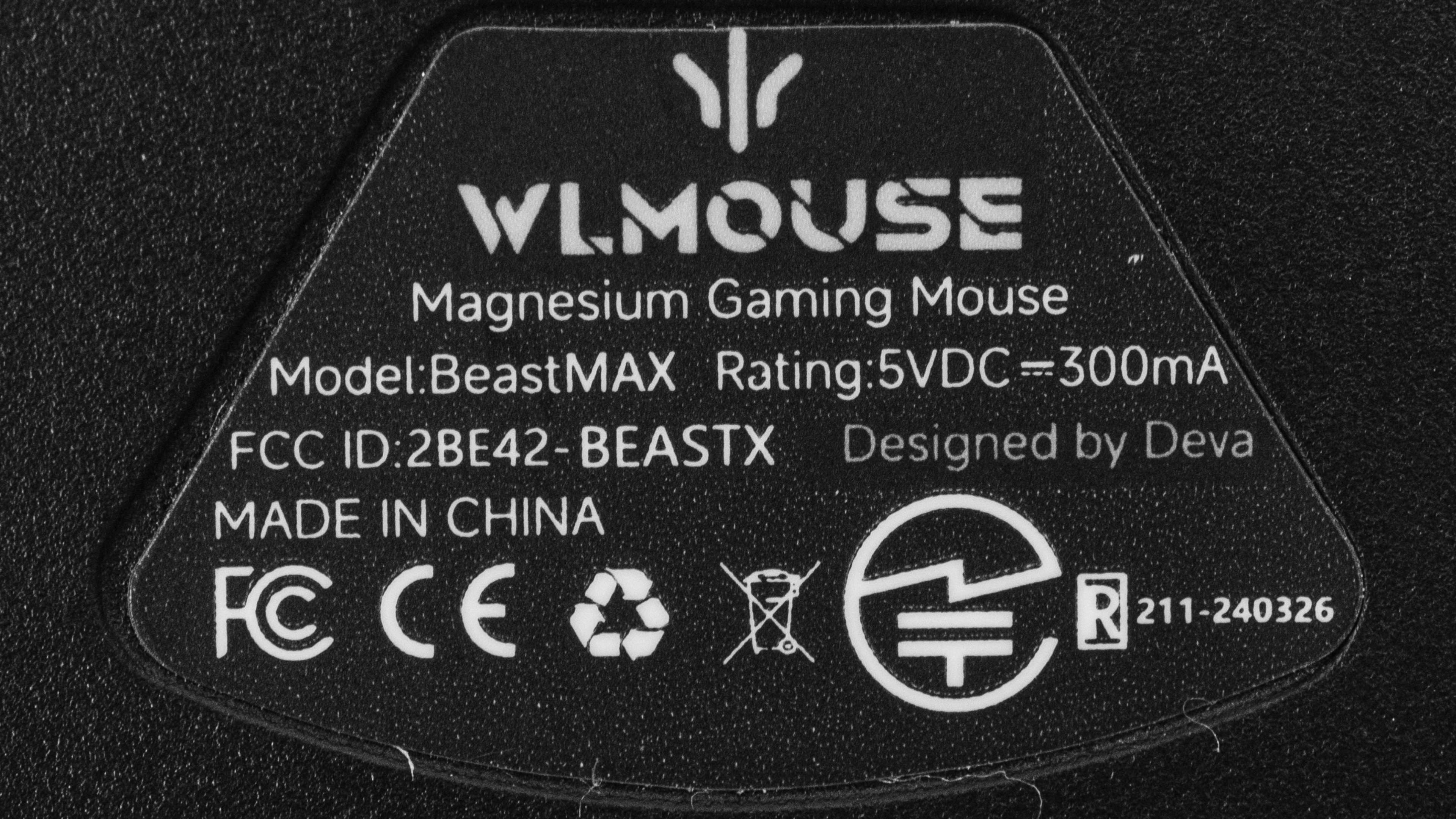
    The WLmouse Beast X Max is available in several colorways and two options for the main buttons. We bought and tested the Purple color option with Omron Optical switches. Here's our unit's label.

    There are two smaller models of this mouse called the WLmouse Beast X 8K and the WLmouse Beast X Mini. Note that the Beast X Max that we tested uses the newer PAW3950 HS sensor, a minor revision to the PAW3395 on the other models. We expect it to deliver marginally lower and more consistent sensor latency.

    Name Size Color Options Advertised Weight Advertised Dimensions Sensor Switch Options
    WLmouse Beast X 8K Small Black, Purple, Silver, Red, White/Blue, White/Yellow, Pink/Blue, White/Red 39g ± 1 122mm Length x 62mm Width x 37mm Height PixArt PAW3395 Omron Opticals, TTC Nihil Transparent Black Dot
    WLmouse Beast X Max Medium Fashion Grey, Purple, Metallic Silver, Black, White, Blue/Pink, White/Blue, White/Yellow, Zebra Limited Edition 42g ± 1* 126mm Length x 65mm Width x 39mm Height PixArt PAW3950 HS Omron Opticals, TTC Nihil Transparent Black Dot
    WLmouse Beast X Mini Extra Small White, Silver, Pink, Violet, Black, White/Blue, White/Yellow 34g ± 1 116mm Length x 58mm Width x 35mm Height PixArt PAW3395 Omron Opticals, TTC Nihil Transparent Black Dot

    *We measured a weight of 44.1g on our unit.

    Popular Mouse Comparisons

    The WLmouse Beast X Max is an extremely lightweight wireless gaming mouse with a magnesium alloy exoskeleton. It's the larger version of the WLmouse Beast X and features the revised PixArt PAW3950 HS sensor with a higher maximum polling rate of 8000Hz. Its symmetrical shape is very similar to the Razer Viper Mini Signature Edition and the Finalmouse UltralightX (Medium/Lion), but its magnesium alloy body is bigger and has large cutouts that cover even more of its shell. This makes it feel considerably different from these other mice in-hand.

    The WLmouse is less expensive and more readily in stock compared to these other mice. It also offers comparable raw performance in a similarly lightweight package. If you're okay with the compromise of its extensive cutouts and open design, it's a compelling alternative.

    For more recommendations, see our picks for the best lightweight mouse, the best FPS mouse, and the best wireless gaming mouse.

    WLmouse Beast X

    The WLmouse Beast X and the WLmouse Beast X Max are lightweight wireless gaming mice from the same model lineup. The two have the same shape and magnesium alloy construction, but the Beast X Max is bigger. It also uses a newer sensor with better latency and a higher 8000Hz polling rate.

    Razer Viper V3 Pro

    The WLmouse Beast X Max and the Razer Viper V3 Pro are high-performance, lightweight gaming mice with symmetrical shapes. The WLmouse has an unconventional magnesium alloy exoskeleton, while the Razer has a more traditional solid plastic body that's slightly heavier. The two mice deliver similarly superb performance.

    Logitech G PRO X SUPERLIGHT 2

    The WLmouse Beast X Max and the Logitech G PRO X SUPERLIGHT 2 are high-performance, lightweight wireless gaming mice with symmetrical shapes. While the Logitech has a conventional solid plastic body, the WLmouse has a magnesium exoskeleton that helps it achieve a lighter weight. The WLmouse has better mouse feet that glide more smoothly than the Logitech. The two mice perform similarly well in terms of raw performance.

    WLmouse Strider

    The WLmouse Beast X Max and the WLmouse Strider are lightweight wireless gaming mice with magnesium alloy bodies and weight-saving cutouts. The key difference is shape: the Beast X Max has a hump closer to the middle point of the mouse and flared sides, making it versatile for all grip types. The Strider has a wider and more rearward hump placement, offering stronger palm support and making it especially well-suited for claw grip. Some users may find the cutouts uncomfortable depending on finger placement, but both mice include grip tape to help address this.

    Show more 

    Test Results

    perceptual testing image
    Sort:
    RATINGS
    Category:
    All
    Design
    Style
    Type
    Standard
    Coating
    Matte
    Lighting ColorNo Lighting

    The WLmouse Beast X Max has a magnesium alloy body that's identical to the smaller WLmouse Beast X. It has an exoskeleton-like framework with large gaps in the shell that expose its internals.

    It doesn't have any visible logos or RGB lighting on the body, but there's a programmable RGB logo on the 8k receiver.

    Not all variants have the same design as our unit. Some are monochrome with a glossy or matte finish, while others boast a gradient or a unique pattern design. Check out the Differences Between Variants section for more information.

    Shape
    Length4.9" (126 mm)
    Width2.6" (65 mm)
    Height1.6" (39 mm)
    Grip Width
    60 mm
    Ambidextrous
    Shape Only
    Left-Handed Friendly
    Yes
    Finger Rest
    No

    Due to the limitations of the 3D scanning tool, the scan includes imperfections in its portrayal of textures and doesn't accurately depict the open space inside this mouse's exoskeleton. That said, the dimensions and shape of the mouse are correct.

    8.5
    Build Quality

    The WLmouse Beast X Max has excellent build quality overall. It's made of a magnesium alloy exoskeleton with large cutouts, making the mouse extremely lightweight while still feeling sturdy. The magnesium has a smooth yet grippy finish that feels high quality.

    The mouse doesn't creak or rattle. Its underside is made of plastic and flexes with pressure to the point where you can actuate the middle click if you press hard enough underneath it. That said, bottom plate flex is typical and doesn't present any issues when using the mouse normally.

    9.7
    Weight
    Lowest Weight
    44.1 g
    Default Weight
    44.1 g
    Weight Distribution
    Centered
    Extra Weights
    No
    Hand Size Recommendation
    Palm Grip Hand Recommendation
    Claw Grip Hand Recommendation
    Fingertip Grip Hand Recommendation

    This mouse has a medium-sized body with a symmetrical shape that's identical to the WLmouse Beast X but bigger. It has a centered hump and flat sides that flare out towards the back. It's well suited for palm, claw, or fingertip grip for most hand sizes.

    This mouse has large cutouts on the sides and body that might be uncomfortable and interfere with your grip, especially if you're used to traditional mice with a solid body. A couple of sets of adhesive grips are included with the mouse that you can use to cover the cutouts for better comfort and grip.

    If you're interested in a separate WLmouse model with a much wider rear and a hump placement closer to the back, making it ideal for claw grip, check out the WLmouse Strider.

    7.2
    Wireless Versatility
    Maximum Of Paired Devices
    1
    Bluetooth
    No
    Receiver
    Yes
    Battery Type
    Rechargeable
    Use When Charging
    Yes
    On/Off Activation
    Auto Off And On/Off Switch
    Receiver Extender
    Yes
    Receiver Storing
    No
    Battery IndicatorNo

    You can connect to the WLmouse Beast X Max using the nano receiver (1000Hz maximum polling rate) or the 8000Hz receiver included in the box. You can hold the two side buttons and middle click to switch between the receivers, but you have to disconnect and reconnect the receiver you're switching to from the PC it's connected to.

    While WLmouse doesn't advertise a battery life figure, it says that its lithium battery has a 300mAh capacity.

    If you have this mouse and would like to share your battery life experience, we'd love to hear from you in the comments.

    Cable
    ConnectivityWireless
    Cable Length
    5.6 ft (1.7 m)
    Cable Type
    Paracord-like
    Permanent Kink
    Yes
    Port Type: Mouse End
    USB-C
    Port Type: PC End
    USB-A

    This mouse comes with a paracord-like charging cable. This cable isn't very flexible compared to most other paracord-like cables. While the material doesn't drag directly on desks, it retains noticeable kinks from its packaging and may be stiff enough to catch on nearby objects on your desk.

    9.0
    Mouse Feet
    Gliding Experience
    Very Good
    Material
    Virgin Grade PTFE
    Extra Included
    Yes

    This mouse has superb feet that glide exceptionally well across hard or soft mousepads. It has four PTFE dot-style feet pre-installed. Two alternate sets of feet are included in the box: A larger set of two black PTFE feet and a set of four triangular black PTFE feet.

    In The Box

    • Nano receiver
    • 8000Hz receiver
    • USB-A to USB-C charging cable
    • 1x set of alternate (large-sized) mouse feet
    • 1x set of alternate (triangular) mouse feet
    • General adhesive grip tape
    • 2x sets of side panels and main button adhesive grip tape
    • Travel case
    • User documentation
    • WLmouse wipes
    Control
    Main Button
    See details on graph tool
    See details on graph tool
    Switch Type
    Optical
    Switch Model
    Omron Opticals

    WLmouse offers this mouse with two switch options for the main clicks: Omron Opticals or TTC Nihil Transparent Black Dot mechanical switches.

    WLmouse doesn't provide a force/actuation graph for the TTC Nihil Transparent Black Dot mechanical switches. If you own this mouse with those switches and would like to share your experience, don't hesitate to reach out in the comments.

    6.3
    Additional Buttons
    Total Number Of Buttons
    5
    Number Of Side Buttons
    2
    Number Of Programmable Inputs
    5
    Profile Switching Button
    No
    Gesture Support
    No

    Using this mouse's software, you can reprogram the left- and right-click, scroll-click, and both side buttons. However, you can't reprogram the up/down scroll inputs. There's an on/off switch on the underside of the mouse.

    9.8
    Click Latency
    See details on graph tool
    Expected Connection
    1.3 ms
    Wired
    1.5 ms
    Receiver
    1.3 ms
    Bluetooth
    N/A

    The WLmouse Beast X Max delivers superb click latency performance, providing an extremely responsive feeling gaming experience.

    We conducted this wirelessly at its maximum polling rate of 8000Hz and at its maximum wired polling rate of 1000Hz. We also had the debounce delay set to 0ms and High-Speed mode turned off for testing above 1000Hz since it isn't available at higher polling rates.

    We conducted additional testing at 4000Hz and 1000Hz and found it to be virtually identical to the 8000Hz results, delivering 1.4ms and 1.3ms, respectively. Finally, we also tested the click latency at 1000Hz wirelessly using the nano receiver, and it was marginally higher at 1.8ms.

    9.2
    CPI
    See details on graph tool
    SRAV @ 1600 CPI
    -0.04%
    SRAV @ 800 CPI
    0.42%
    SRAV @ 400 CPI
    0.33%
    SRAV @ Fixed CPI
    N/A
    Precision Error Between Speeds
    0.38%
    Precision Error Between CPI
    0.37%
    Worst Tracking Error
    4.44%
    Minimum CPI
    50 CPI
    Maximum CPI
    30,000 CPI
    CPI Adjustment Steps
    50 CPI

    The WLmouse Beast X Max delivers fantastic CPI performance. Its sensor accurately and consistently tracks your movements.

    9.2
    Sensor Latency
    See details on graph tool
    Delay To Start Of Movement
    10.5 ms
    Delay At Half Movement
    3.0 ms
    Delay To End Of Movement
    3.8 ms

    The WLmouse Beast X Max has outstanding sensor latency performance and reacts remarkably quickly to your inputs, making it well-suited for competitive play in all genres.

    We performed this test using the maximum wireless polling rate of 8000Hz with Motion Sync disabled.

    Note: Our originally published results showed a significantly better Sensor Latency performance. During a targeted audit, we retested this mouse after noting that the Delay To End Of Movement results appeared unrealistically low and didn't align with expected behavior.

    Following the retest, we've updated our results, and the Sensor Latency score has dropped considerably—though it's worth noting that overall sensor performance remains remarkably good. We apologize for the earlier mistake and are actively investigating the cause, which appears to be partially related to our testing rig's clamping force. We're continuing to examine the issue to ensure greater accuracy and consistency in future testing.

    For comparison and full transparency, you can view an image of our original results and scoring.

    Sensor Specifications
    Sensor Technology
    Optical (LED)
    Sensor Model
    PixArt PAW 3950 HS
    Works On Glass
    Yes
    Minimum Lift Off Distance
    1.2 mm
    Maximum Polling Rate
    8000 Hz

    The available wireless polling rate settings are 125Hz, 250Hz, 500Hz, 1000Hz, 2000Hz, 4000Hz, and 8000Hz. When using this mouse wired, the polling rate settings are 125Hz, 250Hz, 500hz, and 1000Hz.

    Mouse Wheel
    Scroll Wheel Type
    Notched Wheel
    Scroll Wheel Tilt
    No
    Thumb Wheel Type
    No

    This mouse has a grippy scroll wheel with a patterned rubber finish. It has precise steps and operates quietly. Its middle click is light but provides tactile feedback.

    Noise
    Click Noise
    Quiet

    This mouse's main buttons, scroll wheel, and side buttons are fairly quiet and won't bother those around you.

    Operating System And Software
    Configuration Software
    Software NameWLmouse Core v2.1.0.0
    Software Windows Compatibility
    Yes
    Software macOS Compatibility
    No
    On-Board Memory
    Yes
    CPI (DPI) Adjustment
    Yes
    Polling Rate Adjustment
    Yes
    Profile Configuration
    Yes
    Profile Auto-Switching
    No
    RGB On/Off
    No RGB

    The software is straightforward and includes expected settings to adjust the polling rate, CPI, and lift-off distance. You can adjust the sleep settings, debounce time, and enable or disable motion sync. Additionally, you can create macros, save your custom profile settings to onboard memory, and customize the wireless receiver's RGB lighting color, effect, and brightness.

    There's also a web version of the software.

    10
    Mouse Compatibility
    Windows CompatibilityFully
    macOS CompatibilityFully

    All default button functions work in Windows and macOS, but the software is only available for Windows.