Turtle Beach Elite Atlas Aero Wireless  Headphones Review

Reviewed Jun 23, 2020 at 08:05am
Writing modified Oct 27, 2021 at 01:22pm
Tested using Methodology v1.4 
Turtle Beach Elite Atlas Aero Wireless
6.2
Mixed Usage 
6.8
Neutral Sound 
5.6
Commute/Travel 
5.9
Sports/Fitness 
6.2
Office 
7.0
Wireless Gaming 
7.5
Wired Gaming 
7.1
Phone Calls 
 0

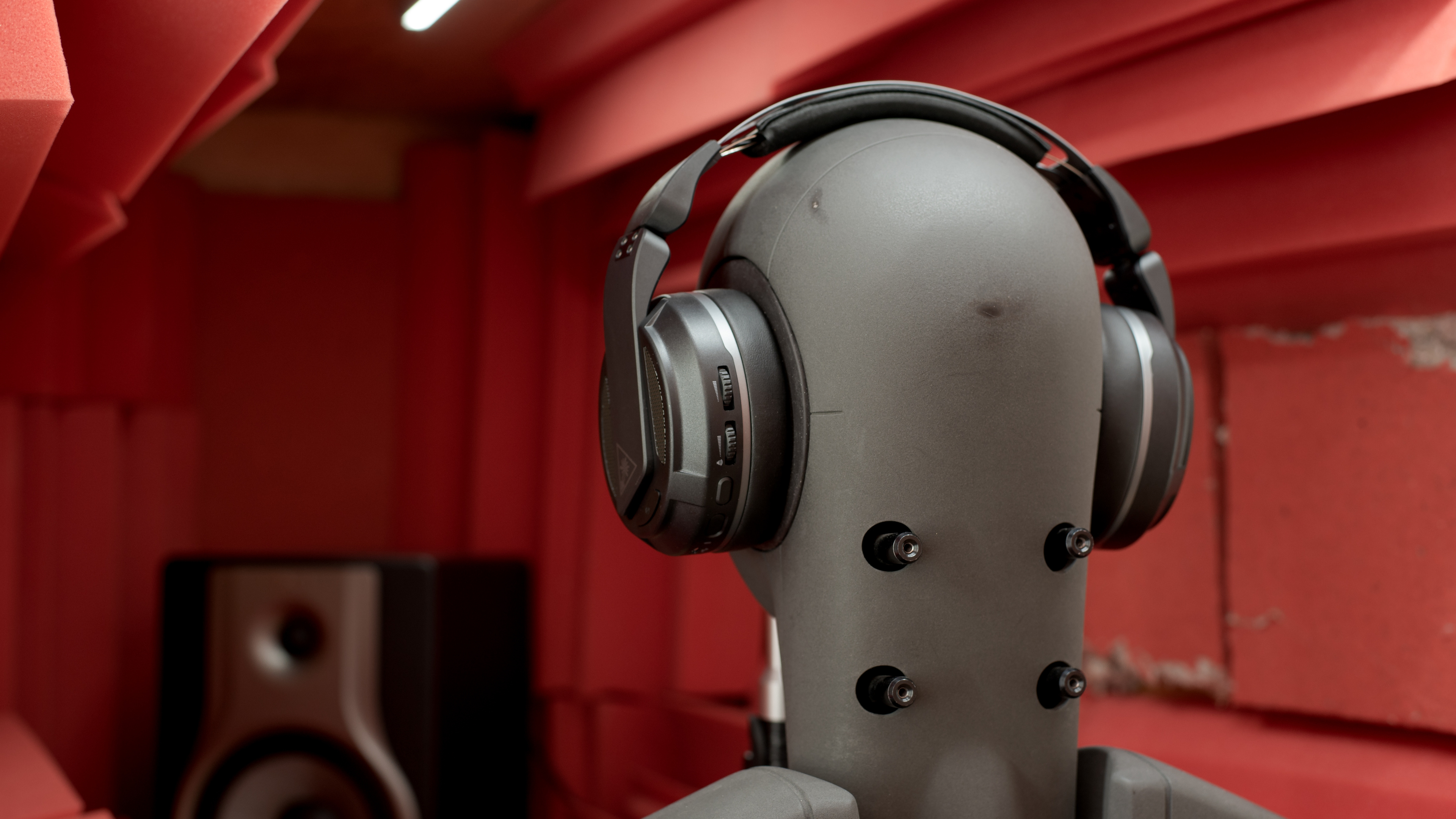
The Turtle Beach Elite Atlas Aero Wireless are decent gaming headphones. Unfortunately, they clamp very tightly and are heavy, making them uncomfortable to wear for extended periods. They also look and feel cheap and plasticky, and their control scheme is sub-par. While their boom microphone works well, it only works when you use the headphones wirelessly, and when using the supplied 1/8" TRRS cable, the headphones switch to the in-line mic. They're also only designed to work on PC, and our PS4 couldn't detect them wirelessly. On the bright side, they last over 30 hours off a single charge, which is excellent.

Our Verdict

6.2
Mixed Usage 

The Turtle Beach Elite Atlas Aero are only mediocre headphones for mixed usage. They're designed for gaming, and their poor noise isolation and bulky design make them less than ideal for day-to-day use. They're also only decently comfortable, as they clamp the head very tightly and are heavy. That said, their boom microphone has a good recording quality and does a great job of separating your voice from background noise.

Pros
  • Excellent 30-hour battery life.
  • Companion software offers tons of customization options.
Cons
  • Headphones clamp the head very tightly.
  • Headphones block very little background noise.
6.8
Neutral Sound 

The Turtle Beach Atlas Aero are okay for neutral sound. Their default sound profile isn't the more accurate and even, and they lack a lot of treble, resulting in vocals and instruments being dull and pushed back. On the bright side, their companion software offers a graphic EQ as well as presets, so you can change the way they sound.

Pros
  • Companion software offers tons of customization options.
Cons
  • Headphones clamp the head very tightly.
5.6
Commute/Travel 

The Turtle Beach Elite Atlas Aero Wireless aren't recommended for commuting or travel. These headphones aren't very comfortable for extended periods as they clamp tightly and are heavy. They also block almost no background noise and leak a fair amount of audio. While they can be used wirelessly with their USB receiver, if you want to connect them to your phone, you'll need to use them wired.

Pros
  • Companion software offers tons of customization options.
Cons
  • Headphones clamp the head very tightly.
  • Headphones block very little background noise.
5.9
Sports/Fitness 

The Turtle Beach Atlas Aero aren't recommended for sports. These over-ears are very bulky, and you can only use them wired with a phone, which can be a pain while working out. They don't block out much background noise at all and leak a fair amount of noise. On the bright side, they clamp the head quite hard, so they feel stable enough for jogs or light workouts.

Pros
  • Companion software offers tons of customization options.
Cons
  • Headphones clamp the head very tightly.
6.2
Office 

The Turtle Beach Elite Atlas Aero are mediocre headphones for use in the office. They aren't the most comfortable and will likely cause soreness and fatigue after a few hours of use. They also block almost no background noise and leak quite a bit of audio, which could be distracting to your coworkers. On the bright side, if you use them wirelessly with their USB receiver plugged into your PC, they last over 30 hours off a single charge, which is excellent.

Pros
  • Excellent 30-hour battery life.
  • Companion software offers tons of customization options.
Cons
  • Headphones clamp the head very tightly.
  • Headphones block very little background noise.
7.0
Wireless Gaming 

The Turtle Beach Elite Atlas Aero are decent wireless gaming headphones. Their boom microphone is very good, and your voice sounds clear, natural, and easy to hear. Unfortunately, they're only designed to work on PC, and our PS4 couldn't detect the headphones wirelessly. They also aren't very comfortable and will likely cause fatigue and soreness during marathon gaming sessions.

Pros
  • Excellent 30-hour battery life.
  • Boom microphone has good recording quality.
  • Companion software offers tons of customization options.
Cons
  • Headphones clamp the head very tightly.
  • Wireless USB receiver only works with PC; no PS4 or Xbox One support.
7.5
Wired Gaming 

The Turtle Beach Elite Atlas Aero are good wired gaming headphones. They come with a 1.8" TRRS audio cable with an in-line mic, so you can easily plug them into the controller of your console or directly into your phone or PC. It's worth noting that we only test the primary boom microphone, and when using them wired, the headphones use the in-line mic as opposed to their boom mic. Therefore, we aren't sure how the microphone will perform when using these headphones wired, though we'd expect the in-line microphone to perform worse than the boom mic.

Pros
  • Companion software offers tons of customization options.
Cons
  • Headphones clamp the head very tightly.
7.1
Phone Calls 

The Turtle Beach Elite Atlas Aero are decent headphones for phone calls. If you use them wirelessly with their USB receiver plugged into your PC for Skype calls, your voice sounds natural, clear, and fairly full-bodied. Unfortunately, when using them wired, the headphones use the in-line mic as opposed to their boom mic. Since we only test the primary boom mic, we're not sure how the in-line mic performs.

Pros
  • Excellent 30-hour battery life.
  • Boom microphone has good recording quality.
  • Companion software offers tons of customization options.
Cons
  • Headphones clamp the head very tightly.
  • Headphones block very little background noise.
  • 6.2
    Mixed Usage
  • 6.8
    Neutral Sound
  • 5.6
    Commute/Travel
  • 5.9
    Sports/Fitness
  • 6.2
    Office
  • 7.0
    Wireless Gaming
  • 7.5
    Wired Gaming
  • 7.1
    Phone Calls
  • Changelog

    1.  Updated Jun 23, 2020: Review published.
    2.  Updated Jun 18, 2020: Early access published.
    3.  Updated Jun 01, 2020: Our testers have started testing this product.
    4.  Updated May 29, 2020: The product has arrived in our lab, and our testers will start evaluating it soon.

    Check Price

    Black/SilverElite Atlas Aero
    SEE PRICE
    Amazon.com
    Black/SilverElite Atlas Aero
    SEE PRICE
    BestBuy.com
    Black/SilverElite Atlas Aero
    SEE PRICE
    Walmart.com
    Black/SilverElite Atlas Aero
    B&H

    Popular Headphones Comparisons

    Comparison picture

    The Turtle Beach Elite Atlas Aero Wireless PC Gaming Headset doesn't stand out much from the crowd. Like with many Turtle Beach headsets, these headphones feel quite cheap and plasticky, and they aren't as comfortable as the Turtle Beach Stealth 600 Wireless or the HyperX Cloud Flight S. Unlike most wireless gaming headphones, their USB receiver only works with PC and not PS4, which limits their functionality.

    If you want to see our picks for the best gaming headphones, check out our recommendations for the best gaming headsets for PC, the best PS4 headsets, and the best wireless gaming headsets.

    SteelSeries Arctis 7 Wireless 2017

    The SteelSeries Arctis 7 Wireless 2017 are better wireless gaming headphones than the Turtle Beach Elite Atlas Aero Wireless. The SteelSeries are more comfortable and feel much better-built. They also have a better-balanced sound profile, a slightly better boom microphone, and work wirelessly with both PS4 as well as PC, while the Turtle Beach only work wirelessly with PC. On the other hand, the Turtle Beach last longer off a single charge, and have a virtual soundstage feature.

    Turtle Beach Stealth 600

    The Turtle Beach Stealth 600 are better wireless gaming headphones than the Turtle Beach Elite Atlas Aero Wireless. The Stealth 600 are more comfortable, have a more accurate sound profile, and work wirelessly with both PC as well as PS4, instead of only for PC like with the Atlas Aero. That being said, the Atlas Aero feel slightly better built, though they still feel quite cheap and plasticky overall. They also have a virtual surround feature, and their battery lasts much longer off a single charge.

    SteelSeries Arctis 7 2019 Edition Wireless

    The SteelSeries Arctis 7 2019 Edition Wireless are much better wireless gaming headphones than the Turtle Beach Elite Atlas Aero Wireless. The SteelSeries are more comfortable, feel much better-built, have better controls, and have a better-balanced default sound profile with more bass. They also work wirelessly with both PS4 as well as PC, unlike the Turtle Beach which are only compatible with PC. That being said, the Turtle Beach last longer off a single charge, and support Waves NX 3D Audio virtual surround sound.

    HyperX Cloud Flight S

    The HyperX Cloud Flight S are better wireless gaming headphones than the Turtle Beach Elite Atlas Aero Wireless. The HyperX are more comfortable, have better controls, and feel much better built. They also have a better recording quality and work with both PC as well as PS4, unlike the Turtle Beach that are only compatible with PC. That being said, the Turtle Beach can also be used wired, and have better companion software with a Graphic EQ to change how they sound.
    Overhauling Our Audio Measurements And A New Multi-Curve Graphing Tool

    We've upgraded our Headphones Test Bench to 2.0! This update brings several key changes to our tests and usages, making it easier than ever to interpret our sound results based on your personal preferences. You'll also find a brand-new interactive graph tool featuring multiple targets (including our own!) for you to explore and compare.

    For a full breakdown, check out our changelog, which includes detailed commentary from our test designer explaining the rationale behind our update.

    We'd also love to hear your thoughts: your feedback helps us keep improving, so join us in the comments!

    Test Results

    perceptual testing image
    Sort:
    RATINGS
    Category:
    All
    Design
    Style
    TypeOver-ear
    EnclosureClosed-Back
    WirelessYes
    TransducerDynamic

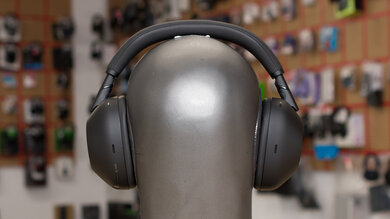
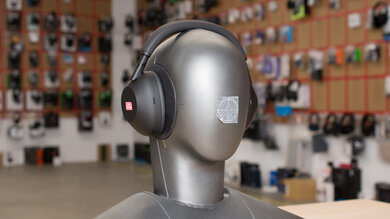
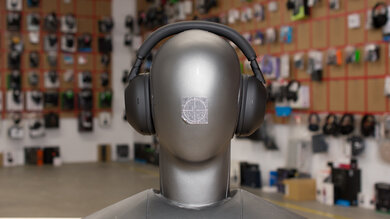
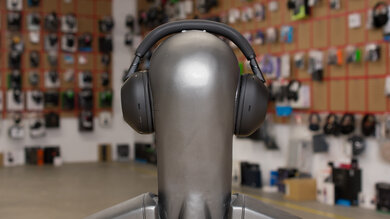
    The Turtle Beach Elite Atlas Aero Wireless have a sleek and straightforward design that doesn't look as flashy as some other gaming headphones. The headphones are covered in a matte black and grey finish and have a somewhat casual look, thanks to the detachable boom microphone.

    7.0
    Comfort
    Weight0.87 lbs
    Clamping Force
    1.8 lbs

    The Turtle Beach Elite Atlas Aero Wireless have a decently comfortable fit. These headphones have very well-padded ear cups, but unfortunately, they clamp very tightly on the head. They're also quite heavy and cause a fair amount of fatigue after a short time of using them. On the bright side, they feature Turtle Beach's ProSpecs Glasses Relief System that creates room for your glasses to remove pressure from the headphones pressing against your frames. It's worth noting that this will break the seal these headphones make with your ears, and you'll experience their sound reproduction differently.

    5.4
    Controls
    OS Compatibility
    Not OS specific
    Ease Of UseDecent
    FeedbackDecent
    Call/Music ControlNo
    Volume ControlYes
    Microphone ControlMute/Unmute
    Channel Mixing
    No
    Noise Cancelling ControlNo
    Talk-Through
    No
    Additional ControlsSurround Sound

    The Turtle Beach Elite Atlas Aero's controls are disappointing. While the controls are fairly easy to use, unfortunately, the infinite-scrolling wheels are very easy to accidentally hit while moving the headphones. One of the buttons and one of the wheels can be remapped within the companion software, which is nice.

    5.5
    Portability
    L7.7"
    W5.7"
    H4"
    Volume176 in³
    Transmitter RequiredNo

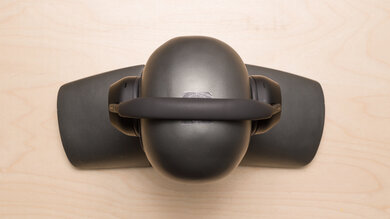
    The Turtle Beach Elite Atlas Aero are bulky. On the bright side, these headphones fold into a more compact shape, which many gaming headphones don't do.

    0.0
    Case
    TypeNo case
    LN/A
    WN/A
    HN/A
    VolumeN/A

    The Turtle Beach Elite Atlas Aero Wireless don't come with a carrying case.

    6.5
    Build Quality

    The Turtle Beach Elite Atlas Aero Wireless' build quality is only okay. The entire headphones look and feel cheap and plasticky, and the headband feels very fragile. On the bright side, the ear cups have nice thick padding that doesn't feel cheap.

    7.0
    Stability

    Due to the high clamping force, the Turtle Beach Elite Atlas Aero feel decently stable on the head. They likely won't move from most normal head movements or during a jog or run, but may not be the best choice to take to the gym.

    Headshots 1
    Headshots 2
    Top
    In The Box

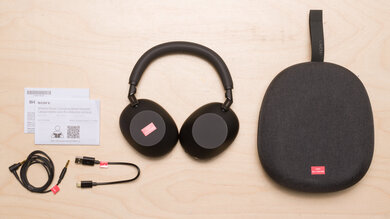
    • Turtle Beach Elite Atlas Aero Wireless PC Gaming Headset
    • Wireless USB dongle
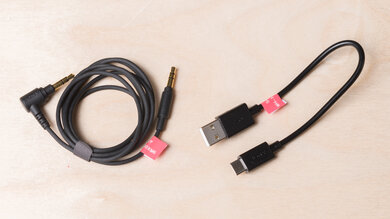
    • 1/8" TRRS cable with in-line mic and remote
    • Detachable boom microphone
    • Micro-USB charging cable
    • Manuals
    • Turtle Beach sticker
    Sound
    Sound Profile
    See details on graph tool
    Bass Amount
    -0.48 dB
    Treble Amount
    -2.07 dB

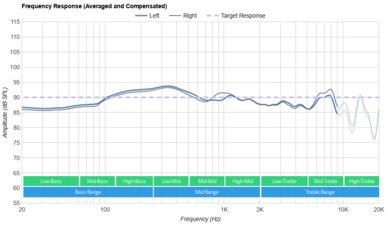
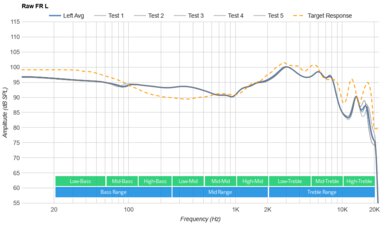
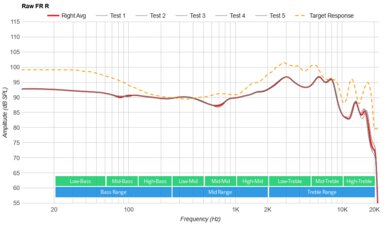
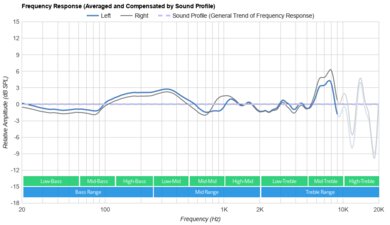
    The Turtle Beach Elite Atlas Aero's sound profile is somewhat well-balanced but lacks thump and brightness. That said, they should be versatile enough for most genres. It's worth noting that due to their inconsistent frequency response, our results are an average, and people may experience their sound reproduction differently.

    6.3
    Frequency Response Consistency
    See details on graph tool
    See details on graph tool
    Avg. Std. Deviation
    0.81 dB

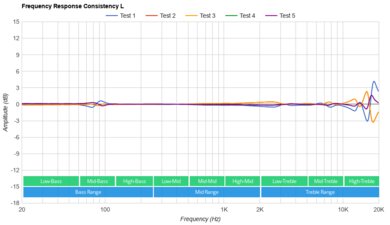
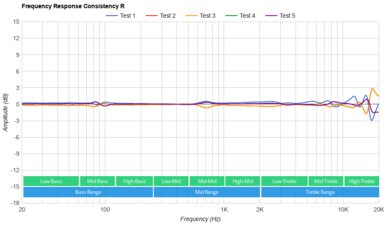
    The Turtle Beach Elite Atlas Aero's frequency response consistency is mediocre. People with glasses or long hair experience their bass differently depending on the quality of the fit and seal they can achieve. You'll also likely have to adjust them slightly to achieve the same treble reproduction every time you wear them.

    Raw Frequency Response
    See details on graph tool
    See details on graph tool
    7.9
    Bass Accuracy
    See details on graph tool
    Std. Err.
    2.47 dB
    Low-Frequency Extension
    81.16 Hz
    Low-Bass
    -3.66 dB
    Mid-Bass
    -2.23 dB
    High-Bass
    -1.06 dB

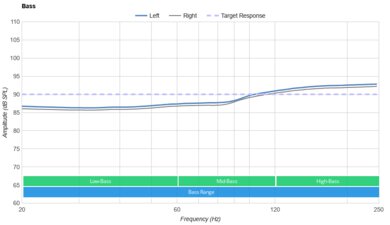
    The Turtle Beach Elite Atlas Aero's bass accuracy is very good. While these headphones are a little lacking in thump and rumble, they still provide a good amount of punch and kick. Overall, the entire bass range is fairly even and balanced. It's worth noting that this is an average of our results, and you may experience their bass performance differently depending on the fit and seal you can achieve.

    7.5
    Mid Accuracy
    See details on graph tool
    Std. Err.
    3.35 dB
    Low-Mid
    -5.29 dB
    Mid-Mid
    -0.63 dB
    High-Mid
    -1.02 dB

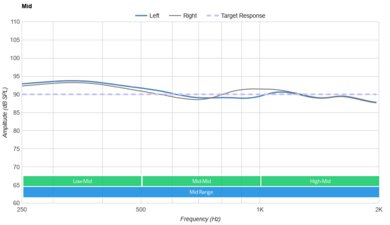
    The Turtle Beach Elite Atlas Aero Wireless' mid accuracy is good. Most of the range is well-balanced and even, though unfortunately, they lack a fair amount of low-mid, which thins out vocals and lead instruments.

    5.9
    Treble Accuracy
    See details on graph tool
    Std. Err.
    5.44 dB
    Low-Treble
    -4.3 dB
    Mid-Treble
    -2.84 dB
    High-Treble
    -12.21 dB

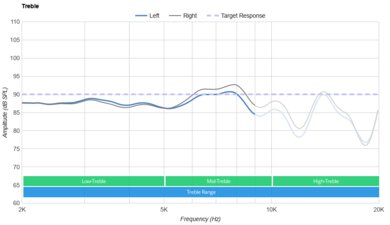
    The treble accuracy is sub-par. Almost the entire range is recessed, resulting in vocals and instruments that sound dull, lispy, and hard to understand. High mid-treble is fairly overemphasized, causing some frequencies to sound piercing.

    6.9
    Peaks/Dips
    See details on graph tool
    Peaks
    2.09 dB
    Dips
    1.56 dB

    There are quite a few peaks and dips throughout all ranges, and these headphones' performance in this regard is only okay. The dip in low-mid preceded by the peak in high-bass results in a muddy sound, as vocals and instruments are pushed back and muffled. The large peak in mid-treble makes some higher frequencies sound piercing, especially the recessed low-treble range.

    7.8
    Imaging
    See details on graph tool
    See details on graph tool
    Weighted Group Delay
    1.01
    Weighted Amplitude Mismatch
    0.46
    Weighted Frequency Mismatch
    1.45
    Weighted Phase Mismatch
    8.08

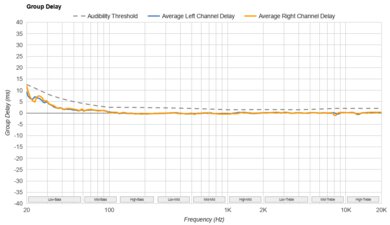
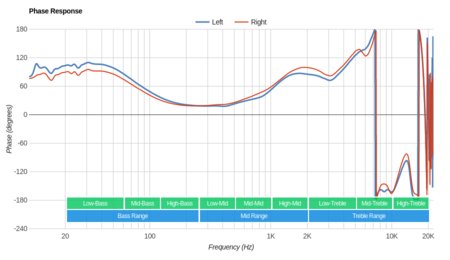
    The imaging performance is good. Unfortunately, their uneven group delay causes their bass to be loose, though they have a transparent treble range. The left and right drivers of our unit were well-matched, ensuring accurate placement and localization of objects (voices, instruments, video game effects) in the stereo field. However, these results are only valid for our unit, and yours may perform differently.

    6.0
    Passive Soundstage
    See details on graph tool
    PRTF Accuracy (Std. Dev.)
    2.49 dB
    PRTF Size (Avg.)
    4.34 dB
    PRTF Distance
    11.75 dB
    Openness
    5.0
    Acoustic Space Excitation
    4.1

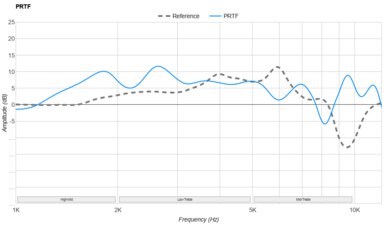
    The Turtle Beach Elite Atlas Aero Wireless' passive soundstage is only mediocre. Due to these headphones' closed-back design, they don't sound very open, and they have a small soundstage that makes audio sound like it's coming from inside your head as opposed to out in front of you.

    2.0
    Virtual Soundstage
    Head Modeling
    No
    Speaker Modeling
    On/Off
    Room Ambience
    No
    Head Tracking
    No
    Virtual Surround
    Yes

    The Turtle Beach Atlas Aero support Waves NX 3D Audio virtual surround sound.

    7.4
    Weighted Harmonic Distortion
    See details on graph tool
    WHD @ 90
    0.420
    WHD @ 100
    0.146

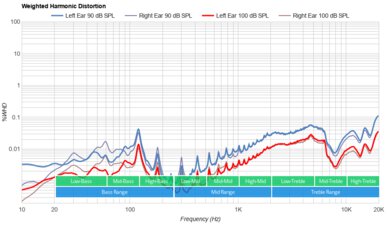
    The weighted harmonic distortion is decent. At both moderate and high volume, there's very little distortion, and audio sounds quite clear and pure.

    Test Settings
    Firmware
    1.1.7
    Power
    On
    Connection
    Wireless (Proprietary)
    Codec
    PCM, 24-bit, 48kHz
    EQ
    Default
    ANC
    No ANC
    Tip/Pad
    Default
    Microphone
    Boom

    These are the settings used while testing the Turtle Beach Elite Atlas Aero Wireless PC Gaming Headset; therefore, the results are only valid for these test settings.

    Isolation
    4.9
    Noise Isolation
    See details on graph tool
    Isolation Audio
    Overall Attenuation
    -12.82 dB
    Noise CancellingNo
    Bass
    -0.98 dB
    Mid
    -7.83 dB
    Treble
    -30.06 dB

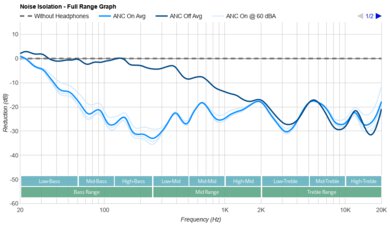
    As is common with large over-ear gaming headphones, the noise isolation of the Turtle Beach Elite Atlas Aero is poor. These headphones do very little to block out background noise, except for the higher-pitched sounds of an AC unit or fan.

    6.4
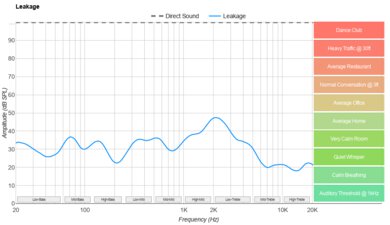
    Leakage
    See details on graph tool
    Leakage Audio
    Overall Leakage @ 1ft
    42.7 dB

    The Turtle Beach Elite Atlas Aero's leakage performance is mediocre. At higher volumes, people nearby will likely hear a bit of what you're listening to.

    Microphone
    Microphone Style
    Integrated
    No
    In-Line
    Yes
    Boom
    Yes
    Detachable Boom
    Yes
    MicYes

    These headphones have a detachable boom microphone as well as an in-line mic on the included TRRS cable. Our tests reflect the detachable boom mic's performance, though, which you can only use when using the headphones wirelessly. The microphone has a side-tone feature that can be turned on/off within the companion software, so you can hear yourself while talking.

    7.7
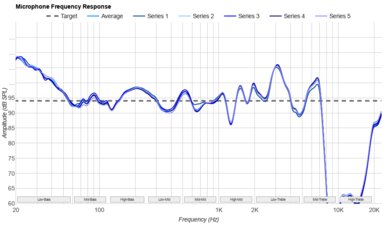
    Recording Quality
    See details on graph tool
    Recorded Speech
    LFE
    82.34 Hz
    FR Std. Dev.
    2.59 dB
    HFE
    6,177.3 Hz
    Weighted THD
    2.965
    Gain
    19.42 dB

    The boom microphone's recording quality is good. When using the mic, your voice sounds natural, clear, and fairly full-bodied.

    8.0
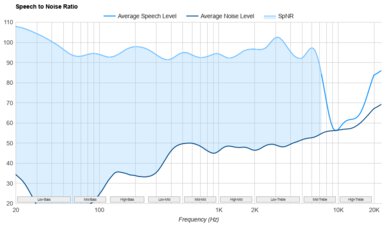
    Noise Handling
    See details on graph tool
    Speech + Pink Noise
    Speech + Subway Noise
    SpNR
    28.13 dB

    The boom microphone's noise handling is great. Your teammates should have no problems hearing you, even in noisy environments, like a gaming tournament.

    Active Features
    8.6
    Battery
    Battery Type
    Rechargable
    Continuous Battery Life
    30.1 hrs
    Additional Charges
    0.0
    Total Battery Life
    30.1 hrs
    Charge Time
    2.4 hrs
    Power-Saving Feature
    Auto-Off Timer
    Audio While Charging
    No
    Passive Playback
    Yes
    Charging Portmicro-USB

    The battery performance is excellent. They last over 30 hours off a single charge, which is superb and is exactly what Turtle Beach advertised. Unfortunately, they take almost 2.5 hours to charge, which isn't that great. On the bright side, they feature an auto-off timer, though they don't state how long it takes to turn the headphones off, and it seemed to turn off the headphones quite quickly during our testing.

    7.5
    App Support
    App NameTurtle Beach Control Studio
    iOSNo
    AndroidNo
    macOSYes
    WindowsYes
    Equalizer
    Graphic + Presets
    ANC Control
    No
    Mic ControlAdjustable Level
    Room Effects
    No
    Playback Control
    No
    Button MappingYes
    Surround Support
    Yes

    The companion software is good. While it has many features, including a graphic EQ and presets, unfortunately, the software itself is confusing and hard to navigate. However, once you get used to it, you'll enjoy the plethora of available options.

    Connectivity
    0.0
    Bluetooth
    Bluetooth Version
    No Bluetooth
    Multi-Device Pairing
    No
    NFC Pairing
    No
    Line Of Sight Range
    N/A
    PC Latency (SBC)
    N/A
    PC Latency (aptX)
    N/A
    PC Latency (aptX HD)
    N/A
    PC Latency (aptX-LL)
    N/A
    iOS Latency
    N/A
    Android Latency
    N/A

    These headphones only work wirelessly with their included USB receiver.

    6.9
    Non-Bluetooth Wireless
    Non-BT Line Of Sight Range
    102 ft
    Non-BT Latency
    101 ms

    The Turtle Beach Elite Atlas Aero Wireless PC Gaming Headset connect wirelessly via a proprietary USB receiver. Unfortunately, the latency is high, especially for headphones that use a dedicated receiver.

    9.5
    Wired
    Analog Audio
    Yes
    USB Audio
    No
    DetachableYes
    Length4.7 ft
    Connection1/8" TRRS
    Analog/USB Audio Latency
    0 ms

    These headphones come with a micro-USB cable for charging and a 1/8" TRRS audio cable with an in-line microphone and remote.

    PC / PS4 Compatibility
    PC/PS4 Analog
    Audio + Microphone
    PC/PS4 Wired USB
    No
    PC/PS4 Non-BT Wireless
    Audio + Microphone (PC Only)

    The USB receiver for these headphones only works on PC, and when we plugged it into our PS4, it couldn't detect the headphones. While you can use them wired by plugging them into our PS4 controller, the headphones will then use the in-line microphone as opposed to the boom mic.

    Xbox One Compatibility
    Xbox One Analog
    Audio + Microphone
    Xbox One Wired USB
    No
    Xbox One Non-BT Wireless
    No

    These headphones are compatible with Xbox One by plugging the audio cable into the controller of your console. Unfortunately, when using them wired, the headphones will use the in-line microphone as opposed to the boom mic.

    3.4
    Base/Dock
    Type
    Wireless USB Dongle
    USB Input
    Yes
    Line In
    No
    Line Out
    No
    Optical Input
    No
    RCA Input
    No
    Dock Charging
    No
    Power Supply
    USB

    The Turtle Beach Elite Atlas Aero use a wireless USB dongle for their wireless connection. The headphones also have a small compartment in the right ear cup to store the receiver, which is handy.