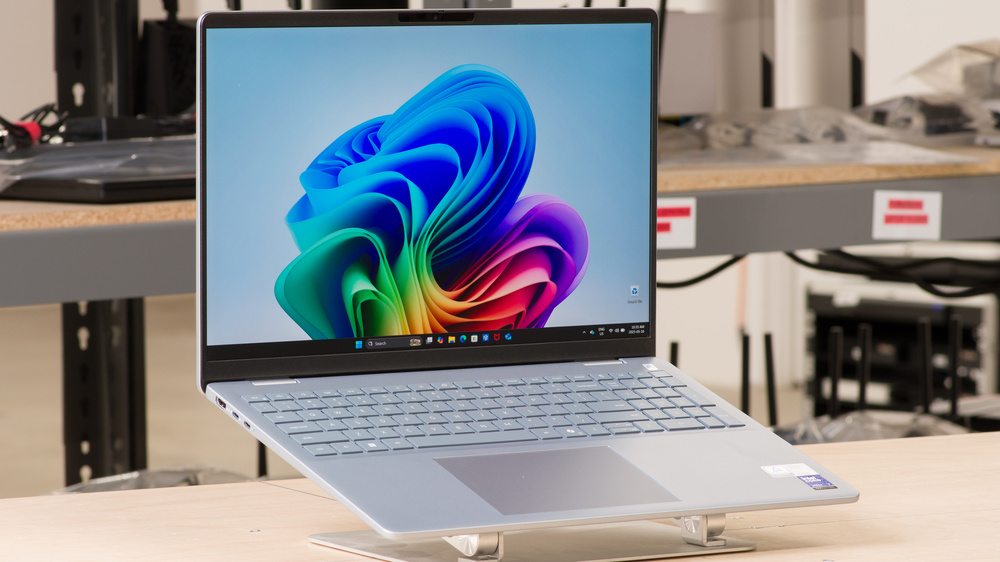
The Dell 16 Plus (2025) is a mid-range laptop designed for general productivity. It's available with Intel Core Ultra Series 2 processors, up to 32GB of RAM, and 2TB of storage. Display options include two FHD+ 60Hz IPS screens (with or without touch input), as well as two QHD+ panels (120Hz IPS and 90Hz Mini LED). You get a 1080p webcam with a privacy cover, and you can choose between a Wi-Fi 6E or Wi-Fi 7 wireless adapter. Ports include one USB-A, two USB-C (one supporting Thunderbolt 4), an HDMI 2.0 port, and a headphone jack.
See our unit's specifications and the available configuration options in the Differences Between Variants section.
Our Verdict
The Dell 16 Plus is good for school use. It's quite portable for a 16-inch device, and its battery lasts easily through a typical school day. You get a big screen for split-screen multitasking, a spacious, comfortable keyboard, and a large touchpad. This laptop's Intel Core Ultra SoCs can handle most general productivity tasks like text processing, web browsing, and video playback. However, they aren't ideal for highly intensive workloads, such as 3D rendering or data analysis.
Relatively portable for a 16-inch device due to thin design.
Battery lasts easily through a typical day of light use.
Large screen for multitasking.
Comfortable keyboard, large touchpad.
Low-power SoC can only handle light to moderately intensive tasks.
Display coating doesn't handle reflections well.
The Dell 16 Plus laptop isn't designed for gaming. Its integrated GPU is too weak to handle highly demanding games. You can play some moderately intensive titles, but you'll have to lower the settings to get playable frame rates. As for the display, although it features a 120Hz IPS panel, its response time is slow, resulting in visible ghosting behind fast-moving objects. The 90Hz Mini LED screen will likely provide a better viewing experience; however, note that none of the displays support variable refresh rate, which can help reduce screen tearing.
90Hz and 120Hz display options.
Minimal thermal throttling.
Low fan noise.
Integrated GPU can't handle highly demanding games.
No VRR support to reduce screen tearing.
The Dell 16 Plus is okay for media consumption. This 16-inch device has a thin design that makes it easy to carry around, and its battery lasts nearly 10 hours of local video playback, giving you plenty of time for a couple of full-length movies and TV show episodes. You can get it with a FHD+, a QHD+ IPS, or a QHD+ Mini LED display; the latter will give you the best viewing experience, as it delivers deeper blacks and more vibrant colors. Unfortunately, while the speakers get decently loud, they sound boxy and unnatural, with almost no bass.
Relatively portable for a 16-inch device due to thin design.
Battery lasts nearly 10 hours of local video playback.
Speakers get decently loud.
Mini LED display option.
Speakers sound boxy and unnatural.
IPS panels aren't ideal for dark room viewing.
FHD+ panels look washed out.
Display coating doesn't handle reflections well.
The Dell 16 Plus laptop isn't designed for use as a workstation. Its Intel Core Ultra SoCs can handle some moderately CPU-intensive workloads, but their integrated graphics are pretty weak, so anything requiring lots of GPU processing power is out of the question. Plus, you can only get up to 32GB of soldered RAM, which might not be enough for tasks with large datasets. You can perform color-critical work, like photo editing, as its QHD+ Mini LED display has full DCI P3 coverage. Thermal throttling is minimal, and the laptop doesn't get overly hot or loud under load.
Minimal thermal throttling.
Low fan noise.
Mini LED display option with 100% DCI P3 coverage.
Low-power SoC can only handle light to moderately intensive tasks.
Can only get up to 32GB of soldered RAM.
The Dell 16 Plus is good for business use. This sturdily built laptop is quite portable for a 16-inch device, and its battery lasts over 11 hours in light uses, enough to get you through a typical workday with some charge to spare. You get plenty of screen real estate for multitasking, a spacious, comfortable keyboard, a large touchpad, and a good number of ports for peripherals and external displays. There's also a fingerprint sensor and an IR webcam, so you can log in quickly. Its Intel Core Ultra SoCs can easily handle productivity tasks like text processing, spreadsheets, and presentations. The webcam is okay; audio comes through clearly, but the image looks soft and noisy.
Relatively portable for a 16-inch device due to thin design.
Battery lasts easily through a typical day of light use.
Large screen for multitasking.
Comfortable keyboard, large touchpad.
Webcam image looks soft and noisy.
Display coating doesn't handle reflections well.
Check Price
Differences Between Sizes And Variants
We tested the Dell 16 Plus (model DB16250) with a 120Hz QHD+ IPS display, an Intel Core Ultra 7 258V SoC, 32GB of RAM, and 1TB of storage. The display, SoC, memory, and storage are configurable; see the available options below.
SCREEN
- 16" IPS 1920 x 1200 60Hz (matte, 300 cd/m², 45% NTSC)
- 16" IPS 1920 x 1200 60Hz (touchscreen, glossy, 300 cd/m², 45% NTSC)
- 16" IPS 2560 x 1600 120Hz (matte, 300 cd/m², 100% sRGB)
- 16" Mini-LED 2560 x 1600 90Hz (touchscreen, glossy, HDR600, 100% DCI P3)
SoC
- Intel Core Ultra 5 226V (8 cores/8 threads, up to 4.5GHz, 8MB cache, ARC Graphics 130V)
- Intel Core Ultra 5 228V (8 cores/8 threads, up to 4.5GHz, 8MB cache, ARC Graphics 130V)
- Intel Core Ultra 7 256V (8 cores/8 threads, up to 4.8GHz, 12MB cache, ARC Graphics 140V)
- Intel Core Ultra 7 258V (8 cores/8 threads, up to 4.8GHz, 12MB cache, ARC Graphics 140V)
- Intel Core Ultra 9 288V (8 cores/8 threads, up to 5.1GHz, 12MB cache, ARC Graphics 140V)
MEMORY
- 16GB LP-DDR5x 8533MHz (Core Ultra 5 226V, Core Ultra 7 256V)
- 32GB LP-DDR5x 8533MHz (Core Ultra 5 228V, Core Ultra 7 258V, Core Ultra 9 288V)
STORAGE
- 512GB M.2 2230 PCIe Gen 4 NVMe SSD
- 1TB M.2 2230 PCIe Gen 4 NVMe SSD
- 2TB M.2 2230 PCIe Gen 4 NVMe SSD
COLOR
- Ice Blue
Popular Laptop Comparisons
The Dell 16 Plus DB16250 is a good general-purpose productivity laptop. Its build feels quite sturdy, even compared to more expensive models like the LG gram 16 (2024), and it provides a good user experience overall. However, the FHD+ displays are rather underwhelming, so you must upgrade to one of the QHD+ displays to achieve a good viewing experience, which increases the price.
For more options, check out our recommendations for the best lightweight laptops, the best laptops for business, and the best 15- and 16-inch laptops.
The Dell 16 Plus (2025) and the Lenovo Yoga Slim 7i Aura Edition 15 (2024) are both ultraportables featuring Intel Core Ultra Series 2 processors, resulting in very similar performance. However, the Lenovo is a better device overall, sporting a more premium build and providing a superior user experience with a brighter display, a more tactile keyboard, a more responsive touchpad, and better-sounding speakers.
The ASUS Zenbook S 16 UM5606 (2024) is better than the Dell 16 Plus (2025) overall. The ASUS has a more premium build, a more tactile keyboard, a more responsive touchpad, and a higher quality webcam. You can achieve better performance with the ASUS if you opt for the top-end AMD Ryzen AI 9 CPU, but the battery life may not be as good as Dell's. Also, keep in mind that the ASUS' OLED display flickers at 480Hz, which might bother some people.
Although both are general productivity laptops, the Microsoft Surface Laptop 7th Edition 15 (2024) is a higher-end model than the Dell 16 Plus (2025) with a more premium build. The Surfave Laptop also has a brighter display, an easier-to-use haptic touchpad, a higher-quality webcam, and longer battery life. That said, unlike the Dell 16 Plus, the Surface Laptop is an ARM-based device with a Qualcomm processor, which means that some programs may run poorly or not at all.
The Dell 16 Plus (2025) and the LG gram 16 (2024) are both 16-inch ultraportables with similar performance. The LG edges out the Dell slightly in terms of overall user experience, as it features a better keyboard and touchpad, a wider port selection, and significantly longer battery life. However, the LG doesn't feel as sturdy as the Dell, as its magnesium-alloy chassis exhibits a lot more flex.
Test Results
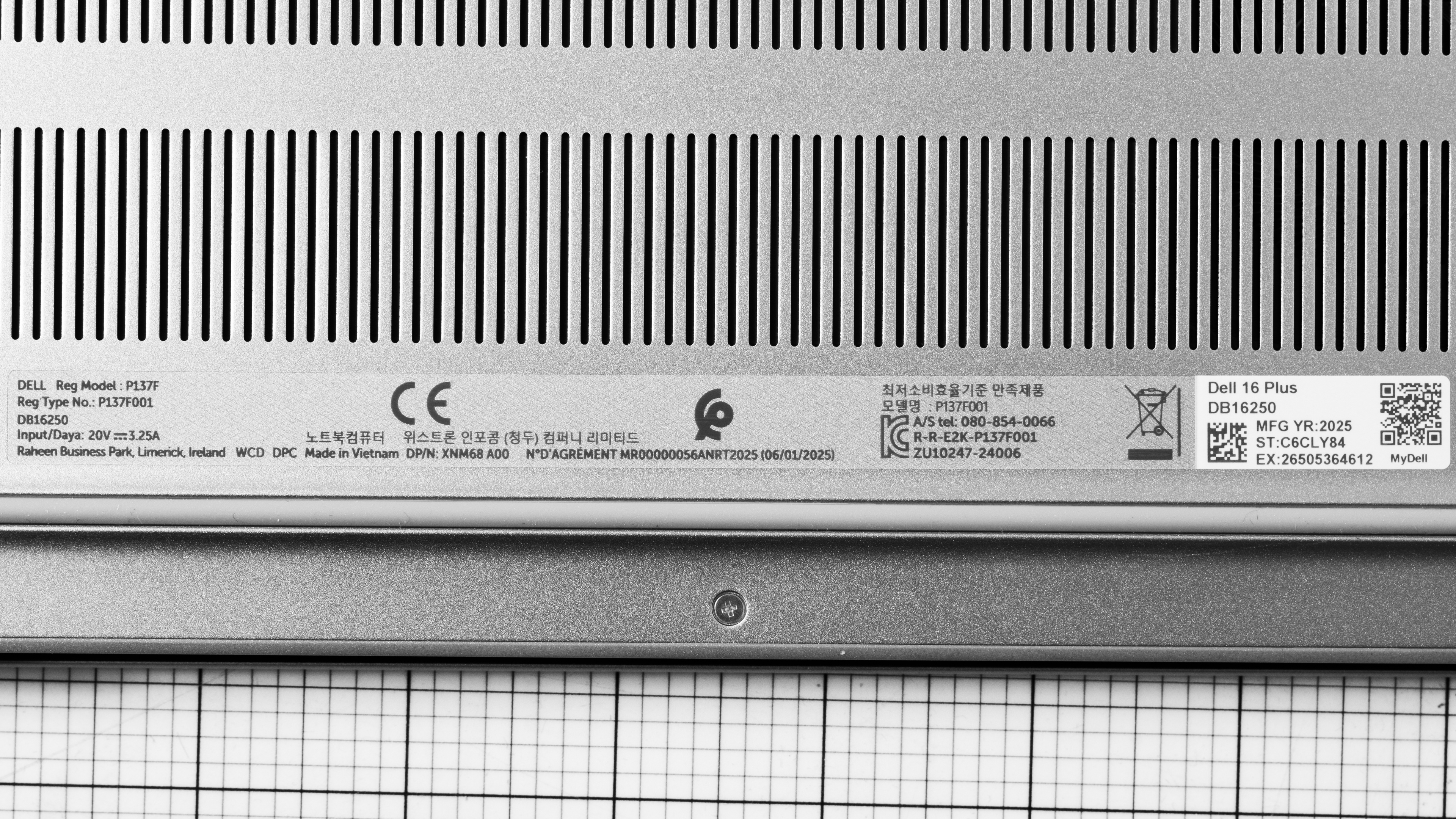
The Dell 16 Plus laptop is only available in the Ice Blue colorway. See the bottom of the laptop.
The Dell 16 Plus laptop feels very well-built. The outer chassis (lid and bottom) is metal, while the keyboard deck is plastic. There's a fair amount of flex on the keyboard deck, but almost none on the lid. The finish is relatively resistant to fingerprints and smudges, and while it may pick up some minor scratches from regular use, you can easily buff them away with a simple wipe. The feet feel solid and stick firmly to the bottom.
The hinges have a wide range that allows you to lay the screen flat, which is useful if you need to share content with someone opposite you. They're relatively stable; they move slightly when picking up the laptop quickly, though that isn't a significant issue in regular use. There's almost no wobble when adjusting the screen or when typing heavily.
Accessing the Dell 16 Plus laptop's internals is easy; you only need to remove nine Philips screws and use a prying tool to release the clips holding the bottom panel. The two top corner screws are longer than the rest, but they're also captive, meaning they remain attached to the panel, so you don't have to worry about mixing them up with the other shorter screws. The storage slot supports M.2 2230 PCIe Gen 4 NVMe SSDs.
The Dell 16 Plus laptop is available with the following displays:
- 16" IPS 1920 x 1200 60Hz (matte, 300 cd/m², 45% NTSC)
- 16" IPS 1920 x 1200 60Hz (touchscreen, glossy, 300 cd/m², 45% NTSC)
- 16" IPS 2560 x 1600 120Hz (matte, 300 cd/m², 100% sRGB)
- 16" Mini-LED 2560 x 1600 90Hz (touchscreen, glossy, HDR600, 100% DCI P3)
The two FHD+ displays are visually identical; the only differences are their anti-reflective coating and touch input support. In terms of sharpness, while a FHD+ resolution isn't uncommon on mid-range devices such as this laptop, it's on the low side for a 16-inch display, with a pixel density of 141 PPI, which is low enough that you can see individual pixels up close. The QHD+ panels will deliver the best viewing experience, but the higher resolution and refresh rates will drain the battery faster.
While the QHD+ panel's 120Hz refresh rate improves input responsiveness, its response time is quite slow, resulting in visible ghosting behind fast-moving objects. The 60Hz FHD+ displays are also slow, with the same 35 ms advertised response time. The 90Hz QHD+ (Mini LED) screen has a faster advertised response time of 11 ms.
The 120Hz QHD+ display's contrast ratio is good for an IPS panel, but low compared to other current display technologies like Mini LED and OLED. This contrast level makes blacks look gray in dim settings. Dell advertises a lower contrast ratio of 800:1 on the FHD+ panels. The 90Hz Mini LED display offers significantly deeper blacks due to local dimming, making it the ideal choice for dark room viewing and HDR content.
The 120Hz QHD+ display gets reasonably bright. It's suitable for most indoor settings, but you may have trouble seeing some dark-colored content if bright lights shine directly on the screen. Both FHD+ displays have the same advertised brightness of around 300 cd/m². The 90Hz Mini LED display is likely brighter; however, we can't confirm it, as Dell only advertises HDR600 certification.
The 120Hz QHD+ display's matte coating is not effective in handling reflections. Bright lights, such as a lamp or an open window during the day, are visible even with the screen at full brightness. Expect the glossy displays to struggle more with direct, mirror-like reflections, as most glossy panels do.
The 120Hz QHD+ display has poor accuracy out of the box. Its white balance is noticeably off, especially at higher brightness levels, and the gamma is too high throughout, making all scenes look too dark. Color accuracy is decent, though, as most inaccuracies are minor and hard to spot with the naked eye.
The 120Hz QHD+ display is an sRGB panel, meaning it only has full coverage of the commonly used sRGB color space. Dell advertises both FHD+ displays as having 45% NTSC coverage (roughly 65% sRGB). This means they'll appear slightly washed out, which is fine if you only view text documents, but isn't ideal for media consumption or color-critical work. The 90Hz QHD+ Mini LED display boasts the widest gamut, offering full coverage of the wider DCI-P3 color space.
The Dell 16 Plus has a decent keyboard. Its layout feels spacious and is relatively easy to get used to. The keys have a decent amount of travel and tactile feedback; overall, the typing experience is satisfactory but not particularly noteworthy. There are two backlight brightness levels; the backlight shines well through the legends, but could be a tad brighter.
The Dell 16 Plus laptop has a good touchpad. It's large enough to perform most actions and gestures with ease, and its surface is quite smooth, despite being made of plastic. The tracking is generally good, although it occasionally fails to register inputs near the left and right edges. Palm rejection works as intended, and there are no issues with actions like dragging and dropping. This is a diving board touchpad that can only be clicked in the bottom half; the buttons feel satisfyingly tactile but have very little travel.
The Dell 16 Plus has bottom-firing speakers that get decently loud with minimal compression artifacts. Unfortunately, they sound boxy and unnatural, with almost no bass whatsoever. They also get muddy at higher volume levels.
The webcam's video quality is okay. While the audio sounds relatively clear, the image looks soft, noisy, and washed out. The privacy cover is only a physical barrier, meaning the laptop can still record audio with the lens covered.
The Dell 16 Plus has a great port selection. The USB-A port supports USB 3.2 Gen 1 data transfer speeds of up to 5Gbps. Both USB-Cs support charging, video output, and data; however, the one closest to the HDMI port supports USB 3.2 Gen 2 data transfer speeds of up to 10Gbps and DisplayPort 1.4, while the other one supports Thunderbolt 4 data transfer speeds (up to 40Gbps) and DisplayPort 2.1. Dell advertises the HDMI port as HDMI 2.1, but we consider it HDMI 2.0 because it can only output a maximum resolution of 4k @ 60Hz.
The Dell 16 Plus laptop's wireless adapter is an Intel Wi-Fi 7 BE201. You can also get this laptop with an Intel Wi-Fi 6E AX211 adapter. If you aren't sure which to get, check out our article about the differences between Wi-Fi 6, 6E, and 7.
The Dell 16 Plus is available with the following SoCs:
- Intel Core Ultra 5 226V (8 cores/8 threads, up to 4.5GHz, 8MB cache)
- Intel Core Ultra 5 228V (8 cores/8 threads, up to 4.5GHz, 8MB cache)
- Intel Core Ultra 7 256V (8 cores/8 threads, up to 4.8GHz, 12MB cache)
- Intel Core Ultra 7 258V (8 cores/8 threads, up to 4.8GHz, 12MB cache)
- Intel Core Ultra 9 288V (8 cores/8 threads, up to 5.1GHz, 12MB cache)
These are low-power processors designed for general productivity tasks, such as web browsing, text processing, spreadsheets, and video playback. Unlike previous-generation Intel chips, these Lunar Lake processors are proper SoCs (System-on-Chip) with the RAM built in. This means the choice of the SoC will depend in part on how much RAM you need (see the RAM section for more details). Another significant change compared to the previous generation of Intel CPUs is the lack of Hyper-Threading, resulting in slightly slower multi-thread performance.
All five SoCs have the same core count and composition, consisting of four performance cores and four efficiency cores. The Core Ultra 5 226V and 228V are essentially the same chip, differing only in the amount of RAM. The same applies to the Core Ultra 7 256V and 258V. There's a performance difference between the Core Ultra 5, 7, and 9, but it's relatively minute and hard to notice in light, general productivity workloads. Finally, all five SoCs feature an NPU (Neural Processing Unit) to handle AI tasks, such as Windows Copilot, image generation in photo editing apps, and background blurring on video calls. The Core Ultra 5s' NPU has a rated performance of 40 TOPS (Trillions of Operations per Second). The Core Ultra 7s have a rated performance of 47 TOPS, and the Core Ultra 9 288V has a rated performance of 48 TOPS.
You can see more information about the Lunar Lake SoCs on Intel's support page.
The Dell 16 Plus laptop is only available with integrated graphics. The Core Ultra 5s use the Intel Arc 130V GPU, while the Core Ultra 7s and Core Ultra 9 use the slightly faster Intel Arc 140V. Both are low-power GPUs designed for general productivity. These ARC GPUs are a step up in gaming performance compared to Intel's previous generation of integrated graphics, allowing you to play some moderately intensive games at 1080p (with low graphical settings), but they don't improve much in terms of raw computing power in productivity workloads.
You can get this laptop with 16GB or 32GB of RAM. As the memory is an integrated part of the SoC, the 16GB configuration is only available on models with an Intel Core Ultra 5 226V or Core Ultra 7 256V SoC, while the 32GB option is only available on models with an Intel Core Ultra 5 228V, Core Ultra 7 258V, or Core Ultra 9 288V.
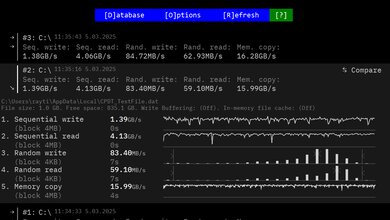
You can configure the Dell 16 Plus laptop with 512GB, 1TB, or 2TB of storage. The SSD is user-replaceable; the storage slot supports M.2 2230 PCIe Gen 4 NVMe SSDs.
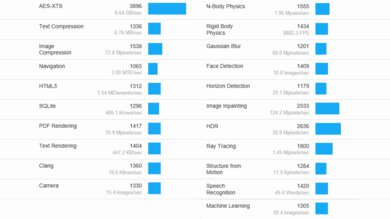
The Dell 16 Plus laptop's Intel Core Ultra 7 258V scores well in the Geekbench 5 benchmarks for a low-power SoC. While its multi-thread performance is a tad behind other current-gen chips, like the Apple MacBook Air 15 (M4, 2025)'s base M4 SoC, it's still more than adequate for this laptop's intended use, which is light, general productivity tasks such as web browsing, text processing, and video playback. For more intensive workloads, you're better off getting a gaming or workstation laptop with an HX CPU or an Apple MacBook Pro.
Unfortunately, while the new Arc Graphics are better than previous-generation integrated GPUs from Intel, they're still pretty weak compared to current-gen entry-level discrete GPUs when it comes to non-gaming computing tasks.
Here are additional benchmark scores from Geekbench 6 in case you're more familiar with those numbers:
- CPU Single-thread: 2,725
- GPU Multi-thread: 11,196
- GPU Compute: 34,874
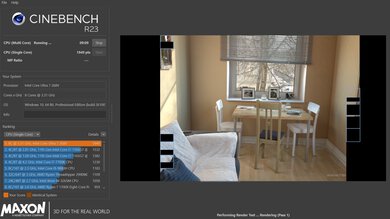
The Dell 16 Plus DB16250 scores reasonably well in Cinebench R23. This performance level is in line with most current-gen low-power CPUs, meaning it can handle light to moderately intensive workloads. If you need to perform highly demanding tasks, it's best to get a gaming or workstation laptop, like the HP OMEN MAX 16 (2025) or the Apple MacBook Pro 16 (2024).
Here are additional benchmark numbers from Cinebench 2024 in case you're more familiar with them:
- Single-thread: 121
- Multi-thread: 542
The Intel Core Ultra 7 258V's integrated Arc Graphics 140V scores decently well in the Basemark GPU benchmarks. This performance is roughly in the same ballpark as an NVIDIA GeForce GTX 1650 (mobile), an entry-level discrete GPU from 2019. It can handle some moderately demanding games at 1080p, but you'll have to lower the graphical settings to get playable frame rates. The Core Ultra 5's Arc Graphics 130V is weaker, so you can expect even lower frame rates.
The posted results apply to only to our model, which has a QHD+ IPS display. Models with an FHD+ display will have a longer battery life, while models with a 90Hz QHD+ Mini LED display will have a shorter battery life.
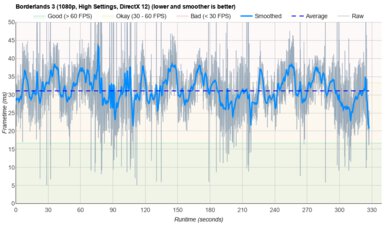
Borderlands 3 isn't playable on the Dell 16 Plus DB16250. Although you can get over 60 fps at 1080p with the lowest settings, the game is far too choppy due to frequent frame drops.
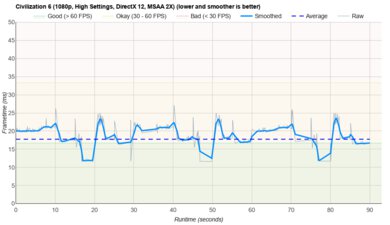
Civilization VI runs pretty smoothly with just a few tweaks in the settings since it isn't a graphically demanding game. The Intel Core Ultra 5's Arc 130V GPU won't have any problems either. The average turn time is decent and within the expected range for a low-power SoC; upgrading to the Core Ultra 9 will have minimal effect on the turn time.
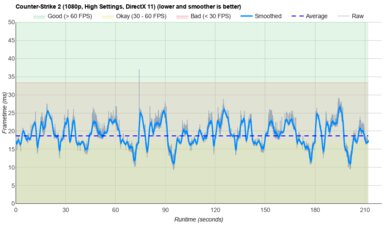
Counter-Strike 2 isn't really playable. You can get high frame rates at 1080p with the lowest graphical settings, but you'll likely encounter frequent frame drops, which isn't ideal for an FPS game that requires fast reaction times and precise aiming.
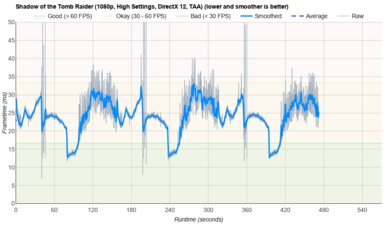
Shadow of the Tomb Raider runs poorly on the Dell 16 Plus laptop. You can get close to 60 fps at 1080p with the lowest graphical settings, but the gameplay is still choppy due to frame drops. The performance will be even worse on models with a Core Ultra 5 SoC.
The keyboard gets warm under load but not to the point of causing discomfort. The bottom is much hotter, though, reaching 52.8 °C (127.04 °F) even with the 'Cool' setting (under Thermal Management in the Dell Optimizer app) enabled, which pushes the fans to their top speed. Thankfully, the fans are relatively quiet.
You can get the Dell 16 Plus laptop with Windows 11 Home or Pro. There are many pre-installed software applications; see this video for the full list.