See the previous 0.9.1 changelog.
Laptop Test Bench 1.0 makes it easier to decide whether a laptop is right for you. We've added performance ratings at the top of our reviews and refined our existing usage scores. We've also simplified some tests and reorganized our results to make reviews clearer and easier to understand.
What's Changed?
| Section | Main Changes |
|---|---|
| Our Verdict | Renamed three usages, changed their score components, and added four performance usages. |
| Design | Renamed Build Quality to Chassis Quality, changed Hinge Stability to a score, and reorganized several fields. |
| Display | Corrected contrast results for OLED displays, moved touch and pen support information, and removed the Black Uniformity test and refresh rate image. |
| Battery | Created a dedicated section for the Battery test group. |
| Interface | Added a separate Fingerprint Sensor field, renamed Operating Force, and removed Webcam Position. |
| Connectivity | Removed scoring from the Ports test group. |
| Configuration | Removed secondary drive fields and clarified the RAM capacity field. |
| Performance | Consolidated GPU tests and removed several benchmarks and score fields. |
| Additional Features And Software | Removed the section and its Additional Software, RGB Illumination, and Secondary Display fields. |
Why Are We Making These Changes?
Choosing a laptop means balancing how you'll use it with the features and performance that matter most to you. Our updated usage scores help you assess whether a laptop suits your needs, while the new performance usages let you compare specific aspects, like battery life or processing performance, directly at the top of the review.
We're also simplifying how we present our testing. Bringing related results together, clarifying field names, and removing some tests and fields makes our reviews easier to follow and helps you find the information you need.
Our Verdict
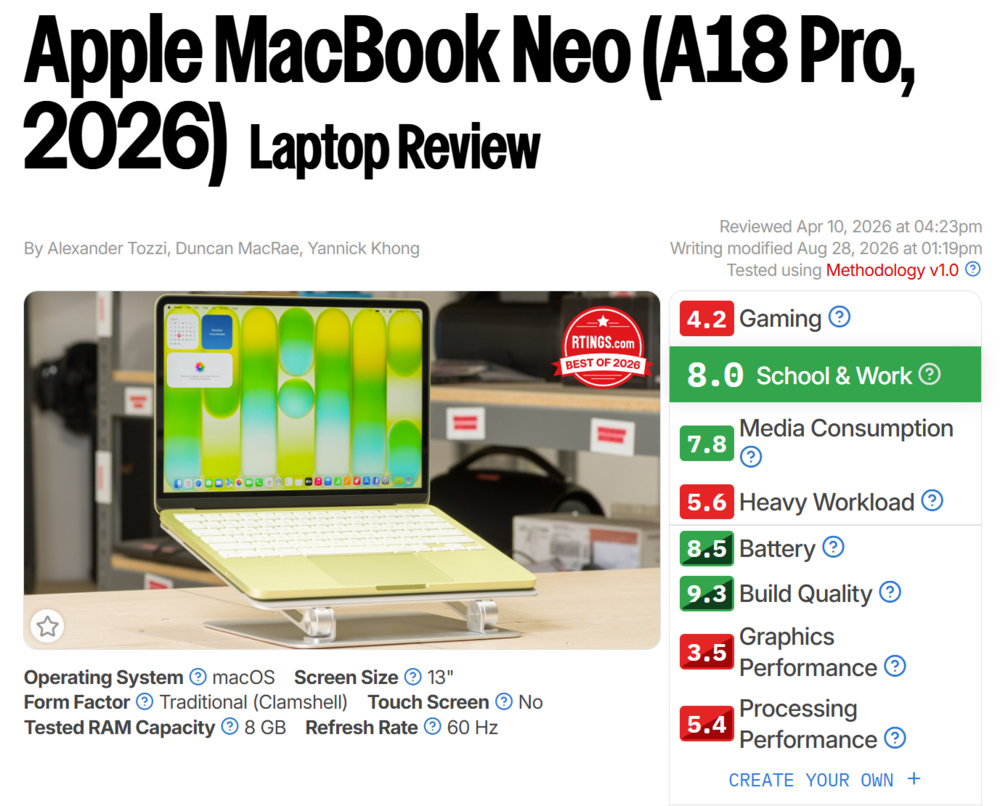
We've renamed three usages in the Our Verdict section and changed the components that contribute to each score:
| Previous Name | New Name |
|---|---|
| General Productivity | School & Work |
| Workstation | Heavy Workload |
| Multimedia | Media Consumption |
These changes refine how we rate a laptop's suitability for each use.
Performance Usages
We've added four performance usages at the top of our reviews:
- Battery
- Build Quality
- Graphics Performance
- Processing Performance
These ratings help you quickly see some of the most important aspects of a laptop at a glance.
The new Build Quality performance usage is separate from the test group previously called Build Quality, which we've renamed Chassis Quality.
Design
We've renamed the Build Quality test group to Chassis Quality. In the Hinge test group, Stability is now reported as a numerical score instead of a word rating.
We've removed the Style test group and moved its Form Factor field to Hinge. We've also moved the Operating System field from Software to Serviceability.
Display
We've corrected our Contrast test to report an infinite contrast ratio for OLED displays. OLED pixels can turn off completely to display black, and the updated result reflects this.
We've moved the touch and pen support fields from Extra Features to Screen Specs, bringing them together with the other screen specifications.
We've also removed the Black Uniformity test and the image from the Refresh Rate test group.
Battery
Battery now has its own review section. We've moved the Battery test group there from Performance, making battery results easier to find.
Interface
The Keyboard test group now includes a separate Fingerprint Sensor field, split from the previous Biometrics field.
We've also renamed Operating Force to Peak Tactile Force in the Keyboard test group and removed the Webcam Position field.
Connectivity
We've removed the score from the Ports test group. Port information remains available in the review.
Configuration
We've removed the Drive 2 and Drive 2 Type fields from the Storage test group since secondary drives in laptops are very uncommon.
In the RAM test group, we've renamed Capacity to Tested Capacity to clarify that the value refers to the configuration we tested.
Performance
We've brought graphics benchmarks together in a single GPU Performance test group, replacing High Tier Graphics, Low Tier Graphics, and Professional 3D (GPU Accelerated). This makes the results easier to find and compare.
We've also removed two benchmarks:
- mprep – Stress My GPU
- GFXBench – High Level Test (Vulkan/Metal)
In our CPU-Intensive Game Performance and GPU-Intensive Game Performance test groups, we've removed the Baldur's Gate 3 results and previous methodology score fields. We've also removed Black Myth: Wukong from our benchmark games.
We've removed the separate RT Performance test group and moved its ray tracing benchmarks to GPU-Intensive Game Performance. You can now find these results alongside the other GPU gaming benchmarks.
Lastly, for this section, we've renamed the Performance Over Time test to Performance Stability and now run it for 30 minutes instead of 60. We're making this change to better highlight the significant performance dips that laptops tend to make before stabilizing.
Additional Features And Software
We've removed the 'Additional Features And Software' section, including the Additional Software, RGB Illumination, and Secondary Display fields.
What Do You Think?
Do these changes make it easier to find the right laptop for you? Let us know in the comments if you have questions or suggestions for future updates to our laptop testing.
27 Laptops Updated
We have retested popular models. The test results for the following models have been converted to the new testing methodology. However, the text might be inconsistent with the new results.
- Acer Chromebook Plus Spin 714 (2024)
- Apple MacBook Air 13 (M4, 2025)
- Apple MacBook Air 13 (M5, 2026)
- Apple MacBook Neo (A18 Pro, 2026)
- Apple MacBook Pro 14 (M5, 2025)
- Apple MacBook Pro 16 (M4, 2024)
- ASUS Chromebook CX15 (2026)
- ASUS ROG Flow Z13 (2025) GZ302
- ASUS Zenbook A14 UX3407 (2025)
- Dell Alienware 15 (2026)
- Dell Alienware 18 Area-51 (2025)
- Dell Pro Max 16 (2025)
- Dell XPS 13 (2026)
- Dell XPS 14 (2026)
- Framework Laptop 12 (2025)
- Framework Laptop 13 (2025)
- Framework Laptop 16 (2026)
- Gigabyte AORUS MASTER 16 (2025)
- HP OMEN MAX 16 (2025)
- HP OmniBook 3 14 (2025)
- HP OmniBook 5 16 (2026)
- Lenovo IdeaPad 5a 2-in-1 14 (2026)
- Lenovo ThinkPad X1 Carbon Gen 14 Aura Edition (2026)
- Lenovo ThinkPad X9 Aura Edition (2025)
- LG gram Pro 2-in-1 16 (2026)
- Microsoft Surface Laptop 7th Edition 15 (2024)
- Microsoft Surface Pro 13 12th Edition (2026)