
The HyperX Pulsefire Haste is an excellent gaming mouse with a honeycomb body that makes it very lightweight. It feels well-built and durable and has a comfortable design that's suitable for most hand sizes using any grip style. It also comes with extra grip tape for those who want a better hold. It has remarkable feet that provide a smooth gliding experience. It also has very good click latency and a wide CPI range that’s pretty consistent, although you can’t adjust it super precisely. Unfortunately, it doesn’t have as many programmable inputs as other gaming mice, but it should still be adequate for most people. Also, the software doesn’t offer that many customization options and isn’t compatible with macOS, but at least you can save your favorite profile on the onboard memory.
Our Verdict
The HyperX Pulsefire Haste is acceptable for office use. While it's very comfortable and feels well-built, it lacks useful office features, like a horizontal scrolling wheel or wireless connectivity. It also doesn't have that many programmable inputs, and even though the mouse works on macOS, the companion software doesn't, so you can't make any customization changes.
- Comfortable, ambidextrous design.
- Feels very well-built and solid.
- Well-suited for most hand sizes with any grip type.
- May be too bulky for some laptop cases.
- Can’t be used wirelessly.
- Software not available on macOS.
The HyperX Pulsefire Haste is an excellent FPS gaming mouse. It has a honeycomb design that makes it very lightweight, while still feeling well-built and durable. Its click latency is very good, so most gamers won't notice any delays, and it has excellent feet that provide a smooth gliding experience. Its design is quite universal, and only people with smaller hands may find it hard to use it with a fingertip grip.
- Low click latency.
- Very lightweight.
- Well-suited for most hand sizes with any grip type.
- May be too bulky for some laptop cases.
- Only six programmable inputs.
The HyperX Pulsefire Haste is a decent choice for MMO gaming. It's a very comfortable mouse that feels durable and that should fit most hand sizes using any grip type. It also has very good click latency and a wide CPI range. Unfortunately, it doesn't have nearly as many programmable buttons as dedicated MMO mice, and the onboard memory only allows you to save one profile at a time.
- Comfortable, ambidextrous design.
- Feels very well-built and solid.
- Well-suited for most hand sizes with any grip type.
- May be too bulky for some laptop cases.
- Software not available on macOS.
- Not nearly as many buttons as a dedicated MMO mouse.
- May be too bulky for some laptop cases.
Changelog
- Updated Aug 19, 2025: We've converted this review to Test Bench 1.5.1. This update removes less relevant or redundant elements, including several videos. We've also adjusted our Sensor Latency testing, resulting in minor score changes. See our full 1.5.1 changelog for details.
- Updated Jan 05, 2024: We've updated the CPI graph displayed in the Sensor Latency section of this review. Our results remain the same, but these graphs have two new columns with results from the Delay At Half Movement and Delay To End Of Movement tests.
- Updated Oct 02, 2023: We've added text to this review for the new tests added in TBU 1.5.
- Updated Oct 02, 2023: We've converted this review to Test Bench 1.5. This update adds a new Main Button test group, which provides button actuation data and switch information. We've also made minor changes to how we calculate the Office usage score. For more details, you can see our full changelog here.
Check Price
Differences Between Sizes And Variants
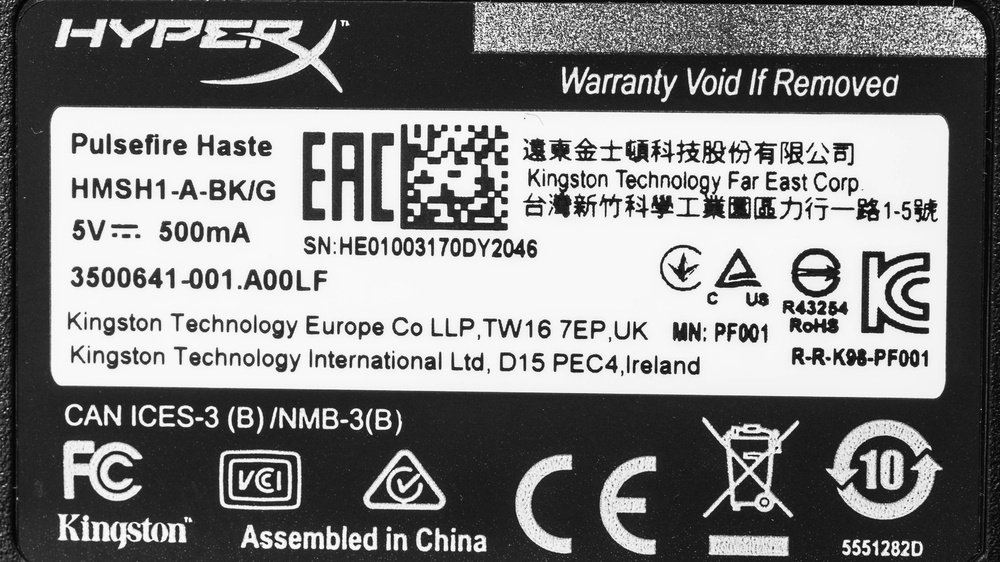
There are no other variants of the HyperX Pulsefire Haste, and it only comes in black. You can see our unit's label here.
Popular Mouse Comparisons
The HyperX Pulsefire Haste is an excellent ultra-light gaming mouse and is among the lightest ones we’ve tested. Compared to other gaming mice, it has an almost universal design that fits most hand sizes using any grip style; only people with smaller hands using a fingertip grip may have a harder time reaching all the buttons. It also comes with extra grip tape to customize the L/R clicks and the sides to your liking. Unfortunately, it doesn’t have as many programmable inputs as other mice we’ve tested, and the L/R click buttons can only be reprogrammed as each other. For more options, check out our recommendations for the best mice, the best wired mice, and the best gaming mice.
The Logitech G PRO X SUPERLIGHT and the HyperX Pulsefire Haste are excellent ultra-light gaming mice with symmetrical shapes, but the Logitech has better overall performance. The Logitech connects wirelessly with its USB receiver. Its feet glide more smoothly on mousepads and desks, it has lower click latency, and it has a wider CPI range. Its software is also compatible with Windows and macOS. On the other hand, the HyperX is a wired-only model. It also has RGB lighting, which the Logitech lacks. However, its software is only compatible with Windows.
The Razer Viper Mini and the HyperX Pulsefire Haste are both excellent ultra-light gaming mice. The HyperX features a honeycomb design, while the Razer has a plain body, but both are very light and weigh almost the same. The Razer has many more programmable inputs, as it allows you to cycle through different profiles directly on the mouse. It also has a much lower click latency. On the other hand, the HyperX is slightly more comfortable and is suitable for a lot more hand sizes and grip types, especially if you have larger hands. It also has a lower lift-off distance and a wider CPI range with a lot less variation.
The GLORIOUS Model O and the HyperX Pulsefire Haste perform quite similarly. Both options are wired-only and feature a honeycomb design, but the HyperX is shorter and a bit lighter. It also has a wider CPI range and slightly better click latency, though the difference shouldn’t be noticeable. On the other hand, the GLORIOUS' cable is a little more flexible, and its set CPI is slightly more consistent. It also allows you to save more than one profile to its onboard memory.
The HyperX Pulsefire Haste 2 and the HyperX Pulsefire Haste are lightweight gaming mice in the same lineup. The newer Haste 2 has a solid plastic shell and is more lightweight. It has lower click latency, significantly better sensor performance, and it supports a higher maximum polling rate of 8000Hz. On the other hand, the older Haste feels a bit sturdier, but it's also heavier and has small honeycomb-shaped cutouts on its body.
Test Results

for pictures & test results


for pictures & test results








for pictures & test results




for pictures & test results



for videos & test results
