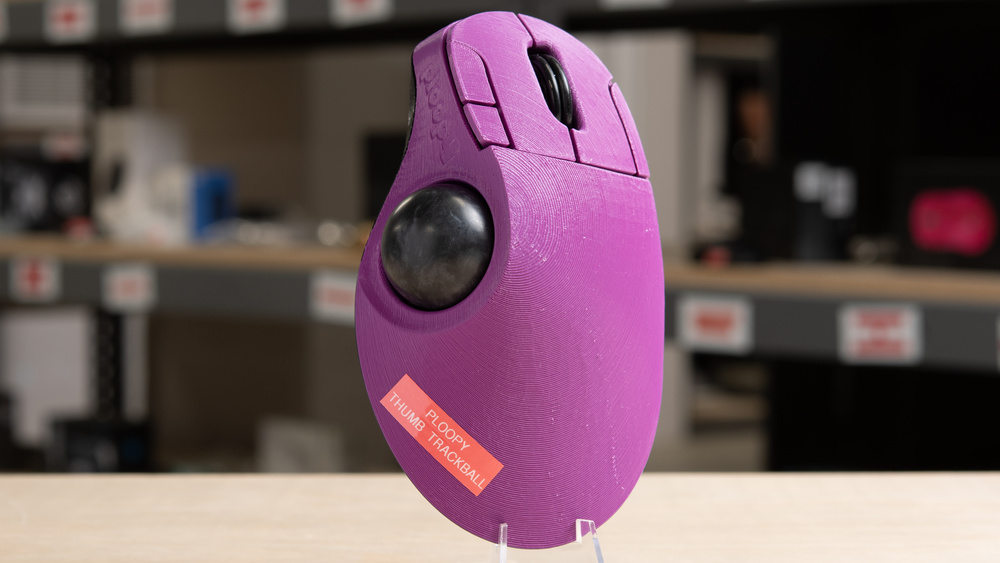
The Ploopy Thumb Trackball is a wired, thumb-operated trackball mouse available as either a prebuilt unit or a "do-it-yourself" kit. It has a 3D-printed case and uses roller bearings for trackball movement. It also supports VIA for button remapping and QMK for deeper firmware-level customization. We bought a fully assembled unit for our review. For more details, see the Differences Between Variants section.
Our Verdict
The Ploopy Thumb Trackball scores poorly on our test bench for work use, though we should note that our scoring is geared more towards conventional mice and places greater emphasis on wireless connectivity and work-focused features such as secondary scroll wheels. That said, this may still be a good option if you're specifically looking for a thumb-controlled trackball. It has a large, right-handed 3D-printed body and offers extensive customization on both the hardware and software sides. Unfortunately, its build quality is disappointing. The 3D-printed shell feels rough, and there are some fit and finish issues with the buttons. The optional 20-degree wedge also doesn't fit securely, resulting in noticeable wobble.
DIY design is highly customizable and repairable at the hardware level.
Supports VIA software and QMK firmware.
Build quality is functional with a distinct DIY aesthetic, but it feels very rough and unpolished.
Optional wedge attachment doesn’t fit securely, resulting in some wobble during use.
Though not designed specifically for FPS gaming, the Ploopy Thumb Trackball is suitable for both casual and competitive play. That said, it may take some time to adjust if you're used to a conventional mouse, and you may want to use a third-party utility like RawAccel to fine-tune acceleration for faster tracking. It has excellent click latency, but due to our test rig, which is designed primarily for conventional mice, we can't evaluate sensor latency. However, it uses a reliable flagship gaming sensor we've tested in other mice, and we expect similarly responsive performance without any noticeable delay. Unfortunately, the build quality is disappointing. The 3D-printed body feels rough, there are some fit and finish issues with the buttons, and the optional wedge attachment doesn't fit securely, resulting in wobble.
DIY design is highly customizable and repairable at the hardware level.
Supports VIA software and QMK firmware.
Excellent click latency.
Build quality is functional with a distinct DIY aesthetic, but it feels very rough and unpolished.
Optional wedge attachment doesn’t fit securely, resulting in some wobble during use.
The Ploopy Thumb Trackball is alright for MMO gaming, though it doesn't have nearly as many buttons as dedicated MMO mice, which often have 12-button side panels. That said, its six buttons are fully customizable using VIA or QMK. It also has excellent click latency, and while we can't evaluate sensor latency with our current test rig, which is designed for conventional mice, it uses a widely used and reliable previous-generation gaming sensor that should still provide a responsive experience. Unfortunately, the build quality is disappointing overall. The 3D-printed case feels rough and looks unpolished, and the optional 20-degree wedge we bought doesn't fit securely, resulting in noticeable wobble.
DIY design is highly customizable and repairable at the hardware level.
Supports VIA software and QMK firmware.
Build quality is functional with a distinct DIY aesthetic, but it feels very rough and unpolished.
Optional wedge attachment doesn’t fit securely, resulting in some wobble during use.
The Ploopy Thumb Trackball delivers superb raw performance. It's suitable for playing casual or competitive games. It has excellent click latency and a 1000Hz polling rate, which is rare for trackball mice and helps, in part, to maintain consistent low latency performance. We can't test the sensor latency using our current test methodology, which is primarily geared toward testing conventional mice. However, its sensor model, PixArt PMW3360, is a previous-generation gaming sensor with an excellent performance record, so we're confident it provides a responsive experience without any perceptible delay. For more details, see the Sensor Latency section.
Excellent click latency.
1000Hz polling rate, still relatively rare for trackball mice.
Changelog
- Updated Jun 30, 2026: We've converted this review to Test Bench 1.5.2. This update removes the Delay To Start Of Movement and Delay To End Of Movement measurements from the Sensor Latency test. See our full 1.5.2 changelog for details.
- Updated Apr 13, 2026: Review published.
- Updated Jan 26, 2026: Early access published.
- Updated Jan 15, 2026: Our testers have started testing this product.
Check Price
Differences Between Sizes And Variants
The Ploopy Thumb Trackball is available as either a prebuilt unit or a build-it-yourself kit. For both configurations, you can choose from Black, Blue, Purple, or Yellow case colors, as well as Red, Blue, or Black trackball options. An optional 20-degree wedge is available, along with the option to purchase a USB-A to USB-C cable.
We bought a prebuilt unit with a Purple case and a Black trackball, along with the optional wedge. While we typically include a photo of the serial number of our unit, there's no visible serial number on this model.
Popular Mouse Comparisons
The Ploopy Thumb Trackball is a wired, open-source trackball mouse with all the design files and documentation available online. It has a 3D-printed ergonomic base and uses a thumb-operated design rather than a finger-operated one. What sets it apart is its focus on customization. With open design files, a DIY build option, and support for VIA and QMK, it offers far more flexibility than mainstream alternatives like the Logitech MX ERGO. Granted, this focus comes with some trade-offs. The Ploopy uses rough 3D-printed plastic parts with a coarse texture, some cosmetic marring, and minor fit-and-finish issues, especially with the buttons, which can shift slightly out of alignment if pressed at certain angles. In comparison, the MX ERGO feels much more polished but isn't designed for physical modification and offers only basic software customization.
Another notable design difference is that the Ploopy Thumb Trackball uses "roller" bearings instead of the static bearings found in most other trackball mice, including models like the Kensington SlimBlade Pro Trackball, the ELECOM HUGE M-HT1DRBK, and the Logitech MX ERGO. These bearings are noticeably louder but provide smooth, consistent motion and help reduce static friction, or "sticktion."
For more recommendations, see our picks for the best ergonomic mouse, the best work mouse, and the best trackball mouse.
The Kensington Expert Mouse Wireless Trackball and the Ploopy Thumb Trackball are both trackball mice, but they use different control styles. The Kensington is a finger-operated model, while the Ploopy is thumb-operated. Neither is inherently better, and the choice largely comes down to personal preference and any specific ergonomic issues you deal with. The Kensington is wireless and supports both a USB receiver and Bluetooth connection, while the Ploopy is wired-only. The Ploopy is also much bulkier and has a distinct DIY look and a rough 3D-printed finish, but it's also far more customizable on both a hardware and software level. It's available as a prebuilt unit or a "build-it-yourself" kit and supports VIA and QMK for customization. It also has a higher polling rate and a newer sensor, making it the better option for gaming.
The Logitech MX ERGO and the Ploopy Thumb Trackball are both thumb-operated trackball mice. The Logitech has a more polished build quality, with higher-quality materials and better fit and finish. It's also a wireless model that connects via USB receiver or Bluetooth. The Ploopy, by comparison, is a wired-only model with a much more DIY look and feel, including a rough 3D-printed body. That said, it's designed with a high degree of hardware customizability and supports more in-depth software customization via VIA and QMK. It also has a newer sensor and better click latency, making it the better choice for gaming. However, the Logitech's scroll wheel supports tilt inputs, which the Ploopy lacks. The Logitech also includes a tilt adjustment plate, while the Ploopy's optional wedge is sold separately and didn't fit securely on our unit, resulting in some wobble during use.
The Ploopy Thumb Trackball and Kensington SlimBlade Trackball are both trackball mice, but they use different control styles. The Ploopy is thumb-operated, while the Kensington is finger-operated. Neither has a clear advantage, and the choice comes down to your personal preference and ergonomic needs. The Ploopy is a wired-only model that's significantly bulkier, with a distinct DIY look and a rough 3D-printed body. That said, it's designed to be much more customizable on both a hardware and software level, with support for VIA and QMK. It also has a higher polling rate and a newer sensor, making it the better option for gaming. The Kensington, on the other hand, is a wireless model that connects via USB receiver or Bluetooth. It has a low-profile design that takes up less desk space, but it isn't designed for hardware customization and offers more limited software options.
Both the Ploopy Adept Trackball and Ploopy Thumb Trackball are similar wired trackball mice, but they use different control setups. The Adept is finger-operated, while the Thumb is thumb-operated. Neither has a clear advantage, and the choice comes down to your ergonomic preferences. Both share the same design philosophy, with fairly rough but functional 3D-printed cases, and a strong focus on hardware and software customizability. The Adept is ambidextrous, has a lower-profile design, and takes up less desk space, while the Thumb is a right-handed model that's considerably bulkier. While both have the same number of programmable buttons, the Thumb has a conventional scroll wheel, whereas the Adept uses a click-and-drag scrolling function with the trackball. They also use the same sensor and deliver excellent click latency, making them suitable for casual or even competitive gaming.
Test Results

for pictures & test results


for pictures & test results








for pictures & test results






for videos & test results
