Pulsar X3  Mouse Review

Reviewed Feb 27, 2025 at 02:11pm
Tested using Methodology v1.5.1 
Pulsar X3
7.1
Work 
9.1
Video Games (FPS) 
7.8
Video Games (MMO) 
9.3
Raw Performance 
 2

The Pulsar X3 is a lightweight wireless gaming mouse. It has a right-handed "ergo" shape with a fairly aggressively curved left side and supportive rear hump, making it well-suited for a palm or claw grip for medium or large-sized hands. This model uses Kailh optical switches and a Pulsar-branded XS-1 sensor, which is based on the PixArt PAW3950.

This mouse is available in different sizes and in right- or left-handed shapes. We bought a right-handed medium (Size 2) model. For more details, see the Differences Between Variants section.

Our Verdict

7.1
Work 

The Pulsar X3 is decent for work use despite not being designed specifically for it. It has a supportive right-handed shape that comfortably accommodates medium or large hand sizes. It also has excellent build quality, and you can easily remap buttons using the companion software. Unfortunately, it doesn't have Bluetooth support for multi-device pairing. Additionally, it lacks helpful productivity features like free-scrolling and L/R scroll tilt inputs.

Pros
  • Excellent build quality.

  • Supportive shape for palm or claw grip.

Cons
  • Scroll wheel lacks L/R tilt inputs and free-scrolling.

  • No Bluetooth connectivity or multi-device pairing.

9.1
Video Games (FPS) 

The Pulsar X3 is a remarkably good FPS gaming mouse. It's extremely lightweight and well built and has a smooth chalky coating that helps ensure a solid grip. Its right-handed 'ergo' shape is a good fit for medium or large hands using a palm or claw grip. Performance-wise, it boasts outstanding click latency and excellent sensor latency, delivering a highly responsive experience in-game.

Pros
  • Excellent raw performance.

  • Extremely lightweight.

  • Excellent build quality.

  • Supportive shape for palm or claw grip.

Cons
None
7.8
Video Games (MMO) 

The Pulsar X3 is good for MMO gaming, although it doesn't have as many additional buttons as a dedicated MMO mouse. That said, you can still easily reprogram its buttons using the companion software. It also has excellent build quality and raw performance and a right-handed shape that's supportive and comfortable even for long gaming sessions.

Pros
  • Excellent raw performance.

  • Excellent build quality.

  • Supportive shape for palm or claw grip.

Cons
  • Fewer side buttons than dedicated MMO mice.

9.3
Raw Performance 

The Pulsar X3 has excellent raw performance and consistently delivers a highly responsive-feeling gaming experience. It has both remarkable click latency and excellent overall sensor performance using the maximum default polling rate of 1000Hz.

Pros
  • Outstanding click latency.

  • Excellent overall sensor performance.

Cons
None
  • 7.1
    Work
  • 9.1
    Video Games (FPS)
  • 7.8
    Video Games (MMO)
  • 9.3
    Raw Performance
  • Changelog

    1.  Updated Aug 19, 2025: We've converted this review to Test Bench 1.5.1. This update removes less relevant or redundant elements, including several videos. We've also adjusted our Sensor Latency testing, resulting in minor score changes. See our full 1.5.1 changelog for details.
    2.  Updated May 23, 2025: 

      We've corrected an error where we incorrectly marked this mouse as not left-handed friendly in the shape test, when there's actually a left-handed version available.

    3.  Updated Mar 27, 2025: 

      We've added measurements with Pulsar's 8K dongle (sold separately), which were initially omitted while we investigated unusual results. That investigation is now complete—we've identified that the anomalies were caused by differing byte positions in the report packet data when using the 8K dongle. We're confident in our finalized results, which we've added to the Click Latency and Sensor Latency sections.

    4.  Updated Feb 27, 2025: Review published.

    Check Price

    Differences Between Sizes And Variants

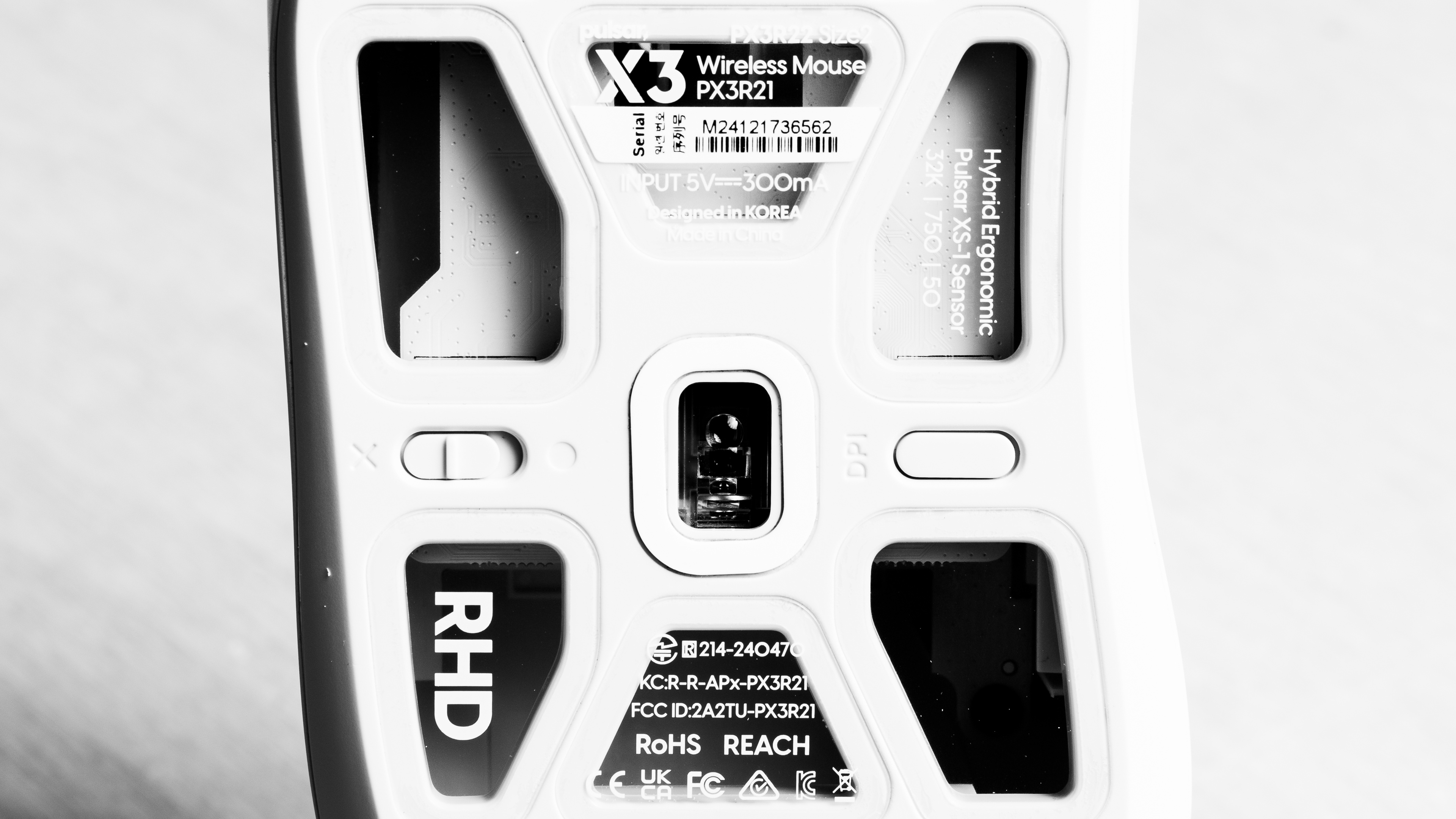
    The Pulsar X3 is available in a Black or White colorway. We tested a White unit (Medium/Size 2). See a photo of our unit's label.

    As part of Pulsar's wider X3 series, there are also mini and left-handed variants available.

    Name Size Handedness
    Pulsar X3 Medium (Size 2) Right
    Pulsar X3 Mini Small (Size 1) Right
    Pulsar X3 LHD Medium (Size 2) Left
    Pulsar X3 LHD Mini Small (Size 1) Left

    Apart from their shapes and handedness, there are no advertised internal differences. We expect all models in the table to deliver the same performance as the model we tested.

    Popular Mouse Comparisons

    The Pulsar X3 is a lightweight wireless gaming mouse with a right-handed "ergo" shape. Pulsar indicates on their product page that the shape is based on the Pulsar Xlite V3 family of mice, but the hump is broader and more supportive, making it better-suited for claw or palm grip or more hybrid grips in between, while the Xlite V3 is best suited for a palm grip, exclusively. However, many in the community have also pointed out that the shape is virtually identical to the Logitech G703 LIGHTSPEED with HERO Sensor, although the side buttons on the X3 are slightly higher. 

    The X3 uses an updated Pulsar-branded sensor based on PixArt's PAW3950, which offers marginal benefits, such as the ability to track on transparent glass surfaces and slightly better stability at higher polling rates. Altogether, this mouse is a great lightweight option if you prefer more versatile "ergo" shapes. Price to performance-wise it also compares favourably to more expensive flagship models from bigger brands. It performs roughly as well as the Razer DeathAdder V3 Pro, though it doesn't match the same raw performance as the Logitech G PRO X SUPERLIGHT 2 DEX.

    For more recommendations, see our picks for the best gaming mouse, the best wireless gaming mouse, and the best lightweight mouse.

    Pulsar X2

    These two mice offer very similar performance. The Pulsar X3 has a right-handed ergonomic shape suited for claw or palm grips. It features a newer sensor that provides minor benefits, like tracking on transparent glass and slightly better stability at higher polling rates. It also uses optical switches, which are generally more durable than the mechanical switches on the Pulsar X2. In comparison, the X2 has a symmetrical shape that's versatile but best suited for claw or fingertip grips.

    Pulsar Xlite V3

    The Pulsar X3 and Pulsar Xlite V3 offer similar raw gaming performance. The X3 has a newer sensor model, but this only provides minor benefits, like tracking on transparent glass and slightly better stability at higher polling rates. The main difference is shape: The X3's shape is based on the Xlite V3 but is more versatile for claw or palm grips with a broader hump towards the rear. In contrast, the Xlite V3 is optimized for palm grip, with a more pronounced downward slope at the rear. Note: Both have small and medium variants, but only the Xlite V3 offers a large version, making it better suited for extra-large hands.

    Razer DeathAdder V3 Pro

    The Razer DeathAdder V3 Pro and the Pulsar X3 are lightweight gaming mice with right-handed "ergo" shapes and very similar raw gaming performance. The Pulsar has a slightly lower hump that widens more towards the rear, offering palm support, making it suitable for either a palm or claw grip. On the other hand, the DeathAdder's rear isn't as wide and tapers more, making it better suited for a pure palm grip. The Pulsar is also a bit lighter, but it has an open baseplate design that it's potentially more prone to collecting dust and debris.

    Logitech G PRO X SUPERLIGHT 2 DEX

    The Logitech G PRO X SUPERLIGHT 2 DEX and the Pulsar X3 are lightweight wireless gaming mice with right-handed "ergo" shapes. The Logitech's shape is versatile but overall best suited for a palm grip. It also has better raw gaming performance and supports a maximum polling rate of 8Khz out of the box. Comparatively, the Pulsar's shape has a wider and more supportive rear that makes it suited for palm or claw grips. It supports a polling rate of 1000Hz out of the box, but you can buy a separate 8k dongle to increase the polling rate to 8000Hz.

    Pulsar X2V2

    The Pulsar X2V2 and Pulsar X3 are wireless gaming mice with similar performance and nearly identical weights. The main difference is their shape: The X2V2 has a symmetrical shape best suited for claw or fingertip grips, while the X3 features a right-handed "ergo" shape with a pronounced hump and broad rear, making it well-suited for palm or claw grips. The X3 also uses a slightly newer sensor, but this provides only marginal benefits, like tracking on transparent glass and slightly better stability at higher polling rates.

    Logitech G703 LIGHTSPEED with HERO Sensor

    The Pulsar X3 and Logitech G703 LIGHTSPEED with HERO Sensor are wireless gaming mice with nearly identical shapes, but the X3 is significantly lighter and offers better raw performance. It also features higher-quality feet and uses optical switches that aren't prone to developing double-clicking issues over time.

    Test Results

    perceptual testing image
    Sort:
    RATINGS
    Category:
    All
    Design
    Style
    Type
    Standard
    Coating
    Matte
    Lighting ColorNo Lighting

    This mouse has a straightforward, minimal design, a matte coating, and glossy side buttons. There isn't any RGB lighting, but there's a small CPI indicator on the left side towards the front. 

    This mouse also has an open baseplate design that allows you to see inside the mouse. However, unlike some other open baseplate designs—including many earlier Pulsar models—its internals aren't actually exposed, as the openings are covered by transparent plastic pieces. You can see these coverings more clearly in this photo.

    Shape
    Length4.9" (125 mm)
    Width2.7" (68 mm)
    Height1.8" (46 mm)
    Grip Width
    64.1 mm
    Ambidextrous
    Shape Only
    Left-Handed Friendly
    Left-Handed Version Available
    Finger Rest
    No

    Note that smaller and left-handed variants are available. See the Differences Between Variants section for more details. 

    8.5
    Build Quality

    The Pulsar X3 has excellent build quality. The plastic shell feels very sturdy, and it has a matte finish with a smooth, chalky texture that's quite grippy and resistant to scratching. The main buttons have crisp tactility, but the side buttons are a little on the mushy side. Note that this mouse does have an open baseplate design that allows you to see inside the mouse, but there are plastic pieces that cover the openings to prevent dust and debris from getting inside. There's a small degree of flexibility on the underside panels, but this is expected and doesn't present any issues when playing normally.

    9.3
    Weight
    Lowest Weight
    54.4 g
    Default Weight
    54.4 g
    Weight Distribution
    Centered
    Extra Weights
    No
    Hand Size Recommendation
    Palm Grip Hand Recommendation
    Claw Grip Hand Recommendation
    Fingertip Grip Hand Recommendation

    Pulsar describes this mouse as having a "Hybrid Ergonomic" shape, making it well-suited for both palm and claw grips or hybrid grips between the two for medium or large-sized hands.

    It has a fairly aggressive curve on the left side, but the hump on the top is broader and more supportive towards the rear of the mouse, giving it added versatility over the Pulsar Xlite V3, which is primarily designed for palm grips.

    The shape is also extremely similar to the Logitech G703 LIGHTSPEED with HERO Sensor, although the side buttons are positioned a bit higher on the Pulsar X3.

    Note that there are smaller and left-handed variants of the X3 available. See the Differences Between Variants section for more details. 

    7.2
    Wireless Versatility
    Maximum Of Paired Devices
    1
    Bluetooth
    No
    Receiver
    Yes
    Battery Type
    Rechargeable
    Use When Charging
    Yes
    On/Off Activation
    Auto Off And On/Off Switch
    Receiver Extender
    Yes
    Receiver Storing
    No
    Battery IndicatorYes

    Pulsar doesn't provide any battery life estimates for this mouse, which is disappointing. For context, they advertise up to 100 hours at 1000Hz for the similar Pulsar Xlite V3, though this seems optimistic. Based on our testing of previous Pulsar mice and other brands, we expect the X3 to achieve around 70-90 hours.

    This mouse also supports higher polling rates with Pulsar's 4k or 8k dongle, sold separately. However, using these higher rates significantly reduces battery life.

    If you have this mouse and want to share your experiences with battery life, we encourage you to leave a comment at the end of this review.

    Cable
    ConnectivityWireless
    Cable Length
    6.2 ft (1.9 m)
    Cable Type
    Paracord-like
    Permanent Kink
    Yes
    Port Type: Mouse End
    USB-C
    Port Type: PC End
    USB-A

    This mouse has a paracord-like charging cable that's fairly lightweight and flexible. It glides across desks and mousepads with minimal drag. However, it retains some permanent kinks from its packaging.

    9.0
    Mouse Feet
    Gliding Experience
    Very Good
    Material
    Virgin Grade PTFE
    Extra Included
    No

    The feet have a fairly large surface area and rounded edges. They glide smoothly across mousepads and directly on desks with little friction. We did note that the smallest rectangular foot around the sensor was marginally thicker than the other feet, resulting in a very small degree of side-to-side wobble on some surfaces. However, we don't expect this to be an issue for most people as this small degree of extra height should wear down after a short period of normal usage. There are also first- and third-party replacement feet available, including glass feet from Pulsar.

    In The Box

    • USB-A to USB-C charging cable
    • USB receiver
    • USB receiver extender
    • Stickers
    • User documentation
    Control
    Main Button
    See details on graph tool
    See details on graph tool
    Switch Type
    Optical
    Switch Model
    KAILH Optical Switch
    6.5
    Additional Buttons
    Total Number Of Buttons
    6
    Number Of Side Buttons
    2
    Number Of Programmable Inputs
    6
    Profile Switching Button
    No
    Gesture Support
    No

    You can reprogram all of the buttons on the Pulsar X3, including the CPI button on the underside. However, you can't remap the scroll up/down inputs.

    9.7
    Click Latency
    See details on graph tool
    Expected Connection
    1.7 ms
    Wired
    1.5 ms
    Receiver
    1.7 ms
    Bluetooth
    N/A

    The Pulsar X3 has exceptional click latency, providing an extremely responsive gaming experience suitable for top-level competitive play.

    We conducted this test at a 1000Hz polling rate and at the lowest debounce setting of 0 ms.

    We also performed supplementary testing at 1000Hz, 4000Hz, and 8000Hz using Pulsar's 8K dongle (sold separately) and confirmed that higher polling rates have no meaningful effect on click latency.

    9.0
    CPI
    See details on graph tool
    SRAV @ 1600 CPI
    -0.58%
    SRAV @ 800 CPI
    0.79%
    SRAV @ 400 CPI
    -0.17%
    SRAV @ Fixed CPI
    N/A
    Precision Error Between Speeds
    0.66%
    Precision Error Between CPI
    0.78%
    Worst Tracking Error
    -1.75%
    Minimum CPI
    50 CPI
    Maximum CPI
    32,000 CPI
    CPI Adjustment Steps
    10 CPI

    This mouse's sensor doesn't exhibit any problematic variation or tracking accuracy issues.

    8.7
    Sensor Latency
    See details on graph tool
    Delay To Start Of Movement
    15.2 ms
    Delay At Half Movement
    3.9 ms
    Delay To End Of Movement
    5.1 ms

    The Pulsar X3 has excellent sensor latency performance. The sensor reacts quickly when moving your mouse, and these movements closely match the timing of the cursor movements you see on-screen.

    We tested at this mouse's default maximum polling rate of 1000Hz and with Motion Sync turned off.

    We performed a supplementary test run at 800 CPI with Motion Sync on, which predictably adds a very small degree of latency. For more information about Motion Sync, see the Configuration Software section.

    We also performed additional tests at 1000Hz, 4000Hz, and 8000Hz using Pular's 8k dongle, which is sold separately.

    Sensor Specifications
    Sensor Technology
    Optical (LED)
    Sensor Model
    Pulsar XS-1
    Works On Glass
    Yes
    Minimum Lift Off Distance
    1.2 mm
    Maximum Polling Rate
    1000 Hz

    From all indications we've seen, the Pulsar XS-1 sensor is based on PixArt's PAW3950 sensor, which offers marginal improvements over the PixArt 3395 used in earlier Pulsar releases, including the Pulsar Xlite V3 and the Pulsar X2V2. Notably, this updated sensor promises marginally better stability and Motion Sync performance using higher polling rates, and it can track on transparent glass surfaces.

    This mouse's polling rate options are 125Hz, 250Hz, 500Hz, and 1000Hz. It also supports up to an 8000Hz polling rate with the additional purchase of Pulsar's 8k Dongle.

    Mouse Wheel
    Scroll Wheel Type
    Notched Wheel
    Scroll Wheel Tilt
    No
    Thumb Wheel Type
    No

    This mouse has a plastic scroll wheel with a ridged rubber finish for grip. Scrolling is quiet with well-defined steps. The middle click provides tactile feedback that's on the heavier side. 

    You can also actuate the middle mouse button by pushing laterally into the scroll wheel from the left side. This is a functionality some people appreciate since it can make the middle mouse button easier to click without repositioning your hand, depending on your finger placement.

    Noise
    Click Noise
    Quiet
    Operating System And Software
    Configuration Software
    Software NamePulsar Fusion Drive
    Software Windows Compatibility
    Yes
    Software macOS Compatibility
    No
    On-Board Memory
    Yes
    CPI (DPI) Adjustment
    Yes
    Polling Rate Adjustment
    Yes
    Profile Configuration
    Yes
    Profile Auto-Switching
    No
    RGB On/Off
    No RGB

    The companion software is fairly user-friendly and has a simple layout, although it can feel a bit slow at times. It allows you to change various expected settings as well as more advanced settings, including debounce time, scrolling speed, and power settings. You can also toggle Motion Sync, which is a setting that attempts to synchronize sensor data with USB polling events. It can make on-screen motion feel more consistent, though it typically adds a small amount of latency (up to around 1 ms)

    10
    Mouse Compatibility
    Windows CompatibilityFully
    macOS CompatibilityFully

    All default button functions work in Windows and macOS, but the software is only available for Windows.