Epson EX3280  Projector Review

Reviewed Feb 27, 2024 at 08:33am
Tested using Methodology v0.10 
Epson EX3280
7.0
Movies 
4.8
Gaming 
 0

The Epson EX3280 is an XGA LCD projector. Its relatively lightweight frame and 1024 x 768 resolution mean it's geared towards productivity/office work rather than content consumption. It can project up to a massive 350" image, which is great for boardroom presentations. It has Epson's 3LCD design, allowing it to project colorful images. The unit features one HDMI port and one USB-B port, intended for connection to a PC. Finally, it has one monoaural 2W speaker.

How We Test Projectors

We've independently bought and tested over 60 projectors, and we've published all the detailed results for each so you can decide which one to buy. These have all been tested under the same standardized methodology, allowing you to compare them side by side. We still have all these projects in our lab so we can continually go back and compare them to ensure our reviews are still accurate. All our test methodology is also public on our website, so you can validate the results yourself.

Our Verdict

7.0
Movies 

The Epson EX3280 is decent for watching movies, although its 4:3 aspect ratio is not optimal for that usage. It's very bright, so it performs well in moderately lit rooms, and it's even bright enough for well-lit rooms. Unfortunately, its blacks are significantly raised, so it's not optimal for watching movies in a dark room. Luckily, the projector's image accuracy is great out of the box, so you don't need to worry about calibrating it.

Pros
  • Image is bright enough for well-lit rooms.
  • Great image accuracy out of the box.
Cons
  • Blacks are significantly raised, so they look gray in dark rooms.
  • No integrated smart features or Wi-Fi support.
  • 4:3 aspect ratio is not optimal for watching movies or playing games.

4.8
Gaming 

The Epson EX3280 is a poor choice for gaming. Its native 1024x768 resolution means that 1080p and 1440p signals are always scaled down and look soft, and it only accepts up to 1080p @ 60Hz with no support for 4k or higher refresh rates. Input lag is also high, with no dedicated Game Mode to help reduce it, so controls feel a bit sluggish. It's fine for very casual console play or turn-based titles, where image sharpness and responsiveness aren't critical, but serious gamers should look for a 1080p or 4k projector with lower lag and 120Hz support.

Pros
  • Image is bright enough for well-lit rooms.
  • Great image accuracy out of the box.
Cons
  • Blacks are significantly raised, so they look gray in dark rooms.
  • 4:3 aspect ratio is not optimal for watching movies or playing games.

  • High input lag.

  • Limited resolution support.

  • 7.0
    Movies
  • 4.8
    Gaming
  • Changelog

    1.  Updated Nov 17, 2025: 

      We've added Imaging, Optics, Noise, Supported Resolutions, HDR Format Support, 3D, Input Lag, and Audio Passthrough boxes as a result of our latest test bench. We've also added a Gaming usage in the Verdict section.

    2.  Updated Nov 12, 2025: We've converted the review to Test Bench 0.10, which updates our Design tests, and adds a whole new suite of Inputs tests. We also added new gaming-oriented usage scores in Our Verdict. See the 0.10 changelog.
    3.  Updated Jun 26, 2024: This projector's contrast score changed after the recent 0.9 TBU update, requiring some adjustments to the Compared To Other Projectors and Contrast sections.
    4.  Updated Jun 25, 2024: We've converted this review to Test Bench 0.9. We've overhauled our Contrast tests, as we now measure contrast at various average pixel levels (APL). You can see the full changelog here.

    Check Price

    WhiteEX3280
    SEE PRICE
    Amazon.com
    WhiteEX3280
    SEE PRICE
    BestBuy.com
    WhiteEX3280
    SEE PRICE
    Walmart.com
    WhiteEX3280
    B&H

    Differences Between Sizes And Variants

    We bought and tested the Epson EX3280. It has no variants. It's part of Epson's line of portable projectors for office use, which also includes the Epson EpiqVision Flex CO-W01, although the latter is also promoted as a home theater projector.

    Our unit was manufactured in the Philippines.

    Popular Projector Comparisons

    The Epson EX3280 is a decent projector geared towards office use; we don't recommend buying it for content consumption. It projects a 1024 x 768 image, which is an aspect ratio of 4:3, so it's not an optimal aspect ratio for movies. If you're looking for a projector that can serve as both a content consumption device and a work machine, the Epson EpiqVision Flex CO-W01 is a better choice due to its 16:10 aspect ratio and significantly lower price, even if the EX3280 offers better image quality. For a pure movie-watching experience, the Epson Home Cinema 1080 is much better than the EX3280 or EpiqVision Flex CO-W01 due to its 1080p resolution and better wireless connectivity features.

    Check out our recommendations for the best outdoor projectors, or, if you're looking for something more general, our list of the best projectors. If you'd prefer to shop for another product in the same price range, look up the best projectors under $500 instead.

    Epson Home Cinema 1080

    The Epson Home Cinema 1080 and Epson EX3280 have similar image quality. However, the Home Cinema 1080 is better for watching movies due to its 16:9 aspect ratio, which is far better suited for content consumption than the 4:3 aspect ratio of the EX3280. The Home Cinema 1080 has Wi-Fi 5 with Miracast support, while the EX3280 has no smart features or wireless connectivity options.

    BenQ HT2050A

    The Epson EX3280 and BenQ HT2050A are different projectors, each with strengths and weaknesses. The Epson EX3280 is a 4:3 projector aimed at office use, so it's very bright and can overcome even well-lit rooms. The BenQ HT2050A is a projector meant for home theater use. It has the better contrast of the two products, as well as a 1080p resolution, which is optimal for content consumption.

    Epson EpiqVision Flex CO-W01

    The Epson EpiqVision Flex CO-W01 and Epson EX3280 are both geared toward office usage, but the EpiqVision Flex CO-W01 is better for home theater use due to its versatile 16:10 aspect ratio. The EX3280 is limited to a 4:3 aspect ratio, which isn't optimal for watching movies. Still, the EX3280 does have slightly better image quality due to its better contrast, higher peak brightness, and better pre-calibration image accuracy.

    BenQ TH671ST

    The Epson EX3280 and BenQ HT2050A are different projectors, each with strengths and weaknesses. The EX3280 is the brighter projector, as it is bright enough even for well-lit rooms. Inversely, the BenQ TH671ST has better contrast, so it looks its best when the lights are off. Ultimately, the BenQ is the better product for content consumption as it projects a 1080p image with a 16:9 aspect ratio, while the Epson's 1024 x 768 4:3 resolution is not well suited for watching movies and is better used as an office machine.

    Throw Calculator

    Global Controls

    132
    1
    100
    Epson EX3280
    100.0 in
    Aspect ratio: 4:3
    Throw distance: 115.2 in (range: 115.2 in – 115.2 in)
    Throw Ratio: 1.44
    Zoom (Wide → Tele): (1 - 1.00) 
    1
    Screen Size (D / W / H)
    100.0 in / 80.0 in / 60.0 in
    Lens Shift (Vertical / Horizonal)
    0% (0.0 in) / 0% (0.0 in)
    Screen Brightness (estimated)
    291 cd/m² (84.9 fL)

    Test Results

    perceptual testing image
    Sort:
    RATINGS
    Category:
    All
    Picture Quality
    8.3
    Brightness
    White Light Output
    1,920 lm
    Color Light Output
    1,921 lm
    Brightness Uniformity
    93%
    Screen Brightness
    291 cd/m²

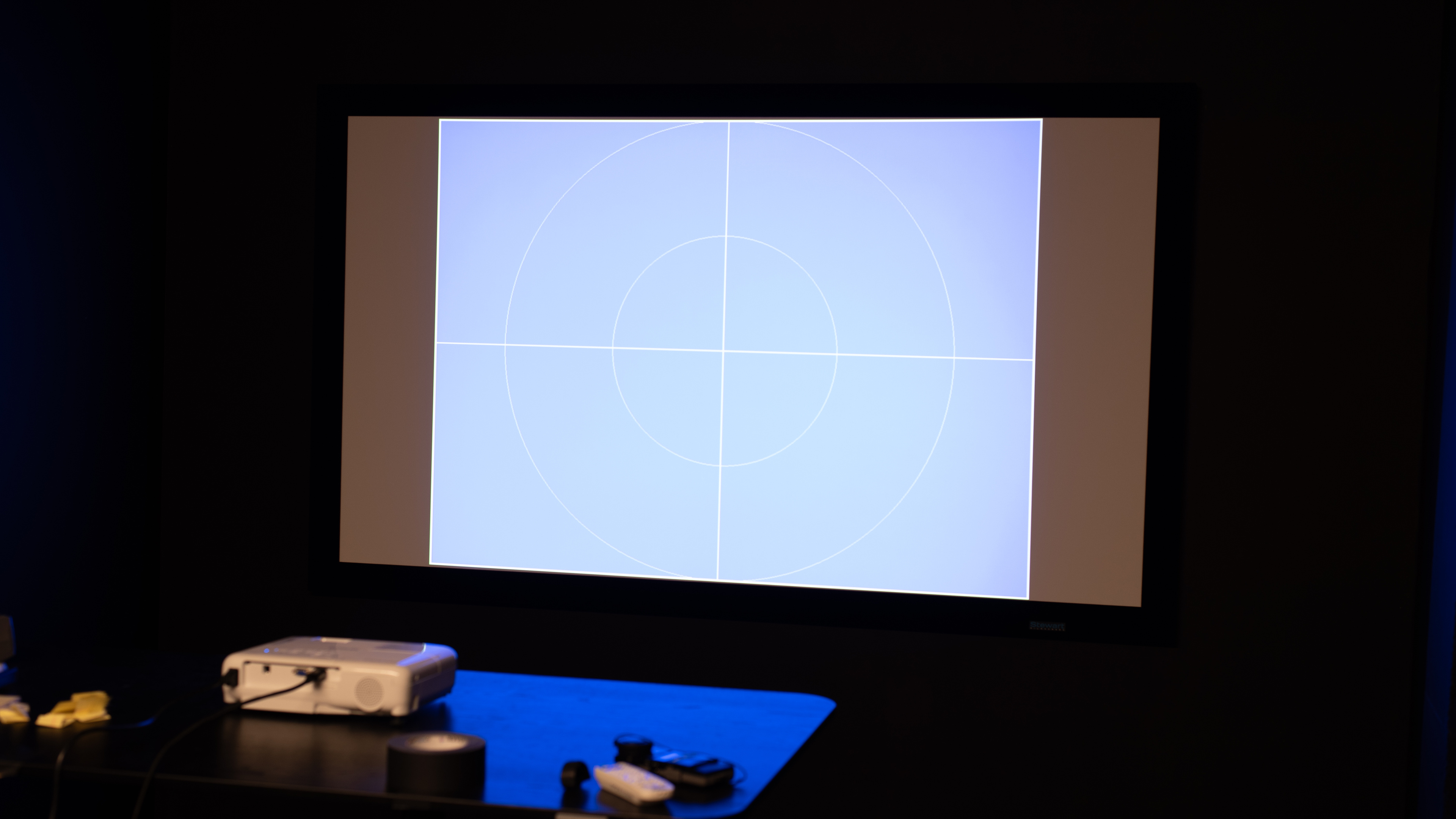
    This Epson EX3280's peak brightness is great. The projector is easily bright enough to look great in a moderately lit room, and it even looks good in bright rooms.

    5.2
    Contrast
    See details on graph tool
    1% APL Native Contrast
    290 : 1
    5% APL Native Contrast
    248 : 1
    10% APL Native Contrast
    210 : 1
    15% APL Native Contrast
    181 : 1
    25% APL Native Contrast
    141 : 1
    50% APL Native Contrast
    88 : 1

    This projector's contrast is poor. Blacks are raised, more in the middle of the projection than on the sides, so it looks best when a few lights are on.

    8.1
    Pre-Calibration Color Accuracy
    White Balance dE
    3.20
    Color dE
    1.54
    Gamma
    2.15
    Color Temperature
    6,814 K
    Picture Mode
    sRGB
    Color Temp Setting
    6500 K
    Gamma Setting
    No Gamma Setting

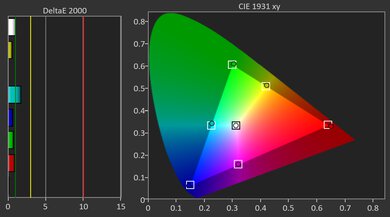
    This projector has great pre-calibration image accuracy. Its color accuracy is excellent; reds are slightly off, but all other colors are almost exactly as they should be. Its color temperature is also excellent, even if it leans somewhat too cool. Its white balance is decent; there are minimal errors in most shades of gray, but blues are overrepresented in near blacks.

    9.3
    Post-Calibration Color Accuracy
    White Balance dE
    0.90
    Color dE
    0.88
    Gamma
    2.17
    Color Temperature
    6,784 K
    White Balance Calibration
    2 point
    Color Calibration
    No
    Picture Mode
    sRGB

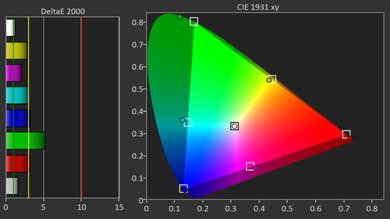
    This projector has a 2-point white balance calibration, and it looks spectacular after calibration, with fantastic white balance and color accuracy. Still, blues are overrepresented in near blacks, and saturated reds are still not quite what they should be. The unit's color temperature still leans too cool, although it's a tad better than before calibration.

    6.9
    Color Gamut
    Rec. 709 xy
    93.40%
    Rec. 709 uv
    92.48%
    Rec. 2020 xy
    52.22%
    Rec. 2020 uv
    57.01%

    The Epson EX3280 3LCD XGA projector has an adequate color gamut. It does a great job with the Rec. 709 color space used with SDR content but struggles with the wider Rec. 2020 color space used with HDR content, although this projector doesn't support HDR anyway.

    Design
    Imaging
    Imaging Technology
    LCD
    Light Source
    Lamp

    This LCD projector uses a lamp as its light source, which can last from 6000 to about 12,000 hours, according to the manufacturer, after which you'll need to swap the lamp for a new one. This projector's native resolution is 1024 x 768, with a 4:3 aspect ratio. Epson promotes a variable throw ratio for this projector, featuring a Maximum Throw Ratio of 1.95; however, this is accomplished through digital zoom, which effectively functions as a crop-in.

    Optics
    Optical Zoom
    Manual
    Focus
    Manual Focus
    Keystone
    Manual Keystone
    Aspect Ratio
    4 : 3
    Minimum Throw Ratio
    1.44
    Maximum Throw Ratio
    1.44
    Horizontal Lens Shift
    N/A
    Vertical Lens Shift
    N/A

    The Epson EX3280 has a fixed-zoom lens with fully manual focusing and no lens shift, but you do get manual vertical and horizontal keystone up to ±30°, plus an automatic vertical skew sensor to help square the image if the projector is slightly tilted. The projector has a 1.95x throw ratio on its spec sheet, but that's for the digital zoom.

    6.5
    Portability
    Height3.3" (8.4 cm)
    Width11.8" (30.0 cm)
    Depth9.1" (23.0 cm)
    Weight
    5.2 lbs (2.4 kg)

    The Epson EX3280 is somewhat portable due to its fairly compact and lightweight body, and it even comes with a travel bag in case you want to take it with you. It doesn't have an integrated battery however, so you need an outlet to plug the unit in. The projector lacks any automatic image adjustment technology, so you must manually adjust the image when setting it up. It does have an integrated speaker in case you need to move it, but it's only a 2W mono speaker, so it sounds very tinny. The unit doesn't come with an adjustable stand, but there is a retractable foot at the front to adjust the projection angle.

    5.2
    Noise
    Noise @ Maximum Brightness
    61.6dBA

    The Epson EX3280 is on the noisy side. At maximum brightness, the fan is clearly audible in quiet scenes, especially if the projector is on a table close to you.

    Inputs
    Inputs & Connectivity
    HDMI
    1x (HDMI 1.4)
    HDMI 2.1 Rated Speed
    No HDMI 2.1
    USB Data Ports
    0
    Audio Out 3.5mm0
    Digital Optical Audio Out0
    Wi-FiNo
    Ethernet SpeedNo Ethernet

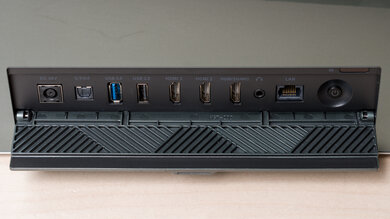
    Inputs and connectivity are very simple. You get a single HDMI 1.4 input for modern sources, plus an old-school VGA port and a USB-B control port for hooking the projector up to a computer. However, there are no USB media ports, no audio outputs, and no Ethernet or Wi-Fi for networking or screen casting. In practice, this means plugging in a laptop or streaming stick via HDMI and relying on the built-in speaker (or running audio separately from your source). If you need more than one HDMI device, you'll either need to swap cables or use an external switch.

    2.5
    Supported Resolutions
    Native Resolution
    1024 x 768 (XGA)
    4k @ 60Hz
    No
    4k @ 120Hz
    No
    1440p @ 60Hz
    Scaled (Forced)
    1440p @ 120Hz
    No
    1080p @ 60Hz
    Scaled
    1080p @ 60Hz @ 4:4:4
    Scaled
    1080p @ 120Hz
    No
    1080p Maximum Refresh Rate
    60 Hz

    The Epson EX3280 features a native XGA resolution of 1024x768 in a 4:3 aspect ratio, making it primarily suited for basic office use rather than modern video or gaming applications. It accepts a 1080p or 1440p signal over HDMI, but everything is scaled down to XGA, so text and fine details look soft and a bit fuzzy even with a 4:4:4 signal. There's no support for 4k or high-refresh inputs, and the maximum refresh rate is 60Hz, which is fine for slides and simple video playback but not ideal for detailed work or gaming.

    4.2
    Input Lag
    4k @ 60Hz
    N/A
    4k @ 60Hz Outside Game Mode
    N/A
    4k @ 120Hz
    N/A
    1080p @ 60Hz
    40.5
    1080p @ 60Hz Outside Game Mode
    40.5
    1080p @ 120Hz
    N/A
    1080p @ Max Refresh Rate
    40.5

    This unit's input lag is rather high, and there's no Game Mode to lower it further. Still, it's okay for slow turn-based titles, but overall, this projector really isn't meant for responsiveness in mind.

    HDR Format Support
    HDR10
    No
    HDR10+
    No
    Dolby Vision
    No
    HLG
    No
    Audio Passthrough
    ARC/eARC
    No
    eARC: Dolby Atmos Over Dolby Digital Plus
    No
    eARC: Dolby Digital Plus 7.1
    No
    eARC: LPCM 7.1 Over Dolby MAT
    No
    eARC: Dolby TrueHD 7.1
    No
    eARC: DTS:X Over DTS-HD MA
    No
    eARC: DTS-HD Master Audio 7.1
    No
    eARC: LPCM Channels (Bitstream)
    0
    ARC: Dolby Digital 5.1
    No
    ARC: DTS 5.1
    No
    Optical: Dolby Digital 5.1
    No
    Optical: DTS 5.1
    No

    The Epson EX3280 doesn't support any kind of audio passthrough. There's no ARC/eARC over HDMI and no optical or analog audio outputs, so you can’t send sound from the projector to a soundbar or receiver. All audio stays at the source, and the projector only plays basic stereo LPCM through its built-in speaker, which is fine for simple presentations but very limited for movies or games. If you want better sound, you'll need to connect your speakers or sound system directly to your laptop, media player, or streaming stick instead of the projector.

    3D
    3D Support
    No
    Features
    In The Box

    • Power cable
    • Remote control
    • 2x batteries
    • User documentation
    • Travel bag
    Smart Features & Sound
    Cast Capable
    No
    Smart OS
    No
    Speaker(s)
    Yes

    The Epson EX3280 lacks a built-in smart platform or casting capabilities, so it behaves like a traditional office projector: you simply plug in a laptop or streaming stick via HDMI and control everything from there. It does include a small integrated speaker that's loud enough for classroom or meeting use, but the sound quality is thin, and the fan noise is easily audible over quieter content. Therefore, for movie nights or more immersive use, you'll want to use separate speakers connected directly to your source.