
Our Verdict
The picture quality of the LG LB6300 LED TV is inferior to other TVs in the same price range. Unless you really want WebOS or the wide viewing angle, go for another TV, like the Samsung H6350.
- Great Smart TV interface. The WebOS platform is visually appealing and user friendly.
- Low input lag, which is great for gaming.
- Poor contrast ratio. The blacks are gray in a dimly lit room.
- The screen reflects a lot of light. The screen becomes yellow when you have too much light in your room.
Check Price

We buy and test dozens of TVs yearly, taking an objective, data-driven approach to deliver results you can trust. Our testing process is complex, with hundreds of individual tests that take over a week to complete. Most of our tests use specially designed test patterns that mimic real content, but we also use the same sources you have at home to ensure our results match the real-world experience. We use two main tools for our testing: a Colorimetry Research CR-100 colorimeter and a CR-250 spectroradiometer.
Test Results
Older Test Bench: We tested this product using an older TV test methodology before a major update. Some of the test results below aren't directly comparable with other TVs. Learn more

for pictures & test results

You need a wide table to accommodate this TV because the stand is as wide as the TV itself.


for pictures & test results
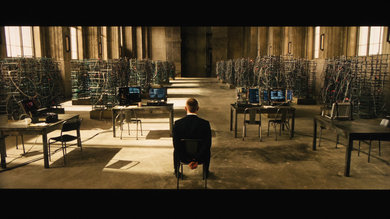
In a dark room, the poor blacks of this TV are apparent. The contrast ratio is low so they appear gray instead. The colors are accurate, at least.
for pictures & test results

The backlight uniformity is average-good for an LED.
for pictures & test results

It has a noticeable dirty screen effect. When the camera is moving, you can notice the darker spots on the screen.
for videos & test results

As expected for an IPS display, the viewing angle is great. The colors stay great even when viewed from the side.
for pictures & test results

This LG TV reflects a lot of light. You can also see a rainbow around the lamp.
for pictures & test results

It is even worse in a room with windows. The whole screen has a yellow tint. If you can't control the lighting in your room, this isn't the TV for you.

for pictures & test results

Like all IPS panels, the response time of the pixels is slower, so the blur trail is longer. However, this LG LB6300 does use its backlight effectively to reduce the perception of the blur.

for pictures & test results
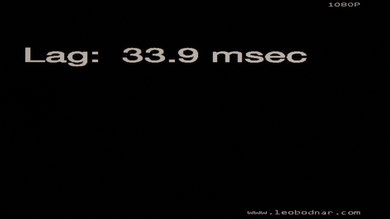
To achieve an input lag of 33.9 ms, we had to set the icon of the input to PC and put the TV into game mode. The input lag varied between 20ms and 38ms. More often than not, it was in the low 30s, so we decided to take the picture at 33.9ms.

for pictures & test results

1 Component In
1 Composite In
1 RF In
1 Digital Optical Audio Out
1 Ethernet
for pictures & test results

The main selling point of this LG is the smart TV interface called WebOS. It is indeed the most user friendly smart TV that we tested. Check out our full review of LG's 2014 smart TV platform.
for pictures & test results

The remote can also be used as a pointer for the on-screen cursor, which is great for using the built-in web browser.


