
Our Verdict
The smart TV interface is pretty useless, so unless you only plan on using Netflix, get the cheaper Toshiba L1400U instead. The picture quality is very similar, although the uniformity is a bit better on the Toshiba L3400U.
- Excellent contrast ratio
- Few reflections, so you can also use it in a relatively bright room.
- Colors out of the box were off. Calibration fixed most of the issues.
- Significant amount of motion blur. This TV isn't good for sports or video games (although the input lag was very low).
- Very limited smart TV features. The TV practically only has YouTube and Netflix on it, and no web browser.
Check Price

We buy and test dozens of TVs yearly, taking an objective, data-driven approach to deliver results you can trust. Our testing process is complex, with hundreds of individual tests that take over a week to complete. Most of our tests use specially designed test patterns that mimic real content, but we also use the same sources you have at home to ensure our results match the real-world experience. We use two main tools for our testing: a Colorimetry Research CR-100 colorimeter and a CR-250 spectroradiometer.
Test Results
Older Test Bench: We tested this product using an older TV test methodology before a major update. Some of the test results below aren't directly comparable with other TVs. Learn more
for pictures & test results

As expected, considering the price, the Toshiba L3400U feels a bit cheap. At least the borders are small and the TV is thin.
for pictures & test results

The stand is very sturdy, and it can fit even on a small table.


for pictures & test results
The contrast ratio is surprisingly good for a TV in this price range. That said, the color calibration out of the box was way off.
for pictures & test results

The black uniformity wasn't perfect, but it is not so bad. Two brighter spots can be seen, one at the bottom right and one on the left edge.
for pictures & test results

The Toshiba L3400U doesn't have good gray uniformity. The edges are noticeably darker than the center of the screen.
for videos & test results

The tint of the colors changes when viewed at an angle. The contrast is also greatly reduced.
for pictures & test results

The L3400U LED TV doesn't reflect a lot of light, so you won't have any problem watching it with a few lights on at night.
for pictures & test results

It doesn't get very bright, though. It is still enough for 1-2 windows during the day, but not for a very bright room.


for pictures & test results
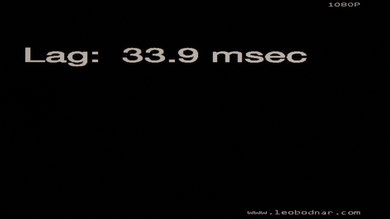
It has very low input lag no matter the mode you put it in.

for pictures & test results

2 HDMI
1 RF In
1 Component In
1 Composite In
1 Digital Audio Out
for pictures & test results

The smart TV features are the most limited that we have seen so far, with only Netflix, YouTube and media share (for USB playback) available. No web browser or app store is available.


