The BenQ X3100i is a 4k HDR10/HLG 4LED projector primarily meant for playing video games. It replaces the BenQ X3000i and comes with the more advanced QS02 Android TV streaming dongle, while the X3000i comes with the QS01 dongle. It projects a 60" image at a distance of 5 to 6.5 feet, up to a very large 200" at a distance of 16.7 to 21.8 feet. The projector comes with auto vertical 2D Keystone technology to eliminate trapezoid effects when you install it at an angle.
It has two HDMI 2.0b ports for 4k @ 60Hz, 1440p @ 120Hz, or 1080p @ 240Hz gaming. It has one other internal HDMI 2.0b port that's reserved for the included Android TV 11 QS02 dongle. The dongle brings Wi-Fi 6 and Bluetooth 5.0 support, casting capabilities with Google Chromecast and Apple AirPlay, and support for Google Assistant and Google Voice Search. You can also use the QS02 dongle as a USB passthrough reader, so you can connect USB devices to it to use with the projector. Finally, the projector has two integrated 5W chambered speakers.
Our Verdict
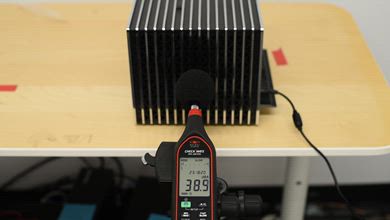
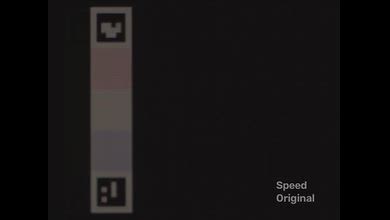
The BenQ X3100i is an acceptable home theater projector. Its contrast is adequate across most scenes, and combined with its great brightness, makes movies and shows look reasonably deep in a dark room. It's also very accurate out of the box, so most people won't feel the need to calibrate it, although its poor color volume limits how vibrant images look. Motion and camera pans are a bit choppy unless you're using a device that can match the content's frame rate, like an Apple TV. Those sensitive to the rainbow effect (RBE) with projectors will likely be bothered by it with this one, too. Finally, this projector's fan is decently quiet when it's at max brightness unless you're sitting right next to it, though it mostly fades into the background at normal listening volumes.
Reasonable contrast in most scenes.
Bright enough to handle a few lights and look vibrant in dark rooms.
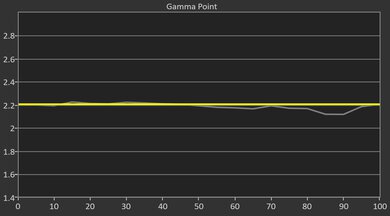
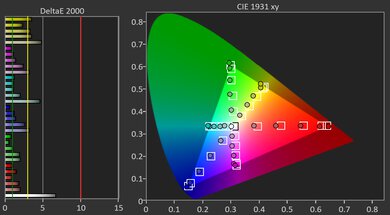
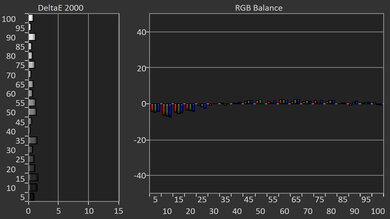
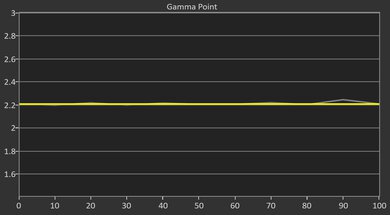
Very accurate out of the box.
Fan is reasonably quiet.
The included streaming dongle has many wireless and streaming features.
Very bright content looks washed out relative to the best projectors.
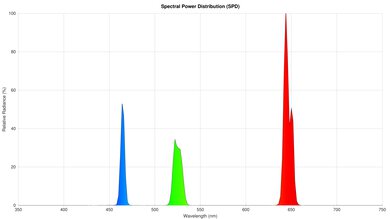
Colors don't look vibrant in recommended picture mode.
Only removes judder from sources that match the content's frame rate.
Rainbow flashes will bother those who are sensitive to them.
Fails to passthrough a lot of lossless audio formats.
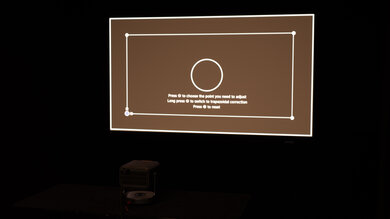
The BenQ X3100i is an okay outdoor projector. Its brightness is one of its strengths, as it can fight off some ambient lighting, like from patio lights. That said, it's not a very portable projector and is a bit cumbersome to bring outside or to a friend's place for gaming or movie night. Aside from auto vertical keystone correction, the setup process is manual: it has adjustable feet to tilt the projector up, plus a mounting hole for a universal mount. It also has a manual zoom lens as well as vertical lens shift to resize and shift the image up to help fit it to your screen without having to move the projector. Finally, it doesn't have a built-in battery, which can impact where you set it up. Finally, while it doesn't have a dedicated OS, a QS02 Android TV dongle is included with the projector to stream content.
Bright enough to handle a few lights and look vibrant in dark rooms.
The included streaming dongle has many wireless and streaming features.
Mounting hole for a universal mount.
Fairly bulky.
No dedicated carrying features.
Mostly manual setup process.
No built-in battery.
The BenQ X3100i is a sub-par bedroom projector. It's too big to fit on most nightstands, so setting it up on a separate table is more ideal for most people, as long as it's near an outlet, as it lacks a built-in battery. It has a few features to help with more casual setups, though it's mostly a manual process. This includes adjustable feet, a manual zoom lens, and vertical lens shift to help point and resize the image to your screen or wall, and horizontal and vertical keystone to further adapt the image to your setup, though only the latter is automated. Finally, its fan noise is reasonably quiet at max brightness, though it's still audible if you're right next to it, especially in quiet scenes, so consider this in your setup.
Fan is reasonably quiet.
The included streaming dongle has many wireless and streaming features.
Mounting hole for a universal mount.
Fairly bulky.
Mostly manual setup process.
No built-in battery.
The BenQ X3100i is a great gaming projector if you value both speed and image quality. In terms of performance, the projector has a bit of everything: 120Hz and 240Hz support at 1080p, 4k @ 60Hz, and relatively low input lag. Unfortunately, there's no Dolby Vision support for Xbox gamers. As for image quality, it's bright enough to hold up with a couple of lights on, and its contrast is adequate in most scenes compared to other projectors. Colors are accurate out of the box, although it has limited color volume that limits how punchy the image looks.
120Hz and 240Hz support at 1080p.
Fast input lag at any resolution and refresh rate.
Reasonable contrast in most scenes.
Bright enough to handle a few lights and look vibrant in dark rooms.
Very accurate out of the box.
1440p at 60Hz and 120Hz is downscaled to 1080p.
Very bright content looks washed out relative to the best projectors.
Colors don't look vibrant in recommended picture mode.
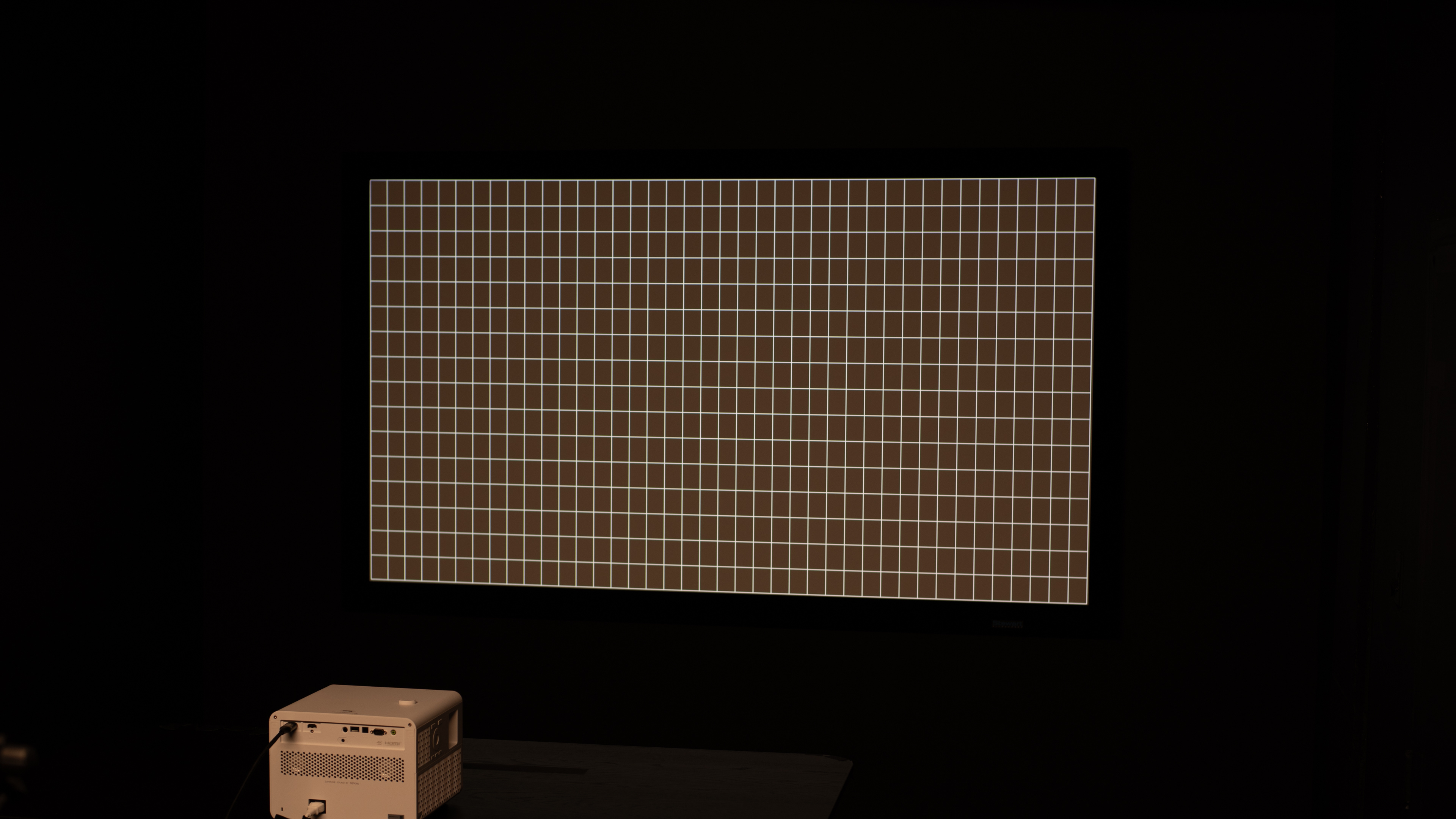
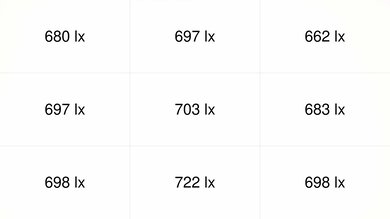
The BenQ X3100i is a very bright projector. It's easily bright enough to look good in dim rooms, even with a light on. Still, avoid turning on a ton of lights if you want the best image quality. It's also extremely uniform, with no visible vignetting.
Bright enough to handle a few lights and look vibrant in dark rooms.
Brightness is uniform across the whole image.
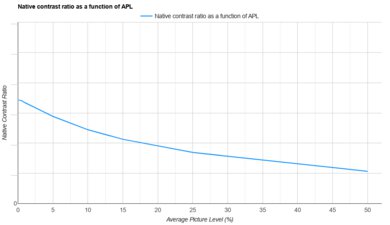
The BenQ X3100i has adequate contrast. It's a very bright projector that performs best in dark scenes relative to other projectors, with great separation between elements. It can't maintain the same level of performance in very bright scenes, making them look washed out by comparison.
Reasonable contrast in most scenes.
Very bright content looks washed out relative to the best projectors.
The BenQ X3100i is a projector with subpar portability. It's a fairly bulky projector that lacks dedicated transport features, such as a handle or a carrying case, and it also lacks lens protection when it's not in use. It does include a few features to help set it up for casual gaming or movie night, though it's mostly a manual process. It has adjustable feet, a manual zoom lens, and vertical lens shift, as well as horizontal and vertical keystone correction to adapt the image to your screen or wall, with the latter being automated. Lastly, it doesn't feature a built-in battery, so it needs to be set up somewhere near an outlet.
The included streaming dongle has many wireless and streaming features.
Mounting hole for a universal mount.
Fairly bulky.
No dedicated carrying features.
Mostly manual setup process.
No built-in battery.
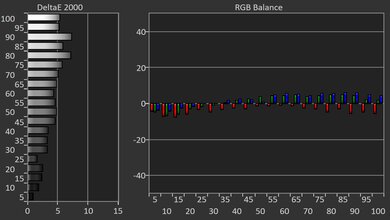
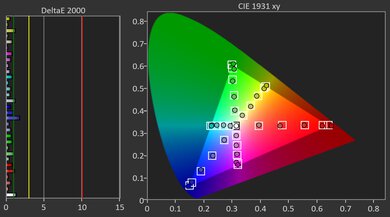
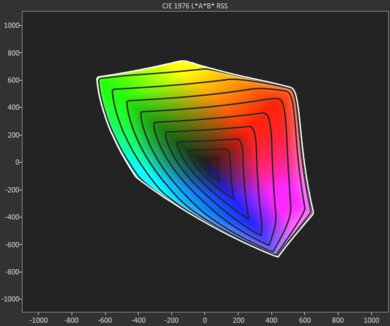
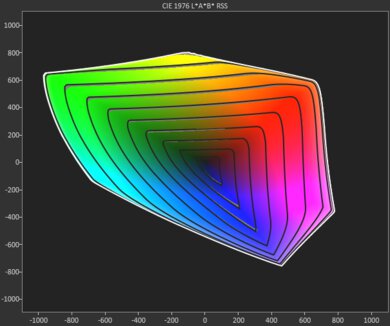
The BenQ X3100i has decent color performance. In our recommended 'Cinema' picture mode, the projector is very accurate out of the box, and while that can be further improved with a calibration, most people won't feel the need to. On the other hand, in this picture mode, the projector has limited color volume in both the DCI-P3 and BT.2020 color spaces, preventing images from looking especially punchy. Alternatively, switching to the projector's 'FPS' picture mode provides better color volume but comes at the cost of accuracy, so which picture mode you use depends on whether you prioritize an accurate image or a vibrant one.
Very accurate out of the box.
Colors don't look vibrant in recommended picture mode.
The BenQ X3100i projector has great gaming responsiveness. As a projector primarily meant for gaming, it has 120Hz and 240Hz support at 1080p as well as 4k @ 60Hz. While it also accepts 1440p signals, these are downscaled to 1080p. That said, it has relatively low input lag in its 'Game Mode', even at 60Hz, so it's a good fit for a wide array of games. Finally, its DLP imaging technology also minimizes motion blur.
120Hz and 240Hz support at 1080p.
Fast input lag at any resolution and refresh rate.
No excessive motion blur.
1440p at 60Hz and 120Hz is downscaled to 1080p.
Performance Usages
Changelog
- Updated Oct 07, 2026: We've converted the review to Test Bench 1.0, which replaces our Color Gamut test with Color Volume and adds a new Rainbow Effect test box. We also updated Effective Contrast (formerly Native Contrast) to account for projector brightness and reworked Judder scoring. The new bench also adds Outdoors and Bedroom usages, plus Portability, Color, and Gaming Responsiveness Performance Usages; Movies is now Home Theater, and all existing usage scores have been updated. See the 1.0 changelog.
-
Updated May 11, 2026:
We've added text to some test boxes as a result of our latest test bench. We've also updated Inputs & Connectivity to include Bluetooth support checks, as well as the 3D test box.
- Updated May 11, 2026: We've converted the review to Test Bench 0.12, which adds new Judder, Screen Adaptation, Battery, Maximum Volume, Size, Mobility Features, and Physical Setup Features test boxes. We also updated Inputs & Connectivity to verify Bluetooth support with wireless speakers or headphones. See the 0.12 changelog.
-
Updated Jan 30, 2026:
We've modified the text in our Brightness and Native Contrast text boxes as a result of our latest test bench. We've also added Brightness and Contrast performance usages in the Verdict section.
Check Price
Differences Between Sizes And Variants
We bought and tested the BenQ X3100i, which succeeds the very similar BenQ X3000i. Overall, the X3100i is a slight but noticeable upgrade over its predecessor, as it hits higher brightness peaks, has better contrast, and has a wider color gamut. More noticeable is the inclusion of the QS02 Android TV streaming dongle, which has many more features than the QS01 dongle included with the X3000i, including Bluetooth 5.0, Wi-Fi 6, and native Netflix support.
| Model | Bluetooth | Native Netflix | Wi-Fi | Dongle USB passthrough | 1440p @ 120Hz |
|---|---|---|---|---|---|
| BenQ X3000i (QS01) | 4.2 | No | Wi-Fi 5 | No | No |
| BenQ X3100i (QS02) | 5.0 | Yes | Wi-Fi 6 | Yes | Yes |
Our unit was manufactured in September 2023.
Popular Projector Comparisons
The BenQ X3100i is a great projector, and like its predecessor, the BenQ X3000i, it's very versatile. The X3100i is a slight but noticeable upgrade over its predecessor, especially due to the included QS02 dongle, which has more features than the QS01 dongle included with the X3000i. Otherwise, the X3100i is a fully featured projector, and even has advanced gaming features like 1080p @ 240Hz and 1440p @ 120Hz support. Still, if you're looking for a gaming projector and don't care about having the best image quality, the ViewSonic PX701-4K is significantly cheaper. Inversely, if you're only interested in a pure home theater setup and don't care about streaming or gaming features, then the Epson Home Cinema 3800 is a better value. Still, if you're looking for a projector that can do it all, the BenQ is one of the best options on the market.
Check out our recommendations for the best 4k projectors, the best gaming projectors, and the best projectors for home theater. If you'd prefer to shop for a cheaper product, check the best projectors under $1,000 instead.
For most people, the Valerion VisionMaster Pro 2 is the better choice than the BenQ X3100i. It's brighter and much more colorful than the BenQ, which is especially apparent in HDR content. The Valerion also supports Dolby Vision and HDR10+, while the BenQ is limited to HDR10. They're both pretty evenly matched for gamers, although the BenQ supports 1440p at 120Hz, while the Valerion only supports 1080p at that refresh rate; both projectors otherwise support 1080p at 240Hz and 4k at 60Hz.
The BenQ X3100i is a slight but noticeable upgrade over the BenQ X3000i. The X3100i has better contrast, leading to an image with more depth. The X3000i is somewhat more accurate out of the box, but the X3100i is still excellent. The biggest difference between the two is in the inclusion of the QS02 streaming dongle with the X3100i, which has significantly more features than the QS01 dongle included with the X3000i. Thus, if you care about streaming features, the X3100i is better, although you can buy an upgrade pack to install the QS02 dongle on the BenQ X3000i.
The BenQ X3100i is a higher-end model than the BenQ X500i and is better overall. The X500i does have some minute advantages, such as slightly better contrast and pre-calibration accuracy, but they can't overcome the X3100i's edge in brightness. The X500i is a short-throw projector, making it easier to place closer to your screen than the X3100i. They both come with the advanced QS02 streaming dongle, giving them identical streaming and wireless features. If you're planning to use the projector solely in a dim or dark room, you might not need the extra brightness of the X3100i, but if you hope to use it in a brighter room, the X3100i could be worth the extra money.
The Hisense C2 Ultra is better than the BenQ X3100i. The Hisense matches the BenQ when it comes to gaming features, and is a bit brighter, with deeper blacks. The Hisense is also much more colorful, which is especially noticeable in HDR content. The one thing the BenQ model has going for it is its slightly more accurate image right out of the box, but otherwise, the Hisense has it beat in most aspects.
We've independently bought and tested over 100 projectors and published detailed results for each, so you can decide which one to buy. These have all been tested under the same standardized methodology, allowing you to compare them side by side. We still have all these projectors in our lab, so we can continually go back and compare them to ensure our reviews are still accurate. All our test methodologies are also public on our website, so you can validate the results yourself.
Throw Calculator
Global Controls
Test Results
for pictures & test results
for pictures & test results



for pictures & test results