Logitech G933 Wireless  Headphones Review

Reviewed Jul 12, 2018 at 10:40am
Tested using Methodology v1.5 
Logitech G933 Wireless
7.3
Neutral Sound 
5.5
Commute/Travel 
6.0
Sports/Fitness 
6.7
Office 
7.6
Wireless Gaming 
7.8
Wired Gaming 
7.1
Phone Calls 
 1

The Logitech G933 Wireless deliver on all the essentials that make a great gaming headphone. They have very low latency, a great mic, decent sound quality, and lots of customization and connection options. They're comfortable, decently sturdy and come with a regular and an RCA cable, so they will work with your phone, console controllers, and home theater setup. Unfortunately, they won't be the most versatile headphones to use outdoors unlike some other gaming headsets.

Our Verdict

7.3
Neutral Sound 

The Logitech G933 are good for neutral listening. They have a decently well-balanced sound with a good amount of bass. Their mid-range is a little recessed which may make some instruments and vocals sound a bit distant. But overall their audio reproduction will sound good to most. Unfortunately, they don't have the most spacious soundstage, and their bass range is quite inconsistent. So if you wear glasses, you may get a lot less bass than other listeners. On the upside, you can EQ their sound via the Logitech software and save the EQ to one of the programmable buttons.

Pros
  • Good microphone quality.
  • Great customization options.
  • Low latency wireless and wired connection.
Cons
  • Bulky design.
  • Poor isolation.
  • Bass delivery varies significantly across users. Sensitive to glasses.
5.5
Commute/Travel 

The Logitech G933 are mediocre-at-best for commuting. They have to be within the range of the USB transmitter if you want to use them wirelessly. They also don't block much noise and they're bulky and cumbersome to carry around. Their mic is also not detachable, but on the upside, they have a cable that will work with your phone and has a good in-line remote.

Pros
  • Good microphone quality.
  • Great customization options.
  • Low latency wireless and wired connection.
Cons
  • Bulky design.
  • Poor isolation.
  • Bass delivery varies significantly across users. Sensitive to glasses.
6.0
Sports/Fitness 

The Logitech G933 aren't made for sports. They're bulky and not breathable or stable enough for sports. They also have to be in the range of their USB transmitter if you want to use them wirelessly but on the upside, they do come with a cable that will work with your phone.

Pros
  • Good microphone quality.
  • Great customization options.
  • Low latency wireless and wired connection.
Cons
  • Bulky design.
  • Poor isolation.
  • Bass delivery varies significantly across users. Sensitive to glasses.
6.7
Office 

The Logitech G933 are decent for office use. They don't isolate well in loud environments, and they're quite leaky at high volumes. On the upside they're comfortable to wear for hours, they have a long battery life, and a lot of connection options. They also have a well-balanced sound that you can EQ to your liking with the Logitech gaming software.

Pros
  • Good microphone quality.
  • Great customization options.
  • Low latency wireless and wired connection.
Cons
  • Bulky design.
  • Poor isolation.
  • Bass delivery varies significantly across users. Sensitive to glasses.
7.6
Wireless Gaming 

The Logitech G933 are good for gaming. They have low latency, a good mic, and sound quality and great customization options. They will work with your PS4 and PC wirelessly and you can use their regular audio cable with your Xbox controller or phone. They have a good range, a long battery life, and a decently comfortable design. They also have programmable buttons and great software support but they won't be the most versatile gaming headphones to use outdoors.

Pros
  • Good microphone quality.
  • Great customization options.
  • Low latency wireless and wired connection.
Cons
  • Bulky design.
  • Poor isolation.
  • Bass delivery varies significantly across users. Sensitive to glasses.
7.8
Wired Gaming 

Pros
  • Good microphone quality.
  • Great customization options.
  • Low latency wireless and wired connection.
Cons
  • Bulky design.
  • Poor isolation.
  • Bass delivery varies significantly across users. Sensitive to glasses.
7.1
Phone Calls 

Pros
  • Good microphone quality.
  • Great customization options.
  • Low latency wireless and wired connection.
Cons
  • Bulky design.
  • Poor isolation.
  • Bass delivery varies significantly across users. Sensitive to glasses.
  • 7.3
    Neutral Sound
  • 5.5
    Commute/Travel
  • 6.0
    Sports/Fitness
  • 6.7
    Office
  • 7.6
    Wireless Gaming
  • 7.8
    Wired Gaming
  • 7.1
    Phone Calls
  • Changelog

    1.  Updated Dec 26, 2022: We've renamed these headphones from Logitech G933 Wireless Gaming Headset to Logitech G933 Wireless across the site.
    2.  Updated Sep 09, 2022: We've added a small disclaimer to the App Support test which highlights some of the most commonly reported issues users online have encountered with Logitech's G HUB companion software.
    3.  Updated Mar 31, 2022: Thanks to user feedback, we've retested 'Virtual Soundstage' to include Dolby 7.1 Surround and DTS as both features are available via their companion software.
    4.  Updated Nov 24, 2021: Converted to Test Bench 1.5.

    Check Price

    Popular Headphones Comparisons

    The Logitech G933 are great gaming headsets with lots of customization options. They have an excellent mic, low latency and a well-balanced sound that you can EQ via the Logitech gaming software. They have a couple of connection options that make them a suitable choice for watching movies. They're also comfortable and sturdy enough to last you a while although their mostly plastic design isn't as durable as some of the gaming headsets. On the upside, they have programmable buttons that let you quickly switch between settings and modes which sets them apart from most of the other gaming headphones compared below. See our recommendations for the best gaming headsets for PC and the best PS4 headsets.

    Logitech G935 Wireless

    The Logitech G935 Wireless and the Logitech G933 Wireless are very similar in design, but the G935 isn't necessarily an upgrade over the G933, especially if you already have the first model. Some features like the in-line remote controls or the inputs on the dongle are now gone on the newer model. On the other hand, the G935 have better sound quality, but you can EQ both headsets inside the G HUB app. The G935 have better wireless range and very minimal latency. The G933 also has a slightly better-sounding microphone, which is better for online games.

    Logitech G Pro X Gaming Headset

    The Logitech G933 Wireless and the Logitech G Pro X Gaming Headset are both good gaming headphones but the G933 can be used wirelessly and their mic has a better recording quality. They're not as comfortable as the G Pro X though, and they feel more cheaply-made.

    Corsair Void PRO RGB Wireless

    The Corsair Void PRO RGB Wireless and the Logitech G933 Wireless are both decent pairs of wireless gaming headphones. The Logitech have better controls, feel more durable and stable, block out more background noise, have a better microphone recording quality, and can be used wired as well as wirelessly. On the other hand, the Corsair's microphone separates your voice from background noise much better, and the headphones are much more consistent between various users.

    Logitech G PRO X WIRELESS LIGHTSPEED Gaming Headset

    The Logitech G PRO X WIRELESS LIGHTSPEED Gaming Headset is better for wireless gaming than the Logitech G933 Wireless. The G PRO X headphones have a much longer continuous battery life. Their boom mic has a much better noise-handling performance, which makes them more suitable for gaming in noisy environments. They also have a more neutral bass response, which some listeners may prefer. However, some may prefer the G933 headphone's bass-heavy sound profile. The G933 can also be used wirelessly or wired with their 1/8" TRRS cable. Their USB dongle has a line in, so it can mix in-game audio with an auxiliary source.
    Logitech G635

    The Logitech G933 Wireless and Logitech G635 are practically identical in design, other than the fact the G933 is wireless and the G635 is wired. Overall, the microphone of the G933 has a better recording quality. The G635 also have better sound quality, but won’t offer the freedom of the G933’s wireless design, although you won’t have to worry about a battery life with the G635.

    Razer Nari Ultimate Wireless

    The Logitech G933 Wireless are slightly better gaming headphones than the Razer Nari Ultimate. The Logitechs control scheme provides much better feedback, is easier to use, and features 3 mappable buttons for great customizability. They also have a better microphone and a longer-lasting battery. On the other hand, the Razer have better isolation performance, lower latency, and greater wireless range.

    Corsair HS70 Wireless

    The Logitech G933 Wireless is a better gaming headset than the Corsair HS70 Wireless. It has programmable buttons, and the Logitech Gaming Software offers more options than Corsair iCUE. Also, the Logitech microphone performs better and transmits a more accurate and full-bodied speech. You can also use the Logitech with a wired connection, even if the battery is dead, which you can’t do on the Corsair. On the other hand, the Corsair has better sound quality and a slightly better battery life as well. Some may also find the Corsair to be better-built thanks to the metal grills and hinges and dense cups.

    Logitech G733 LIGHTSPEED Wireless

    The Logitech G733 LIGHTSPEED Wireless and the Logitech G933 Wireless have different advantages. The G733 have a better-balanced sound profile out-of-the-box, less audio leakage, a better overall boom microphone, and longer battery life. Meanwhile, the G933 are better-built, block out more ambient noise, and offer full wired audio and microphone compatibility with their included 1/8" TRRS cable.

    HyperX Cloud Flight S

    The Logitech G933 Wireless and the HyperX Cloud Flight S are both decent wireless gaming headsets. The Logitech have better controls, have better software with EQ settings, and can be used wired as well as wirelessly. On the other hand, the HyperX have a much longer battery life and a better frequency response consistency.

    SteelSeries Arctis 7 2019 Edition Wireless

    The SteelSeries Arctis 7 2019 Edition Wireless are better gaming headphones than the Logitech G933 Wireless. They have channel mixing, which can be useful when you need to mute game or chat audio. They also feel better-built and their microphone offers better recording quality. They also offer about twice the battery life of the Logitech. On the other hand, the Logitech have more customization options in their app and also offer RGB lighting, which some may like. You also have more controls on the headset and have access to mappable buttons.

    SteelSeries Arctis 7 Wireless 2017

    The SteelSeries Arctis 7 Wireless 2017 are better wireless headphones than the Logitech G933 Wireless. Their build quality is better, they leak less sound, and their battery is much better. The Arctis also sound much better than the G933 and have a superior microphone. That said, the Logitech G933 have three mappable buttons on the cups that can be programmed in the Logitech Gaming Software to trigger specific commands, which is a great feature. If you prefer gaming headphones that have better performance out-of-the-box, get the SteelSeries, but if you prefer to spend time deeply customizing your headset to perfection, consider the Logitech.

    Audeze Mobius

    The Audeze Mobius are a slightly better gaming headset than the Logitech G933 Wireless. The Logitech have great connection options, a low latency wireless connection for PS4 and PC, and an excellent app that offers a lot of customizable settings. They also have programmable buttons, which come in handy if you like to play a lot of different games since you can easily switch profiles to better fit what you are playing. The Audeze, on the other hand, offers a unique experience thanks to their 3D feature. They're also Bluetooth headphones with a more casual design that you can use outdoors with your phone. They have a better-balanced default sound but do not come with a proper EQ like the Logitech, which may be addressed in a future update.

    Logitech G Pro Gaming Headset

    The Logitech G933 Wireless are better gaming headphones than the Logitech G Pro Gaming Headset. Their wireless design with minimal latency is great and their overall performance is slightly better when it comes to sound. They also have a great control scheme with mappable buttons, and they feel a bit better built. The G933 are also compatible with the G HUB software, which allows tons of customization options, while the Pro doesn’t have any. On the other hand, the Pro have a much clearer and better performing microphone. Their wired connection also means no latency at all, and you won’t have to manage battery life. However, you can also use the G933 wired.

    HyperX Cloud Flight

    The Logitech G933 Wireless and the HyperX Cloud Flight are both decent wireless gaming headphones. The Logitech feel a bit better built and have better controls on the headphones themselves, but they look very bulky. While the Logitech have better-balanced mid and treble ranges, they are very bass-heavy. That being said, their companion software is much better and has graphic EQ and presets to change how they sound. On the other hand, the HyperX's microphone has better noise handling, and the headphones last significantly longer off a single charge.

    Logitech G930 Wireless

    The Logitech G933 Wireless are a better gaming headset than the Logitech G930 Wireless. The G933 have a better-balanced default sound, more customization options, and a longer battery life than the G930. The G933 also have a better, more stylish-looking build quality with better, more responsive controls. The G933 also have more connection options, which makes them a bit more versatile for watching movies or using them outdoors. On the other hand, the G930 have a slightly more understated design that some may prefer over the G933. They also come with a USB extension cord which may be a bit more practical for some users on PC.

    Logitech G533 Wireless

    While the Logitech G533 Wireless is also good for gaming, the Logitech G933 Wireless are gaming headphones that are slightly more customizable, have programmable buttons, and have a better microphone performance, which can be useful if you often play online or with friends. Also, you can use the G933 wired on consoles even if the battery is dead, which can’t be done with the Logitech G533. On the other hand, the G533 have a more low-profile look, and their sound profile is more neutral. You also get a slightly longer battery life with the G533. They also offer channel mixing, which the G933 doesn’t have.

    Astro A50 Gen 3

    The Astro A50 Gen 3 are slightly better gaming headphones than the Logitech G933 Wireless, but they do have a few flaws. The Astro have a more neutral sound profile, are very well-built, and are comfortable. Unfortunately, they can’t be used wired like the Logitech, and their base is needed for the headset to work. The Logitech have a better microphone recording quality but don’t have a channel mixing feature like the Astro. The Logitech G HUB also offers more features and customization options than the Astro Command Center software. Overall, the Logitech might offer better value for most, but if you choose the Astro, remember to order the appropriate console variant for your needs.

    Overhauling Our Audio Measurements And A New Multi-Curve Graphing Tool

    We've upgraded our Headphones Test Bench to 2.0! This update brings several key changes to our tests and usages, making it easier than ever to interpret our sound results based on your personal preferences. You'll also find a brand-new interactive graph tool featuring multiple targets (including our own!) for you to explore and compare.

    For a full breakdown, check out our changelog, which includes detailed commentary from our test designer explaining the rationale behind our update.

    We'd also love to hear your thoughts: your feedback helps us keep improving, so join us in the comments!

    Test Results

    perceptual testing image
    Sort:
    RATINGS
    Category:
    All
    Design
    Style
    TypeOver-ear
    EnclosureClosed-Back
    WirelessYes
    TransducerDynamic

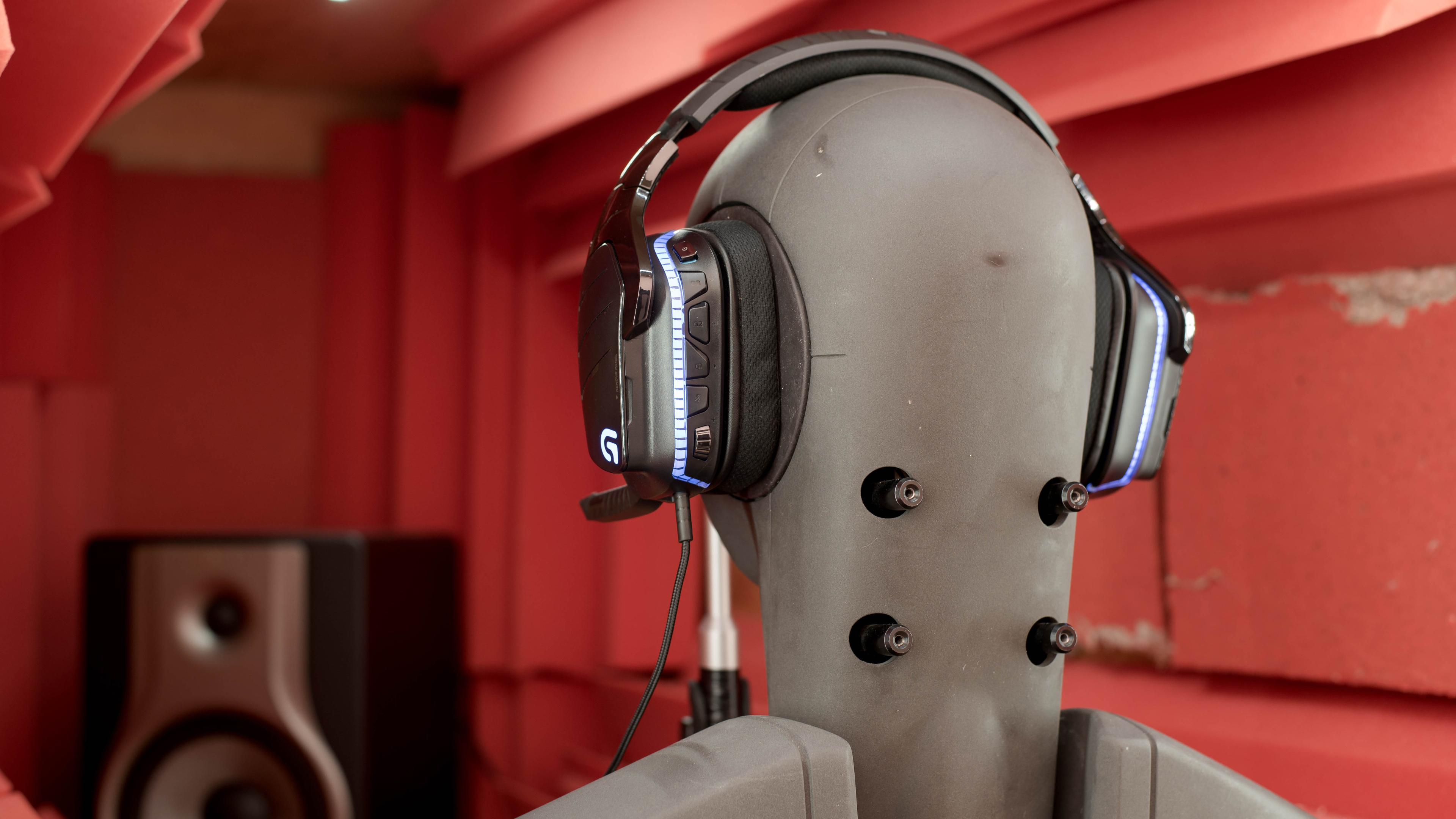
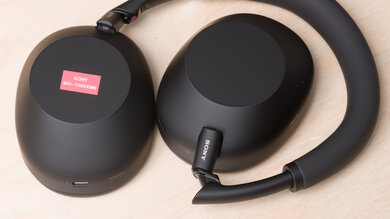
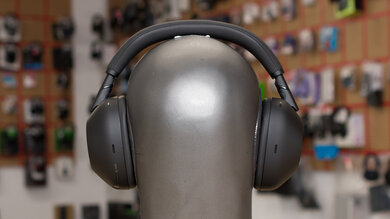
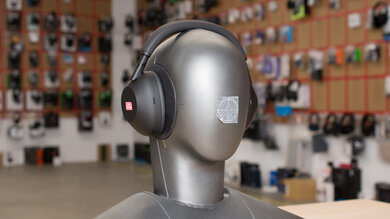
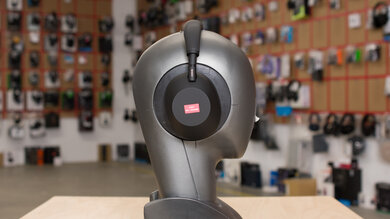
    The Logitech G933 Artemis look somewhat like a cross between the Logitech G930 Wireless and the Logitech G533 Wireless. Like the rest of the Logitech lineup and most gaming headphones, they're a little bulky and have large and slightly square-ish ear cups with a wide headband and a cool two-tone color scheme that looks great. However, they're not the most outdoor-friendly headphones, since like most gaming-focused headsets they have a bulky design and a retractable mic instead of a detachable one. So while they're one of the better-looking gaming headsets we've tested, they will not be the ideal option to use outside even if they do come with a standard audio cable that will work with your phone.

    7.5
    Comfort
    Weight0.8 lbs
    Clamping Force
    1.1 lbs

    These headphones, like the Logitech G930 Wireless, the Logitech G533 Wireless and the HyperX Cloud Flight, are decently comfortable headphones that come with removable and breathable pads. They have large and spacious ear cups and a relatively loose fit that doesn't clamp your head as much as some of the other gaming headphones we've tested. They're comfortable enough to wear for long gaming sessions. However, the padding on the ear cups is a bit stiff and doesn't feel as nice on the skin as the microfiber or pleather coating of some of the other gaming over-ears.

    7.1
    Controls
    OS Compatibility
    iOS
    Ease Of UseDecent
    FeedbackGreat
    Call/Music ControlYes
    Volume ControlYes
    Microphone ControlMute/Unmute
    Channel Mixing
    No
    Noise Cancelling ControlNo
    Talk-Through
    No
    Additional ControlsMulti function

    The Logitech G933 have great but slightly confusing controls. They provide two control schemes; one when wireless with the default button layout on the right ear cup, and another when wired with the 1/8" TRRS audio cable that has an in-line remote. The in-line remote has a typical button layout, with a play, pause and call management button, a small volume dial and a microphone mute switch. The wireless layout, however, provides a bit more control over the headphones' functionalities. Here you have a volume dial with better feedback, a mute mic button, and the power switch. You also get 3 programmable buttons that you can set to different settings and functions via the Logitech gaming software. The default setup will cycle through different EQ modes, enable surround sound and switch between different light patterns for the LEDs. All the buttons feel well made and a bit reminiscent of console controller d-pads with excellent feedback. Unfortunately, since there are so many options on one ear cup, it can be a bit confusing at first, especially during a heated multiplayer game. You do get used to it eventually thanks to the slightly raised notches on the buttons, but it does take a bit of time.

    6.7
    Breathability
    Avg.Temp.Difference5.2 °C

    These headphones have an average over-ear design with decently breathable ear cup pads. They create a fairly good seal around your ears so they will obstruct a good amount of airflow. But on the upside, the slightly breathable pads make them a bit cooler than typical over-ear headsets. They won't be the best headphones to use in hot and humid conditions and they will make your ears a bit warm after a couple of hours of listening but on the upside, they'll be fine for gaming and about average for other use cases.

    5.2
    Portability
    L8.0" (20.3 cm)
    W8.0" (20.3 cm)
    H4.0" (10.2 cm)
    Volume257.00 in³ (4,211.46 cm³)
    Transmitter RequiredNo

    The Logitech G933, like most gaming headsets, aren't very portable headphones you can carry around on your person. They're bulky, cumbersome, and don't fold into a more compact format. They're also limited by the range of the USB transmitter if you want to use them wirelessly, but since they come with a good mobile-friendly audio cable, you don't have to. Unfortunately, they don't provide a case and a pouch in the box which is slightly disappointing even if you're not going to be carrying them around very often.

    0.0
    Case
    TypeNo case
    LN/A
    WN/A
    HN/A
    VolumeN/A

    These headphones don't come with a case or pouch.

    7.5
    Build Quality

    The Logitech G933 feel more premium than the Logitech G930 Wireless. They have a fairly similar mostly-plastic build quality but the subtle design tweaks of the G933 make for a better-built and more premium-looking headset overall. They have a decently flexible headband that is reinforced with a metal frame. The ear cups feel dense and decently durable with removable backplates that cleverly hide the USB dongle and battery in each ear cup. The mic design is a relatively short plastic hinge with a retractable and flexible boom mic. It's sturdy and looks decent but won't be as durable as the mic designs of other gaming headphones we've tested. On the upside, the ear cup pads, the cables, and the battery are replaceable which makes them a bit more durable than most headsets in the long run.

    6.5
    Stability

    These headphones aren't stable enough for running and doing physical activity but will be okay for more casual uses. They won't move much if you're just sitting on the couch gaming, or walking around your home listening to music. Unfortunately, they're not at all designed for exercising or working out. They have slightly larger and heavier ear cups than the Logitech G930 Wireless so they will easily fall off your head under strenuous physical conditions. They're not a suitable option for sports.

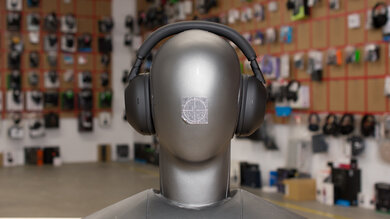
    Headshots 1
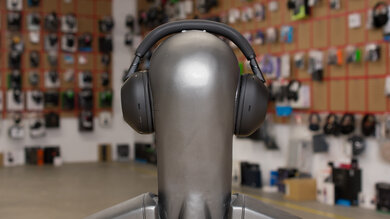
    Headshots 2
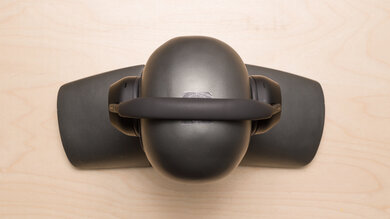
    Top
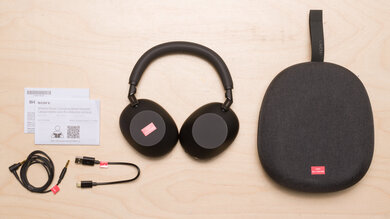
    In The Box

    • Logitech G933 Headphones
    • USB transmitter
    • 1/8 to 1/16 TRS adapter
    • Audio cable
    • USB Charging cable
    • RCA cable
    • Manual
    Sound
    Sound Profile
    See details on graph tool
    Bass Amount
    3.05 dB
    Treble Amount
    -0.39 dB
    5.5
    Frequency Response Consistency
    See details on graph tool
    See details on graph tool
    Avg. Std. Deviation
    1.23 dB

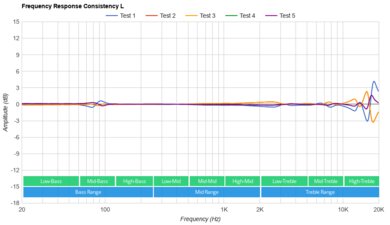
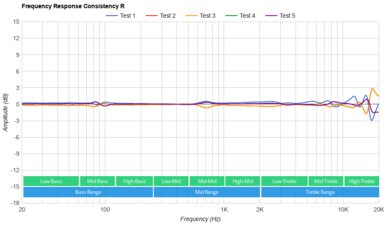
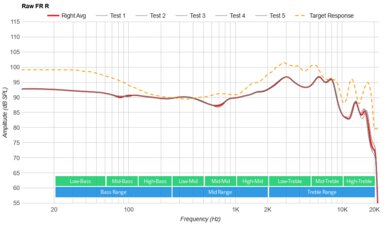
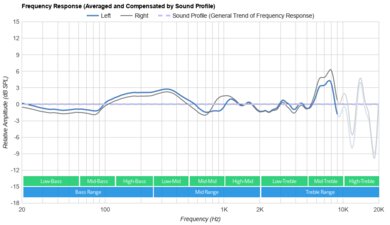
    The frequency response consistency of the Logitech G933 is sub-par. These headphones are a bit inconsistent in their delivery across multiple subjects, especially in the lower frequencies. In the bass range, they show more than 6dB of variance below 100Hz across our five human subjects, especially on the subject who wears glasses. In the treble range, they perform better since the inconsistencies occur in narrower bands.

    Raw Frequency Response
    See details on graph tool
    See details on graph tool
    6.5
    Bass Accuracy
    See details on graph tool
    Std. Err.
    5.71 dB
    Low-Frequency Extension
    10 Hz
    Low-Bass
    5.94 dB
    Mid-Bass
    6.92 dB
    High-Bass
    5.67 dB

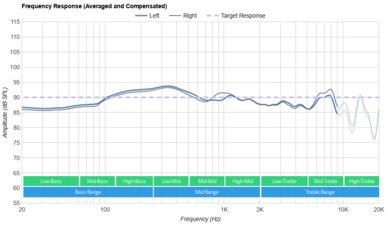
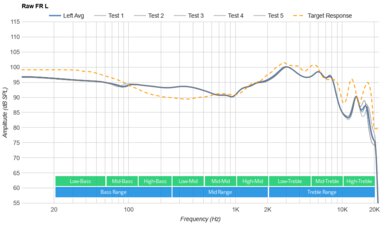
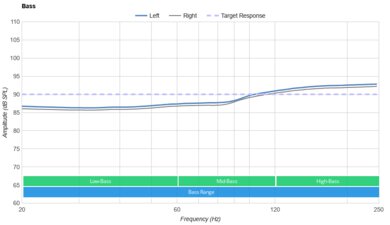
    The bass is very good. LFE (low-frequency extension) is at 10Hz, which is excellent. Also, low-bass is above our target by more than 3dB. This indicates a deep and extended bass with a bit of extra of thump and rumble, which some users may like. Mid-bass, responsible for the body of bass guitars and the punch of kick drums, is also overemphasized by more than 3dB. High-bass, responsible for warmth is better balanced and is hyped by about 1dB. If you're a fan of bass-heavy music and video game sound effects, take a look at the Razer Nari Ultimate and their bass haptic feedback system. Also, their bass delivery varies significantly across users, and is sensitive to the quality of the fit, seal, and whether you wear glasses. The response here represents the average bass response and your experience may vary.

    8.7
    Mid Accuracy
    See details on graph tool
    Std. Err.
    1.76 dB
    Low-Mid
    0.49 dB
    Mid-Mid
    0.61 dB
    High-Mid
    1.02 dB

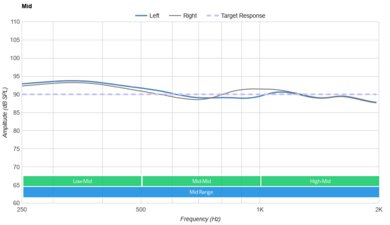
    The Logitech G933 headset has a very good mid-range. The response is relatively flat and even, which is good for reproducing clear and well-balanced vocals/instruments. However, it's consistently recessed by about 2.5dB, which nudges vocals toward the back of the mix by giving more emphasis to the lower frequencies.

    7.3
    Treble Accuracy
    See details on graph tool
    Std. Err.
    3.97 dB
    Low-Treble
    2.37 dB
    Mid-Treble
    3.05 dB
    High-Treble
    -2.29 dB

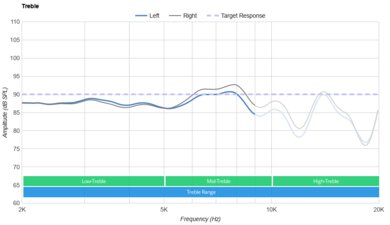
    The treble performance is very good. The frequency response in the treble range is a bit uneven, but overall well-balanced. Low-treble is under our neutral target by 0.6dB, which along with the dip around 6KHz, will have a small negative effect on the detail and brightness of vocals and lead instruments. These headphones could also sound slightly sibilant (sharp on S and Ts) due to the peak around 10Khz. This will be most audible on vocals and cymbals.

    7.4
    Peaks/Dips
    See details on graph tool
    Peaks
    1.71 dB
    Dips
    1.18 dB
    7.5
    Imaging
    See details on graph tool
    See details on graph tool
    Weighted Group Delay
    0.4
    Weighted Phase Mismatch
    10.1
    Weighted Amplitude Mismatch
    1.3
    Weighted Frequency Mismatch
    2.84

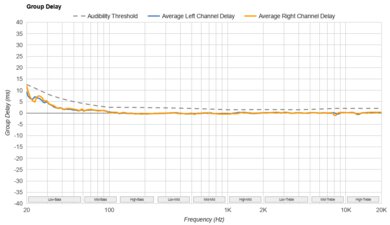
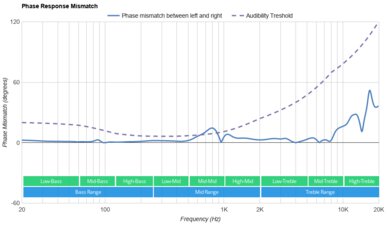
    The imaging performance is about average. Weighted group delay is at 0.4, which is good, but the GD graph shows that the response crosses the audibility threshold around 60Hz. This could result in a bass that is a tad slow, but it's subtle enough that most people won't notice it. Additionally, the L/R drivers of our test unit were very well-matched in amplitude, frequency, and phase response. This is important for the accurate localization and placement of objects (like voice, instruments, and video game effects) in the stereo field.

    6.1
    Passive Soundstage
    See details on graph tool
    PRTF Accuracy (Std. Dev.)
    3.99 dB
    PRTF Size (Avg.)
    4.26 dB
    PRTF Distance
    12.34 dB
    Openness
    5.4
    Acoustic Space Excitation
    4.7

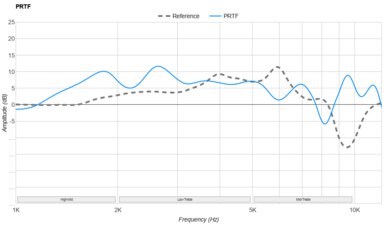
    The soundstage is mediocre. The PRTF graph shows a decent amount of pinna interaction and activation, which is good, but it has low accuracy. There is not a notch present around the 10kHz region either. Therefore, their soundstage may be perceived as relatively large, but unnatural and located inside the head.

    2.0
    Virtual Soundstage
    Head Modeling
    No
    Speaker Modeling
    On/Off
    Room Ambience
    No
    Head Tracking
    No
    Virtual Surround
    Yes

    The Logitech G933 are compatible with Dolby 7.1 Surround and DTS, found in the headphones' companion software. When you turn on Dolby Surround, you can change the speakers' volume and toggle between 'Music' and 'Movie' mode, depending on what kind of an audio experience you prefer. With DTS, you can also adjust the volume of the speakers and select different modes: 'DTS Standard', 'FPS', and 'Signature Sound'.

    8.1
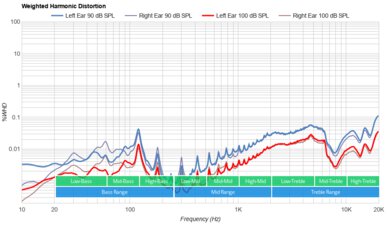
    Weighted Harmonic Distortion
    See details on graph tool
    WHD @ 90
    0.236
    WHD @ 100
    0.079
    Test Settings
    Firmware
    Unknown
    Power
    On
    Connection
    Wireless (Proprietary)
    Codec
    PCM, 24-bit, 48kHz
    EQ
    Default
    ANC
    No ANC
    Tip/Pad
    Default
    Microphone
    Boom
    Isolation
    4.0
    Noise Isolation
    See details on graph tool
    Isolation Audio
    Overall Attenuation
    -11.07 dB
    Noise CancellingNo
    Bass
    0.26 dB
    Mid
    -7.21 dB
    Treble
    -26.81 dB

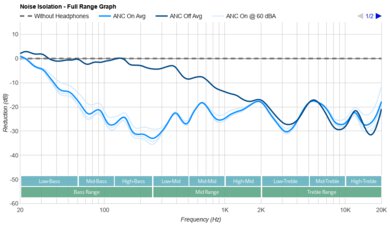
    The isolation performance is sub-par. In the bass range, occupied by the rumble of airplane and bus engines, they achieve no isolation. In the mid-range, important for blocking out speech, they achieve about 7dB of isolation, which is about average. In the treble range, where sharp sounds like S and Ts sit, they isolate by 20dB, which is decent.

    5.9
    Leakage
    See details on graph tool
    Leakage Audio
    Overall Leakage @ 1ft
    45.61 dB

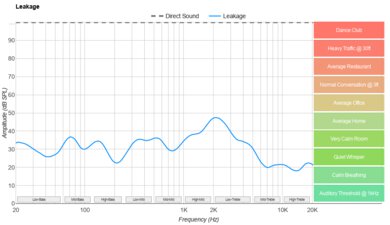
    The Logitech G933 have a sub-par leakage performance. The significant portion of their leakage sits between 300Hz and 4KHz, which is a broad range. The overall level of the leakage is a bit loud too. With the music at 100dB SPL, the leakage at 1 foot away averages at 46dB and peaks at around 58dB. This is a little above the noise floor of most offices.

    Microphone
    Microphone Style
    Integrated
    No
    In-Line
    Yes
    Boom
    Yes
    Detachable Boom
    No
    MicYes
    8.0
    Recording Quality
    See details on graph tool
    Recorded Speech
    LFE
    281 Hz
    FR Std. Dev.
    1.16 dB
    HFE
    5,747.01 Hz
    Weighted THD
    0.121
    Gain
    29.79 dB

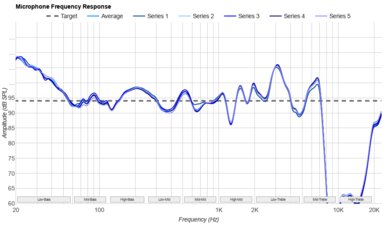
    The Logitech G933 has a very good microphone. The LFE (low-frequency extension) of 281Hz indicates a recorded/transmitted speech that sounds a little thin. The HFE (high-frequency extension) is at 6.3kHz, which results in a clear and detailed speech, but it may lack a bit of airiness. The response between the LFE and HFE points is quite flat, resulting in a natural voice capture.

    7.8
    Noise Handling
    See details on graph tool
    SpNR
    25.13 dB
    Noise Gate
    Always On
    Speech + Pink Noise Handling
    8.0
    Speech + Pink Noise Audio Sample
    Speech + Subway Noise Handling
    7.5
    Speech + Subway Noise Audio Sample

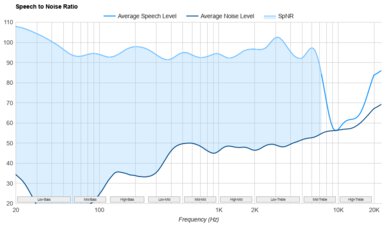
    The boom microphone of the Logitech G933 is excellent at noise handling. It achieved a speech-to-noise ratio of 25dB in our SpNR test. This indicates that they can separate speech from ambient noise to a good degree in most situations.

    Active Features
    8.1
    Battery
    Battery Type
    Rechargable
    Continuous Battery Life
    12.5 hrs
    Additional Charges
    0.0
    Total Battery Life
    12.5 hrs
    Charge Time
    3.8 hrs
    Power-Saving Feature
    Auto-Off Timer
    Audio While Charging
    Yes
    Passive Playback
    Yes
    Charging Portmicro-USB

    The Logitech G933 headphones have a decent battery life that delivers up to 12 hours of continuous playtime. They take quite a bit of time to charge when compared to more recent Bluetooth headphones but compared to some gaming headsets, they are about average at 3.8hrs. They also automatically turn off if there's no audio playing after 5 minutes which saves a lot of power. Also, they can be used while charging which is great for gaming marathons if you're close to a power source, like when gaming on PC. If you want better battery life, take a look at the SteelSeries Arctis 7 2019 Edition with their 25 hours, or the dual battery system of the Arctis Pro Wireless.

    9.0
    App Support
    App NameLogitech G Hub
    iOSNo
    AndroidNo
    macOSYes
    WindowsYes
    Equalizer
    Graphic + Presets
    ANC Control
    No
    Mic ControlAdjustable Level
    Room Effects
    No
    Playback Control
    No
    Button MappingYes
    Surround Support
    Yes

    Logitech G HUB is highly customizable when paired with the G933 headset. You get access to a great equalizer and surround sound effects you can personalize, microphone and volume levels, as well as swappable profiles with saved personal settings and an adjustable audio off timer you can set directly in the app. You can also access Dolby 7.1 Surround and DTS virtual soundstage features to help create a more immersive gaming experience. Like the Logitech G930 Wireless, these headphones have three programmable buttons that you can map to trigger specific commands, which is great and sets them apart from most for most gaming headsets. Unfortunately, there have been a lot of user reports regarding the stability of this software, including startup issues, freezing, and connection issues with some devices. Although we didn't encounter these issues with these headphones, if you've had issues using this app, let us know in the discussions.

    Connectivity
    0.0
    Bluetooth
    Bluetooth Version
    No Bluetooth
    Multi-Device Pairing
    No
    NFC Pairing
    No
    Line Of Sight Range
    N/A
    PC Latency (SBC)
    N/A
    PC Latency (aptX)
    N/A
    PC Latency (aptX HD)
    N/A
    PC Latency (aptX-LL)
    N/A
    iOS Latency
    N/A
    Android Latency
    N/A

    These headphones don't have Bluetooth connectivity. If you want a gaming headset that also supports Bluetooth, check out the Turtle Beach Stealth 700 or the Elite 800.

    They have only about 22ms of latency which is great for gaming and watching movies.

    8.7
    Non-Bluetooth Wireless
    Non-BT Line Of Sight Range
    125.00 ft (38.10 m)
    Non-BT Latency
    24 ms
    9.5
    Wired
    Analog Audio
    Yes
    USB Audio
    No
    DetachableYes
    Length4.50 ft (1.37 m)
    Connection
    1/8" TRRS
    Analog/USB Audio Latency
    0 ms

    Update: 01/23/2019: The Logitech G933 don't have audio over USB on PC or on consoles. The review has been updated to reflect this.

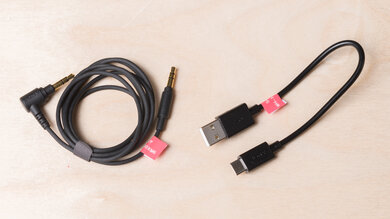
    The Logitech G933 come with a 1/8" TRRS audio cable with an in-line remote and mic that will work with your phone, consoles, and PC, although you're more than likely going to use their USB cable on PC to have access to their app. However, the 1/8" TTRS cable works best with iOS devices and only has partial support on older Androids.

    PC Compatibility
    Analog
    Audio + Microphone
    Wired USB
    No
    Non-BT Wireless
    Audio + Microphone
    PlayStation Compatibility
    PS4 Analog
    Audio + Microphone
    PS4 Wired USB
    No
    PS4 Non-BT Wireless
    Audio + Microphone
    PS5 Analog
    Audio + Microphone
    PS5 Wired USB
    No
    PS5 Non-BT Wireless
    Audio + Microphone
    Xbox Compatibility
    Xbox One Analog
    Audio + Microphone
    Xbox One Wired USB
    No
    Xbox One Non-BT Wireless
    No
    Xbox Series X|S Analog
    Audio + Microphone
    Xbox Series X|S Wired USB
    No
    Xbox Series X|S Non-BT Wireless
    No
    6.8
    Base/Dock
    Type
    Wireless USB Dongle
    USB Input
    Yes
    Line In
    Yes
    Line Out
    No
    Optical Input
    No
    RCA Input
    Yes
    Dock Charging
    No
    Power Supply
    USB

    The base/dock is a small USB dongle transmitter with a line-in. It also acts as an audio mixer that has a line input that will mix the in-game audio with an auxiliary source, like your phone, console or TV. It's compatible with the PS4 and PC but only provides audio for Xbox One. However, since it's just a simple USB stick, it will not provide dock charging which isn't as convenient as some of the other wireless headsets we've tested.