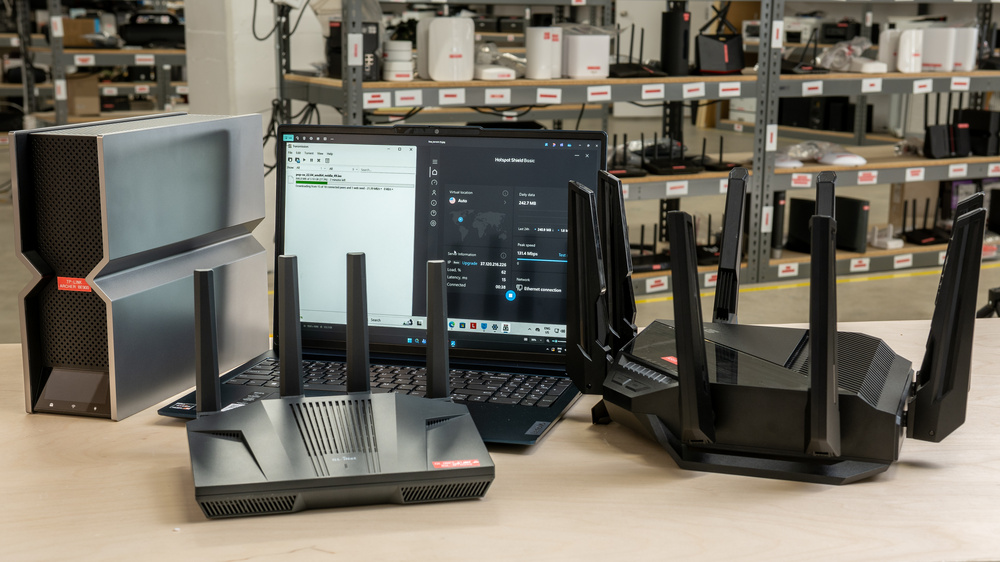
A VPN can be an effective tool for protecting your privacy and bypassing regional content blocks, but installing one on every device you use isn't always practical (or even possible). Using your router as a VPN client keeps things simple by covering your entire network at once, so every device gets the same protection without having to configure them individually. Better yet, because your router counts as a single device, you can avoid the extra fees some VPN providers charge for multiple connections.
Depending on what you want your VPN router to accomplish, look for features like:
- A VPN client mode to encrypt every device on your home network at once, including devices like smart TVs and consoles that might not have standalone VPN apps of their own.
- VPN server functionality, so you can access your Network-Attached Storage (NAS), media servers (like Plex), or work resources from anywhere.
- A built-in kill switch to avoid data leaks if your VPN connection drops.
- Split tunneling, so you can choose which devices you want routed through the VPN.
- Support for common protocols like WireGuard and OpenVPN.
- Pre-configured VPN profiles, if you don't want to set yours up manually.
We've tested over 80 routers, evaluating their VPN capabilities, ease of setup, and overall value to find the best options for most people. Keep in mind that our test scores don't measure a router's speeds while connected to a VPN.
If you're after more router recommendations, have a look at our picks for the best mesh routers and best routers for streaming. And if you haven't yet settled on a VPN provider to pair with your router, check out our guides to the best VPNs we've tested, both free and paid.

Since we started reviewing them in 2024, we've tested over 60 routers. We maintain complete editorial independence and impartiality by purchasing each router ourselves, which ensures we aren't testing specially selected review units. Rather than casually assessing performance by throwing on Netflix and seeing if it works, we rigorously evaluate each router on a standardized testing platform, providing you with all the data you need to compare different models.
-
Best VPN Router
 Apartment/CondoMulti-Level HouseConfigurabilitySpeedVPN Client:VPN Server:Type:Standalone RouterSee all our test resultsWAN Port Speed:Gbps
We recommend the ASUS ROG Strix GS-BE18000 as the best VPN router for households that want whole-home VPN coverage, a straightforward setup, and flexible mesh network support. The router supports WireGuard and OpenVPN protocols in both client and server modes, so you can route your traffic through any compatible provider or set it up as a VPN server to access your network remotely. It doesn't include a kill switch feature, however, so it may not be the best choice if protecting your devices against data leaks is a priority.
This router supports multiple simultaneous VPN connections, so you can assign your devices to the server you want each to use; a media player can stream geo-restricted content, for instance, while your desktop stays connected to a dedicated P2P server for file sharing. You can even set up a dedicated VPN network using ASUS's mobile app or web interface, making it easy to protect all your devices without the hassle of installing a VPN on each one. With fast Wi-Fi 7 speeds, mesh expandability, and an approachable yet versatile set of VPN tools, the Strix is well-suited to delivering whole-home VPN coverage across busy, multi-device households.
-
Best Upper Mid-Range VPN Router
Apartment/CondoMulti-Level HouseConfigurabilitySpeedVPN Client:VPN Server:Type:Standalone RouterSee all our test resultsWAN Port Speed:GbpsWe recommend the UniFi Dream Router 7 if you're looking for prosumer-level VPN features and don't mind a slightly steeper learning curve. While our top pick delivers plenty of robust VPN tools in a familiar home package, this router offers power users and remote workers even deeper control over how different parts of their network connect. Its routing rules let you send traffic from specific devices, apps, domains, VLANs, and IP subnets through separate VPNs, giving you the flexibility to manage more complex network setups. It also includes a built-in kill switch that blocks traffic if a VPN connection drops, ensuring your devices remain encrypted and secure while browsing the web. The UDR7 is a fantastic choice if your home's already outfitted with Ubiquiti gear, but it isn't ideal if you aren't familiar with the ecosystem or just want a quick, one-tap setup on your phone.
The router supports WireGuard and OpenVPN, but unlike the ASUS ROG Strix GS-BE18000's preloaded provider profiles, connecting to a VPN requires downloading a configuration file from your provider's website and uploading it to the router. While setting it up as a client can require some tweaking, using the router as a server is more straightforward: you simply generate a unique link or QR code in the router's settings and open it on any device you want to use to access your network. It trades plug-and-play convenience for absolute freedom, letting you build highly specific traffic rules that a standard consumer router wouldn't normally support, so it makes the most sense if you plan to use its broader network management tools alongside your VPN. Just keep in mind that expanding your Wi-Fi down the road will require dedicated UniFi access points rather than simply adding any compatible consumer router.
-
Best Mid-Range VPN Router
Apartment/CondoMulti-Level HouseSpeedType:Standalone RouterSee all our test resultsWAN Port Speed:GbpsThe GL.iNet Flint 3 (GL-BE9300) is our top mid-range pick if you want strong VPN capabilities and modern Wi-Fi 7 hardware at a sensible price. It natively supports WireGuard and OpenVPN, and can be set up as either a VPN client to protect your devices, or a VPN server for a secure remote connection to your home network. Like our upper mid-range pick, the UniFi Dream Router 7, the router includes a built-in kill switch and similar policy-based routing controls, so you can route different devices, domains, and IP addresses through separate VPNs simultaneously. Instead of manually uploading configuration files, this router comes preloaded with profiles for over 30 major VPN services, so you can connect by simply selecting your provider from a list.
While its interface might feel a bit utilitarian if you're used to more streamlined consumer software, the mobile app and web dashboard are well-organized and give you full network control without locking any features behind a paywall. However, this router offers less if you're looking for a central management system for a larger network, as it doesn't provide tools to manage switches, access points, or other network equipment alongside your VPN. But for a standard household using a single router, its tools offer plenty of flexibility.
If you want the same features in a portable form factor, the GL.iNet Slate 7 (GL-BE3600) is a great travel companion. While it has a more modest selection of physical ports and doesn't quite match the range of a full-sized router like the Flint, it offers the same configurable software and preloaded VPN profiles in a far more pocketable package. It's ideal if you want an easy way to secure hotel or public Wi-Fi while traveling. For more travel router recommendations, head on over to our shortlist of favorites.
-
Best Lower Mid-Range VPN Router
Apartment/CondoMulti-Level HouseConfigurabilitySpeedVPN Client:VPN Server:Type:Standalone RouterSee all our test resultsWAN Port Speed:GbpsThe GL.iNet Flint 2 (GL-MT6000) is our top lower mid-range recommendation for shoppers prioritizing VPN versatility on a tighter budget. It runs on the same software ecosystem as the GL.iNet Flint 3 (GL-BE9300), offering client and server modes, native support for WireGuard and OpenVPN, a functional kill switch, and zero subscription fees. It offers the same policy-based routing features, so you can configure multiple devices, websites, and IP addresses to tunnel through different VPN connections simultaneously. Just like the Flint 3, you can manage this router through the GL.iNet mobile app or web interface, which includes over 30 configuration presets for the most common VPN providers.
This router's lower price tag is purely due to its older hardware: you get dual-band Wi-Fi 6 rather than its successor's Wi-Fi 7 tri-band configuration, and you miss out on a few more high-speed Ethernet ports on the rear. It also doesn't support mesh expandability. But if you don't need the latest Wi-Fi 7 technology and don't plan to connect many devices to your router over Ethernet, it delivers much of the same extensive VPN and security features for less.
-
Best Budget VPN Router
Apartment/CondoMulti-Level HouseSpeedType:Standalone RouterSee all our test resultsWAN Port Speed:GbpsIf you're shopping on a budget but still want reliable VPN protection, the TP-Link Archer BE230 is a solid choice. It covers all the core privacy essentials, with VPN client and server support for both WireGuard and OpenVPN. The router comes with basic split-tunneling controls that let you assign traffic from specific devices to your VPN while leaving the rest under your regular ISP connection. Unlike the GL.iNet routers, it doesn't have built-in commercial VPN presets, so you'll need to manually import your provider's configuration files, as with the UniFi Dream Router 7. The router also doesn't feature a dedicated kill switch to cut your internet if the VPN drops. However, TP-Link includes all its VPN features for free out of the box, while some of its broader network security and parental control tools are locked behind a paid subscription.
As a dual-band Wi-Fi 7 router, the real draw comes from its ease of use and newer Wi-Fi 7 hardware, all at a palatable price. Once you've imported your provider's configuration file, its device-based controls let you choose which devices use the VPN without getting into complex routing rules. Its smartphone app also makes everyday router management approachable, with more beginner-friendly polish than some of the open-source alternatives on this list. If you're just looking for a no-fuss Wi-Fi 7 router with basic VPN functionality, then it's a strong option at this price point.











Notable Mentions
-
TP-Link Archer BE550:
If you're already familiar with TP-Link's software and don't care much about more advanced VPN configurability, the TP-Link Archer BE550 is a beginner-friendly option worth considering over the GL.iNet Flint 3 (GL-BE9300). It has VPN client and server functionality, support for WireGuard and OpenVPN, and the ability to split device traffic across multiple VPN providers. We'd still choose the GL.iNet if you want more control over which websites and services go through the VPN, especially since some of the TP-Link's broader security features require a paid subscription.
See our review
All Reviews
The right VPN router for you depends on your specific usage and how much setup you're comfortable with. For most buyers, that usually comes down to three common needs:
- Changing your virtual location on devices like smart TVs and streaming boxes to access region-specific content
- Encrypting and protecting all household internet traffic at the network level
- Setting up a personal VPN server to access your home network while away
Our picks carefully weigh each router's test results alongside its VPN features, price, and ease of configuration. The most expensive model won't necessarily deliver the best experience or performance, especially if a cheaper router already meets your needs.
Looking for more test results? Check out our table tool below to compare all the models we've tested.


