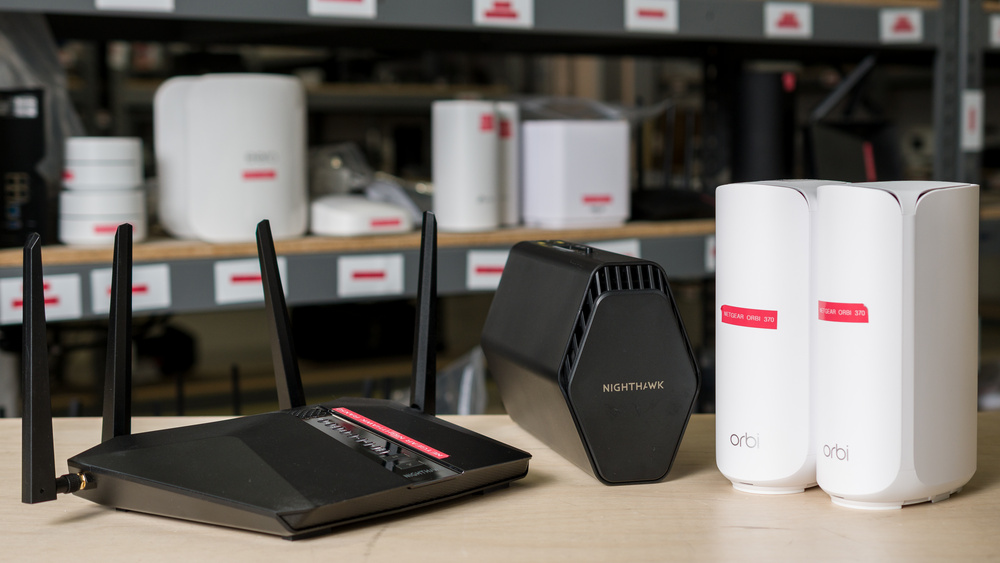
From the sleek standalone Nighthawk to the compact, expandable Orbi, NETGEAR has long been a familiar fixture of the router aisle. With straightforward mobile apps, modern designs, and practical features like isolated networks for guests and IoT devices, NETGEAR routers pack plenty of consumer appeal. The brand's polished look and easy-to-use interface aren't always enough to close the gap with rivals, though, many of which offer better performance at similar (and oftentimes lower) prices.
For starters, parental controls and tools that other brands often include out of the box are gated behind various monthly subscriptions, and its Wi-Fi 7 claims deserve some scrutiny, too. While Multi-Link Operation (MLO) is generally more limited than router marketing would have you believe, NETGEAR goes so far as to omit the technology entirely from some of its "Wi-Fi 7" routers. The distinction matters: a Wi-Fi 7 label doesn't guarantee certification from the Wi-Fi Alliance or compliance with its Wi-Fi CERTIFIED 7 requirements. Still, there are some solid options in the lineup that you might find worth the price of admission.
The right fit depends on the space you need to cover, your internet plan, Ethernet needs, and whether paid security and parental controls matter to you. We've tested a range of NETGEAR routers and picked the best based on their features, price, and performance in our tests. Looking for more recommendations? Be sure to check our guides to the best gaming routers, the best mesh Wi-Fi systems, and the best routers overall.
Updates
- 03/18/2026NETGEAR Orbi 370 updated
- 01/26/2026NETGEAR Nighthawk RS90 reviewed
- 12/06/2024NETGEAR Nighthawk RS300 reviewed
- 07/22/2024NETGEAR Nighthawk RAX30 reviewed
- 07/22/2024NETGEAR Nighthawk RAX50 reviewed

Since we started reviewing them in 2024, we've tested over 60 routers. We maintain complete editorial independence and impartiality by purchasing each router ourselves, which ensures we aren't testing specially selected review units. Rather than casually assessing performance by throwing on Netflix and seeing if it works, we rigorously evaluate each router on a standardized testing platform, providing you with all the data you need to compare different models.
-
Best NETGEAR Router
 Apartment/CondoMulti-Level HouseGamingSpeedRangeLatencyType:Standalone RouterMulti Band:Tri-Band (2.4 / 5 / 6)See all our test resultsWi-Fi Version:Wi-Fi 7 (be)
The NETGEAR Nighthawk RS300 is the best NETGEAR router we've tested if you want fast wireless performance and multi-gigabit Ethernet in a standalone package. With a 6GHz band and an impressive 1.8Gbps peak speed under ideal conditions, it makes quick work of large downloads and delivers fast performance to nearby compatible devices. Wireless latency is fair overall, with only occasional spikes on the 5GHz band that are unlikely to disrupt video calls or casual gaming. For competitive play, however, a direct Ethernet connection is always recommended. The router's 2.5Gbps WAN port supports multi-gigabit internet plans, while two 2.5Gbps and two 1Gbps LAN ports can accommodate several wired devices. Coverage is sufficient for most homes, but the 5GHz band slows down at longer distances. Since there's no option to expand your range with mesh access points, more sprawling layouts and multi-storied homes might be left underserved.
Getting it running is simple, with the app guiding you through installation, and its narrow upright chassis takes up relatively little shelf space. Unfortunately, the user experience becomes more restrictive once you're online; NETGEAR's cybersecurity suite and parental control tools cost extra, so malware protection, content filters, and device management tools require ongoing payment to access. The absence of any MLO functionality also prevents this router from qualifying for Wi-Fi CERTIFIED 7 certification, despite its marketing suggesting otherwise.
-
Best Mid-Range NETGEAR Router
Apartment/CondoMulti-Level HouseGamingSpeedRangeLatencyType:Standalone RouterMulti Band:Dual Band (2.4 / 5)See all our test resultsWi-Fi Version:Wi-Fi 6 (ax)The NETGEAR Nighthawk RAX50 is our mid-range choice if you have a 1Gbps or slower internet plan and want dependable performance throughout a medium-sized home. It provides enough speed and range for common activities like streaming, browsing, and video calls. You don't get the 2.5Gbps connectivity of our top pick, the NETGEAR Nighthawk RS300, but its four Gigabit LAN ports give you plenty of room for wired devices. You can also connect a storage drive to its USB 3.0 port and share files across your network.
Setup takes only a few taps in the app, and the router itself features a flat, winged design with positionable antennas. The downside is entirely software-related: NETGEAR charges a recurring premium for its security suite and parental controls, in keeping with industry tradition. It's a solid piece of hardware, provided you can stomach paying extra for features that competing brands often include for free.
-
Best Lower Mid-Range NETGEAR Router
Apartment/CondoMulti-Level HouseGamingTravelSpeedRangeLatencyConfigurabilityType:Standalone RouterMulti Band:Dual Band (2.4 / 5)See all our test resultsWi-Fi Version:Wi-Fi 7 (be)The NETGEAR Nighthawk RS90 is our budget pick for users who prioritize wired connectivity and close-range speed over broad coverage. It's marginally faster at short range than our mid-range pick, the NETGEAR Nighthawk RAX50, but performance declines sharply with distance, making it ill-suited to larger homes. Its port selection is a highlight, with one 2.5Gbps WAN port, one 2.5Gbps LAN port, and three 1Gbps LAN ports.
The compact router is straightforward to set up through the app. Still, its wireless capabilities come with several caveats: it lacks a 6GHz band, and its limited MLO support doesn't allow for any simultaneous communication across bands. Interestingly, the RS90 also avoided Dynamic Frequency Selection (DFS) channels by default during our testing, and manually selecting a 160MHz channel width resulted in an unstable connection. As is customary with NETGEAR, additional security and parental controls require paid subscriptions.
-
Best Budget NETGEAR Router
Apartment/CondoMulti-Level HouseGamingSpeedRangeLatencyType:Standalone RouterMulti Band:Dual Band (2.4 / 5)See all our test resultsWi-Fi Version:Wi-Fi 6 (ax)The NETGEAR Nighthawk RAX30 is our top budget recommendation if you want to get your apartment online without overcomplicating things. This dual-band Wi-Fi 6 router is significantly slower than the lower mid-range NETGEAR Nighthawk RS90, but it counters with significantly better range. You'll notice the difference when your devices stay connected through walls and closed doors, making it a more dependable choice for a standard floor plan. It's equipped with a 1Gbps WAN port and four 1Gbps LAN ports, and includes a USB 3.0 port for local file sharing.
Setup is painless through the app, and the router's three external antennas allow for some positional tweaking to improve your signal. However, budget routers from NETGEAR aren't exempt from their aggressive monetization; essential security features and content filters sit behind the usual paywalls, leaving you with limited network configurability if you choose not to subscribe. Its wireless latency is just as middling, so it's not the best choice if you rely on split-second reaction times for online gaming. Still, for everyday browsing and the occasional video call, it's a decently well-rounded option at an accessible price.
-
Best Mesh NETGEAR Router
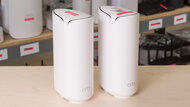
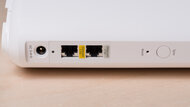
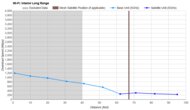
Apartment/CondoMulti-Level HouseGamingSpeedRangeLatencyType:MeshMulti Band:Dual Band (2.4 / 5)See all our test resultsWi-Fi Version:Wi-Fi 7 (be)If you need broader coverage than a single router can provide or want the option to expand later, the NETGEAR Orbi 370 is our top pick. Although its peak speeds don't quite reach the heights of our top standalone pick, the NETGEAR Nighthawk RS300, its mesh design delivers better coverage and is well-suited to everyday use. Its 2.5Gbps Ethernet ports support multi-gigabit internet while leaving space for wired connections to the router and its satellites. It's a decent option for gaming over Wi-Fi, with adequate latency levels for casual play and the option for a wired backhaul between nodes.
This router offers approachable software and unobtrusive hardware, with an app-based installation guide and a relatively slim design that feels at home tucked into a shelf. Its subscription-based services and limited Wi-Fi 7 implementation weaken the overall package, however, as the security suite and additional parental controls both require subscriptions to access. The hardware itself also falls short of its next-generation branding; it excludes the faster 6GHz frequency entirely, and we couldn't verify its advertised MLO support since the necessary information was absent from its beacon frames during testing.






Compared To Other Brands
-
Dependable everyday speeds.
NETGEAR routers tend to perform well at close range, keeping video streams consistent, large downloads moving, and online games responsive.
-
Frictionless setup.
You don't need an IT degree to get online, as the companion mobile apps walk you through the entire setup process step by step.
-
Expensive software paywalls.
You only get the bare necessities out of the box, as most network security tools and parental control functions require pricey monthly subscriptions.
-
Misleading next-generation marketing.
Several of the brand's more affordable Wi-Fi 7 routers omit features commonly associated with the standard, including a 6GHz band and Multi-Link Operation (MLO) support.
-
Tough value proposition.
You can frequently find competitors offering faster speeds, more multi-gigabit ports, and free security tools for the same price.
-
Limited expandability on standalone routers.
Unlike compatible TP-Link EasyMesh and ASUS AiMesh models, NETGEAR's standalone routers can't be combined into a mesh system if your coverage needs grow.
NETGEAR vs ASUS
ASUS and NETGEAR prioritize different aspects of the user experience, and the choice between them largely comes down to configurability versus convenience. ASUS leans heavily into configurability, giving advanced users plenty of control over their network. Perhaps most notably, ASUS includes its security tools, VPN features, and parental controls at no extra cost, resisting the increasingly popular urge to bill by the feature. NETGEAR opts for a simpler, more streamlined app-based approach to get you online quickly, but it requires a recurring monthly subscription to access equivalent tools.
NETGEAR vs TP-Link
TP-Link generally offers better value than NETGEAR, though both have embraced the modern custom of charging extra for some advanced network tools. However, TP-Link routinely undercuts NETGEAR on price, delivering far better performance per dollar with a wider range of mid-tier models and generally better port selections. Although neither brand lets you escape subscriptions entirely, TP-Link softens the blow with a lower upfront price and more capable hardware.
NETGEAR vs eero
NETGEAR and eero share a preference for simple apps and paid extras, but eero is the more minimalist of the two. Its app makes setup and mesh expansion straightforward, though unsurprisingly, advanced features like content filtering, ad blocking, and VPN tools require a subscription. NETGEAR also charges for some security and parental-control tools, but the company offers a wider choice of hardware and modestly more room to configure your network. Neither rejects the subscription model, but eero embraces simplicity with an unprecedented enthusiasm.
NETGEAR offers a wide range of capable routers and mesh systems, though its pricing and feature sets don't always compare favorably with the competition. The Nighthawk and Orbi lineups cover everything from basic standalone routers to high-end mesh systems, and their respective apps simplify initial setup and routine management. However, malware protection and some parental controls require paid subscriptions, which can increase the total cost of ownership. Some newer routers marketed as Wi-Fi 7 also omit core features of the standard, like MLO and a 6GHz band, so it's worth double-checking their spec sheets before taking NETGEAR's branding at face value.
Lineup
Nighthawk: NETGEAR's traditional line of standalone routers. Running from affordable budget models to massive quad-band flagships, these units are easily recognizable by their dark, angular styling. They're designed to cover your entire home from a central location and are managed exclusively through the mobile app.
Orbi: Built to eliminate dead zones in larger or multi-level homes, Orbi is NETGEAR's family of whole-home mesh systems. Instead of relying on a single standalone router, these systems use multiple tower-like nodes to blanket your floor plan with a more consistent signal. They prioritize a hands-off, seamless experience with an app-based setup, though they carry a significant price premium.
Conclusion
While NETGEAR routers are undeniably easy to set up and generally perform well, their overall value proposition is severely hindered by their software ecosystem. Navigating their catalog requires a sharp eye, since you'll need to weigh their performance and features against an aggressive multi-subscription model that charges for basic security tools. Add in the fact that several models misrepresent their Wi-Fi 7 capabilities, and finding the right fit can certainly take a bit of research.
Ready to evaluate the data yourself? You can use our table tool to sort through our test results.


