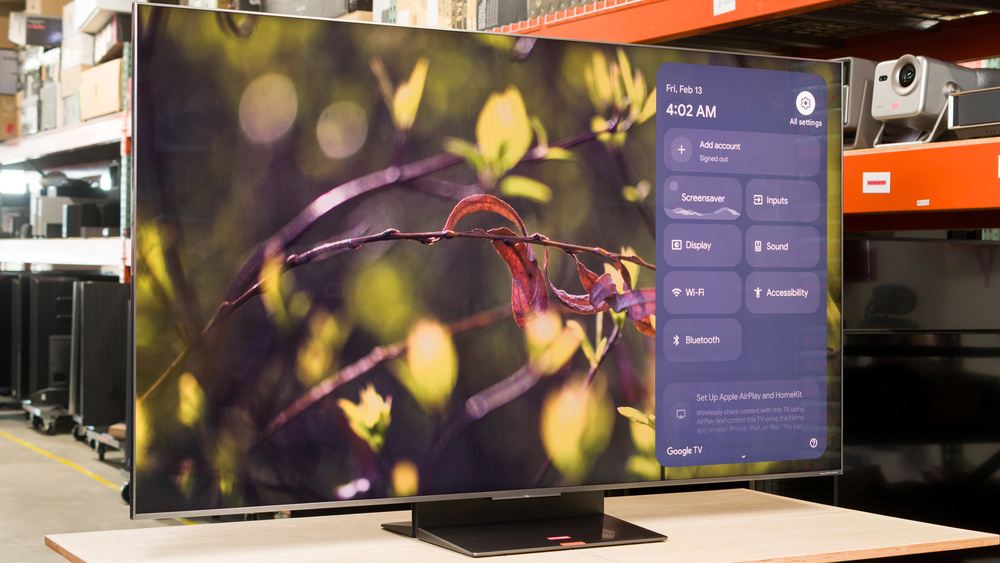
The TCL QM8L is a high-end TV released in 2026, replacing the TCL QM8K. Sitting between the TCL QM7L and the flagship TCL X11L, it's a premium TV that features Mini LED local dimming and TCL's Super Quantum Dot (SQD) technology, designed to deliver brighter, more vibrant colors than previous quantum dot panels. It also features TCL's WHVA 2.0 panel, which is meant to provide wider viewing angles than traditional VA panels. It's packed with features, including four HDMI 2.1 bandwidth ports, a high refresh rate, an ATSC 3.0 NEXTGEN TV tuner for 4k over-the-air viewing, and a speaker system that's been tuned by Bang & Olufsen. We bought and tested the 65-inch model, but it's also available in a 75-, 85-, and 98-inch size in North America.
Our Verdict
The TCL QM8L is great for most uses. It's great for watching movies or shows in a dark room, thanks to its high contrast ratio and excellent local dimming feature. It's also excellent for a bright room, thanks to its high peak brightness. It has a great selection of gaming features and incredibly low input lag, but it's not as well-suited for faster games due to its high response time. It also has poor accuracy in HDR, so although it has great format support, it's not perfect for physical media collectors who care more about creative intent.
Bright enough to easily overcome glare in any room.
Deep, uniform blacks.
Colors are bright and vibrant.
Mediocre direct reflection handling.
Image degrades rapidly from the sides.
The TCL QM8L is an excellent TV for home theater usage. It looks amazing in a dark room, thanks to its very high contrast ratio and excellent Mini LED local dimming feature. Colors are bright and vibrant, and HDR content stands out incredibly well, thanks to its high peak brightness. It also supports all advanced audio and video formats, including Dolby Vision, HDR10+, and DTS audio formats, and it'll eventually support Dolby Vision 2, making it a great choice for physical media collectors. Unfortunately, the TV has poor accuracy in HDR, even after a full calibration, so it's not as suitable for anyone who cares about creative intent.
Deep, uniform blacks.
Very little haloing around bright highlights on dark backgrounds.
Extremely bright in HDR.
Supports all common audio and video formats.
Disappointing HDR accuracy.
Can't be fully calibrated in HDR.
Poor PQ EOTF tracking.
The TCL QM8L is an excellent TV for a bright room. It's incredibly bright in SDR, so it can easily overcome glare during the day. It struggles to maintain high brightness when more of the screen is bright at once, but this isn't an issue most of the time. It has mediocre reflection handling, though, so bright lights and open windows are still visible, and HDR content doesn't look as good during the day. Ambient light has very little impact on color saturation or contrast.
Bright enough to easily overcome glare in any room.
Ambient light has very little impact on color saturation or black levels.
Mediocre direct reflection handling.
The TCL QM8L is a good TV for watching sports. It has great peak brightness, so you can comfortably watch sports during the day without worrying about glare. It does a very good job cleaning up low-quality streams, with just a slight loss of fine details, which is great, as most sports feeds are low quality. On the other hand, the image degrades rapidly when viewed from the sides, so it's not a great choice for a wide seating arrangement. Fast action is also very blurry due to the TV's slow response time, and there are noticeable edge artifacts in fast-moving shots.
Bright enough to easily overcome glare in any room.
Colors are bright and vibrant.
Ambient light has very little impact on color saturation or black levels.
Very good low-quality content smoothing.
Noticeable edge artifacts in fast transitions.
Image degrades rapidly from the sides.
The TCL QM8L delivers a mixed gaming experience overall. It has incredibly low input lag, ensuring a very responsive feel when gaming, and it supports VRR to reduce tearing. It has a very high refresh rate, especially when paired with a PC, and it supports HDMI 2.1 bandwidth on all four HDMI inputs, so you can take full advantage of multiple consoles. There's also no noticeable impact on picture quality when you switch to the low-latency Game Master mode. On the other hand, it has mediocre motion handling when gaming, and there's considerable blur around fast-moving objects.
Low input lag with all supported formats.
Switching to Game Master mode has no impact on picture quality.
Extremely bright in HDR.
Very high CAD leads to blurry motion in Game Master mode at all refresh rates.
The TCL QM8L is an incredibly bright TV. It's bright enough in SDR to easily overcome glare in a bright room. Small specular highlight details in HDR stand out incredibly well, delivering a very impactful HDR experience overall, even in very bright scenes. It struggles to maintain that brightness when more of the scene is bright at once, but it's still bright enough that this isn't an issue most of the time.
Bright enough to easily overcome glare in any room.
Colors are bright and vibrant.
Extremely bright in HDR.
The TCL QM8L has excellent black levels. Its Mini LED local dimming feature delivers incredibly deep, uniform blacks. It keeps up well with fast-moving objects, so there are minimal transition artifacts, and it has excellent backlight control, so you'll barely see any haloing around bright highlights on dark backgrounds. The panel's native contrast is good, too, which helps maintain low black levels in more complicated scenes.
Deep, uniform blacks.
Very little haloing around bright highlights on dark backgrounds.
The TCL QM8L has great colors. Colors are incredibly bright and vibrant in both SDR and HDR. In HDR, it pushes whites to be brighter than pure colors, so some colors are a bit washed out in very bright scenes. It has great color accuracy before calibration in SDR, but its HDR accuracy is significantly worse, even after a full calibration.
Colors are bright and vibrant.
Very accurate in SDR out of the box.
Disappointing HDR accuracy.
Can't be fully calibrated in HDR.
The TCL QM8L has good motion handling when watching content. It removes judder from most sources, ensuring an even frame cadence, but like most TVs, there's some noticeable stutter in slow-panning shots. It has an okay average response time, but it's uneven, so most transitions are either very quick or very slow, causing noticeable motion blur in most content. This also causes noticeable edge artifacts in quick transitions.
Removes judder from most sources.
Motion interpolation feature does a very good job reducing stutter.
Noticeable edge artifacts in fast transitions.
Some stutter in slow-panning shots.
The TCL QM8L has just decent responsiveness when you switch to the low-latency Game Master mode. It has a high refresh rate and very low input lag, so your actions are in-sync with the action on the screen. It also has a low-latency frame generation mode that works with any source without adding much lag. On the other hand, it has a very high CAD at all refresh rates, so fast motion is very blurry, especially when something changes from very bright to very dark and vice-versa.
Low input lag with all supported formats.
High refresh rate support, up to 4k @ 144Hz or 1080p @ 288Hz.
Very high CAD leads to blurry motion in Game Master mode at all refresh rates.
Note: We're in the process of improving our tests related to image processing, but this score should give you a general idea of how a TV performs overall with its image processing capabilities.
The TCL QM8L has just okay processing. It does a very good job of smoothing out low-quality content, significantly reducing macro blocking and posterization with just a slight loss of fine details. It also upscales low-resolution sources extremely well. Unfortunately, it doesn't fare as well with HDR content, as PQ EOTF tracking is bad, and there's some noticeable banding in gradients.
Excellent upscaling.
Very good low-quality content smoothing.
Poor PQ EOTF tracking.
Performance Usages
Changelog
-
Updated Jul 09, 2026:
We bought and tested the Hisense UR9SG, and added a comparison in the Contrast and SDR Color Volume sections of the review.
-
Updated Jul 07, 2026:
We bought and tested the Sony BRAVIA 7 II, and added a comparison in the HDR Brightness and SDR Color Volume sections of the review.
- Updated May 20, 2026: Review published.
- Updated May 14, 2026: Early access published.
Check Price
Differences Between Sizes And Variants
We bought and tested the 65-inch TCL QM8L, and these results also apply to the 75-, 85-, and 98-inch models. The number of zones and the peak brightness increase slightly with each step up in size, but we don't expect it to make a significant difference in overall performance.
It's sold as the TCL C8L in Europe. The hardware is the same as the U.S. model, but the fine-tuning is a bit different, so our results might not be an exact match for those models. There's also a 55-inch model available in Europe, but it hasn't yet been confirmed for the U.S.
| Size | U.S. Model | E.U. Model | Dimming Zones | Area Per Dimming Zone (approximate) | Advertised Peak Brightness | Panel Type |
|---|---|---|---|---|---|---|
| 55" | N/A | TCL 55C8L | 1,008 | 1.28 in² | Up to 3,000 nits | HVA 2.0 |
| 65" | TCL 65QM8L | TCL 65C8L | 2,040 | 0.88 in² | Up to 5,000 nits | WHVA 2.0 |
| 75" | TCL 75QM8L | TCL 75C8L | 2,584 | 0.93 in² | Up to 5,500 nits | WHVA 2.0 |
| 85" | TCL 85QM8L | TCL 85C8L | 3,200 | 0.96 in² | Up to 6,000 nits | WHVA 2.0 |
| 98" | TCL 98QM8L | TCL 98C8L | 4,032 | 1.02 in² | Up to 6,000 nits | WHVA 2.0 |
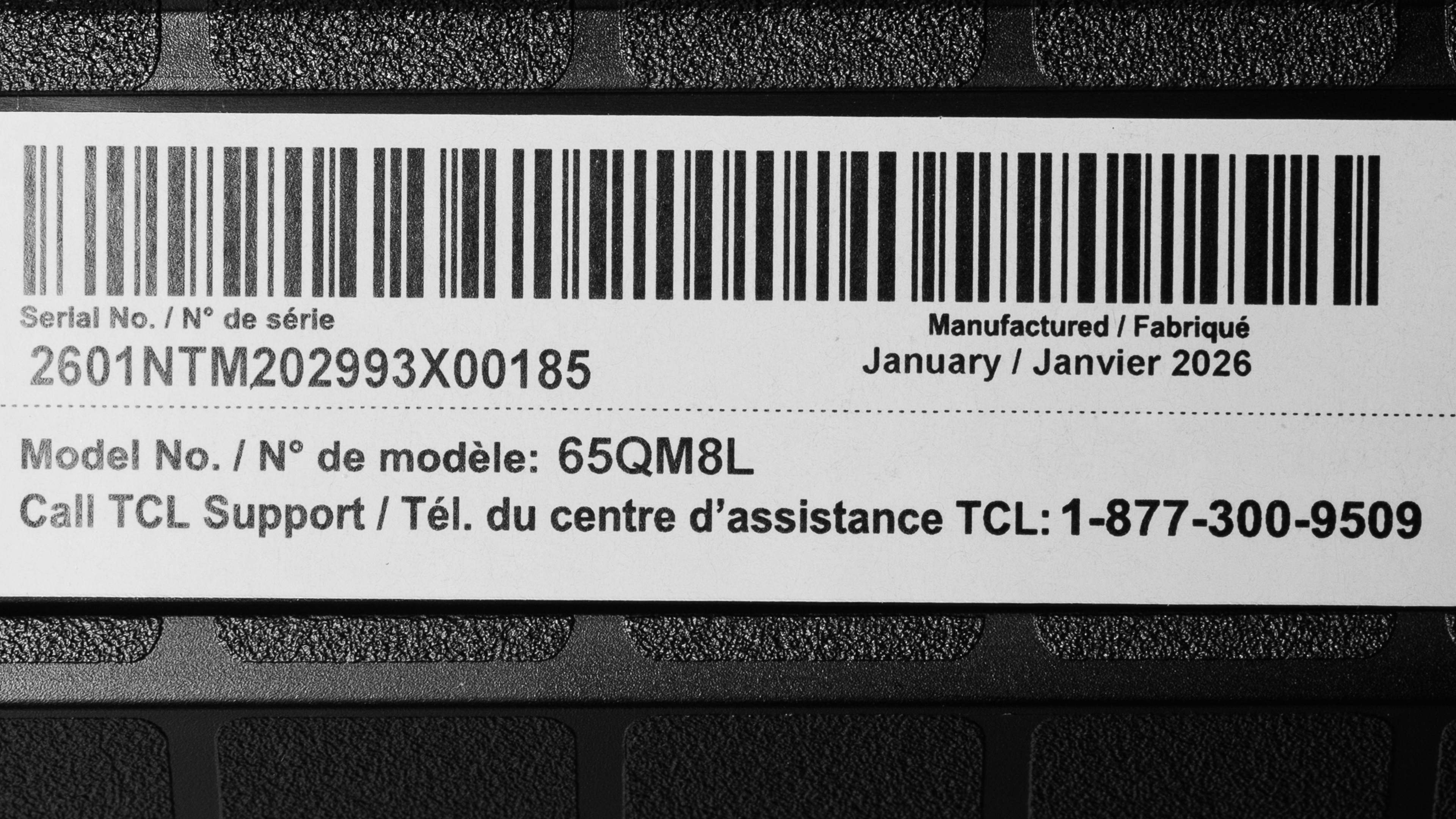
Our unit was made in China in January 2026.
Popular TV Comparisons
The TCL QM8L is an impressive TV with very high peak brightness and impressive colors. It's also incredibly feature-packed, with a great selection of smart features, powerful gaming options like a high refresh rate and four HDMI 2.1 bandwidth ports, and support for all major HDR formats. It's well-suited to a wide range of uses and room setups, making it a versatile choice for just about anyone. Its high peak brightness and vibrant colors come at a cost, though, as it favors a punchy image over accuracy. It offers a better overall experience, with better picture quality and no issues like color cross-talk, compared to RGB Mini LED models from competing brands, such as the Hisense UR9SG or the Sony BRAVIA 7 II.
For more options, check out our recommendations for the best QLED TVs, the best gaming TVs, and the best TVs.
The TCL QM8L is better than the TCL QM7L. Even though the QM7L is a very bright TV, the QM8L is brighter in both SDR and HDR, so it handles a bit more glare in a well-lit room and displays even brighter highlights in HDR. The QM8L also displays slightly more vivid colors, does a better job upscaling, and has deeper blacks with less haloing around highlights. However, the QM7L does a slightly better job reducing the intensity of direct reflections, even though both TVs don't excel in that area.
The TCL QM8L and the Hisense U8QG are very similar overall, and there's no clear winner between the two. The Hisense has slightly deeper blacks in very dark scenes, but the TCL does a better job controlling its dimming zones, resulting in a more uniform dark scene experience, with less haloing around bright highlights. The Hisense, on the other hand, is considerably more accurate in HDR, and there's less banding in similar shades, so it's a better choice for home theater use.
The TCL QM8L is a bit of an improvement over the TCL QM8K that it replaces, but there are a few downsides to the new model. The QM8L has better color volume, delivering brighter, more saturated colors in light scenes. It also has a more advanced processor, so it supports HDMI 2.1 bandwidth on all four ports instead of just two on the QM8K. On the other hand, the QM8L has slightly worse contrast, and it's significantly less accurate in HDR, even after a full calibration.
The LG C5 OLED is better than the TCL QM8L overall, but the TCL is still a great choice for certain use cases. The C5 delivers a spectacular movie-watching experience, especially in a dark room, thanks to its perfect blacks, with no distracting haloing around bright highlight details. Whereas the C5 truly shines in a dim or dark room, the TCL stands out better in a bright room. The TCL gets significantly brighter, and while most of that extra brightness is lost in real content, it still looks better in a very bright room when watching bright content like sports.

We buy and test dozens of TVs yearly, taking an objective, data-driven approach to deliver results you can trust. Our testing process is complex, with hundreds of individual tests that take over a week to complete. Most of our tests use specially designed test patterns that mimic real content, but we also use the same sources you have at home to ensure our results match the real-world experience. We use two main tools for our testing: a Colorimetry Research CR-100 colorimeter and a CR-250 spectroradiometer.
Test Results
for pictures & test results

for pictures & test results

for pictures & test results

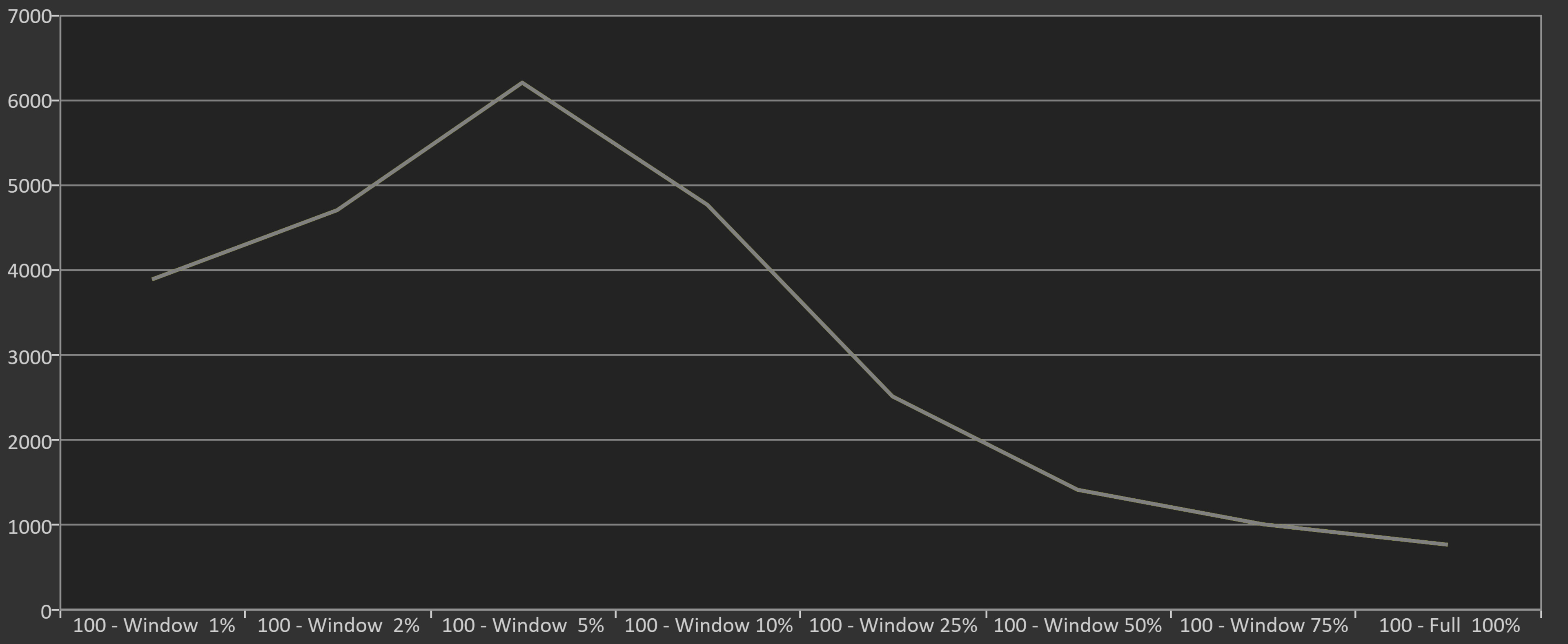
The TCL QM8L is incredibly bright. Small specular highlight details get extremely bright and stand out well. It struggles to keep the brightness high when more of the screen is bright at once, but it's still bright enough with most content to deliver an impactful viewing experience. Still, it's brighter than competing models like the Sony BRAVIA 7 II and the Hisense UR9SG.
It's even brighter when displaying a window between 2-10%. A 5% window appears to be a bit of a sweet spot for the TV's local dimming feature, and it even exceeds 6,000 nits with a window that size.
The TV's peak brightness varies depending on the settings used. Below are additional measurements showing the impact of some of these settings on real scene brightness measurements.
Dynamic Tone Mapping 'Off':
| Peak Brightness Setting | Hallway Lights | Yellow Skyscraper | Landscape Pool |
|---|---|---|---|
| Boost | 1,225 cd/m² | 761 cd/m² | 358 cd/m² |
| High | 1,240 cd/m² | 750 cd/m² | 358 cd/m² |
| Low | 1,230 cd/m² | 426 cd/m² | 305 cd/m² |
Peak Brightness 'High':
| Dynamic Tone Mapping Setting | Hallway Lights | Yellow Skyscraper | Landscape Pool |
|---|---|---|---|
| Detail Priority | 1,186 cd/m² | 696 cd/m² | 413 cd/m² |
| Balanced | 1,192 cd/m² | 717 cd/m² | 492 cd/m² |
| Brightness Priority | 1,214 cd/m² | 750 cd/m² | 611 cd/m² |
for pictures & test results

for pictures & test results

for pictures & test results

With most content, there's no difference in peak brightness when you switch to the low-latency Game Master mode. Some scenes are slightly dimmer, but they're still bright enough to deliver an impactful gaming experience.
| Peak Brightness | Hallway Lights | Yellow Skyscraper | Landscape Pool |
|---|---|---|---|
| Boost | 1,186 cd/m² | 534 cd/m² | 314 cd/m² |
| Low | 1,110 cd/m² | 312 cd/m² | 254 cd/m² |
This TV is incredibly bright in SDR. It's bright enough to easily overcome glare in a bright room. Like most TVs, it struggles to maintain high brightness levels when more of the scene is bright at once, but this isn't an issue with most real content.
for pictures & test results

The TCL QM8L has excellent contrast. Its Mini LED local dimming system does a fantastic job of improving contrast in dark scenes, and the native contrast ratio is high enough to maintain deep blacks in areas that are too small for the local dimming feature to handle.
for pictures & test results

The backlight control on this TV is extremely precise. It handles oddly shaped objects like subtitles well, with very minimal haloing around them.
for videos & test results

The zone transitions on this TV are excellent. The processor keeps up with fast-moving objects well, so there's no noticeable halo trail behind fast-moving objects. There's a slight flicker effect as fast-moving objects move between zones, though.



for pictures & test results

for pictures & test results

The black uniformity on this TV is amazing. With local dimming on, it's nearly perfect, with almost no variation in black levels across the screen. Even with local dimming off, it's still very good, with no distracting flashlighting or other visible issues.
for pictures & test results

for pictures & test results

The TCL QM8L has excellent SDR color volume. Colors are incredibly bright and vibrant even in very light scenes, and it displays most of the DCI-P3 color space. Coverage of the wider BT.2020 color is lower, but still great. Unlike RGB Mini LED TVs, like the Sony BRAVIA 7 II and Hisense UR9SG, there's no color cross-talk or loss in color volume in more complex scenes.
| Volume ΔE³ | DCI-P3 Coverage |
BT.2020 Coverage |
|---|---|---|
| L10 | 94.91% | 78.67% |
| L20 | 95.67% | 81.50% |
| L30 | 95.28% | 82.03% |
| L40 | 94.60% | 84.00% |
| L50 | 93.38% | 84.72% |
| L60 | 92.21% | 84.29% |
| L70 | 91.60% | 79.48% |
| L80 | 91.24% | 77.85% |
| L90 | 91.12% | 77.93% |
| L100 | 92.12% | 78.05% |
| Total | 92.63% | 81.21% |
for pictures & test results

for pictures & test results

The HDR color volume on the TCL QM8L is fantastic. Colors are incredibly bright and vibrant, with excellent coverage of the DCI-P3 color space used by most HDR content. It has much lower coverage of the BT.2020 color space, but it's still very good.
Unfortunately, colors are a bit washed out at high luminance levels, as the TV pushes pure whites higher than the combined luminance of each subpixel when displayed individually. This isn't noticeable with most real content, but in exceptionally bright scenes, colors are a bit washed out.
for pictures & test results

for pictures & test results

for pictures & test results

The TCL QM8L has great accuracy in SDR before calibration. Gamma tracks a bit higher than the target, so most content is a bit too dark, but the white balance and color errors are excellent, with very few noticeable issues. There's a bit too much blue in most midtones, though, and the overall color temperature is a bit cool.
for pictures & test results

for pictures & test results

for pictures & test results

This TV is fairly easy to calibrate, and it delivers superb results after calibration. It has nearly perfect color and white balance accuracy, and gamma is perfect. The color temperature is also nearly perfect.
See our full calibration settings.
Unfortunately, there's a bug with the user interface that makes it slightly more complicated to calibrate. When you switch from one stimulus level to the next, the UI makes it look like the TV has copied the values from the previous level. You have to back out to the previous menu and reselect the stimulus level you want to adjust each time you change levels.
for pictures & test results

for pictures & test results

Unfortunately, the TCL QM8L has disappointing accuracy in HDR out of the box. The RGB balance is pretty good, but color accuracy is sub-par, with noticeable mapping and luminance errors across the spectrum. The white balance is a bit better, but there are still noticeable issues in most shades, and the color temperature is too cold.
for pictures & test results

for pictures & test results

Unfortunately, this TV has sub-par accuracy in HDR even after a full calibration. Color accuracy and the white balance are slightly better, but it simply doesn't respond well to calibration, and the overall color temperature is still too cold.
Given how bright this TV can get, it can be difficult to get accurate measurements with certain equipment, especially lower-end colorimeters, which are usually only accurate to a brightness level below this TV's peak brightness. These results were checked with a Colorimetry Research CR-100 and double-checked with a CR-250 to rule out any potential measurement issues from the equipment.
for pictures & test results

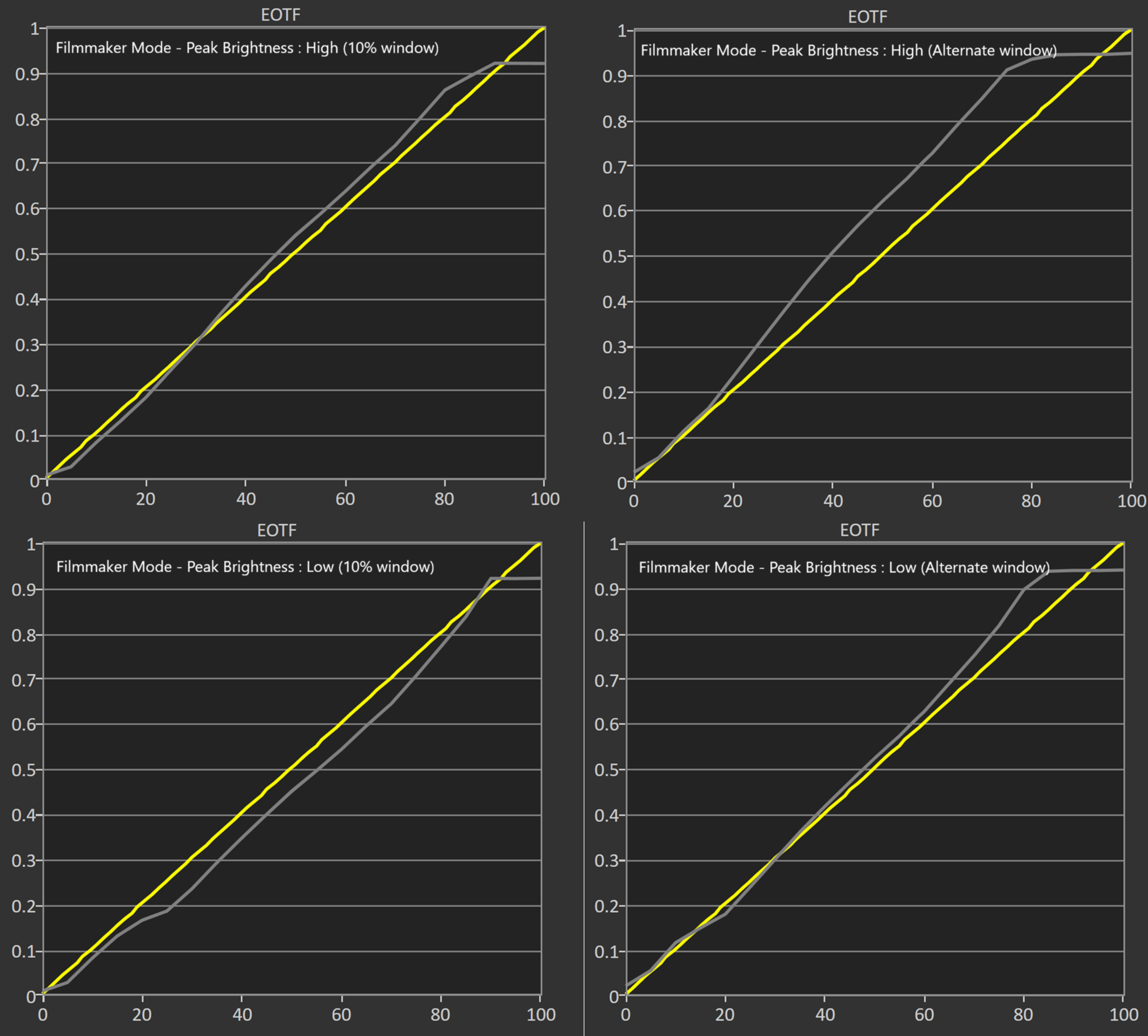
Unfortunately, the TCL QM8L has poor PQ EOTF tracking with Peak Brightness set to 'High.' Shadow details are displayed well, but midtones and bright shades are way too bright. The TV also cuts off sharply at its peak brightness, but this isn't too much of an issue since the TV can actually display most bright highlights at their intended brightness level, so it doesn't need to tone map them to preserve gradation.
Dropping the Peak Brightness setting to 'Low' significantly improves the PQ EOTF tracking, but bright highlights are still too bright. This mode also decreases the TV's peak brightness with small highlights by about 1,000 nits. If you care more about accuracy than brightness, 'Low' is the better choice.
The PQ EOTF tracking on this TV also varies depending on the window size used to measure it. The TV is considerably more accurate when sent a 10% window, which is the window size used by most TV reviewers to measure PQ EOTF tracking. We use a different window size,
for pictures & test results

This TV has very good low-quality content smoothing. It does a great job reducing macro blocking and pixelization from streaming sources, but there's some slight loss of fine details.
for pictures & test results

The TCL QM8L has excellent upscaling and sharpness processing.
for pictures & test results

The TV has decent gradient handling. There's some noticeable banding in darker shades of gray and brighter shades of green and blue, but it's not too bad.
The TCL QM8L has excellent input lag once you switch to the Game Master mode. It's incredibly responsive, especially at higher refresh rates. Like other high-end TCL and Samsung TVs, it also has a low-latency motion interpolation feature, which generates intermediate frames when gaming to improve the fluidity of motion. Unlike similar features like AMD's Fluid Motion Frames or NVIDIA's Frame Generation, this feature works with any source, even older consoles.
Adjusting the local dimming setting has no impact on input lag. We measured it with local dimming on 'High' and on 'Off' and found no difference.
The TV supports all common resolutions up to 4k @ 144Hz on all four of its HDMI ports. It also supports up to 288Hz with 1080p and 1440p signals. All supported formats also support proper chroma 4:4:4, which is essential for clear text from a PC.
The TCL QM8L supports all three types of variable refresh rate (VRR) technology to reduce screen tearing. It works well with AMD sources, like an AMD GPU or any console across a wide refresh rate range, and it works with Low Framerate Compensation (LFC), ensuring your games remain nearly tear-free even when your frame rate drops very low.
Unfortunately, like the TCL QM8K, VRR doesn't work properly with NVIDIA GPUs when the refresh rate is locked at 60Hz. This is only an issue if you have an older GPU and can't handshake above 4k @ 60Hz; it works fine if you set your computer to 4k @ 120Hz or higher.
for pictures & test results
for pictures & test results

Unfortunately, the CAD at the max 4k refresh rate of 144Hz is very high. Near-black shadow details are very clear, but longer transitions are slow, resulting in significant motion blur.


for pictures & test results

The TV is fully compatible with everything the PS5 offers, like 1440p @ 120Hz and 4k @ 120Hz, as well as HDMI Forum VRR. It also supports Auto Low Latency Mode, so you don't have to worry about manually switching to Game Master to get the lowest input lag.
for pictures & test results

The TV is fully compatible with everything the Xbox Series X|S offers, including 1440p @ 120Hz, 4k @ 120Hz, HDMI Forum VRR, Dolby Vision, and FreeSync Premium Pro. It also supports Auto Low Latency Mode, so you don't have to manually switch to Game Master to get the lowest input lag.
for videos & test results
for pictures & test results
for pictures & test results
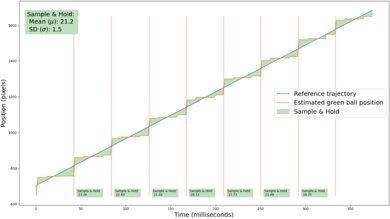
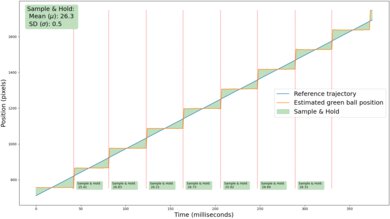
The motion interpolation feature on this TV does a very good job of reducing stutter. Even with low levels of interpolation, the frame hold time is significantly lower. It's also incredibly consistent, with very little variation between frames.
for pictures & test results
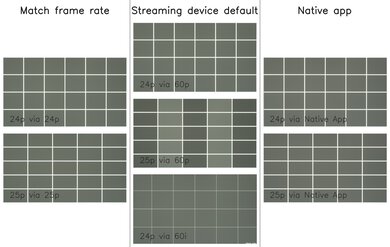
This TV removes judder from most sources. The TV doesn't entirely remove judder from 25p content being sent via a 60p source like an older cable box, as frame times are slightly inconsistent, so motion is a bit jittery.
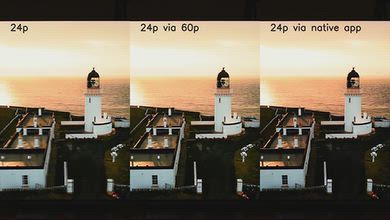
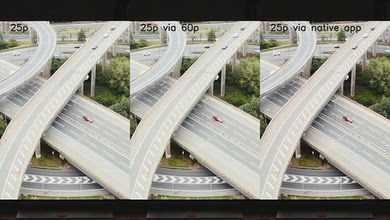
for pictures & test results

for pictures & test results

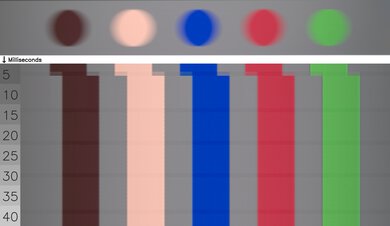
The TCL QM8L has an okay response time when watching content like sports or movies. Transitions are inconsistent, though, and it's especially slow when coming out of a dark shade or transitioning to a very bright one.
for pictures & test results
for pictures & test results
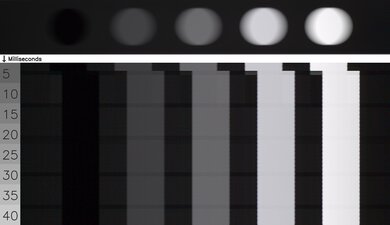
Unfortunately, transitions are uneven, leading to noticeable artifacts. There are some unwanted intermediate colors, but they're extremely minor and not very noticeable. Edges are noticeably soft, and there's noticeable ghosting at the sides of moving objects.
for pictures & test results

This TV uses PWM to adjust the backlight, but it flickers at an extremely high frequency that's not noticeable.
for pictures & test results

for pictures & test results

The TV has an optional backlight strobing feature, commonly known as black frame insertion. This feature is meant to reduce persistence blur and improve the appearance of motion, but the pulse timing is a bit off, and motion is still very blurry. Oddly, it only flickers at 120Hz, even with a 60Hz source, which creates a noticeable double image.


for pictures & test results

for pictures & test results

The total amount of reflected light is good. Reflections are still noticeable in a bright room, and there are obvious diffraction artifacts, including a distracting rainbow smear around bright lights.
for pictures & test results

Ambient light has almost no noticeable impact on perceived color volume on this TV. High-luminance colors are noticeably washed out, but this is an impact of the way the TV boosts pure white at the expense of color saturation in bright scenes. It's not caused by ambient light.
for videos & test results

for pictures & test results

for pictures & test results

for pictures & test results

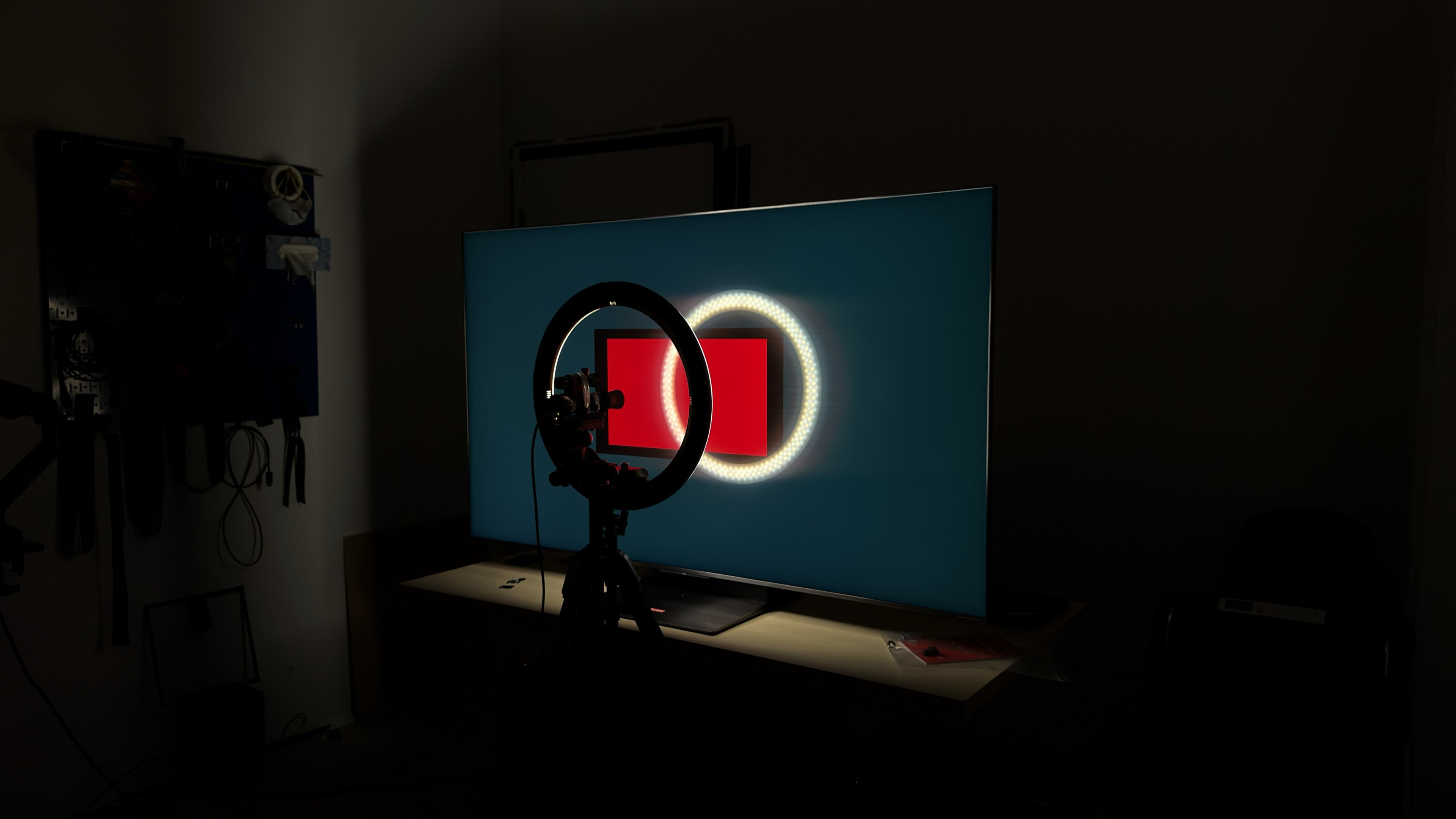
Unfortunately, the TV has a mediocre viewing angle. Colors wash out quickly as you move to the sides, and blues drop off rapidly.
Note: The red tint on this video is an interaction between the camera sensor and the very strong red peak emitted by the TV. It's not noticeable in person.
for pictures & test results

for pictures & test results

The TV has okay gray uniformity. There's just a bit of dirty screen effect in the center, but the sides of the screen are noticeably darker. It's a lot better in near-black scenes.
for pictures & test results

for pictures & test results

The TCL QM8L uses a combination of new panel technologies, including an improved color filter, a new WHVA 2.0 panel structure, and improved quantum dots, which TCL calls Super Quantum Dots.


The TV supports eARC, which lets you pass high-quality, uncompressed audio to a compatible receiver or soundbar through an HDMI cable. It supports all major audio formats, so you don't have to worry about compatibility with external sources.
This model will also support Dolby Vision 2 with a future firmware update. TCL hasn't confirmed if it'll support HDR10+ Advanced, though.
for pictures & test results

The TCL QM8L has a premium style, with incredibly thin bezels on all four sides and a modern, pedestal-style stand that takes up very little space.
for pictures & test results

The pedestal stand takes up very little space, and it offers a high and low mounting position so you can fit a soundbar in front of the TV without blocking the screen.
Footprint of the 65-inch screen: 15.3" x 14.6" x 3.4" in the high position and 2.2" in the low position.
for pictures & test results

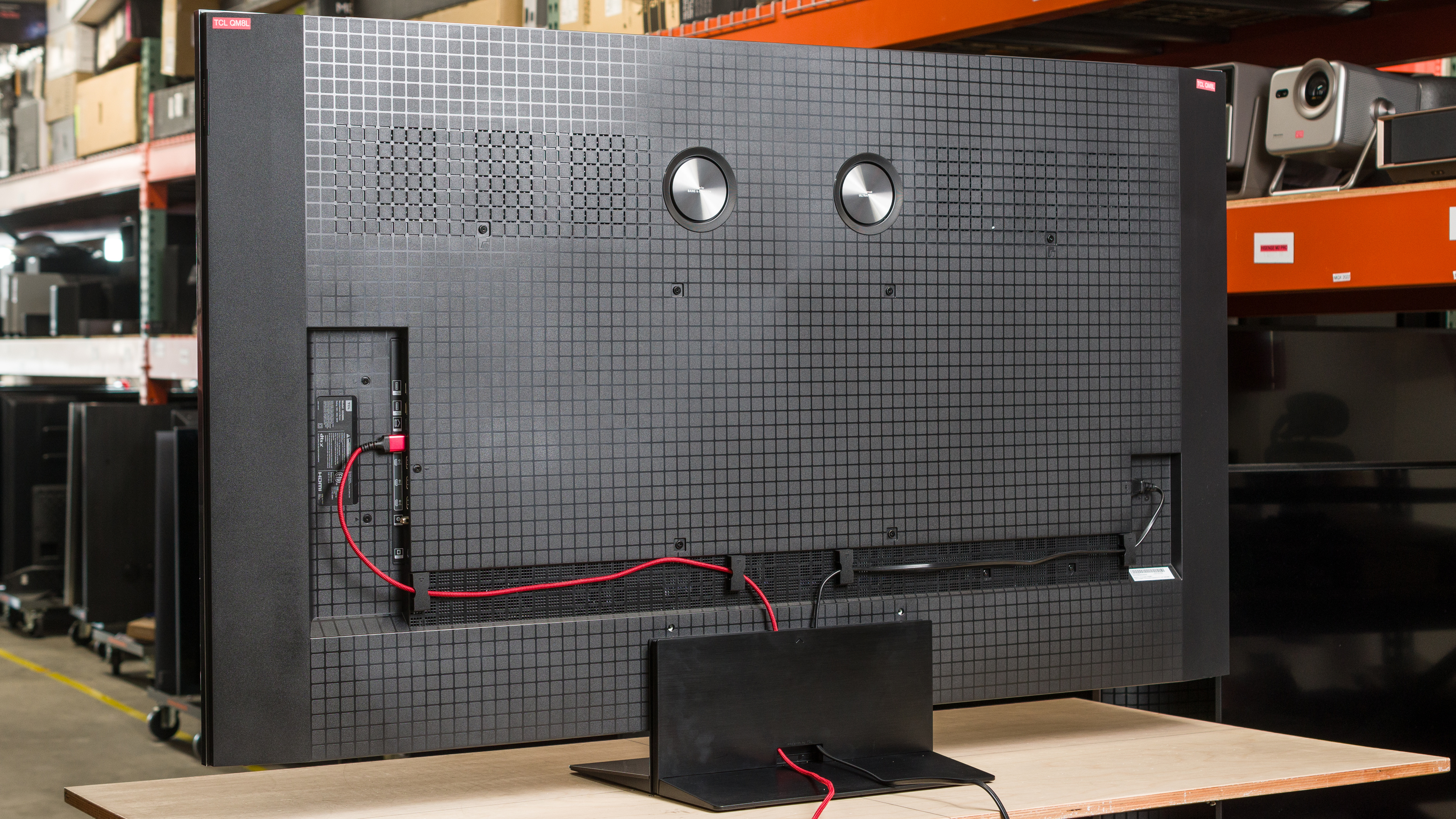
The back of the TV has the same textured pattern as the TCL X11L. There are cable guides along the back of the TV and a notch in the stand to help with cable management. The inputs are recessed into a cutout on the back of the TV, so they can be difficult to access if the TV is mounted close to the wall.


for pictures & test results

The TCL QM8L has excellent build quality. It's mostly made of a high-quality plastic, giving it a somewhat premium feel. There are no obvious quality control issues with the unit we bought.
for pictures & test results

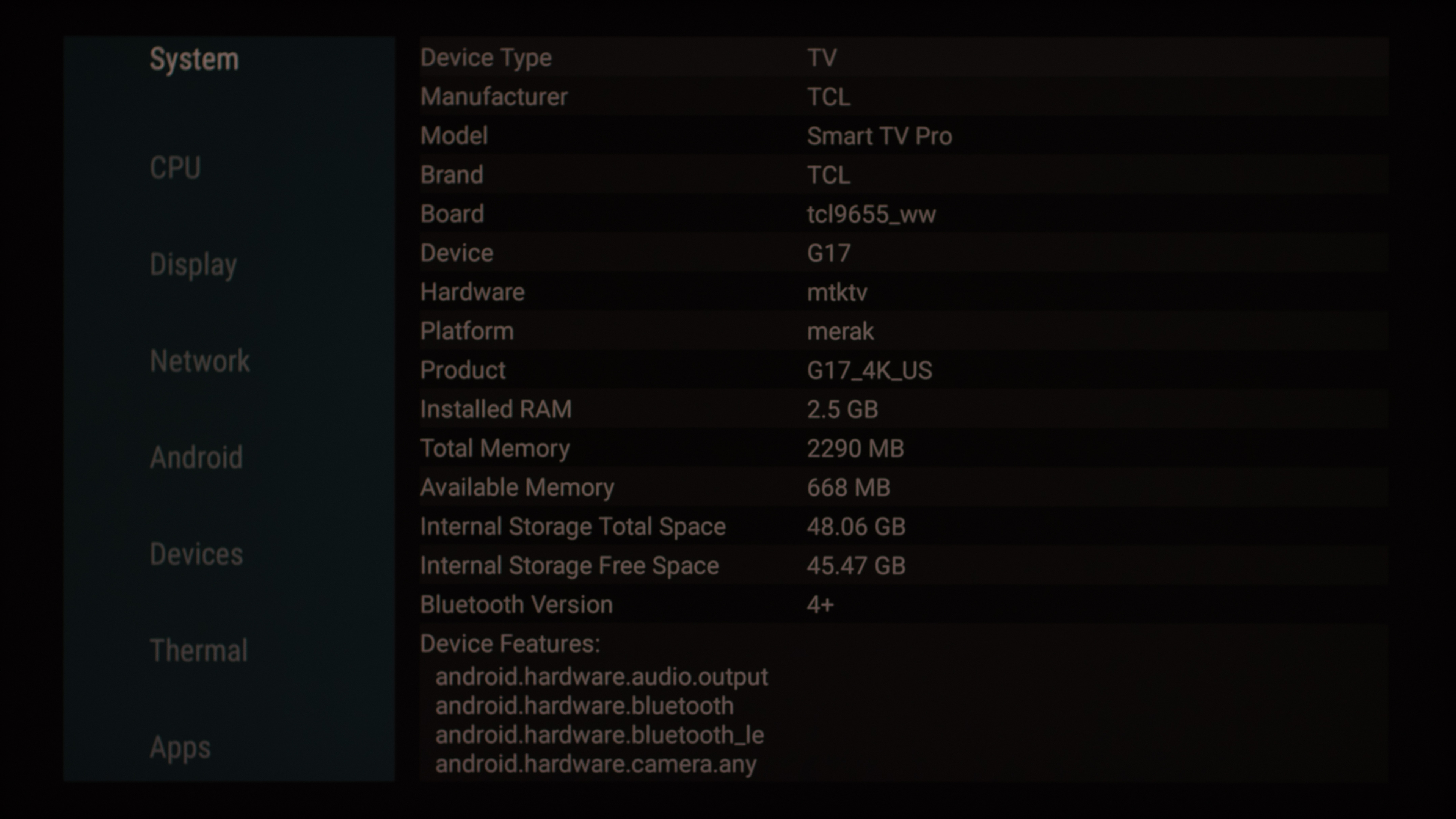
The TCL QM8L ships with Google TV version 14 and includes support for the Google Gemini smart assistant. Running AIDA64 on the TV shows that it's powered by the MediaTek Pentonic 800 chipset, with 2.5GB of RAM and ~48GB of storage space.
for pictures & test results

Unfortunately, like almost all TVs on the market, the smart interface contains ads, and you can't disable them.
When you first start up the TV you can choose to run it in a Basic TV mode. This gives you an ad-free experience, but also disables most smart features.


for pictures & test results

- Setup guide
- Remote
- 2x AAA batteries
- Power cable
- Cable management clips
- Wall-mount spacers
This TV was originally tested with firmware version V080, but V082 was released late in the testing process. We spot checked the most important aspects of the TV and confirmed that only the pre-calibration results changed, so that was completely redone.
for pictures & test results

The TCL QM8L has a decent frequency response. It has a very well-balanced sound profile as long as you're not driving it at max volume, so dialogue is clear and easy to understand. It has okay max volume and a bit more bass than most TVs, but there's noticeable thumping at max volume.