
Deciding exactly where to start searching for a new monitor can be difficult. It isn't a straightforward process, and there's no perfect solution for everyone. There are many different types of monitors available in various sizes, panel types, refresh rates, and resolutions. While most people would be happy with a basic monitor that's good enough for everyday use, there are plenty of models that are designed for different uses, like gaming or work, and offer extra perks for these, so it's important to think about how you'll use it.
The best PC monitors are usually focused on gaming and provide high-end picture quality, particularly in HDR. This means they're versatile enough to use for anything from gaming to watching content. You can also consider well-rounded budget monitors, but the trade-offs as you move down price categories are that they have fewer features and worse picture quality than higher-end models. If you aren't sure what to look for in a monitor or if the marketing terms confuse you, check out our monitor guides.
We've bought and tested over 400 monitors, and below, you'll find our picks for the best computer monitors available. If you have a more specific usage in mind, check out our recommendations for the best multimedia monitors, the best HDR monitors, the best video editing monitors, and the best photo editing monitors. You can also see all our monitor recommendations. If you want more than just a monitor, look into the best home printers.

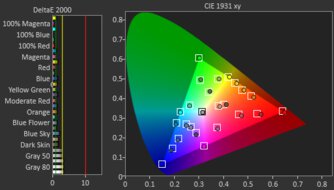
We buy and test more than 30 monitors each year, all of which we purchase ourselves, without cherry-picked units or samples. We put a lot into each unbiased, straight-to-the-point review, and there's a whole process from purchasing to publishing, involving multiple teams and people. We do more than just use the monitor for a week; we use specialized, custom tools to measure various aspects and deliver objective, data-driven results. We also consider multiple factors before making any recommendations, including the monitor's cost, its performance compared to the competition, and whether it's easy to find.
-
Best Monitor
 PC GamingConsole GamingOfficeEditingBrightnessHDR PictureSDR PictureColor AccuracyResponse TimeSize32"Panel TypeOLEDSub-TypeQD-OLEDMax Refresh Rate240 HzSee all our test resultsNative Resolution3840 x 2160
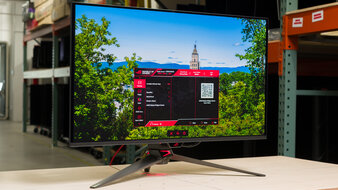
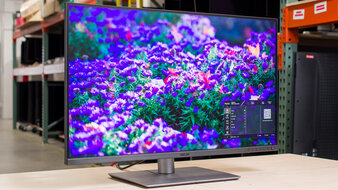
The best monitor we've tested is the ASUS ROG Swift OLED PG32UCDM Gen3. It's a premium 32-inch, 4k monitor that has a QD-OLED panel. Although it's designed for gaming, it's great for a variety of uses and delivers fantastic picture quality. Your favorite content looks incredible, with deep, inky blacks in dark rooms, a bright screen, highlights that pop, and colors that look vivid. While its blacks look gray in bright rooms, its BlackShield coating means it's better at maintaining low black levels than on other QD-OLEDs.
Besides that, it's one of the best options for gaming because of its 240Hz refresh rate and near-instantaneous response time. It even has HDMI and DisplayPort 2.1 bandwidth to take full advantage of gaming consoles and modern graphics cards. While OLEDs like this risk permanent burn-in with constant exposure to the same static elements over time, the risk is mitigated if you vary your usage. Even if you want to use it for work, its 4k resolution and high pixel density result in sharp text clarity. It also has a USB-C port with 90W of power delivery and a KVM switch, which helps if you want to change sources and use the same keyboard and mouse on both. You can also check out the 27-inch ASUS ROG Swift OLED PG27UCDM if you want a smaller screen for cheaper. It performs similarly, but it isn't as bright, and it has worse black level raise in bright rooms.
See our recommendations for the best gaming monitors.
-
Best Upper Mid-Range Monitor
PC GamingConsole GamingOfficeEditingBrightnessHDR PictureSDR PictureColor AccuracyResponse TimeSize27"Panel TypeOLEDSub-TypeQD-OLEDMax Refresh Rate240 HzSee all our test resultsNative Resolution3840 x 2160If you don't need all the premium features of the ASUS ROG Swift OLED PG32UCDM Gen3 and you prefer saving a bit of money, look into the Dell Alienware AW2725Q. Although it's another 4k QD-OLED with similar picture quality, there are a few downsides to getting this lower-cost model. For example, it's missing a few features that the ASUS offers, such as a KVM switch. Despite having a USB-C port, it lacks DisplayPort Alt Mode to display an image from a laptop, so you need to connect it over DisplayPort or HDMI. It, at least, has other USB ports to connect your devices, like your mouse or keyboard.
As for gaming, it has the same 240Hz refresh rate and near-instantaneous response time as the ASUS, leading to a smooth and responsive feel. That said, it doesn't have DisplayPort 2.1 bandwidth to take advantage of the latest graphics cards either. Its HDMI 2.1 bandwidth is helpful if you have an HDMI 2.1 graphics card or current-gen gaming console, though. Besides fewer features, it offers the advantages of OLED, with deep blacks and vivid colors, so it's something to consider if you want high-end picture quality while saving some money. However, it uses an older QD-OLED panel that isn't as bright, and it has worse black level raise in bright rooms, so blacks look purple in ambient lighting.
See our recommendations for the best 4k monitors.
-
Best Mid-Range Monitor
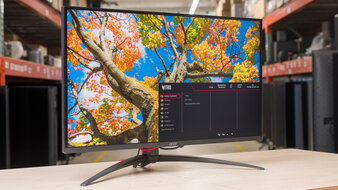
PC GamingConsole GamingOfficeEditingBrightnessHDR PictureSDR PictureColor AccuracyResponse TimeSize27"Panel TypeLCDSub-TypeIPSMax Refresh Rate320 HzSee all our test resultsNative Resolution3840 x 2160If you don't need an OLED monitor and you prefer something versatile in the mid-range price category, look into the Acer Nitro XV275K P5biipruzx. It's worth getting when you can get it on sale. It's different from Dell Alienware AW2725Q because it doesn't have the same deep blacks, vivid colors, and perfect black uniformity, so it has worse overall picture quality. On the plus side, it gets much brighter than the Dell thanks to its Mini LED backlighting, making it the better choice to use in well-lit rooms. It also has an alright local dimming feature, which improves black levels and the overall picture quality in dark scenes. However, it mutes small highlights, so they don't pop as much as on an OLED, there's haloing around bright objects, and you can only use this feature in HDR.
Regardless of these trade-offs in picture quality, it's a versatile monitor for both work and play. It has everything you'd want in a gaming monitor, like a native 160Hz refresh rate and HDMI 2.1 bandwidth to take advantage of gaming consoles. Motion looks sharp, and it has low input lag for a responsive feel at any refresh rate, including in its 1080p, 320Hz dual mode. Plus, its native 4k resolution helps deliver sharp images and text. It even has a small USB hub with DisplayPort Alt Mode and a KVM switch, which is useful if you want to connect two computers to the monitor.
See our recommendations for the best Mini LED monitors.
-
Best Budget Monitor
PC GamingConsole GamingOfficeEditingBrightnessHDR PictureSDR PictureColor AccuracyResponse TimeSize27"Panel TypeLCDSub-TypeVAMax Refresh Rate180 HzSee all our test resultsNative Resolution2560 x 1440If you're looking for a multi-use monitor and you're on a budget, look at the AOC Q27G3XMN. It has a lower 1440p resolution than the Acer Nitro XV275K P5biipruzx, so text and images aren't as sharp and detailed. Another trade-off for getting something cheaper is that the AOC has fewer features than the Acer, as it doesn't have a USB hub to connect your devices. That's normal for an entry-level monitor, so you must ensure your computer has enough ports to connect your devices.
The biggest advantage of the AOC, especially compared to other low-cost monitors, is that it utilizes Mini LED backlighting, similar to the Acer. This means it displays deep blacks against bright highlights, which is great for watching HDR content. Its local dimming is even better than that of the Acer, as it has less black crush, so you can see more details in dark scenes, and you can use it outside of HDR as well. Lastly, it includes gaming capabilities, like a 180Hz refresh rate and a fast response time; however, there's smearing behind fast-moving objects in dark scenes. You can also check out the similar AOC Q27G40XMN if you can find it available and for cheaper. It even has a better local dimming feature, but it has worse motion handling.
See our recommendations for the best gaming monitors under $300.
-
Best Cheap Monitor
PC GamingConsole GamingOfficeEditingBrightnessHDR PictureSDR PictureColor AccuracyResponse TimeSize27"Panel TypeLCDSub-TypeIPSMax Refresh Rate180 HzSee all our test resultsNative Resolution2560 x 1440If you want a simple option that's cheaper than the AOC Q27G3XMN, look at the Dell Alienware AW2725DM. While it's a 27-inch, 1440p monitor like the AOC, there are some things to keep in mind as you drop down in price categories. It has significantly worse picture quality, as it lacks Mini LED backlighting. Combined with its low contrast ratio, this means blacks appear gray, and highlights don't pop, resulting in a less vivid HDR experience. It also has a terrible local dimming feature that causes blooming around bright objects against dark backgrounds. You can only use this local dimming in HDR, though, so it's better to use this monitor outside of HDR to avoid this issue.
It remains a versatile display for various purposes, including gaming. It features a 180Hz refresh rate that's fast enough for entry-level gamers. Motion appears fairly sharp, with less black smearing in dark scenes than the AOC. Its 1440p resolution also helps make text look decently sharp. It has a few useful productivity features, like an ergonomic stand and two USB-A ports, but it lacks any USB-C ports to connect a laptop. If you need a work display with a larger USB hub, including USB-C, you can also consider the Dell S2725DC, although it has worse gaming performance and more motion blur.
See our recommendations for the best budget and cheap monitors.
-
Best Work Monitor
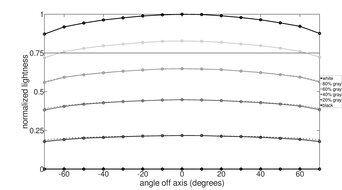
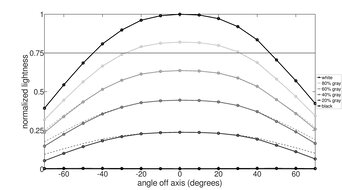
PC GamingConsole GamingOfficeEditingBrightnessHDR PictureSDR PictureColor AccuracyResponse TimeSize32"Panel TypeLCDSub-TypeIPSMax Refresh Rate60 HzSee all our test resultsNative Resolution6016 x 3384While the monitors recommended above are versatile for work and play, if you want something specifically for work, look into the ASUS ProArt Display 6K PA32QCV. It has a 6k resolution with a 32-inch screen for high pixel density. Text looks sharp, but you need to use a scaled resolution, as the default resolution results in really small text. It also offers a wide viewing angle and excellent ergonomics, making it easy to share your screen with others or adjust it to your preferred position.
Another advantage of getting this over other high-resolution options, like the ASUS ROG Swift OLED PG32UCDM Gen3 or the Dell Alienware AW2725Q, is that it has a big USB hub that lets you connect a variety of devices. This includes four USB-A ports and two more USB-C ports. Plus, it has a KVM switch and supports Thunderbolt 4 and 90W of power delivery, which is ideal if you want to connect a Thunderbolt laptop, like a MacBook, and charge it with a single cable. Lastly, it's bright enough to fight glare if you want to use it in a room with a few lights, and its matte coating reduces glare really well, with almost no mirror-like reflections. However, the trade-off of this coating is that it introduces haze to the image.
See our recommendations for the best work monitors.







Notable Mentions
-
ASUS ROG Swift OLED PG34WCDN:
The ASUS ROG Swift OLED PG34WCDN is a high-end OLED ultrawide monitor. Its QD-OLED panel is similar to that of the ASUS ROG Swift OLED PG32UCDM Gen3, and it's something to consider if you want a wider screen for a more immersive feel. However, it has a lower resolution for less detailed images than the PG32UCDM Gen3.
See our review -
ASUS ROG Strix OLED XG32UCWMG:
The ASUS ROG Strix OLED XG32UCWMG is a 32-inch, 4k OLED that competes with the ASUS ROG Swift OLED PG32UCDM Gen3. The main difference is that the ASUS has a WOLED panel that maintains low black levels better in bright rooms. However, its colors aren't as vivid as on the PG32UCDM Gen3.
See our review -
Dell S3225QC:
The Dell S3225QC is an upper mid-range OLED that sometimes costs less than the Dell Alienware AW2725Q. It has many of the same benefits, like its deep blacks and sharp motion. However, there are some trade-offs as it has a lower refresh rate and and lacks a DisplayPort input.
See our review -
LG 27GM950B-B:
The LG 27GM950B-B is a 5k Mini LED monitor that's something to consider over the Dell Alienware AW2725Q if you want a brighter screen and higher resolution. The LG has some great gaming features, like a dual mode to boost its refresh rate. However, it doesn't offer the same deep blacks as an OLED like the Dell.
See our review -
HyperX OMEN OLED 27q:
The HyperX OMEN OLED 27q is an OLED that's in the same price range as the Acer Nitro XV275K P5biipruzx. It's worth getting if you want the better picture quality and improved motion handling. However, the HyperX has a lower 1440p resolution, so it's less versatile for work.
See our review -
Dell U2725QE:
The Dell U2725QE is a 4k work monitor that costs a lot less than the ASUS ProArt Display 6K PA32QCV. It offers many productivity features, like a bigger USB hub, but it has a smaller screen than the ASUS.
See our review
Recent Updates
Jul 29, 2026:
We replaced the ASUS ROG Swift OLED PG27UCDM with the newer and brighter ASUS ROG Swift OLED PG32UCDM Gen3 as the best overall monitor. We also replaced the hard-to-find KOORUI S2741LM with the Acer Nitro XV275K P5biipruzx. In the Notable Mentions, we removed the LG 24GS65F-B, and we added the Dell S3225QC and the LG 27GM950B-B to reflect the changes to the recommendation.
Jun 19, 2026:
We replaced the Dell S3225QC in the upper mid-range category with the Dell Alienware AW2725Q, which has a higher refresh rate for gaming.
May 22, 2026:
In the Notable Mentions, we replaced the Dell Alienware AW2725Q and the Dell S2725DC with the ASUS ROG Swift OLED PG34WCDN and the HyperX OMEN OLED 27q to better reflect the current market.
Apr 24, 2026:
We replaced the Acer Nitro XV275K P5biipruzx with the KOORUI S2741LM, which has better local dimming and motion handling. In the Notable Mentions, we removed the MSI MPG 274URDFW E16M, and we added the Acer XV275K.
Mar 26, 2026:
We replaced the Dell U2725QE with the ASUS ProArt Display 6K PA32QCV for consistency with other recommendations. In the Notable Mentions, we removed the ASUS ProArt Display PA279CRV and the Dell S2725QS, and we added the MSI MPG 274URDFW E16M and the U2725QE.
All Reviews
Our recommendations are based on what we think are the best computer monitors currently available in the United States. They're adapted to be valid for most people in each price range. The rating is based on our review, feedback from visitors, and price. For example, two monitors may perform the same, but the cheaper one will be recommended. We also consider availability, as we don't recommend a monitor that's hard to find.
If you'd prefer to make your own decision, here's the list of all of our monitor reviews. Be careful not to get too caught up in the details. Most of the best PC monitors are good enough to please most people, and the things we fault monitors on are often not noticeable unless you really look for them.