The Sharp AQUOS FS1 OLED is Sharp's first OLED TV and is part of their premium AQUOS line-up. It uses a WOLED panel and is the first OLED on the market to run the Roku TV operating system. It includes Dolby Vision IQ to adjust the picture brightness based on the amount of ambient light in a room, and it uses Sharp's Medalist S4 AI image processor that can automatically adjust brightness, details, and colors based on what it detects in content. It's only available in 55-inch and 65-inch sizes. The TV features two 15W speakers and has support for Dolby Atmos.
Our Verdict
The Sharp AQUOS FS1 OLED is a great TV for mixed usage. It has an amazing viewing angle, so it's a good choice for watching shows or sports with a group since everyone sees a consistent image no matter where they're sitting. It's an outstanding TV for gaming thanks to its HDMI 2.1 bandwidth, 4k @ 120Hz, VRR support, low input lag, and fantastic response time, so it's a good option to pair with modern gaming consoles. The TV has remarkable contrast, so blacks are deep and inky with no blooming around bright highlights or text. Unfortunately, it has unremarkable HDR brightness, so highlights in HDR movies and games don't pop, and HDR content lacks impact. The TV also has mediocre SDR brightness and doesn't get bright enough to overcome glare in a bright room, so it's best suited for a moderately lit or dark room.
- Near infinite contrast ratio and incredible black uniformity for perfect blacks.
- Wide viewing angle for a consistent image when viewed from the sides.
- Fantastic response time with very little blur behind quick moving objects.
- Can't overcome glare in a bright room due to low SDR brightness.
- HDR content lacks impact due to low HDR brightness.
- No panel care settings to help mitigate the chance of burn-in.
The Sharp AQUOS FS1 OLED is good for watching TV shows. The built-in Roku interface is loaded with a big selection of streaming apps, so it's easy to find your favorite shows. It has exceptional reflection handling to help reduce the intensity of glare, but it doesn't get bright enough to completely overcome glare in a bright room, so it's best suited for a moderately lit or dark room. The TV has an amazing viewing angle, so you can enjoy a consistent image from the sides if you like to move around your room while watching TV. Unfortunately, it has poor low-quality content smoothing, so lower-quality content like DVDs or low-bitrate streams have noticeable artifacts. The TV also has disappointing sharpness processing, so low-resolution content is soft and lacks sharpness.
- Near infinite contrast ratio and incredible black uniformity for perfect blacks.
- Wide viewing angle for a consistent image when viewed from the sides.
- Can't overcome glare in a bright room due to low SDR brightness.
- Poor low-quality content smoothing.
- No panel care settings to help mitigate the chance of burn-in.
The Sharp AQUOS FS1 OLED is very good for watching sports. It has a fantastic response time, so motion is clear, with very little blur behind fast-moving players and objects. The TV has exceptional reflection handling to reduce the intensity of glare, but it doesn't get bright enough to overcome glare in a bright room, so it's best suited for moderately lit or dark rooms. Its amazing viewing angle makes it a great choice for watching the game with friends since anyone watching from the side sees a consistent image. The TV has excellent uniformity, so there's very little dirty screen effect when watching sports with large areas of the same color, like hockey.
- Near infinite contrast ratio and incredible black uniformity for perfect blacks.
- Wide viewing angle for a consistent image when viewed from the sides.
- Excellent gray uniformity with very little dirty screen effect.
- Fantastic response time with very little blur behind quick moving objects.
- Can't overcome glare in a bright room due to low SDR brightness.
- Poor low-quality content smoothing.
- No panel care settings to help mitigate the chance of burn-in.
The Sharp AQUOS FS1 OLED is outstanding for playing video games. It has incredibly low input lag, so there's almost no delay between the inputs on your controller and what happens on screen. The TV's fantastic response time provides clear motion with very little blur behind quick movements, and its VRR support gives a nearly tear-free gaming experience. The TV has HDMI 2.1 bandwidth on two of its ports that allows you to play in 4k @ 120Hz, so it's a good choice to pair with modern consoles. Although the TV has exceptional reflection handling, it doesn't get bright enough to overcome glare in a bright room, so it's best suited for moderately lit or dark rooms. Fortunately, the TV looks spectacular in a dark room due to its remarkable contrast, so blacks are deep and inky, and they stay that way when bright highlights are on screen.
- Near infinite contrast ratio and incredible black uniformity for perfect blacks.
- Incredibly low input lag for a responsive experience.
- HDMI 2.1 bandwidth and advanced gaming features.
- Fantastic response time with very little blur behind quick moving objects.
- Can't overcome glare in a bright room due to low SDR brightness.
- No panel care settings to help mitigate the chance of burn-in.
The Sharp AQUOS FS1 OLED is very good for watching movies in a dark room. It has deep and inky blacks with no blooming when bright highlights are on screen, thanks to its remarkable contrast and incredible black uniformity, so it looks spectacular in a dark room. The TV can remove 24p judder from any source, so movies are judder-free, and its amazing wide color gamut displays vibrant and lifelike colors. Unfortunately, it has poor low-quality content smoothing, so low bitrate streams and movies on DVD have noticeable artifacts. Finally, the TV has unremarkable HDR peak brightness and doesn't get bright enough for highlights to pop, so HDR content lacks impact.
- Near infinite contrast ratio and incredible black uniformity for perfect blacks.
- Automatically removes 24p judder from any source.
- Wide color gamut for vibrant and lifelike colors in HDR content.
- HDR content lacks impact due to low HDR brightness.
- Poor low-quality content smoothing.
- Doesn't support advanced DTS audio formats that are regularly used in physical media.
- No panel care settings to help mitigate the chance of burn-in.
The Sharp AQUOS FS1 OLED is excellent for gaming in HDR. It has HDMI 2.1 bandwidth on two of its ports for 4k @ 120Hz gaming, so it pairs well with modern consoles. It also has VRR support, so games are nearly tear-free. The TV has incredibly low input lag for a responsive gaming experience, and its fantastic response time provides clear motion with very little blur behind quick movements. The TV looks spectacular in a dark room thanks to its remarkable contrast, so blacks are deep and inky with no blooming when highlights are on screen. Unfortunately, the TV has unremarkable HDR brightness, so bright highlights don't pop the way they should, and HDR games lack impact.
- Near infinite contrast ratio and incredible black uniformity for perfect blacks.
- Incredibly low input lag for a responsive experience.
- Wide color gamut for vibrant and lifelike colors in HDR content.
- HDMI 2.1 bandwidth and advanced gaming features.
- Fantastic response time with very little blur behind quick moving objects.
- HDR content lacks impact due to low HDR brightness.
- No panel care settings to help mitigate the chance of burn-in.
The Sharp AQUOS FS1 OLED is outstanding for use as a PC monitor. It has a fantastic response time, so there's very little blur behind quick cursor movements or when quickly scrolling through pages. It also has incredibly low input lag, providing a very responsive desktop experience. The TV has a wide viewing angle, so you can sit close to the screen, and the edges remain consistent with the center. It has excellent uniformity, so there's very little dirty screen effect when looking at large areas of the same color, like when browsing the web. The TV properly displays chroma 4:4:4, which is essential for clear text from a PC, but due to its WRGB subpixel layout, there are still clarity issues with text. It's also great to pair with a gaming PC since it has HDMI 2.1 bandwidth, 4k @ 120Hz, and VRR support. Unfortunately, as with all OLEDs, there's a risk of permanent burn-in when regularly exposed to static elements, like the UI elements of a computer desktop.
- Near infinite contrast ratio and incredible black uniformity for perfect blacks.
- Wide viewing angle for a consistent image when viewed from the sides.
- Incredibly low input lag for a responsive experience.
- HDMI 2.1 bandwidth and advanced gaming features.
- Excellent gray uniformity with very little dirty screen effect.
- Risk of permanent burn-in.
- No panel care settings to help mitigate the chance of burn-in.
Changelog
- Updated Oct 16, 2024: Mentioned the newly-reviewed Panasonic Z85A OLED in the Upscaling: Sharpness Processing section of this review.
- Updated Jun 20, 2024: Mentioned the newly-reviewed Sony BRAVIA 8 OLED in the Low-Quality Content Smoothing section of this review.
- Updated May 07, 2024: Mentioned the newly-reviewed LG B4 OLED in the Pre-Calibration section of this review.
- Updated May 02, 2024: Mentioned the newly-reviewed LG C4 OLED in the SDR Brightness section of this review.
Check Price
Differences Between Sizes And Variants
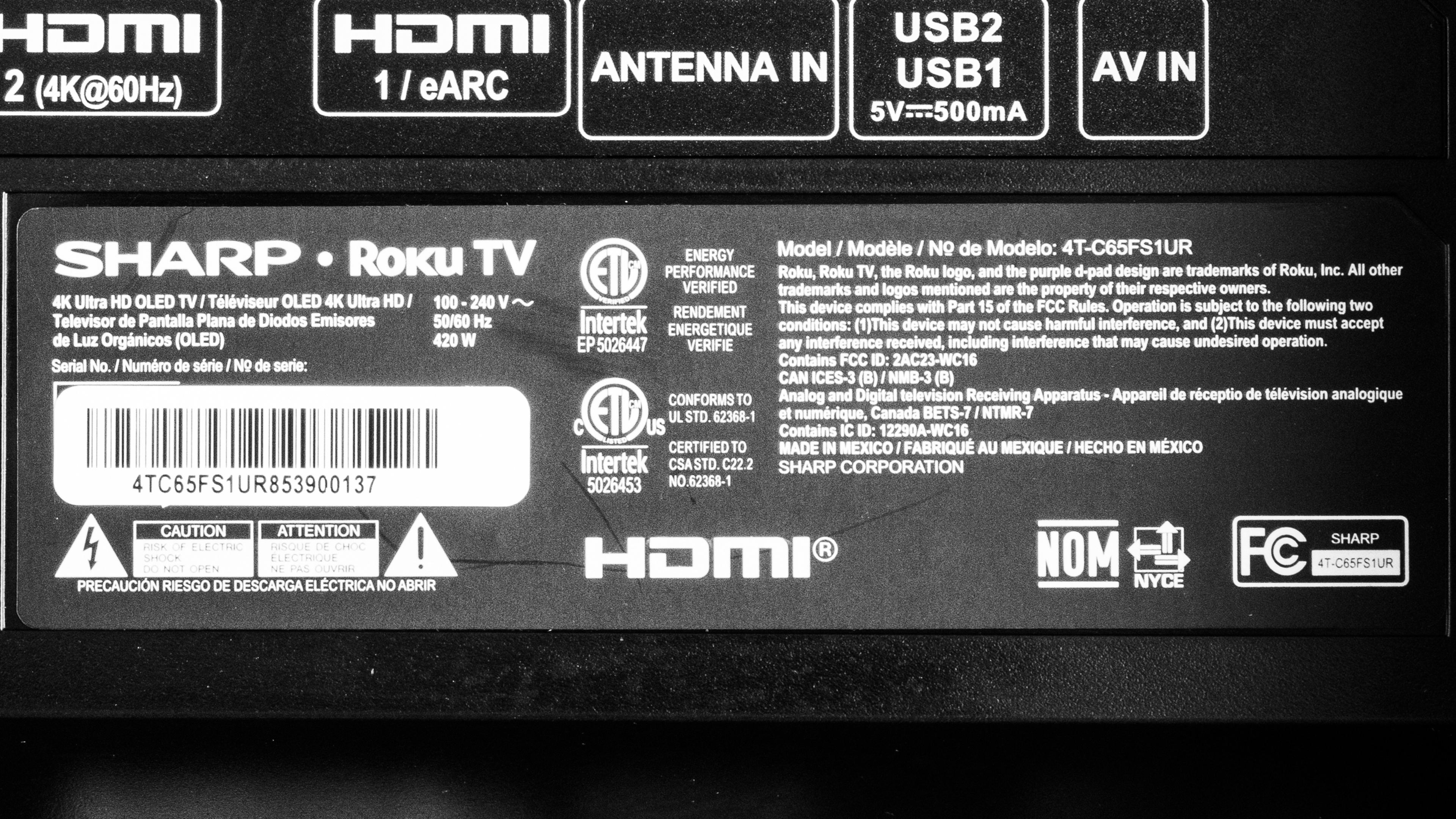
We bought and tested the 65-inch Sharp AQUOS FS1 OLED (4T-C65FS1UR), but our results are also valid for the 55-inch model. In Japan, the FS1 is the QD-OLED version of this TV, and this model is referred to as the FQ1. There's no QD-OLED model available in the US.
| Size | US Model | Japan Model Code |
|---|---|---|
| 55" | 4T-C55FS1UR | 4T-C55FQ1 |
| 65" | 4T-C65FS1UR | 4T-C65FQ1 |
You can see the label for our unit here.
Popular TV Comparisons
The Sharp AQUOS FS1 OLED is a great TV, but it's held back by its low HDR and SDR brightness, no panel care settings, and lack of size options. It doesn't stand out in any way when compared to other OLEDs on the market, and you would be much better served getting the similarly priced LG C3 OLED since it's much brighter in SDR and HDR, is available in more sizes, and has an even wider viewing angle. It also has better upscaling, low-quality content smoothing, pre-calibration accuracy, and has HDMI 2.1 bandwidth on all four ports. Even the cheaper LG B3 OLED has better SDR and HDR brightness and scores better in most categories, so it's the better option if you want to spend less.
For more options, check out our recommendations for the best OLED TVs and the best 4k TVs, and if you need something larger, check out our recommendations for the best 70-75-77 inch TVs.
Although the LG C1 OLED and the Sharp AQUOS FS1 OLED are similar TVs, the LG is better in most ways. The LG has many features that the Sharp model doesn’t, like a BFI feature, HDMI bandwidth on all four ports, and better image processing. The LG is also a bit brighter than the Sharp, so it can fight a bit more glare in a room with lights on when watching SDR content, and highlights pop more in HDR content. However, the Sharp is much more accurate pre-calibration, so it's better if you care about accuracy and don't want to get your TV calibrated.
The LG C2 OLED and the Sharp AQUOS FS1 OLED are similar TVs, but the LG is better. The LG has a wider viewing angle, better pre-calibration accuracy, HDMI 2.1 bandwidth on all four ports, and better image processing. The LG is also brighter, so SDR content looks better in a bright room, and HDR content has impactful highlights that pop.
The LG A2 OLED and the Sharp AQUOS FS1 OLED are similar TVs, each having strengths over the other. The LG has a wider viewing angle, so the image remains more consistent with the center when viewed from the sides. The LG also has better low-quality content smoothing, so DVDs and low-bitrate streams look better on it than the Sharp TV. However, the Sharp is a much better option for gamers due to its HDMI 2.1 bandwidth, 4k @ 120Hz, and VRR support, so it can take advantage of modern gaming consoles and PCs much more than the LG can.
The LG B3 OLED and the Sharp AQUOS FS1 OLED are similar TVs, but the LG is better. The LG has a wider viewing angle, so the image stays more consistent from the sides than on the Sharp. The LG also has much better overall image processing and a useful BFI feature. On top of that, the LG is brighter in both SDR and HDR.

We buy and test dozens of TVs yearly, taking an objective, data-driven approach to deliver results you can trust. Our testing process is complex, with hundreds of individual tests that take over a week to complete. Most of our tests use specially designed test patterns that mimic real content, but we also use the same sources you have at home to ensure our results match the real-world experience. We use two main tools for our testing: a Colorimetry Research CR-100 colorimeter and a CR-250 spectroradiometer.
Test Results
Older Test Bench: We tested this product using an older TV test methodology before a major update. Some of the test results below aren't directly comparable with other TVs. Learn more

for pictures & test results

The Sharp 4TC65FS1UR has a sleek and modern design reminiscent of the LG C1 OLED. It looks and feels like a premium TV and is aesthetically pleasing.
for pictures & test results

It uses two non-adjustable plastic feet that are wide set and do a good job of holding the TV. There's some noticeable wobble, but this doesn't cause any issues with the TV's stability. The feet lift the TV about 3.5", so most soundbars fit underneath without blocking the screen.
Footprint of the 65-inch stand: 57.2" X 11".
for pictures & test results

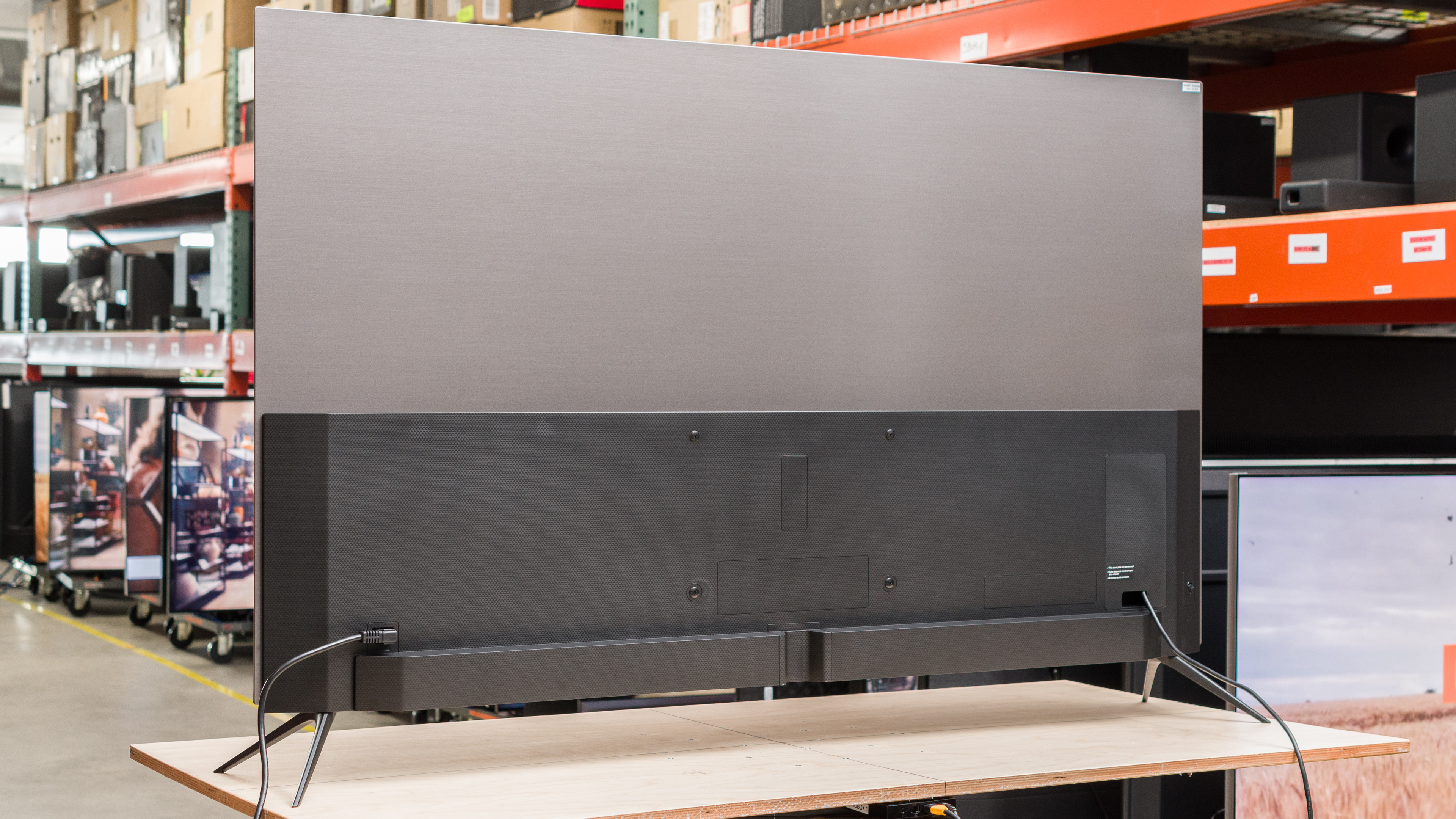
The brushed silver metal backing gives the TV a sleek look. All of the inputs face the side of the TV, so they're easy to reach when the TV is on a stand, but since they're set into the TV, they're hard to reach when it's wall-mounted. There's a channel in the bottom middle of the back and an input cover that you can use for cable management.


for pictures & test results

Despite there being some wobble, the Sharp AQUOS FS1 OLED has excellent build quality. There's some noticeable flex on the rear plastic panel near the VESA mounting points and some slight flex on the exhaust vents, but this is normal and doesn't cause any issues. There are no quality control concerns, and the TV is solid overall.
for pictures & test results

The Sharp AQUOS FS1 OLED has remarkable contrast and a nearly infinite contrast ratio. Due to OLED's self-lit pixels, the TV can display very bright highlights next to perfect inky blacks, making it very impressive in a dark room.
for pictures & test results

Since OLEDs don't use local dimming and instead have individual pixels that can be lit up to their maximum brightness next to pixels that are turned off, there's no blooming when bright elements are surrounded by deep blacks.
for videos & test results

The Sharp AQUOS FS1 is an OLED and doesn't have a backlight, so its self-lit pixels give it the same performance as a TV with perfect local dimming and no zone transitions. We still film the zone transition video on the TV so you can see how it compares to a TV with local dimming.



for pictures & test results

for pictures & test results

for pictures & test results

The Sharp AQUOS FS1 OLED has unremarkable HDR brightness. It gets bright enough for smaller highlights to pop, but large bright scenes are significantly dimmer due to its aggressive Automatic Brightness Limiter (ABL).
These measurements are after calibrating the HDR white point with the following settings:
- HDR Picture Mode: Dark HDR
- OLED Luminance: 100
- TV Brightness: Brighter
- Contrast: 50
- Color: 40
- Gamma Correction: 2.2
- Color Temperature: Warm
- Color Space: Auto
- Dynamic Tone Mapping: Off
If you want a Sharp TV with better HDR brightness, check out the Sharp AQUOS XLED FV1.
for pictures & test results

for pictures & test results

for pictures & test results

There's no noticeable difference with HDR brightness when the TV is set into Game Mode.
These measurements are after calibrating the HDR white point with the following settings:
- HDR Picture Mode: Dark HDR
- OLED Luminance: 100
- TV Brightness: Brighter
- Contrast: 50
- Color: 40
- Gamma Correction: 2.2
- Color Temperature: Warm
- Color Space: Auto
- Dynamic Tone Mapping: Off
- Game Mode: On
for pictures & test results

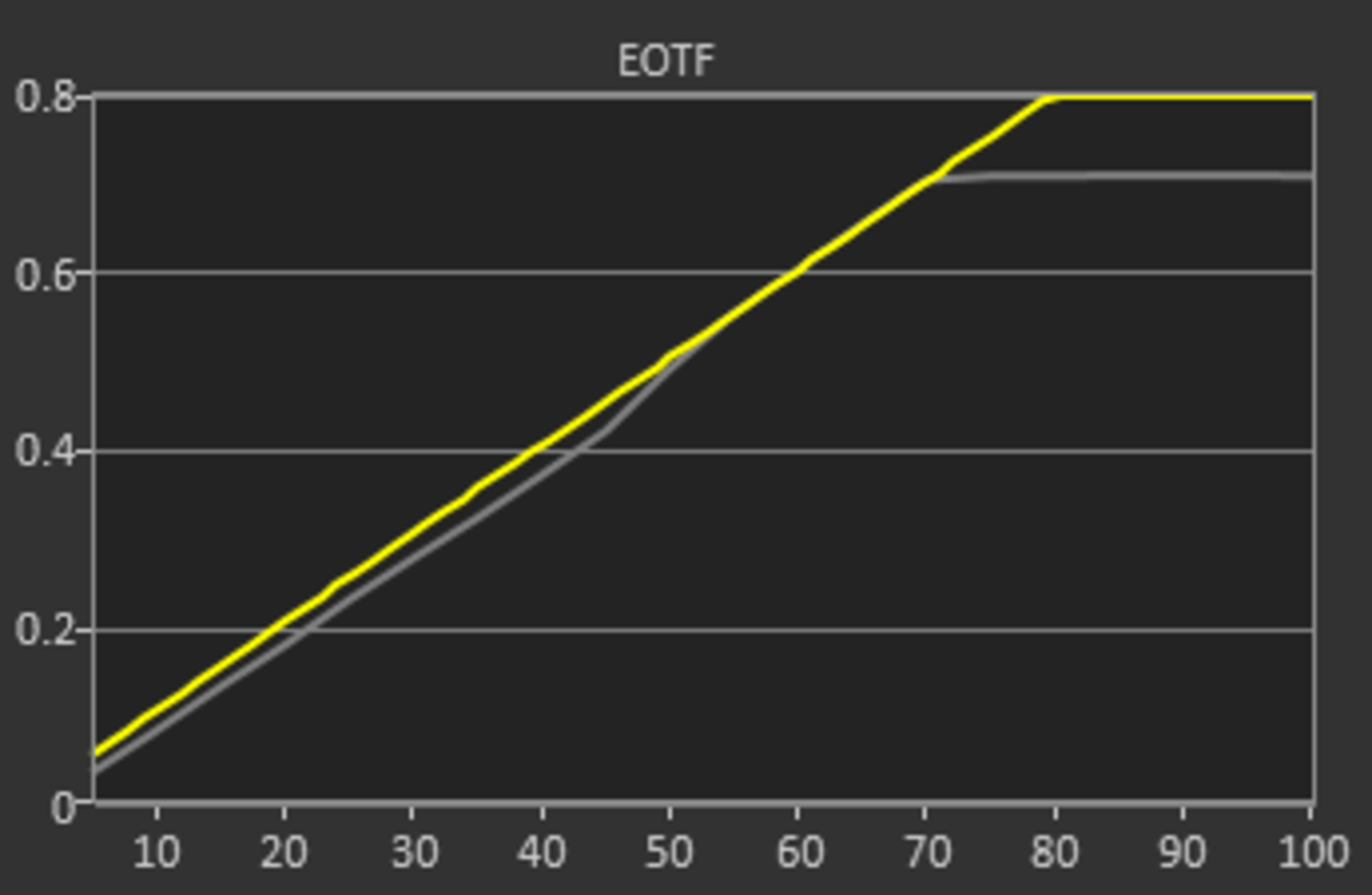
The TV has outstanding PQ EOTF tracking. Some shadows and midtones are slightly darker than intended, but the TV tracks the curve very closely until there's a sharp cutoff when content reaches the TV's peak brightness, so details in bright highlights are lost.
You can see what the tracking looks like with Dynamic Tone Mapping set to 'On' here.
The Sharp AQUOS FS1 OLED has mediocre SDR brightness. It gets bright enough to overcome some glare in a moderately lit room, but it's best suited for use in a dark room. Unfortunately, it has an aggressive ABL that dims the screen when large areas of brightness are present.
These measurements are after calibration with the following settings:
- Picture Mode: Movie
- OLED Luminance: 100
- TV Brightness: Brighter
- Contrast: 50
- Color: 40
- Gamma Correction: 2.2
- Color Temperature: Warm
- Color Space: Auto
- Game Mode: Off
If you want an OLED with better SDR brightness, check out the LG C4 OLED.
for pictures & test results

for pictures & test results

The Sharp AQUOS FS1 OLED has an amazing color gamut. It has outstanding coverage of the DCI-P3 color space used in most HDR content, with good coverage of the wider Rec.2020 space that is increasing in popularity. Colors are very close to the mark in the DCI-P3 color space, with reds and green being a bit undersaturated. Colors are more off in the Rec. 2020 color space, with all colors being undersaturated and magentas appearing too blue.
for pictures & test results

for pictures & test results

The TV has very good color volume. Thanks to its high contrast ratio, it can display dark, saturated colors well. On the other hand, it struggles with colors displayed at higher luminance levels since the TV is limited by its relatively low peak brightness.
for pictures & test results

for pictures & test results

for pictures & test results

With only a few quick settings changes out-of-the-box, the Sharp AQUOS FS1 OLED has very good pre-calibration accuracy. Its white balance is good overall, with reds and greens being only slightly underrepresented in darker shades of gray and blues being a bit overrepresented in brighter shades of gray. Gamma is very close to the target of 2.2 for a moderately lit room, with most scenes being displayed a bit darker and very bright scenes being a bit too bright.
Color accuracy is great with only minor accuracy errors; cyans, whites, and lighter blues are the most off the mark, but even those aren't too bad. Its color temperature is excellent and is only a bit cooler than the target of 6,500K.
If you want a TV with even better pre-calibration accuracy, check out the LG B4 OLED.
for pictures & test results

for pictures & test results

for pictures & test results

After calibration to the D65 white point, the Sharp AQUOS FS1 OLED has superb accuracy. Almost all inaccuracies with white balance and color temperature are gone, and besides very bright scenes being displayed a bit darker than they should be, gamma is almost exactly at the 2.2 target. Color accuracy is also better, with cyans still being the most off, but even then, it's close enough that most people won't notice.
You can see our full calibration settings here.
for pictures & test results

for pictures & test results

The TV has excellent gray uniformity. There's very little dirty screen effect, and the sides of the screen aren't noticeably dimmer than the center. There are some very faint vertical lines in very dark scenes, but this is typical of OLEDs, and it's not distracting unless you're specifically looking for it.
for pictures & test results

Because OLEDs can turn off individual pixels, the TV has incredible black uniformity with no blooming or halo effect around bright objects.
for videos & test results

for pictures & test results

for pictures & test results

for pictures & test results

The Sharp AQUOS FS1 OLED has an amazing viewing angle. Colors shift a bit when you watch the TV at an angle, but there's very little gamma shift, brightness loss, black level raise, and color washout, so the image is very consistent whether you are watching from the center or from an angle.
for pictures & test results

for pictures & test results

for pictures & test results

The TV has exceptional reflection handling. Its glossy screen finish reduces the intensity of direct reflections and significantly reduces the intensity of indirect reflections. Despite this, visibility is still an issue in very bright rooms due to the TV's low peak brightness.
for pictures & test results

The TV's HDR native gradient handling is decent. There's noticeable banding in dark grays, mid grays, and darker greens, but other colors have minimal banding.
for pictures & test results

The Sharp AQUOS FS1 OLED has poor low-quality content smoothing with noticeable artifacts present. It preserves details well, but that's because there's very little smoothing actually being done. Check out the Sony BRAVIA 8 OLED if you want an OLED with significantly better low-quality content smoothing.
for pictures & test results

Unfortunately, the TV has disappointing sharpness processing with low-resolution and low-bitrate content. The image isn't very clear or sharp, finer details are mostly lost, and small hard-coded text is hard to make out.
Sharpness processing was calibrated with no over-sharpening for low-resolution or low-bitrate content, with the following settings:
- Sharpness: 25
If you need an OLED TV with much better upscaling capabilities, check out the Panasonic Z85A OLED.
for pictures & test results

The Sharp AQUOS FS1 OLED uses a WOLED panel with a WRGB pixel structure where all four pixels are never lit at the same time. Due to its subpixel layout, it has issues with displaying text on Windows since ClearType isn't well optimized to non-RGB subpixel layouts.
for pictures & test results

for pictures & test results

Like all OLEDs, the TV has a nearly instantaneous response time, so there's very little blur behind fast-moving objects. Unfortunately, due to the sample-and-hold technology used on OLEDs, there's still some persistence blur present.
for pictures & test results

The Sharp AQUOS FS1 OLED doesn't have a traditional backlight and doesn't use pulse-width modulation to dim each pixel, but it's not completely flicker-free. There's a slight dip in brightness that corresponds to the TV's refresh rate. This is very different from the PWM flicker on TVs with LED backlights and occurs on every OLED we've tested. It's not noticeable, but it can still bother people who are extra sensitive to flicker.
The TV doesn't have an optional black frame insertion feature to help reduce the amount of persistence blur caused by the TV's nearly instantaneous response time.
for pictures & test results

for pictures & test results

The Sharp AQUOS FS1 OLED has an optional motion interpolation feature to help improve the appearance of motion. It works well with slower scenes but struggles with fast-moving action, so there's noticeable haloing and artifacts present in busier scenes. It also gives motion the noticeable 'soap opera effect' when used at anything but a very low setting, so it's not a great solution to help smooth motion.
Like all TVs with a fast response time, the Sharp AQUOS FS1 OLED has noticeable stutter with low frame-rate content. It's especially noticeable with slow panning shots, although some viewers won't notice it. The TV's motion interpolation feature can help smooth it out, but it's not a great solution since that has its own drawbacks, like introducing artifacts.
The TV automatically removes judder when watching movies or shows that are in 24p, even if they're in a 60Hz signal, like from a cable box. It can remove judder from its built-in apps, as well as from external sources.
The TV supports HDMI Forum VRR, FreeSync, and G-SYNC, which provides a nearly tear-free gaming experience from any VRR-capable source. Unfortunately, there's noticeable VRR flicker at lower frame rates and during darker scenes, which you can see here.
The Sharp AQUOS FS1 OLED has incredibly low input lag when set to Game Mode, which results in a very responsive gaming experience with very little delay between the actions on your controller and what happens on screen.
The TV supports all common resolutions up to 4k @ 120Hz on two of its four HDMI ports. It also displays chroma 4:4:4 properly in most resolutions and refresh rates, which is essential for clear text from a PC. Strangely enough, there are no issues with 1080p @ 60Hz @ 4:4:4, but 1080p @ 120Hz @ 4:4:4 has washed-out colors and text that's barely readable.
for pictures & test results

As long as you're using HDMI ports 3 or 4, the TV is fully compatible with everything the PS5 offers.
for pictures & test results

As long as you're using HDMI ports 3 or 4, the TV is compatible with almost everything the Xbox Series X|S offers. Unfortunately, the TV can't do 4k @ 120Hz with Dolby Vision enabled, so if you want to play in Dolby Vision, you're limited to 60Hz.
The Sharp AQUOS FS1 OLED supports both HDR10, HLG, and Dolby Vision but doesn't support the less common HDR10+. Unfortunately, HDMI 2.1 bandwidth is limited to HDMI ports 3 and 4, so you're limited with the amount of HDMI 2.1 capable devices you can plug in.


for pictures & test results

The TV has a mediocre frequency response. Dialogue sounds clear enough, but the TV doesn't get very loud, and bass is almost non-existent. You will want to pair it with a decent soundbar or surround sound system if you want proper bass and louder overall volume.
for pictures & test results

The TV's distortion handling is very good. It doesn't get very loud, but the audio doesn't get overly distorted unless you use the speakers at or near max volume.
for pictures & test results

The Sharp AQUOS FS1 OLED uses version 12.5.5 of the Roku TV operating system. The interface is very smooth and is easy to use.
for pictures & test results

Unfortunately, like almost all TVs on the market, there are ads throughout the smart interface, and you can't disable them.
for pictures & test results

The Sharp AQUOS FS1 OLED has a great selection of apps, so it's easy to find your favorite content. You can also cast content from your phone onto the TV or play videos from a USB stick.
for pictures & test results

The TV comes with the typical Roku remote that's included with most modern Roku devices. It has dedicated buttons for the most popular streaming services, and you can use the built-in microphone to give voice commands. You can use it to change inputs, search for content within apps, and ask for the weather and time.
for pictures & test results

The TV has a single button located on the rear bottom left. You can use it to power the TV on/off, navigate menus, switch inputs, and adjust the volume.
for pictures & test results

- Remote (with 2x AAA batteries)
- Power Cable
- User manuals
- AV adapter