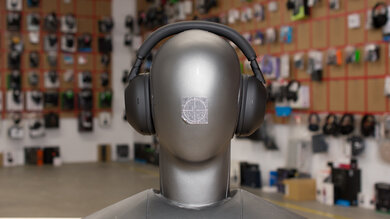
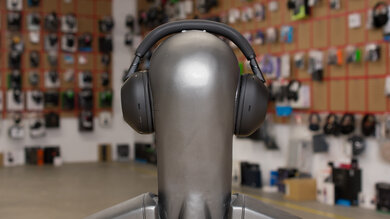
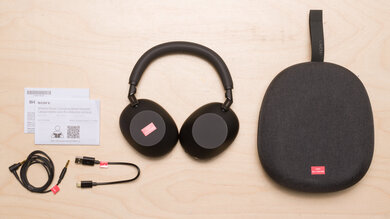
The Astro A50 Gen 4 Wireless 2019 are premium wireless gaming headphones. They have a similar design to the previous-generation Astro A50 Gen 3 Wireless 2017 but with updates like a more compact base station. Kitted with a boom mic and designed with some replaceable parts, you can find models for PC, Xbox, and PlayStation consoles. While the software includes a host of features, unfortunately, there have been user reports of significant issues using it. You can read more in the App Support box.
Our Verdict
- Comfortable fit.
- Excellent mic recording quality and noise handling capability.
Companion software allows custom EQing
- Sturdy construction.
- Bulky design.
- Base station is required to make the headphones work.
- Terrible isolation performance.
- High levels of audio leakage.
- Comfortable fit.
- Excellent mic recording quality and noise handling capability.
Companion software allows custom EQing
- Sturdy construction.
- Bulky design.
- Base station is required to make the headphones work.
- Terrible isolation performance.
- High levels of audio leakage.
- Comfortable fit.
- Excellent mic recording quality and noise handling capability.
Companion software allows custom EQing
- Sturdy construction.
- Bulky design.
- Base station is required to make the headphones work.
- Terrible isolation performance.
- High levels of audio leakage.
- Comfortable fit.
- Excellent mic recording quality and noise handling capability.
Companion software allows custom EQing
- Sturdy construction.
- Bulky design.
- Base station is required to make the headphones work.
- Terrible isolation performance.
- High levels of audio leakage.
- Comfortable fit.
- Excellent mic recording quality and noise handling capability.
Companion software allows custom EQing
- Sturdy construction.
- Bulky design.
- Base station is required to make the headphones work.
- Terrible isolation performance.
- High levels of audio leakage.
- Comfortable fit.
- Excellent mic recording quality and noise handling capability.
Companion software allows custom EQing
- Sturdy construction.
- Bulky design.
- Base station is required to make the headphones work.
- Terrible isolation performance.
- High levels of audio leakage.
- Comfortable fit.
- Excellent mic recording quality and noise handling capability.
Companion software allows custom EQing
- Sturdy construction.
- Bulky design.
- Base station is required to make the headphones work.
- Terrible isolation performance.
- High levels of audio leakage.
- Comfortable fit.
- Excellent mic recording quality and noise handling capability.
Companion software allows custom EQing
- Sturdy construction.
- Bulky design.
- Base station is required to make the headphones work.
- Terrible isolation performance.
- High levels of audio leakage.
Performance Usages
Changelog
- Updated Dec 15, 2025: We've converted this review to Test Bench 2.0, which updates our sound tests and adds performance usages. You can read more about this in our changelog.
-
Updated Jan 08, 2025:
We updated the review and comparisons to more accurately reflect the headphones' enclosure as semi-open and made text adjustments throughout for clarification.
-
Updated Jan 06, 2025:
Several Sound tests have been updated following Test Bench 1.8. There have also been text changes made throughout the review, including to the Usages and Product Comparisons to match these results. We want to ensure you see our more recent data so some outdated text has been removed.
- Updated Dec 16, 2024: We've converted this review to Test Bench 1.8, which updates our target curve and Sound tests. You can read more about this in our changelog.
Check Price
Differences Between Sizes And Variants
The Astro A50 are available in two variants: 'PC/PS4' and 'PC/Xbox'. We tested the 'PC/PS4' variant but can't confirm whether or not the other model performs similarly overall.
Let us know in the forums if you've encountered a different variant of these headphones.
Popular Headphones Comparisons
The Astro A50 are great gaming headphones but aren't the most versatile as they can only be used wirelessly, and you need to buy the appropriate console variant for your needs. Unlike the SteelSeries Arctis Nova Pro Wireless, they don't support Bluetooth for more casual use either. Thankfully, they're very comfortable and have a well-balanced sound profile that can be customized using the graphic EQ in their companion software. They also come with a charging base that offers several inputs. These headphones represent an incremental update to the Astro A50 Gen 3 Wireless 2017, improving battery charging and reducing base size. You get an improved microphone on the newer pair. While the fourth generation Astro A50 are wireless-only with semi-open backs, the Astro A40 TR Headset + MixAmp Pro 2019 are the brand's open-backed and wired-only entry.
See our recommendations for the best wireless gaming headsets, the best PS4 gaming headsets, the best Xbox One gaming headsets, and the best gaming headsets.
Depending on how you game, you may prefer either the Astro A50 Gen 4 or the SteelSeries Arctis Nova Pro. The Astro are wireless gaming headphones that are more comfortable, better built, and have more consistent audio delivery. Additionally, their boom mic has a significantly better overall performance. However, the SteelSeries Arctis Nova Pro are wired headphones that come with a GameDAC so that you can make adjustments as you game. Their companion software offers significant customization features too.
The Astro A50 Gen 4 and the Astro A40 TR Headset + MixAmp Pro 2019 are both great gaming headphones. The A50 are wireless-only, while the A40 are wired-only and have a fully open-back design. So, if you also don't want to be limited by battery life, then the A40 are a better option. However, if you prefer a cable-free experience or walking around with headphones on, the A50 Gen 4 are a better pick.
The Audeze Maxwell Wireless have a slight edge over the Astro A50 Gen 4. While both headphones are well-built, the Audeze have a significantly longer continuous battery life and support Bluetooth. They can also be used wired via USB or analog. However, the Astro are more comfortable and their boom mic offers a better overall performance.
The Astro A50 X are better overall gaming headphones than the Astro A50 Gen 4. The new version introduces more connectivity options via the base station, with USB-C and HDMI 2.1 inputs and the option to switch between different gaming systems and charge the headphones. While both headsets are similarly comfortable and well-built, the newer version's companion software is more reliable. They also have a longer continuous battery life. That said, the previous generation have better mic noise handling and give you the option to switch between EQ presets or enable Dolby Digital Surround sound via the physical controls.
Test Results
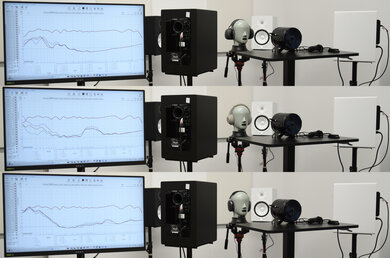
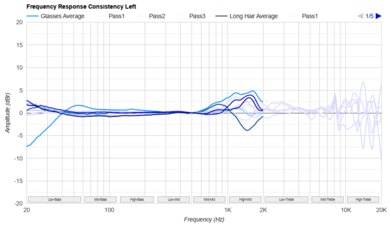
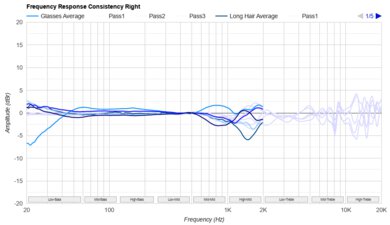
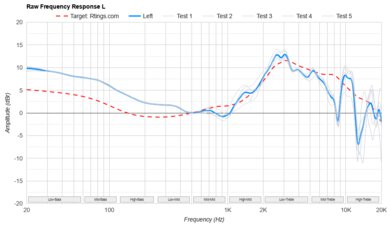
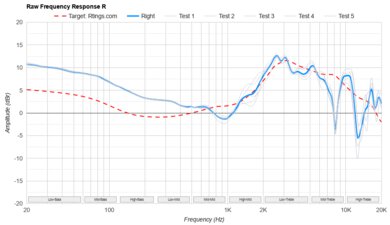
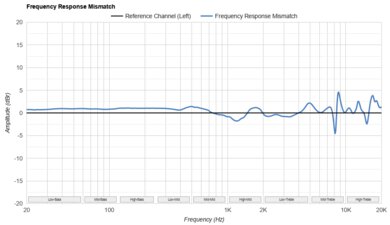
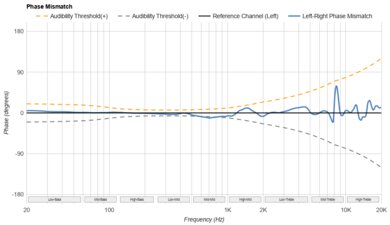
These headphones have excellent frequency response consistency. This means they deliver audio relatively similarly across different users and between reseats, so you can expect consistent sound without fussing to get them to sit just right.
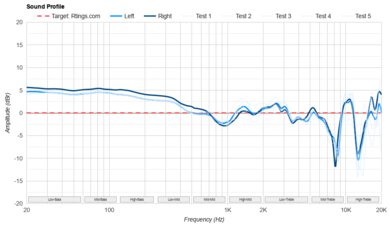
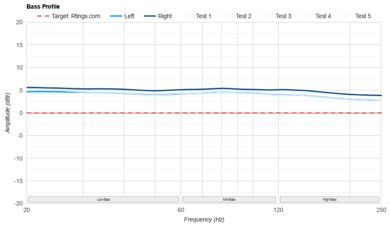
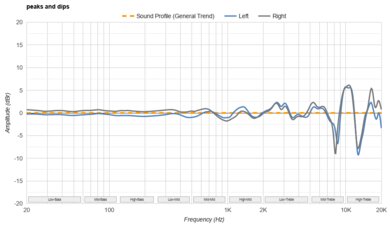
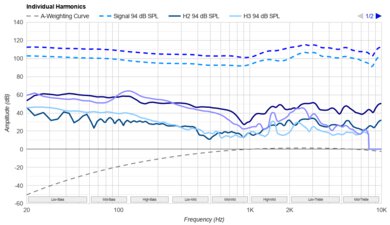
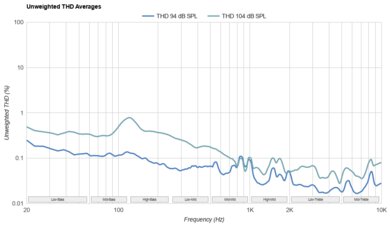
These headphones have very good bass compliance. Their low-end bass response is underemphasized, so sound effects in action-heavy games can lack a bit of thump and rumble. A small bump in the high-bass range adds a bit of boom and punch to your audio by emphasizing the attack of bassy sounds.
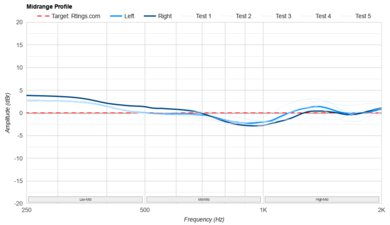
The headphones have great mid-range compliance. Vocals and lead instruments sound full-bodied and clear with good presence. However, a small dip in the mid-mids can nudge them to the back of the mix. Ambient effects and character dialogue in Baldur's Gate 3 sound clear, although, during exciting action sequences, the boominess of the bass can compete for your attention.
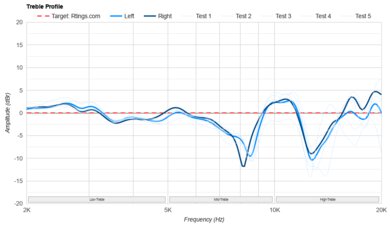
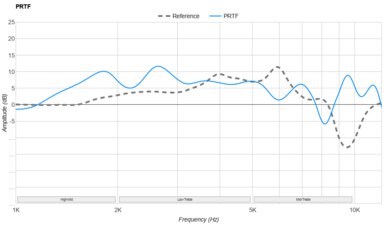
The Astro A50's treble compliance is decent. These headphones fluctuate their response relative to our target. Vocals and instruments can sound unintelligible, while sibilants (S and T sounds) and cymbals can sound piercing.
These headphones have an alright passive soundstage. They have a very open soundstage, but it can sound unnatural and located as if inside the listener's head rather than in front of them.
The headphones have a dedicated button for surround sound. With a PC, you can also use the Windows Sonic for Headphones software or Dolby Access with Dolby Atmos (although Dolby Atmos is an added cost with the 'PC/PS' variant). Both variants can support Dolby Atmos, but the feature is restricted to PCs and Xbox consoles.
To use them with your Xbox, you enable Dolby Atmos in your console's settings and use the Dolby Access app to control surround sound. You can use the button on the headphones to turn this feature on/off. With the 'PC/PS' variant and the PlayStation 4 console, audio upscales audio to 7.1 surround with Dolby Digital. With a PlayStation 5, you'll need to purchase a separate HDMI to Optical Adapter for PlayStation 5 by the manufacturer to gain surround sound using Dolby Digital in your console's settings. Using the PS5 Tempest 3D AudioTech via a USB connection disables the EQ and mic settings saved from your PC to the headphones, so the manufacturer recommends getting the adapter instead.
Keep in mind that whether your headphones come with a lifetime Dolby Atmos license seems to depend on whether you have a 'PC/Xbox' version or not, when you purchased them, where you purchased them, and if you've updated their firmware. An Xbox-compatible variant with the latest firmware ought to have a lifetime license, but the manufacturer has changed support over the lifecycle of the headphones ranging from seven-day trials to lifetime licenses. If your headphones don't have a current Dolby Atmos license, try updating the firmware first, as you may gain the license; otherwise, Dolby Atmos is an additional cost. Our unit is the 'PC/PS' variant and doesn't come with a Dolby Atmos license.
These are the settings used to test these headphones. Our results are only valid when they're used in this configuration.
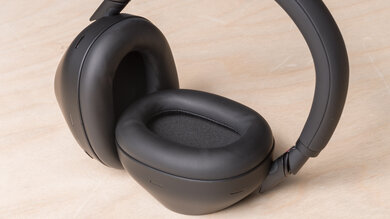
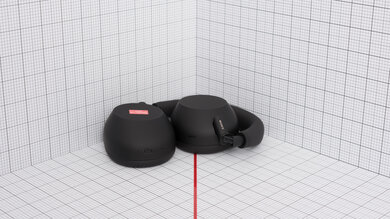
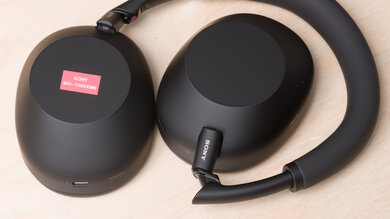
The Astro A50 look very similar to the Astro A40 TR Headset + MixAmp Pro 2019 with similar squarish ear cups found on the brand's headsets. The headset has a fairly conservative color scheme, with few adornments besides a slightly contrasting model logo on the ear cups. Still, the bulky design and non-removable microphone make the headset stand out in most environments. You can also swap out the plates on the other surface of the ear cups if you want to individualize your headphones a little more, and you can purchase mod kits from the Astro website. You can't mix and match the kits, so get the one for your model.
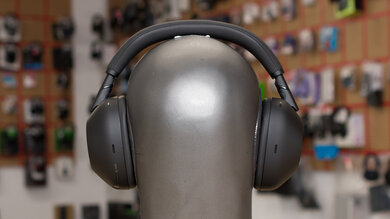
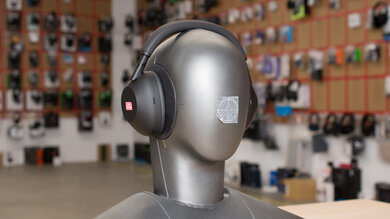
These are comfortable headphones. Their ear cups are spacious and deep, accommodating most ear shapes and sizes. They don't clamp the head as tightly as the Astro A50 Gen 3 Wireless 2017. Their headband does a good job of distributing their weight, too. The coating on the padding is also quite soft and feels nice on the skin. However, they're quite big and heavy.
The Astro A50's control scheme is acceptable. The headphones lack any onboard controls for music playback or call management. Instead, they address the needs of gamers rather than casual users. Their mic is flip-to-mute, and otherwise, the controls have single functions.
Right ear cup towards the front:
- Volume wheel
- Spin: Increase/decrease volume.
- EQ preset cycle button
- Single press: Cycle through EQ presets.
- Dolby button
- Single press: Dolby Digital Surround Sound on/off.
- Power button
- Single press: Turns power on/off.
They also have two additional controls on the outside face of the right ear cup that let you balance the mix between in-game audio and call audio.
They differ from the previous generation by having a button to cycle between EQ presets instead of a switch, and the base now has a screen that shows you which preset you're on. There's good audible and tactile feedback, and all the controls are easy to use.
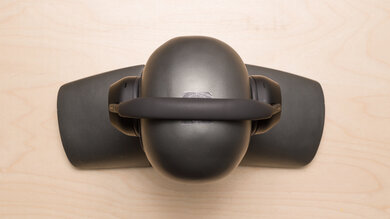
These headphones aren't especially portable. This makes sense for gaming headphones that stay in the same location. They're very bulky and don't fold into a more compact format, though their ear cups swivel flat to reduce their footprint. They also need to be within range of their base station to work, which further limits their portability.
These over-ears are very well-built and feel durable. The ear cups are dense and made from solid plastic, so the headphones feel like they can handle a few accidental drops without too much damage. The hinges are sturdy and made of metal, but their headband seems to be the weakest point of their construction.
The headphones are reasonably stable. They don't clamp your head tightly, and head movement can easily make them shift off your head. This is unlikely to pose a problem when seated and gaming. If you're a dynamic and expressive gamer, the headphones will likely move around or fall off with head movements. If you prefer to relax and sit still while gaming, they'll stay in place.
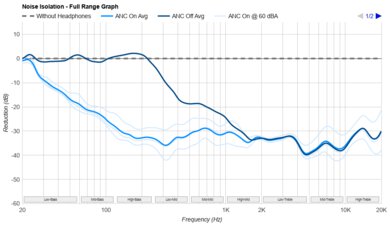
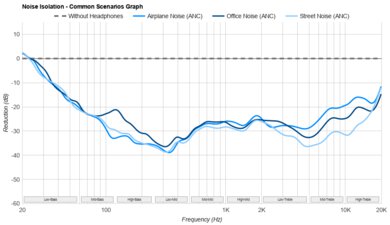
These headphones have terrible noise isolation performance. They don't really block out any ambient noise in the bass and mid-ranges, like the rumble of construction outside an open window or background chatter. They also don't block out much higher-pitched ambient noise, like a noisy computer fan whine.
This is fine if you have a quiet room with a door. However, in noisier communal environments, it's beneficial to isolate external noise so it's easier to hear your audio without compensating by cranking the volume.
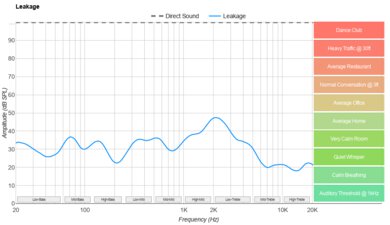
The Astro A50's leakage performance is bad. They aren't the best to use around people in quiet environments because sound still escapes loudly enough that even in crowded settings, it's noticeable. They don't leak much bass, but the mids and highs are audible as a thin representation of your audio, complete with lead instruments and bright percussion.
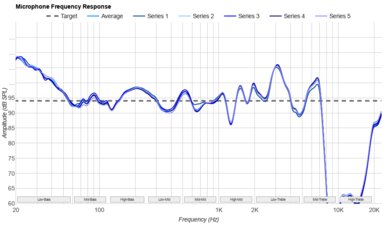
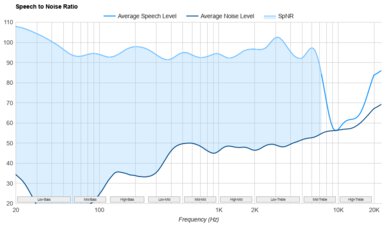
The boom mic has excellent recording quality. Owing to the relatively flat frequency response of the microphone (except at the upper frequencies beyond speech), your voice sounds clear, natural, and full-bodied. While the included software also has additional mic settings you can adjust to taste, the headset's mic already starts with a solid foundational recording quality.
The boom mic has impressive noise handling performance. Teammates or those on the other end of a phone call can understand you clearly, even if you're speaking in a loud or crowded environment.
Note: There are four mic profiles inside their companion software with four different noise gate settings. We tested the microphone with the 'Streaming' setting, as it has the lowest noise gate, though you can also select 'Night,' which has the least aggressive noise gate setting, 'Home,' which is the default, and 'Tournament,' which is the most aggressive setting.
These over-ears have very good battery performance. They supply over 17 hours of battery life, which is more than enough for most gaming sessions, though this can vary with real-world usage. You can also use them when charging, which is useful. They only take about two hours to charge with the micro-USB cable but more than four hours with the dock. On the upside, this charging cycle is still noticeably shorter than the older Astro A50 Gen 3 Wireless 2017. The base has four bars to indicate the battery charge status. They have an auto-off timer, too, which turns off the headphones during periods of inactivity. However, it's rather short, which can be annoying if you're gaming and don't move too much, as it can still trigger even if audio is being played.
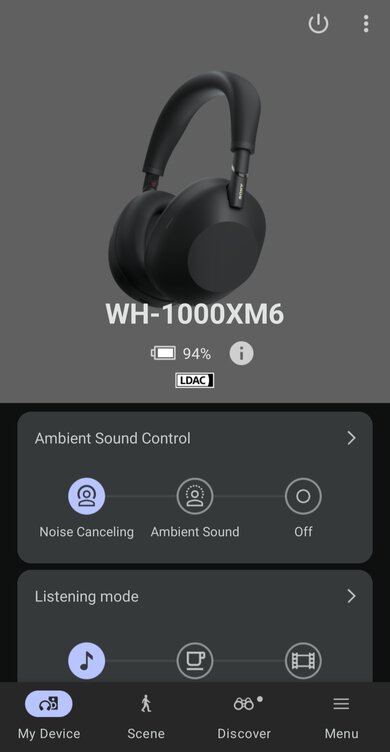
These headphones are compatible with Astro Command Center. However, some users have reported encountering severe issues when using the software. They can't update the headphones' firmware, which is necessary to connect them via USB to newer consoles. Users also can't access any of the software's features. These issues may be due to Astro moving the software download from their site to the Microsoft Store. This poses a significant drawback if you want to pick up a pair of these headphones. Astro have changed their companion app software to the Logitech G HUB app for the latest iteration of these headphones, the Astro A50 X Wireless. So far, this software has proven to be much more stable.
When working correctly, the Astro Command Center offers a wide array of features. It has a graphic EQ that you can use to set up different presets, which you can cycle through using the EQ button on the right ear cup. You can also choose between four noise gate settings for the boom mic to isolate your voice from ambient noise. Unfortunately, you can't control the mic's frequency response like it on the Astro A50 Gen 3 Wireless 2017. There's also no option to extend or turn off the gyroscope auto-off timer feature, which is frustrating. They also have no true button mapping beyond the EQ presets. You'll need to use the Windows Sonic for Headphones software for surround sound.
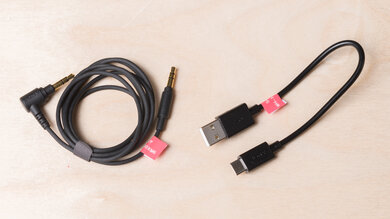
You can't use the Astro A50 wired. They come with a USB-A to micro-USB cable, which is only for charging. They also have an optical cable used for plugging in their base station. If you want gaming headphones that you can use wired with console controllers, check out the Corsair Virtuoso RGB Wireless SE.
These headphones have superb wireless connectivity, thanks to their base station. It doesn't have as long of a wireless range as other headphones in the Astro range, like the Astro A30 Wireless. Still, latency is very low, so your audio and visuals will stay in sync during the heat of competitive gameplay.
These headphones wirelessly connect to your PC using the included base station over USB-A or optical (if your soundcard has an optical port). You get full audio and microphone support and software to adjust the settings to taste.
You can use both the 'PC/PS' and 'PC/Xbox' versions of the headphones with PS4 and PS5. Since the PS5 doesn't support optical, you'll need to update the headphones to the latest firmware using the Astro Command Center with your PC. This firmware lets you connect the base station to the console via USB. However, some users have reported that the audio quality drops when using this connection compared to using optical. While we conducted our original testing using the base station connected to our PC via USB, these results will still be valid compared to the sound you get from the PS5 when connected via USB.
Alternatively, you can purchase an Astro HDMI adapter for the PS5 directly from the manufacturer, allowing you to connect to the console via optical. The manufacturer advertises this adapter to enable the 'Game:Voice Balance' channel mixer control for this console. You can find more detailed instructions on how to connect your headphones this way here.
These headphones have full mic and audio compatibility with PS4 and PS5 consoles when you connect their non-Bluetooth wireless transmitter to the console via USB. However, you may need a firmware update for this connection to work on PS5 consoles.
Astro makes a 'PC/Xbox' compatible variant of the headphones with full mic and audio support on Xbox consoles. If you have the PC/PS variant of these headphones, they can only receive audio when connected to an Xbox One and don't function at all with Xbox Series X|S consoles.
Note: While the 'PC/PS' versions of these headphones aren't fully compatible with Xbox One or Xbox Series X consoles, the 'PC/Xbox' variants are. You can connect the 'PC/Xbox' headphones to your Xbox Series X console by following the steps outlined on the Astro Gaming Blog.
The fourth generation Astro A50's dock is great. It has a lot of inputs and acts as a charging station for the headset. This variant is fully compatible via USB on the PS4, PS5, and PC. The manufacturer advertises the base station as console-locked for either PS4 or Xbox One, but the headset can connect to both base variants.