
Getting a proper monitor can maximize your Mac Studio's full capabilities. When buying a new display, there are a few factors to consider, like the type of work you need it for. A display with a high resolution and sharp text clarity is important for reading documents or viewing detailed images. If you're a content creator, you'll want it to display a wide range of accurate colors in various color spaces, from sRGB to Rec. 2020. A high contrast ratio with deep blacks and bright highlights is also helpful if you edit content in HDR.
Besides that, the latest Mac Studios support Thunderbolt 5. While very few monitors from other brands support it, there are some that support Thunderbolt 4 instead. A monitor's HDMI 2.1 bandwidth ports also take advantage of the HDMI output on the Mac Studio. There are some monitors that have large USB hubs to which you can connect a variety of devices. These are useful if you want to connect a second computer alongside your Mac Studio and use the same devices on both with a KVM switch.
For every monitor we buy and test, we check their macOS compatibility by testing with a 2023 MacBook Pro (M2 Pro) and a 2024 MacBook Pro (M4 Max). The results are also valid for any Mac Studio, regardless of which chip it uses.
We've bought and tested over 395 monitors, and below are our recommendations for the best monitors for Mac Studio. You can also check out our recommendations for the best monitors for Mac mini, the best monitors for MacBook Pro and MacBook Air, and the best monitors for graphic design.

We buy and test more than 30 monitors each year, all of which we purchase ourselves, without cherry-picked units or samples. We put a lot into each unbiased, straight-to-the-point review, and there's a whole process from purchasing to publishing, involving multiple teams and people. We do more than just use the monitor for a week; we use specialized, custom tools to measure various aspects and deliver objective, data-driven results. We also consider multiple factors before making any recommendations, including the monitor's cost, its performance compared to the competition, and whether it's easy to find.
-
Best Monitor For Mac Studio
 OfficeEditingColor AccuracyHDR PictureSDR PictureResponse TimeSDR BrightnessSize27"Panel TypeLCDSub-TypeIPSMax Refresh Rate120 HzNative Resolution5120 x 2880See all our test resultsThunderbolt
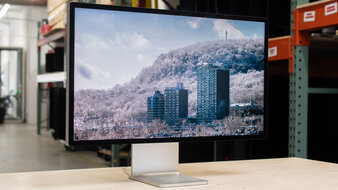
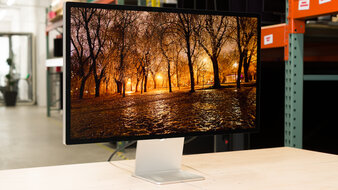
The Apple Studio Display XDR is the best monitor for Mac Studio. It's Apple's flagship display that pairs perfectly with a Mac Studio. It has features to make full use of the computer, including Thunderbolt 5 and four USB-C ports for connecting your devices if you don't have any space left on your Mac. It also supports daisy chaining to a second screen, which helps if you want to get a second monitor for a multi-display setup.
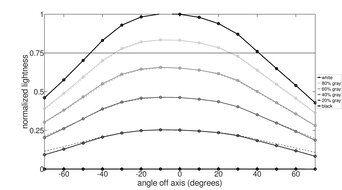
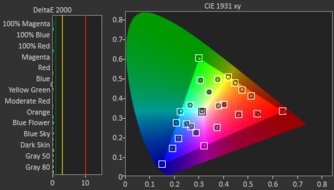
What makes this monitor stand out is its picture quality. It offers a high 5k resolution for detailed images, and Mini LED backlighting with 2,304 dimming zones. Together, they help the monitor display deep blacks alongside very bright highlights that pop, especially in HDR, but there's haloing around bright objects. It also gets very bright, so it fights glare in well-lit rooms, and it has a very accurate sRGB mode for content creators. Plus, you can choose if you want to get the variant with a standard glossy coating for clear images or a matte Nano-texture coating for less mirror-like reflections. Lastly, it has a 120Hz refresh rate that provides a fairly smooth feel when editing videos or scrolling through webpages.
-
Best Upper Mid-Range Monitor For Mac Studio
OfficeEditingColor AccuracyHDR PictureSDR PictureResponse TimeSDR BrightnessSize27"Panel TypeLCDSub-TypeIPSMax Refresh Rate60 HzNative Resolution5120 x 2880See all our test resultsThunderboltThe Apple Studio Display XDR is an expensive monitor, and you should only get it if you're going to take advantage of its high-end picture quality for content creation. If not, you can save a lot of money by getting the lower-end Apple Studio Display 2026. As it's lower in Apple's display lineup, there are some notable differences with the Studio Display XDR. For example, the Studio Display 2026 doesn't support HDR at all and lacks Mini LED backlighting. This means it has much worse picture quality with blacks that look gray, which is something to consider if you're a content creator, especially if you work in HDR. Regardless, it also comes with a dedicated sRGB mode that's more accurate than on the Studio Display XDR, which helps when editing SDR content.
Like the higher-end model, it has a high 5k resolution that results in sharp text, and it gets very bright as well. Plus, you can get it in different variants, including screen coating and the stand it comes with, or choose to go without a stand and mount it yourself. It also comes with a USB hub that supports daisy chaining and Thunderbolt 5, which is ideal for the latest Mac Studio.
-
Best Mid-Range Monitor For Mac Studio
OfficeEditingColor AccuracyHDR PictureSDR PictureResponse TimeSDR BrightnessSize27"Panel TypeLCDSub-TypeIPSMax Refresh Rate320 HzNative Resolution3840 x 2160See all our test resultsThunderboltAs the Apple monitors are expensive, you can save even more money by getting a mid-range option, like the Acer Nitro XV275K P5biipruzx. The main downside of getting this monitor is that it has fewer features than the Apple Studio Display 2026. It doesn't support Thunderbolt 5 or daisy chaining. It also has a 4k resolution with lower pixel density, so text isn't as sharp. Regardless, it still has two HDMI 2.1 bandwidth inputs, two USB-A ports, and a USB-C port, allowing you to connect a few devices directly to the monitor.
Despite the trade-off in features, the Acer offers better picture quality than the Apple monitor. It uses Mini LED backlighting with a local dimming feature that you can use in HDR. It helps improve the picture quality with deep blacks and bright highlights, making it a great choice for editing or watching HDR content. That said, you can't use this local dimming outside of HDR, so the picture quality is similar to the Apple, and it has an accurate sRGB mode. If you don't need a monitor for HDR, the ASUS ProArt Display PA279CRV is another fantastic choice that has even more accurate colors in SDR, but it has worse motion handling when editing fast-moving content than the Acer.
-
Best Lower Mid-Range Monitor For Mac Studio
OfficeEditingColor AccuracyHDR PictureSDR PictureResponse TimeSDR BrightnessSize27"Panel TypeLCDSub-TypeIPSMax Refresh Rate120 HzNative Resolution3840 x 2160See all our test resultsThunderboltIf you want a simple, lower-cost 4k monitor for your Mac Studio, consider the Dell S2725QC. Like the higher-end Acer Nitro XV275K P5biipruzx, it has a 4k, 27-inch screen, so text looks sharp. However, the main trade-off for getting this monitor is that it has worse picture quality, particularly in HDR. It lacks a local dimming feature and has a low contrast ratio, so blacks look gray in dark rooms. Plus, it doesn't make highlights pop, either, but that's the trade-off you need to make for a cheaper monitor.
It's fairly similar to the Acer outside of HDR, though. Text looks sharp, it gets bright enough to fight some glare, and it has an accurate sRGB mode that's helpful if you're a content creator. It even has HDMI 2.1 bandwidth, which is a nice touch for a lower-end monitor if you want to connect your Mac Studio over HDMI. Plus, it has a small USB hub with two USB-A and two USB-C ports, allowing you to connect some devices to the monitor. You can also check out the Dell S2725QS if you don't need any USB ports, though, as it performs similarly and usually costs a bit less.
-
Best Budget Monitor For Mac Studio
OfficeEditingColor AccuracyHDR PictureSDR PictureResponse TimeSDR BrightnessSize27"Panel TypeLCDSub-TypeIPSMax Refresh Rate144 HzNative Resolution2560 x 1440See all our test resultsThunderboltIf you're on a tight budget to get a monitor after buying a new Mac Studio, the Dell S2725DC is something that offers good value at a low cost. It's lower-end than the Dell S2725QC, with the main difference being that it has a lower 1440p resolution. This means text isn't as sharp, but this is the resolution you have to expect in this price range. It doesn't have a dedicated sRGB mode like the S2725QC, either, so you may need to calibrate it if you care about the best color accuracy.
Besides a few differences in performance aspects, this monitor has many of the same features as the S2725QC. This includes the same number of USB ports to connect your devices. Although it doesn't have HDMI 2.1 bandwidth like the higher-end Dell, it still supports a fixed 120Hz signal over HDMI with a Mac Studio, or up to its max refresh rate of 144Hz with VRR enabled. It has limited picture quality, though, and you may want to consider the AOC Q27G3XMN if that's important to you. It performs much better in HDR, but it has fewer productivity features as it lacks a USB hub.
Notable Mentions
-
LG 27GM950B-B:
The LG 27GM950B-B is a high-end 5k monitor that's cheaper than the Apple Studio Display XDR. The LG is similar for the most part as it also has Mini LED backlighting, but the biggest downside is that it doesn't have Thunderbolt support.
See our review -
ASUS ProArt Display PA27JCV:
The ASUS ProArt Display PA27JCV is a 5k monitor that's a cheaper alternative to the Apple Studio Display 2026. The ASUS has many great features, including a large USB hub, but it doesn't support Thunderbolt.
See our review -
BenQ MA270S:
The BenQ MA270S is a 5k monitor that's geared towards macOS computers and is cheaper than the Apple Studio Display 2026. It also has a glossy screen and comes with a bigger USB hub than the Apple monitor. However, it can be harder to find.
See our review -
Dell U2725QE:
The Dell U2725QE is a 4k monitor that's an alternative to the Acer Nitro XV275K P5biipruzx if you want Thunderbolt support and a bigger USB hub. However, the Dell usually costs more and has worse HDR picture quality.
See our review -
Dell P2425H:
The Dell P2425H is a cheaper alternative to the Dell S2725DC if you're on a really tight budget. It has a smaller 24-inch screen and 1080p resolution. While the S2725DC is still the better entry-level option, the P2425H is worth considering if you don't mind its smaller display at a lower cost.
See our review
Recent Updates
Jun 29, 2026:
In the Notable Mentions, we removed the hard-to-find KOORUI S2741LM and we added the LG 27GM950B-B.
May 06, 2026:
We replaced the ASUS ProArt Display 6K PA32QCV and the Dell U2725QE with the Apple Studio Display XDR and the Apple Studio Display 2026, respectively, to better reflect the current market. In the Notable Mentions, we added the BenQ MA270S, the KOORUI S2741LM, and the U2725QE, and we removed the Dell S3225QC.
Mar 16, 2026:
We replaced the Apple Studio Display 2022, which has been discontinued, with the ASUS ProArt Display 6K PA32QCV. We also removed the Dell U4025QW, which is hard to find, and renamed the Dell U2725QE to the 'Best Upper Mid-Range Monitor For Mac Studio.' In turn, we replaced the ASUS ProArt Display PA279CRV with the Acer Nitro XV275K P5biipruzx, renaming it to the 'Best Mid-Range Monitor For Mac Studio.' We added the Dell S2725QC as the 'Best Lower Mid-Range Monitor For Mac Studio.' We also replaced the Dell S2725QS with the Dell S2725DC, as it's cheaper. In the Notable Mentions, we removed the Dell U3425WE and Dell P2423D, and added the Dell S3225QC and Dell P2425H.
Jan 23, 2026:
We made several changes to match the structure of other articles. We removed the BenQ MOBIUZ EX321UX because it's becoming hard to find, and we renamed the Apple Studio Display to the 'Best Monitor For Mac Studio.' We also renamed the Dell U4025QW to the 'Best Upper Mid-Range Monitor For Mac Studio' and the ASUS ProArt Display PA279CRV to the 'Best Lower Mid-Range Monitor For Mac Studio.' We added the Dell U2725QE and replaced the AOC Q27G3XMN with the Dell S2725QS due to its higher resolution. In the Notable Mentions, we removed the LG 40WP95C-W and added the Dell U3425WE and the Dell S2725QC.
Nov 24, 2025:
We replaced the AOC Q27G40XMN with the AOC Q27G3XMN for consistency with other recommendations. In the Notable Mentions, we replaced the Dell U3225QE with the Dell U2725QE and added the Acer Nitro XV275K P5biipruzx.
All Reviews
Our recommendations are based on what we think are the best monitors for Mac Studio. They're adapted to be valid for most people in each price range. The rating is based on our review, factoring in price and feedback from our visitors.
If you'd prefer to make your own decision, here's the list of all of our monitor reviews. Be careful not to get too caught up in the details. Most monitors are good enough to please most people, and the things we fault monitors on are often not noticeable unless you really look for them.