
Our Verdict
Below average for a wide range of uses. Picture quality is average. Dark scene performance is good, but lacks features such as local dimming to improve picture quality. Motion blur is good, but input lag is worse than most TVs.
- Good contrast for dark scene performance
- Poor motion handling
- Higher than average input lag
- Can't get very bright
Poor movie performance. Dark scene performance is good with deep blacks, but lacks features such as local dimming to improve it further. Picture quality is average. Those sensitive to judder may notice it while watching movies.
Average for watching TV in a bright room. Average at handling reflections, but can't get bright enough to combat glare. Upscaling of low quality content such as cable is good. Picture quality is average, and degrades when viewed at an angle. Smart features work well and are easy to use.
Sports performance is slightly better than average. Fast movements look good due to the fairly quick response time, resulting in only a little motion blur. Uniformity is good. Picture quality is average.
Average for video games. Fast motion results in slightly below average blur which is good, but input lag is average. Picture quality is average.
Doesn't support HDR. Picture quality is average. Doesn't support a wide color gamut or high peak brightness of highlights.
Doesn't support any HDR formats. Picture quality is decent but can't produce bright highlights or vivid colors.
Poor choice for a PC monitor. Native 1080p TV so doesn't support higher resolutions. Motion blur is good, but input lag is higher than most TVs which results in worse performance.
Check Price
Differences Between Sizes And Variants
We tested the 55" (UN55K6250) version FA01. For the most part, we expect our review to be valid for the other sizes.
If someone comes across a different type of panel or if their Samsung K6250 doesn't correspond to our review, let us know and we will update the review.
| Size | Model |
| 40" | UN40K6250 |
| 49" | UN49K6250 |
| 55" | UN55K6250 |
Popular TV Comparisons

While the Samsung K6250 is the cheapest curved TV, it is still priced well above the competition. Other TVs available at a similar price offer 4k resolution, and sometimes other features to improve the picture quality such as local dimming. Keep this in mind when viewing our recommendations below.

We buy and test dozens of TVs yearly, taking an objective, data-driven approach to deliver results you can trust. Our testing process is complex, with hundreds of individual tests that take over a week to complete. Most of our tests use specially designed test patterns that mimic real content, but we also use the same sources you have at home to ensure our results match the real-world experience. We use two main tools for our testing: a Colorimetry Research CR-100 colorimeter and a CR-250 spectroradiometer.
Test Results
Older Test Bench: We tested this product using an older TV test methodology before a major update. Some of the test results below aren't directly comparable with other TVs. Learn more
for pictures & test results

The Samsung K6250 has a sleek design, which appears quite high end. The borders have a metallic finish, and the four-legged stand supports the TV well. The back is very similar to the high end Samsung KS8500, with the same reflective finish. Although it looks good, it also attracts fingerprints and dust.
for pictures & test results

The four-legged stand supports the TV well. It also looks good, with a brushed metal finish.
Footprint of the 55" TV stand: 28.7" x 11.7"
for pictures & test results

The back is sleek, with a smooth and reflective plastic finish. It is very similar to the high end KS8500, but the inputs go directly into the TV instead of a OneConnect box. The inputs all connect sideways, so this should not be an issue for wall mounting.
for pictures & test results

The borders have a metallic finish, which looks good. They are an average thickness, but appear high end.
for pictures & test results

The K6250 appears a bit thicker in the picture due to the curved screen. It is still quite thin though, and looks good from the side.
for pictures & test results

Contrast ratio is very good for the Samsung K6250. Blacks are deep and should provide a good picture quality in a dark room.
for videos & test results

There is no local dimming feature available on the Samsung K6250. Video for reference only. There is an auto-dimming feature called 'CE Dimming', but it is implemented directly in the TV software and cannot be control under 'Movie' picture mode. This cause dark scene to become too dark and is generally more annoying than helpful. Under 'PC' mode the 'CE Dimming' is turned off.
The Samsung K6250 has a bad peak brightness performance. The 2% window is extremely dim because of the implemented 'CE Dimming'. Under 'Movie' picture mode, the 'CE Dimming' cannot be turned off unfortunately. All the other size windows remain at around 272cd/m², which is still well under what other mid-range TV can generally do.
for pictures & test results

The gray uniformity is good for the K6250. On the test picture, you can see the left side is more bright and the right side is more dark. Luckily, the rest of the picture is relatively uniform, which should not cause too much of dirty screen effect.
for videos & test results

Viewing angle is average for the K6250. The colors lose some saturation at an angle, but when compared to other TVs with VA panel, the Samsung K6250 outperforms most of them.
Update: We have changed the methodology of testing. Since this is an old TV which we don't have anymore, we extrapolated the results.
for pictures & test results

Black uniformity is great. We can still make out a bit of clouding, but it is more evident in our test picture. During normal movie viewing, the clouding is not really noticeable.
for pictures & test results

The Samsung K6250 has an 8 bit panel. The 8 bit gradations are clearly visible in the darker colors. The gradient does not show any signs of irregular color shades or any obvious banding.
for pictures & test results

for pictures & test results

for pictures & test results

Prior to calibration, the colors are slightly oversaturated and white balance is a bit off, but for most people this should not be an issue.
for pictures & test results

for pictures & test results

for pictures & test results

Calibration is easily performed using the inbuilt 10 point white balance and color settings. It results in very accurate colors, and a good white balance. The gamma drops slightly below 10% to preserve dark details. Our calibration settings can be found here.
for pictures & test results

Upscaling of 480p content results in a slightly soft picture, with some loss of details. Overall the result is quite good.
for pictures & test results

720p content such as cable TV also looks a bit soft, but the upscaling still performs well.
for pictures & test results

Native 1080p sources look clear, as they require no upscaling. Some moire can be seen in this image, but this is a camera artifact and is not an issue.
for pictures & test results

The colors of the K6250 are good for SDR content, but it does not support a wide color gamut for those interested in HDR.
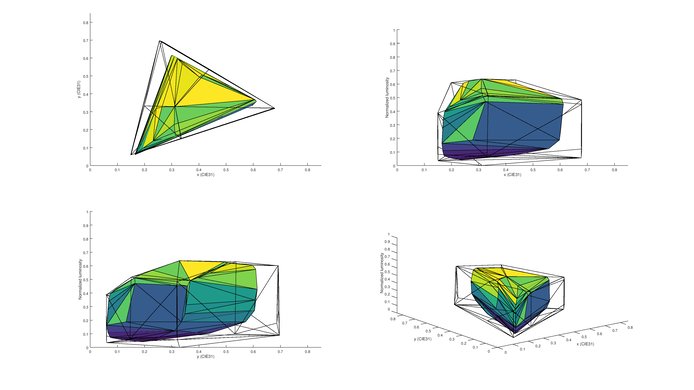
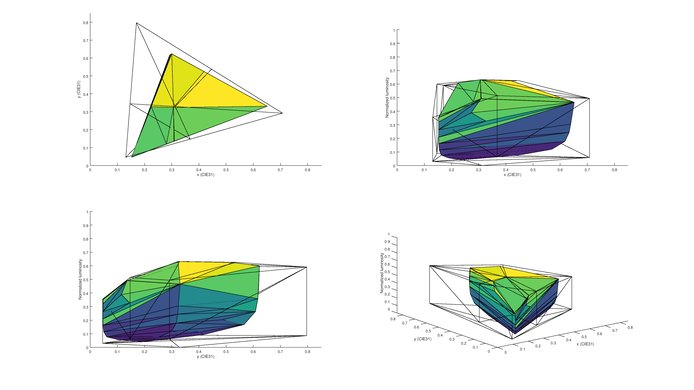
for pictures & test results

for pictures & test results

The K6250 is average at dealing with reflections. The semi-gloss finish helps to diffuse reflections. The curved screen spreads them across the screen, but in doing so reduces the intensity of the reflections making them easier to see through. Some rainbow effect can be seen around reflections.
This TV doesn't support any 3D features, just like all other Samsung TVs this year.

for pictures & test results

for pictures & test results

The response time is good and only results in a short trail following moving objects. The backlight uses PWM to dim, and so flickers at 120Hz. This can be seen in the clear duplications following the logo.



The K6250 is unable to play movies from any source without some judder, but most people won't notice it.
for pictures & test results

The K6250 has a 60Hz panel, which is able to interpolate 30Hz content. To do this, set 'Auto Motion Plus' to 'Custom' and increase the 'De-Judder' slider.
The input lag of the K6250 is average. Even casual gamers might notice some delay between controller actions and the result on the screen. Label the input as 'PC' to achieve the lowest input lag. With the input labelled as 'Game Console', and the 'Game' special viewing mode the input lag is 53.2ms.
The K6250 is a 1080p TV, and so cannot accept or display any resolutions beyond this. It has a 60Hz panel, and so cannot display a 120Hz signal. It does support chroma subsampling though, so text appears clear on all backgrounds. To do this, label the input to 'PC'. The input lag in 'PC' mode is 47.2ms.
for pictures & test results

All inputs are located on the side, same as the Samsung KU6300.
for pictures & test results

Average performance. Maximum volume and low-end cutoff are about average, for a TV. Frequency response is good at 75 and 85. However, at maximum volume considerable pumping and compression is present.
for pictures & test results

Poor distortion performance. The overall amount of harmonic distortion is decent at 75 and 85dB SPL. However, at maximum volume, there's noticeable rise in harmonic distortion, which may not necessarily be audible in real-life situations.
for pictures & test results

The K6250 supports the most popular applications such as Netflix, YouTube and Amazon Video. There are a wide range of applications available from the store.
for pictures & test results

The Samsung K6250 comes with the latest Tizen smart OS. This is the same platform found in the other 2016 Samsung TVs, such as the KU6300. After turning on the TV it does take some time to load, but is simple to use, and feels responsive when it is up and running. There is a wide range of supported applications available in the 'App store'. It is easy to watch videos or movies with a thumb drive or USB hard drive.

for pictures & test results

The remote is the same smart remote found with the Samsung KU6300. It is simple and works well.
for pictures & test results

- Manuals
- Stand cover
- Wall mount spacers
- Cable management piece
- Composite video adapter
- Component video adapter
- Batteries
- Remote


