
Our Verdict
Good all-round TV. Excels in dark scene performance thanks to great picture quality. Great motion for sports and low input lag for video games.
- Great picture quality, especially for watching movies in a dark room
- Great motion handling and low input lag for sports and video games
- Picture quality degrades from the side
- Can't get very bright
- Lacks TV tuner
- Sub-par upscaling of lower resolutions
Very good for watching movies in a dark room. Local dimming works well, and native contrast ratio is high. Blu-rays play smoothly.
Average performance for TV shows in a bright living room. Can't get very bright to combat glare but deals with reflections well. Picture quality is great from in front, but deteriorates when viewed from the side. Lacks TV tuner.
Good TV for watching sports. Fast movement is handled very well with a minimum of motion blur. Average field uniformity.
Excels in video game performance. Low input lag on HDMI 5 with game mode which is good. Great handling of fast camera movement with minimum motion blur.
Good for HDR. Supports Dolby Vision and HDR10 but average peak brightness. Slightly above average colors but not enough to take full advantage of HDR.
Good for HDR gaming. Support HDR10 and Dolby Vision but doesn't really benefit from HDR signal. Picture quality is great, but can't get bright highlights or display a wide range of colors. Input lag for HDR is good for casual gaming.
Good when use as a PC monitor. Supports a wide range of resolutions. Very good motion handling and feels responsive. Chroma subsampling is displayed correctly at many resolutions.
Check Price
Differences Between Sizes And Variants
The Vizio M Series TV that we bought is the 70" with SKU M70-D3. Note that the M60-D1 has an IPS panel. This means we expect it to have a worse contrast ratio, and wider viewing angle.
The 50" and 55" models have 60Hz panels so some of the motion interpolation options are not available (i.e. 'Reduce Judder' and 'Reduce Motion Blur'). For those who like the soap opera effect, it is maybe better to get an 120Hz version of the M series 2016.
Update 05/30/2017: The M50-D1 and M55-D0 cannot perform motion interpolation at all.
Different sizes have different panel provenances, so it is possible our review doesn't represent exactly all sizes. If someone's Vizio M Series doesn't correspond to our review, let us know and we will update the review.
| Size | Model | Effective Refresh Rate | Real Refresh Rate | HDMI # | Speakers | Panel | Local Dimming Zones |
| 50" | M50-D1 | 120 Hz | 60 Hz | 4 | 10W x 2 | VA | 32 |
| 55" | M55-D0 | 120 Hz | 60 Hz | 4 | 15W x 2 | VA | 64 |
| 60" | M60-D1 | 240 Hz | 120 Hz | 5 | 10W x 2 | IPS | 64 |
| 65" | M65-D0 | 240 Hz | 120 Hz | 5 | 15W x 2 | VA | 64 |
| 70" | M70-D3 | 240 Hz | 120 Hz | 5 | 10W x 2 | VA | 64 |
| 80" | M80-D3 | 240 Hz | 120 Hz | 5 | 10W x 2 | VA | 64 |
Popular TV Comparisons

The Vizio M Series 2016 provides great movie and TV watching performance, especially for the price.

We buy and test dozens of TVs yearly, taking an objective, data-driven approach to deliver results you can trust. Our testing process is complex, with hundreds of individual tests that take over a week to complete. Most of our tests use specially designed test patterns that mimic real content, but we also use the same sources you have at home to ensure our results match the real-world experience. We use two main tools for our testing: a Colorimetry Research CR-100 colorimeter and a CR-250 spectroradiometer.
Test Results
Older Test Bench: We tested this product using an older TV test methodology before a major update. Some of the test results below aren't directly comparable with other TVs. Learn more
for pictures & test results

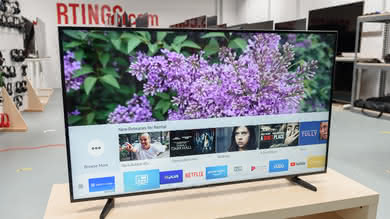
The design is quite similar to the Vizio M Series 2015. The front is plastic and appears more solid and higher end than that found on the Vizio E Series 2016, but doesn't look as good as the Vizio P Series 2016's metal finish. The most significant change from the 2015 model is the legs, which have a stylish new look.
for pictures & test results

Like other Vizio TVs, the stand is very wide so that we had to extend our test table to fit the 70". The TV is not as stable as some of the other models with sturdier stands.
Footprint of the 70" TV stand: 55" x 11"for pictures & test results

The back of the TV is similar to the P Series 2016. All inputs and outputs are directed to the side of the back, providing easy access if wall mounted.
for pictures & test results

The borders feature metal sides with a nice textured finish and a plastic front.
for pictures & test results

Like other Vizio TVs, it is quite thick when viewed from the side. If wall mounted it will stick out quite obviously.
for pictures & test results
The full-array local dimming heats up the TV evenly. You do however see some hot spots where internal electronics are located.
for pictures & test results

The native contrast ratio is pretty good. It is not as good as this year's P series, but it is not far behind. This should provide dark scenes with rich details.
for videos & test results

Like this year P Series 2016, the local dimming called 'Active LED Zones' works very well. In combination with the full-array backlight, it can provide very deep blacks when watching a movie and especially when watching HDR content. There is also no major blooming around the highlight in our video test when viewed straight in front. Unfortunately, like this years P Series, the local dimming did dim a bit of the white dot. Because there are fewer (and bigger) dimming zones than the P Series, it is more noticeable when they turn on and off.
The SDR peak brightness of the Vizio M Series 2016 is bad. The maximum the TV can reach is around 320 on a 100% windows. The local dimming dim too much the small highlights, making the 2% windows only 1/3 of the brightness it can get. Since this TV can't get very bright, it will not be the best option for people that have a bright room.
The Vizio M is not a very bright TV. The 2% window is only at 183 cd/m², which is less bright than the 2015 M series. The 100% peak windows is also not very bright at 232 cd/m² making the 2016 M series well under the 535 cd/m² of the P series 2016. We tested the peak brightness with a HDR10 signal.
Update 08/09/2016: Retested with newest firmware update, sending a HDR10 signal over HDMI. No improvement to peak brightness.
Update 10/14/2016: Retested with the newest 2.2.7.4 firmware update.
for pictures & test results

for pictures & test results

The gray uniformity of the Vizio M Series 2016 is average and when viewed from an angle, it looks worse. The LED of the full array backlight are visible and the corner are also more dark. Dirty screen effect will certainly displease sport fans, since it is in sport like football or hockey that you have more panning shots over uniform background.
for videos & test results

for pictures & test results
for pictures & test results
for pictures & test results
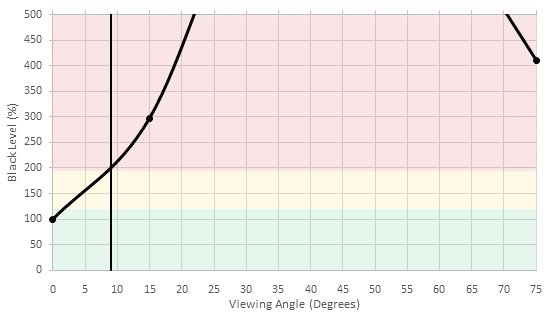
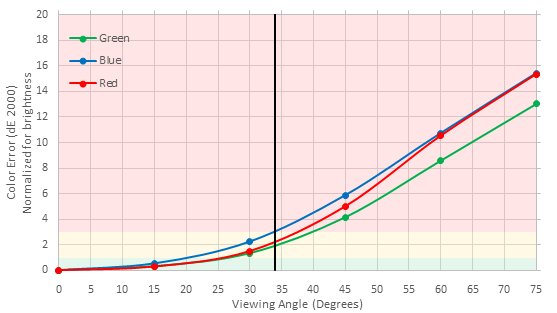
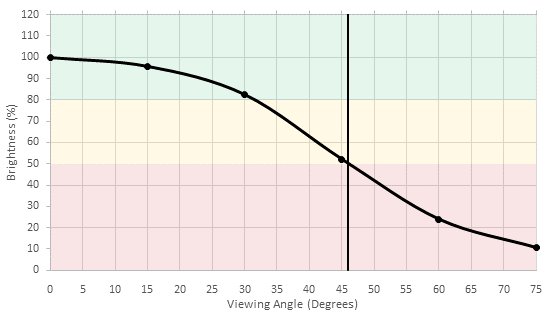
The viewing angle is good for a TV using a VA panel. In fact, when view side by side, the M Series 2016 actually give a better viewing experience than the more expensive P Series 2016.
for pictures & test results

The black uniformity is good, but there is definitely some clouding issues on our unit, and it is more visible at an angle. With local dimming enabled this is not an issue.
for pictures & test results

When sending a 10 bit signal, 8 bit gradations can be seen even though the panel is 10 bit. Despite this, the gradient performs pretty well, without any major color or banding issues.
for pictures & test results

for pictures & test results

for pictures & test results

Out of the box, the pre-calibration of this TV was pretty great. There were some issues with the reds being too high and the blues being too low in the white balance. As for the colors, it too had it's share of issues, with some colors being too saturated.


for pictures & test results

DVDs or standard TV channels upscaling is not as good as other TV. You can see on the picture that the sail boat ropes looks choppy.
for pictures & test results

Small details are a bit lost and the general rendering is a bit soft.
for pictures & test results

Blu-rays upscaling looks very good and details are very sharps.
for pictures & test results

4k content looks very good without any image problems.
for pictures & test results

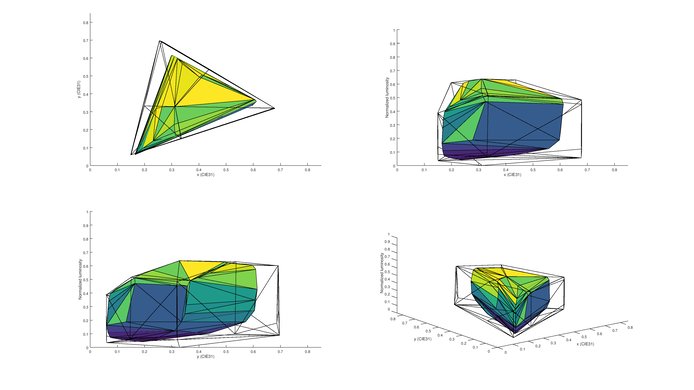
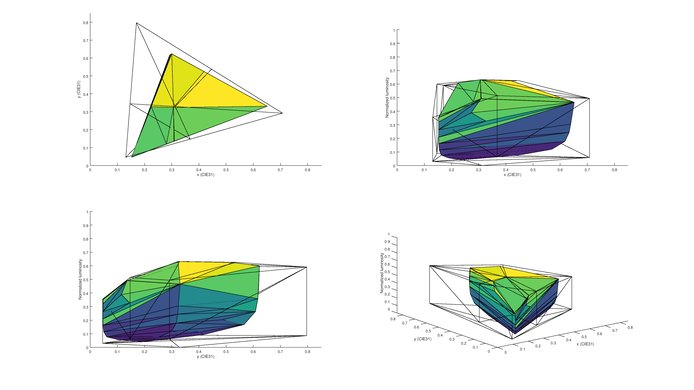
We measured the color gamut coverage in the Dolby Vision mode (via the metadata tunneling of Spectracal's Calman software). It doesn't have a wide color gamut for HDR, but it is enough for Rec 709 content.
Update 08/09/2016: Retested with newest firmware update, sending a HDR10 signal over HDMI. No improvement to color gamut.
for pictures & test results

for pictures & test results

Reflections on the Vizio M Series 2016 appear large and diffused. This helps to combat bright glare. It is similar to the Vizio M Series 2015.

for pictures & test results

for pictures & test results

The response time of this TV is excellent. No trail can be seen following the Rtings logo. This means that fast moving objects on this TV will be quite clear. This TV uses PWM flickering to adjust the luminosity of the backlight.



The Vizio M Series 2016 is judder free only for 24p sources like movies on Blu-ray, DVD and from streaming apps. On other movie sources which play at 60Hz such as from a cable/satellite box, judder does occur, but not consistently. We were able to eliminate this completely when setting 'Reduce Judder' function to 1, however this does add a little of the Soap Opera Effect.
for pictures & test results

for pictures & test results

'Reduce Judder' is the setting that turns on motion interpolation for 30 fps (and lower) content. For 60 fps to be interpolated to 120, you will need to use the 'Reduce Motion Blur' slider (but there is currently a bug; in order for RMB to work, you also need to set 'Reduce Judder' to at least 1 as well).
Update 05/30/2017: The M50-D1 and M55-D0 cannot perform motion interpolation.
Input lag is great. For best results, use HDMI5 with 'Game Low Latency' on for both 1080p and 4k resolutions. Note that HDR is only possible for HDMI 1, and so the input lag is higher. It is still playable for casual gamers. Shown below are the results for combinations of HDMI ports, HDR vs SDR, with different signal formats.
| Format | HDR | HDMI | Input lag |
| 1080p@60Hz | SDR | 5 | 17.1ms |
| 1080p With Interpolation | SDR | 5 | 79.2ms |
| 1080p @ 60Hz Outside Game Mode | SDR | 5 | 83.8ms |
| 1080p @ 60Hz @ 4:4:4 | SDR | 5 | 16.9ms |
| 4k @ 60Hz | SDR | 5 | 16.7ms |
| 4k @ 60Hz @ 4:4:4 | SDR | 5 | n/a |
| 4k @ 60Hz + HDR | HDR | 5 | n/a |
| 4k @ 60Hz @ 4:4:4 + HDR | HDR | 5 | n/a |
| 1080p@60Hz | SDR | 1 | 51.5ms |
| 1080p With Interpolation | SDR | 1 | 122.7ms |
| 1080p @ 60Hz Outside Game Mode | SDR | 1 | 126.8ms |
| 1080p @ 60Hz @ 4:4:4 | SDR | 1 | 51.5ms |
| 4k @ 60Hz | SDR | 1 | 43.8ms |
| 4k @ 60Hz @ 4:4:4 | SDR | 1 | 43.8ms |
| 4k @ 60Hz + HDR | HDR | 1 | 43.8ms |
| 4k @ 60Hz @ 4:4:4 + HDR | SDR | 1 | 43.8ms |
Update 01/24/2017: Retested with the newest firmware (3.0.12.2) and now the Vizio M Series 2016 can now display the chroma subsampling correctly when set in 'Computer' picture mode. The input lag has also been reduced.
Update 01/24/2017: Retested with the newest firmware (3.0.12.2) and now the Vizio M Series 2016 can now display the chroma subsampling correctly when set in the 'Computer' picture mode. Note that it can also correctly display chroma subsampling at 1080p @ 120Hz.


HDR10 is supported only on HDMI1. Despite what is mentioned on Vizio website, HDCP 2.2 protected content can play on all HDMI ports.
for pictures & test results

Poor overall response. The frequency response is poor. The low-end cutoff, at 302Hz, is the worst we have measured so far. This TV doesn't produce any bass. On the other hand, we didn't notice many compression/pumping artifacts and the maximum loudness is good too. But it's not difficult to make a TV loud when it's not producing much bass.
for pictures & test results

Poor distortion results. The overall amount of harmonic distortion is elevated, even at low volumes. As the volume increases, the harmonic distortion increases with it. At 85dB and especially Max dB, the rise in harmonic distortion is significant and could be audible.
for pictures & test results

This TV uses SmartCast, and as such, there is no applications on the actual TV itself. However, using the tablet provided with this TV, or any other handheld device, you will have many applications to choose from that supports casting services. There are already many major applications that do so such as Youtube, Netflix, and Spotify. Amazon Prime isn't supported at the moment.
for pictures & test results

The Vizio M Series 2016 shares the same smart operating system as the Vizio P Series 2016 and the Vizio E Series 4k 2016 from past reviews we have done. While some may enjoy the simplicity of the SmartCast smart interface, which is similar to a chrome cast experience, depending on the quality of your wireless network there may be disconnections with the tablet. While having a tablet that comes with a TV is great included gift, some people may find it less intuitive than a traditional smart remote. For basic functions, you can use the included traditional remote control but for adjusting picture settings or to control the smart features a tablet or smartphone is required. In terms of inputs, there are 5 HDMI ports which is great for anyone who wants to connect all their devices. You can learn more about Smartcast and its app here.
Keep in mind that it is lacking a TV tuner, which means you cannot connect an antenna or cable directly to the TV. You will need to buy a separate tuner like this one.
for pictures & test results

The TV controls are located behind the TV on the left side.
for pictures & test results

The Vizio TV comes with both a 8-inch tablet and a basic remote. You will most likely be using the tablet more often than the remote itself though as that's how you can adjust all the settings of the TV. You can also download the 'Vizio SmartCast' application on any handheld device. It's available for Android and Apple.
for pictures & test results

- 8-Inch Tablet (XR6M)
- Tablet Manual
- Wireless charging Dock
- Charging block
- Charging cable
- Remote
- Batteries
- HDMI cable
- Quick start guide


