Our Verdict
The M Series 2017 is a good TV for a mixed usage. It has good picture quality in a dark room, good handling of motion and features a nice set of HDR related features.
- Great blacks
- Low motion blur
- Better than average local dimming
- Image quality deteriorates at an angle
- Handling of reflections is below average
- Lacks a TV tuner
Great choice for movies in a dark room. The Vizio M produces deep and uniform blacks, and it sports a decent local dimming feature that enhances its contrast further.
The M Series 2017 does an ordinary job with TV shows. It gets decently bright, but it doesn't do a great job at handling reflections. Unfortunately, its upscaling capability is average as well.
Decent TV for watching live sports. The Vizio M series handles motion well, and it produces a uniform image free of major blotchiness. Unfortunately though, picture quality does degrade at an angle.
Great TV for video games. The Vizio M 2017 has low input lag and motion blur. Games feel responsive, and its image flicker feature can greatly enhance the clarity of motion.
The Vizio M 2017 handles HDR movies well. It gets decently bright, and it can reproduce a slightly wider range of colors. It's not the best at handling gradients though.
Very good HDR gaming performance. An HDR input doesn't affect the input lag of the M Series 2017, making it a good choice for HDR consoles.
The M Series 2017 makes for an average PC monitor. While it supports the necessary resolutions for sharp text, the narrow viewing angle causes edges of the screen to darken from up-close. The input lag, while fine for more casual gaming, can also seem a bit sluggish for use with a mouse.
Changelog
- Updated Mar 12, 2018: Converted to Test Bench 1.2.
- Updated Jan 23, 2018: Retested input lag with the latest firmware (3.4.8.15). Input lag is ~9 ms higher across the board; this is also the case with the E Series 2017 and HDMI port 1 on the P Series 2017.
- Updated Aug 10, 2017: Converted to Test Bench 1.1.
- Updated Jun 09, 2017: Review published.
Check Price
Differences Between Sizes And Variants
The Vizio M Series 2017 that we bought is the 65" with SKU M65-E0. Different sizes have different panel provenances, so it is possible our review doesn't represent exactly all sizes. If someone's Vizio M Series 2017 doesn't correspond to our review, let us know and we will update the review.
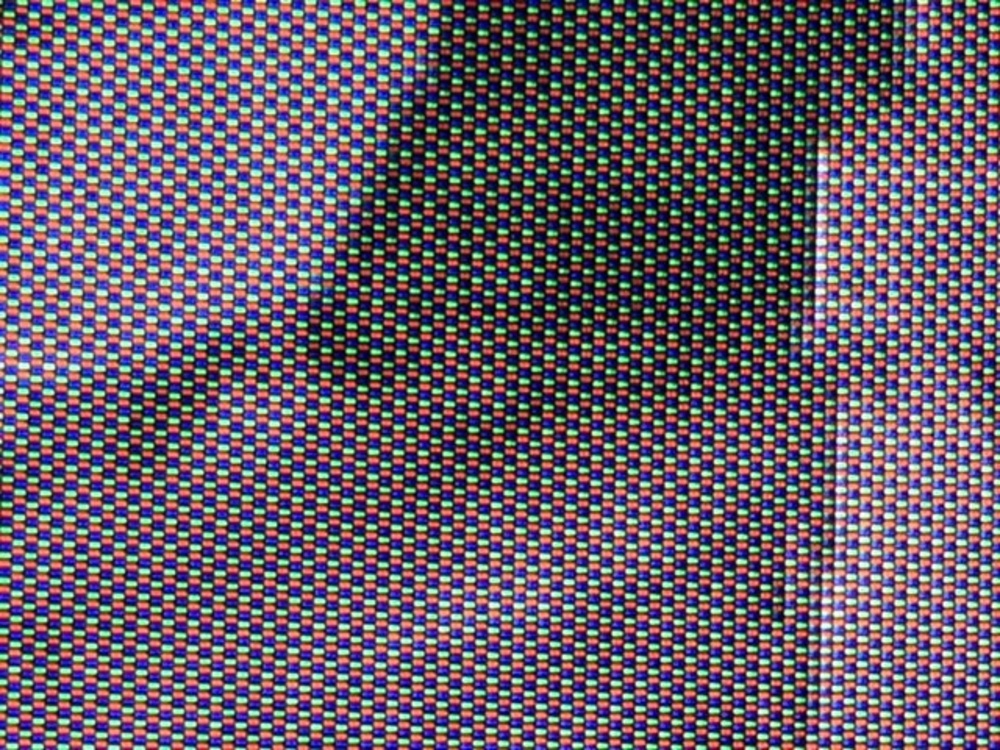
Update 03/12/2018: We have received reports of different panels in the 50" Model (M50-E1). One reader has an offset sub-pixel arrangement which can result in a less-accurate 4k image, especially when used as a PC monitor as the sub-pixels are nonstandard. For another reader the same model of TV has a regular sub-pixel arrangement, which is unlikely to have these issues. There may be a panel lottery in this size.
| Size | Model | Effective Refresh Rate | Real Refresh Rate | Local Dimming Zones |
| 50" | M50-E1 | 120 Hz | 60 Hz | 32 |
| 55" | M55-E0 | 120 Hz | 60 Hz | 32 |
| 65" | M65-E0 | 120 Hz | 60 Hz | 32 |
| 70" | M70-E3 | 120 Hz | 60 Hz | 32 |
| 75" | M75-E1 | 120 Hz | 60 Hz | 32 |
Popular TV Comparisons

The M Series 2017 is a good performer at its price, and offers some of the features found on the more expensive Vizio P Series 2016. It is generally a good pick over its direct competition.
The Vizio M Series XLED 2017 is a bit better than the Vizio E Series 2017. The M Series has a better local dimming feature than the E Series, making it a better choice for movies and HDR content in a dark room. It is also brighter than the E Series with SDR content. The 55" Vizio E Series uses an IPS panel, making it a slightly better choice than the M Series if you watch TV in a wide, bright room.
The TCL P Series/P607 2017 is better than the Vizio M Series XLED 2017. The TCL P607 has much better input lag, both for HDR and SDR, and a better response time, which is great if you play video games. The TCL P607 is better for watching TV shows in bright rooms as its brightness can fight glare better, and it has better reflection handling. On the other hand, the Vizio M Series 2017 is better for movies as it has better black uniformity and better 24p judder removal, which is great if you watch low fps movies. Finally, the Vizio M Series 2017 has better gray uniformity, which makes it marginally better for sports fans.
The Vizio P Series XLED 2017 is significantly better than the Vizio M Series 2017. The P Series has lower input lag and lower response time, which is great if you play video games. The P Series has better local dimming and is equipped with motion interpolation for those who like the soap opera effect. Finally, the P Series is better suited for watching TV shows in brighter rooms, as it has higher brightness to fight glare and slightly better reflection handling.
The Vizio M Series XLED 2017 is much better than the Element Amazon Fire TV. The Vizio M Series supports HDR and has a local dimming feature that improves dark room performance. It also has lower input for gaming and is more consistent in removing judder from 24p sources. The Fire TV has an optional motion interpolation feature that can make motion appear smoother by introducing some soap opera effect.

We buy and test dozens of TVs yearly, taking an objective, data-driven approach to deliver results you can trust. Our testing process is complex, with hundreds of individual tests that take over a week to complete. Most of our tests use specially designed test patterns that mimic real content, but we also use the same sources you have at home to ensure our results match the real-world experience. We use two main tools for our testing: a Colorimetry Research CR-100 colorimeter and a CR-250 spectroradiometer.
Test Results
Older Test Bench: We tested this product using an older TV test methodology before a major update. Some of the test results below aren't directly comparable with other TVs. Learn more
for pictures & test results

The design of the 2017 Vizio M Series is almost identical to the 2016 model. It has the same wide stand which looks quite good but may be difficult to fit on some tables. The borders are a bit thicker than average, but it still looks good overall and is a step up in design from the E Series 2017.
for pictures & test results

The stand is identical to the 2016 model and almost as wide as the TV. It supports the TV well but isn't quite as stable as some other TVs which use stronger or thicker materials.
Footprint of the 65" TV stand: 10.9" x 51.7"
for pictures & test results

The rear of the TV is quite basic but all of the inputs are accessible if placed close to a wall.
for pictures & test results

The borders are a bit thicker than average, but still look quite good with the metal side. The rest of the border is plastic.
for pictures & test results

The thickness is exactly the same as the M Series 2016. It is a bit thicker than average, so will stick out somewhat if mounted on a wall.
for pictures & test results
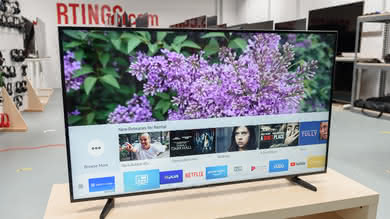
The TV runs fairly cool, never getting more than slightly warm to the touch. The whole bottom edge is a big vent and there are multiple vents along the back. The heat is fairly even across the screen due to its full array backlight.
for pictures & test results

The build quality is a step up from the slightly lower end E Series 2017. The TV is still almost completely made of plastic, but the metal edges on the border is a nice touch.
for pictures & test results

The contrast ratio is excellent on the 2017 M Series, even better than last year's M Series 2016. This high contrast ratio can provide excellent dark scenes performance with deep blacks, especially when the TV is set in a dark room.
When the local dimming is turned on, the contrast ratio goes up a little bit, but not by that much. This is a sign that the local dimming feature on the 2017 M Series is not as good as seen on other higher end LED TV, like the Sony X900E.
for videos & test results

The local dimming feature on the 2017 M Series is not as efficient as that on the M Series 2016 since it has less dimming zones, but it still procures some benefit, as seen on our contrast ratio test and also looking at our black uniformity picture. While turned on, the local dimming helps to produce deeper blacks, especially if the TV is set in a dark room.
On the downside, like both the M Series and P Series 2016, the local dimming darkens the moving highlight too much. This is more visible when the highlight moves to a different dimming zone, and since the zones are even bigger than on the 2016 M Series, this is even more obvious.
Good SDR peak brightness. The TV's local dimming dims highlights in dark scenes, as shown by our smaller window tests, which is not a good thing. This is the opposite of its HDR behavior, which brightens the small windows. The real scene brightness is close to the best case, but even it isn't very bright. This local dimming behavior is similar to the M Series 2016, but is a little better because the small windows aren't dimmed as much. A plot of brightness over time is shown here.
Decent HDR peak brightness, though not as bright as high end TVs. The TV's local dimming effectively brightens highlights in dark scenes, as shown by our smaller window tests, yet its worst case brightness is still fairly bright. A plot of brightness over time is shown here. This brightness is a massive improvement over the M Series 2016, and though it is similar overall to the P Series 2016 the local dimming behavior is very different; the P Series dimmed the smaller windows rather than brightening them.
If you find HDR content too dim you can lower the TV's 'Gamma' setting. This doesn't affect bright white but will brighten everything else.
for pictures & test results

for pictures & test results

The gray uniformity is above average for this Vizio TV and is in the same ballpark as the 2016 M Series. Most of the issues come from the standard deviation being quite high and this is caused mostly from the sides and corners of the TV being darker than the rest of the screen. The 50% dirty screen effect test results is a bit higher than our good value number (0.165%), but dirty screen effect is minimal and is not too distracting.
When it comes to the 5% gray uniformity test, not many uniformity issues can be noticed besides a bit of a brighter edge at the bottom, but this is really not a problem at all since it is not noticeable while watching normal content.
for videos & test results

for pictures & test results
for pictures & test results
for pictures & test results
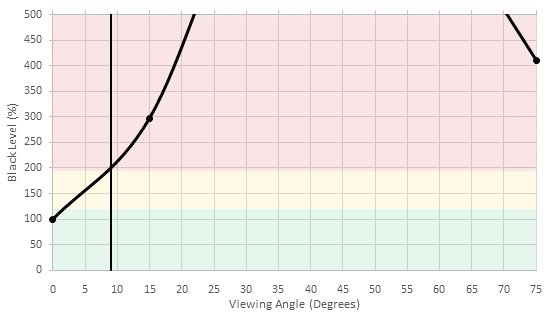
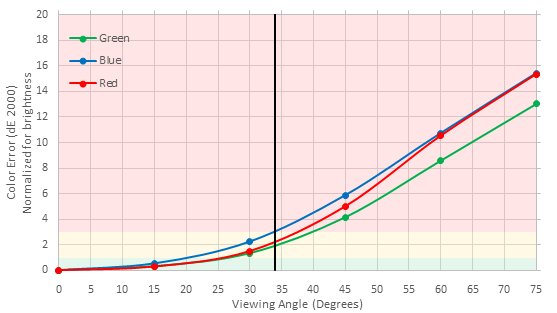
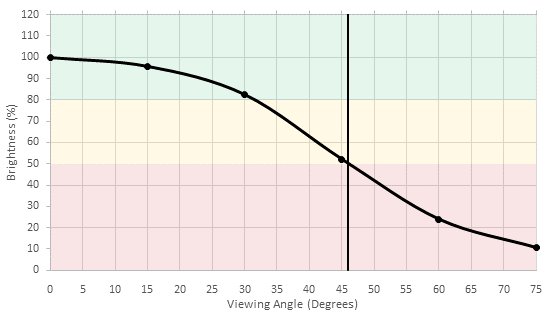
Bad viewing angle. Blacks turn grey and colors shift when the TV is viewed from even a small angle, while the brightness decreases at a more moderate angle. This is fairly typical of a VA panel, and is very similar to the M Series 2016.
for pictures & test results

for pictures & test results

The black uniformity of the 2017 M Series is excellent and it is an upgrade when compared to the 2016 models. Besides a bit of clouding in the bottom right and the top left corners, the rest of the screen is very even, which is great especially for dark scenes in movies.
With local dimming turned on, the uniformity is a bit worse since there is blooming around the middle white cross while the rest of the screen is mostly black. Note that in this test, we don't measure the black level of the screen, but rather the whole uniformity of the black. So even if the overall picture taken for the black uniformity with local dimming seems to have deeper black, the central blooming affects the final result.
for pictures & test results

for pictures & test results

for pictures & test results

The M Series 2017 is good at handling reflections. The semi-gloss finish diffuses reflections across the screen, reducing their intensity. This is very similar to the 2016 Vizio M Series and should be fine for an average room. In a bright room, reflections may be distracting though.
for pictures & test results

for pictures & test results

for pictures & test results

Out of the box, the Vizio M Series 2017 has a great accuracy. The white balance dE is under 3, which very good since most people would not even notice it. The gamma is on our 2.2 target, but the overall gamma curve has some imperfections, but once again this would not be very problematic.
When it comes to the color accuracy, once again, the color dE is under 3, which is very good and most people could use the TV as-is and would not notice the little imperfections. Most of the issues here are because of the white points being a bit off and as a result of this, the overall dE of all the other colors are affected.
for pictures & test results

for pictures & test results

for pictures & test results

The calibration of the Vizio M Series 2017 was very easy to do and the whole process did not take very long. The 2 and 10 points white balance calibration is fairly responsive. The use of the smartcast remote app is a big plus when it comes to the calibration and it makes the whole process much faster.
After calibration the white balance dE is only of 0.13, which is almost perfect. With the color space management system provided by this Vizio TV, the color dE was cut in half, which is a really good result. The blue imperfections are very minimal and will not affect normal content.
Looking at the gamma, the curve was flattened to track more closely our target, which in the end is excellent.
Note: At the beginning of the calibration process, we encountered a bug that makes the 10 point white balance calibration inaccessible. A firmware update occurred during the review process and seems to have taken care of this bug and as a result, we could finalize the calibration process without any problems.
You can see our calibration settings here
for pictures & test results

Low-quality content such as DVDs look a bit worse than most other TVs. Some straight lines appear choppy.
for pictures & test results

Upscaling of 720p content such as cable is a bit softer than most other TVs.
for pictures & test results

Upscaling of 1080p content such as Blu-rays is good. Details remain clear and the image is sharp.
for pictures & test results

No issues can be seen with native 4k content.
Update 03/12/2018: We have received reports of different panels in the 50" Model (M50-E1). One reader has an offset sub-pixel arrangement which can result in a less-accurate 4k image, especially when used as a PC monitor as the sub-pixels are nonstandard. For another reader the same model of TV has a regular sub-pixel arrangement, which is unlikely to have these issues. There may be a panel lottery in this size.
for pictures & test results

for pictures & test results

for pictures & test results

Wide color gamut, much wider than the M Series 2016 and very similar to the P Series 2016, but not as wide as many other high end TVs. Saturated red, blue and green all fall short of their targets, with green being the worst which is typical for modern TVs. The accuracy of the colors the TV can produce is not very good, as it severely undersaturates the lighter shades.
The TV's HDR EOTF most closely follows the PQ curve when the 'Gamma' setting is 2.4. This isn't actually gamma 2.4 as gamma is meaningless in HDR, but the 'Gamma' setting in HDR does raise and lower the EOTF. At the default 'Gamma' of 2.2 everything is brightened too much, as seen in this plot. However because HDR content is mastered for a dark room, you should lower the gamma (making the picture brighter) to suit the brightness of your room. The above two EOTFs were measured in the accurate 'Calibrated Dark' picture mode; the EOTF for the Computer picture mode with 'Gamma' 2.4 is here, and is identical to that of 'Calibrated Dark.
for pictures & test results

for pictures & test results

Mediocre color volume. The P3 volume is good, only really limited by the TV's color gamut and black level. The test was done with local dimming enabled, but still the black level never reached true black on our black-with-white-border slide. The P3 volume is fairly similar to that of the P Series 2016.
Looking at the Rec 2020 volume, fully saturated blues and reds are nowhere near as bright as they should be, blues especially. The E Series 2017 has a similar problem with saturated blue, but not red, and the M Series 2016 had no such issue.
for pictures & test results

The Vizio M Series 2017 performs similarly as the 2016 version with the exception that we did not notice any banding normally seen on 8-bit panel. Comparing to other 10-bit TVs tested before, there are more issues is the shades, even in the lighter color, which usually are free of banding. Luckily, we did not notice too many issues while watching normal content during the review process.
for pictures & test results

The Vizio M Series 2017 does not have any image retention. Looking at our test picture taken right after the 10 minutes burn-in scene, no retention could be seen with the naked eye and detected by the computer analysis. This is a perfect result and it is in line with other VA panel TVs.
We don't expect VA panels to experience permanent image retention, as the VA panel in our long-term test appears immune.
for pictures & test results

Update 03/12/2018: We have received reports of different panels in the 50" Model (M50-E1). One reader has an offset sub-pixel arrangement which can result in a less-accurate 4k image, especially when used as a PC monitor as the sub-pixels are nonstandard. For another reader the same model of TV has a regular sub-pixel arrangement, which is unlikely to have these issues. There may be a panel lottery in this size.


for pictures & test results

The M Series 2017 uses PWM at 480Hz to dim the backlight, starting at 99/100 backlight setting, but at that frequency it isn't really noticeable. Lowering the setting shortens the duty cycle, while amplitude remains constant until very low backlight settings.
for pictures & test results

for pictures & test results

It is possible to enable 'Clear Action' to reduce the PWM frequency to 60Hz, and this helps to clear-up eye tracking persistence blur significantly, but produces a visible flicker. Note that the BFI option isn't available for HDR content as it reduces the brightness of the screen significantly.
This TV has a 60Hz panel and is unable to interpolate lower frame rate content. Fans of the soap opera effect may be disappointed. During testing, the option did appear in the 'Smartcast' app but is not selectable, the presence of this option is likely a bug as it doesn't appear on the on-screen menu.
The Vizio M Series 2017 is great at displaying all types of content without stutter. The response time of the display helps to smooth the transition between frames, which produces a smoother overall image. This is true for movies, video games and sports.
Similar to the 2016 M Series, only 24p movies playing from 24p sources like DVD and Blu-ray players are judder free on the M series 2017. Judder is present in 24p movies playing via 60p/60i sources like cable/satellite boxes.
To remove judder from 24p movies playing from 24p sources, simply turn on the 'Pure Cinema' option from the picture setting menu.
The Vizio M Series 2017 has a 60Hz panel, and doesn't support any variable refresh rate implementation. This is normal behavior for 2017 TVs.
Low input lag, which should be good enough for most people but competitive gamers may be disappointed. Unlike the 2016 M series this TV doesn't have a low latency port, so all ports measured the same for input lag. The picture mode doesn't matter for input lag, only the 'Game Low Latency' toggle matters, which can be activated in any picture mode. This input lag is nearly identical to that of the E Series 2017.
Aside: We measure input lag using the industry standard Leo Bodnar tool, connected to an HDFury Linker and Integral to change the resolution of the signal for the different tests. However when we tested using the Leo Bodnar tool alone, we measured ~29 ms, which is much lower than was measured using the HDFury chain. This is the only TV we've measured where the input lag from the tool was different than the input lag from the whole chain, because the Linker and Integral add less than 0.1 ms of lag each. To confirm our results we tested the input lag several times using the two screen method and TVs whose input lag was already known. All these tests measured an input lag between 40 and 43 ms, confirming our previous result of ~40 ms. This shows that our input lag results are valid for typical sources like game consoles and PCs.
Update 01/23/2018: Retested input lag with the latest firmware (3.4.8.15). Input lag is ~9 ms higher across the board; this is also the case with the E Series 2017 and HDMI port 1 on the P Series 2017. The review has been updated.
Most of the common resolutions are supported, except 120 Hz because this is a 60 Hz panel. 4:4:4 color is only displayed properly in the Computer picture mode. Only HDMI port 1 supports 4k @ 60 Hz @ 4:2:2 or 4:4:4 color, and only when 'Full UHD Color' is enabled for that port.


Like the 2016 model, the Vizio M Series 2017 doesn't have a TV tuner.
Update 07/14/2017: Variable analog audio out is supported, there was an error in the review.
for pictures & test results

Below average frequency response. The M Series has a strong emphasis on lower frequencies that causes it to sound muddy and dark. Furthermore, its low-end cut-off is bad, causing the TV to sound very thin.
for pictures & test results

Poor distortion performance. THD is high at all levels, and it very noticeable levels at higher volumes.
for pictures & test results

There is a side menu that can be accessed in any input, which contains all the TV's settings. There is also an apps screen, listed as 'SmartCast' under inputs, which is currently only one page and has really choppy animations. Because the app screen is listed as an input and has no button on the remote, it can take a while to click through the inputs to reach it.
There are no ads in the TV's interface or the SmartCast app.
for pictures & test results

The TV can play content cast from most phone and tablet apps. It also has a few built-in apps, but currently only Netflix, Amazon Video, Hulu, Crackle, iHeartRadio, Xumo, Vudu and Pluto TV are available (not YouTube). Animations in the built in apps are really choppy, but there isn't much lag to actions.
for pictures & test results

The Vizio M 2017's remote is a considerable improvement over the very basic remotes from last year, but the TV does not come with an included tablet like the 2016 M Series. The remote is still fairly basic and lacks smart features like a microphone or a pointer, like the smart remotes of other platforms.
for pictures & test results
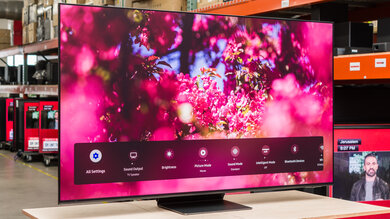
The SmartCast app has more features than most other TV apps. Its highlight is its full control over the TV's settings, providing a much better experience than clicking through menus on the TV.
for pictures & test results

There are only four physical buttons: power, input, volume up and volume down.
for pictures & test results

- Manual
- Batteries
- Remote
Unlike the 2016 model, the M Series 2017 doesn't come with a tablet.