
If you're a professional photo editor or content creator, getting a proper monitor to work with can help you perfect your craft. While there are dedicated professional displays with perfect color accuracy, those tend to cost a lot. The next best option is to get a consumer-level monitor that performs well enough even for serious photo editing. A monitor with a wide color gamut and a dedicated, accurate sRGB mode is useful if you don't want to pay more for calibration in SDR. You may also want to consider the monitor's HDR performance if you edit photos in HDR, where a high contrast ratio and bright highlights are important.
Besides the color accuracy, a high-resolution display lets you see images with a ton of detail, and you can also think about the size, but that's a personal preference. Getting a monitor with a USB hub and a KVM switch also improves your workflow, especially if you need to multitask with different devices or computers. You may also want something with an ergonomic stand and a wide viewing angle if you need to share your screen with someone next to you.
We've bought and tested more than 395 monitors, and below are our picks for the best monitors for editing photos. See our recommendations for the best monitors for graphic design, the best monitors for video editing, and the best HDR monitors. If you need more than just a monitor, check out the best laptops for photo editing, the best cameras for photography, and, to complete your setup, the best home printers.

We buy and test more than 30 monitors each year, all of which we purchase ourselves, without cherry-picked units or samples. We put a lot into each unbiased, straight-to-the-point review, and there's a whole process from purchasing to publishing, involving multiple teams and people. We do more than just use the monitor for a week; we use specialized, custom tools to measure various aspects and deliver objective, data-driven results. We also consider multiple factors before making any recommendations, including the monitor's cost, its performance compared to the competition, and whether it's easy to find.
-
Best Monitor For Photo Editing
 EditingColor AccuracySDR PictureHDR PictureBrightnessSize27"Panel TypeLCDSub-TypeIPSMax Refresh Rate120 HzNative Resolution5120 x 2880sRGB Coverage xy%Adobe RGB Coverage xy%DCI-P3 Coverage xy%See all our test resultsRec. 2020 Coverage xy%
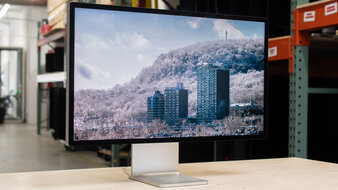
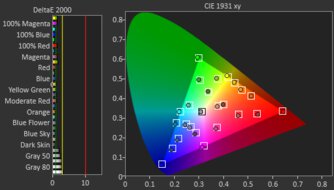
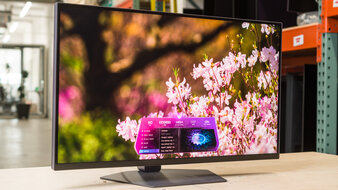
The Apple Studio Display XDR is amongst the best monitors for editing photos. It's a high-end model that's ideal for serious editors. It has a high 5k resolution, and combined with its high pixel density, it delivers detailed and sharp images. Its biggest advantage is its Mini LED backlighting that helps it display deep blacks next to bright highlights, which is ideal for editing content in a dark room. Even if you want to use it in a well-lit room, it gets bright enough to fight glare. Plus, you can choose to get it with a glossy coating for clear images or a matte coating for better reflection handling. It also displays a wide range of colors and makes them look vivid. It's even very accurate before calibration in its sRGB mode, which you can access with a macOS computer, like a MacBook.
Besides its high-end picture quality, it offers premium features. It has Thunderbolt 5 support that takes full advantage of the latest Thunderbolt laptops. With 140W of power delivery, you can connect your laptop to display an image from it and keep it charged while you're working. It also supports daisy chaining, allowing you to connect a second screen directly to this one. If you find it expensive, you can also check out the lower-end Apple Studio Display 2026 for cheaper. However, it has worse picture quality because it lacks Mini LED backlighting, so blacks look gray.
-
Best Upper Mid-Range Monitor For Photo Editing
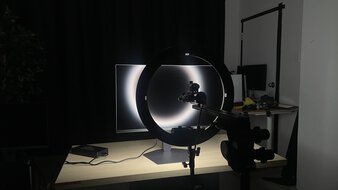
EditingColor AccuracySDR PictureHDR PictureBrightnessSize27"Panel TypeLCDSub-TypeIPSMax Refresh Rate330 HzNative Resolution5120 x 2880sRGB Coverage xy%Adobe RGB Coverage xy%DCI-P3 Coverage xy%See all our test resultsRec. 2020 Coverage xy%If you find the Apple Studio Display XDR too expensive for your needs, the LG 27GM950B-B is a solid alternative that costs less. It's similar in many ways to the Apple monitor because it's another 5k, 27-inch option with high pixel density and sharp images. It also has Mini LED backlighting that performs very well, as it helps the monitor display deep blacks. It even has less haloing around bright objects than the Apple monitor when editing photos, but a trade-off is that there's more haloing around desktop icons instead. A downside is that this monitor is less accurate out of the box, so you may need to calibrate it to fix white balance and gamma issues. Although it doesn't get as bright as the Apple, it still fights glare well in a bright working space.
Besides that, this monitor has different features than the Apple monitor. It doesn't have Thunderbolt support, which is a trade-off if you want something to take full advantage of a Thunderbolt laptop. Regardless, it supports DisplayPort Alt Mode over USB-C instead, and with 90W of power delivery, it makes it easy to connect a laptop and keep it charged as you're using it. It has extra USB-A ports as well, which are useful if you want to connect your devices directly to it.
-
Best Mid-Range Monitor For Photo Editing
EditingColor AccuracySDR PictureHDR PictureBrightnessSize27"Panel TypeLCDSub-TypeIPSMax Refresh Rate320 HzNative Resolution3840 x 2160sRGB Coverage xy%Adobe RGB Coverage xy%DCI-P3 Coverage xy%See all our test resultsRec. 2020 Coverage xy%Should you want a mid-range option that offers good value, check out the Acer Nitro XV275K P5biipruzx. The main trade-off of getting this monitor versus the LG 27GM950B-B is that it has a lower 4k resolution. So, while images aren't as sharp, they look crisp regardless. Like the LG, it also uses Mini LED backlighting and has full-array local dimming, but it doesn't perform as well. There's more haloing around bright objects against dark backgrounds, which is something to consider if you edit darker content. While its local dimming helps improve its black levels and makes highlights pop, you can only use it in HDR. This means blacks look gray in SDR, where it has worse picture quality than the LG.
If you edit photos in SDR, you should know that it comes with an accurate sRGB mode. Like the LG, though, you can still benefit from calibrating it if you want the best possible accuracy. It comes with a small USB hub to connect your devices, and it also supports DisplayPort Alt Mode and 90W of power delivery over USB-C. Plus, it has a KVM switch that makes it easy to change sources and use the same devices on both, which is ideal if you want to connect more than just your editing laptop to the monitor.
-
Best Lower Mid-Range Monitor For Photo Editing
EditingColor AccuracySDR PictureHDR PictureBrightnessSize27"Panel TypeLCDSub-TypeIPSMax Refresh Rate60 HzNative Resolution3840 x 2160sRGB Coverage xy%Adobe RGB Coverage xy%DCI-P3 Coverage xy%See all our test resultsRec. 2020 Coverage xy%If the Acer Nitro XV275K P5biipruzx is too expensive for your needs, look into the ASUS ProArt Display PA279CRV when you can find it for less. Despite being another 27-inch, 4k option, it's different from the Acer because it doesn't use Mini LED backlighting. It doesn't get as bright because of this, which is something to consider if you edit photos in well-lit rooms. It also has a worse local dimming feature that results in distracting haloing around bright objects, and blacks aren't as deep. This means the ASUS is worse for editing content in HDR.
That said, the main advantage of this monitor is if you want to edit content in SDR. It has an extremely accurate sRGB mode that doesn't need much calibration to improve it. Not only that, but it also offers other picture modes for various color spaces you may work with, including Adobe RGB, DCI-P3, and Rec. 2020. It even comes with a useful USB hub to which you can connect your devices. However, it lacks a KVM switch, which is disappointing if you want to have two computers connected to the monitor and you often need to switch between them.
-
Best Budget Monitor For Photo Editing
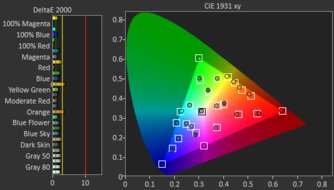
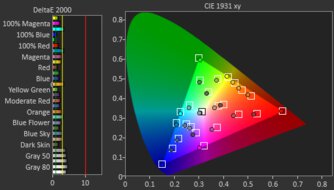
EditingColor AccuracySDR PictureHDR PictureBrightnessSize27"Panel TypeLCDSub-TypeIPSMax Refresh Rate180 HzNative Resolution2560 x 1440sRGB Coverage xy%Adobe RGB Coverage xy%DCI-P3 Coverage xy%See all our test resultsRec. 2020 Coverage xy%If you're on a budget and looking for the best photo editing monitor, there are a handful of decent monitors to choose from, including the ASUS ROG Strix XG27ACS. It's a rather basic entry-level monitor that's actually focused on gaming, but it's still good for content creation. This is mainly thanks to its fantastic out-of-the-box accuracy, and calibrating it brings minimal benefits. This is great if you don't want to pay more for a full calibration. Like the ASUS ProArt Display PA279CRV, it's also a decent choice if you want to use it in a room with a few lights around as it gets bright. However, its overall HDR picture quality is limited because blacks look gray, especially in dark rooms.
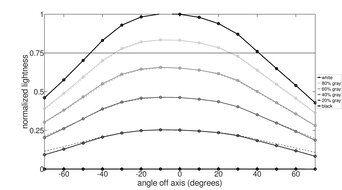
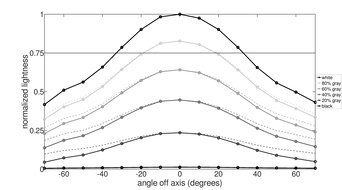
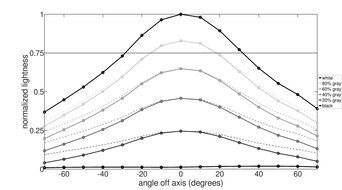
There are some trade-offs versus the PA279CRV, though. Notably, it has a lower 1440p resolution, so images aren't as detailed. It doesn't have as many picture modes for different color spaces like the PA279CRV as well. Plus, it has a smaller USB hub that only has one USB-C port. Even though you can connect your editing laptop to it via USB-C, it doesn't provide enough power to keep it charged while you're editing your photos. On the plus side, this monitor's wide viewing angle and ergonomic stand are ideal if you need to share your screen with someone next to you.





Notable Mentions
-
ASUS ROG Swift OLED PG27UCDM:
The ASUS ROG Swift OLED PG27UCDM is a premium 4k OLED that's in the same price range as the LG 27GM950B-B. The ASUS is the better choice for editing content in dark rooms as it displays perfect blacks without any haloing. However, it has a lower resolution and isn't as bright as the LG.
See our review -
BenQ MA270S:
The BenQ MA270S is a 5k content creation monitor that's a cheaper alternative to the LG 27GM950B-B. It has accurate colors and useful features, like Thunderbolt support, but it doesn't display the same deep blacks as the LG because it lacks local dimming.
See our review -
HyperX OMEN OLED 27q:
The HyperX OMEN OLED 27q is an entry-level OLED that's in the same price range as the Acer Nitro XV275K P5biipruzx. It's worth considering if you want the superior picture quality that OLEDs are known for, with their deeper blacks. It's also accurate before calibration, but it doesn't get as bright as the Acer.
See our review -
Dell S2725QC:
The Dell S2725QC is a lower mid-range 4k monitor that's similar to the ASUS ProArt Display PA279CRV, and sometimes costs less. However, it has a narrower color gamut, and it has fewer picture modes for various color spaces than the ASUS.
See our review -
AOC Q27G40XMN:
The AOC Q27G40XMN is a budget-friendly 1440p monitor with Mini LED backlighting. It delivers better picture quality than the ASUS ROG Strix XG27ACS, particularly in HDR. However, the downside is that it has a worse viewing angle and a less ergonomic stand, making it harder to share the screen.
See our review
Recent Updates
Jul 03, 2026:
We replaced the ASUS ROG Swift OLED PG27UCDM with the Apple Studio Display XDR, which has a higher resolution and extra features. We also replaced the Dell Alienware AW2725DF with the higher-resolution LG 27GM950B-B. We replaced the AOC Q27G40XMN with the ASUS ROG Strix XG27ACS, which has a more ergonomic stand and extra perks. In the Notable Mentions, we removed the ASUS ROG Strix OLED XG32UCWMG, the Dell S3225QC, and the MSI MPG 274URDFW E16M, and we added the PG27UCDM, the Q27G40XMN, and the BenQ MA270S to reflect the changes in the recommendation.
Jun 02, 2026:
In the Notable Mentions, we removed the ASUS ROG Strix XG27ACS, which is hard to find, and we added the HyperX OMEN OLED 27q.
Apr 24, 2026:
We added the Acer Nitro XV275K P5biipruzx as the 'Best Mid-Range Monitor for Photo Editing' for consistency with other recommendations. We also renamed the ASUS ProArt Display PA279CRV to the 'Best Lower Mid-Range Monitor for Photo Editing,' and moved the Dell S2725QC to the Notable Mentions. We added the MSI MPG 274URDFW E16M to the Notable Mentions as well.
Mar 16, 2026:
We added the Dell S2725QC as the 'Best Lower Mid-Range Monitor For Photo Editing' to give another option, and removed the MSI G274QPF-QD, as it's hard to find. In the Notable Mentions, we replaced the Apple Studio Display 2022 with the Dell S3225QC.
Jan 26, 2026:
We replaced the hard-to-find BenQ MOBIUZ EX321UX with the Dell Alienware AW2725DF. In the Notable Mentions, we replaced the Dell Alienware AW3225QF and the Dell P2425H with the ASUS ROG Strix OLED XG32UCWMG and the Acer Nitro XV275K P5biipruzx.
All Reviews
Our recommendations are based on what we think are the best monitors for editing photos currently available. They are adapted to be valid for most people in each price range. The rating is based on our review, factoring in price and feedback from our visitors.
If you would prefer to make your own decision, here is the list of all of our monitor reviews. Be careful not to get too caught up in the details. Most monitors are good enough to please most people, and the things we fault monitors on are often not noticeable unless you really look for them.