AOC AGON PRO AG276QZD2  Monitor Review

Reviewed Mar 31, 2025 at 09:43am
Test bench update Nov 10, 2025 at 09:01am
Tested using Methodology v2.1.1 
AOC AGON PRO AG276QZD2
8.9
PC Gaming 
7.5
Console Gaming 
7.1
Office 
8.7
Editing 
6.8
Brightness 
9.9
Response Time 
8.3
HDR Picture 
10
SDR Picture 
 82

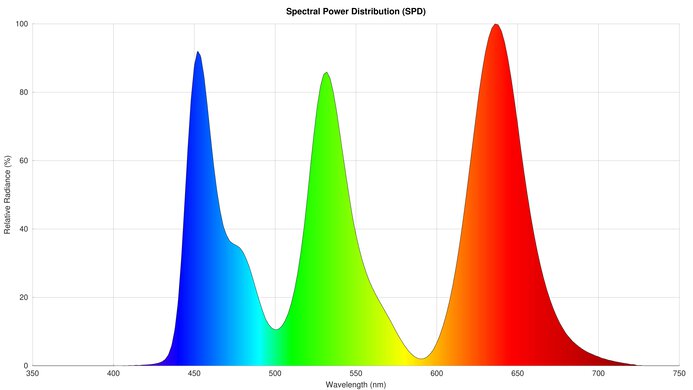
The AOC AGON PRO AG276QZD2 is a mid-range gaming monitor with a 27-inch 1440p QD-OLED display. It has a lower 240Hz refresh rate than most other QD-OLEDs at this size, such as the MSI MPG 271QRX QD-OLED and the Gigabyte AORUS FO27Q3, though it has the same refresh rate as a limited number of monitors like it, such as the Gigabyte AORUS FO27Q2. It's one of a limited number of OLEDs in AOC's lineup, including the 27-inch WOLED AGON PRO AG276QZD and the 32-inch QD-OLED AGON PRO AG326UD. The AG276QZD2 has a number of extra features for gamers, including RGB lighting at the back, integrated speakers, and AOC's G-MENU, which lets you control monitor settings with your mouse.

Note: We originally tested this monitor on firmware V109 and experienced frame-skipping issues. While there wasn't a firmware update for the monitor, we updated the software of the G-MENU program to V3.28.0. The monitor stopped frame skipping after doing this update.

How We Test Monitors

We buy and test more than 30 monitors each year, with units that we buy completely on our own, without any cherry-picked units or samples. We put a lot into each unbiased, straight-to-the-point review, and there's a whole process from purchasing to publishing, involving multiple teams and people. We do more than just use the monitor for a week; we use specialized and custom tools to measure various aspects with objective data-based results. We also consider multiple factors before making any recommendations, including the monitor's cost, its performance against the competition, and whether or not it's easy to find.

Our Verdict

8.9
PC Gaming 

The AOC AGON PRO AG276QZD2 is excellent for PC gaming. Motion looks sharp thanks to its near-instant response time, and this monitor has low input lag at its max refresh rate. However, the input lag is a lot higher with 60Hz and 120Hz signals. It also has noticeable VRR flicker with changing frame rates. Additionally, it displays a narrow range of colors for a QD-OLED, and HDR scenes don't look vivid or rich. It displays deep blacks in a dark room, and small highlights are bright enough to pop.

Pros
  • Uniform deep and inky blacks.

  • 240Hz refresh rate and VRR support.

  • Low input lag at max refresh rate.

  • Sharp motion with fast-moving objects.

Cons
  • Distracting VRR flicker.

  • Ambient light causes black levels to rise.

  • Has frame skipping issue before updating G-MENU program to latest software.

  • Very limited HDR color gamut and volume.

  • Input lag is higher at 60Hz and 120Hz.

7.5
Console Gaming 

The AOC AGON PRO AG276QZD2 27 OLED is good for console gaming. While motion looks sharp, it's not the most responsive monitor as it has high input lag with 60Hz and 120Hz signals. Additionally, it has a narrow color gamut in HDR and doesn't look as vivid or rich as other QD-OLEDs. It also can't downscale a 4k @ 120Hz signal, so you can't use HDR at 120Hz with the Xbox Series X|S. Finally, it doesn't support VRR with the PS5 and PS5 Pro. However, small highlights do pop, and it displays deep blacks in a dark room.

Pros
  • Uniform deep and inky blacks.

  • Low input lag at max refresh rate.

  • Sharp motion with fast-moving objects.

Cons
  • Ambient light causes black levels to rise.

  • Has frame skipping issue before updating G-MENU program to latest software.

  • Very limited HDR color gamut and volume.

  • Can't take full advantage of gaming consoles.

  • Input lag is higher at 60Hz and 120Hz.

7.1
Office 

The AOC AGON AG276QZD2 is decent for office work in certain circumstances. It's bright enough for someone to easily see it in a well-lit room, though it can't overcome bright glare. It also has a USB hub to attach peripherals. However, the monitor's triangular subpixel layout causes text to be slightly less clear than most 27-inch IPS or VA monitors. Additionally, there's a risk of permanent burn-in if you display static elements like taskbars in the same place on your screen.

Pros
  • Wide viewing angles.

  • USB hub.

  • Superb ergonomics.

  • Easily seen in a well-lit room.

Cons
  • Worse text clarity than IPS and VA 27-inch, 1440p monitors.

  • Doesn't overcome bright glare.

8.7
Editing 

The AOC AG276QZD2 is excellent for some types of editing. In SDR it's very accurate, even before calibration, and it has superb accuracy after calibration. It also displays deep blacks in a dark room, though they appear purple in rooms with a lot of ambient light. However, when using HDR, its color gamut is very limited for a QD-OLED, so it's not ideal if you're editing HDR content. There's also a risk of burn-in if the same static elements are always in the same place on your screen.

Pros
  • Wide viewing angles.

  • Impressive accuracy before calibration.

  • USB hub.

  • Superb ergonomics.

Cons
  • Worse text clarity than IPS and VA 27-inch, 1440p monitors.

  • Ambient light causes black levels to rise.

  • Very limited HDR color gamut and volume.

6.8
Brightness 

Though the AOC AGON PRO AG276QZD2 27 OLED can't overcome glare from a bright light source, it's bright enough for you to easily see it in a typical room. Like most OLEDs, small highlights pop but larger ones are more muted.

Pros
  • Easily seen in a well-lit room.

Cons
  • Doesn't overcome bright glare.

9.9
Response Time 

The AOC AG276QZD2 has a fantastic response time for sharp motion. However, you need to make sure you have the downloadable AOC G-MENU program updated to its latest software, as we initially experienced frame skipping before updating the program.

Pros
  • Sharp motion with fast-moving objects.

Cons
  • Has frame skipping issue before updating G-MENU program to latest software.

8.3
HDR Picture 

The AOC AGON PRO AG276QZD2 is great for HDR, with a few caveats. It displays deep blacks in a dark room, though they appear purple in a well-lit room. However, it displays a limited range of colors in HDR, and they don't look vivid.

Pros
  • Uniform deep and inky blacks.

Cons
  • Very limited HDR color gamut and volume.

10
SDR Picture 

The AOC AGON PRO AG276QZD2 27 OLED has superb SDR picture quality. It displays SDR colors very accurately and shows deep blacks in a dark room.

Pros
  • Uniform deep and inky blacks.

Cons
None
8.8
Color Accuracy 

The AOC AGON PRO AG276QZD2's color accuracy is excellent. It has impressive accuracy before calibration, and it displays a very uniform image across the screen.

Pros
  • Impressive accuracy before calibration.

  • Fantastic accuracy after calibration.

Cons
None
  • 8.9
    PC Gaming
  • 7.5
    Console Gaming
  • 7.1
    Office
  • 8.7
    Editing

  • Performance Usages

  • 6.8
    Brightness
  • 9.9
    Response Time
  • 8.3
    HDR Picture
  • 10
    SDR Picture
  • 8.8
    Color Accuracy
  • Changelog

    1.  Updated Nov 10, 2025: We've converted this review to Test Bench 2.1.1. We removed the Vertical Viewing Angle test.
    2.  Updated Jul 23, 2025: 

      We retested the Adobe RGB color gamut coverage because our original results were inaccurate.

    3.  Updated Jul 14, 2025: 

      We updated text throughout to match the new and updated tests with Test Bench 2.1, including in the Verdict section.

    4.  Updated Jul 10, 2025: We've converted this review to Test Bench 2.1. This includes new tests for Direct Reflections, Ambient Black Level Raise, and Total Reflected Light. You can see all the changes in the changelog.

    Check Price

    27"AGON PRO AG276QZD2
    SEE PRICE
    Amazon.com
    27"AGON PRO AG276QZD2
    SEE PRICE
    Walmart.com
    27"AGON PRO AG276QZD2
    B&H
    27"AGON PRO AG276QZD2
    BestBuy.com

    Differences Between Sizes And Variants

    We tested the 27-inch AOC AGON PRO AG276QZD2, which is the only size available. AOC has other QD-OLED displays, such as the 32-inch AG326UD and the very large 49-inch PD49. However, these are quite different monitors and aren't variants of the AG276QZD2. The AG276QZD also isn't a variant, despite the similar name, as it has a WOLED panel rather than a QD-OLED panel. These results are only valid for this monitor.
    Name Size Pixel Type Max Refresh Rate Native Resolution
    AG276QZD2 27" QD-OLED 240Hz 1440p
    AG276QZD 27" WOLED 240Hz 1440p

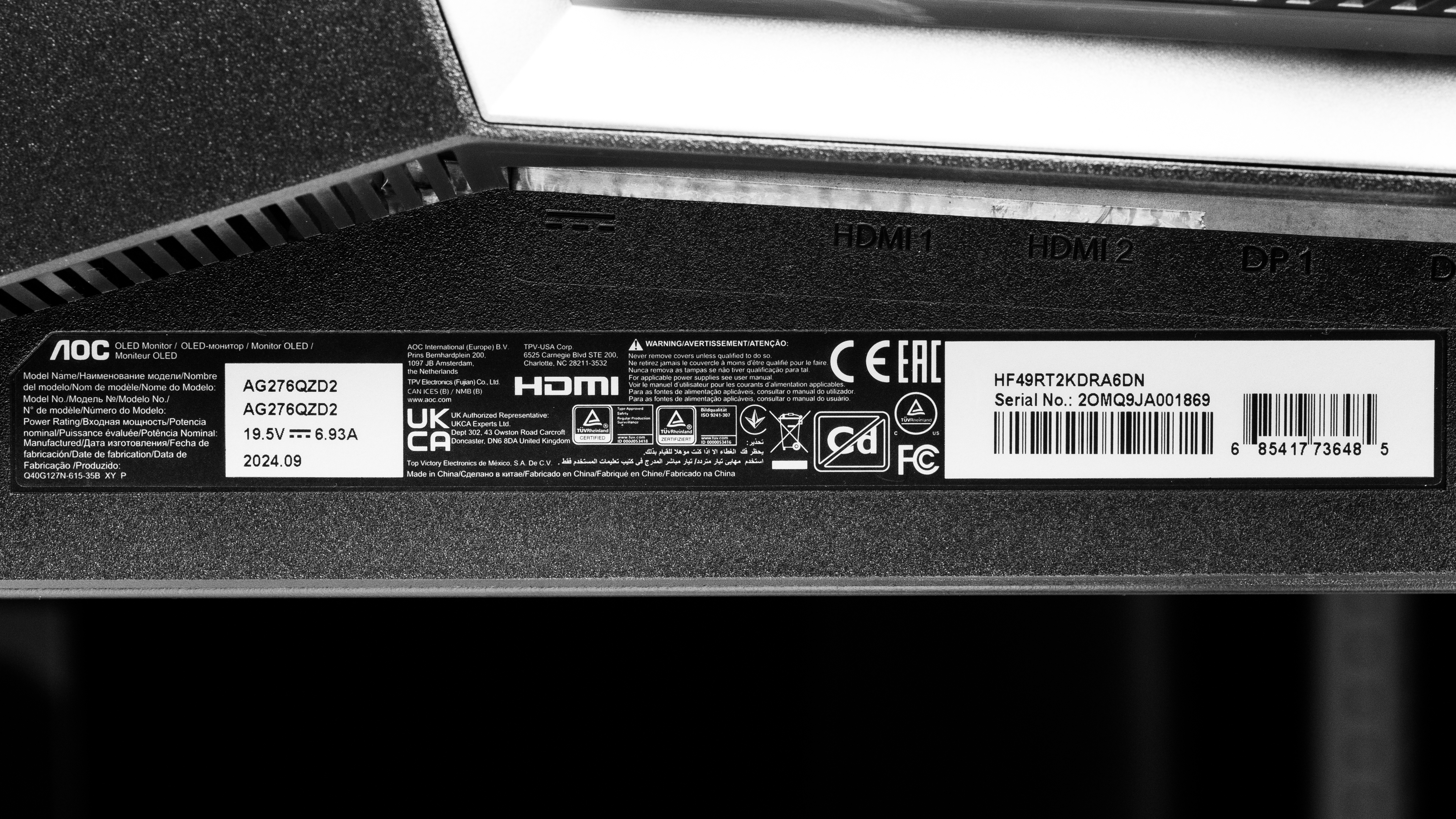
    Our unit's label indicates it was manufactured in September 2024. We tested it with firmware V109, with the AOC G-MENU on software V3.28.0.

    Popular Monitor Comparisons

    The AOC AGON PRO AG276QZD2 is a 27-inch 240Hz QD-OLED gaming monitor. It's in a lower price category than many 27-inch QD-OLEDs, in part because of its 240Hz refresh rate, which is lower than the 360Hz refresh rate that's standard for the category. However, despite its lower price, it's not good for most gamers. It displays a limited range of colors in HDR, and they're not very vivid. It also comes with a few bugs, like frame skipping, which are fixed with G-MENU software updates. These factors make other comparably priced OLED models, like the older Acer Predator X27U bmiipruzx, a much better choice. If you can afford to spend a bit more, it's worthwhile choosing a class-leading 27-inch OLED like the MSI MPG 271QRX QD-OLED or the Gigabyte AORUS FO27Q3, which are more responsive, display far more vivid colors, and have a number of extras like HDMI 2.1 bandwidth and a KVM switch.

    See our recommendations for the best 1440p monitors, the best 27-inch gaming monitors, and the best OLED monitors.

    ASUS ROG Strix OLED XG27AQDMG

    The ASUS ROG Strix OLED XG27AQDMG and the AOC AGON PRO AG276QZD2 are 27-inch OLED gaming monitors. The ASUS has fewer bugs, and it also displays a wider range of colors, and does so more vividly.

    AOC Q27G3XMN

    The AOC Q27G3XMN and the AOC AGON PRO AG276QZD2 are both 27-inch gaming monitors. The Q27G3XMN is the better choice, as it displays a wider range of colors more vividly in HDR, making it more immersive. However, the AG276QZD2 has better motion handling thanks to its faster response time.


    Samsung Odyssey OLED G60SD S27DG602S

    The Samsung Odyssey OLED G60SD S27DG602S and the AOC AGON PRO AG276QZD2 are both 27-inch QD-OLED gaming monitors. The Samsung is the better monitor, as it feels more responsive with its higher refresh rate, and colors are far more vivid on its display.

    ASUS ROG Strix OLED XG27ACDNG

    The ASUS ROG Strix OLED XG27ACDNG and the AOC AGON PRO AG276QZD2 are 27-inch QD-OLED gaming monitors. The ASUS is the better option, as its colors are more vivid and rich. Another advantage of the ASUS is that it has a higher refresh rate, resulting in a smoother feel.

    Show more 

    Video

    Test Results

    perceptual testing image
    Sort:
    RATINGS
    Category:
    All
    Design
    Style
    Curved
    No
    Curve Radius
    Not Curved

    The AOC AGON PRO AG276QZD2 has a unique gamer aesthetic, with five-sided shapes present throughout the monitor's design. It has a unique design approach, even compared to other gaming monitors.

    7.5
    Build Quality

    The build quality is good. The exterior plastic casing is solid, and the stand is steel and is well built.

    9.0
    Ergonomics
    Min Height To Top Of Panel
    15.5" (39.4 cm)
    Height Adjustment
    5.0" (12.7 cm)
    Tilt Range
    -20° to 2.5°
    Rotate Portrait/Landscape
    Yes, Both Ways
    Swivel Range
    -30° to 30°
    Wall Mount
    VESA 100x100

    The ergonomics are superb. It has all common adjustments, so it's easy to set it to your preferred position or share your screen with someone else. In addition to a loop for cable management, it also has a retractable headphone hook.

    Stand
    Base Width
    10.4" (26.5 cm)
    Base Depth
    8.9" (22.7 cm)
    Thickness (With Display)
    6.8" (17.2 cm)
    Weight (With Display)
    14.9 lbs (6.8 kg)

    The five-sided stand holds the monitor well, and if someone bumps the display, there's minimal wobble. In fact, the display is held so firmly that if someone adjusts the monitor's tilt or swivel, it can cause the entire display, including the stand, to move around the table.

    Display
    Size
    27"
    Housing Width
    24.1" (61.2 cm)
    Housing Height
    14.2" (36.0 cm)
    Thickness (Without Stand)
    2.8" (7.2 cm)
    Weight (Without Stand)
    12.3 lbs (5.6 kg)
    Borders Size (Bezels)
    0.3" (0.8 cm)
    Controls

    The AOC AG276QZD2 has a joystick that controls the on-screen display and turns the monitor on and off.

    In The Box
    Power Supply
    External Brick

    • DisplayPort cable
    • HDMI cable
    • Power cable
    • USB-B cable
    • VESA 100x100 adapter
    • Philips head mini screwdriver
    • 4 Philips head screws
    • Documentation
    Picture Quality
    10
    Contrast
    Native Contrast
    Inf : 1
    Contrast With Local Dimming
    Inf : 1

    The AOC AGON PRO AG276QZD2 has a near-infinite contrast ratio and displays perfect blacks next to bright highlights in a dark room. However, in brighter environments, black levels rise, and deep blacks appear purple.

    10
    Local Dimming
    Local Dimming
    No
    Backlight
    No Backlight

    The AOC AGON PRO AG276QZD2 doesn't have a backlight, so it doesn't require a local dimming feature. However, with a near-infinite contrast ratio, there isn't any blooming around bright objects, which is the equivalent of a perfect local dimming feature. We still film these videos on the monitor so you can see how the screen performs and compare it with a monitor that has local dimming.

    6.9
    SDR Brightness
    Real Scene
    251 cd/m²
    Peak 2% Window
    252 cd/m²
    Peak 10% Window
    252 cd/m²
    Peak 25% Window
    253 cd/m²
    Peak 50% Window
    253 cd/m²
    Peak 100% Window
    254 cd/m²
    Sustained 2% Window
    250 cd/m²
    Sustained 10% Window
    251 cd/m²
    Sustained 25% Window
    252 cd/m²
    Sustained 50% Window
    252 cd/m²
    Sustained 100% Window
    250 cd/m²
    Automatic Brightness Limiting (ABL)
    0.001
    Minimum Brightness
    14 cd/m²

    Settings

    • Eco Mode: Standard (after calibration)
    • Game Mode: Off
    • Color Temperature: User
    • Brightness: Max

    The SDR brightness is adequate. Though it can't overcome glare if very bright light is shining on the screen, it's easily visible in a well-lit room. This monitor has consistent brightness across different content, which is helpful for tasks such as photo editing.

    6.8
    HDR Brightness
    VESA DisplayHDR Certification
    DisplayHDR TRUE BLACK 400
    Real Scene
    427 cd/m²
    Peak 2% Window
    983 cd/m²
    Peak 10% Window
    454 cd/m²
    Peak 25% Window
    359 cd/m²
    Peak 50% Window
    302 cd/m²
    Peak 100% Window
    253 cd/m²
    Sustained 2% Window
    974 cd/m²
    Sustained 10% Window
    449 cd/m²
    Sustained 25% Window
    357 cd/m²
    Sustained 50% Window
    300 cd/m²
    Sustained 100% Window
    251 cd/m²
    Automatic Brightness Limiting (ABL)
    0.078

    Settings

    • HDR Mode: HDR Peak

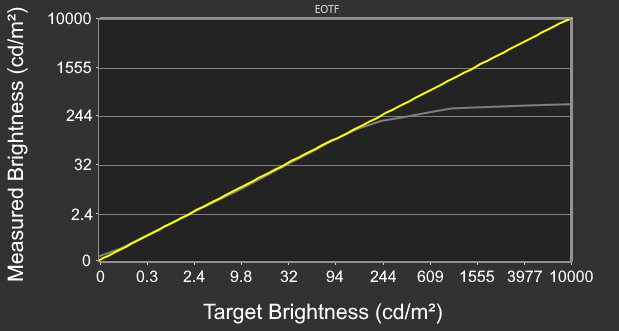
    The HDR brightness is okay. Only smaller highlights pop against the rest of the image, as larger ones are more muted. Additionally, it has a slow roll-off as it approaches peak brightness, so highlights don't get as bright as possible.

    The 'DisplayHDR' HDR Mode significantly clamps wider color gamuts such as DCI-P3 and Rec. 2020. Though 'DisplayHDR' has slightly better EOTF tracking, it also has a lower Real Scene brightness of 373 cd/m². As a result, we used 'HDR Peak' whenever we tested HDR in this review.

    8.9
    Gray Uniformity
    50% Std. Dev.
    1.029%
    50% DSE
    0.117%

    The gray uniformity is amazing. There's very little dirty screen effect or variation in brightness across the display. Like any OLED, there are thin gray vertical lines in dark scenes. However, most people won't notice them unless they're looking for them.

    10
    Black Uniformity
    Native Std. Dev.
    0.323%
    Std. Dev. w/ L.D.
    N/A

    The AOC AG276QZD2 has outstanding black uniformity, with a uniform black level across the screen.

    8.4
    Color Accuracy (Pre-Calibration)
    Picture Mode
    Off (sRGB)
    sRGB Gamut Area xy
    103.6%
    White Balance dE (Avg.)
    3.57
    Color Temperature (Avg.)
    6,305 K
    Gamma (Avg.)
    2.25
    Color dE (Avg.)
    2.05
    Contrast Setting
    N/A
    RGB Settings
    Default
    Gamma Setting
    Default
    Brightness Setting
    90
    Measured Brightness
    213 cd/m²
    Brightness Locked
    No

    The accuracy before calibration in the 'sRGB' Color Gamut mode is impressive. Its color accuracy is great, and its color temperature is close to the 6500K target. However, its white balance is only satisfactory. Additionally, it displays dark parts of scenes too darkly and bright parts of scenes too brightly.

    Locked-out Settings

    Using the sRGB mode locks out the following settings:

    • Contrast
    • Eco Mode
    • Gamma
    • HDR Mode
    • Game Mode
    • Shadow Control
    • Game Color
    • LowBlue Mode
    • Color Temp
    • Low Input Lag
    • Dark Boost
    • Red/Green/Blue

    If you want to access these settings, you need to change the Color Space to 'Panel Native', though this has worse accuracy and oversaturated colors.

    9.7
    Color Accuracy (Post-Calibration)
    Picture Mode
    Off
    sRGB Gamut Area xy
    101.5%
    White Balance dE (Avg.)
    0.57
    Color Temperature (Avg.)
    6,484 K
    Gamma (Avg.)
    2.18
    Color dE (Avg.)
    0.35
    Contrast Setting
    50
    RGB Settings
    48-49-50
    Gamma Setting
    Gamma 1
    Brightness Setting
    38
    Measured Brightness
    101 cd/m²
    ICC Profile
    Download

    Settings

    • Eco Mode: Standard
    • Color Gamut: Panel Native

    The accuracy after calibration is superb, and you won't notice any inaccuracies.

    9.8
    SDR Color Gamut
    sRGB Coverage xy
    100.0%
    sRGB Picture Mode
    Off
    Adobe RGB Coverage xy
    95.3%
    Adobe RGB Picture Mode
    Off

    The SDR color gamut is superb. It displays the full range of colors in sRGB and a wide range of colors in the Adobe RGB color space. However, some colors are oversaturated in Adobe RGB.

    6.0
    HDR Color Gamut
    Wide Color Gamut
    No
    DCI-P3 Coverage xy
    75.5%
    DCI-P3 Picture Mode
    HDR Peak
    Rec. 2020 Coverage xy
    55.2%
    Rec. 2020 Picture Mode
    HDR Peak

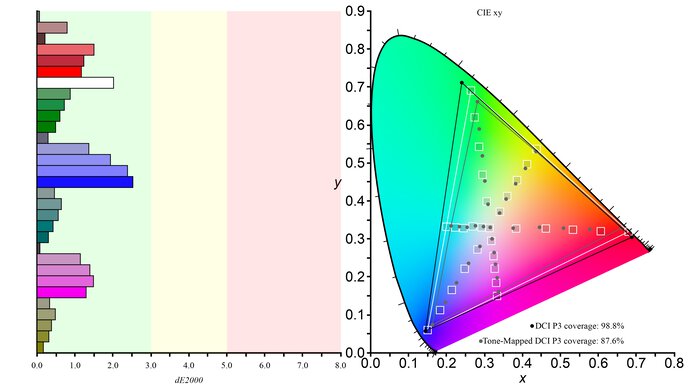
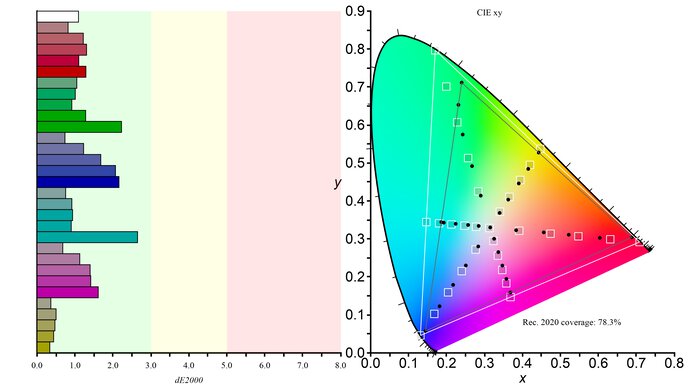
    The HDR color gamut is passable but far lower than expected for a QD-OLED display. It has somewhat limited coverage of the commonly used DCI-P3 color space and quite limited coverage of Rec. 2020 compared to other OLEDs.

    The 'HDR Peak' HDR Mode has the widest HDR gamut. Other HDR Mode settings cause the gamut to be even narrower, and all Picture Settings are locked when using HDR except for Adaptive Sync and Frame Counter.

    7.6
    HDR Color Volume
    1,000 cd/m² DCI-P3 Coverage ICtCp
    48.6%
    DCI-P3 Picture Mode
    HDR Peak
    10,000 cd/m² Rec. 2020 Coverage ICtCp
    32.0%
    Rec. 2020 Picture Mode
    HDR Peak

    The HDR color volume is good, but is significantly lower than expected for a QD-OLED display. Brighter colors aren't very saturated, though darker colors look good in a dark room. Additionally, in brighter rooms darker colors begin to desaturate.

    10
    Viewing Angle
    Color Washout From Left
    70°
    Color Washout From Right
    70°
    Color Shift From Left
    70°
    Color Shift From Right
    70°
    Brightness Loss From Left
    70°
    Brightness Loss From Right
    70°
    Black Level Raise From Left
    70°
    Black Level Raise From Right
    70°
    Gamma Shift From Left
    70°
    Gamma Shift From Right
    70°

    The horizontal viewing angle is incredible. Although it technically isn't perfect, you visually won't see any inconsistencies when viewing from the sides or if you sit close to the screen.

    7.0
    Text Clarity
    Pixel Type
    QD-OLED
    Subpixel Layout
    Triangular RGB

    The text clarity is decent. However, because of its triangular subpixel layout, it's not as good as 27-inch 1440p IPS or VA monitors. These photos are in Windows 10, and you can also see them in Windows 11 with ClearType on or off.

    Due to the triangular subpixel layout, there's some color fringing around letters and at the edge of windows. Some people find it hard to see unless they look closely at the monitor, though others notice this more.

    7.0
    Direct Reflections
    See details on graph tool
    Peak Direct Reflection Intensity
    25.3%
    Screen Finish
    Glossy

    The direct handling is decent. Light bounces off like a mirror due to the screen coating, but it doesn't have strong glare. Because the panel isn't perfectly even throughout, some objects look warped, depending on their positioning in front of the screen.

    4.2
    Ambient Black Level Raise
    See details on graph tool
    Black Luminance @ 0 lx
    0.00 cd/m²
    Black Luminance @ 1000 lx
    3.43 cd/m²

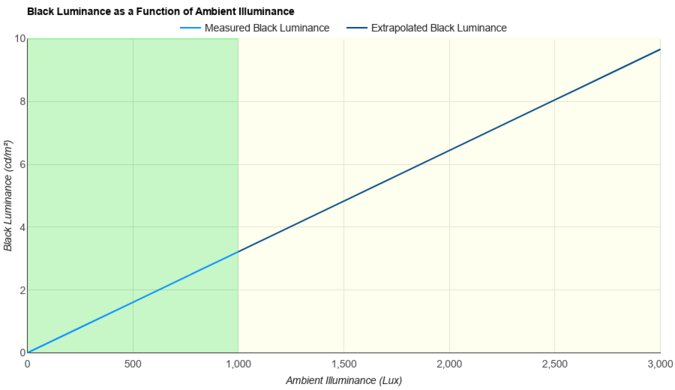
    The black levels quickly rise in bright rooms, which is typical of QD-OLEDs. They lack a polarizer, causing blacks to look purple, and you need to use it in a dark room to get perfect black levels.

    9.1
    Total Reflected Light
    Total Reflected Light Intensity
    4,641% ⋅ pixel
    Diffraction Artifacts
    No

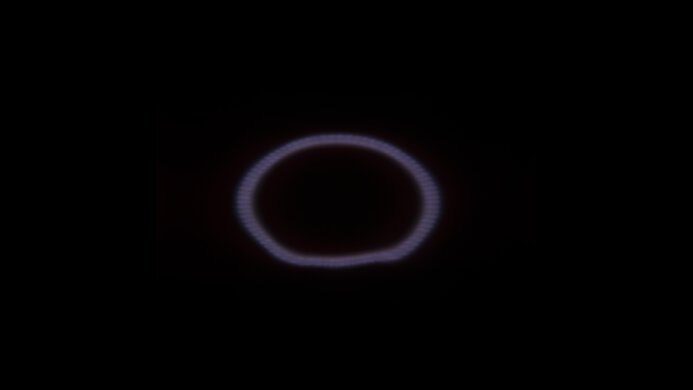
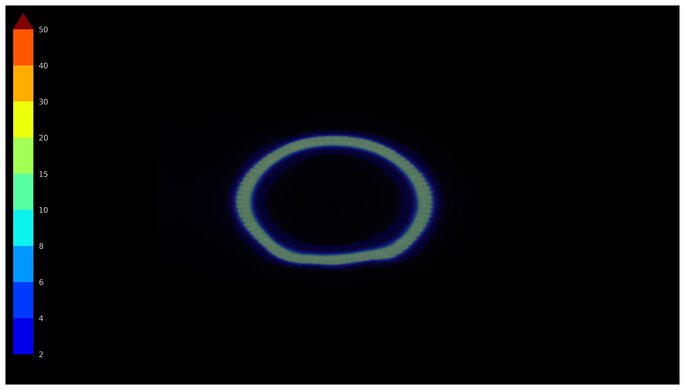
    The monitor has minimal reflected light, even in a bright room. Our unit has some markings on the screen, which you can see in the photo, but they're very hard to notice unless we have it in a really bright room.

    9.8
    Gradient
    Color Depth
    10 Bit

    The gradient handling is fantastic, and you won't notice any banding.

    Motion
    8.0
    Refresh Rate
    Native Refresh Rate
    240 Hz
    Max Refresh Rate
    240 Hz
    Max Refresh Rate Over DP
    240 Hz
    Max Refresh Rate Over HDMI
    144 Hz
    Max Refresh Rate Over DP @ 10-bit
    240 Hz
    Max Refresh Rate Over HDMI @ 10-Bit
    60 Hz
    DSC Toggle
    No
    DSC Off Max Refresh Rate Over DP
    N/A
    DSC Off Max Refresh Rate Over HDMI
    N/A

    While you can reach the monitor's max refresh rate over DisplayPort without using DSC, you have to use 8-bit color to do so. Because this monitor only has HDMI 2.0 bandwidth, the maximum refresh rate with HDMI is significantly slower.

    Variable Refresh Rate (VRR)
    Variable Refresh Rate
    Yes
    FreeSync
    Yes
    G-SYNC
    Compatible (NVIDIA Certified)
    VRR Maximum
    240 Hz
    VRR Minimum
    < 20 Hz
    VRR Supported Connectors
    DisplayPort, HDMI

    NVIDIA - G-SYNC Compatibility
    Connection VRR Min VRR Max
    DisplayPort <20Hz 240Hz
    HDMI N/A N/A
    AMD - FreeSync
    Connection VRR Min VRR Max
    DisplayPort <20Hz 240Hz
    HDMI <20Hz 144Hz

    The AOC AG276QZD2 has FreeSync and G-SYNC compatibility but doesn't support HDMI Forum VRR.

    9.9
    VRR Motion Performance
    See details on graph tool
    Recommended VRR OD Setting
    No OD Mode
    Variable Overdrive Advertised
    No
    Avg. CAD
    9
    Best CAD
    9
    Worst CAD
    10

    Frame Rate CAD Heatmap RT Chart Pursuit Photo
    239 Heatmap Chart Photo
    165 Heatmap Chart Photo
    144 Heatmap Chart Photo
    120 Heatmap Chart Photo
    100 Heatmap Chart Photo
    80 Heatmap Chart Photo
    60 Heatmap Chart Photo

    This monitor has fantastic motion handling across its VRR range. There's minimal blur, and any blur you see at low refresh rates is persistence blur.

    Originally, we tested this monitor with firmware V109, and experienced frame skipping. We tried different things to fix this, including using different PCs and updating the monitor's firmware, but no update was available, and nothing stopped the frame skipping. This negatively impacted the appearance of motion, as fast-moving content didn't appear as smooth as it should. However, after we updated the AOC G-MENU program to software V3.28.0, the frame skipping issue stopped, even though it wasn't a firmware update for the monitor. The results in the Motion section have been updated to reflect this.

    You can see examples of this frame skipping from videos we took at 60Hz, 120Hz, and 240Hz on Blur Buster's Frame Skipping Checker. If you experience the same thing, try updating the G-MENU software.

    9.8
    Refresh Rate Compliance
    See details on graph tool
    See details on graph tool
    Compliance @ Max Hz
    94%
    Compliance @ 120 FPS
    96%
    Compliance @ 60 FPS
    98%

    The refresh rate compliance is remarkable. It makes full-color transitions before the monitor draws the next frame at any refresh rate. However, it only has this near-perfect compliance after we updated the G-MENU software to stop the frame-skipping issue that we initially experienced during testing.

    9.9
    CAD @ Max Refresh Rate
    OD Transition Max Refresh Rate
    od-transition-max-refresh-rate-noodmode-0-31
    OD noodmode
    0 to 31
    Recommended Overdrive Setting
    No OD Mode
    Avg. CAD
    10
    Best 10% CAD
    4
    Worst 10% CAD
    25

    Overdrive Mode CAD Heatmap RT Chart Pursuit Photo
    No Overdrive Heatmap Chart Photo

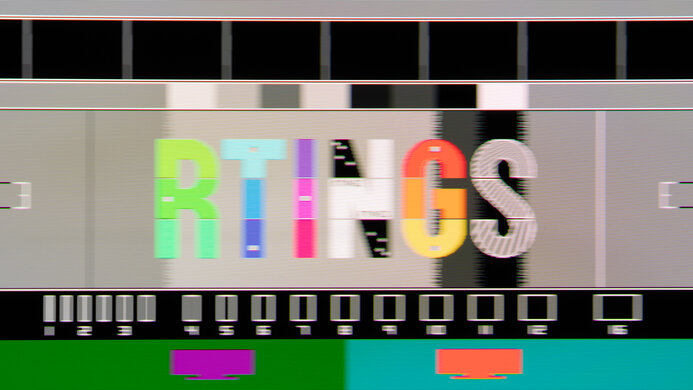
    The CAD at the max refresh rate is remarkable. Motion looks sharp, without any inverse ghosting or blur.

    Response Time @ Max Refresh Rate
    Recommended Overdrive Setting
    No OD Mode
    First Response Time
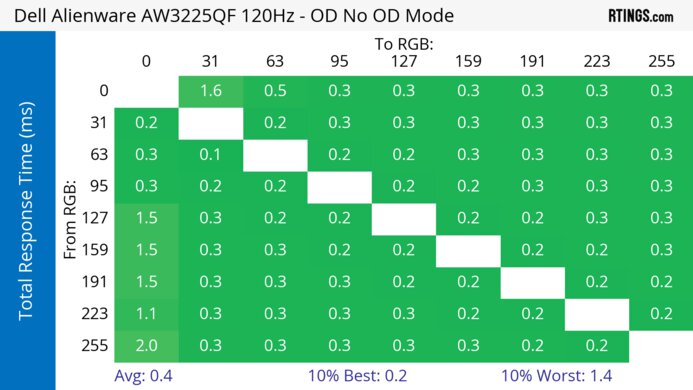
    0.3 ms
    Total Response Time
    0.8 ms
    RGB Overshoot
    3 RGB
    Worst 10% First Response Time
    1.0 ms
    Worst 10% Total Response Time
    5.4 ms
    Worst 10% RGB Overshoot
    27 RGB

    Overdrive Mode First Response Heatmap Total Response Heatmap RGB Overshoot Heatmap
    No Overdrive Heatmap Heatmap Heatmap

    9.9
    CAD @ 120Hz
    OD Transition 120Hz
    od-transition-120-noodmode-0-31
    OD noodmode
    0 to 31
    Recommended Overdrive Setting
    No OD Mode
    Avg. CAD
    11
    Best 10% CAD
    4
    Worst 10% CAD
    18

    Overdrive Mode CAD Heatmap RT Chart Pursuit Photo
    No Overdrive Heatmap Chart Photo

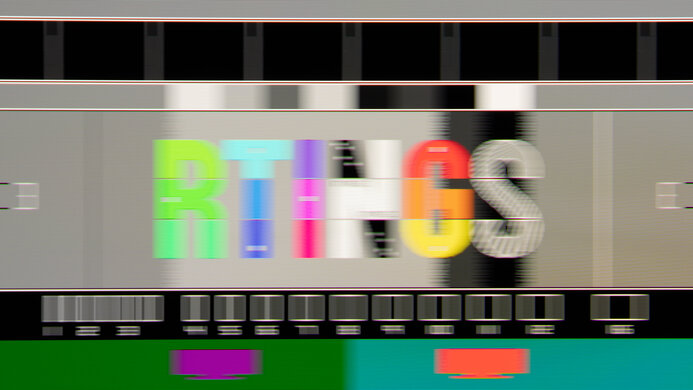
    The CAD at 120Hz is fantastic. Motion looks crisp, and any blur you see is persistence.

    Response Time @ 120Hz
    Recommended Overdrive Setting
    No OD Mode
    First Response Time
    0.4 ms
    Total Response Time
    0.4 ms
    RGB Overshoot
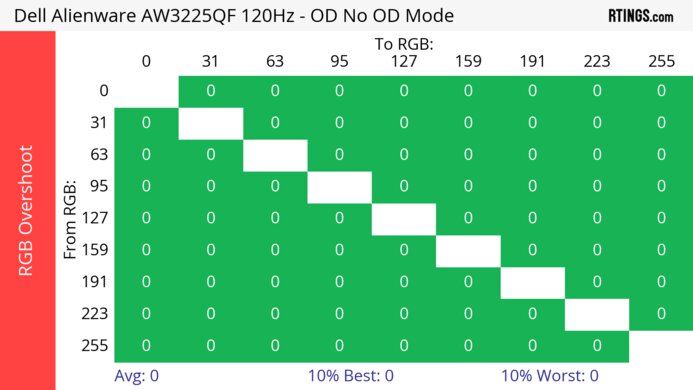
    0 RGB
    Worst 10% First Response Time
    1.8 ms
    Worst 10% Total Response Time
    1.8 ms
    Worst 10% RGB Overshoot
    0 RGB

    Overdrive Mode First Response Heatmap Total Response Heatmap RGB Overshoot Heatmap
    No Overdrive Heatmap Heatmap Heatmap

    9.9
    CAD @ 60Hz
    OD Transition 60Hz
    od-transition-60-noodmode-0-31
    OD noodmode
    0 to 31
    Recommended Overdrive Setting
    No OD Mode
    Avg. CAD
    9
    Best 10% CAD
    4
    Worst 10% CAD
    15

    Overdrive Mode CAD Heatmap RT Chart Pursuit Photo
    No Overdrive Heatmap Chart Photo

    The CAD at 60Hz is incredible. Any blur you see is persistence blur.

    Response Time @ 60Hz
    Recommended Overdrive Setting
    No OD Mode
    First Response Time
    0.3 ms
    Total Response Time
    0.3 ms
    RGB Overshoot
    0 RGB
    Worst 10% First Response Time
    1.2 ms
    Worst 10% Total Response Time
    1.2 ms
    Worst 10% RGB Overshoot
    0 RGB

    Overdrive Mode First Response Heatmap Total Response Heatmap RGB Overshoot Heatmap
    No Overdrive Heatmap Heatmap Heatmap

    Backlight Strobing (BFI)
    Backlight Strobing (BFI)
    No BFI
    Maximum Frequency
    N/A
    Minimum Frequency
    N/A
    Longest Pulse Width Brightness
    N/A
    Shortest Pulse Width Brightness
    N/A
    Pulse Width Control
    No BFI
    Pulse Phase Control
    No BFI
    Pulse Amplitude Control
    No BFI
    VRR At The Same Time
    No BFI

    The AOC AG276QZD2 doesn't have a black frame insertion feature to reduce persistence blur.

    5.6
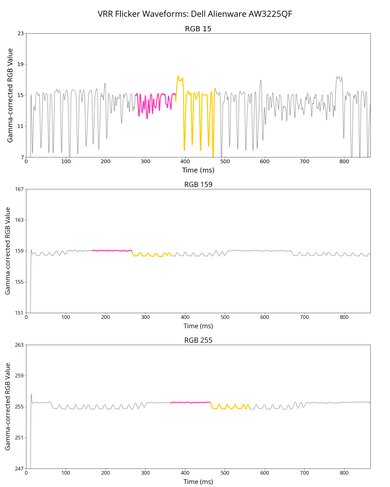
    VRR Flicker
    Dark Gray Flicker
    5.9 RGB
    Middle Gray Flicker
    0.5 RGB
    Light Gray Flicker
    0.6 RGB

    The AOC AGON PRO AG276QZD2 has noticeable VRR flicker with changing frame rates, particularly in darker parts of scenes, as you can see in the VRR flicker video.
    10
    Image Flicker
    Flicker-Free
    No
    PWM Dimming Frequency
    0 Hz

    The backlight isn't technically flicker-free because it has a slight dip in brightness that corresponds to the monitor's refresh rate.

    Inputs
    8.8
    Input Lag
    Native Resolution @ Max Hz
    2.5 ms
    Native Resolution @ 120Hz
    15.3 ms
    Native Resolution @ 60Hz
    23.0 ms
    Backlight Strobing (BFI)
    N/A

    The input lag at the monitor's max refresh rate is excellent. However, it's a lot higher at 60Hz and 120Hz.

    However, if you enable VRR at 60Hz or 120Hz, the input lag is lower, as you can see below:

    • 1440p @ 60Hz: 14.3 ms
    • 1440p @ 120Hz: 5.9 ms
    7.5
    Resolution
    Native Resolution
    2560 x 1440
    Aspect Ratio
    16:9
    Megapixels
    3.7 MP
    Pixel Density
    110 PPI
    4.9
    PS5 Compatibility
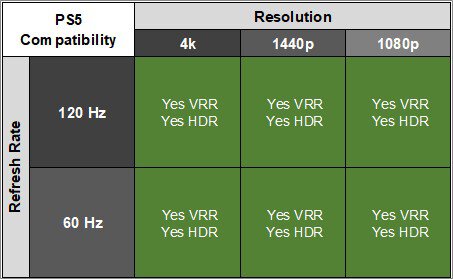
    4k @ 120Hz
    No
    4k @ 60Hz
    Yes
    1440p @ 120Hz
    Yes
    1440p @ 60Hz
    Yes
    1080p @ 120Hz
    Yes
    1080p @ 60Hz
    Yes

    When HDR is enabled with the PS5 and PS5 Pro colors look desaturated, which is expected given this monitor's limited HDR gamut and volume performance.

    6.8
    Xbox Series X|S Compatibility
    4k @ 120Hz
    No
    4k @ 60Hz
    Yes
    1440p @ 120Hz
    Yes
    1440p @ 60Hz
    Yes
    1080p @ 120Hz
    Yes
    1080p @ 60Hz
    Yes

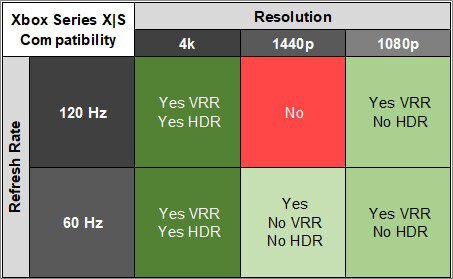
    This monitor has some compatibility issues with the Xbox Series X|S. You have to use the Xbox's HDMI override function for 1440p @ 60Hz to work, but that disables VRR.

    Additionally, when HDR is enabled with the Xbox colors look desaturated, which is expected given this monitor's limited HDR gamut and volume performance.

    As the Xbox only supports HDR with 4k signals, you can only get HDR with downscaled 4k signals with this monitor.

    Inputs
    DisplayPort
    2 (DP 1.4)
    DisplayPort Transmission Bandwidth
    No DisplayPort 2.1
    Mini DisplayPort
    No
    HDMI
    2 (HDMI 2.0)
    HDMI 2.1 Bandwidth
    No HDMI 2.1
    Daisy Chaining
    No
    3.5mm Audio Out
    Yes
    Ethernet
    No
    HDR10
    Yes
    Dolby Vision
    No
    USB
    USB-A Ports
    2
    USB-A Rated Speed
    5Gbps (USB 3.2 Gen 1)
    USB-B Upstream Port
    Yes
    USB-C Ports
    0
    USB-C Upstream
    No USB-C Ports
    USB-C Rated Speed
    No USB-C Ports
    USB-C Power Delivery
    No USB-C Ports
    USB-C DisplayPort Alt Mode
    No USB-C Ports
    Thunderbolt
    No
    macOS Compatibility

    Connection HDMI 2.0 HDMI 2.1 USB-C to DisplayPort
    Max Refresh Rate 144Hz N/A 240Hz 
    VRR Range N/A N/A 48-240Hz 
    HDR Yes N/A Yes

    The AOC AGON PRO AG276QZD2 works well with macOS. VRR works well, and HDR looks okay. If you're using a MacBook and close the lid windows shift to the AOC's screen. Opening the lid or waking the laptop up from sleep moves windows back to their original position. 

    Features
    Additional Features
    Speakers
    Yes
    RGB Illumination
    Controllable
    Multiple Input Display
    PIP + PBP
    KVM Switch
    No
    Smart OS
    No

    The AOC AGON PRO AG276QZD2 has some extra features, such as:

    • Speakers: This monitor has integrated speakers, though they don't sound good.
    • RGB Lighting: The back of the monitor has RGB lighting you can adjust to a range of different colors.
    • AOC G-MENU: Allows you to adjust monitor settings with your mouse.
    • LowBlue: Decreases blue light to help reduce eye strain.

    It also has some settings to reduce the risk of burn-in associated with OLEDs in the OLED Care/Extra section:

    • Logo Protection: Dims the screen where logos are detected.
    • Taskbar Dimmer: Dims the taskbar without noticeably changing the brightness elsewhere.
    • Pixel Orbiting: Slightly shifts the displayed image once a second to reduce image retention.
    • Pixel Refresh: Helps eliminate image retention refreshing the monitor's pixels. This takes approximately 10 minutes.
    On-Screen Display (OSD)

    You can learn more about the monitor's settings in the user manual, accessible by clicking the "Manuals" tab at this monitor's Drivers & Software page.