
Our Verdict
Slightly above average TV for a range of usages. Average picture quality, which degrades when viewed at an angle. Very little motion blur so good for sports. Due to the low pixel density, it is better suited for viewing from further away.
- Excellent motion handling
- Low input lag
- Colors are inaccurate at an angle
- Average peak brightness
Average for movies in a dark room. Picture quality is average, but lacks features such as local dimming. Can play all movie sources smoothly.
Slightly above average for watching TV in a bright room. Whole screen maintains same level of brightness which is good. Picture quality is average but degrades from the side. Smart platform is good for casual watching.
Good TV for sports. Plays 1080p sources at native resolution. Excellent motion handling. Very little motion blur. Can interpolate content to 120fps for those who prefer smooth motion. Picture quality is average.
Very good for gamers. Fast paced motion is displayed very well, with little blur. Input lag is low, which is great even for the more avid gamers. Picture quality is average.
Doesn't support HDR from any source. Can't achieve bright highlights or more vivid colors.
Average PC monitor. Displays text clearly with chroma support. Doesn't accept 120Hz input and is only 1080p TV. Input lag is low which is great. Fast motion is handled very well.
Check Price
Differences Between Sizes And Variants
We tested the 60" (KDL60W630B), the only size available at the moment.
If someone comes across a different type of panel or if their Sony KDL60W630B doesn't correspond to our review, let us know and we will update the review.
| Size | Model |
| 60" | KDL60W630B/2 |
Popular TV Comparisons

The Sony W630B is a low-end TV, offering an average picture quality. For those looking for a 1080p TV on a tight budget it shouldn't disappoint, but spending a bit more money does provide a proportional increase in picture quality. Keep that in mind when reading our recommendations below.

We buy and test dozens of TVs yearly, taking an objective, data-driven approach to deliver results you can trust. Our testing process is complex, with hundreds of individual tests that take over a week to complete. Most of our tests use specially designed test patterns that mimic real content, but we also use the same sources you have at home to ensure our results match the real-world experience. We use two main tools for our testing: a Colorimetry Research CR-100 colorimeter and a CR-250 spectroradiometer.
Test Results
Older Test Bench: We tested this product using an older TV test methodology before a major update. Some of the test results below aren't directly comparable with other TVs. Learn more

for pictures & test results

Small, sleek stand similar in design to the Sony W800C. Feels sturdy with a small footprint. Footprint of the 60" TV stand: 22.8" x 8.9"
for pictures & test results

When wall mounted, the component and composite inputs may be difficult to access.

for pictures & test results

The TV is thicker than average due to the wide bottom half.
for pictures & test results

The contrast ratio of the W630B is pretty good. Black looks deep enough to provide a good experience in a dark environment.
for videos & test results

The Sony W630B does not have any local dimming option. Video for reference only.
Peak brightness is average for the KDL60W630B. At 273 cd/m², is it not the worst, but it is far from the best we have seen. The only one advantage here is that the brightness remains the same no matter how large the white window is and also it does not vary over time when a static image is displayed.
This TV does not support HDR.
for pictures & test results

Gray uniformity is average. You can see some vertical bands from the backlight. Dirty screen might be seen when watching sport or any other content where large panning shots over a uniform surface are present on screen.
for videos & test results

for pictures & test results
for pictures & test results
for pictures & test results
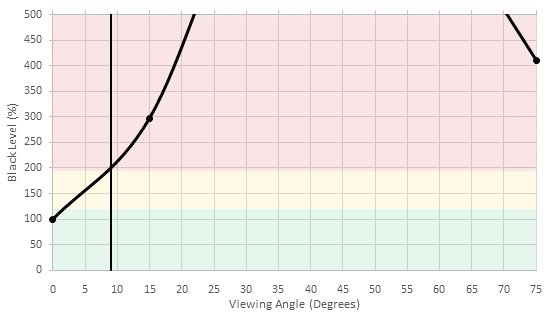
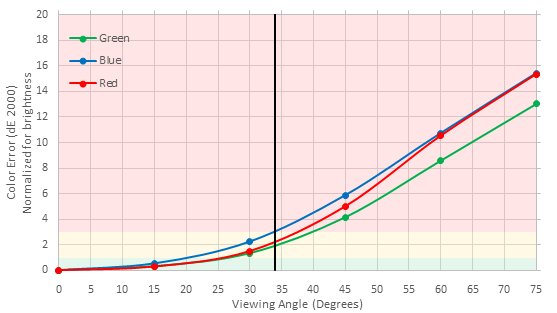
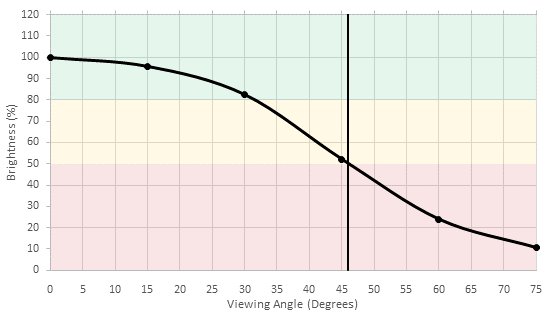
The viewing angle is below average, but it is better than most of the Sony TVs with the same kind of panel. When compared, it is better than the high end X930D that got a viewing angle of only 16°. Any IPS or OLED TV would be an improvement.
for pictures & test results

Black uniformity is also very good. It is not as perfect as OLED TV are, but for an LCD TV is very acceptable. On the test picture you may see some faint clouding but you should not notice any clouding watching normal content.
for pictures & test results

The color gradient of the W630B is very good without any particular banding in any shade.
Note that when looking at the picture you can see some banding, but it is cause by Moiré when the picture was taken and not because of banding issues in the gradient.
for pictures & test results

for pictures & test results

for pictures & test results

Before calibration, the W630B was not bad at all. The white balance is just a bit off and the gamma is just a a little high. But the total deviation is really low and normal customer could enjoy it "as is" without noticing anything wrong.
for pictures & test results

for pictures & test results

for pictures & test results

After calibration, which was done very easily, since there is just a 2 point correction, the white balance and gamma curve are almost spot on. You can see our calibration settings here.
for pictures & test results

The 480p upscaling perform slightly worse than what we usually see with Sony TVs. On the test picture, little details like waves on the water or leafs on the bush look less defined and edges look a bit softer too.
for pictures & test results

720p content like cable TV looks good once upscaled and the details are well kept.
for pictures & test results

The 1080p native resolution looks good on the W630B. The picture is sharp and clean.
for pictures & test results

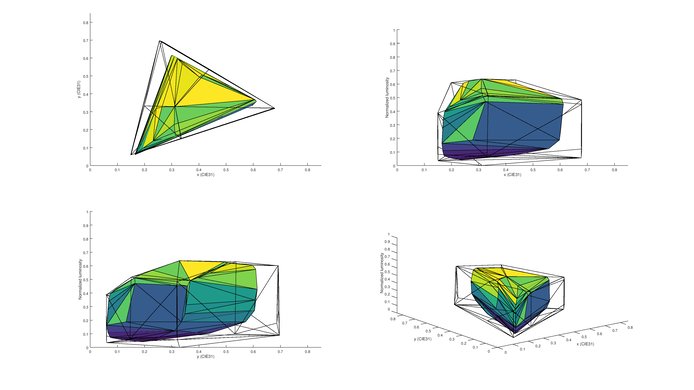
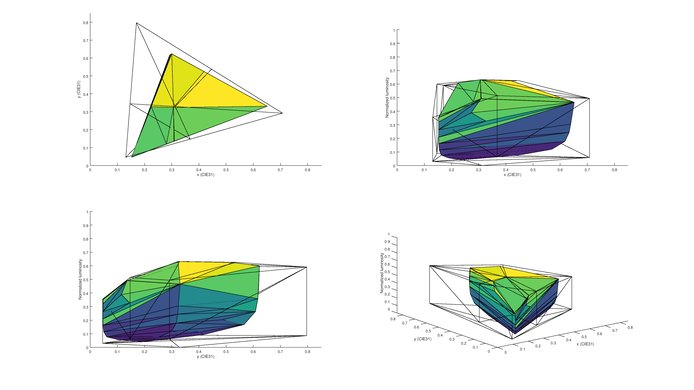
Does not support a wide color gamut. Color space is only enough for Rec. 709 content.
for pictures & test results

No image retention could be notice on the Sony W630B. This is in line with most other VA TVs that we have tested this far. This is a very good result and this will please gamers an PC user.



for pictures & test results

for pictures & test results

Very little motion blur on this TV, due to pixel 'overdrive'. Short response time, with some overshoot. Overall a very good result. The backlight by default doesn't strobe, but it is possible to achieve this by adjusting 'MotionFlow'.



The Sony KDL60W630B does play 24p content like movies from DVD, Blu-rays and from online streaming service without judder. 60p and 60i content can also be played without judder. To achieve this, you need to set the 'Motionflow' option to 'True Cinema'.
for pictures & test results

for pictures & test results

The Sony W630B features a 120Hz panel which can interpolate 30fps and 60fps content. To do so without backlight flicker, change the 'MotionFlow' setting to 'Standard' or 'Smooth'.
Input lag is very good for the KDL60W630B. With game mode selected, the input lag was only 23.6 ms. Avid players will be pleased with this TV.
For Chroma 4:4:4 support, set 'Scene' to 'Graphics' or 'Game'. When in 'Graphic' mode, the input lag is only 24.6ms.


for pictures & test results

Poor overall performance. Frequency response and low-end cutoff are quite poor, even for a TV. Maximum volume is decent, but the TV doesn't get too loud.
for pictures & test results

Poor distortion performance. The overall amount of harmonic distortion is decent at 75 and 85dB SPL. However, at maximum volume, there's quite a big jump in harmonic distortion, which seems to be typical of most Sony TVs.
for pictures & test results

Even if the smart interface is pretty simple, there is a large offering of apps and games that should satisfy most people out there. All the major apps like Netflix, YouTube, MLB.TV and other are there. There is also Sony PlayStation network on top of that.
for pictures & test results

The KDL60W630B features a modified Android platform. It has some extra features, such as PlayStation Now which allows PS3 games to be streamed to the TV. There are a wide variety of apps, but the interface feels slow and is not as refined as competitors such as LG's WebOS. After turning on the TV, it is necessary to wait before loading the smart OS. It comes pre loaded with Netflix, including a dedicated button on the remote.
for pictures & test results

The controls are located behind the left side of the TV. They may be difficult to access if the TV is against a wall.
for pictures & test results

Includes a basic remote, with the same familiar layout as other Sony TVs.


