
Our Verdict
Very good TV overall. The P607 is a versatile TV that covers all essential bases. Its picture quality is better than average, and it gets bright enough for every environment.
- Good local dimming produces deep blacks
- Low input lag, great for gaming
- Wide Color gamut for HDR
- Overall uniformity could be better
- Picture quality degrades at angle
Great TV for watching movies in a dark room. The TCL's better than average local dimming does a good job at enhancing the blacks and giving the picture a lot of depth. The uniformity of the blacks could be a bit better though.
Decent TV for watching TV shows. The P607 has a good image, but it lacks a soap opera effect feature. Its handling of reflections leaves a bit to be desired, and its picture quality degrades at an angle.
The P607 is average for sports watching. It gets bright enough for most environments, and its good motion keeps fast moving content crisp. Unfortunately though, the mediocre uniformity can lead to some field sports looking slightly blotchy.
The TCL P607 is a great TV for gaming. Its input lag is excellent, and it produces very little motion blur, giving a clear image free of annoying trail.
Great TV for HDR movies. The TCL gets bright, can display a wide color gamut without major gradations and features a good local dimming feature that enhances the blacks. This combines into a well featured package that produces a very good experience.
Impressive TV for HDR Gaming. The TCL P607 has exceptionally low input lag in every picture mode, and the TV's great HDR performance is well translated into gaming. It even features Dolby Vision which some HDR games support.
Decent PC monitor. The P607 supports chroma 4:4:4 for clear text, and it has both low motion blur and input lag which keeps it responsive. Unfortunately though, the uniformity issues can be annoying when used as a monitor, and the narrow viewing angles will be problematic when used from up close.
Changelog
- Updated Mar 12, 2018: Converted to Test Bench 1.2.
- Updated Jan 19, 2018: There is a problem with how the Xbox One, Xbox One S and Xbox One X detect the audio passthrough capabilities of TCL TVs; a workaround is detailed in the Additional Review Notes.
- Updated Aug 10, 2017: Converted to Test Bench 1.1.
- Updated Aug 01, 2017: Local dimming now works with 'Game mode' enabled, as of software version 7.7.0 (build 4111).
Check Price
Differences Between Sizes And Variants
The only size available is the 55" (55P607).
If someone comes across a different type of panel or if their TCL P607 doesn't correspond to our review, let us know and we will update the review.
The variant found at Bestbuy (55P605) is the same TV, but it has a simpler IR remote that lacks the private listening feature. This isn't a big deal though, since you can use the app on your phone instead.
| Size | Model | Variant |
| 55" | 55P607 | 55P605 |
Update 08/15/2017: TCL has confirmed to us that the 65" variant of the P607 will not be coming out this year.
Popular TV Comparisons

The TCL P607 is a great TV that offers excellent value for money. It's a good performer that competes with TVs often priced significantly higher.
The TCL 6 Series 2018 is somewhat better than the TCL P Series/P607 2017. The TCL 6 Series has a motion interpolation feature, which will please the soap opera effect fans, and a slightly better SDR peak brightness, which is great if you watch TV shows in a brighter room. The 6 Series also has better black frame insertion (BFI) that clears the image blur in fast action. On the other hand, the TCL P607 has slightly better contrast, which is great if you watch movies in a dark room, and a lower input lag to please those who play video games.
The TCL P Series/P607 2017 is better than the Vizio M Series XLED 2017. The TCL P607 has much better input lag, both for HDR and SDR, and a better response time, which is great if you play video games. The TCL P607 is better for watching TV shows in bright rooms as its brightness can fight glare better, and it has better reflection handling. On the other hand, the Vizio M Series 2017 is better for movies as it has better black uniformity and better 24p judder removal, which is great if you watch low fps movies. Finally, the Vizio M Series 2017 has better gray uniformity, which makes it marginally better for sports fans.
The TCL P Series/P607 2017 is better than the TCL S Series/S405 4k 2018. The TCL P607 has better contrast and supports local dimming, so it can display deep blacks. The TCL P607 also has better HDR performance, better color volume, and higher levels of brightness. Also, the TCL P607 has a faster response time, which is great for fast content. On the other hand, the TCL S405 has slightly better reflection handling, which can be good if you watch TV shows in a room with many light sources.
The TCL P Series/P607 2017 is much better than the TCL C Series/C807 2017. The P607 has a full-array local dimming feature that improves dark room performance and helps small highlights in some scenes in HDR to pop out better. The P607 also has a faster response time, so motion looks better with less blur trail.

We buy and test dozens of TVs yearly, taking an objective, data-driven approach to deliver results you can trust. Our testing process is complex, with hundreds of individual tests that take over a week to complete. Most of our tests use specially designed test patterns that mimic real content, but we also use the same sources you have at home to ensure our results match the real-world experience. We use two main tools for our testing: a Colorimetry Research CR-100 colorimeter and a CR-250 spectroradiometer.
Test Results
Older Test Bench: We tested this product using an older TV test methodology before a major update. Some of the test results below aren't directly comparable with other TVs. Learn more
for pictures & test results

The design of the TCL p series is similar to most other TCL TVs we have tested, such as the UP130 from 2016. The wide stand supports the TV well and feels stable, but may be harder to fit on some tables. It doesn't stand out as much as premium TVs but is quite functional.

for pictures & test results

The rear of the TV is made of metal, which is nice. There is only a single velcro strap for cable management at the bottom of the TV.
for pictures & test results

The borders have an average thickness but look quite good. They are made of plastic but have a silver accent which is nice.
for pictures & test results

The TV has an average thickness when viewed from the side, and is thickest near the base of the TV. If wall mounted it will stick out a bit.
for pictures & test results
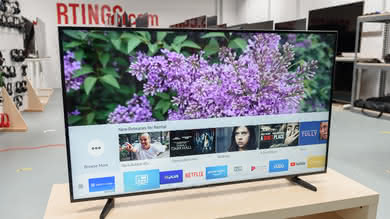
The TV runs fairly cool, only getting warm to the touch in a few places on the back. The bottom is one big vent, as with most TVs, and there is another vent midway up the back of the TV.
for pictures & test results

The build quality of the p series is okay. The metal back is nice, and screws throughout the TV hold it together well.
for pictures & test results

The TCL P607 has an excellent native contrast ratio and is on par with some of the best high-end LED TVs we have tested and even better than most Samsung top tier LED TVs. This high native contrast means the TCL p series can display very deep blacks, which is very important for dark scenes in movies, especially when the TV is set in a dark viewing room.
When the local dimming is turned on, the contrast ratio goes up by about 11% to reach 7269:1 which is a great result.
for videos & test results

The local dimming on the TCL p series is decent, and improves the contrast ratio on our black checkerboard pattern significantly.
It isn't without some flaws though. On a side by side comparison, we found it to be better than the Vizio M Series 2017 but just a bit shy of the Sony X900E. Unfortunately, it darkens the moving white highlight too much compared to the Sony X900E. It is easier to see on the smaller highlights, but the behavior is present event with the bigger one. The darkening is more obvious when the moving highlight crosses the limits of each dimming zone. It seems the algorithm is a bit too aggressive here.
Update 07/10/2017: Testing with the latest firmware shows no visible changes to the local dimming performance. The algorithm remains very aggressive, often dimming small highlights and turning backlight zones on and off quickly instead of gradually as highlights move across the screen, which produces flashing as visible in the above video.
Update 07/17/2017: Enabling 'Game Mode' unfortunately disables local dimming, which means picture quality is a little worse in 'Game Mode'.
Update 08/01/2017: Local dimming now works with 'Game mode' enabled, as of software version 7.7.0 (build 4111).
Great SDR peak brightness. The real scene brightness is very strong, and in an ideal case the TV's local dimming can make highlights even brighter. However highlights in very dark scenes will be dimmed below what they should be, as shown by the low brightness in our 2% and 10% white window tests. Still, the P607's SDR brightness is much better than any of its competitors like the Vizio M Series 2017 or the Samsung MU6300.
Decent HDR peak brightness. The real scene brightness is decent, and in certain scenes the TV's local dimming will be able to make highlights even brighter. Unfortunately the TV dims highlights in very dark scenes, as shown by the low brightness in our smaller window tests. The HDR brightness is comparable to that of the Vizio M Series 2017, but much brighter than any of its other competitors like the Samsung MU6300.
for pictures & test results

for pictures & test results

The gray uniformity of the P607 is disappointing. All the corners and edges are darker than the center the screen and the top and bottom also have a warmer look than the rest of the screen. The dirty screen effect isn't too bad, but is noticeable for sports.
Looking at our 5% gray uniformity test picture, overall the screen is pretty uniform with only the sides being a bit more bright than the center, but this is mostly due to the effect of the narrow viewing angle rather than a uniformity problem of the screen itself.
for videos & test results

for pictures & test results
for pictures & test results
for pictures & test results
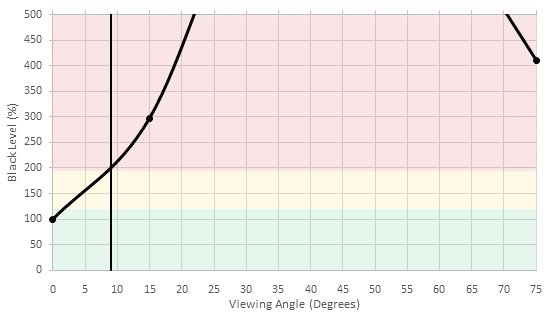
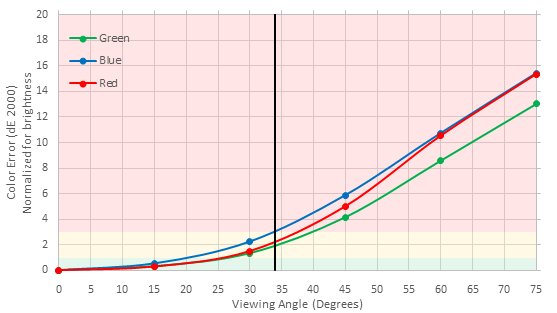
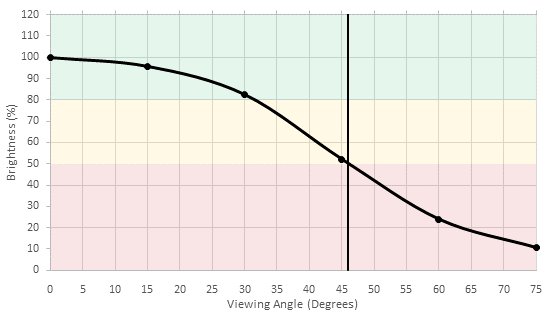
Bad viewing angle, even for a TV with a VA panel. Blacks turn grey very rapidly even at a small angle, followed by colors shifting and brightness decreasing when viewed from larger and larger angles. This TV is not well suited for a room where people often view the TV from the side.
for pictures & test results

for pictures & test results

The TCL p series has a decent overall black uniformity. Most of the issues are due to some visible clouding in each corner of the TV screen on the native black uniformity picture (with local dimming turned off). Luckily the clouding is not too bad and is barely visible in dark scenes.
When the local dimming is turned on, the uniformity of the screen is much better, as seen with our standard deviation number (1.774 to 0.837) and also visually when looking at both test pictures. The local dimming takes care of the blooming that was visible in each corner and the blooming around the middle cross is also kept to a minimum, which is great and also a good sign that the local dimming is pretty effective.
for pictures & test results

for pictures & test results

for pictures & test results

The TCL p series has a semi-gloss finish which diffuses reflections across the screen. It is fine for an average-lit room but the reflections may be distracting in a well-lit room or with a few windows facing the TV.
for pictures & test results

for pictures & test results

for pictures & test results

Very good accuracy after changing to the 'Movie' picture mode out of the box. The white balance is a bit on the warm side and the dE just over 3 is almost not perceivable unless you are used to using a calibrated monitor. Gamma is not far off too, as the curve tracks pretty closely to our 2.2 target. As for the color reproduction accuracy, with a dE of 2.34, this is a great result and most of the inaccuracies are due to the slightly warm white balance.
For most people, the TCL P could be used as is without any need of a calibration.
for pictures & test results

for pictures & test results

for pictures & test results

Amazing accuracy after calibration. The white balance is almost perfect, with only small imperfections in the brighter end of the grayscale, and the gamma curve tracks much more closely. As for the color, many of the problems noted before calibration are corrected, and most of it is due to the white balance being more precise.
The calibration process is fairly easy to do with the Roku app and the 11 points white balance and color space management really help here. Note that on the TV itself, there is no calibration menu and it has to be done via the Roku app itself (on a smart phone or tablet).
You can see our recommended settings here.
for pictures & test results

Upscaling of low quality content such as DVDs is good. As with other TCL TVs, the image isn't too soft and details are preserved.
for pictures & test results

720p sources such as cable TV are upscaled well. Details remains clear.
for pictures & test results

Full HD content such as Blu-rays look good. The image remains clear.

for pictures & test results

for pictures & test results

for pictures & test results

Good wide color gamut, similar to some high end TVs like the Sony X930E and LG SJ8500, and wider than any of the P series's competitors. The Rec 2020 gamut can show very saturated red and blue, only struggling with green, which is a common problem with modern TVs. The P3 gamut on the other hand is significantly smaller when tested at our standard brightness (75% stimulus), but is as wide as the Rec 2020 gamut at lower brightness, as seen in the P3 Color Volume plot to the right.
The TV's EOTF follows the HDR PQ curve fairly closely, though very dark shades are dimmed too much. The EOTF when 'Game Mode' is enabled, shown here, is very similar, differing only because local dimming is disabled in game mode.
Update 11/27/2017: Local dimming now works with 'Game mode' enabled, as of software version 7.7.0 (build 4111).
for pictures & test results

for pictures & test results

Decent color volume, as good as many high end TVs and better than any of the P series's competitors. The TV's local dimming helps it bring its wide color gamut to a large range of brightnesses. In the P3 volume though the gamut narrows significantly at very high and very low brightness, more than the Rec 2020 volume. In both volumes the darkest colors (10% stimulus) are dimmed far too much.
for pictures & test results

The TCL P607 has an excellent gradient performance and looking at our test picture, not many imperfections can be noticed, which is great. None of the banding normally seen on an 8-bit panel can be noticed which is good for HDR content.
for pictures & test results

The TCL P did not present any image retention while doing this specific test, which is good news for gamers out there who will engage in long sessions of gaming or PC user who might use this TV as a monitor.
We don't expect VA panels to experience permanent image retention, as the VA panel in our long-term test appears immune.
for pictures & test results

This image of the pixels is taken with a 100% white background. Note that the way the TCL dims some colors results in artifacts which are only visible from very close to the TV. This image of the pixels was taken of a 50% gray, showing the patterns which appear.


for pictures & test results

The TV uses PWM at 120Hz to dim the backlight, starting at 100/100 backlight setting. Lowering the setting reduces backlight amplitude, while duty cycle remains constant. This results in duplications following fast-moving objects, visible in the motion blur box.
Like with other TCL TVs, there is no option to reduce the flicker frequency to 60 Hz, although its 120 Hz PWM flicker does help somewhat to make motion look more clear.
The P607 doesn't have any motion interpolation features, so fans of the soap opera effect may be disappointed.
The TCL P Series 2017 can display 60fps content without stutter, but stutter may be visible with 24p movies - especially if they have wide panning shots. This is a result of the fast response time, which results in very little blur to smooth between frames.
24p movies playing from 24p sources like DVDs and Blu-rays are judder-free on the TCL p and no specific option needs to be turned on, as the TV displays the correct cadence without any extra input from the user. On the other hand, 24p movies playing from 60p/60i sources like cable or satellite boxes will present judder and no option in the TV picture setting is available to remove judder from 24p movies on those sources.
The TCL P Series has a 60 Hz panel. Like other 2017 TVs, it doesn't support any variable refresh rate features.
Outstanding low input lag, which should please nearly any gamer. All picture modes have the same low input lag when the 'Game Mode' setting is on, and all modes show 4:4:4 color properly. This is a massive improvement over other TCL TVs like the S305, where the 'Game Mode' setting doesn't improve the input lag.
Update 07/17/2017: Enabling 'Game Mode' unfortunately disables local dimming, which means picture quality is a little worse in 'Game Mode'.
Update 07/18/2017: The TV only shows 4:4:4 color properly when in 'PC mode'. For most sources this is accomplished by changing the input's icon to 'Computer'. For a PC, if the TV detects a PC as its source it forces PC mode, and this cannot be avoided except by intercepting the AVI infoframes sent from the PC. The 4:4:4 input lag measurements were in error, but all input lag measurements have now been updated (essentially unchanged).
Update 08/01/2017: Local dimming now works with 'Game mode' enabled, as of software version 7.7.0 (build 4111).
Update 08/15/2017: The 'Game mode' input lag with local dimming on and off was compared, and both were nearly identical.
Most input resolutions are supported. 4k @ 60 Hz @ 4:2:2 or 4:4:4 color is only supported if the HDMI input used has been set to HDMI 2.0 in the TV's settings. 4:4:4 color is always shown properly, in any picture mode.
The TV's chroma 4:2:0 support is inconsistent. When 4:2:0 video is played from some sources like a PC, white becomes pink, blue becomes green and scanlines appear across the screen. Also 4k @ 60 Hz @ 4:2:0 @ 12 bit wasn't displayed at all from a PC. Our HDR Blu-ray player had no such issues. These inconsistencies could be a problem for 4k @ 60 Hz sources that only support HDMI 1.4, as 4:2:0 is often needed to remain within HDMI 1.4's bandwidth limitation.
Update 07/18/2017: The TV only shows 4:4:4 color properly when in 'PC mode'. Sharpness also has no effect in PC mode, even though the slider can still be changed. For most sources PC mode is activated by changing the input's icon to 'Computer'. For a PC, if the TV detects a PC as its source it forces PC mode, and this cannot be avoided except by intercepting the AVI infoframes sent from the PC. Changing the input's icon does not avoid this forced PC mode. This behavior was not known during initial testing, leading to the incorrect assumption that 4:4:4 color is displayed properly in all modes.

The p series has two 3.5mm analog audio jacks. One is situated on the back of the TV and the other one is on the left side of the remote. This is very practical for those who want to listen to the TV privately without the need of a long extension cord.
With CEC enabled, HDMI devices do turn off when the TV is turned off, but the TV's remote can't be used to navigate the menu of our PlayStation 3 or Samsung UHD Blu-ray player, which is possible on many other TVs with CEC.
Update 01/19/2018: There is a problem with how the Xbox One, Xbox One S and Xbox One X detect the audio passthrough capabilities of TCL TVs; a workaround is detailed in the Additional Review Notes.
for pictures & test results

Subpar frequency response. Bass extension is quite limited, causing the sound signature to be quite thin. There is also a strong emphasis on lower frequencies, causing a muddy sound. This is further exaggerated by the pumping and compression used to reach higher volumes, so they are best avoided.
for pictures & test results

Average performance. The TCL P607 produces a fair amount of THD at every volume setting and aliasing is present even as low as 80 dB. Because of this, it is best to avoid the higher volume settings.
for pictures & test results

The Roku TV interface is very fluid and responsive, with next to no lag and very smooth animations for everything. The column list based layout is fast and easy to understand, but most interactions require a trip through the home menu, which can slow down navigation. When content is playing there is a quick menu containing basic settings like picture and audio, which avoids going through the home menu.
Update 01/24/2018: There is a bug with the 'Color' slider in HDR: sometimes when the slider is increased then decreased immediately, or vice versa, the TV freezes, crashes and reboots. This shouldn't be a problem for normal usage though.
The TV's main interface has no ads, but third party apps can have ads. You can opt out of personalized advertising for these ads using the TV's 'Limit Ad Tracking' setting. The TV's home screen does have a large box for suggested content, which can be annoying.
for pictures & test results

Roku calls its apps 'Streaming Channels', and although it doesn't have as many apps as some other smart platforms it still has the most popular ones, such as Netflix, YouTube, Amazon Video and Hulu. Like the interface the apps run very smoothly.
for pictures & test results

The remote is very simple, with only basic buttons for navigating the Roku interface. However one unique feature is that the remote can play the TV's audio through a headphone jack on the side of the remote, but there are sometimes stutters in the audio.
Update 07/03/2018: We have retested voice control on firmware 8.0.0 build 4183-30 and it can now launch apps and inputs in addition to do content searches. The review has been updated.
for pictures & test results
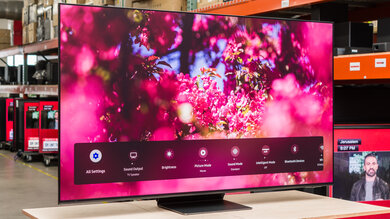
The Roku app has more features than many other smart TV apps. The TV's sound can be played through a device running the app, but not for HDMI, composite or antenna inputs. This allows a user to listen to the TV's sound through headphones plugged into their phone. The TV's calibration settings are found only in the app, and not in the TV's interface.
for pictures & test results

The TV has five physical buttons: the center button is the power button, up and down control the volume, and left and right bring up and scroll through a menu containing the TV's inputs and a find remote feature, which makes the remote make noise so it can be found.
for pictures & test results

- Manual
- Batteries
- Remote
- Earphones
- Earbuds
- Composite adapter


