Acer Nitro XF243Y Pbmiiprx  Monitor Review

Reviewed Jan 12, 2021 at 10:24am
Tested using Methodology v1.2 
Acer Nitro XF243Y Pbmiiprx
7.6
Mixed Usage 
7.8
Office 
8.1
Gaming 
7.2
Media Consumption 
7.8
Media Creation 
5.9
HDR 
 12

The Acer Nitro XF243Y Pbmiiprx is an excellent budget gaming monitor. It delivers amazingly smooth and responsive gameplay due to its low input lag, fast response time, and 165Hz refresh rate. It has an IPS panel with wide viewing angles, and its excellent ergonomics include a full 360-degree swivel range, making it great for sharing content and playing co-op games. It has both native FreeSync support and G-SYNC compatibility to reduce screen tearing. Its 24 inch screen should be big enough for most gamers, but it might feel a bit cramped for work, especially if you like having multiple windows opened side-by-side. Unfortunately, it has a low contrast ratio that makes blacks look gray, which isn't ideal for dark rooms. Also, it can't deliver a good HDR experience because it can't display a wide color gamut and doesn't get bright enough to make highlights stand out the way they should.

How We Test Monitors

We buy and test more than 30 monitors each year, with units that we buy completely on our own, without any cherry-picked units or samples. We put a lot into each unbiased, straight-to-the-point review, and there's a whole process from purchasing to publishing, involving multiple teams and people. We do more than just use the monitor for a week; we use specialized and custom tools to measure various aspects with objective data-based results. We also consider multiple factors before making any recommendations, including the monitor's cost, its performance against the competition, and whether or not it's easy to find.

Our Verdict

7.6
Mixed Usage 

The Acer Nitro XF243Y Pbmiiprx is a great monitor for most uses. It's excellent for gaming due to its low input lag, fast response time, and high refresh rate. It has wide viewing angles and excellent ergonomics that make it a great choice for work, but some may find the screen too small and the resolution too low. Unfortunately, it can't deliver a true HDR experience because it can't display a wide color gamut and doesn't get bright enough to make highlights pop.

Pros
  • Low input lag.
  • Wide viewing angles.
  • Excellent ergonomics.
  • Good visibility in bright rooms.
Cons
  • Mediocre contrast ratio.
  • Screen might be too small for some.
7.8
Office 

The Acer Nitro XF243Y Pbmiiprx is great for office use. It has wide viewing angles and excellent ergonomics, making it ideal for sharing the screen with coworkers. It handles reflections well and gets bright enough to combat glare. For some people, the screen can feel a little cramped, especially if you work with multiple windows opened side-by-side, and the 1080p resolution might be too low.

Pros
  • Wide viewing angles.
  • Excellent ergonomics.
  • Good visibility in bright rooms.
Cons
  • Screen might be too small for some.
  • Pixel density might bee too low for some.
8.1
Gaming 

The Acer Nitro XF243Y Pbmiiprx is an excellent gaming monitor. It has a fast response time, low input lag, and a 165Hz refresh rate, resulting in smooth and responsive gameplay. It supports FreeSync and is compatible with G-SYNC to reduce screen tearing. The 24 inch screen isn't the most immersive, but it does make it easier to see your game's entire interface. Sadly, it isn't well-suited for gaming in the dark due to its low contrast ratio and sub-par black uniformity.

Pros
  • Exceptional response time.
  • Low input lag.
  • High refresh rate.
  • VRR support.
Cons
  • Mediocre contrast ratio.
7.2
Media Consumption 

The Acer Nitro XF243Y Pbmiiprx is good for media consumption. It has wide viewing angles and excellent ergonomics, making it a great choice for sharing content. However, its 24 inch screen and 1080p resolution aren't the most immersive. Unfortunately, it has a mediocre contrast ratio and sub-par black uniformity, which isn't ideal for dark room viewing.

Pros
  • Wide viewing angles.
  • Excellent ergonomics.
  • Good visibility in bright rooms.
Cons
  • Mediocre contrast ratio.
  • Screen might be too small for some.
7.8
Media Creation 

The Acer Nitro XF243Y Pbmiiprx is good for content creation. It has an excellent color gamut with full sRGB coverage and exceptional gradient handling. It has wide viewing angles and allows for a full 360-degree swivel, great for showing your work to clients and colleagues. However, the screen is more on the compact side and can feel a bit cramped, and the resolution might be too low for some.

Pros
  • Wide viewing angles.
  • Excellent ergonomics.
  • Good visibility in bright rooms.
Cons
  • Mediocre contrast ratio.
  • Screen might be too small for some.
  • Pixel density might bee too low for some.
5.9
HDR 

The Acer Nitro XF243Y is disappointing for HDR. It doesn't display deep blacks due to its low contrast ratio, and it lacks a local dimming feature to further improve the picture quality in dark scenes. It also doesn't get bright enough to make highlights pop, and it can't display a wide range of colors in HDR either.

Pros
None
Cons
  • Can't display a wide color gamut.
  • Not bright enough for HDR.
  • Mediocre contrast ratio.
  • No local dimming.
  • 7.6
    Mixed Usage
  • 7.8
    Office
  • 8.1
    Gaming
  • 7.2
    Media Consumption
  • 7.8
    Media Creation
  • 5.9
    HDR
  • Changelog

    1.  Updated Aug 15, 2024: Added that the Dell P2425H has a USB hub.
    2.  Updated Apr 18, 2023: Tested the monitor's compatibility with 1440p on the PS5, but it doesn't work.
    3.  Updated Mar 14, 2023: Clarified text throughout as part of Test Bench 1.2, including adding text to the Console Compatibility boxes.
    4.  Updated May 02, 2022: We tested the monitor with the PS5's new variable refresh rate feature and confirmed that it's not compatible, since the PS5 only supports HDMI Forum VRR.

    Check Price

    23.8"Nitro XF243Y Pbmiiprx
    SEE PRICE
    Amazon.com
    23.8"Nitro XF243Y Pbmiiprx
    SEE PRICE
    BestBuy.com
    23.8"Nitro XF243Y Pbmiiprx
    B&H
    23.8"Nitro XF243Y Pbmiiprx
    Walmart.com

    Differences Between Sizes And Variants

    We tested the 23.8 inch Acer Nitro XF243Y Pbmiiprx, also known as the Nitro XF3 Series. There's a 27 inch model in the same series, the Acer Nitro XF273 Sbmiiprx; however, we haven't tested it.

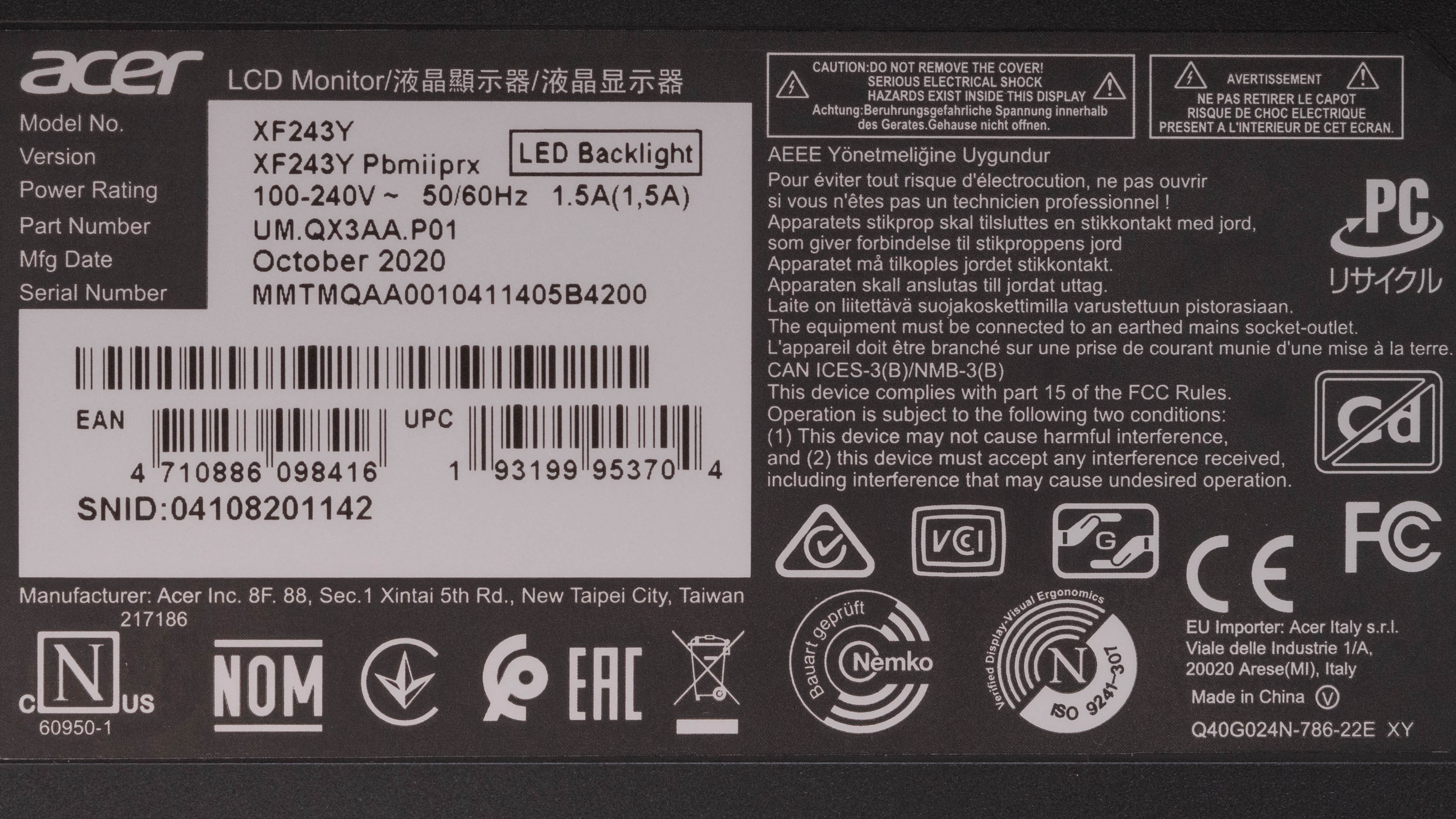
    Our unit was manufactured in October 2020; you can see the label here.

    Popular Monitor Comparisons

    The Acer Nitro XF243Y Pbmiiprx is an excellent budget gaming monitor, one of the best that we've tested in its price range. However, like most budget monitors, it lacks additional features such as USB ports, and it can't display a wide color gamut for HDR. For more options, check out our recommendations for the best gaming monitors, the best 24-25 inch monitors, and the best gaming monitors under $200.

    ASUS TUF Gaming VG259QM

    The Acer Nitro XF243Y and the ASUS TUF Gaming VG259QM are both 1080p IPS gaming monitors, but the ASUS has a much higher refresh rate, 280Hz compared to the Acer's 165Hz. This results in a smoother and more responsive gaming experience. Other than that, these two monitors are remarkably similar. The ASUS is an inch bigger than the Acer.

    AOC 24G2

    The AOC 24G2 and the Acer Nitro XF243Y Pbmiiprx are both 24" 1080p gaming monitors. The Acer provides a slightly smoother gaming experience because it has a higher refresh rate and better response times. It also has wider viewing angles, making it a better choice for playing co-op or sharing content. The Acer has HDR support, but it doesn't add much because it can't display a wide color gamut.

    BenQ ZOWIE XL2411P

    Overall, the Acer Nitro XF243Y is much better than the BenQ ZOWIE XL2411P. The Acer has a significantly faster response time and a slightly higher refresh rate, resulting in more responsiveness and clearer motion. Also, it supports VRR to reduce screen tearing, which the BenQ doesn't. However, the BenQ's Black Frame Insertion feature works over a wider frequency range to reduce motion blur.

    LG 24GL600F

    The Acer Nitro XF243Y performs better than the LG 24GL600F for most uses. The Acer has a lower input lag and a slightly higher refresh rate of 165Hz to provide smoother and more responsive gameplay. It has significantly better ergonomics and wider viewing angles, making it a better choice for co-op gaming. If you're often in a well-lit room, the Acer gets a bit brighter than the LG, but the LG has better reflection handling.

    Acer Nitro VG271 Pbmiipx

    Overall, the Acer Nitro XF243Y is better than the Acer Nitro VG271 Pbmiipx. The XF243Y performs better gaming-wise because it has a much faster response time and a slightly higher refresh rate. The XF243Y is also a better choice for sharing content and co-op gaming due to its wider viewing angles and superior ergonomics. However, the VG271 gets brighter, especially in HDR, and it has a Picture-in-Picture/Picture-by-Picture mode that can be useful for streamers using a second computer to stream.

    ViewSonic XG2402

    The Acer Nitro XF243Y is better than the ViewSonic XG2402 for most uses. The Acer has wider viewing angles better ergonomics, making it a better choice for co-op gaming. However, even though the Acer has a slightly higher 165Hz refresh rate, the ViewSonic has a faster response time at the max refresh rate, especially in the darker transitions.

    HP X24ih

    The Acer Nitro XF243Y Pbmiiprx is a better gaming monitor than the HP X24ih. The Acer's 144Hz native refresh rate can be overclocked to 165Hz, which the HP can't do. The Acer has much better ergonomics than the HP, making it easier to place the screen in an ideal viewing position. Lastly, the Acer supports HDR, while the HP doesn't, but it doesn't add much since it can't display a wide color gamut and has low HDR peak brightness.

    Samsung Odyssey G3 F27G35T

    The Acer Nitro XF243Y Pbmiiprx is much better than the Samsung Odyssey G3 F27G35T. They each have a 1080p resolution, but they have different panel types. The Acer has an IPS panel with wider viewing angles. It also has a significantly faster response time, so motion looks smoother, and you can overclock its 144Hz refresh rate to 165Hz. Although the Acer has a smaller screen, it has a higher pixel density to provide better text clarity. On the other hand, the Samsung has a VA panel with a higher contrast ratio, displaying deeper blacks.

    MSI Optix G27C6

    The Acer Nitro XF243Y Pbmiiprx is a much better monitor than the MSI Optix G27C6, but they have different panel types. The Acer has an IPS panel with much wider viewing angles. It also has a much quicker response time, making motion look smoother. The Acer gets brighter, has better reflection handling, and the ergonomics are significantly better. The Acer supports HDR, which the MSI doesn't, but it doesn't add much because it can't display a wide color gamut. On the other hand, the MSI is a bit bigger and has a VA panel, resulting in a much higher contrast ratio.

    ASUS TUF Gaming VG249Q1A

    The ASUS TUF Gaming VG249Q1A and the Acer Nitro XF243Y Pbmiiprx are IPS gaming monitors with a 24" screen, 1080p resolution, and a 165Hz refresh rate. While they both provide a great gaming experience, the ASUS does have slightly better response times at max refresh rate, resulting in a clearer image in fast-moving scenes. On the other hand, the Acer has significantly better ergonomics, whereas the ASUS only allows for tilt adjustment. The Acer also gets brighter to combat glare in well-lit environments. It has HDR support, which the ASUS lacks, but it can't display a wide color gamut.

    Lepow Z1 Gamut

    While the Lepow Z1 Gamut and the Acer Nitro XF243Y Pbmiiprx are 1080p IPS monitors, they're for different uses. The Lepow is a compact portable monitor, while the Acer is a budget desktop gaming monitor. Unless you need a portable monitor, the Acer is a better choice for most uses. However, it doesn't support a wide color gamut, while the Lepow does.

    ASUS VG246H

    The Acer Nitro XF243Y Pbmiiprx is much better than the ASUS VG246H. The Acer has a higher refresh rate and much faster response times, resulting in significantly clearer motion, with almost no noticeable blur behind fast-moving objects. The Acer also supports HDR, although this doesn't add much, and it has better viewing angles.

    Samsung Odyssey G3 S24AG30

    The Acer Nitro XF243Y Pbmiiprx is much better overall than the Samsung Odyssey G3 S24AG30. They each have a 24 inch screen with a 1080p resolution, but they have different panel types. The Acer has an IPS panel with wider viewing angles, while the Samsung has a VA panel with better contrast. Motion looks much better on the Acer thanks to the much quicker response time, and it has a slightly faster 165Hz refresh rate. The Acer is also better for bright room gaming because it gets brighter and has better reflection handling. It also has more features like built-in speakers and HDR10, which the Samsung doesn't support.

    Dell G2722HS

    The Acer Nitro XF243Y Pbmiiprx is better overall than the Dell G2722HS. Although they're both 1080p gaming monitors with a 165Hz refresh rate, the Acer has a few advantages over the Dell. It has significantly better ergonomics, making it easier to place in an ideal viewing position. It's also a better choice if you want to use something for console gaming because it downscales a 4k image, which the Dell doesn't do. The Acer also supports HDR, which the Dell doesn't have, but it doesn't add much because it has a low contrast ratio.

    Video

    Test Results

    perceptual testing image
    Sort:
    RATINGS
    Category:
    All
    Design
    Style
    Curved
    No
    Curve Radius
    Not Curved

    The Acer Nitro XF243Y Pbmiiprx has a simple design that's almost identical to the Acer Nitro XF252Q. It has thin borders on three sides and a stand with a round base.

    Accelerated Longevity Test
    Uniformity PicturesN/A
    7.0
    Build Quality

    The Acer Nitro XF243Y Pbmiiprx's build quality is decent, very similar to the Acer Nitro XF252Q. It's entirely plastic except for the stand's column, which is metal. The stand is sturdy, and the monitor doesn't wobble much. However, there's some flex on the back, and the buttons feel a bit cheap. Overall, it doesn't feel particularly premium, but there are no issues with the construction.

    9.3
    Ergonomics
    Height Adjustment
    4.3" (11.0 cm)
    Tilt Range
    -25° to 5°
    Rotate Portrait/Landscape
    Yes, Both Ways
    Swivel Range
    -180° to 180°
    Wall Mount
    VESA 100x100

    The ergonomics are excellent. It allows for all manner of adjustments so that you can place the screen easily at your optimal viewing position. Like the Acer Nitro XF252Q, it has a base plate that can rotate freely within the plastic enclosure, allowing it to rotate a full 360 degrees. Other than the branding and the airflow vents, the back is relatively plain. There's a small clip at the bottom of the stand that serves as basic cable management.

    Stand
    Base Width
    9.3" (23.5 cm)
    Base Depth
    9.3" (23.5 cm)
    Thickness (With Display)
    6.5" (16.5 cm)
    Weight (With Display)
    11.5 lbs (5.2 kg)

    The stand consists of a simple cylindrical column with a round base. The base doesn't take up much desk space, and you can still put things on top of it. It supports the monitor well, and there's very little wobble.

    Display
    Size
    24"
    Housing Width
    21.3" (54.0 cm)
    Housing Height
    12.8" (32.4 cm)
    Thickness (Without Stand)
    2.6" (6.5 cm)
    Weight (Without Stand)
    8.2 lbs (3.7 kg)
    Borders Size (Bezels)
    0.3" (0.7 cm)
    Controls

    You can find the controls on the screen's right backside. There are four buttons and a joystick to power the monitor On/Off and navigate the on-screen menu.

    In The Box
    Power Supply
    Internal

    • Power cord
    • DisplayPort cable
    • HDMI cable
    • User guide
    Picture Quality
    6.0
    Contrast
    Native Contrast
    1,006 : 1
    Contrast With Local Dimming
    N/A

    The Acer Nitro XF243Y Pbmiiprx has a mediocre contrast ratio that results in blacks looking grayish in dark environments, which is typical for IPS panels. It's very close to the advertised 1000:1 contrast; however, this can vary between individual units. If you want a budget-friendly monitor with a VA panel and higher contrast, then check out the Samsung Odyssey G3 S24AG30.

    0.0
    Local Dimming
    Local Dimming
    No
    Backlight
    Edge

    The Acer Nitro XF243Y Pbmiiprx doesn't have a local dimming feature. The video above is provided for reference only.

    8.1
    SDR Brightness
    Real Scene
    351 cd/m²
    Peak 2% Window
    383 cd/m²
    Peak 10% Window
    398 cd/m²
    Peak 25% Window
    398 cd/m²
    Peak 50% Window
    397 cd/m²
    Peak 100% Window
    397 cd/m²
    Sustained 2% Window
    383 cd/m²
    Sustained 10% Window
    398 cd/m²
    Sustained 25% Window
    397 cd/m²
    Sustained 50% Window
    397 cd/m²
    Sustained 100% Window
    396 cd/m²
    Automatic Brightness Limiting (ABL)
    0.002
    Minimum Brightness
    93 cd/m²

    The Acer Nitro XF243Y Pbmiiprx has great SDR peak brightness. It's very consistent across different content and bright enough to combat glare in most lighting conditions. Surprisingly, it's significantly higher than the advertised 250 cd/m².

    We measured the SDR peak brightness after calibration in the 'User' Picture Mode with Brightness set to max.

    6.6
    HDR Brightness
    VESA DisplayHDR Certification
    DisplayHDR 400 - 1.0/1.1
    Real Scene
    370 cd/m²
    Peak 2% Window
    384 cd/m²
    Peak 10% Window
    398 cd/m²
    Peak 25% Window
    398 cd/m²
    Peak 50% Window
    398 cd/m²
    Peak 100% Window
    398 cd/m²
    Sustained 2% Window
    383 cd/m²
    Sustained 10% Window
    397 cd/m²
    Sustained 25% Window
    398 cd/m²
    Sustained 50% Window
    398 cd/m²
    Sustained 100% Window
    398 cd/m²
    Automatic Brightness Limiting (ABL)
    0.002

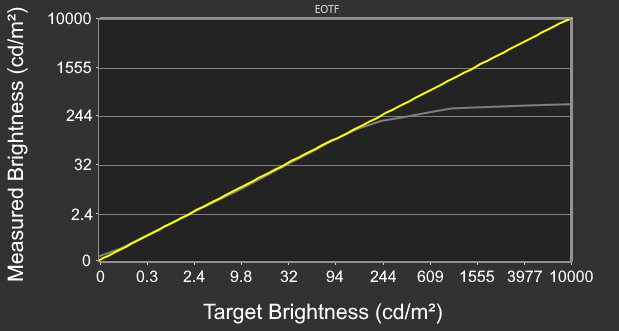
    The HDR peak brightness is okay. It's again very consistent when displaying different scenes. However, even though it's very close to the required 400 cd/m² for its advertised DisplayHDR 400 certification, it isn't enough to make specular highlights stand out. It's almost identical to the SDR peak brightness, so HDR content doesn't look much different from SDR.

    We measured the HDR peak brightness in the 'HDR Mode' Picture Mode with Brightness set to max.

    8.7
    Horizontal Viewing Angle
    Color Washout From Left
    51°
    Color Washout From Right
    48°
    Color Shift From Left
    59°
    Color Shift From Right
    61°
    Brightness Loss From Left
    51°
    Brightness Loss From Right
    49°
    Black Level Raise From Left
    70°
    Black Level Raise From Right
    70°
    Gamma Shift From Left
    58°
    Gamma Shift From Right
    57°

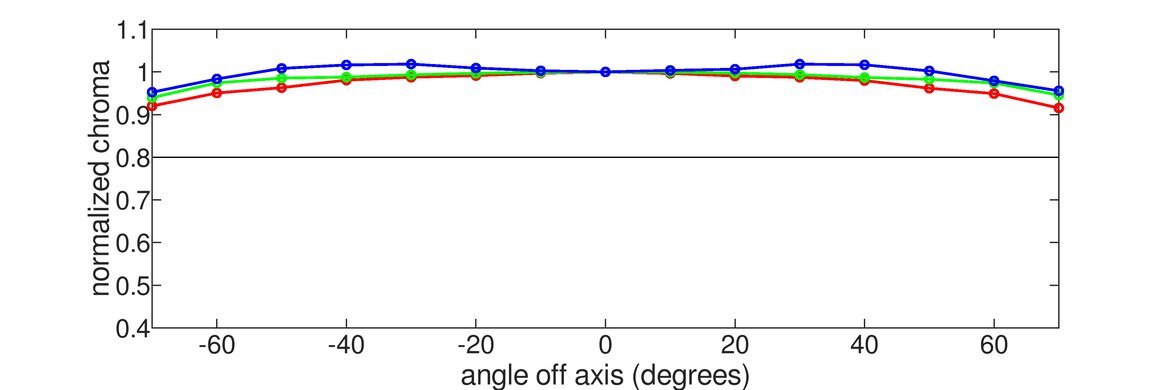
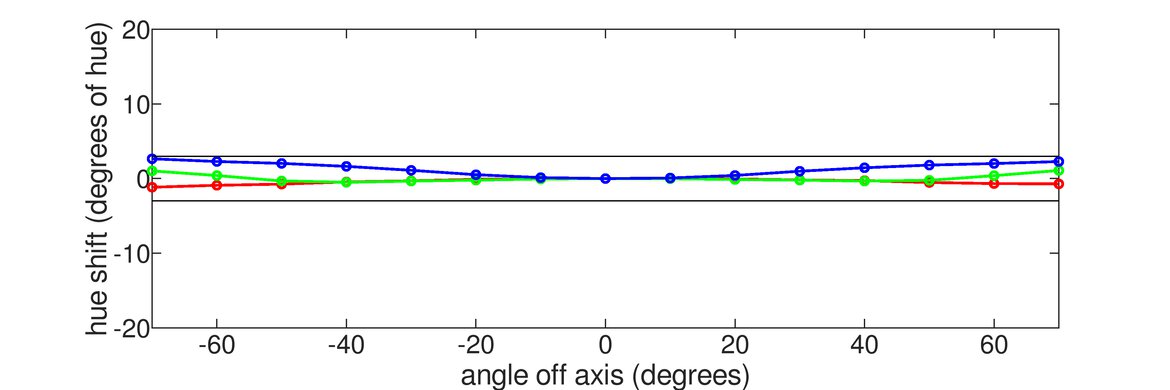
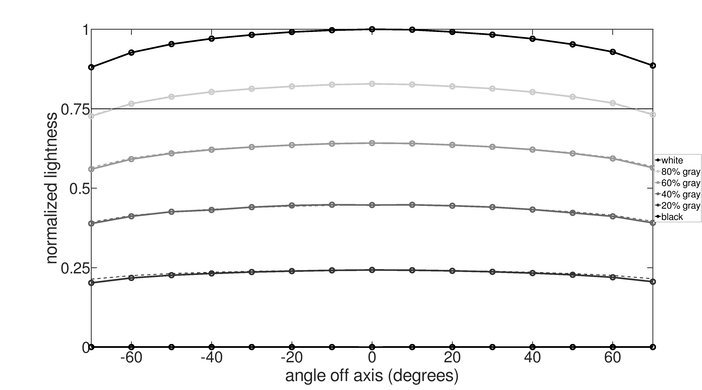
    The Acer Nitro XF243Y Pbmiiprx has excellent horizontal viewing angles. Images remain accurate when viewed from the side, great for sharing content or playing co-op games.

    7.7
    Vertical Viewing Angle
    Color Washout From Below
    36°
    Color Washout From Above
    39°
    Color Shift From Below
    53°
    Color Shift From Above
    53°
    Brightness Loss From Below
    41°
    Brightness Loss From Above
    44°
    Black Level Raise From Below
    70°
    Black Level Raise From Above
    70°
    Gamma Shift From Below
    37°
    Gamma Shift From Above
    40°

    Good vertical viewing angles. Images remain accurate even if you mount the monitor above eye level.

    7.8
    Gray Uniformity
    50% Std. Dev.
    3.612%
    50% DSE
    0.147%

    The gray uniformity is good. While the edges are darker than the rest, there's hardly any noticeable dirty screen effect in the center, which is great for browsing the web or watching sports.

    5.7
    Black Uniformity
    Native Std. Dev.
    2.223%
    Std. Dev. w/ L.D.
    N/A

    Black uniformity is sub-par, but this can vary between units. There's some clouding in the center, as well as some backlight bleed along the top and bottom edges of the screen. That said, this is only noticeable when viewing dark scenes in a dark environment.

    8.2
    Color Accuracy (Pre-Calibration)
    Picture Mode
    User (sRGB)
    sRGB Gamut Area xy
    107.6%
    White Balance dE (Avg.)
    1.97
    Color Temperature (Avg.)
    6,581 K
    Gamma (Avg.)
    2.16
    Color dE (Avg.)
    2.28
    Contrast Setting
    N/A
    RGB Settings
    Default
    Gamma Setting
    2.2 (Default)
    Brightness Setting
    N/A
    Measured Brightness
    210 cd/m²
    Brightness Locked
    Yes

    The Acer Nitro XF243Y Pbmiiprx has great accuracy before calibration. It has an sRGB Mode that aims to lock the colors to the sRGB color space so that they aren't oversaturated, but some colors are still slightly inaccurate. Luckily, the color temperature is very close to the 6500K target, but gamma doesn't follow the sRGB curve well as dark scenes are too dark, while bright scenes are over-brightened.

    You can use the sRGB Mode with any of the picture modes. It doesn't fully lock all of the picture settings, but if you change some settings like Brightness while you're using the sRGB Mode, it disables the mode and reverts to its defaults. The color accuracy is still good if you don't use the sRGB Mode, but some colors are slightly more oversaturated.

    9.7
    Color Accuracy (Post-Calibration)
    Picture Mode
    User
    sRGB Gamut Area xy
    99.5%
    White Balance dE (Avg.)
    0.58
    Color Temperature (Avg.)
    6,448 K
    Gamma (Avg.)
    2.18
    Color dE (Avg.)
    0.42
    Contrast Setting
    50
    RGB Settings
    47-46-50
    Gamma Setting
    2.2 (Default)
    Brightness Setting
    1
    Measured Brightness
    99 cd/m²
    ICC Profile
    Download

    The Acer Nitro XF243Y Pbmiiprx has exceptional accuracy after calibration. White balance is nearly perfect, and the remaining color inaccuracies aren't visible to the naked eye. The color temperature is still in the same ballpark, just a little warmer than our 6500K target. Gamma is much improved, but both dark and bright scenes are now slightly too bright.

    9.2
    SDR Color Gamut
    sRGB Coverage xy
    99.4%
    sRGB Picture Mode
    User
    Adobe RGB Coverage xy
    76.0%
    Adobe RGB Picture Mode
    User

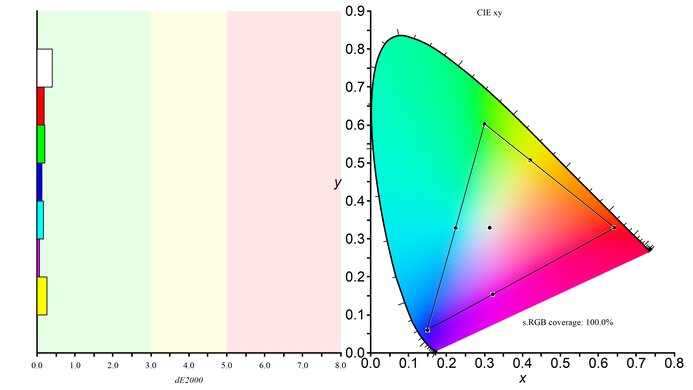
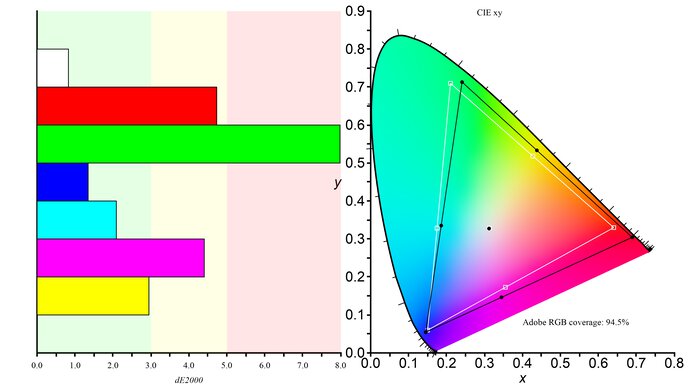
    The Acer Nitro XF243Y Pbmiiprx has an excellent SDR color gamut. It covers the entire sRGB color space used in most content, and it has good coverage of the Adobe RGB color space, mostly used in photo editing.

    9.3
    SDR Color Volume
    sRGB In ICtCp
    96.4%
    sRGB Picture Mode
    User
    Adobe RGB In ICtCp
    81.0%
    Adobe RGB Picture Mode
    User

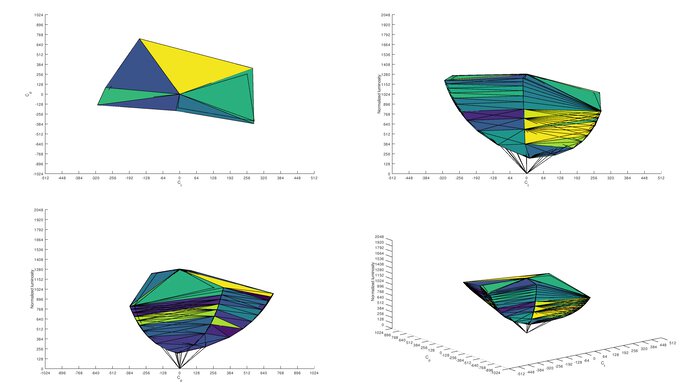
    Excellent color volume. It only has trouble displaying dark colors due to its low contrast ratio.

    6.3
    HDR Color Gamut
    Wide Color Gamut
    No
    DCI-P3 Coverage xy
    78.1%
    DCI-P3 Picture Mode
    HDR Mode
    Rec. 2020 Coverage xy
    55.8%
    Rec. 2020 Picture Mode
    HDR Mode

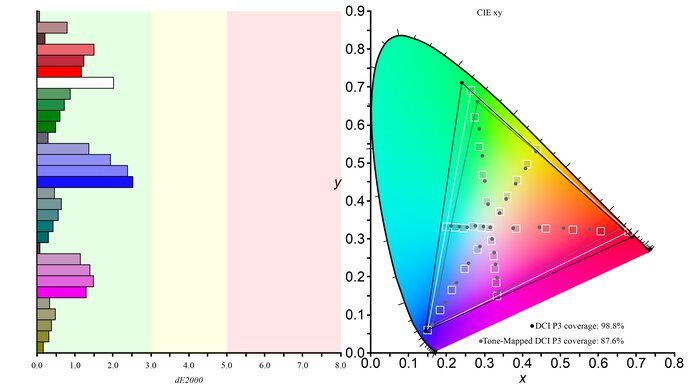
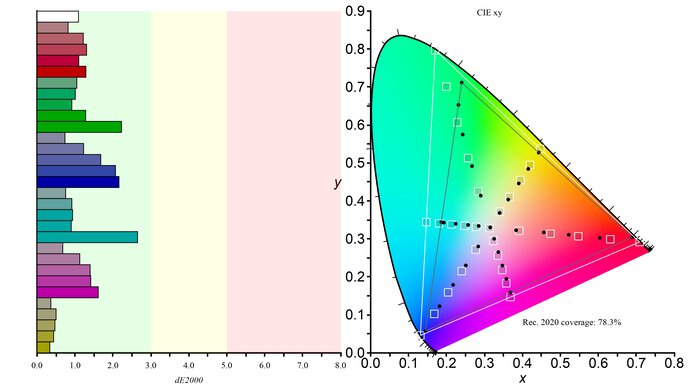
    Unfortunately, the Acer Nitro XF243Y Pbmiiprx can't display a wide color gamut for HDR. It only has decent coverage of the commonly-used DCI P3 color space, and its coverage of the wider Rec. 2020 is sub-par.

    6.5
    HDR Color Volume
    DCI-P3 In ICtCp
    67.1%
    DCI-P3 Picture Mode
    HDR Mode
    Rec. 2020 In ICtCp
    49.1%
    Rec. 2020 Picture Mode
    HDR Mode

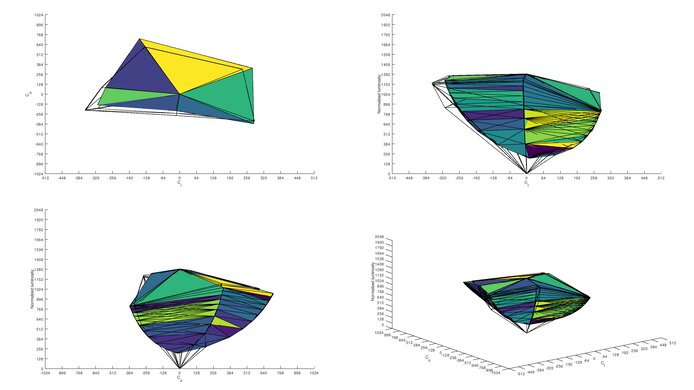
    The Acer Nitro XF243Y Pbmiiprx has a sub-par HDR color volume, mostly due to its lack of a wide color gamut. It has trouble displaying both bright and dark colors at different luminance levels.

    7.7
    Reflections
    Screen Finish
    Matte
    Total Reflections
    5.4%
    Indirect Reflections
    4.0%
    Calculated Direct Reflections
    1.4%

    The Acer Nitro XF243Y Pbmiiprx has good reflection handling. Combined with the monitor's great peak brightness, you shouldn't have any visibility issues in well-lit environments.

    7.0
    Text Clarity
    Pixel Type
    IPS
    Subpixel Layout
    RGB

    The Acer Nitro XF243Y Pbmiiprx has decent text clarity. You can improve it by enabling Windows ClearType (top photo) as it makes letters look more fleshed out, especially diagonal lines such as on the R and N.

    9.4
    Gradient
    Color Depth
    10 Bit

    The Acer Nitro XF243Y Pbmiiprx has exceptional gradient handling. There's only a tiny amount of banding in the reds, but it shouldn't be noticeable in regular content. It's advertised as having a 6-bit+Hi-FRC panel; however, it accepts a 10-bit signal without any issues.

    Motion
    8.5
    Refresh Rate
    Native Refresh Rate
    144 Hz
    Max Refresh Rate
    165 Hz
    Max Refresh Rate Over DP
    165 Hz
    Max Refresh Rate Over HDMI
    165 Hz
    Max Refresh Rate Over DP @ 10-bit
    165 Hz
    Max Refresh Rate Over HDMI @ 10-Bit
    165 Hz

    The Acer Nitro XF243Y Pbmiiprx has a native refresh rate of 144Hz, overclocked up to 165Hz. It comes overclocked out of the box, so there's no setting to change. If you want a monitor with an even higher refresh rate, check out the ASUS TUF Gaming VG258QM.

    Variable Refresh Rate (VRR)
    FreeSync
    Yes
    G-SYNC
    Compatible (Tested)
    VRR Maximum
    165 Hz
    VRR Minimum
    < 20 Hz
    VRR Supported Connectors
    DisplayPort, HDMI
    Variable Refresh Rate
    Yes

    It supports FreeSync to reduce screen tearing and is compatible with NVIDIA's G-SYNC as well, but the latter only works over a DisplayPort connection. Enabling FreeSync disables the overdrive setting and locks Ultra-Low Latency to 'On'. It doesn't prevent you from turning on BFI; however, turning BFI on disables VRR.

    8.7
    Response Time @ Max Refresh Rate
    Recommended Overdrive Setting
    FreeSync On
    Rise / Fall Time
    2.6 ms
    Total Response Time
    7.4 ms
    Overshoot Error
    8.1%
    Worst 3 Rise / Fall Time
    3.1 ms
    Worst 3 Total Response Time
    11.8 ms
    Worst 3 Overshoot Error
    37.6%

    Overdrive Setting Response Time Chart Response Time Tables Motion Blur Photo
    Off Chart Table Photo
    Normal Chart Table Photo
    Extreme Chart Table Photo
    FreeSync On Chart Table Photo

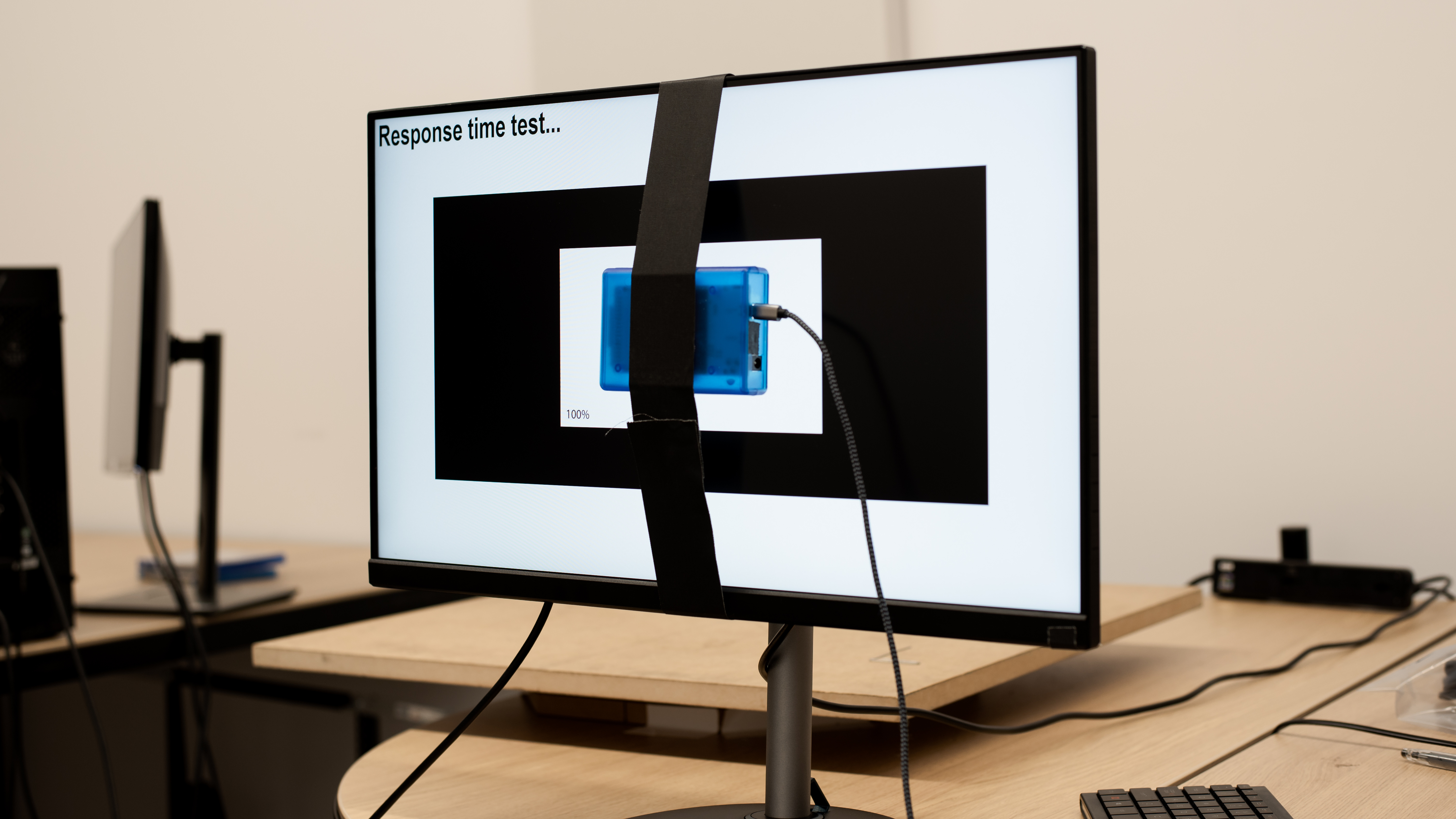
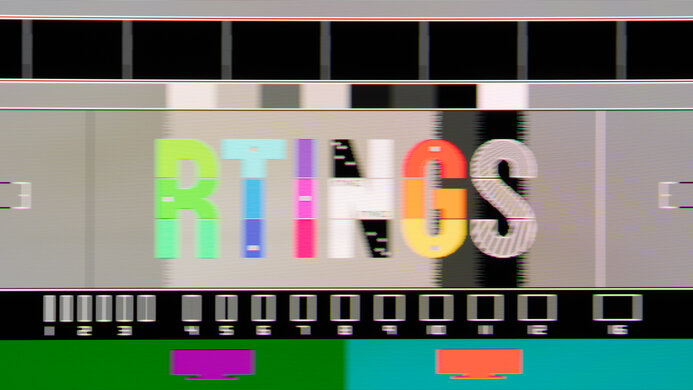
    The Acer Nitro XF243Y Pbmiiprx has exceptional response time at its max refresh rate, resulting in almost no blur trail behind fast-moving objects. Enabling VRR disables any of the overdrive settings, and if you disable VRR, the 'Normal' setting performs similarly to when VRR is on. However, turning the overdrive setting off also results in less overshoot than 'Normal'.

    8.3
    Response Time @ 120Hz
    Recommended Overdrive Setting
    FreeSync On
    Rise / Fall Time
    2.6 ms
    Total Response Time
    9.5 ms
    Overshoot Error
    10.8%
    Worst 3 Rise / Fall Time
    3.0 ms
    Worst 3 Total Response Time
    15.4 ms
    Worst 3 Overshoot Error
    46.6%

    Overdrive Setting Response Time Chart Response Time Tables Motion Blur Photo
    Off Chart Table Photo
    Normal Chart Table Photo
    Extreme Chart Table Photo
    FreeSync On Chart Table Photo

    The response time at 120Hz is great. With VRR enabled, motion look great as there's minimal blur. If you disable VRR, setting the overdrive setting to 'Off' results in the best motion handling as there's less overshoot than 'Normal'.

    7.3
    Response Time @ 60Hz
    Recommended Overdrive Setting
    FreeSync On
    Rise / Fall Time
    2.7 ms
    Total Response Time
    16.3 ms
    Overshoot Error
    12.3%
    Worst 3 Rise / Fall Time
    3.2 ms
    Worst 3 Total Response Time
    23.8 ms
    Worst 3 Overshoot Error
    52.2%

    Overdrive Setting Response Time Chart Response Time Tables Motion Blur Photo
    Off Chart Table Photo
    Normal Chart Table Photo
    Extreme Chart Table Photo
    FreeSync On Chart Table Photo

    The Acer Nitro XF243Y Pbmiiprx has a decent response time at 60Hz. There's a lot of overshoot when you have VRR enabled, resulting in inverse ghosting. If this bothers you, disabling VRR and the overdrive setting results in no overshoot and good motion handling.

    Backlight Strobing (BFI)
    Backlight Strobing (BFI)
    Yes
    Maximum Frequency
    165 Hz
    Minimum Frequency
    119 Hz
    Longest Pulse Width Brightness
    190 cd/m²
    Shortest Pulse Width Brightness
    100 cd/m²
    Pulse Width Control
    Limited
    Pulse Phase Control
    No
    Pulse Amplitude Control
    No
    VRR At The Same Time
    No

    The Acer Nitro XF243Y Pbmiiprx has an optional backlight strobing feature, also known as black frame insertion (BFI). The setting to enable it is called VRB and you can set it to 'Normal' or 'Extreme', depending on the intensity of how you prefer it. You can also change the overdrive setting at the same time. You can see photos of the combinations of the two settings below. The above photo and graph are with BFI on 'Extreme' and the overdrive on 'Normal'.

    Refresh Rate VRB Setting Over Drive Setting Motion Blur Photo
    165Hz Normal Off Photo
    Normal Normal Photo
    Normal Extreme Photo
    Extreme Off Photo
    Extreme Normal Photo
    Extreme Extreme Photo
    120Hz Normal Off Photo
    Normal Normal Photo
    Normal Extreme Photo
    Extreme Off Photo
    Extreme Normal Photo
    Extreme Extreme Photo

    10
    Image Flicker
    Flicker-Free
    Yes
    PWM Dimming Frequency
    0 Hz

    The backlight is entirely flicker-free, which helps minimize image duplication and reduce eye strain.

    Inputs
    8.9
    Input Lag
    Native Resolution @ Max Hz
    3.8 ms
    Native Resolution @ 120Hz
    5.2 ms
    Native Resolution @ 60Hz
    9.3 ms
    Backlight Strobing (BFI)
    6.8 ms

    The Acer Nitro XF243Y Pbmiiprx has an exceptionally low input lag, resulting in an extremely responsive gaming experience. It's slightly higher at 60Hz, which is typical, but it shouldn't be noticeable to most people.

    6.8
    Resolution And Size
    Native Resolution
    1920 x 1080
    Aspect Ratio
    16:9
    Megapixels
    2.1 MP
    Pixel Density
    92 PPI
    Measured Screen Diagonal
    24.0"
    Screen Area
    247 in²

    The Acer Nitro XF243Y Pbmiiprx has a decent resolution and size. The smaller screen size makes it easier to see the entire screen for better environmental awareness in some games; however, it feels less immersive. It might also feel a bit cramped for productivity, especially if you like having multiple windows placed side-by-side. The 1080p resolution is very common for a screen this size and helps achieve a higher frame rate for smoother gameplay, but the resulting pixel density might still be too low for some.

    7.0
    PS5 Compatibility
    4k @ 120Hz
    No
    4k @ 60Hz
    Yes
    1440p @ 120Hz
    No
    1440p @ 60Hz
    No
    1080p @ 120Hz
    Yes
    1080p @ 60Hz
    Yes
    HDR
    Yes
    VRR
    No

    This monitor works well with the PS5. It downscales a 4k image, which results in a sharper image than a native 1080p signal, but because it lacks HDMI 2.1 bandwidth, you can't use it for 4k @ 120Hz gaming. HDR isn't automatically enabled on the monitor with the PS5, and you have to manually enable it.

    8.3
    Xbox Series X|S Compatibility
    4k @ 120Hz
    No
    4k @ 60Hz
    Yes
    1440p @ 120Hz
    No
    1440p @ 60Hz
    Yes
    1080p @ 120Hz
    Yes
    1080p @ 60Hz
    Yes
    HDR
    Yes
    VRR
    Yes

    There aren't many issues using this monitor with the Xbox Series X|S. Like with the PS5, it downscales a 4k signal, and because the Xbox only supports HDR in 4k, you need to use that if you want HDR. 1440p @ 60Hz also works, but only if you manually enable it with the console's HDMI override settings, which also disables VRR.

    Inputs Photos
    Video And Audio Ports
    DisplayPort
    1 (DP 1.2)
    Mini DisplayPort
    No
    HDMI
    2 (HDMI 2.0)
    HDMI 2.1 Rated Speed
    No HDMI 2.1
    DVI
    No
    VGA
    No
    Daisy Chaining
    No
    3.5mm Audio Out
    1
    HDR10
    Yes
    3.5mm Audio In
    No
    3.5mm Microphone In
    No
    USB
    USB-A Ports
    0
    USB-A Rated Speed
    No USB-A Ports
    USB-B Upstream Port
    No
    USB-C Ports
    0
    USB-C Upstream
    No USB-C Ports
    USB-C Rated Speed
    No USB-C Ports
    USB-C Power Delivery
    No USB-C Ports
    USB-C DisplayPort Alt Mode
    No USB-C Ports
    Thunderbolt
    No

    If you're looking for a monitor with a USB hub, check out the Dell P2425H.

    macOS Compatibility

    Unfortunately, there are some issues when using this monitor with a MacBook. It doesn't always recover from sleep mode right away, and when it does, windows don't go back to their original position. VRR and HDR work well in-game, but there's some flickering with VRR enabled if the refresh rate is around 48Hz. You have to manually enable HDR from the monitor's OSD; it doesn't automatically switch.

    Features
    Additional Features
    Speakers
    Yes
    RGB Illumination
    No
    Multiple Input Display
    No
    KVM Switch
    No

    The Acer Nitro XF243Y Pbmiiprx has a few additional features, including:

    • Crosshair: Adds a virtual crosshair.
    • Low Blue Light: Blue light filter to help reduce eye strain.
    • DDC/CI: Lets you change the monitor's settings through software.
    • Frame rate counter: Adds an overlay that shows the current frame rate.
    On-Screen Display (OSD)