The 4k LG OLED E6 TV delivers an excellent picture quality that can be enjoyed from anywhere in the room. Due to its perfect black, it has an infinite contrast ratio which results in a picture that pops. Motion blur is also practically non existent. It isn't perfect though, maximum brightness and dark gray uniformity could be better.
Our Verdict
Great TV for a range of different usages. Can't be beaten for movies or sports watching. Very responsive for playing video games.
- Nearly no motion blur in sports and video games
- Excellent picture quality even when viewed from the side
- Infinite native contrast ratio due to perfect black
- Brightness not as high as other HDR TVs and varies depending on content
- Prone to temporary image retention after displaying static images
Excellent movie performance. Provides perfect blacks and great picture quality. Bright enough to make the image pop.
Great for watching TV shows in a bright living room. Picture quality is great, even at an angle. Deals well with ambient reflections.
Very good sports performance. Almost perfect motion handling for fast plays. Very good uniformity for panning across a field.
Excellent for video games. Low input lag, and excellent response for fast paced games. Works well with a range of resolutions.
Exceptional HDR performance. Displays a wide range of colors and can get bright highlights.
Great choice for HDR gaming. Picture quality is excellent due to perfect blacks and feels responsive due to fairly low input lag and instantaneous response time. Supports both HDR10 and Dolby Vision formats. Unfortunately some temporary image retention may be visible with static elements and the screen brightness depends on the content.
Great as a PC monitor. Supports a wide range of resolutions and displays very clear text. Very good input lag.
Check Price
Differences Between Sizes And Variants
We tested the 55" (OLED55E6P). For the most part, we expect our review to be valid for the 65" (OLED65E6P).
If someone comes across a different type of panel or if their LG OLED 55E6P doesn't correspond to our review, let us know and we will update the review.
| Size | Model |
| 55" | OLED55E6P |
| 65" | OLED65E6P |
Popular TV Comparisons

The LG OLED E6 is very similar to last year 4k OLED TVs. Its picture quality can't be beat but some high quality LED TVs offers better bang for the bucks. If budget is not an issue though, there is still nothing better than an OLED TV.

We buy and test dozens of TVs yearly, taking an objective, data-driven approach to deliver results you can trust. Our testing process is complex, with hundreds of individual tests that take over a week to complete. Most of our tests use specially designed test patterns that mimic real content, but we also use the same sources you have at home to ensure our results match the real-world experience. We use two main tools for our testing: a Colorimetry Research CR-100 colorimeter and a CR-250 spectroradiometer.
Test Results
Older Test Bench: We tested this product using an older TV test methodology before a major update. Some of the test results below aren't directly comparable with other TVs. Learn more
for pictures & test results

The look of the LG OLED E6 is impressive. From first glimpse, the TV appears high end. The upper part of the TV is so thin that it is hard to imagine televisions getting any thinner than this. The stand and speakers are flat with the table surface which is an interesting design.
for pictures & test results

The stand is minimalist and extend from the middle of the flat speaker surface. It is made of plastic but doesn't deviate from the classy look of the LG E6P.
Footprint of the 55" TV stand: 18.5" x 4.3"
for pictures & test results

The back of the TV has a nice shiny dark purple and textured finish. It doesn't require a special mount like previous OLED TVs.
for pictures & test results

Borders look very good from up close. The front glass sits directly on the back panel of the TV.
for pictures & test results

The upper part of the LG E6 is amazingly thin when viewed from the side. Only the lower part of the TV goes thicker on the back. Because of this, the screen won't be flush on a wall if wall mounted. On such a setup, some of the back connections might be blocked too. The 'Max Thickness' measurement includes the cable management hanger that stick out at the back of the TV and that can't be removed.
for pictures & test results

The pixels in an OLED display are individually switched on and off, and so infinite contrast ratio exists where the blacks emit no light.
for videos & test results

For reference, we took a video of our local dimming test.
The overall SDR peak brightness is average for the LG E6 OLED TV. SDR peak brightness is good until the highlight gets pass 25% of the total windows size. At this point, ABL (Automatic Brightness Limiter) start to dim the highlight making each of the following windows dimmer than the previous one and leaving the full screen 100% windows at almost 1/4 of the brightness of the 2% windows.
The E6 has a much better peak brightness than any other OLED TV we have reviewed. Like other OLED TVs, it has ABL (Automatic Brightness Limiter). The maximum luminosity varies depending on the content. A bright image full screen is significantly darker than on other TVs, which is apparent in scene transitions.
When displaying static content, brightness starts to go down after around 1 minute 45 seconds until it stabilizes at around 6 minutes. During that time, any movement on screen will bring back the brightness to its full capacity.
for pictures & test results

for pictures & test results

The gray uniformity is better than LED TVs, but it is still not perfect. You can see in our picture that the top half is warmer than the bottom, and the edges brighter.
In the dark shadows (see the 5% picture), there is less vignetting than on the EF9500, which is great. A few vertical bands can still be seen though.
There is image retention, which is most obvious when viewing a gray screen after long periods of static content. This should not be an issue when viewing normal content.
for videos & test results

for pictures & test results
for pictures & test results
for pictures & test results
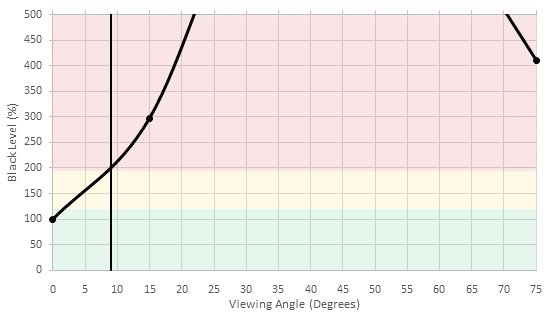
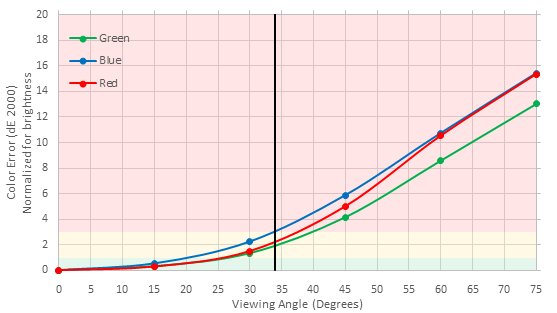
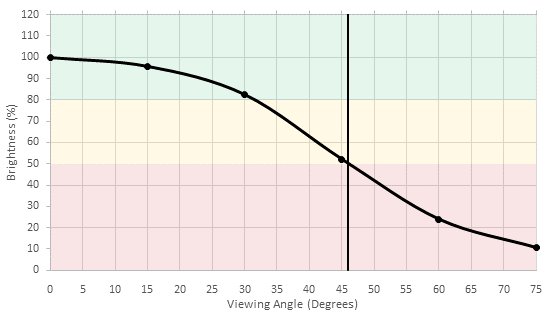
The viewing angle of the E6 is great and won't be an issue. Contrast stays very good even from severe angles but like other OLED TVs, color shifts can be observed from around 20 degrees.
for pictures & test results

On a completely black screen, the pixels emit no light and the uniformity is perfect.
for pictures & test results

The E6 has a 10 bit panel, and the colors appear very good with only very slight tints, not noticeable when viewing normal content.
for pictures & test results

for pictures & test results

for pictures & test results

Good out of the box white balance and color dE. Although faint, a blue tint can be observed and appear more prominent in our pictures than it is with our eyes. The camera sensor would be more sensible to it.
for pictures & test results

for pictures & test results

for pictures & test results

Calibrating the LG E6 wasn't hard and most problems could be fixed. Unfortunately, the blue tint issue couldn't be resolved completely although it became less prominent.
for pictures & test results

Lower resolution content like DVDs are upscaled without any issues and looks very good on the LG E6.
for pictures & test results

720p content like Cable TV also looks very nice and crisp on the E6.
for pictures & test results

Blu-rays looks very good and define on this TV.
for pictures & test results

Native 4k content looks sharp and very define. Note that the blue tint observed in our pictures isn't as pronounced when viewed with our eyes. Our camera sensor seems to exaggerate it because of the special screen coating.
for pictures & test results

To achieve greater support for Rec. 2020 you must change 'Color Gamut' to 'Wide' and enable 'HDMI Ultra HD Deep Color' on the input you are using. The color gamut will be automatically changed to 'Wide' when an HDR signal is detected.
Update 10/13/2016: We remeasured the color gamut, and have updated the result.
for pictures & test results
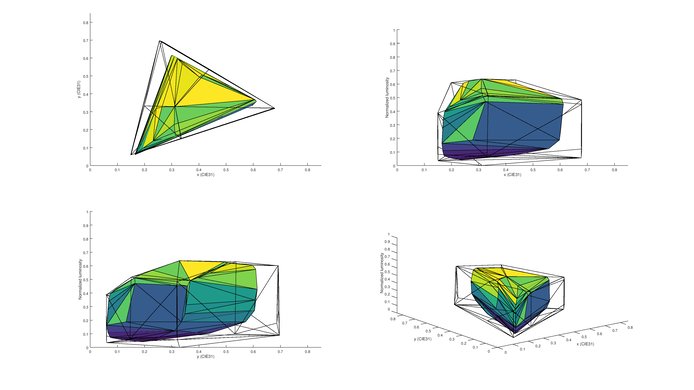
for pictures & test results
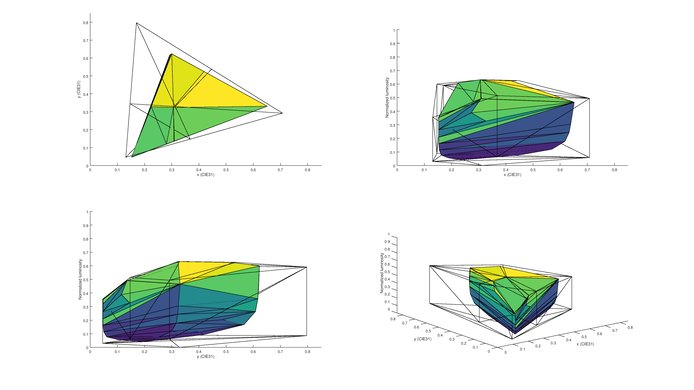
The E6 has the same good color volume coverage of the other 2016 OLED models. It can produce saturated P3 colors even at low luminance.
for pictures & test results

The E6P OLED TV does have some image retention, like the B6P and the C6P OLED TVs. The image retention is not as strong as we have seen on some LG IPS TVs, but it tends to last much longer, which can be annoying to people who play a lot of video game and also watch TV shows or movies with the same TV. Note that we did have to run the test/fix program from the TV main menu to get rid of some residual image retention, before we could run our image retention test, since it already had some image retention from other testing done beforehand. The procedure got rid of all the image retention and we could do our test afterward. This is a good example of how OLED TV behave and even if retention last a bit longer, it is not a permanent problem.
for pictures & test results

for pictures & test results

Reflections are well taken care off on the LG E6. The TV can get bright enough so it isn't a problem in a bright room and direct reflections can be seen through although they have a purple tint. No rainbow effect could be seen which is also good.
for pictures & test results
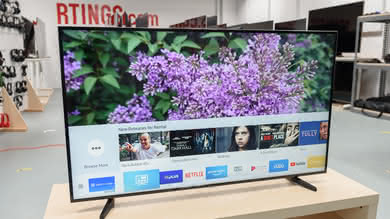
The E6 has passive 3D which performs very well. The higher resolution of the 4k screen means you don't see the alternating lines which are visible on 1080p OLEDs.

for pictures & test results

for pictures & test results

Just like other OLED TV we have reviewed in the past, the response time is practically perfect and there is very little overshoot. No trail can be seen following the logo at all, which will give a very clear watching experience during fast movements. The backlight of the TV is also flicker-free.
for pictures & test results

As with the other LG OLED TVs, the E6 doesn't flicker moving images. This means that despite the very fast response time, some blur is seen due to eye tracking.
Enable 'RealCinema' under 'Picture Mode Settings'>'Picture Options' to remove judder on 24p content over a 60i signal. Movies over 24p signals such as a blu-ray player experience no judder.


Update 06/17/2016: The input lag can take some time to stabilize, but adjusting the picture mode to 'Game' and changing the input icon to 'Game console' reduces the input lag to 34.2ms at 1080p. Ensure 'TruMotion' is disabled.
Update 08/09/2016: The 1080p input lag outside game mode was updated to 50.7ms and the input lag under HDR mode with a 1080p resolution was also verified, and it is also of 50.7ms.
Update 09/14/2016: The input lag with an HDR signal under a 4k @ 60Hz resolution is a bit higher than without an HDR signal, because when the TV detects a HDR signal, it switches to a special HDR picture mode. To have the best input lag, be sure to select the 'HDR Standard' picture mode.
Note that the less expensive LG B6 has a better input lag under HDR with a 4k resolutions than the E6.
Update 10/07/2016: A video of the input lag differences can be seen here.
Update 11/08/2016: Some owners have started a petition to LG to address these issues. This can be found here.
Update 12/02/2016: With the newest firmware update (04.30.19) there has been the addition of a HDR gaming mode. In this mode the HDR input lag is lower, and should be fine for HDR gaming. Note that although the TV accepts a 4k @ 60Hz @ 4:4:4 + HDR signal, it can't accurately display the chroma subsampling in any HDR mode, even with the 'PC' icon selected. The HDR chroma subsampling looks the same as the B6, visible here .
To enable chroma 4:4:4 support, change the input icon to PC. Press the input button on the remote, select 'All Inputs', and click 'Edit Icon'. For chroma 4:4:4 support at 4k and 60Hz, enable 'ULTRA HD Deep Color' under 'General' settings. The input lag in PC mode with the 'Game' picture mode is 34.0 ms.


for pictures & test results

Very good frequency response, for a TV. With the low-end cutoff of 71Hz and maximum loudness of 91.2dB, this TV should be able to perform decently in most situations. However, at higher volumes, some pumping and compression may be present. Also, it won't be able to produces the punch and low-end thump that external speaker/sub systems are able to produce.
for pictures & test results

Average performance. The amount of total harmonic distortion at 75dB is excellent. However, there is a noticeable rise in the amount of harmonic distortion under heavier load, especially at maximum volume, while remaining within acceptable limits.
for pictures & test results

The TV doesn't lack support for applications as it has the most demanded applications such as Youtube, Netflix and Amazon Video already pre-loaded to the home screen, you can also downloaded plenty of applications from 'LG Content Store' that is also located on the home screen. Since WebOS is open source to the public there will never be the lack of applications.
for pictures & test results

The LG E6P comes loaded with WebOS 3.0 that has both a sleek design and a very responsive interface. WebOS 3.0 comes with many demanded application such as Youtube, Netflix, and Amazon Video already pre-loaded on the home screen which is great for easy access, you can also download plenty of application straight from the 'LG Content Store'. Since WebOS is open source you can expect frequent updates as well the number of applications to increase. The remote, just like other LG TVs we have reviewed in the past, has a pointer which makes it very easy to navigate through menus. In terms on inputs, this TV has it all, you will not have any issue when it comes to connecting all your devices to it.
The E6 is one of the most expensive TVs this year. In spite of that, it isn't free from ads.
for pictures & test results

Basic TV controls can be performed with a little controller located at the back of the left side of the TV. This can be accessed if the TV is wall mounted.
for pictures & test results

The LG E6 comes with the new premium magic remote. It is bigger than previous magic remote iterations but works the same with a pointer that can be controlled on the screen with remote movements. It works great and is a pleasure to use.
for pictures & test results

- Remote
- Batteries
- Wall Mount Cover
- Component In Adapter
- Composite In Adapter
- Two 3D Glasses