Note that this is a different TV to the 2017 QLED Q6F. The 2018 Q6FN is also called Q6F or Q6.
Our Verdict
Very good TV for mixed usage. The Samsung Q6F has good picture quality and looks good in most room types. It has some great features for use as a PC monitor and for gaming. Dark room performance is good and it has good HDR capabilities.
- Blacks are deep and uniform
- Low input lag for gamers
- Supports FreeSync for Variable Refresh Rates
- Image degrades when viewed at an angle
Good TV for watching movies in a dark room. It has good picture quality, and the native contrast ratio is high, so blacks appear black in a dark room. Unfortunately, the bad local dimming feature isn't very effective at dimming areas of the screen and letterbox bars aren't completely black.
Decent TV for watching TV in a bright room. It has decent reflection handling and gets bright enough to overcome glare in a bright room, but it has a poor viewing angle and the picture degrades when viewed at an angle.
Good TV for watching sports. The Samsung Q6 is able to overcome most glare in a bright room but has limited reflection handling due to the lack of an anti-reflective coating. Fast-paced movement appears fluid with little motion blur thanks to the high response time, but there is some dirty screen effect and the center of the screen is a bit brighter than the rest.
Excellent TV for video games. It has extremely low input lag for 4k and for 1080p content as long as Game mode is on. It supports a variable refresh rate when used with compatible hardware. Motion is fluid with very little trail thanks to the fast response time.
Good TV for HDR movies. The contrast is excellent, so blacks appear black, and it is bright enough for small highlights to pop in HDR. The local dimming feature is bad and can't effectively dim dark areas of the screen. It supports a wide color gamut and there is only slight gradation in scenery.
Great TV for HDR gaming. The input lag is extremely low and it supports a variable refresh rate. Dark room performance is great thanks to the high native contrast ratio but the local dimming feature is bad and can't be disabled.
Great TV for use as a PC Monitor. The response time is fast and the input lag is extremely low, so the screen feels responsive. Chroma 4:4:4 is properly supported with most resolutions, and it supports a variable refresh rate, great for PC gaming.
Changelog
- Updated May 21, 2020: Converted to Test Bench 1.5.
- Updated Feb 21, 2020: Converted to Test Bench 1.4.
- Updated Feb 28, 2019: Converted to Test Bench 1.3.
- Updated Nov 16, 2018: We have received confirmation that the 55" model with version FB02 has a VA-type panel. You can see a photo of the pixels here.
Check Price
Differences Between Sizes And Variants
We tested the 55" (QN55Q6FN) version FA01. For the most part, we expect our review to be valid for the 65" version (QN65Q6FN), 75" version (QN75Q6FN) and 82" version (QN82Q6FN). Note that larger TVs are typically more prone to uniformity issues.
The 49" model (QN49Q6FN) is not yet available but likely has a 60 Hz panel as documented by the Samsung Support Page, as such some results may be slightly different including the motion interpolation. We have also received confirmation from a reader that the 49" Q6FN does not support FreeSync. For the most part, we still expect our review to be valid.
The warehouse variant of the 2018 Q6F is known as the Q65FN. The stand is black instead of chrome, and depending on the specific warehouse model it might have a simpler remote. We don't expect any other differences and our review should still be valid.
Update 09/25/2018: The Q65FN has a 4.1 sound system rather than the 2.1 system found on the Q6FN.
If someone comes across a different type of panel or if their Samsung Q6FN doesn't correspond to our review, let us know and we will update the review.
| Size | Model | Model Short | US | Warehouse Model | Canada | UK |
| 49" | QN49Q6FN | QN49Q6 | QN49Q6FNAFXZA | N/A | QN49Q6FNAFXZC | QE49Q6FNATXXU |
| 55" | QN55Q6FN | QN55Q6 | QN55Q6FNAFXZA | QN55Q65FNFXZA | QN55Q6FNAFXZC | QE55Q6FNATXXU |
| 65" | QN65Q6FN | QN65Q6 | QN65Q6FNAFXZA | QN65Q65FNFXZA | QN65Q6FNAFXZC | QE65Q6FNATXXU |
| 75" | QN75Q6FN | QN75Q6 | QN75Q6FNAFXZA | QN75Q65FNFXZA | QN75Q6FNAFXZC | QE75Q6FNATXXU |
| 82" | QN82Q6FN | QN82Q6 | QN82Q6FNAFXZA | N/A | QN82Q6FNAFXZC | QE82Q6FNATXXU |
Update 11/15/2018: We've been contacted by a reader who bought a 55" Q6FN with version FB02 that has an IPS panel. We expect this to have a much lower contrast ratio and worse dark room performance, but a more accurate image when viewed at an angle.
Update 11/16/2018: We have received confirmation that the 55" Q6FN with version FB02 has a VA type panel. We expect performance in the same ballpark as the version VA01 we reviewed. You can see a photo of the pixels here.
Popular TV Comparisons

See our recommendations for the best 4k TVs, the best smart TVs, and the best OLED TVs.
The LG C8 OLED is significantly better than the Samsung Q6FN/Q6/Q6F QLED 2018. The LG C8 is an OLED TV with perfect blacks, which has remarkable picture quality that looks amazing in a dark room. The LG C8 has better reflection handling and wider viewing angles, and is more suitable for a wide room with many light sources. On the other hand, the VA panel of the Samsung Q6FN doesn't have a permanent burn-in risk, like the OLEDs, and the TV incorporates the FreeSync variable refresh rate and a low input lag, which is great if you're a fan of video games.
The Samsung Q6FN/Q6/Q6F QLED 2018 is a bit better than the Samsung RU8000, but it may be hard to find now. The Q6FN has an edge-lit local dimming feature, which, although it isn't very effective, it can help a bit with some content. The Q6FN can also get a lot brighter, especially with HDR content. The RU8000, on the other hand, has a faster response time and supports a 1440p @ 60Hz resolution, making it better for gaming.
The Samsung Q70R is better than the Samsung Q6FN/Q6/Q6F QLED 2018. The Q70R has full-array local dimming that enhances dark room performance and a marginally faster response time, which is great for watching sports. The Q70R also has better reflection handling to minimize distraction if your room has many light sources. The Q6FN can get a little brighter, which is important if you have a very bright room.
The Samsung Q6FN/Q6/Q6F QLED 2018 is a bit better than the Samsung Q60R. The Q6FN is much brighter, especially in HDR, and can produce a wider color gamut. The Q6FN also has a local dimming feature, although it isn't very effective. The Q60R, on the other hand, has a faster response time, and the smart interface is somewhat smoother.

We buy and test dozens of TVs yearly, taking an objective, data-driven approach to deliver results you can trust. Our testing process is complex, with hundreds of individual tests that take over a week to complete. Most of our tests use specially designed test patterns that mimic real content, but we also use the same sources you have at home to ensure our results match the real-world experience. We use two main tools for our testing: a Colorimetry Research CR-100 colorimeter and a CR-250 spectroradiometer.
Test Results
Older Test Bench: We tested this product using an older TV test methodology before a major update. Some of the test results below aren't directly comparable with other TVs. Learn more
for pictures & test results

The design of the Samsung Q6FN is very good. Some of its features like the stand, the back, and the cable management system resemble the higher-end Q8FN. Just like the Q8FN, the Q6FN does not come with the external One Connect box, so you do not have to plan for it if you decide to wall mount it. The TV is thin with nice borders and operates at a reasonably cool temperature. The build quality is okay but lacks those finishings that premium models have.
for pictures & test results

The stand of the Samsung Q6F is metallic, supports the TV well and look very much like the Q8FN only slightly bulkier.
Footprint of the 55" TV stand: 38.3" x 9.8"
for pictures & test results

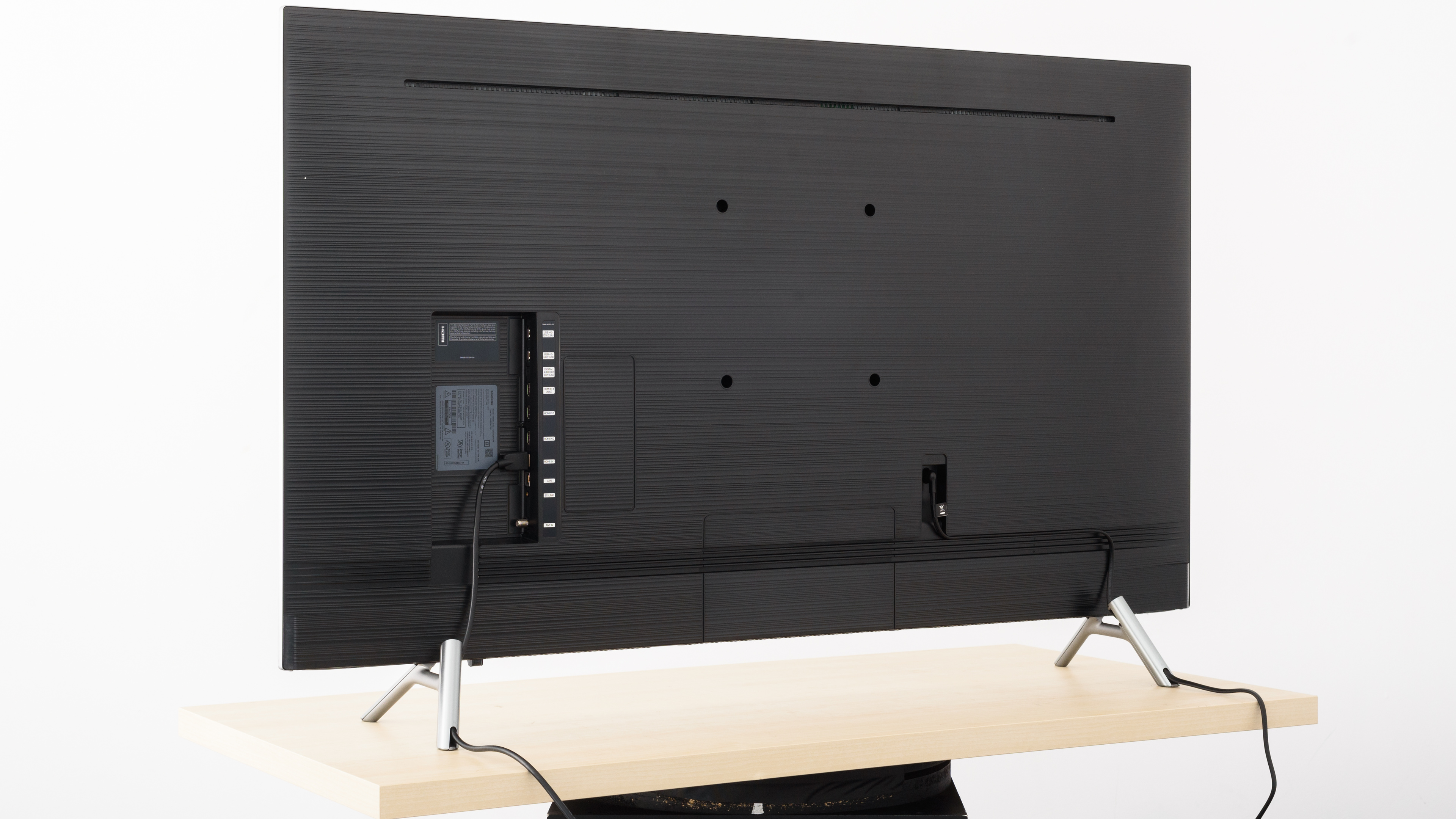
The back of the Samsung Q6F 55 is plastic, and nearly identical to the Q8FN and the NU8000.
It has nice cable management planning. There are some grooves for guiding all of the cables either through the legs or through the bottom of the TV when wall-mounted.
for pictures & test results

The borders are metallic with a silver finish. They are slightly thinner than the Q8FN.
for pictures & test results

The Samsung Q6 is a thin TV. Although it is slightly thicker than the Q8FN, it will still not protrude when wall mounted.
for pictures & test results

The build quality of the Q6 is okay. It does not have any gaps and feels solid. It lacks the premium feeling that the Q8FN has.
for pictures & test results

The contrast of the Samsung Q6F 55 is excellent. Just like most Samsung TVs, the contrast level is high. Even with local dimming disabled the contrast is excellent and blacks appear black in a dark room.
Note: This TV does not allow the switching off of Local Dimming from the regular menu. To take our measurements of native contrast and black uniformity we had to deactivate it through the service menu.
for videos & test results

Local Dimming performance is poor, and it is very conservative. It doesn't dim areas of the screen very much, likely to reduce the amount of visible blooming. If you find that it bothers you, you can set it to low as it cannot be turned off completely from the regular menu.
Superb peak brightness with SDR content. Bright highlights that stand out, and real scenes bright enough for most rooms. This is in-line with other 2018 Samsung QLEDs we have tested so far.
The HDR peak brightness performance of the Q6FN is very good. Just like the rest of the 2018 Samsung QLEDs, it will display small highlights very well, and the screen remains uniformly bright throughout all the test window sizes.
for pictures & test results

for pictures & test results

Gray uniformity is decent. At 50% gray, some clouding is visible and the center of the screen is slightly brighter. Dirty screen effect is noticeable when watching sports or playing video games. However, results improve significantly at darker shades of gray and the uniformity is much better, and almost no clouding or DSE can be seen.
for videos & test results

for pictures & test results

for pictures & test results

for pictures & test results

The Samsung Q6F has a poor viewing angle, typical for a VA panel. When looking at an angle one notices blacks turning gray and colors shifting, even at small angles. These results are in line with results from other QLEDs. This TV is not a good option if the intended usage involves wide room seating.
for pictures & test results

for pictures & test results

Black uniformity is outstanding on the Q6F, surpassing the already good performance of the Q8FN. There is almost no clouding even close to the test cross.
With LD activated the results are slightly worse as we can see some clouding around the test cross area, but in general, they are still very good.
Note: This TV does not allow the switching off of Local Dimming from the regular menu. To take our measurements of native contrast and black uniformity we had to deactivate it through the service menu .
for pictures & test results

for pictures & test results

for pictures & test results

The overall reflection handling is good. The Semi-gloss screen of the Q6FN manages to diffuse well most indirect reflections. It fails, however, to perform as well in the total reflections, therefore you should expect some glare in bright rooms.
for pictures & test results

for pictures & test results

for pictures & test results

The pre-calibration out of the box settings are pretty good for the Q6. Best results are with the picture mode set to Movie.
At low input levels, the image appears slightly dark as white is missing luminosity. Colors, however, are quite accurate, and just a little warmer due to the 6318K color temperature. The gamma is off at 2.45.
Here are the white balance and gamma pictures measured with 100% windows. These perform better, as the local dimming cannot be disabled and affects the calibration results of smaller window sizes.
Update 04/12/2019: This TV was incorrectly measured with Brightness +2, instead of at 0. This only has a small impact on the results (slightly dimmer dark scenes below about 30 IRE) and so we don't plan to retest it.
for pictures & test results

for pictures & test results

for pictures & test results

The post-calibration image is excellent. The color temperature is very close to our target, and gamma follows our target almost exactly.
Calibration is done with a 100% window instead of our standard 18% window, as the local dimming causes inconsistent readings of smaller windows.
You can see our recommended settings here.
for pictures & test results

Lower resolution 480p content like DVDs is upscaled well, with no obvious artifacts or quality issues.
for pictures & test results

Upscaling of 720p content such as cable TV or older game consoles looks good.
for pictures & test results

Upscaling of 1080p content such as Blu-rays or game consoles looks good. The image is sharp and there are no obvious issues.
for pictures & test results

The Samsung Q6 displays native 4k content without any issues.

for pictures & test results

for pictures & test results

for pictures & test results

The Q6F has a wide color gamut as it covers more than 90% of the DCI P3 color space and just above 67% of the Rec.2020 color space.
It is not as wide as the Q7FN or the Q8FN and it also suffers when it comes to the representation of cyan, green and yellow.
It tracks the EOTF line well almost up to about 700 nits or 65% of the input signal, after which some compression is taking place. This will not be bothersome to most people.
The PC and Game mode EOTFs do not follow our input stimulus as well. This effectively makes shadows in dark scenes look slightly darker, but it shouldn't be an issue for most people.
for pictures & test results

for pictures & test results

The Samsung Q6FN has good color volume. It can produce bright colors but fails to do the same with deep, dark ones. The color volume is good, but not up to par with the 2018 Q7FN and Q8FN models, but more comparable to the NU8000.
for pictures & test results

The Samsung Q6F 2018 has very good gradient performance. There is some slight banding everywhere, especially in gray and green, but hardly noticeable.
Even if you do notice a case of major banding that bothers you, you can set Digital Clean View to Auto to reduce it, but this could result in a loss of some fine details.
for pictures & test results

There was no temporary image retention on the 2018 Q6.
This is typical of TVs with VA panels.
We don't expect VA panels to experience burn-in, as the VA panel in our long-term test appears immune.
for pictures & test results

for pictures & test results

Excellent response time with almost no overshoot. The response time is slightly slower than the Q7FN, but still excellent. There is a very slight motion trail behind fast-moving objects, but most of the blur (as seen in the photo above) is due to persistence.
for pictures & test results

The Samsung Q6F uses PWM to dim the backlight, and there is visible flicker at all backlight levels. The flicker frequency is quite high at 240 Hz, but the flicker is still noticeable to some, especially at low backlight levels where the backlight is off for longer periods of time.
Like the other 2018 Samsung QLEDs, the backlight flicker varies quite a bit depending on the motion settings used, as shown here.
for pictures & test results

for pictures & test results

The Samsung Q6 can reduce the backlight flicker as low as 60 fps, even in Game Mode. This results in some duplications, as seen in the photo above, but there will be less motion blur.
To enable the black frame insertion feature on the Samsung Q6FN, set Auto Motion Plus to Custom, and set LED Clear Motion to On.
Like the other 2018 Samsung QLEDs, the backlight flicker varies quite a bit depending on the motion settings used, as shown here.
for pictures & test results

for pictures & test results

The Samsung Q6 can interpolate lower frame rate content up to 120 fps. Performance is similar to the other 2018 Samsung QLEDs. There are some visible artifacts in scenes with fast motion, and in some scenes when the motion gets too intense the Q6FN stops interpolating.
Interpolation is activated by setting 'Auto Motion Plus' to 'Custom'. The 'Judder Reduction' can be adjusted for low frame rate content, and the 'Blur Reduction' slider can be adjusted to help clear up motion on 60 fps content.
Like the other 2018 Samsung QLEDs, the backlight flicker varies quite a bit depending on the motion settings used, as shown here.
Update 06/05/2018: The 49" model has a 60 Hz panel, as such it can only interpolate as high as 60 fps.
Low frame rate content like 24p Blu-rays stutters a bit, this is mostly noticeable in wide spanning landscape scenes. If stutter bothers you, it can be reduced by enabling motion interpolation or the optional black frame insertion feature.
The Samsung Q6F 55 is effective at removing Judder from 24p content from all sources, including when sent in a 60 fps signal from a cable box. This is different from the other Samsung QLED TVs we have reviewed this year like the Q7FN and Q9FN.
To enable the Judder reduction feature, set Auto Motion Plus to Custom, with both sliders set to 0 as shown here.
Like the other 2018 Samsung QLEDs, the backlight flicker varies quite a bit depending on the motion settings used, as shown here.
The Samsung Q6F supports FreeSync from our Xbox One S and Radeon RX 580 GPU, at 4k, 1440p and 1080p resolutions. At 1080p its range is wide enough to support Low Frequency Compensation, thus extending its lower limit below 20 Hz; unfortunately its 4k range is a much smaller 60-48 Hz, but good enough for Xbox One games that target 60 fps.
On the TV, Freesync is enabled by turning on Game Mode and setting FreeSync to On. Game mode must be on for VRR to work. Even when set to 'Auto', the TV will stay in game mode as long as Freesync is enabled. The auto function will not turn off game mode when watching a movie on an Xbox One for example.
Update 11/05/2018: The 49" model has a 60 Hz panel and does not support FreeSync.
1440p @ 120 Hz: 9.3 ms
The Samsung Q6F has excellent low input lag when in PC or Game mode. The Q6 supports a variable refresh rate, and the 1080p input lag is extremely low with VRR enabled, which is great for Xbox One gaming.
Like the other 2018 Samsung TVs, the Q6FN can interpolate lower frame rate games up to 60 or 120 Hz. When interpolating up to 60Hz (Judder Reduction -> 10, Blue Reduction -> 0), there is 21.3 ms of input lag. When interpolating up to 120 Hz (Judder Reduction -> 10, Blur Reduction -> 10), there is 27.6 ms of input. Both of these are still low enough for most gamers and can be enabled to help motion appear smoother.
When the input label is set to 'PC' and Game mode is enabled, Game Motion Plus becomes available and the Q6FN supports a variable refresh rate when connected to a compatible PC.
The Samsung Q6FN supports most of the common resolutions without issue. Strangely, it supports 1440p @ 120 Hz without issue as long as Chroma 4:4:4 is not used, but 1440p @ 60 Hz is not supported.
4k @ 60 Hz with Chroma 4:4:4 or 4:2:2 require HDMI UHD Color enabled for the port used. For all resolutions Chroma 4:4:4 requires the input label to be set to PC
Update 06/05/2018: The 49" model has a 60 Hz panel, and does not support 120 Hz input.

Like the other Samsung QLED TVs there is no component and no composite input.
CEC must be enabled and the sound output must be set to 'Receiver (HDMI)' for the audio return channel to work. Like other 2018 Samsung TVs, there is no DTS passthrough. If you are using an external speaker system (receiver), it is better to connect your player directly to the receiver.
for pictures & test results

The frequency response is about average. LFE (low-frequency extension) is at 76Hz, which is decent. It means that this TV will produce a decent amount of punch, but no thump or rumble. The response above the LFE point is also decent, but may lack a little bit of clarity and presence for dialogs. Additionally, this TV doesn't get very loud, and doesn't have a room correction system either. That's why it wasn't able to remove the modes of our test room around 200Hz.
for pictures & test results

The distortion performance is mediocre. The overall amount of harmonic distortion is elevated, even at moderate volumes.
for pictures & test results

The Samsung Q6F has an easy to use, polished interface, but the large number of animations causes some performance issues. Like the other 2018 Samsung TVs, there are dropped frames and lag in the animations, and the interface freezes occasionally for a few seconds.
Like all Samsung TVs, there are intermittent ads in the main interface and they can't be disabled.
The ads are not always present and during testing we were not able to photograph them, but they appear similar to the Q8FN ad photo.
for pictures & test results

Samsung has one of the widest assortment of apps available. Apps are fast and smooth and the built-in apps can play most of the more common audio and video formats.
for pictures & test results

The remote is the same as the one included in all high-end Samsung TVs, including the other QLEDs and the NU8000. There are very few buttons, most of them open other menus on the TV.
The remote is also used for the TV's voice control. It can control most of the TV's settings and answer basic questions, like looking up weather. Unlike LG's voice control, Samsung's voice control can't search within apps.

for pictures & test results

- Batteries
- VESA Spacers
- Remote
- Quick Setup Guide
- 62" Power Cable