ASUS ROG Swift OLED PG32UCWM  Monitor Review

Reviewed Oct 29, 2026 at 08:51am
Tested using Methodology v2.2 
ASUS ROG Swift OLED PG32UCWM

Track

Track

 21

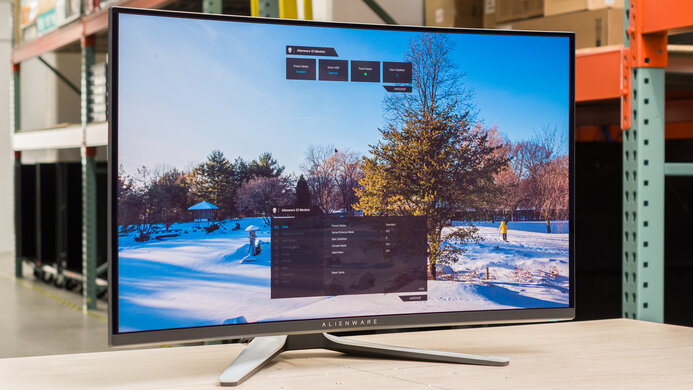
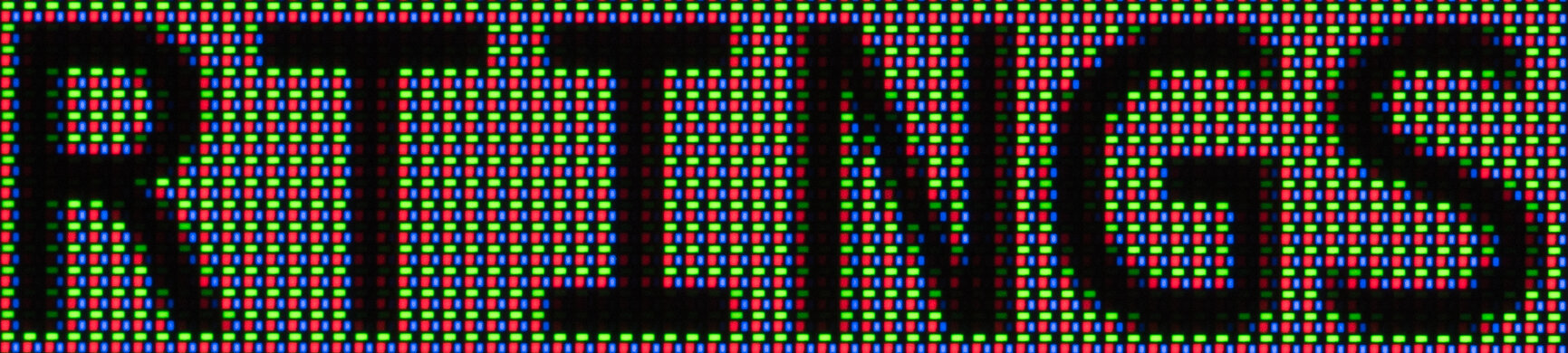
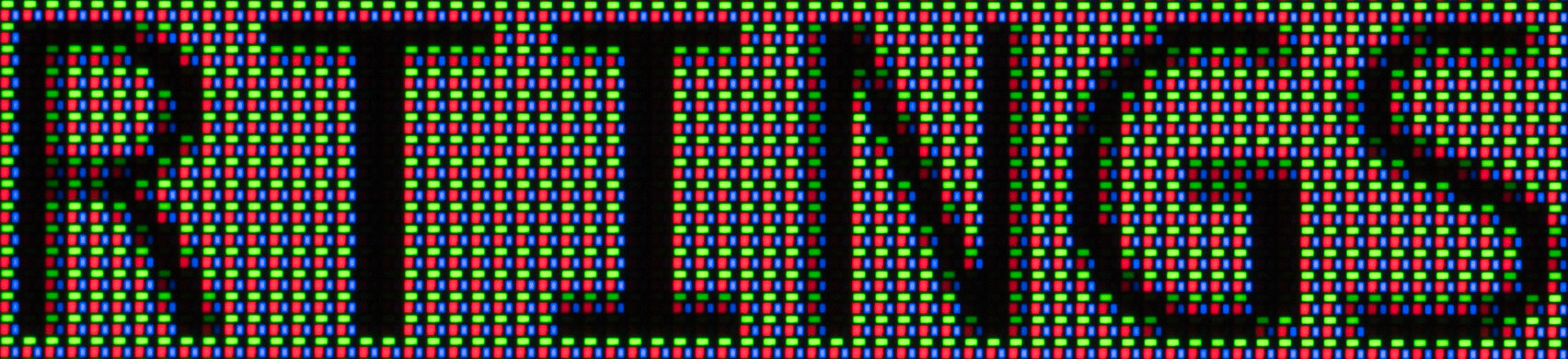
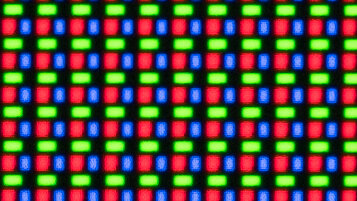
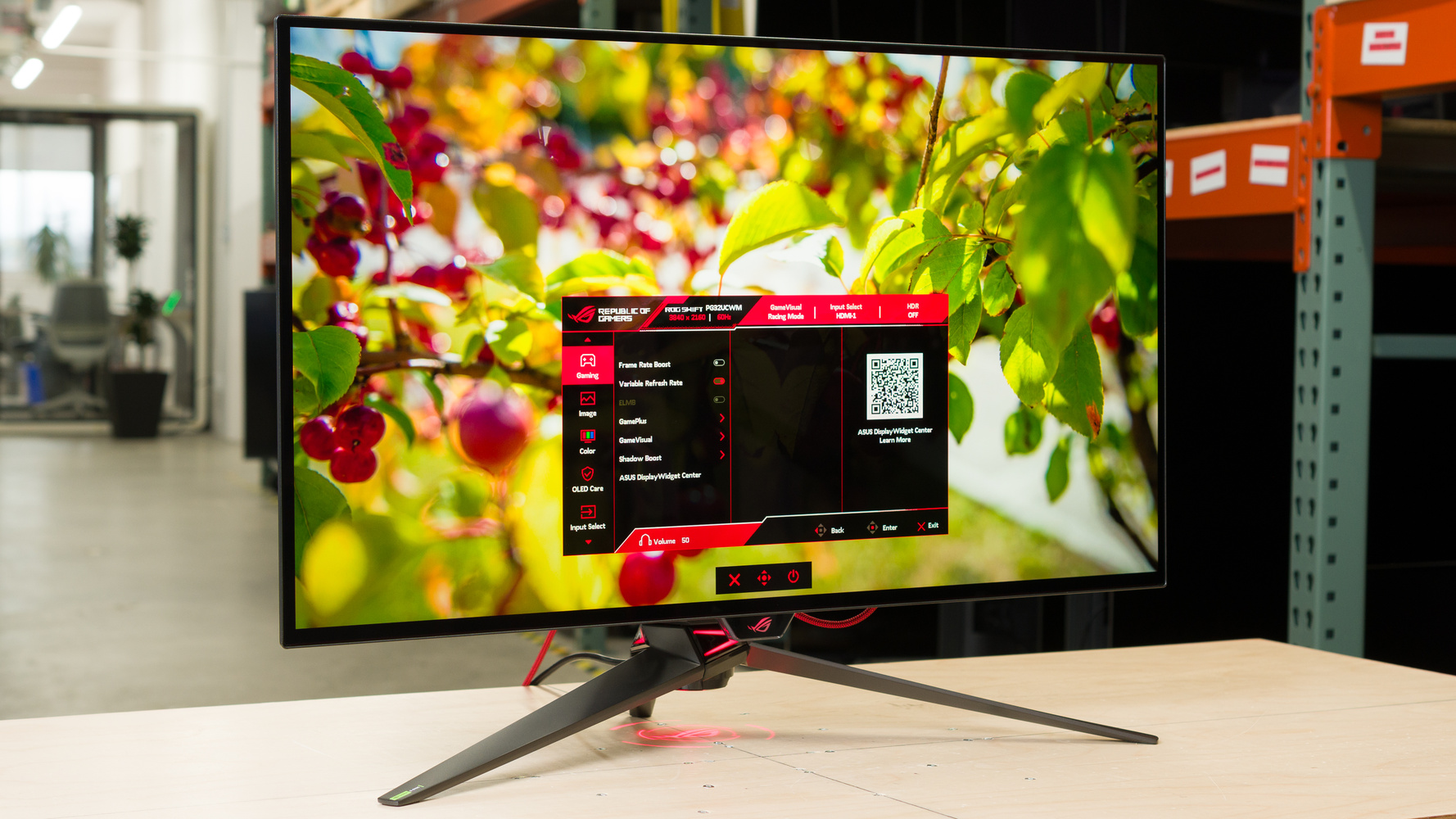
The ASUS ROG Swift OLED PG32UCWM is a high-end 4k, 32-inch OLED gaming monitor. Sitting alongside the smaller ASUS ROG Swift OLED PG27UCWM, it's an updated model of the ASUS ROG Strix OLED XG32UCWMG with a fourth-gen Tandem WOLED panel. It's one of the first of this panel type that uses a more standard RGB subpixel layout as opposed to using a white subpixel, like on older models. This helps improve text clarity with less fringing around letters. It also uses a TrueBlack glossy coating that aims to keep black levels low in bright rooms. As for gaming, it has a 240Hz refresh rate that you can boost to 480Hz with a lower 1080p resolution using its Frame Rate Boost feature. It also has high-bandwidth HDMI and DisplayPort inputs to make full use of the latest graphics cards and gaming consoles, and its Dolby Vision support helps if you want to game with an Xbox Series X|S. Lastly, it has some features to help your gaming experience, like AI Assistant that includes Dynamic Crosshair and Dynamic Shadow Boost modes to make it easier to see opponents.

Our Verdict

0.0
PC Gaming 

The ASUS PG32UCWM is incredible for PC gaming. You can switch between its 4k @ 240Hz and 1080p @ 480Hz modes, so it's versatile for playing different types of games with a smooth feel. Motion looks sharp at any refresh rate, and it has low input lag that's ideal for playing reaction-based games. It supports all common VRR formats to reduce screen tearing, but there's noticeable VRR flicker with fluctuating frame rates in dark scenes. On the plus side, this monitor delivers fantastic picture quality with deep blacks in any room and small highlights that pop in dark scenes. Although it displays a wide range of colors, colors aren't as bright as pure white, so some scenes lack punch.

Pros
  • 4k @ 240Hz and 1080p @ 480Hz dual modes.

  • Crisp motion across refresh rate range.

  • Low input lag; adds minimal delay to total system latency.

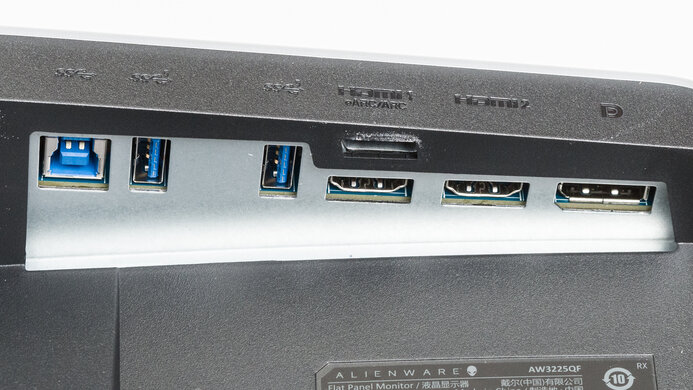
  • DisplayPort and HDMI 2.1-bandwidth inputs.

  • Deep blacks in any environment.

  • Supports all common VRR formats.

Cons
  • Noticeable VRR flicker in dark scenes with fluctuating frame rates.

  • Bright colors aren't as bright as pure white.

0.0
Console Gaming 

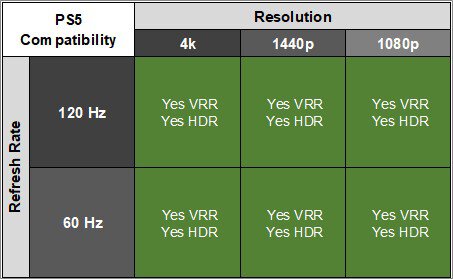
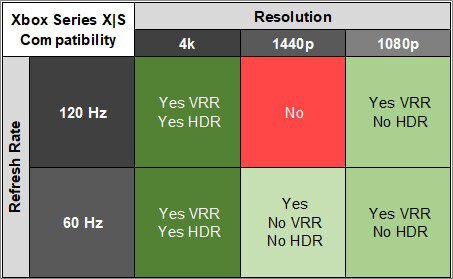
The ASUS PG32UCWM is fantastic for console gaming. It supports 4k signals up to 120Hz with a PS5 or Xbox Series X|S, and it also has Dolby Vision with an Xbox, which is ideal for games that also support it. Motion looks sharp thanks to its near-instantaneous response time, and it has low input lag, ensuring it adds minimal delay to your setup's total latency, which is great for playing games that need fast reactions. It also has fantastic picture quality, especially when playing HDR games. Blacks are deep and inky, small highlights pop in dark scenes, and it displays a wide range of colors, but bright colors aren't the most vivid.

Pros
  • Crisp motion across refresh rate range.

  • Low input lag; adds minimal delay to total system latency.

  • Deep blacks in any environment.

  • Supports 4k up to 120Hz with consoles.

  • Has Dolby Vision support with an Xbox.

Cons
  • Bright colors aren't as bright as pure white.

  • 1440p doesn't work properly with an Xbox.

0.0
Office 

The ASUS PG32UCWM is good for office use. It uses an RGB subpixel layout, and combined with its high resolution and high pixel density, it delivers sharp text without any fringing around letters. Its 32-inch screen is also big enough to open two windows side-by-side. It has some features to help with productivity, like a USB-C port with DisplayPort Alt Mode and 90W of power delivery to connect your laptop and charge it. Its KVM switch is also useful if you want to connect more than one computer and use the same devices on both. However, it's best to avoid using this monitor in a sunny room as it has mirror-like reflections and doesn't get bright enough to fight really intense glare. It also risks burn-in with constant exposure to the same static elements over time.

Pros
  • Sharp image and text clarity without any fringing.

  • Includes USB hub and KVM switch for multitasking.

  • Big 32-inch screen.

Cons
  • Glare is an issue in sunny rooms.

  • Stand offers limited ergonomic adjustments.

  • Risk of burn-in.

0.0
Editing 

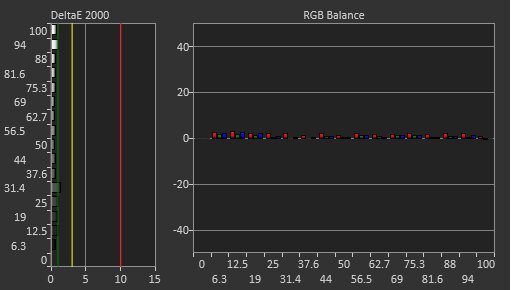
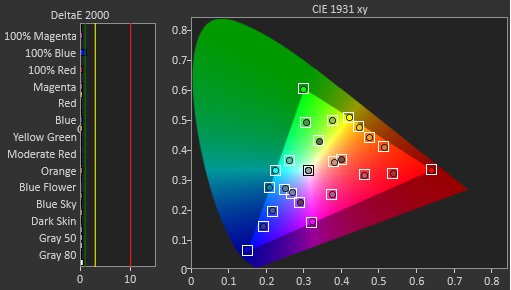
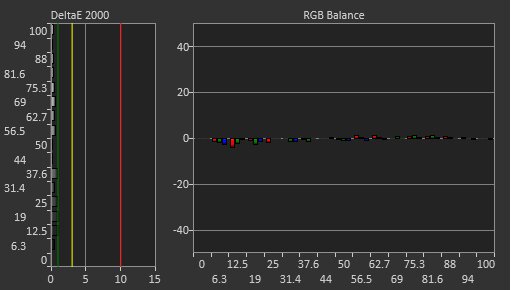
The ASUS PG32UCWM is amazing for content creation. It's very accurate out of the box in its sRGB mode, with only the white balance and gamma tracking needing to be fixed with a full calibration. It displays a wide range of colors in common color spaces, but bright colors aren't the most vivid, so they lack some punch. It at least has a high contrast ratio for deep blacks in dark rooms. It's fine if your editing space has some lights around, but reflections and glare are distracting if you have it in front of a sunny window. Unfortunately, it risks burn-in, which is problematic if you constantly have the same static elements displayed without changing things up. On the plus side, its USB hub and KVM switch help if you want to connect your devices directly to the monitor and multitask with them.

Pros
  • Deep blacks in any environment.

  • Sharp image and text clarity without any fringing.

  • Includes USB hub and KVM switch for multitasking.

  • Very accurate sRGB mode.

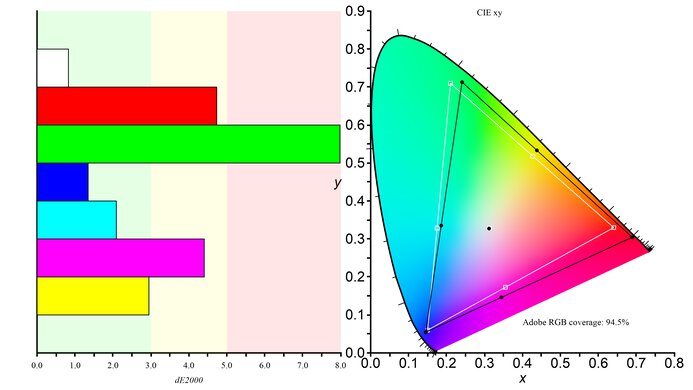
  • Covers common color spaces well.

Cons
  • Bright colors aren't as bright as pure white.

  • Glare is an issue in sunny rooms.

  • White balance needs a full calibration to fix.

  • Risk of burn-in.

0.0
Brightness 

The ASUS PG32UCWM has okay brightness. It makes small highlights stand out against the rest of the image in dark scenes, but it doesn't get bright enough to fight intense glare in sunny rooms.

Pros
  • Small highlights stand out in dark scenes.

Cons
  • Glare is an issue in sunny rooms.

0.0
Response Time 

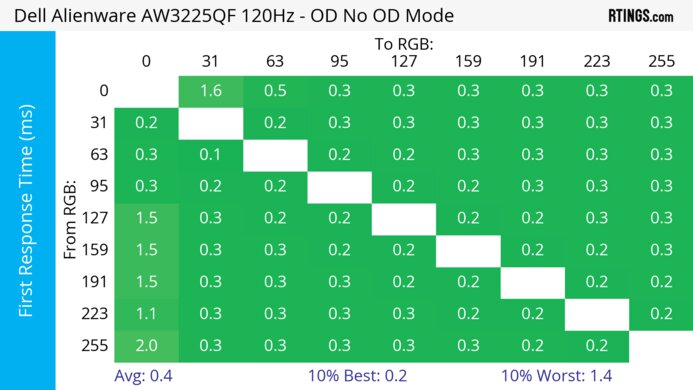
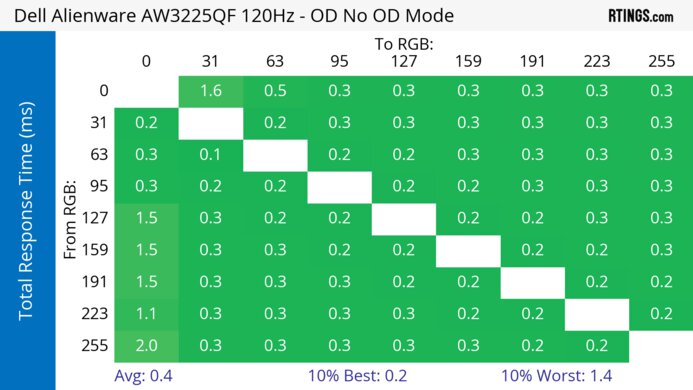
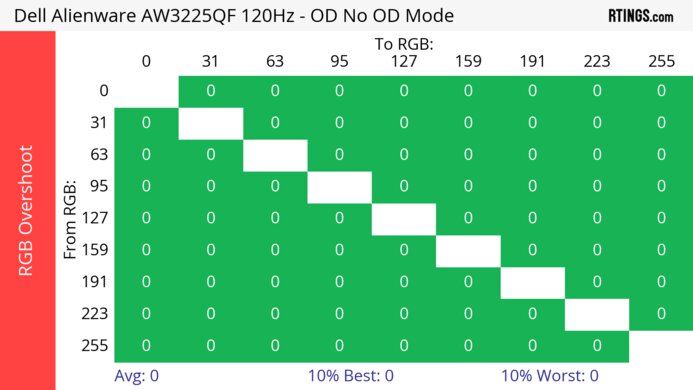
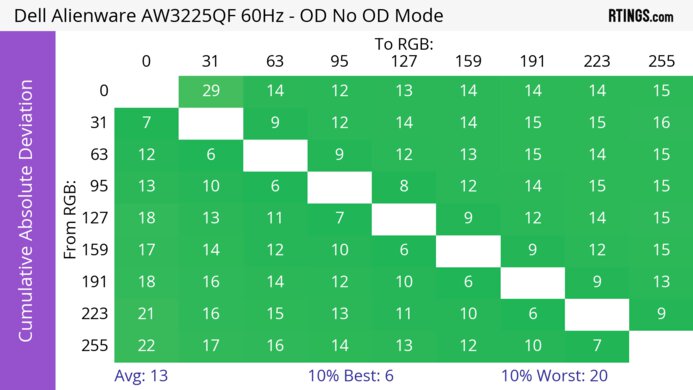
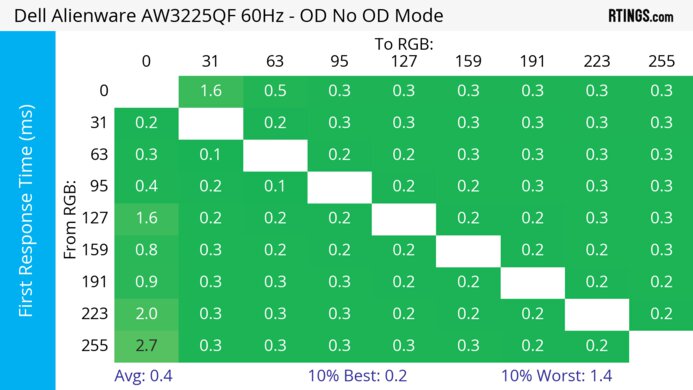
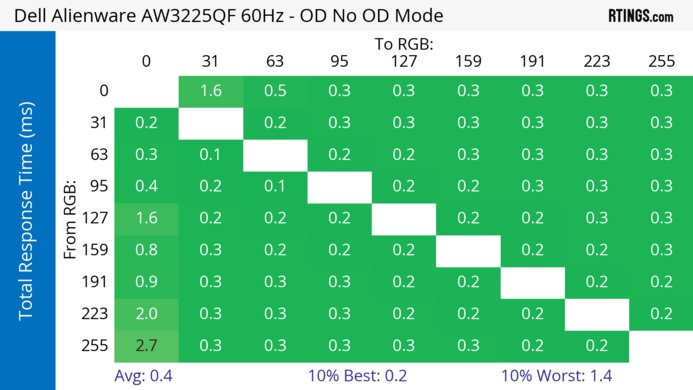
The ASUS PG32UCWM has a near-instantaneous response time for sharp motion at any refresh rate.

Pros
  • Crisp motion across refresh rate range.

Cons
0.0
HDR Picture 

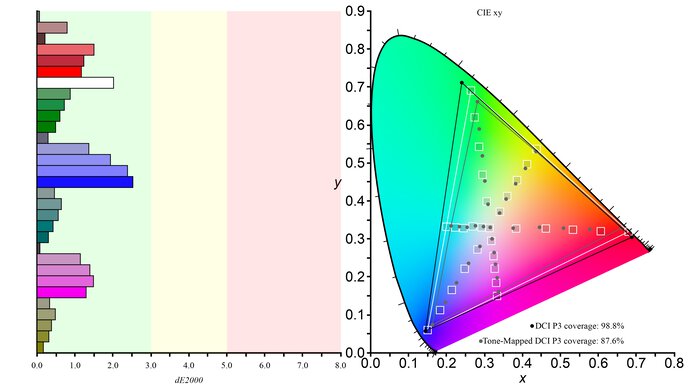
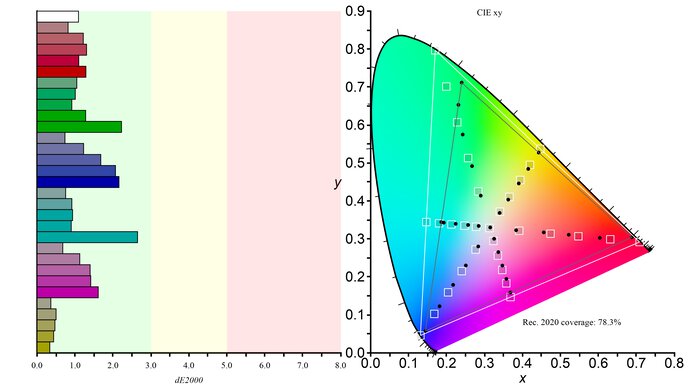
The ASUS PG32UCWM has incredible HDR picture quality. It displays deep, inky blacks without any haloing around bright objects against dark backgrounds. Although it covers a wide range of colors, its biggest downside is that the brightest colors aren't the most vivid, so they lack punch.

Pros
  • Deep blacks in any environment.

  • Covers common color spaces well.

Cons
  • Bright colors aren't as bright as pure white.

0.0
SDR Picture 

The ASUS PG32UCWM has remarkable SDR picture quality thanks to its near-infinite contrast ratio and wide range of colors.

Pros
  • Deep blacks in any environment.

  • Covers common color spaces well.

Cons
0.0
Color Accuracy 

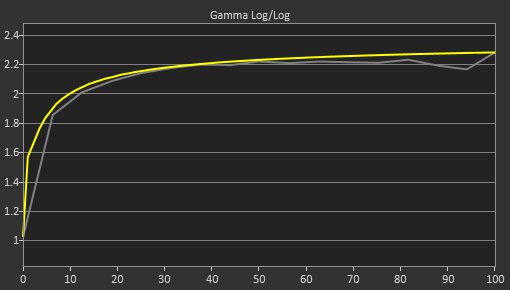
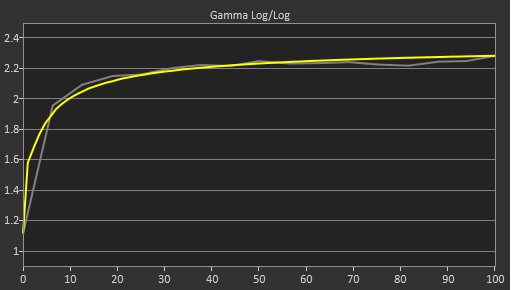
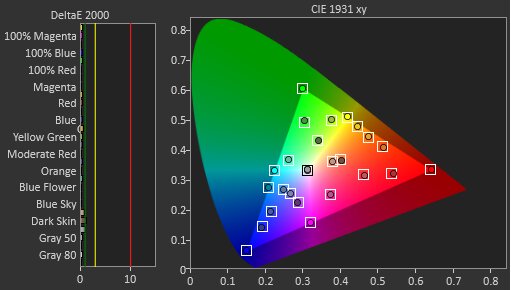
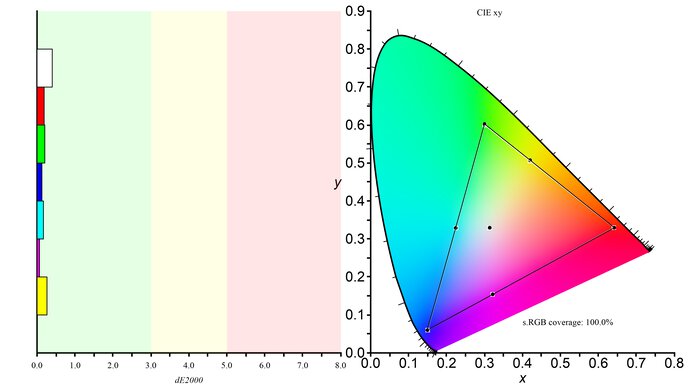
The ASUS PG32UCWM has excellent color accuracy. Its dedicated sRGB mode locks colors well to the sRGB color space. However, brighter shades of white have a red tint and gamma tracking is off in dark scenes. Calibrating it fixes the white balance, but not the gamma tracking.

Pros
  • Very accurate sRGB mode.

Cons
  • White balance needs a full calibration to fix.

  • 0.0
    PC Gaming
  • 0.0
    Console Gaming
  • 0.0
    Office
  • 0.0
    Editing

  • Performance Usages

  • 0.0
    Brightness
  • 0.0
    Response Time
  • 0.0
    HDR Picture
  • 0.0
    SDR Picture
  • 0.0
    Color Accuracy
  • Changelog

    1.  Updated Oct 29, 2026: Review published.
    2.  Updated Oct 23, 2026: Early access published.
    3.  Updated Oct 19, 2026: Our testers have started testing this product.
    4.  Updated Oct 15, 2026: The product has arrived in our lab, and our testers will start evaluating it soon.

    Check Price

    32"ROG Swift OLED PG32UCWM
    SEE PRICE
    ASUS
    32"ROG Swift OLED PG32UCWM
    SEE PRICE
    B&H
    32"ROG Swift OLED PG32UCWM
    Amazon
    32"ROG Swift OLED PG32UCWM
    BestBuy.com
    32"ROG Swift OLED PG32UCWM
    Walmart.com
    32"ROG Swift OLED PG32UCWM
    Staples.com

    Differences Between Sizes And Variants

    We bought and tested the 32-inch ASUS PG32UCWM. While there's also the 27-inch ASUS ROG Swift OLED PG27UCWM available, the results are only for this 32-inch model.

    Model Size Panel Type Resolution & Refresh Rate Pixel Density
    PG27UCWM 27" WOLED 4k @ 240Hz
    (1080p @ 480Hz Dual Mode)
    166 PPI
    PG32UCWM 32" WOLED 4k @ 240Hz
    (1080p @ 480Hz Dual Mode)
    140 PPI

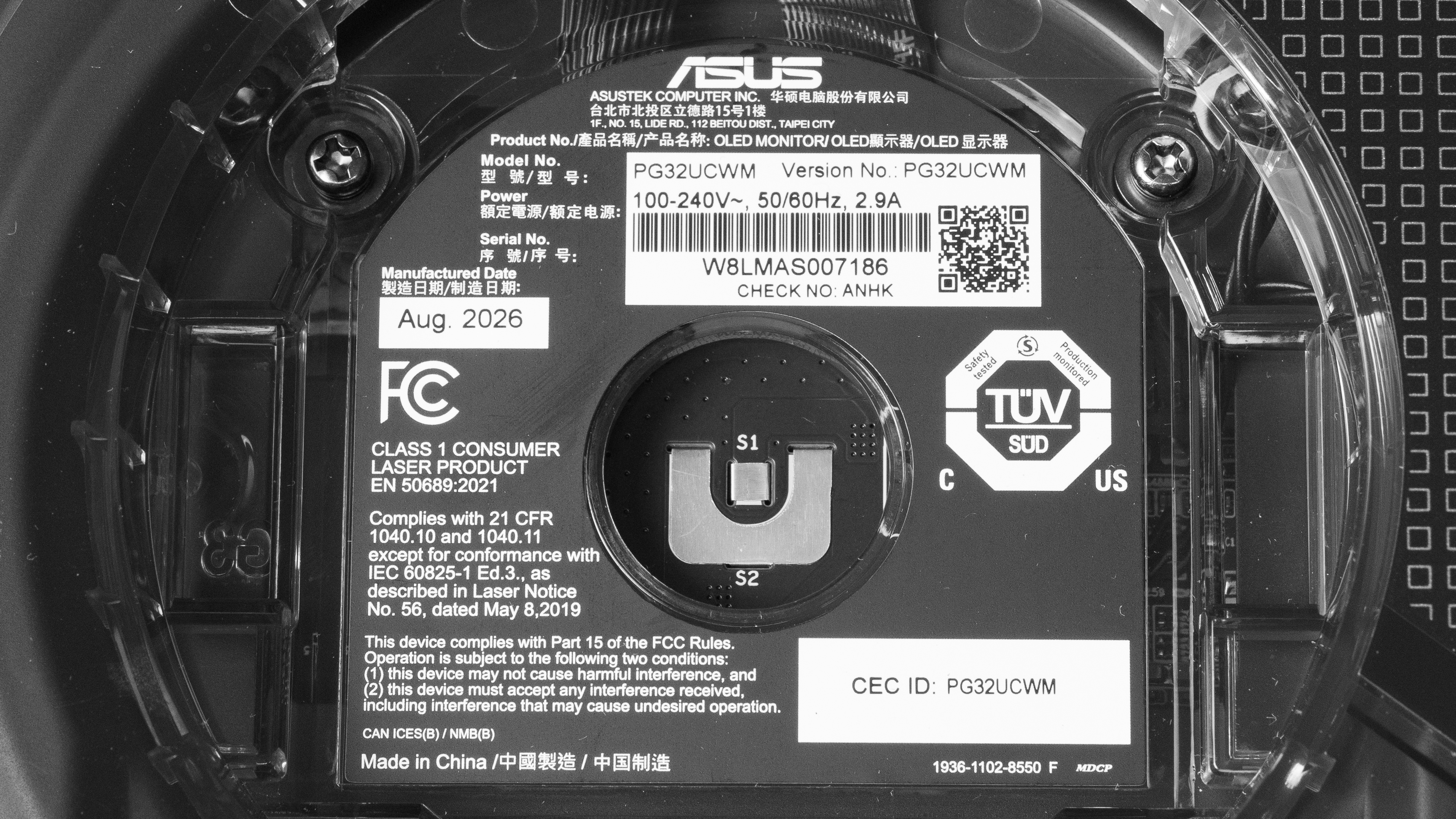
    Our unit's label indicates it was manufactured in August 2026 in China. We tested it with firmware MCM102.

    Popular Monitor Comparisons

    The ASUS ROG Swift PG32UCWM is a fantastic OLED gaming monitor. Like other modern gaming monitors, it features a dual mode to go from 4k @ 240Hz to 1080p @ 480Hz, offering versatility for playing different types of games. It has typical gaming features that you'd expect to find in a premium model, like high-bandwidth DisplayPort and HDMI inputs, Dolby Vision support, and a USB hub that includes a KVM switch to connect your devices. What sets it apart from the competition, though, is the fact that it's one of the first 4k WOLEDs to feature an RGB subpixel. This improves text clarity by reducing fringing around letters compared to older models that use the white subpixel. This makes this monitor an excellent choice for playing text-based games.

    However, there are other areas where it takes a step back. It isn't as bright as some other premium options, like the ASUS ROG Swift OLED PG32UCDM Gen3, and its colors aren't as vivid as on QD-OLEDs. If you want a 4k OLED with sharp text, vivid colors, and a bright screen, you may have to wait for other models to come out.

    Also see our recommendations for the best ASUS monitors, the best 4k gaming monitors, and the best OLED monitors.

    ASUS ROG Swift OLED PG32UCDM Gen3

    Track

    The ASUS ROG Swift OLED PG32UCWM and the ASUS ROG Swift OLED PG32UCDM Gen3 are both high-end OLED gaming monitors. They use different panel types, resulting in some differences in picture quality. The QD-OLED panel of the PG32UCDM Gen3 has more vivid colors, and it gets brighter for a better overall viewing experience. However, the WOLED panel of the PG32UCWM maintains lower black levels in bright rooms, so it may be the better choice if you want to use it in a well-lit room. The PG32UCWM also uses a different subpixel layout that doesn't have any fringing, which is an issue with the PG32UCDM Gen3. Lastly, the PG32UCWM has a dual-mode feature that boosts its 240Hz refresh rate with a 4k resolution to 480Hz with a lower 1080p resolution, so it's more versatile for playing different types of games.

    ASUS ROG Swift OLED PG32UCDP

    Track

    The ASUS ROG Swift OLED PG32UCWM is newer than the ASUS ROG Swift OLED PG32UCDP. They have 4k, 240Hz and 1080p, 480Hz dual-mode features, but there are some differences in features and panel types between them. The PG32UCWM uses a newer Tandem WOLED panel with more vivid colors, and it also has an RGB subpixel layout that has less fringing around text than the PG32UCDP. The PG32UCWM also has DisplayPort 2.1 bandwidth to take advantage of modern graphics cards, which the PG32UCDP lacks. Lastly, they have different screen coatings, as the glossy coating of the PG32UCWM results in clearer images, whereas the matte coating of the PG32UCDP has better reflection handling.

    ASUS ROG Swift OLED PG32UCDM

    Track

    The ASUS ROG Swift OLED PG32UCWM and the ASUS ROG Swift OLED PG32UCDM are both high-end OLED gaming monitors. They use different panel types, resulting in some differences in picture quality. The QD-OLED panel of the PG32UCDM has more vivid colors, and it gets a bit brighter for a better overall viewing experience. However, the WOLED panel of the PG32UCWM maintains lower black levels in bright rooms, so it may be the better choice if you want to use it in a well-lit room. The PG32UCWM also uses a different subpixel layout that doesn't have any fringing, which is an issue with the PG32UCDM. Lastly, the PG32UCWM has a dual-mode feature that boosts its 240Hz refresh rate with a 4k resolution to 480Hz with a lower 1080p resolution, so it's more versatile for playing different types of games. The PG32UCWM also has a few more modern features that the older PG32UCDM doesn't have, like DisplayPort 2.1 bandwidth.

    ASUS ROG Strix OLED XG32UCWMG

    Track

    The ASUS ROG Swift OLED PG32UCWM is newer than the ASUS ROG Strix OLED XG32UCWMG. They have 4k, 240Hz, and 1080p, 480Hz dual-mode features, but there are some differences in features between them. The PG32UCWM uses a newer Tandem WOLED panel with more vivid colors, but the XG32UCWMG is still brighter overall. The PG32UCWM also has an RGB subpixel layout that has less fringing around text than the XG32UCWMG. Although they both use glossy coatings, the PG32UCWM is better at maintaining low black levels in bright rooms. The PG32UCWM also has DisplayPort 2.1 bandwidth to take advantage of modern graphics cards, which the XG32UCWMG lacks. 
    Show more 
    How We Test Monitors
    How We Test Monitors

    We buy and test more than 30 monitors each year, all of which we purchase ourselves, without cherry-picked units or samples. We put a lot into each unbiased, straight-to-the-point review, and there's a whole process from purchasing to publishing, involving multiple teams and people. We do more than just use the monitor for a week; we use specialized, custom tools to measure various aspects and deliver objective, data-driven results. We also consider multiple factors before making any recommendations, including the monitor's cost, its performance compared to the competition, and whether it's easy to find.

    Test Results
    perceptual testing image
    Sort:
    RATINGS
    Category:
    All
    Design
    8 tests
    Longevity
    Uniformity PicturesN/A
    Style
    Curved
    LockedLocked
    Curve Radius
    LockedLocked

    Become a member to view the full test results and text of the reviews, as well as extra website features and tools with no ads.

    0.0
    Build Quality

    Become a member to view the full test results and text of the reviews, as well as extra website features and tools with no ads.

    0.0
    Ergonomics
    Min Height To Top Of Panel
    LockedLock" (Lock cm)
    Height Adjustment
    LockedLock" (Lock cm)
    Tilt Range
    LockedLocked
    Rotate Portrait/Landscape
    LockedLocked
    Swivel Range
    LockedLocked
    Wall Mount
    LockedLocked

    Become a member to view the full test results and text of the reviews, as well as extra website features and tools with no ads.

    Stand
    Base Width
    LockedLock" (Lock cm)
    Base Depth
    LockedLock" (Lock cm)
    Thickness (With Display)
    LockedLock" (Lock cm)
    Weight (With Display)
    LockedLock lbs (Lock kg)

    Become a member to view the full test results and text of the reviews, as well as extra website features and tools with no ads.

    Display
    Size
    Locked32"
    Housing Width
    LockedLock" (Lock cm)
    Housing Height
    LockedLock" (Lock cm)
    Thickness (Without Stand)
    LockedLock" (Lock cm)
    Weight (Without Stand)
    LockedLock lbs (Lock kg)
    Borders Size (Bezels)
    LockedLock" (Lock cm)

    Become a member to view the full test results and text of the reviews, as well as extra website features and tools with no ads.

    Controls

    Become a member to view the full test results and text of the reviews, as well as extra website features and tools with no ads.

    In The Box
    Power Supply
    LockedLocked

    Become a member to view the full test results and text of the reviews, as well as extra website features and tools with no ads.

    Picture Quality
    18 tests
    0.0
    Contrast
    Native Contrast
    LockedLock : 1
    Contrast With Local Dimming
    LockedLock : 1

    Become a member to view the full test results and text of the reviews, as well as extra website features and tools with no ads.

    0.0
    Local Dimming
    SAMPLE
    Join Now

    for videos & test results
    ASUS ROG Swift OLED PG32UCWM Local Dimming Video Sample
    Local Dimming
    LockedLocked
    Backlight
    LockedLocked

    Become a member to view the full test results and text of the reviews, as well as extra website features and tools with no ads.

    0.0
    SDR Brightness
    Real Scene
    LockedLock cd/m²
    Peak 2% Window
    LockedLock cd/m²
    Peak 10% Window
    LockedLock cd/m²
    Peak 25% Window
    LockedLock cd/m²
    Peak 50% Window
    LockedLock cd/m²
    Peak 100% Window
    LockedLock cd/m²
    Sustained 2% Window
    LockedLock cd/m²
    Sustained 10% Window
    LockedLock cd/m²
    Sustained 25% Window
    LockedLock cd/m²
    Sustained 50% Window
    LockedLock cd/m²
    Sustained 100% Window
    LockedLock cd/m²
    Automatic Brightness Limiting (ABL)
    LockedLock
    Minimum Brightness
    LockedLock cd/m²

    Become a member to view the full test results and text of the reviews, as well as extra website features and tools with no ads.

    0.0
    HDR Brightness
    VESA DisplayHDR Certification
    LockedLocked
    Real Scene
    LockedLock cd/m²
    Peak 2% Window
    LockedLock cd/m²
    Peak 10% Window
    LockedLock cd/m²
    Peak 25% Window
    LockedLock cd/m²
    Peak 50% Window
    LockedLock cd/m²
    Peak 100% Window
    LockedLock cd/m²
    Sustained 2% Window
    LockedLock cd/m²
    Sustained 10% Window
    LockedLock cd/m²
    Sustained 25% Window
    LockedLock cd/m²
    Sustained 50% Window
    LockedLock cd/m²
    Sustained 100% Window
    LockedLock cd/m²
    Automatic Brightness Limiting (ABL)
    LockedLock

    Become a member to view the full test results and text of the reviews, as well as extra website features and tools with no ads.

    0.0
    Gray Uniformity
    50% Std. Dev.
    LockedLock%
    50% DSE
    LockedLock%

    Become a member to view the full test results and text of the reviews, as well as extra website features and tools with no ads.

    0.0
    Black Uniformity
    Native Std. Dev.
    LockedLock%
    Std. Dev. w/ L.D.
    LockedN/A

    Become a member to view the full test results and text of the reviews, as well as extra website features and tools with no ads.

    0.0
    Color Accuracy (Pre-Calibration)
    Picture Mode
    LockedLocked
    sRGB Gamut Area xy
    LockedLock%
    White Balance dE (Avg.)
    LockedLock
    Color Temperature (Avg.)
    LockedLock K
    Gamma (Avg.)
    LockedLock
    Color dE (Avg.)
    LockedLock
    Contrast Setting
    LockedN/A
    RGB Settings
    LockedLocked
    Gamma Setting
    LockedLocked
    Brightness Setting
    LockedLock
    Measured Brightness
    LockedLock cd/m²
    Brightness Locked
    LockedLocked

    Become a member to view the full test results and text of the reviews, as well as extra website features and tools with no ads.

    0.0
    Color Accuracy (Post-Calibration)
    Picture Mode
    LockedLocked
    sRGB Gamut Area xy
    LockedLock%
    White Balance dE (Avg.)
    LockedLock
    Color Temperature (Avg.)
    LockedLock K
    Gamma (Avg.)
    LockedLock
    Color dE (Avg.)
    LockedLock
    Contrast Setting
    LockedLock
    RGB Settings
    LockedLocked
    Gamma Setting
    LockedLocked
    Brightness Setting
    LockedLock
    Measured Brightness
    LockedLock cd/m²
    ICC Profile
    Download

    Become a member to view the full test results and text of the reviews, as well as extra website features and tools with no ads.

    0.0
    SDR Color Gamut
    sRGB Coverage xy
    LockedLock%
    sRGB Picture Mode
    LockedLocked
    Adobe RGB Coverage xy
    LockedLock%
    Adobe RGB Picture Mode
    LockedLocked

    Become a member to view the full test results and text of the reviews, as well as extra website features and tools with no ads.

    0.0
    HDR Color Gamut
    Wide Color Gamut
    LockedLocked
    DCI-P3 Coverage xy
    LockedLock%
    DCI-P3 Picture Mode
    LockedLocked
    Rec. 2020 Coverage xy
    LockedLock%
    Rec. 2020 Picture Mode
    LockedLocked

    Become a member to view the full test results and text of the reviews, as well as extra website features and tools with no ads.

    0.0
    HDR Color Volume
    1,000 cd/m² DCI-P3 Coverage ICtCp
    LockedLock%
    DCI-P3 Picture Mode
    LockedLocked
    10,000 cd/m² Rec. 2020 Coverage ICtCp
    LockedLock%
    Rec. 2020 Picture Mode
    LockedLocked

    Become a member to view the full test results and text of the reviews, as well as extra website features and tools with no ads.

    0.0
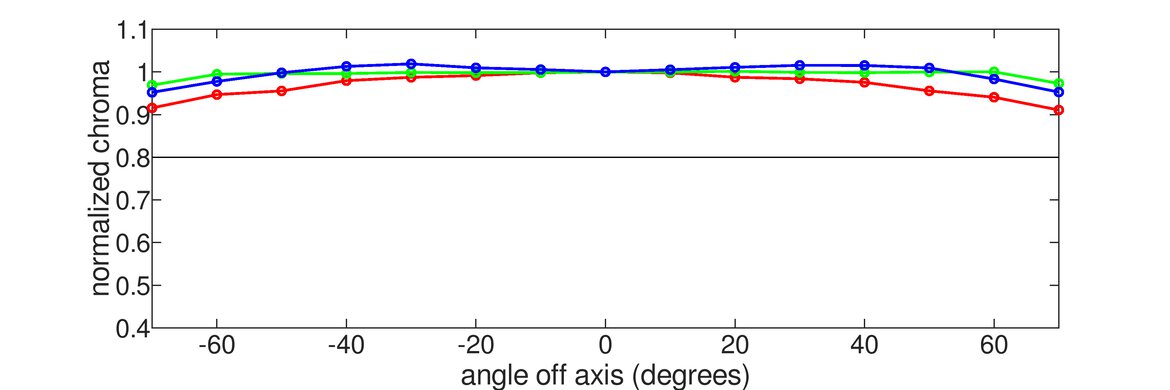
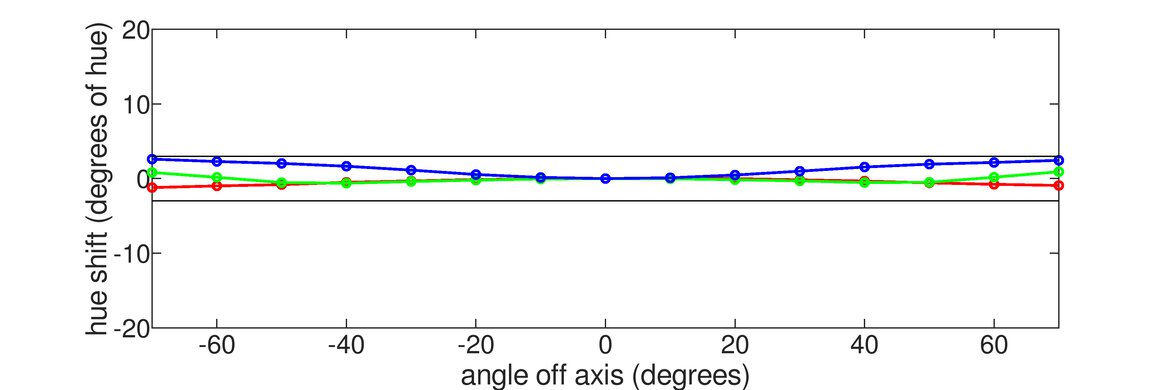
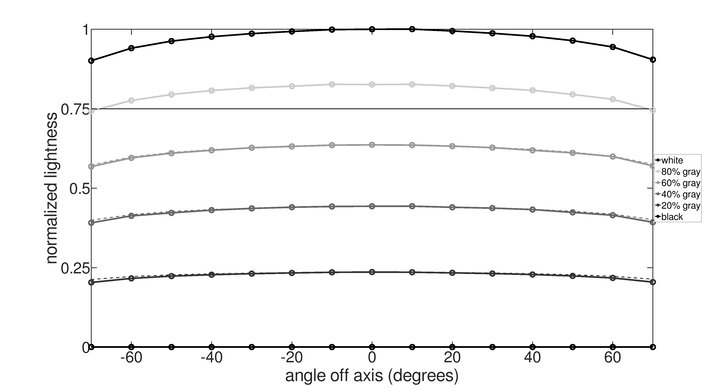
    Viewing Angle
    SAMPLE
    Join Now

    for videos & test results
    ASUS ROG Swift OLED PG32UCWM Viewing Angle Video Sample
    Color Washout From Left
    LockedLock°
    Color Washout From Right
    LockedLock°
    Color Shift From Left
    LockedLock°
    Color Shift From Right
    LockedLock°
    Brightness Loss From Left
    LockedLock°
    Brightness Loss From Right
    LockedLock°
    Black Level Raise From Left
    LockedLock°
    Black Level Raise From Right
    LockedLock°
    Gamma Shift From Left
    LockedLock°
    Gamma Shift From Right
    LockedLock°

    Become a member to view the full test results and text of the reviews, as well as extra website features and tools with no ads.

    0.0
    Text Clarity

    Become a member to view the full test results and text of the reviews, as well as extra website features and tools with no ads.

    Panel Technology
    Panel Type
    LockedOLED
    Sub-Type
    LockedWOLED
    Subpixel Layout
    LockedLocked

    Become a member to view the full test results and text of the reviews, as well as extra website features and tools with no ads.

    0.0
    Direct Reflections
    Peak Direct Reflection Intensity
    LockedLock%
    Screen Finish
    LockedLocked

    Become a member to view the full test results and text of the reviews, as well as extra website features and tools with no ads.

    0.0
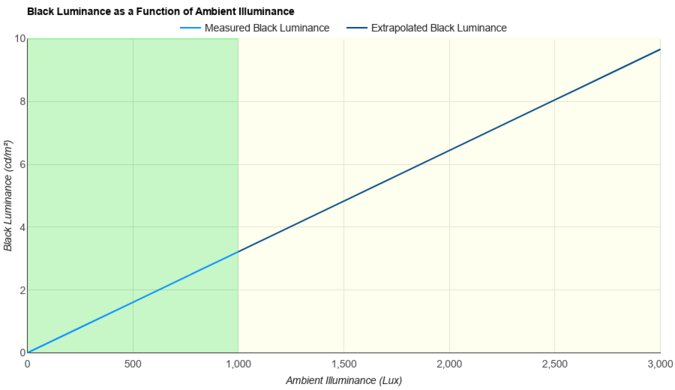
    Ambient Black Level Raise
    Black Luminance @ 0 lx
    LockedLock cd/m²
    Black Luminance @ 1000 lx
    LockedLock cd/m²

    Become a member to view the full test results and text of the reviews, as well as extra website features and tools with no ads.

    0.0
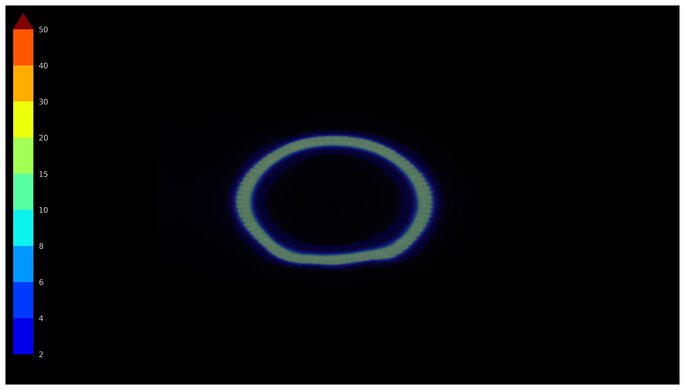
    Total Reflected Light
    Total Reflected Light Intensity
    LockedLock% ⋅ pixel
    Diffraction Artifacts
    LockedLocked

    Become a member to view the full test results and text of the reviews, as well as extra website features and tools with no ads.

    0.0
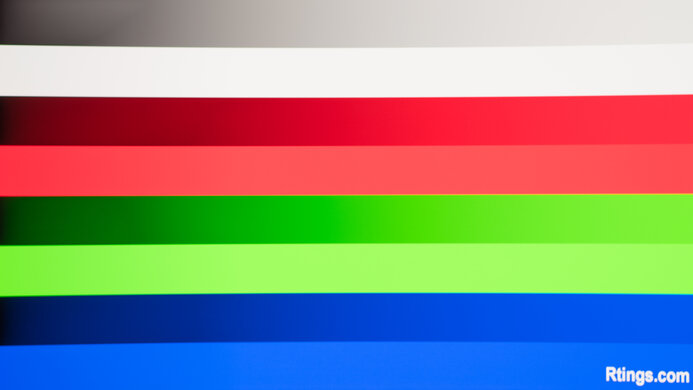
    Gradient
    Color Depth
    LockedLock Bit

    Become a member to view the full test results and text of the reviews, as well as extra website features and tools with no ads.

    Motion
    13 tests
    0.0
    Refresh Rate
    Dual Mode Setting
    LockedLocked
    Native Refresh Rate
    LockedLock Hz
    Max Refresh Rate
    Locked480 Hz
    Max Refresh Rate Over DP
    LockedLock Hz
    Max Refresh Rate Over HDMI
    LockedLock Hz
    Max Refresh Rate Over DP @ 10-bit
    LockedLock Hz
    Max Refresh Rate Over HDMI @ 10-Bit
    LockedLock Hz
    DSC Toggle
    LockedLocked
    DSC Off Max Refresh Rate Over DP
    LockedLock Hz
    DSC Off Max Refresh Rate Over HDMI
    LockedLock Hz

    Become a member to view the full test results and text of the reviews, as well as extra website features and tools with no ads.

    Variable Refresh Rate (VRR)
    Variable Refresh Rate
    LockedLocked
    FreeSync
    LockedLocked
    G-SYNC
    LockedLocked
    VRR Maximum
    LockedLock Hz
    VRR Minimum
    LockedLocked
    VRR Supported Connectors
    LockedLocked

    Become a member to view the full test results and text of the reviews, as well as extra website features and tools with no ads.

    0.0
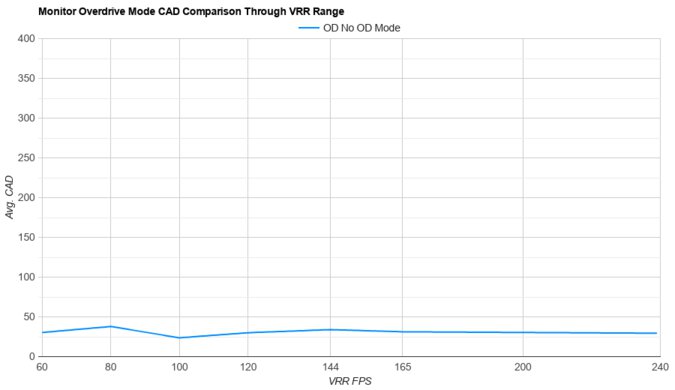
    VRR Motion Performance
    Recommended VRR OD Setting
    LockedLocked
    Variable Overdrive Advertised
    LockedLocked
    Avg. CAD
    LockedLock
    Best CAD
    LockedLock
    Worst CAD
    LockedLock

    Become a member to view the full test results and text of the reviews, as well as extra website features and tools with no ads.

    0.0
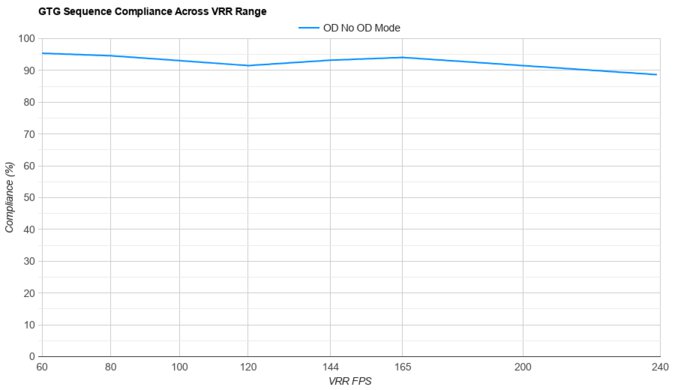
    Refresh Rate Compliance
    Compliance @ Max Hz
    LockedLock%
    Compliance @ 120 FPS
    LockedLock%
    Compliance @ 60 FPS
    LockedLock%

    Become a member to view the full test results and text of the reviews, as well as extra website features and tools with no ads.

    0.0
    CAD @ Max Refresh Rate
    OD Transition Max Refresh Rate
    Join nowfor multiple image controls
    Recommended Overdrive Setting
    LockedLocked
    Avg. CAD
    LockedLock
    Best 10% CAD
    LockedLock
    Worst 10% CAD
    LockedLock

    Become a member to view the full test results and text of the reviews, as well as extra website features and tools with no ads.

    Response Time @ Max Refresh Rate
    Recommended Overdrive Setting
    LockedLocked
    First Response Time
    LockedLock ms
    Total Response Time
    LockedLock ms
    RGB Overshoot
    LockedLock RGB
    Worst 10% First Response Time
    LockedLock ms
    Worst 10% Total Response Time
    LockedLock ms
    Worst 10% RGB Overshoot
    LockedLock RGB

    Become a member to view the full test results and text of the reviews, as well as extra website features and tools with no ads.

    0.0
    CAD @ 120Hz
    OD Transition 120Hz
    Join nowfor multiple image controls
    Recommended Overdrive Setting
    LockedLocked
    Avg. CAD
    LockedLock
    Best 10% CAD
    LockedLock
    Worst 10% CAD
    LockedLock

    Become a member to view the full test results and text of the reviews, as well as extra website features and tools with no ads.

    Response Time @ 120Hz
    Recommended Overdrive Setting
    LockedLocked
    First Response Time
    LockedLock ms
    Total Response Time
    LockedLock ms
    RGB Overshoot
    LockedLock RGB
    Worst 10% First Response Time
    LockedLock ms
    Worst 10% Total Response Time
    LockedLock ms
    Worst 10% RGB Overshoot
    LockedLock RGB

    Become a member to view the full test results and text of the reviews, as well as extra website features and tools with no ads.

    0.0
    CAD @ 60Hz
    OD Transition 60Hz
    Join nowfor multiple image controls
    Recommended Overdrive Setting
    LockedLocked
    Avg. CAD
    LockedLock
    Best 10% CAD
    LockedLock
    Worst 10% CAD
    LockedLock

    Become a member to view the full test results and text of the reviews, as well as extra website features and tools with no ads.

    Response Time @ 60Hz
    Recommended Overdrive Setting
    LockedLocked
    First Response Time
    LockedLock ms
    Total Response Time
    LockedLock ms
    RGB Overshoot
    LockedLock RGB
    Worst 10% First Response Time
    LockedLock ms
    Worst 10% Total Response Time
    LockedLock ms
    Worst 10% RGB Overshoot
    LockedLock RGB

    Become a member to view the full test results and text of the reviews, as well as extra website features and tools with no ads.

    Backlight Strobing (BFI)
    Backlight Strobing (BFI)
    LockedLocked
    Maximum Frequency
    LockedLock Hz
    Minimum Frequency
    LockedLock Hz
    Longest Pulse Width Brightness
    LockedLock cd/m²
    Shortest Pulse Width Brightness
    LockedLock cd/m²
    Pulse Width Control
    LockedLocked
    Pulse Phase Control
    LockedLocked
    Pulse Amplitude Control
    LockedLocked
    VRR At The Same Time
    LockedLocked

    Become a member to view the full test results and text of the reviews, as well as extra website features and tools with no ads.

    0.0
    VRR Flicker
    SAMPLE
    Join Now

    for videos & test results
    ASUS ROG Swift OLED PG32UCWM VRR Flicker Video Sample
    Dark Gray Flicker
    LockedLock RGB
    Middle Gray Flicker
    LockedLock RGB
    Light Gray Flicker
    LockedLock RGB
    VRR Flicker Control Setting
    LockedLocked

    Become a member to view the full test results and text of the reviews, as well as extra website features and tools with no ads.

    0.0
    Image Flicker
    Flicker-Free
    LockedLocked
    PWM Dimming Frequency
    LockedLocked

    Become a member to view the full test results and text of the reviews, as well as extra website features and tools with no ads.
    Inputs
    7 tests
    0.0
    Input Lag
    Native Resolution @ Max Hz
    LockedLock ms
    Native Resolution @ 120Hz
    LockedLock ms
    Native Resolution @ 60Hz
    LockedLock ms
    Backlight Strobing (BFI)
    LockedLock ms

    Become a member to view the full test results and text of the reviews, as well as extra website features and tools with no ads.
    0.0
    Resolution
    Native Resolution
    Locked3840 x 2160
    Aspect Ratio
    LockedLocked
    Megapixels
    LockedLock MP
    Pixel Density
    LockedLock PPI

    Become a member to view the full test results and text of the reviews, as well as extra website features and tools with no ads.
    0.0
    PS5 Compatibility
    4k @ 120Hz
    LockedLocked
    4k @ 60Hz
    LockedLocked
    1440p @ 120Hz
    LockedLocked
    1440p @ 60Hz
    LockedLocked
    1080p @ 120Hz
    LockedLocked
    1080p @ 60Hz
    LockedLocked

    Become a member to view the full test results and text of the reviews, as well as extra website features and tools with no ads.
    0.0
    Xbox Series X|S Compatibility
    4k @ 120Hz
    LockedLocked
    4k @ 60Hz
    LockedLocked
    1440p @ 120Hz
    LockedLocked
    1440p @ 60Hz
    LockedLocked
    1080p @ 120Hz
    LockedLocked
    1080p @ 60Hz
    LockedLocked

    Become a member to view the full test results and text of the reviews, as well as extra website features and tools with no ads.
    Inputs
    DisplayPort
    LockedLocked
    DisplayPort Transmission Bandwidth
    LockedLocked
    Mini DisplayPort
    LockedLocked
    HDMI
    LockedLocked
    HDMI 2.1 Bandwidth
    LockedLocked
    Daisy Chaining
    LockedLocked
    3.5mm Audio Out
    LockedLocked
    Ethernet
    LockedLocked
    HDR10
    LockedLocked
    Dolby Vision
    LockedLocked
    USB
    USB-A Ports
    LockedLocked
    USB-A Rated Speed
    LockedLocked
    USB-B Upstream Port
    LockedLocked
    USB-C Ports
    LockedLocked
    USB-C Upstream
    LockedLocked
    USB-C Rated Speed
    LockedLocked
    USB-C Power Delivery
    LockedLocked
    USB-C DisplayPort Alt Mode
    LockedLocked
    Thunderbolt
    LockedLocked

    Become a member to view the full test results and text of the reviews, as well as extra website features and tools with no ads.
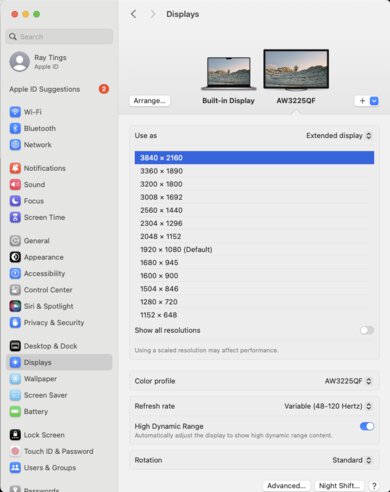
    macOS Compatibility

    Become a member to view the full test results and text of the reviews, as well as extra website features and tools with no ads.

    Features
    2 tests
    Additional Features
    Speakers
    LockedLocked
    RGB Illumination
    LockedLocked
    Multiple Input Display
    LockedLocked
    KVM Switch
    LockedLocked
    Smart OS
    LockedLocked

    Become a member to view the full test results and text of the reviews, as well as extra website features and tools with no ads.
    On-Screen Display (OSD)