The Sony A75L OLED is a new entry-level OLED TV released in 2023, sitting below the Sony A80L/A80CL OLED. Despite its entry-level market position, it's a well-equipped TV with a slew of gaming features, including 4k @ 120Hz support and VRR. The TV has Sony's latest Cognitive Processor XR, which powers the TV's image processing and upscaling capabilities. It runs the Google TV smart platform, with a great selection of streaming apps in an easy-to-use interface. It also supports Sony's S-Center speaker input, which can turn the TV into a center speaker channel when a Sony soundbar is connected, and an ATSC 3.0 tuner for up to 4k over-the-air broadcast support. It's only available in 55" and 65" sizes, though, which is a bit limited for some users.
Our Verdict
The Sony A75L OLED is an excellent TV overall. Like all OLEDs, it looks best in a dark room, where its nearly infinite contrast ratio delivers an amazing movie-watching experience. Although it's not the brightest TV on the market, HDR still looks amazing, and bright highlights stand out well. Thanks to its fantastic reflection handling, it's also a great TV for watching sports or shows in a bright room. Finally, it's a fantastic TV for gamers thanks to its nearly instantaneous response time, low input lag, and plethora of gaming features, including 4k @ 120Hz support on two inputs and VRR support to reduce screen tearing.
- Perfect black uniformity.
- Near-infinite contrast ratio for deep inky blacks.
- Upscales low-resolution content well.
- Fantastic reflection handling.
- Incredibly wide viewing angle.
- Decent SDR brightness, but still lower than its competition.
The Sony A75L is a great TV for watching shows. Though its peak brightness is just decent, glare isn't an issue in a bright room thanks to its fantastic reflection handling. Its nearly perfect viewing angle also allows you to move around the room with the TV on and enjoy a consistent viewing experience from any angle. Even though it's an entry-level model, it's powered by the same image processing as more expensive Sony models, which is great for watching low-resolution or low-quality streaming content.
- Upscales low-resolution content well.
- Fantastic reflection handling.
- Incredibly wide viewing angle.
- Decent SDR brightness, but still lower than its competition.
The Sony A75L is an excellent TV for watching sports. Thanks to its fantastic reflection handling, glare isn't an issue in a bright room. It also has an incredibly wide viewing angle, so you don't have to fight over the best seat if you're watching the big game with a large group of friends or in a large seating area. Its nearly instantaneous response time delivers incredibly clear motion with no noticeable blur behind fast-moving objects. Finally, cable sports channels are upscaled incredibly well thanks to Sony's industry-leading image processing.
- Upscales low-resolution content well.
- Fantastic reflection handling.
- Incredibly wide viewing angle.
- Crystal clear motion with minimal motion blur.
- Decent SDR brightness, but still lower than its competition.
The Sony A75L is a fantastic TV for gaming. Its nearly instantaneous response time delivers fantastic motion handling with no noticeable blur behind fast-moving objects. It also offers incredibly low input lag, ensuring an incredibly responsive gaming experience. Even though it's a budget model in Sony's lineup, it still features an incredible selection of gaming features, including VRR support and 4k @ 120Hz gaming on two of its inputs.
- Upscales low-resolution content well.
- Crystal clear motion with minimal motion blur.
- VRR support and HDMI 2.1 bandwidth for up to 4k @ 120Hz gaming.
- Very low input lag.
- Has only two HDMI 2.1 ports, one of which is the eARC port.
- Decent SDR brightness, but still lower than its competition.
The Sony A75L is a truly amazing TV for watching movies in a dark room. Like all OLED displays, it has a nearly infinite contrast ratio, resulting in crystal clear, inky blacks with no distracting blooming or haloing around bright objects. Although it's not as bright as higher-end OLED displays, most HDR content looks great, and bright specular highlights stand out well. It's also good for people who care about an accurate image. It tracks the PQ EOTF nearly perfectly and has good accuracy before calibration.
- Perfect black uniformity.
- Near-infinite contrast ratio for deep inky blacks.
- Removes 24p judder from any source.
- Wide color gamut.
- Stutter due to near-instantaneous response time.
The Sony A75L is an amazing TV for gaming in HDR. It delivers a fantastic gaming experience in general, thanks to its nearly instantaneous response time, low input lag, and plethora of gaming features. HDR looks amazing thanks to its nearly infinite contrast ratio, delivering an incredible dark room experience with perfect inky blacks. Bright highlights stand out incredibly well, even in bright scenes, so your games look stunning.
- Perfect black uniformity.
- Near-infinite contrast ratio for deep inky blacks.
- Crystal clear motion with minimal motion blur.
- VRR support and HDMI 2.1 bandwidth for up to 4k @ 120Hz gaming.
- Very low input lag.
- Wide color gamut.
- Limited HDR peak brightness in Game Mode.
- Has only two HDMI 2.1 ports, one of which is the eARC port.
The Sony A75L is a great TV for use as a PC monitor, but there are a few caveats. It displays chroma 4:4:4 properly, which is essential for clear text from a PC, but there are still some text rendering issues due to its unusual pixel structure. On the other hand, it has an incredibly wide viewing angle, so the sides of the screen remain uniform even if you're sitting close to it. It delivers a responsive desktop experience thanks to its low input lag, so there's very little delay in your cursor movements, and motion is sharp and crisp thanks to its nearly infinite contrast ratio.
- Fantastic reflection handling.
- Incredibly wide viewing angle.
- Crystal clear motion with minimal motion blur.
- VRR support and HDMI 2.1 bandwidth for up to 4k @ 120Hz gaming.
- Very low input lag.
- Wide color gamut.
- Limited HDR peak brightness in Game Mode.
- Has only two HDMI 2.1 ports, one of which is the eARC port.
- Decent SDR brightness, but still lower than its competition.
Changelog
- Updated Jun 20, 2024: Mentioned the newly-reviewed Sony BRAVIA 8 OLED in the SDR Brightness section of this review.
- Updated Nov 24, 2023: Review published.
- Updated Nov 22, 2023: Early access published.
- Updated Nov 15, 2023: Our testers have started testing this product.
Check Price
Differences Between Sizes And Variants
We bought and tested the 65-inch Sony A75L, and the results are also valid for the 55-inch model. There are no other variants of this model.
| Size | Model |
|---|---|
| 55" | Sony XR-55A75L |
| 65" | Sony XR-65A75L |
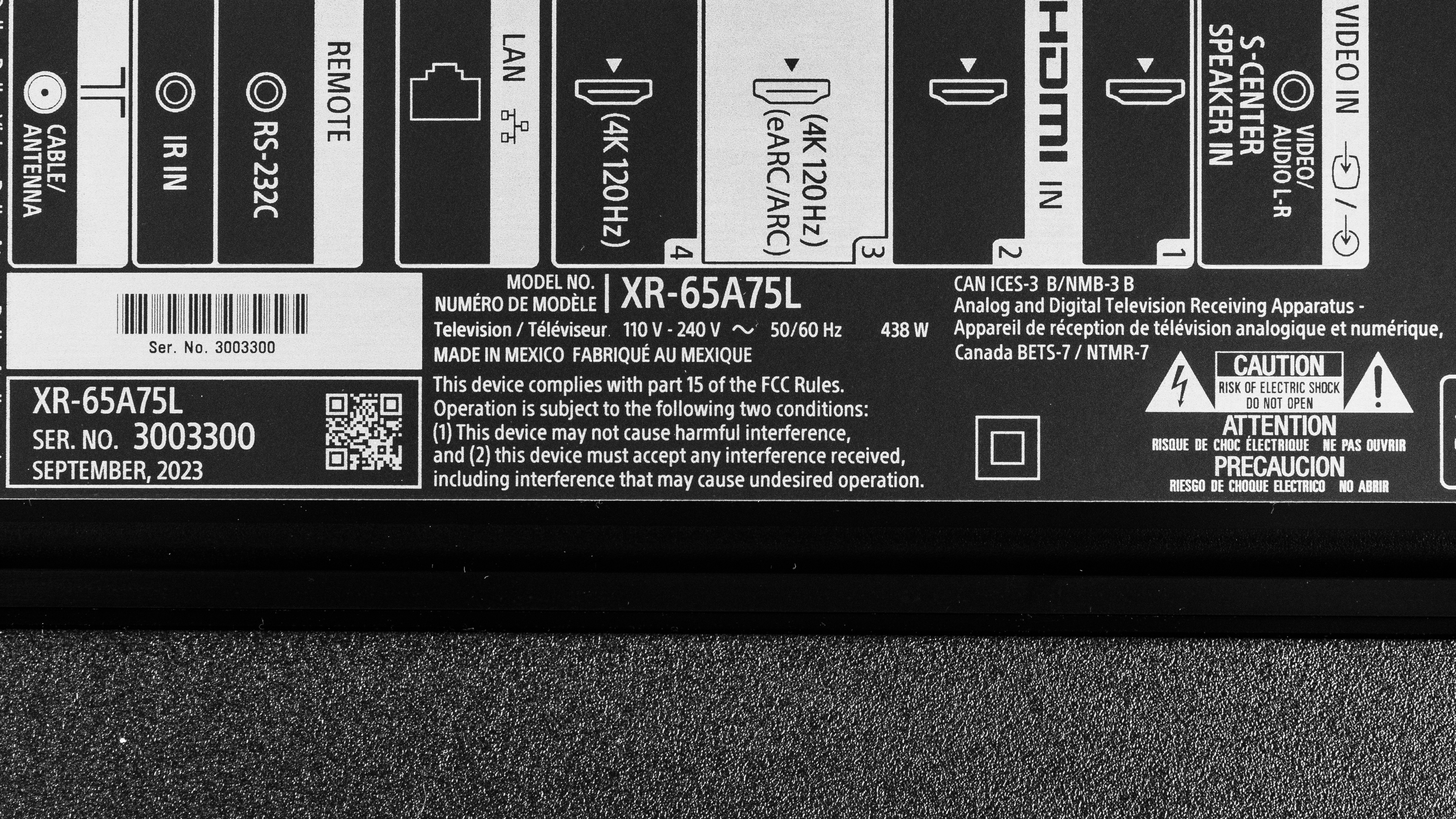
Our unit was manufactured in September 2023; you can see the label here.
Popular TV Comparisons
The Sony A75L is a great choice for beginners looking to upgrade to an OLED TV but who don't want to spend a small fortune. Available at relatively budget prices, it offers similar picture quality to higher-end, far more expensive models like the LG C3 OLED, while offering better processing than other entry-level OLEDs like the LG B3 OLED. It even comes with almost all of the same great gaming features you'll find on higher-end models like the Sony A95L OLED.
See our recommendations for the best smart TVs, the best TVs for movies, and the best OLED TVs.
The Sony BRAVIA 8 OLED is slightly better than the Sony A75L OLED, though the two are nearly identical. While the BRAVIA is a bit brighter overall, the biggest difference shows up in Game Mode: the newer BRAVIA is noticeably brighter and has lower input lag, making it the clear-cut choice for gamers shopping for an OLED TV. Otherwise, the differences are relatively minor.
The LG C4 OLED is much better than the Sony A75L OLED. The LG is far brighter in HDR and in SDR, giving all scenes more pop. It's also more colorful than the Sony and is more accurate in SDR out of the box. The LG is also the superior pick for gamers due to its 144Hz support on all four HDMI ports, while the Sony only supports 120Hz on two ports and has higher input lag. Still, the Sony does have better image processing, so some low-quality or low-resolution content looks a bit better on it than on the LG.
The LG C3 OLED is better than the Sony A75L OLED for most users. The LG gets brighter, so bright highlights in HDR stand out better and it can overcome more glare in a bright room. The LG is also a bit more versatile, with four HDMI 2.1-bandwidth ports, so you can use it with multiple consoles or gaming PCs. On the other hand, if you care more about creative intent, the Sony is slightly better, as it offers better picture processing and a more accurate image overall.
The Samsung S90C OLED is slightly better than the Sony A75L OLED. The Samsung TV uses a different type of OLED panel known as QD-OLED. This panel delivers a similar dark room experience, so both TVs deliver deep, inky blacks with perfect uniformity. The big difference between them is colors, as the Samsung delivers much brighter, purer colors and a wider color gamut. If you care more about creative intent, the Sony is a better choice, but if you enjoy punchy, vibrant colors, go with the Samsung instead.

We buy and test dozens of TVs yearly, taking an objective, data-driven approach to deliver results you can trust. Our testing process is complex, with hundreds of individual tests that take over a week to complete. Most of our tests use specially designed test patterns that mimic real content, but we also use the same sources you have at home to ensure our results match the real-world experience. We use two main tools for our testing: a Colorimetry Research CR-100 colorimeter and a CR-250 spectroradiometer.
Test Results
Older Test Bench: We tested this product using an older TV test methodology before a major update. Some of the test results below aren't directly comparable with other TVs. Learn more
for pictures & test results

The Sony A75L has a design nearly identical to that of higher-end Sony models like the Sony A80L OLED. The stand has a simpler design that's more typically found on budget or mid-range models.
for pictures & test results

The stand consists of two V-shaped feet that are located close to each end of the TV. They take up a lot of space but support the TV well, as it doesn't wobble easily or for long. Stepping down from the higher-end Sony TVs like the Sony A80L OLED, there's no alternative stand position for narrower cabinets. The feet lift the TV high enough that any soundbar fits in front of it without blocking the screen.
Footprint of the 65-inch TV: 38.3" x 13.1" x 3.7".
for pictures & test results

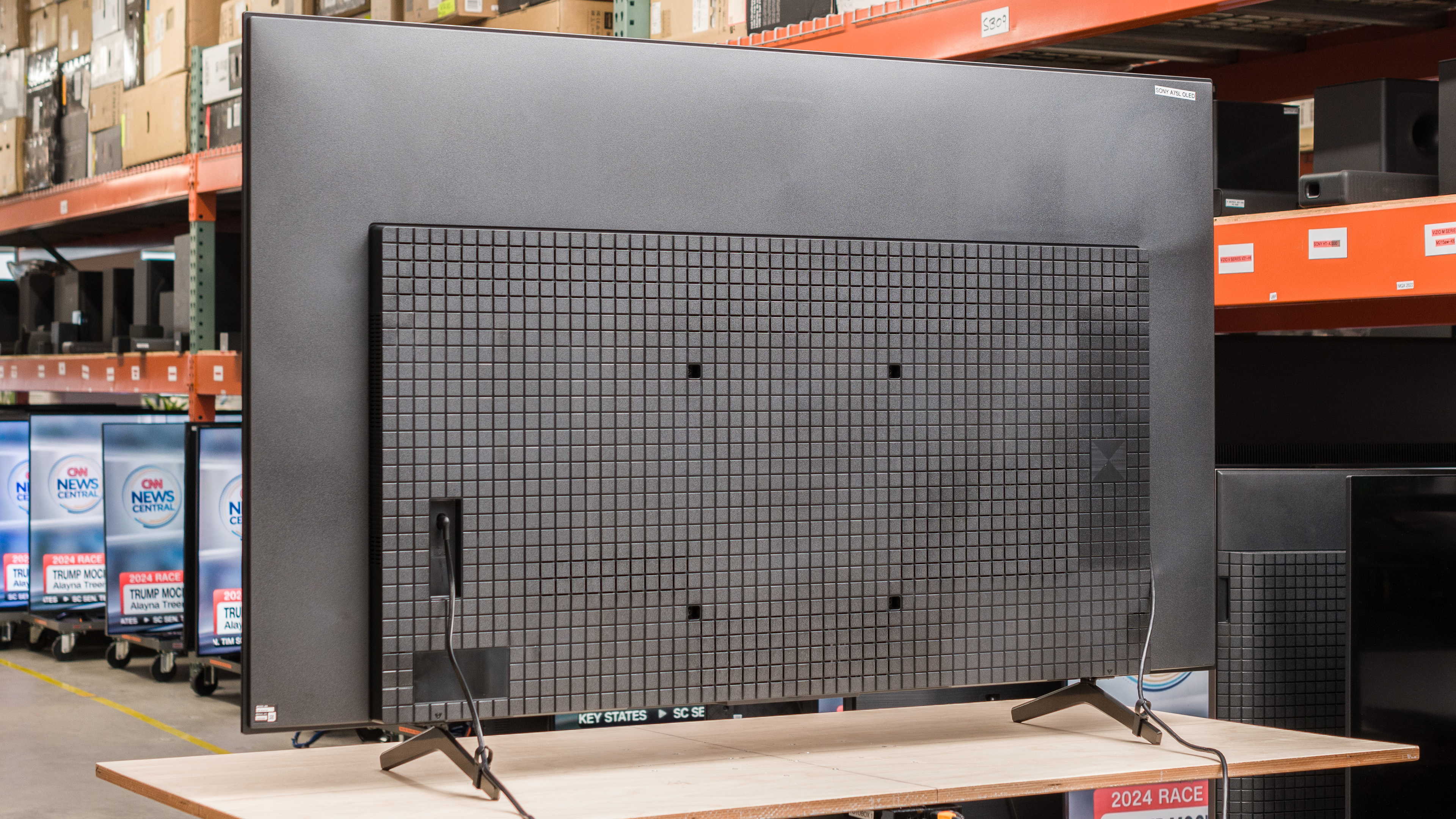
The back of the TV features a textured plastic with a checkerboard pattern that's typical of Sony TVs. The inputs are close to the side of the TV and easy to reach if you wall-mount it. There's a cover to hide the inputs, and the TV comes with clips for the feed to help with cable management.


for pictures & test results

The Sony A75L OLED has excellent build quality. It's very similar to higher-end Sony TVs, including the Sony A80L OLED, but the stand is made of plastic and feels a bit cheaper overall. Other than that, there are no noticeable issues with the overall assembly.
for pictures & test results

The Sony A75L has a near-infinite contrast ratio. This allows it to display perfect blacks even immediately next to the brightest highlights.
for pictures & test results

Since pixels can be completely turned off next to pixels that are lit up to their maximum brightness, the blacks surrounding bright elements are perfect and don't have any blooming.
for videos & test results

As with other OLED TVs, this TV doesn't have a backlight, but its self-emissive pixels give it the equivalent of a perfect local dimming feature with no zone transitions. We still film the zone transition video on the TV so you can see how the screen performs and compare it with a TV that has local dimming.



for pictures & test results

for pictures & test results

for pictures & test results

The Sony A75L has good peak brightness in HDR. Although the brightest scenes in HDR aren't very bright, most content is displayed well, and it delivers an impactful HDR experience overall. Its near-infinite contrast ratio allows it to display small bright highlights well, even in already bright scenes.
These measurements are after calibrating the HDR white point with the following settings:
- HDR Picture Mode: Custom
- Brightness: 100
- Contrast: 90
- HDR Tone Mapping: Gradation Preferred
- Peak Luminance: High
If you prefer a brighter image in HDR, switching the HDR Tone Mapping setting to 'Brightness Preferred' increases the brightness of midtones, but reduces gradation in bright scenes, so some bright highlights blend together.
These are the real scene brightness measurements with HDR Tone Mapping set to 'Brightness Preferred':
- Hallway Lights: 576.0 cd/m²
- Yellow Skyscraper: 428.3 cd/m²
- Landscape Pool: 206.0 cd/m²
for pictures & test results

for pictures & test results

for pictures & test results

The Sony A75L is slightly dimmer in the Game mode than the calibrated picture modes. It's odd, but the Sony A80L OLED and Sony A95L OLED both exhibit the same behavior.
These measurements are after calibrating the HDR white point, with all eco settings disabled, with the following settings:
- HDR Picture Mode: Standard (Game)
- Brightness: 100
- Contrast: 90
- HDR Tone Mapping: Gradation Preferred
- Peak Luminance: High
If you prefer a brighter image in HDR, switching the HDR Tone Mapping setting to 'Brightness Preferred' increases the brightness of mid-tones, but reduces gradation in bright scenes, so some bright highlights blend together.
These are the real scene brightness measurements with HDR Tone Mapping set to 'Brightness Preferred':
- Hallway Lights: 366.2 cd/m²
- Yellow Skyscraper: 461 cd/m²
- Landscape Pool: 206.0 cd/m²
for pictures & test results

The PQ EOTF tracking on this TV is fantastic, and most scenes are displayed at exactly the brightness level the content creator intended.
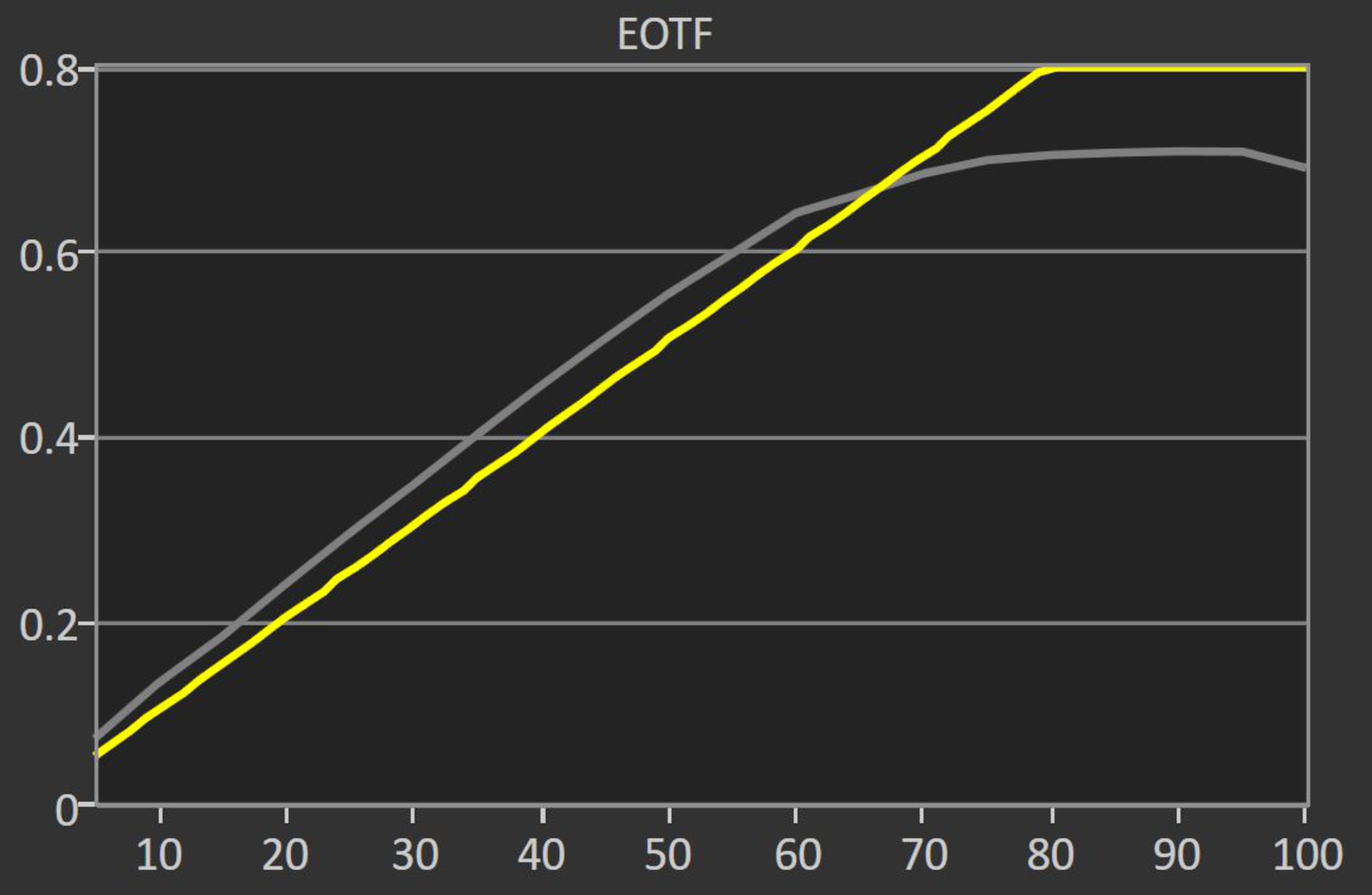
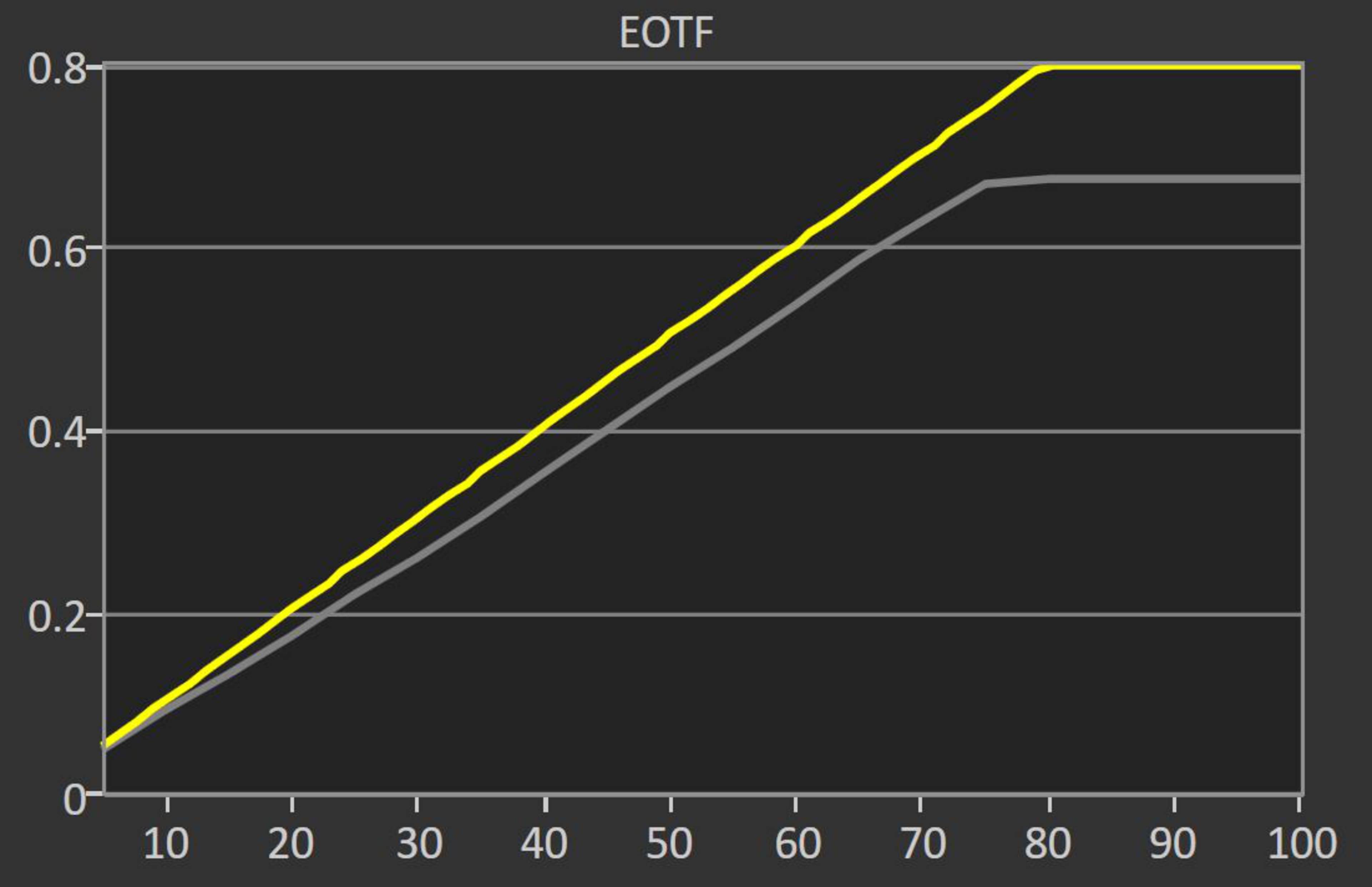
The HDR Tone Mapping setting has a significant impact on the PQ EOTF tracking on this TV. Setting it to 'Gradation Preferred' delivers the most accurate results and preserves fine details in the brightest scenes. If you prefer a brighter image, setting it to 'Brightness Preferred' instead increases the brightness of most scenes but results in a slightly sharper cutoff near the TV's peak brightness, resulting in a loss of gradation in bright scenes, as you can see in this EOTF graph. Setting it to 'Off' disables tone mapping entirely, so almost all scenes are too dim. Bright scenes are a bit brighter overall, though, as the TV isn't tone mapping in scenes close to its peak brightness as shown in this EOTF graph.
The Sony A75L has decent peak brightness in SDR. It's bright enough to handle a moderate amount of glare, and it looks good in a bright room, but it's not as bright as higher-end OLED models like the LG C3 OLED or the Samsung S90C OLED.
These measurements are after calibration with the following settings:
- Picture Mode: Custom
- Brightness: 100
- Contrast: 90
- Color Temperature: Expert 2
- Peak Luminance: High
- Gamma: 0
If you need an OLED with better SDR peak brightness, take a look at the Sony BRAVIA 8 OLED.
for pictures & test results

for pictures & test results

The Sony A75L has an excellent HDR color gamut. It displays most of the DCI-P3 color space used by most HDR content. The tone mapping is a bit off in duller shades, which tend to be closer to white than they should be. It has decent coverage of the wider Rec. 2020 color space, but the tone mapping is worse, and saturated green and cyan are noticeably off.
for pictures & test results

for pictures & test results

The Sony A75L has great color volume. As with all OLEDs, it displays dark colors well due to its perfect blacks and near-infinite contrast ratio, but colors don't get very bright in part due to the A75L's relatively low peak brightness but also due to its WOLED panel.
for pictures & test results

for pictures & test results

for pictures & test results

The Sony A75L has good accuracy in SDR with the best settings out-of-the-box. The white balance is the most noticeable issue, as there's too much red and blue in brighter shades, and gamma is over-brightened in bright scenes. The color accuracy is excellent, with just a few slight issues in colors close to white.
for pictures & test results

for pictures & test results

for pictures & test results

The white balance is very easy to calibrate on this TV, and the results after calibration are fantastic. The color calibration system isn't very useful, though, as any adjustments made to the TV made the overall accuracy worse.
You can see the full calibration settings used here
for pictures & test results

for pictures & test results

The gray uniformity of this TV is excellent. Bright scenes with uniform colors look incredible, with very little dirty screen effect in the center. Dim scenes look great, but in near-black scenes, there's some noticeable vertical banding.
for pictures & test results

The Sony A75L has perfect black uniformity, with no cloudiness or bright patches.
for videos & test results

for pictures & test results

for pictures & test results

for pictures & test results

The Sony A75L has a fantastic viewing angle. This is great for a wide seating arrangement, as everyone will enjoy a consistent image even if they're sitting to the side.
for pictures & test results

for pictures & test results

for pictures & test results

The reflection handling on this TV is fantastic. The semi-gloss anti-reflective coating significantly reduces the intensity of direct reflections without adding any rainbow smear.
for pictures & test results

Gradients are displayed very well, with just a few noticeable issues in certain shades.
for pictures & test results

As is typical of Sony, the low-quality content smoothing on this TV is great. It's almost free of macro-blocking in dark scenes, and fine details are preserved very well.
for pictures & test results

As is typical of Sony TVs, the Sony A75L has remarkable sharpness processing capabilities. Low-resolution content is upscaled well, and lines are sharp with very little over-sharpening. Fine details in busy scenes are easy to make out, and hardcoded text looks great.
These results are with the following processing settings:
- Sharpness: 55
- Reality Creation: 20
for pictures & test results

The TV uses an RWBG panel, or WOLED, with four subpixels. While it doesn't affect picture quality, it's still important for users wanting to use the TV as a PC monitor, as Windows ClearType still can't fully compensate for non-RGB subpixel layouts, negatively affecting text clarity. You can read more about it here.
for pictures & test results

for pictures & test results

The Sony A75L has a near-instantaneous response time, resulting in almost no motion blur behind fast-moving objects. However, due to the sample-and-hold nature of OLEDs, there's still some persistence blur.
for pictures & test results

The TV is not quite flicker-free, as there's a very small dip in brightness every 8 ms, corresponding to the TV's refresh rate. You won't notice it, however, and it's not the same as pulse width modulation (PWM) on LED TVs, as it isn't a full-screen on-and-off cycle.
for pictures & test results

for pictures & test results

The TV has an optional black frame insertion feature to reduce persistence blur. Unfortunately, it only works with 60 fps content, so you can't use it with 120 fps video games.
for pictures & test results

for pictures & test results

The TV has a motion interpolation feature to bring 30 and 60 fps content up to 120 fps. It does a good job with real content, especially in panning shots and slower dialog scenes. However, as is typical of motion interpolation, once the action ramps up, there are more noticeable artifacts, and in really busy scenes, it even stops interpolating entirely. This sudden change creates a jarring effect and is quite distracting due to the sudden significant change in frame rate.
Like all OLED TVs, there's noticeable stutter due to the TV's nearly instantaneous response time. It's especially noticeable in slow-panning shots.
The TV removes 24p judder from any source, including 60p sources that don't have a Match Frame Rate feature, like a cable box.
The TV supports variable refresh rate technology to reduce screen tearing. HDMI Forum VRR and G-SYNC compatibility work over the entire refresh rate range.
The TV has low input lag as long as you're in Game Mode. Although it's a bit higher than most other OLEDs from competing manufacturers, like the LG B3 OLED, it's still good enough for a responsive gaming feel.
The TV supports most common resolutions—except 1440p at any refresh rate—up to 4k @ 120Hz with HDMI ports 3 and 4 or 4k @ 60Hz on HDMI 1 and 2. It displays chroma 4:4:4 with all of its supported resolutions, which is essential for clear text when using the TV with a PC.
for pictures & test results

This TV supports almost everything the PS5 offers through HDMI ports 3 and 4, which are the TV's two HDMI 2.1 bandwidth ports, except for 1440p. It has a few PS5-specific features like Auto HDR Tone Mapping and Auto Low Latency Mode (ALLM), with the latter working automatically on the PS5 without needing to enable it first.
for pictures & test results

The TV works well with the Xbox Series X|S as long as it's connected to ports 3 or 4, which are the TV's two full HDMI 2.1 bandwidth ports. It has Auto Low Latency Mode (ALLM) support, although you need to set it to 'On' before it can work with the Xbox, and then it only switches into Game Mode when a game launches. The TV only supports Dolby Vision up to 4k @ 60Hz from the Xbox, as unlike the Sony A95L OLED, this TV doesn't support Dolby Vision with 4k @ 120Hz signals. Unfortunately, this TV doesn't support 1440p.
The TV supports full HDMI 2.1 bandwidth on HDMI ports 3 and 4, while HDMI ports 1 and 2 are limited to HDMI 2.0 bandwidth. As HDMI 3 is also the eARC port, you lose an HDMI 2.1 slot if you connect a receiver to it, which means that you can't use multiple HDMI 2.1 devices simultaneously when an audio receiver or soundbar is connected to the eARC port unless the receiver has HDMI 2.1 ports with pass through. The tuner supports ATSC 3.0, allowing you to stream over-the-air 4k channels.


As is typical of Sony TVs, the Sony A75L supports a wide range of advanced audio formats through eARC. The TV supports every major audio format, so you don't have to worry about it being compatible with different external sources.
for pictures & test results

The frequency response of this TV is just okay. It's well-balanced at moderate volume levels, but there's an odd dip in the mid-treble range, so some dialogue sounds a bit muddy. Like most TVs, there's very little bass, with no thumb or rumble. Sadly, it can't get very loud, and there's significant compression at max volume.
for pictures & test results

Unfortunately, there's noticeable distortion even at moderate volume levels. It increases a bit at max volume, but since it's not very loud anyway, it's not a significant difference.
for pictures & test results

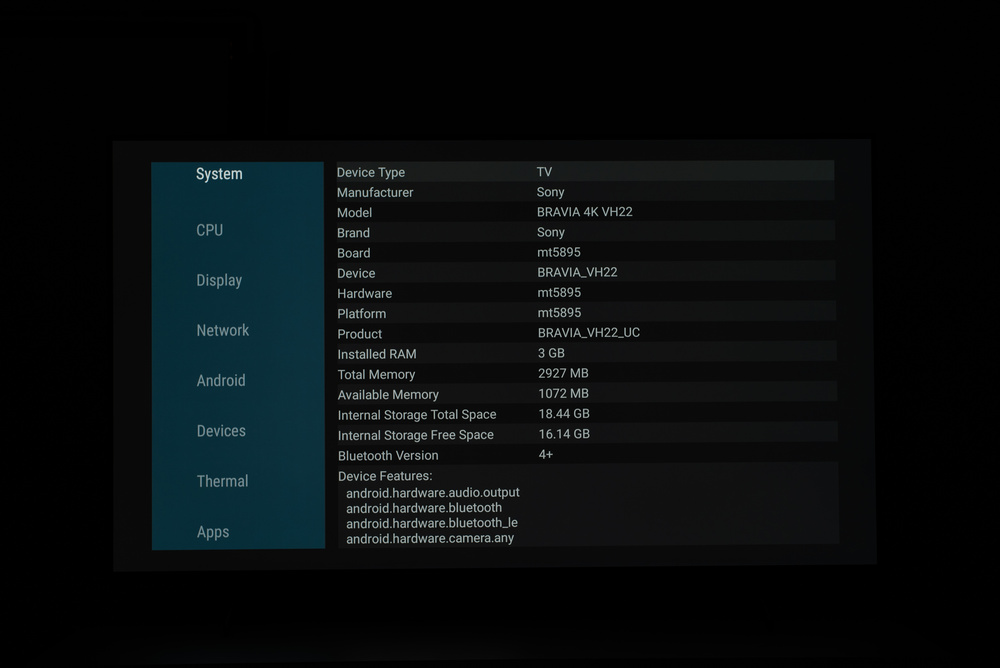
Oddly, the Sony A75L runs an older version of the Google TV smart interface. The differences are minor, though; it still comes with the same great selection of streaming apps. It's powered by the MT5895 chipset, which is a few years old. You can see the internal specs here.
for pictures & test results

Unfortunately, like most TVs, ads are throughout the interface, and you can't fully opt-out.
for pictures & test results

The Google Play Store has tons of apps available to download, and they run very smoothly. It also has Google Chromecast built-in, so you can cast content easily from your phone.
for pictures & test results

The included remote is small and has a built-in microphone, and there's also one in the TV, so you can use Google Assistant through both. The assistant works well; you can ask it to change the TV's inputs, search for content within apps, and even change the TV's brightness.
for pictures & test results

There's a single button underneath the center of the TV that you can use to turn it on or off and change channels, the volume, and the inputs.
for pictures & test results

- Remote control
- 2x AAA batteries
- 4x VESA adapters
- Cable management clips
- Power cable
- User guides