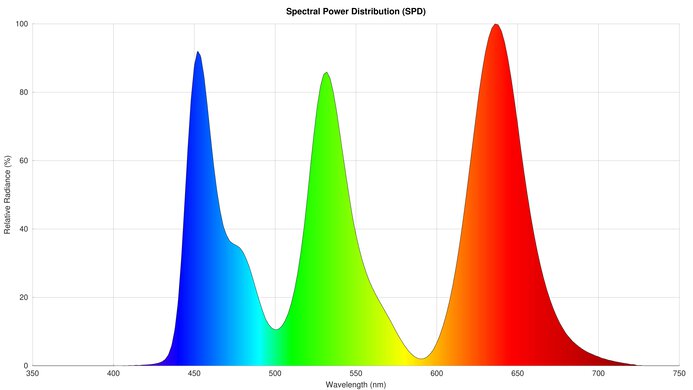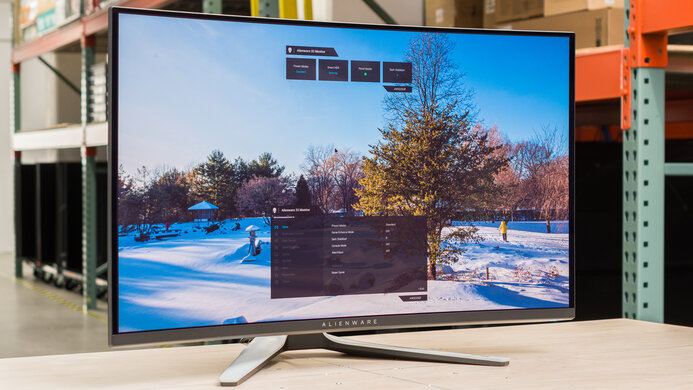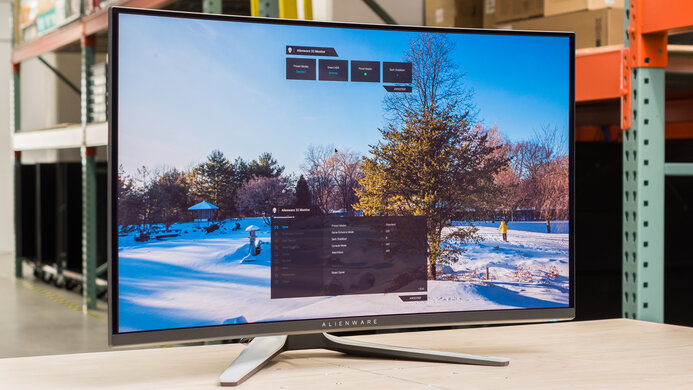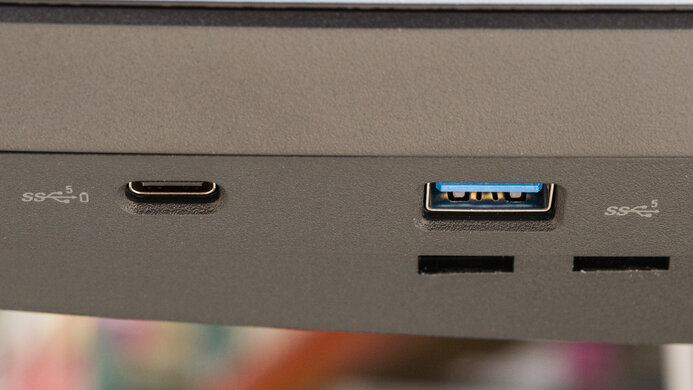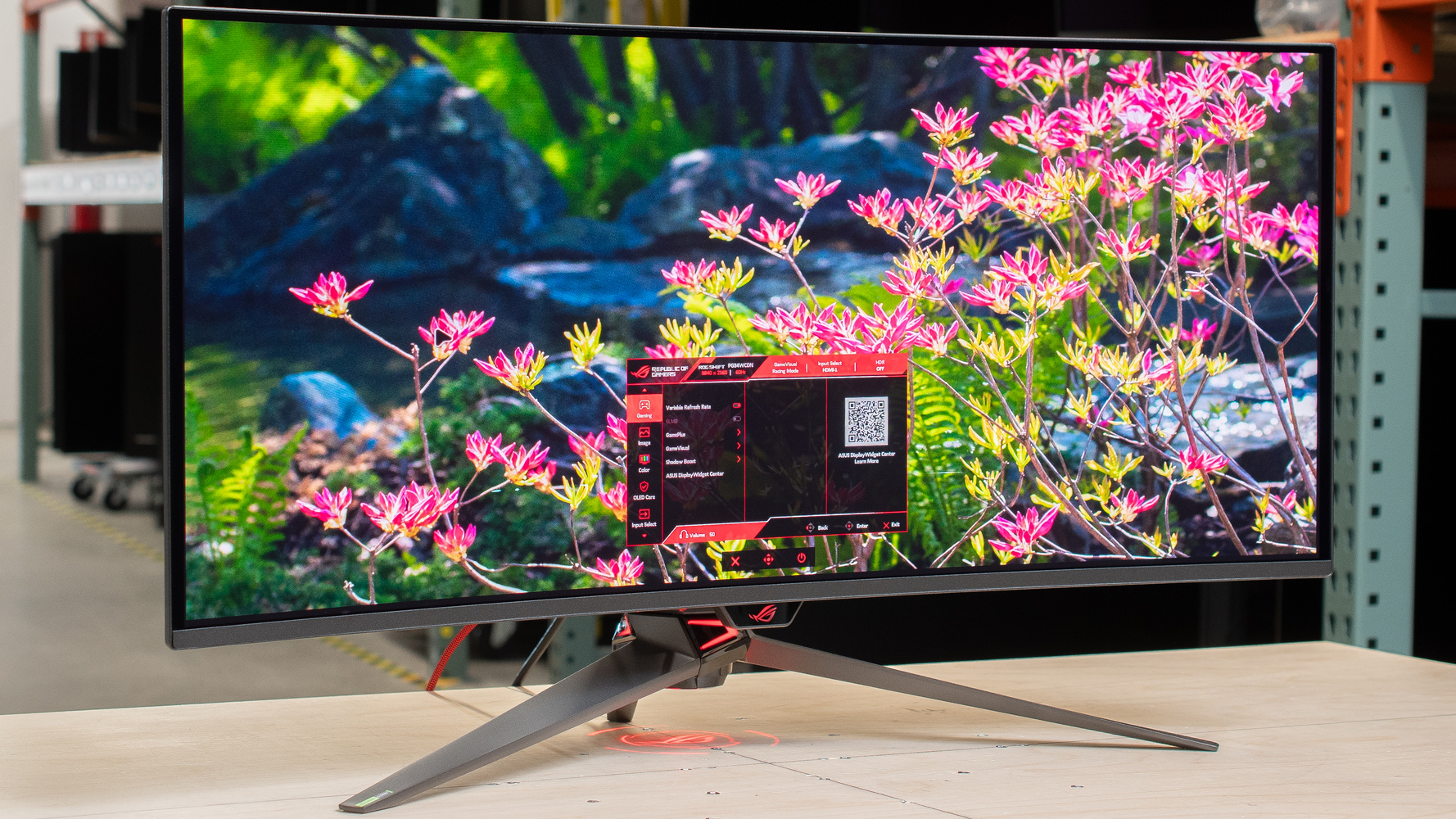
The ASUS ROG Swift OLED PG34WCDN is a high-end ultrawide OLED gaming monitor. It has a 34-inch screen with a 1800R curve, 3440x1440 resolution, and 360Hz refresh rate, competing directly with the MSI MPG 341CQR QD-OLED X36, and sitting higher-end than the Dell Alienware AW3426DW. Featuring a fifth-gen QD-OLED panel, it's the first to use the new RGB Stripe subpixel layout. It arranges subpixels vertically rather than in a triangular layout on previous-generation panels, which is meant to improve text clarity. It also comes with the new BlackShield coating, advertised to provide better black levels in bright rooms alongside improved durability compared to older glossy coatings. Besides that, it has features you'd expect in a premium gaming model, including HDMI and DisplayPort 2.1 bandwidth, an ELMB feature to reduce persistence blur, and a small USB hub that includes a KVM switch and DisplayPort Alt Mode with 90W of power delivery. Plus, it has a few settings to reduce the risk of burn-in, including a Neo Proximity Sensor that turns the screen off when you step away.
Our Verdict
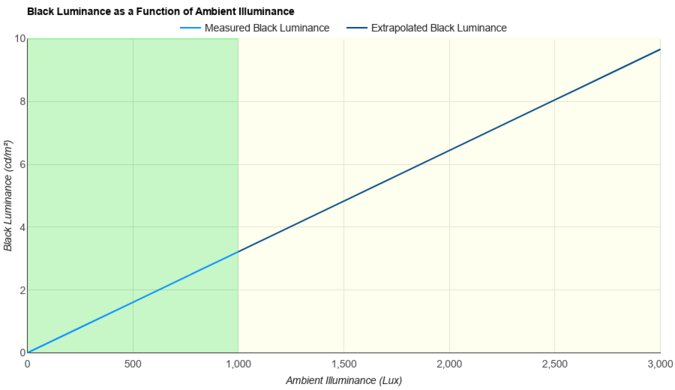
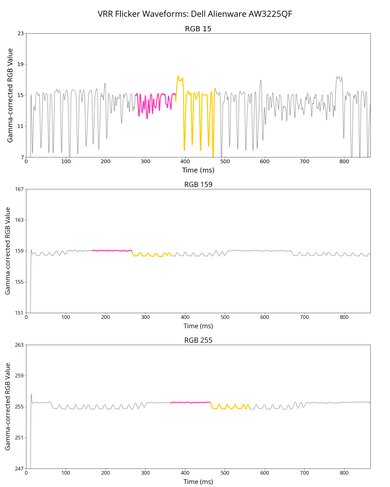
The ASUS PG34WCDN is a superb gaming monitor. Its 360Hz refresh rate offers a smooth gameplay, while it has a fast response time for sharp motion, and low input lag for a responsive feel. Plus, it supports all common VRR formats and has high-bandwidth HDMI and DisplayPort ports to take advantage of the latest gaming sources. It doesn't have distracting VRR flicker with changing frame rates, either. It even delivers remarkable picture quality with its deep blacks, bright highlights, and vivid colors. It also has a BlackShield coating that reduces it black level raise in bright rooms compared to older QD-OLEDs, but blacks still look gray in well-lit environments.
360Hz refresh rate.
High-bandwidth ports.
Incredibly sharp motion.
Low input lag.
Deep blacks in dark rooms.
Bright, vivid colors.
Minimal VRR flicker.
Some black level raise in well-lit spaces.
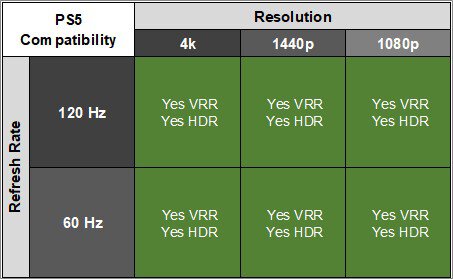
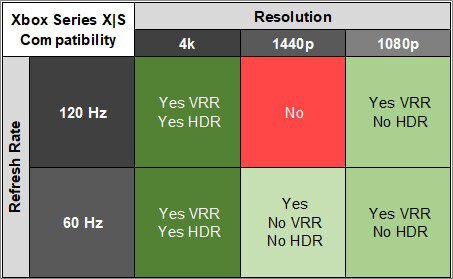
The ASUS PG34WCDN is incredible for console gaming. It supports all common signals from a PS5 or Xbox Series X|S, but you'll see black bars on the sides since the consoles don't support ultrawide signals. Gaming feels responsive thanks to its low input lag, and it has a near-instantaneous response time for sharp motion. Plus, it offers remarkable picture quality with deep blacks in dark rooms, highlights that pop, and vivid colors for an outstanding HDR gaming experience. That said, images aren't the most detailed due to its 1440p resolution.
High-bandwidth ports.
Incredibly sharp motion.
Low input lag.
Deep blacks in dark rooms.
Bright, vivid colors.
Supports most signals from consoles.
Some black level raise in well-lit spaces.
1440p resolution doesn't have the most detailed images.
The ASUS PG34WCDN is good for office use. Its 34-inch screen offers enough space to multitask, and it has good text clarity thanks to its RGB Stripe subpixel layout. Plus, it reduces glare well in bright rooms and has great overall brightness, but visibility is still an issue in sunny environments. It also includes productivity perks, like a USB hub and a KVM switch that help if you want to connect different devices to the monitor. The biggest downside is that it risks burn-in with constant exposure to the same static elements over time.
Good text clarity; better than older QD-OLEDs.
USB hub and KVM switch.
Good overall brightness.
Ultrawide 34-inch screen.
Visibility an issue in sunny rooms.
Risk of burn-in.
The ASUS PG34WCDN is superb for content creation. It comes with an incredibly accurate sRGB mode, and the main benefit of calibrating it is if you want to fix out-of-the-box gamma issues. It's also outstanding for editing HDR content as it displays deep blacks in dark rooms, has no haloing around bright objects, and makes highlights stand out. Plus, images and text look sharp for the most part, and its 34-inch ultrawide screen helps if you're editing a long video timeline. That said, it risks burn-in with constant exposure to the same static elements over time, like if you only work with the same editing program all the time.
Deep blacks in dark rooms.
Bright, vivid colors.
Good text clarity; better than older QD-OLEDs.
USB hub and KVM switch.
Accurate sRGB mode.
Good overall brightness.
Ultrawide 34-inch screen.
Some black level raise in well-lit spaces.
Visibility an issue in sunny rooms.
Risk of burn-in.
Needs full calibration to fix gamma.
The ASUS PG34WCDN has good brightness. It fights most glare well and makes highlights pop, but visibility is still an issue in sunny environments.
Good overall brightness.
Makes small highlights pop.
Visibility an issue in sunny rooms.
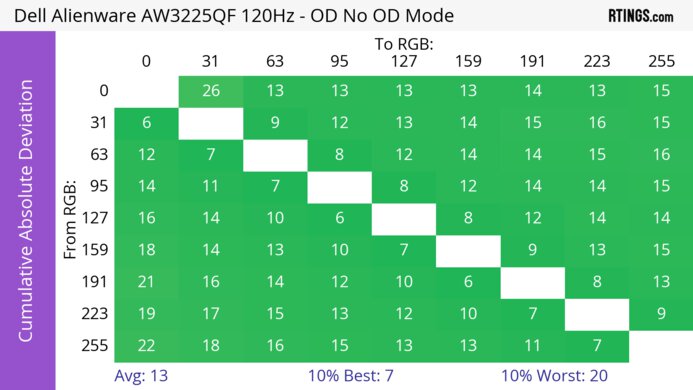
The ASUS PG34WCDN has a near-instantaneous response time for sharp motion at any refresh rate.
Incredibly sharp motion.
The ASUS PG34WCDN has outstanding HDR picture quality. Blacks are deep and inky in dark rooms, without any haloing around bright objects. It displays a wide range of colors and makes them look vivid as well.
Deep blacks in dark rooms.
Bright, vivid colors.
Some black level raise in well-lit spaces.
The ASUS PG34WCDN has remarkable SDR picture quality. It displays deep blacks next to bright highlights and has no haloing around bright objects. Plus, it displays a wide range of colors.
Deep blacks in dark rooms.
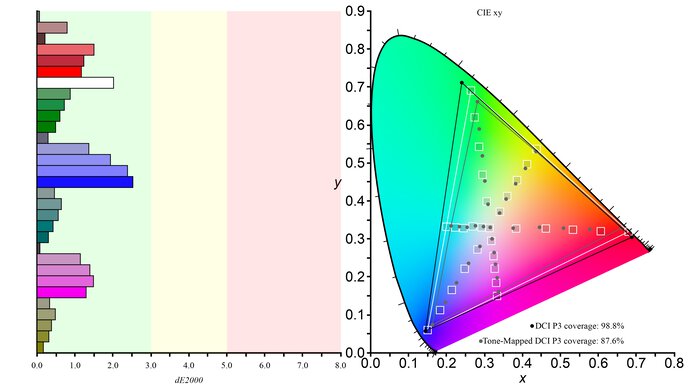
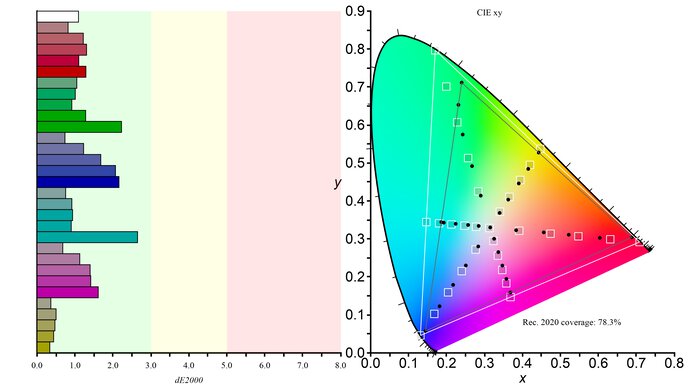
Covers most common SDR color spaces.
The ASUS PG34WCDN has incredible accuracy. Its sRGB mode is accurate out of the box, but it has gamma issues that you may want to fix with a full calibration.
Accurate sRGB mode.
Needs full calibration to fix gamma.
Performance Usages
Changelog
-
Updated Aug 20, 2026:
We bought and tested the HyperX OMEN OLED 34, and added a comparison in the Inputs section of the review.
-
Updated Aug 10, 2026:
We clarified in the Intro that this monitor is slightly higher-end than the Dell Alienware AW3426DW.
-
Updated Jun 08, 2026:
We clarified in the Intro that this monitor competes directly with the MSI MPG 341CQR QD-OLED X36.
-
Updated Jun 01, 2026:
We added that the LG 39GX950B-B is an ultrawide with less black level raise in bright rooms.
Check Price
Differences Between Sizes And Variants
We bought and tested the 34-inch ASUS PG34WCDN, which is the only size available. It's newer than the ASUS ROG Swift OLED PG34WCDM and sits above the ASUS ROG Strix OLED XG34WCDMS, and you can see the differences between these monitors below. The results are only valid for this model.
| Model | Panel Type | Subpixel Layout | Refresh Rate | Coating | Inputs |
|---|---|---|---|---|---|
| PG34WCDN | QD-OLED | RGB Stripe | 360Hz | Glossy BlackShield |
1x DP 2.1 2x HDMI 3x USB-A 1x USB-C (90W) |
| XG34WCDMS | QD-OLED | RGB Stripe | 280Hz | Glossy BlackShield | 1x DP 1.4 2x HDMI 2.1 3x USB-A 1x- USB-C (15W) |
| PG34WCDM | WOLED | RWBG | 240Hz | Matte | 1x DP 1.4 2x HDMI 2.1 2x USB-A 1x USB-C (90W) |
Our unit's label indicates it was manufactured in January 2026 in Vietnam. We tested it with firmware MCM101.
Popular Monitor Comparisons
The ASUS PG34WCDN is a premium ultrawide OLED monitor that's one of the best gaming monitors on the market. Its new fifth-gen QD-OLED panel brings higher brightness and improved text clarity thanks to its RGB Stripe subpixel layout. Unlike previous-gen QD-OLED panels, text looks as sharp as on an LCD display with the same pixel density. Plus, its BlackShield coating reduces the purple tint issue that QD-OLEDs have been known for. That said, there's still black level raise in bright rooms, as blacks look gray instead.
Besides the differences with the new panel, it offers everything you'd want in a gaming monitor. This includes a fast 360Hz refresh rate, support for all common VRR formats, and high-bandwidth HDMI and DisplayPort inputs. Gaming also feels responsive thanks to its low input lag, and there's minimal blur with fast-moving objects. It even has less VRR flicker compared to older QD-OLEDs, like the Dell Alienware AW3425DW. Overall, if you're willing to pay a price premium for its outstanding performance, you can't go wrong with it. Otherwise, there are other options you can find for less, like the MSI MPG 341CQPX QD-OLED, with notable trade-offs.
Also see our recommendations for the best OLED monitors, the best ultrawide gaming monitors, and the best 34-49 inch monitors.
The ASUS ROG Swift OLED PG34WCDN and the MSI MPG 341CQR QD-OLED X36 are competing 360Hz ultrawide OLED gaming monitors. As they use the same panel, they perform similarly, and any differences come down to different features. For example, the ASUS has higher bandwidth over DisplayPort, which is something to consider if you have a DisplayPort 2.1 graphics card. Besides that, they're both similar, and you can't go wrong with either.
The ASUS ROG Swift OLED PG34WCDN and the Dell Alienware AW3426DW are both ultrawide gaming monitors with a fifth-gen QD-OLED panel. While they have similar picture quality, there are a few differences in features. The ASUS has a black frame insertion feature to reduce persistence blur, and a KVM switch that makes it easy to change sources and use the same devices on both. Plus, the ASUS has a faster 360Hz refresh rate with higher DisplayPort 2.1 bandwidth, and it has a bigger USB hub that includes a USB-C port with DisplayPort Alt Mode, which the Dell lacks. That said, the Dell supports Dolby Vision.
The ASUS ROG Swift OLED PG32UCDM Gen3 and the ASUS ROG Swift OLED PG34WCDN are both premium QD-OLEDs. The main differences between them come down to their specs. The PG34WCDN has an ultrawide screen with extra screen real estate on the sides, while the PG32UCDM3 has a higher resolution for more detailed images. That said, the PG34WCDN has less fringing around letters because it uses an RGB Stripe subpixel layout, whereas the PG32UCDM3 has a triangular subpixel layout. The PG34WCDN also has a higher 360Hz refresh rate for a smoother feel. They're similar besides that, as they each get bright and have a BlackShield coating that reduces glare well.
The ASUS ROG Swift OLED PG34WCDN is a newer QD-OLED gaming monitor compared to the Dell Alienware AW3425DW. The ASUS comes with the newer RGB Stripe subpixel layout, resulting in improved text clarity compared to the triangular subpixel layout of the Dell. Plus, the newer panel of the ASUS gets brighter and has a faster refresh rate for gaming. The ASUS even uses a BlackShield coating that doesn't have a purple tint in bright rooms like on the Dell. Lastly, the ASUS has some extra productivity perks, including a bigger USB hub with DisplayPort Alt Mode and a KVM switch.

We buy and test more than 30 monitors each year, all of which we purchase ourselves, without cherry-picked units or samples. We put a lot into each unbiased, straight-to-the-point review, and there's a whole process from purchasing to publishing, involving multiple teams and people. We do more than just use the monitor for a week; we use specialized, custom tools to measure various aspects and deliver objective, data-driven results. We also consider multiple factors before making any recommendations, including the monitor's cost, its performance compared to the competition, and whether it's easy to find.
Test Results






for pictures & test results





for pictures & test results


for pictures & test results

for pictures & test results

for pictures & test results

for pictures & test results

for pictures & test results

for pictures & test results





for videos & test results

for pictures & test results

for pictures & test results

for pictures & test results