MSI MPG 341CQPX QD-OLED  Monitor Review

Reviewed Nov 19, 2024 at 12:09pm
Tested using Methodology v2.1.1 
MSI MPG 341CQPX QD-OLED
9.1
PC Gaming 
9.1
Console Gaming 
7.0
Office 
8.8
Editing 
6.8
Brightness 
9.9
Response Time 
9.5
HDR Picture 
10
SDR Picture 
 19

The MSI MPG 341CQPX QD-OLED is a 34-inch 1440p ultrawide gaming monitor with a QD-OLED panel. It competes against other ultrawide OLED monitors like the LG 34GS95QE-B and the Gigabyte AORUS MO34WQC2. It has a 240Hz refresh rate, VRR support, and HDMI 2.1 bandwidth that lets it take full advantage of gaming consoles and high-end graphics cards. On top of its gaming features, it also has extra perks designed for everyday use, like a USB-C port with DisplayPort Alt Mode support and 90W of power delivery, as well as a KVM switch. As it's an OLED display, it's prone to permanent burn-in when exposed to the same static elements over time. It includes some settings to mitigate the risk of burn-in and has a custom heatsink to dissipate heat without a fan.

How We Test Monitors

We buy and test more than 30 monitors each year, with units that we buy completely on our own, without any cherry-picked units or samples. We put a lot into each unbiased, straight-to-the-point review, and there's a whole process from purchasing to publishing, involving multiple teams and people. We do more than just use the monitor for a week; we use specialized and custom tools to measure various aspects with objective data-based results. We also consider multiple factors before making any recommendations, including the monitor's cost, its performance against the competition, and whether or not it's easy to find.

Our Verdict

9.1
PC Gaming 

The MSI MPG 341CQPX is fantastic for PC gaming. It has a 240Hz refresh rate with VRR support, and motion looks incredibly smooth thanks to its near-instantaneous response time. Your inputs also feel responsive, as it has low input lag. Additionally, it's incredible for gaming in dark rooms as blacks look deep and inky, and bright colors are vivid. However, deep blacks look purple in brighter rooms, and it has distracting VRR flicker when frame rates change rapidly.

Pros
  • Sharp motion thanks to near-instantaneous response time.

  • Perfect black levels in dark rooms.

  • Supports all common VRR formats.

  • Highlights pop in HDR.

  • High 240Hz refresh rate.

Cons
  • Noticeable VRR flicker with changing frame rates.

  • Black levels rise in bright rooms.

9.1
Console Gaming 

The MSI MPG 341CQPX is fantastic for console gaming. It has HDMI 2.1 bandwidth and is fully compatible with the PS5 and the Xbox Series X|S, but the consoles don't support ultrawide gaming, so you'll see black bars on the sides. Because of its near-instantaneous response time, it delivers a very crisp image, and its low input lag creates a responsive feel. It also displays deep blacks in a dark room, so it's great if you're gaming in a darker environment. However, if you're in a brighter room, deep blacks look purple.

Pros
  • Sharp motion thanks to near-instantaneous response time.

  • Perfect black levels in dark rooms.

  • Supports all common VRR formats.

  • HDMI 2.1 bandwidth for console gaming.

  • Highlights pop in HDR.

Cons
  • Black levels rise in bright rooms.

7.0
Office 

The MSI MPG 341CQPX is decent for office use, but there are some limitations. Its large, wide screen makes it easy to open multiple windows next to each other. However, while it works well with a few lights around, it doesn't get bright enough to fight strong glare. Additionally, its subpixel layout makes text appear slightly less clear than some other 27-inch 1440p monitors. Also, OLEDs like this one are prone to burn-in with constant exposure to the same static elements over time.

Pros
  • Ultrawide 34-inch screen.

  • Decent reflection handling.

  • Extra productivity features, like a KVM switch.

  • Wide viewing angles.

Cons
  • Text has a bit of fringing.

  • Doesn't get very bright in SDR.

  • Risk of burn-in with static elements.

8.8
Editing 

The MSI MPG 341CQPX is excellent for media creation, but it has some limitations. It displays a wide range of colors and has impressive accuracy before calibration. Its ultrawide screen allows you to view more of your work area at once, and its wide viewing angles are great if you need to share the screen with someone next to you. However, its curved display isn't ideal if you need to view straight lines, and text has a bit of color fringing. Another major downside is that it runs the risk of permanent burn-in when exposed to the same static elements over time, like if your editing programs are open all the time.

Pros
  • Ultrawide 34-inch screen.

  • Decent reflection handling.

  • Extra productivity features, like a KVM switch.

  • Wide viewing angles.

  • Impressive accuracy before calibration.

Cons
  • Text has a bit of fringing.

  • Doesn't get very bright in SDR.

  • Risk of burn-in with static elements.

  • Black levels rise in bright rooms.

6.8
Brightness 

The MSI MPG 341CQPX has okay brightness. It isn't bright enough to fight intense glare in well-lit rooms, but it makes highlights pop in HDR.

Pros
  • Highlights pop in HDR.

Cons
  • Doesn't get very bright in SDR.

9.9
Response Time 

The MSI MPG 341CQPX has a near-instantaneous response time, leading to exceptionally sharp motion.

Pros
  • Sharp motion thanks to near-instantaneous response time.

  • Outstanding refresh rate compliance.

Cons
None
9.5
HDR Picture 

The MSI MPG 341CQPX is outstanding for HDR. It displays deep blacks in dark rooms, and there isn't any blooming around bright objects either. Its QD-OLED panel also displays a wide range of colors, making them bright and vivid.

Pros
  • Perfect black levels in dark rooms.

  • Displays wide range of vivid colors.

Cons
None
10
SDR Picture 

The MSI MPG 341CQPX has outstanding SDR picture quality, displaying deep and inky blacks in dark rooms and a wide range of colors.

Pros
  • Perfect black levels in dark rooms.

  • Displays wide range of vivid colors.

Cons
None
8.6
Color Accuracy 

The MSI MPG 341CQPX has excellent color accuracy. It has impressive accuracy before calibration, but calibrating it still results in the best accuracy.

Pros
  • Impressive accuracy before calibration.

Cons
None
  • 9.1
    PC Gaming
  • 9.1
    Console Gaming
  • 7.0
    Office
  • 8.8
    Editing

  • Performance Usages

  • 6.8
    Brightness
  • 9.9
    Response Time
  • 9.5
    HDR Picture
  • 10
    SDR Picture
  • 8.6
    Color Accuracy
  • Changelog

    1.  Updated Nov 10, 2025: We've converted this review to Test Bench 2.1.1. We removed the Vertical Viewing Angle test.
    2.  Updated Aug 14, 2025: 

      Added that this monitor competes against the Dell Alienware AW3425DW.

    3.  Updated Jun 13, 2025: 

      We updated text throughout to match the new and updated tests with Test Bench 2.1, including in the Verdict section.

    4.  Updated Jun 13, 2025: We've converted this review to Test Bench 2.1. This includes new tests for Direct Reflections, Ambient Black Level Raise, and Total Reflected Light. You can see all the changes in the changelog.

    Check Price

    34"MPG 341CQPX QD-OLED
    SEE PRICE
    Amazon.com
    34"MPG 341CQPX QD-OLED
    SEE PRICE
    BestBuy.com
    34"MPG 341CQPX QD-OLED
    SEE PRICE
    B&H
    34"MPG 341CQPX QD-OLED
    SEE PRICE
    Walmart.com

    Differences Between Sizes And Variants

    We tested the 34-inch MSI MPG 341CQPX. It's one of several monitors in MSI's lineup that features a QD-OLED panel, including the very similar MSI MEG 342C QD-OLED and the MSI MAG 341CQP QD-OLED. However, these monitors have a few differences, as you can see below. The results are only valid for this model.
    Model Size Resolution Refresh Rate USB-C Power
    MPG 341CQPX 34" 1440p 240Hz 90W
    MEG 342C 34" 1440p 175Hz 65W
    MAG 341CQP 34" 1440p 175Hz 15W

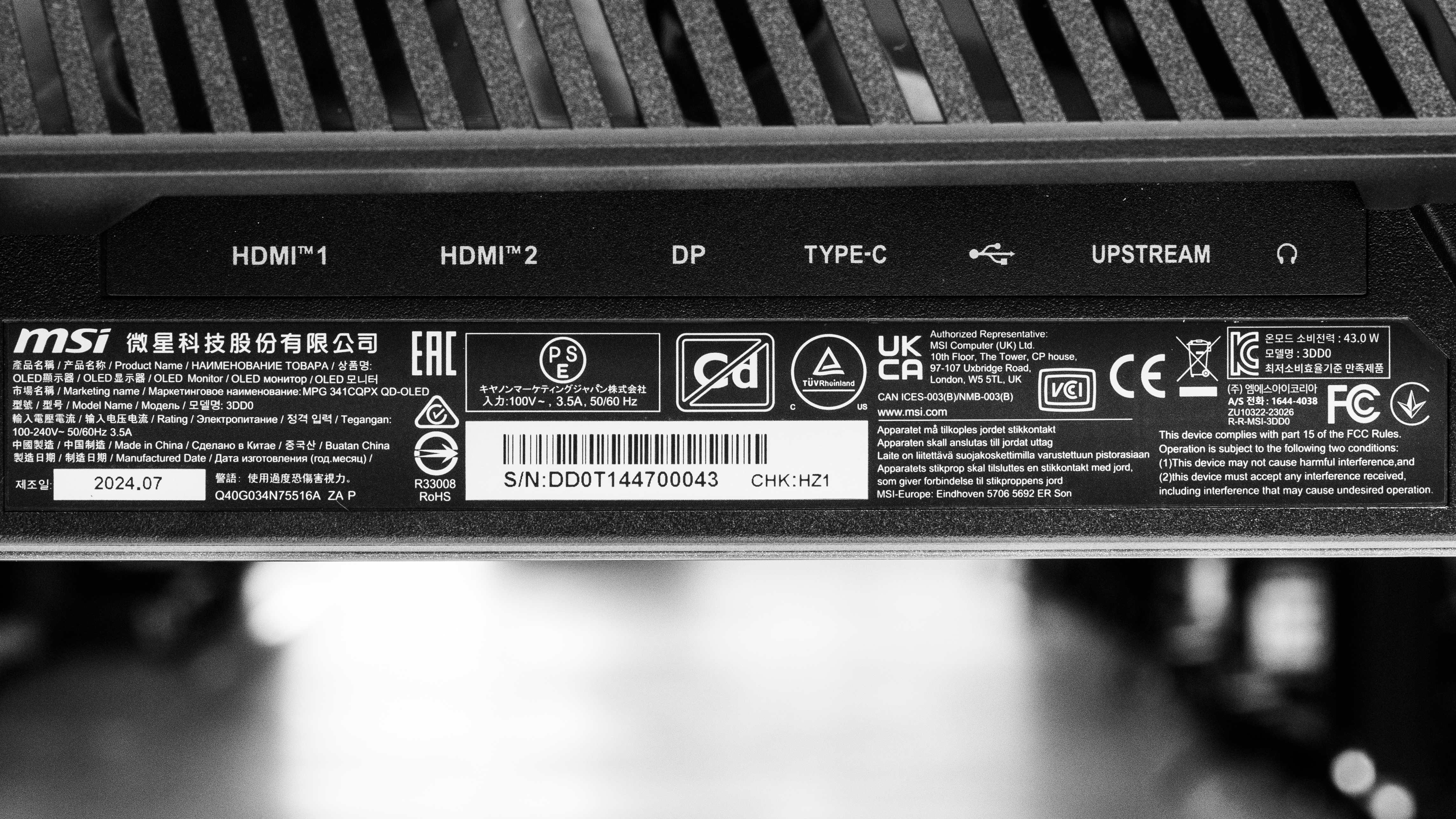
    Our unit's label indicates that it was manufactured in July 2024. We tested it with firmware FW.020.

    Popular Monitor Comparisons

    The MSI MPG 341CQPX is a 34-inch gaming monitor with a 1440p resolution and 240Hz refresh rate. It's a newer monitor with a higher refresh rate than the MSI MEG 342C QD-OLED, and it competes against similar OLED monitors like the LG 34GS95QE-B and the Dell Alienware AW3425DW. Its 240Hz display is smoother than many previous-generation ultrawide OLEDs, and its QD-OLED display ensures bright colors are vivid. As a result, you don't need to choose between performance and image quality with this monitor. As the name indicates, ultrawide monitors are truly ultra-wide, and whether you prefer the extra width is a personal choice. If you prefer monitors with a more standard width, there are other high-refresh-rate QD-OLEDs with a 27- or 32-inch screen.

    See our recommendations for the best ultrawide gaming monitors, the best gaming monitors, and the best 34-49 inch monitors.

    LG 34GS95QE-B

    The LG 34GS95QE-B and the MSI MPG 341CQPX QD-OLED are both 34-inch 240Hz OLED gaming monitors. The MSI is better if you want the most vivid colors. However, the LG is a better choice if you're gaming in a brighter room, as deep blacks don't have a purple tint in those conditions unlike the MSI.

    Dell Alienware AW3425DW

    The Dell Alienware AW3425DW and the MSI MPG 341CQPX QD-OLED are competing ultrawide QD-OLED gaming monitors. They have the same specs and panel and perform similarly. The main differences come down to features, as the MSI has a USB-C port with DisplayPort Alt Mode to connect a laptop and a KVM switch, which the Dell doesn't have.

    Dell Alienware AW3423DWF

    The Dell Alienware AW3423DWF and the MSI MPG 341CQPX QD-OLED are 34-inch ultrawide QD-OLED gaming monitors. The MSI is the better choice for most people, as it has a higher refresh rate for smoother motion, HDMI 2.1 bandwidth, and USB-C connectivity with a KVM switch for productivity. However, the Dell is still an excellent monitor, and unless you need the MSI's higher refresh rate, it's a great option if you can find it for less.

    Samsung Odyssey OLED G85SB S34BG85

    The Samsung Odyssey OLED G85SB S34BG85 and the MSI MPG 341CQPX QD-OLED are 34-inch QD-OLED ultrawide gaming monitors. For most people, the MSI is the better option, as it has a higher refresh rate for smoother motion, a KVM switch, and HDMI 2.1 bandwidth. That said, the Samsung is an excellent monitor, and if you can find it for less, it can be a great choice.

    Show more 

    Video

    Test Results

    perceptual testing image
    Sort:
    RATINGS
    Category:
    All
    Design
    Style
    Curved
    Yes
    Curve Radius
    1800R

    The MSI MPG 341CQPX has a gamer-oriented aesthetic with a black plastic body and art on the back. The screen has a mild curve, which is standard for ultrawide displays.

    8.5
    Build Quality

    The build quality is excellent. It feels solid, and the plastic body doesn't flex very much. However, the bottom of the screen curves up slightly, as you can see in the Vertical Viewing Angle video.

    7.3
    Ergonomics
    Min Height To Top Of Panel
    16.5" (41.9 cm)
    Height Adjustment
    4.0" (10.2 cm)
    Tilt Range
    -20° to 5°
    Rotate Portrait/Landscape
    No
    Swivel Range
    -30° to 30°
    Wall Mount
    VESA 100x100

    The ergonomics are decent, and they are particularly good for an ultrawide monitor. The stand has a cutout for cable management.

    Stand
    Base Width
    25.1" (63.8 cm)
    Base Depth
    12.5" (31.7 cm)
    Thickness (With Display)
    10.6" (27.0 cm)
    Weight (With Display)
    19.5 lbs (8.8 kg)

    This monitor has a V-shaped stand that takes up a lot of space. The monitor wobbles a bit when bumped, but this is normal for an ultrawide monitor. The thickness is measured from the sides to the back of the stand, and the thickness from the center of the screen to the back of the stand is 8.7" (22.0 cm).

    Display
    Size
    34"
    Housing Width
    32.0" (81.3 cm)
    Housing Height
    14.3" (36.2 cm)
    Thickness (Without Stand)
    5.1" (13.0 cm)
    Weight (Without Stand)
    14.8 lbs (6.7 kg)
    Borders Size (Bezels)
    0.4" (0.9 cm)

    The thickness is measured from the sides to the back of the screen, and the thickness from the center of the screen is 3.2" (8.0 cm).

    Controls

    The controls consist of a power button, a macro key, and a joystick to control the on-screen menu.

    In The Box
    Power Supply
    Internal

    • DisplayPort cable
    • HDMI cable
    • USB-A to USB-B cable
    • Power cable
    • Documentation
    • VESA adapter screws
    Picture Quality
    10
    Contrast
    Native Contrast
    Inf : 1
    Contrast With Local Dimming
    Inf : 1

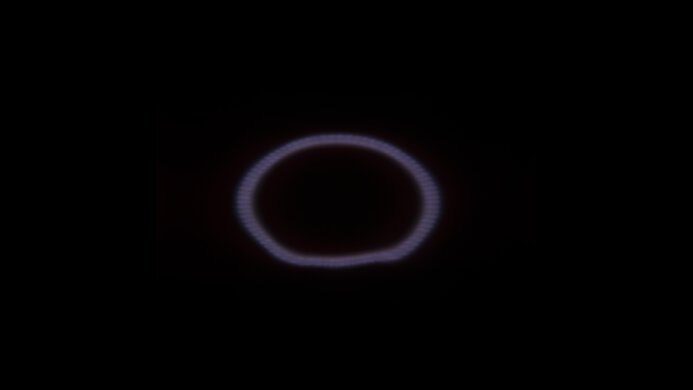
    The MSI MPG 341CQPX has a near-infinite contrast ratio, as its QD-OLED panel can turn individual pixels on and off. This means it displays deep blacks next to bright highlights in dark rooms. However, in brighter environments deep blacks appear purple.

    10
    Local Dimming
    Local Dimming
    No
    Backlight
    No Backlight

    OLED panels like this one don't have a backlight, so they don't require a local dimming feature. However, with a near-infinite contrast ratio, there isn't any blooming around bright objects, and it's the equivalent of a perfect local dimming feature. We still film these videos on the monitor so you can see how the screen performs and compare it with a monitor that has local dimming.

    6.7
    SDR Brightness
    Real Scene
    230 cd/m²
    Peak 2% Window
    258 cd/m²
    Peak 10% Window
    258 cd/m²
    Peak 25% Window
    258 cd/m²
    Peak 50% Window
    258 cd/m²
    Peak 100% Window
    258 cd/m²
    Sustained 2% Window
    254 cd/m²
    Sustained 10% Window
    255 cd/m²
    Sustained 25% Window
    256 cd/m²
    Sustained 50% Window
    256 cd/m²
    Sustained 100% Window
    257 cd/m²
    Automatic Brightness Limiting (ABL)
    0.000
    Minimum Brightness
    30 cd/m²

    Settings

    • Pro Mode: User
    • Game Mode: User
    • Brightness: 100
    • MSI OLED Care
      • Pixel Shift: Slow
      • Other OLED Care Settings: Off

    The SDR brightness is adequate. It gets bright enough to fight glare in rooms with a few lights, though it can't overcome glare if bright light shines directly on the screen.

    6.8
    HDR Brightness
    VESA DisplayHDR Certification
    DisplayHDR TRUE BLACK 400
    Real Scene
    423 cd/m²
    Peak 2% Window
    1,043 cd/m²
    Peak 10% Window
    483 cd/m²
    Peak 25% Window
    379 cd/m²
    Peak 50% Window
    318 cd/m²
    Peak 100% Window
    266 cd/m²
    Sustained 2% Window
    1,019 cd/m²
    Sustained 10% Window
    474 cd/m²
    Sustained 25% Window
    375 cd/m²
    Sustained 50% Window
    316 cd/m²
    Sustained 100% Window
    265 cd/m²
    Automatic Brightness Limiting (ABL)
    0.077

    Settings

    • DisplayHDR: Peak 1000 nits
    • Brightness: Locked to max
    • MSI OLED Care
      • Pixel Shift: Slow
      • Other MSI OLED Care Settings: Off

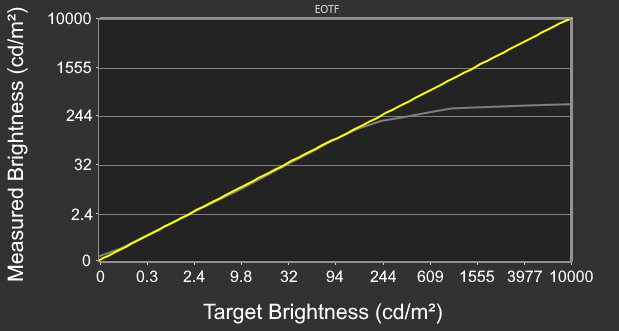
    The HDR brightness is alright. It gets bright enough for small highlights to pop against the rest of the image. It also follows the PQ EOTF well enough, so it displays scenes at their correct brightness, but because it has a slow roll-off at the peak brightness, it doesn't let highlights get the brightest they can.

    If you set DisplayHDR to 'TrueBlack 400' then there's less variation in brightness between scenes, but highlights also don't pop, as you can see below:

    Window Size Peak Sustained
    2% 474 cd/m² 469 cd/m²
    10% 477 cd/m² 470 cd/m²
    25% 385 cd/m² 380 cd/m²
    50% 325 cd/m² 323 cd/m²
    100% 275 cd/m² 274 cd/m²
    • EOTF: Chart
    • Real Scene: 359 cd/m²
    • ABL: 0.035
    8.7
    Gray Uniformity
    50% Std. Dev.
    0.586%
    50% DSE
    0.134%

    The MSI MPG 341CQPX has excellent gray uniformity, and there aren't any noticeable issues. However, like any OLED, there are thin gray vertical lines in dark scenes, but they're hard to notice.

    10
    Black Uniformity
    Native Std. Dev.
    0.202%
    Std. Dev. w/ L.D.
    N/A

    The black uniformity is outstanding, with a uniform black level across the screen.

    8.2
    Color Accuracy (Pre-Calibration)
    Picture Mode
    sRGB
    sRGB Gamut Area xy
    106.2%
    White Balance dE (Avg.)
    2.85
    Color Temperature (Avg.)
    6,408 K
    Gamma (Avg.)
    2.24
    Color dE (Avg.)
    1.95
    Contrast Setting
    N/A
    RGB Settings
    Default
    Gamma Setting
    No Gamma Setting
    Brightness Setting
    70
    Measured Brightness
    215 cd/m²
    Brightness Locked
    No

    The accuracy before calibration is great in the 'sRGB' Pro Mode with Game Mode set to 'User.' It locks colors fairly well to the sRGB color space, though they're a bit oversaturated. Additionally, its color temperature is close to the 6500K target, it has good white balance, and gamma is quite accurate, though very bright parts of scenes are a bit dark.

    The 'sRGB' mode locks out the following settings:

    • Contrast
    • Low Blue Light
    • Ambient RGB Light
    • Color Temperature

    If you want to access those settings, then you need to use another mode with worse color accuracy, as you can see in the graph for 'User' Pro Mode.

    9.6
    Color Accuracy (Post-Calibration)
    Picture Mode
    User
    sRGB Gamut Area xy
    102.2%
    White Balance dE (Avg.)
    0.46
    Color Temperature (Avg.)
    6,488 K
    Gamma (Avg.)
    2.17
    Color dE (Avg.)
    0.65
    Contrast Setting
    70
    RGB Settings
    96-99-100
    Gamma Setting
    No Gamma Setting
    Brightness Setting
    26
    Measured Brightness
    102 cd/m²
    ICC Profile
    Download

    The accuracy after calibration is fantastic. Although it isn't perfect, like with gamma tracking, it improves the overall image accuracy.

    9.8
    SDR Color Gamut
    sRGB Coverage xy
    100.0%
    sRGB Picture Mode
    User
    Adobe RGB Coverage xy
    95.1%
    Adobe RGB Picture Mode
    User

    The SDR color gamut is incredible. It displays a wide range of colors in both the sRGB and Adobe RGB color spaces, but oversaturates some colors in both.

    9.5
    HDR Color Gamut
    Wide Color Gamut
    Yes
    DCI-P3 Coverage xy
    99.1%
    DCI-P3 Picture Mode
    HDR Peak 1000
    Rec. 2020 Coverage xy
    80.1%
    Rec. 2020 Picture Mode
    HDR Peak 1000

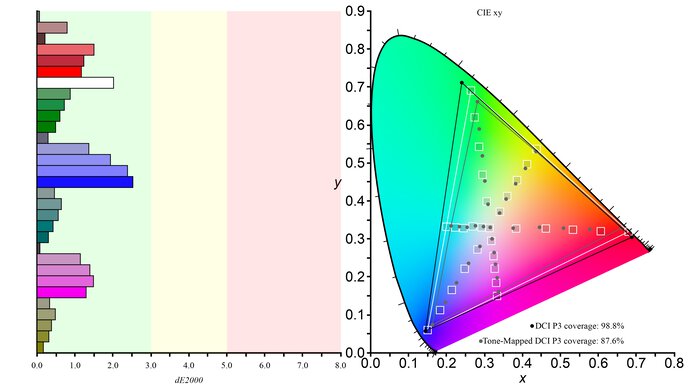
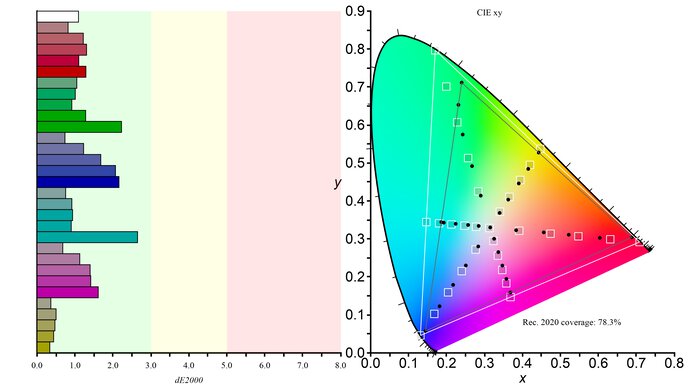
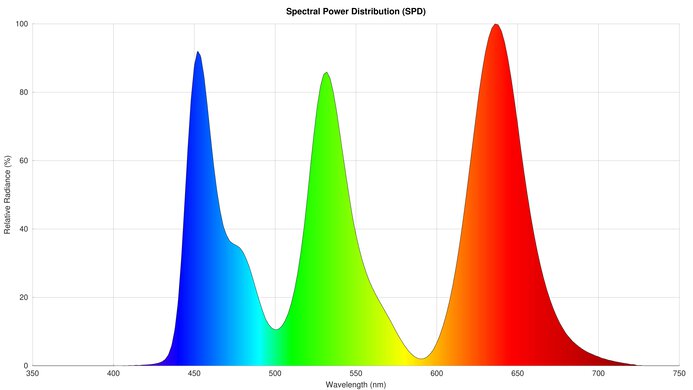
    The HDR color gamut is fantastic. It covers nearly all of the DCI-P3 color space used in most content, with minimal inaccuracies. However, it has a more limited coverage of the wider Rec. 2020 color space.

    9.0
    HDR Color Volume
    1,000 cd/m² DCI-P3 Coverage ICtCp
    97.7%
    DCI-P3 Picture Mode
    HDR Peak 1000
    10,000 cd/m² Rec. 2020 Coverage ICtCp
    48.7%
    Rec. 2020 Picture Mode
    HDR Peak 1000

    The HDR color volume is fantastic. It displays dark colors well and bright colors are vivid. These results are in 'Peak 1000 nits' mode.

    Luminance levels for 'True Black 400'

    • Red Luminance: 241 cd/m²
    • Blue Luminance: 69 cd/m²
    • Green Luminance: 716 cd/m²
    10
    Viewing Angle
    Color Washout From Left
    70°
    Color Washout From Right
    70°
    Color Shift From Left
    70°
    Color Shift From Right
    70°
    Brightness Loss From Left
    70°
    Brightness Loss From Right
    70°
    Black Level Raise From Left
    70°
    Black Level Raise From Right
    70°
    Gamma Shift From Left
    70°
    Gamma Shift From Right
    70°

    The MSI MPG 341CQPX has an incredible horizontal viewing angle. Although it technically isn't perfect, you visually won't see any inconsistencies when viewing from the sides or if you sit close to the screen.

    7.0
    Text Clarity
    Pixel Type
    QD-OLED
    Subpixel Layout
    Triangular RGB

    The MSI MPG 341CQPX has decent text clarity, though it's not as good as some other non-OLED 27-inch 1440p monitors. This is because the monitor's triangular subpixel arrangement causes some color fringing around letters. Enabling Windows ClearType (top photo) improves the boldness of letters. These photos are in Windows 10, and you can also see them in Windows 11 with ClearType on and with ClearType off.

    7.0
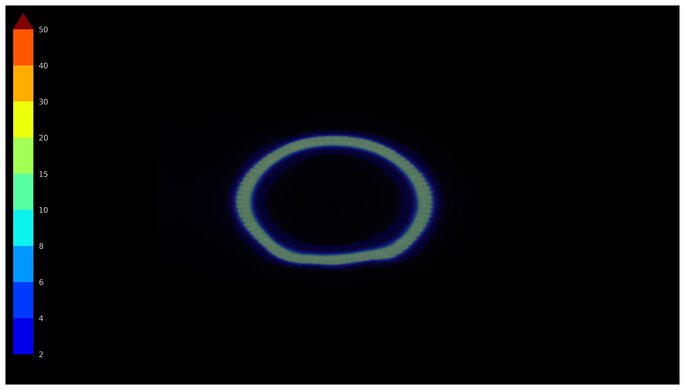
    Direct Reflections
    See details on graph tool
    Peak Direct Reflection Intensity
    25.5%
    Screen Finish
    Glossy

    The direct reflection handling is decent. Reflections have a mirror-like effect, as light bounces off the screen, instead of spreading out. That said, because the screen isn't perfectly even, some bright objects look warped on the screen, but this depends on the light source itself and its positioning.

    4.7
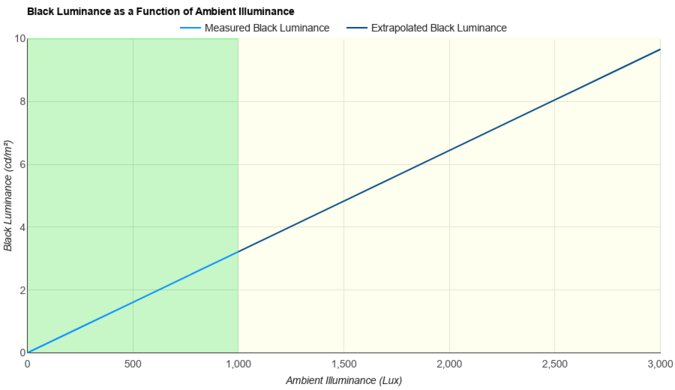
    Ambient Black Level Raise
    See details on graph tool
    Black Luminance @ 0 lx
    0.00 cd/m²
    Black Luminance @ 1000 lx
    3.07 cd/m²

    Ambient light causes the black levels to rise on this monitor, which is distracting if you have it in a bright room. This is typical of QD-OLEDs as they lack a polarizer. You need to use it in a dark room to get perfect black levels.

    8.8
    Total Reflected Light
    Total Reflected Light Intensity
    7,784% ⋅ pixel
    Diffraction Artifacts
    No

    This monitor handles glares really well, and there's minimal reflected light. However, reflections look stretched out because of the monitor's curve.

    9.8
    Gradient
    Color Depth
    10 Bit

    The gradient handling is remarkable, and you won't notice any banding.

    Motion
    8.0
    Refresh Rate
    Native Refresh Rate
    240 Hz
    Max Refresh Rate
    240 Hz
    Max Refresh Rate Over DP
    240 Hz
    Max Refresh Rate Over HDMI
    240 Hz
    Max Refresh Rate Over DP @ 10-bit
    240 Hz
    Max Refresh Rate Over HDMI @ 10-Bit
    240 Hz
    DSC Toggle
    Yes
    DSC Off Max Refresh Rate Over DP
    165 Hz
    DSC Off Max Refresh Rate Over HDMI
    N/A

    While you can reach the max refresh rate with a 1440p resolution over DisplayPort and HDMI, DisplayPort connections require Display Stream Compression (DSC) to do so. Most modern graphics cards support DSC. You can disable DSC on the monitor, but that lowers the refresh rate.

    Variable Refresh Rate (VRR)
    Variable Refresh Rate
    Yes
    FreeSync
    Yes
    G-SYNC
    Compatible (Tested)
    VRR Maximum
    240 Hz
    VRR Minimum
    < 20 Hz
    VRR Supported Connectors
    DisplayPort, HDMI

    NVIDIA
    Connection VRR Min VRR Max
    DisplayPort <20Hz 240Hz
    HDMI <20Hz 240Hz
    AMD
    Connection VRR Min VRR Max
    DisplayPort <20Hz 240Hz
    HDMI <20Hz 240Hz

    In addition to FreeSync and G-SYNC compatibility, this monitor also supports HDMI Forum VRR.

    9.9
    VRR Motion Performance
    See details on graph tool
    Recommended VRR OD Setting
    No OD Mode
    Variable Overdrive Advertised
    No
    Avg. CAD
    13
    Best CAD
    10
    Worst CAD
    27

    Frame Rate CAD Heatmap RT Chart Pursuit Photo
    239 Heatmap Chart Photo
    165 Heatmap Chart Photo
    144 Heatmap Chart Photo
    120 Heatmap Chart Photo
    100 Heatmap Chart Photo
    80 Heatmap Chart Photo
    60 Heatmap Chart Photo

    The MSI 341CQPX has outstanding motion handling across its entire refresh rate range with VRR enabled. CAD remains low throughout, and there's minimal blur with fast-moving objects.

    9.7
    Refresh Rate Compliance
    See details on graph tool
    See details on graph tool
    Compliance @ Max Hz
    91%
    Compliance @ 120 FPS
    94%
    Compliance @ 60 FPS
    96%

    The refresh rate compliance is outstanding. As it has a near-instantaneous response time, it makes full color transitions before drawing the next frame.

    9.9
    CAD @ Max Refresh Rate
    OD Transition Max Refresh Rate
    od-transition-max-refresh-rate-noodmode-0-31
    OD noodmode
    0 to 31
    Recommended Overdrive Setting
    No OD Mode
    Avg. CAD
    10
    Best 10% CAD
    5
    Worst 10% CAD
    16

    Overdrive Mode CAD Heatmap RT Chart Pursuit Photo
    No Overdrive Heatmap Chart Photo

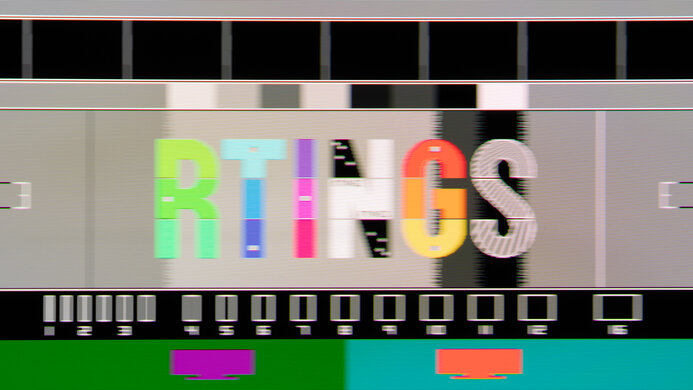
    The CAD at the maximum refresh rate is outstanding. It displays fast-moving objects as intended, and motion is extremely sharp.

    Response Time @ Max Refresh Rate
    Recommended Overdrive Setting
    No OD Mode
    First Response Time
    0.2 ms
    Total Response Time
    0.4 ms
    RGB Overshoot
    0 RGB
    Worst 10% First Response Time
    0.6 ms
    Worst 10% Total Response Time
    2.2 ms
    Worst 10% RGB Overshoot
    2 RGB

    Overdrive Mode CAD Heatmap RT Chart Pursuit Photo
    No Overdrive Heatmap Chart Photo

    9.9
    CAD @ 120Hz
    OD Transition 120Hz
    od-transition-120-noodmode-0-31
    OD noodmode
    0 to 31
    Recommended Overdrive Setting
    No OD Mode
    Avg. CAD
    12
    Best 10% CAD
    5
    Worst 10% CAD
    20

    Overdrive Mode CAD Heatmap RT Chart Pursuit Photo
    No Overdrive Heatmap Chart Photo

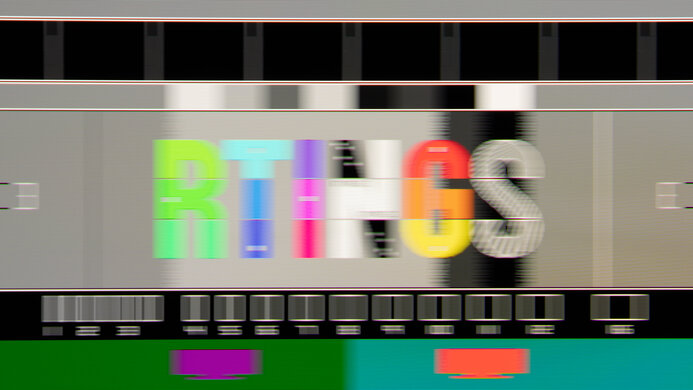
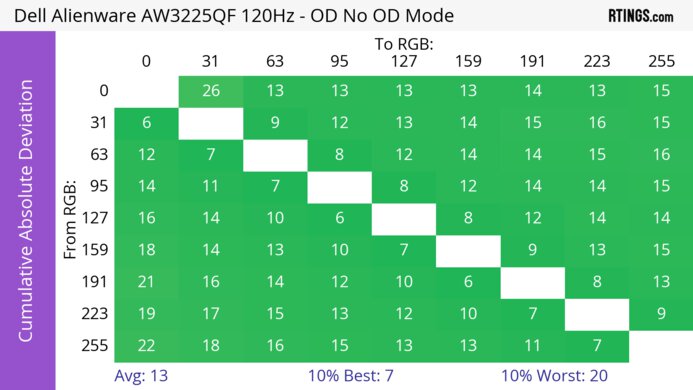
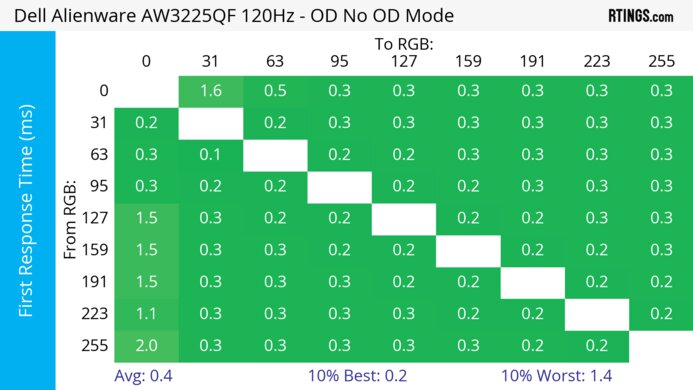
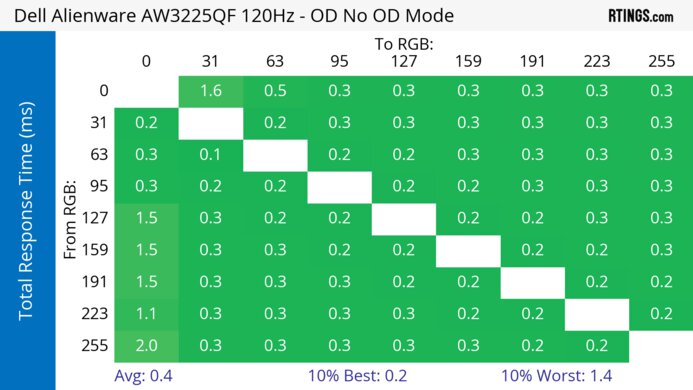
    The CAD at 120Hz is outstanding. Pixels transition to their target RGB level almost instantly, so there isn't any blur trail or noticeable inverse ghosting.

    Response Time @ 120Hz
    Recommended Overdrive Setting
    No OD Mode
    First Response Time
    0.3 ms
    Total Response Time
    0.7 ms
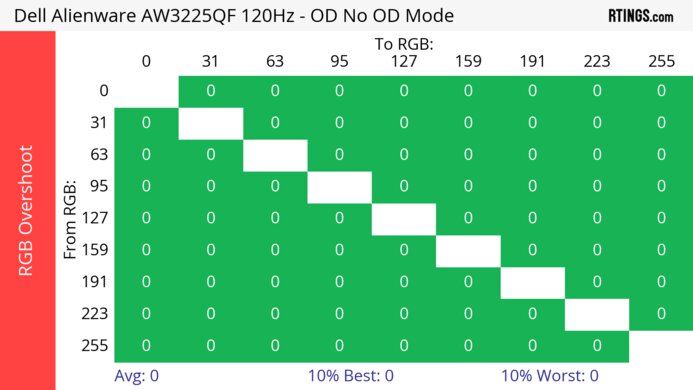
    RGB Overshoot
    0 RGB
    Worst 10% First Response Time
    0.7 ms
    Worst 10% Total Response Time
    5.0 ms
    Worst 10% RGB Overshoot
    3 RGB

    Overdrive Mode First Response Heatmap Total Response Heatmap RGB Overshoot Heatmap
    No Overdrive Heatmap Heatmap Heatmap

    9.9
    CAD @ 60Hz
    OD Transition 60Hz
    od-transition-60-noodmode-0-31
    OD noodmode
    0 to 31
    Recommended Overdrive Setting
    No OD Mode
    Avg. CAD
    12
    Best 10% CAD
    6
    Worst 10% CAD
    21

    Overdrive Mode CAD Heatmap RT Chart Pursuit Photo
    No Overdrive Heatmap Chart Photo

    The CAD at 60Hz is outstanding. Pixels transition colors almost perfectly, and any noticeable blur is persistence.

    Response Time @ 60Hz
    Recommended Overdrive Setting
    No OD Mode
    First Response Time
    0.3 ms
    Total Response Time
    0.7 ms
    RGB Overshoot
    0 RGB
    Worst 10% First Response Time
    0.7 ms
    Worst 10% Total Response Time
    5.5 ms
    Worst 10% RGB Overshoot
    1 RGB

    Overdrive Mode First Response Heatmap Total Response Heatmap RGB Overshoot Heatmap
    No Overdrive Heatmap Heatmap Heatmap

    Backlight Strobing (BFI)
    Backlight Strobing (BFI)
    No BFI
    Maximum Frequency
    N/A
    Minimum Frequency
    N/A
    Longest Pulse Width Brightness
    N/A
    Shortest Pulse Width Brightness
    N/A
    Pulse Width Control
    No BFI
    Pulse Phase Control
    No BFI
    Pulse Amplitude Control
    No BFI
    VRR At The Same Time
    No BFI

    The monitor doesn't have an optional black frame insertion feature to reduce persistence blur further.

    5.5
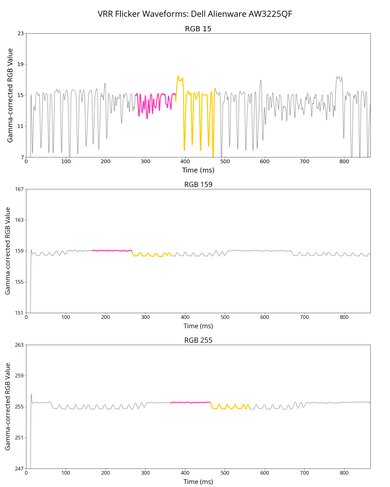
    VRR Flicker
    Dark Gray Flicker
    5.8 RGB
    Middle Gray Flicker
    1.2 RGB
    Light Gray Flicker
    0.7 RGB

    This monitor has disappointing VRR flicker with changing frame rates, which is most distracting in dark scenes. The flicker you see in the video looks nearly the same as it appears in person.

    10
    Image Flicker
    Flicker-Free
    No
    PWM Dimming Frequency
    0 Hz

    The backlight isn't technically flicker-free because it has a slight dip in brightness that corresponds to the 240Hz refresh rate.

    Inputs
    9.1
    Input Lag
    Native Resolution @ Max Hz
    2.8 ms
    Native Resolution @ 120Hz
    5.2 ms
    Native Resolution @ 60Hz
    14.2 ms
    Backlight Strobing (BFI)
    N/A

    The MSI 341CQPX has low input lag with most refresh rates for a responsive feel. However, it increases a bit more than expected with fixed 60Hz signals, but this isn't an issue if you start gaming at a higher refresh rate and use VRR as the refresh rate drops.

    7.7
    Resolution
    Native Resolution
    3440 x 1440
    Aspect Ratio
    21:9
    Megapixels
    5.0 MP
    Pixel Density
    109 PPI
    9.3
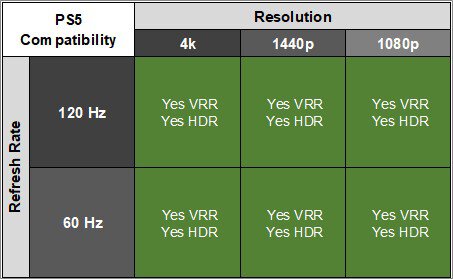
    PS5 Compatibility
    4k @ 120Hz
    Yes
    4k @ 60Hz
    Yes
    1440p @ 120Hz
    Yes
    1440p @ 60Hz
    Yes
    1080p @ 120Hz
    Yes
    1080p @ 60Hz
    Yes

    There aren't any compatibility issues, and the monitor downscales 4k signals. However, you need to change the HDMI 2.1 setting to 'Console' for everything to work. Additionally, because the console doesn't support ultrawide signals, you'll see black bars on the sides unless you stretch the image.

    9.3
    Xbox Series X|S Compatibility
    4k @ 120Hz
    Yes
    4k @ 60Hz
    Yes
    1440p @ 120Hz
    Yes
    1440p @ 60Hz
    Yes
    1080p @ 120Hz
    Yes
    1080p @ 60Hz
    Yes

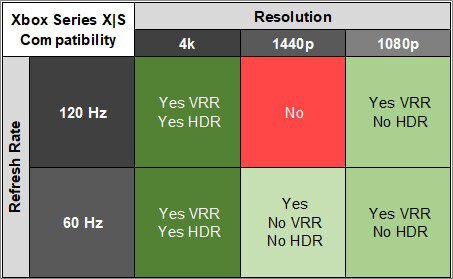
    This monitor works well with the Xbox Series X|S and downscales 4k signals. This is useful, as the Xbox only supports HDR with 4k signals. However, you need to change the HDMI 2.1 setting to 'Console' for everything to work. Additionally, because the console doesn't support ultrawide signals, you'll see black bars on the sides unless you stretch the image.

    Inputs
    DisplayPort
    1 (DP 1.4)
    DisplayPort Transmission Bandwidth
    No DisplayPort 2.1
    Mini DisplayPort
    No
    HDMI
    2 (HDMI 2.1)
    HDMI 2.1 Bandwidth
    48Gbps (FRL 12x4)
    Daisy Chaining
    No
    3.5mm Audio Out
    Yes
    Ethernet
    No
    HDR10
    Yes
    Dolby Vision
    No
    USB
    USB-A Ports
    2
    USB-A Rated Speed
    480Mbps (USB 2.0)
    USB-B Upstream Port
    Yes
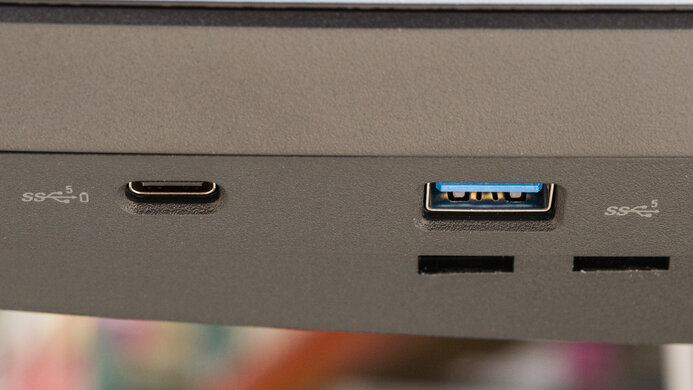
    USB-C Ports
    1
    USB-C Upstream
    Yes
    USB-C Rated Speed
    480Mbps (USB 2.0)
    USB-C Power Delivery
    90W
    USB-C DisplayPort Alt Mode
    Yes
    Thunderbolt
    No

    The DisplayPort Alt Mode on the USB-C port allows you to connect a compatible laptop to display an image from it and charge it at the same time with up to 90W of power.

    macOS Compatibility

    Connection HDMI 2.0 HDMI 2.1 USB-C and DP
    Max Refresh Rate 100Hz 240Hz 240Hz
    VRR Range N/A 48-240Hz 48-240Hz
    HDR Yes Yes Yes

    The MSI MPG 341CQPX has no compatibility issues with macOS. If you're using a MacBook, windows move to the monitor's screen when you close the laptop's lid, and they return to their original position when you reopen it again over any type of connection. VRR and HDR both work well.

    The KVM switch works well on macOS, and it switches effectively between PC and macOS after a 2–3 second switchover. If you put the macOS device to sleep when a PC is attached and turned on, the monitor switches to the PC.

    Features
    Additional Features
    Speakers
    No
    RGB Illumination
    Presets
    Multiple Input Display
    PIP + PBP
    KVM Switch
    Yes
    Smart OS
    No

    The MSI MPG 341CQPX QD-OLED has extra features that improve the user experience. It has a KVM switch that makes it easy to switch between sources and use the same keyboard and mouse connected to the monitor. It works well and is responsive even if changing sources takes a couple of seconds. On top of the KVM switch, it has Picture-in-Picture and Picture-by-Picture modes to view two images at the same time, and it has different settings for how you can display the images.

    MSI OLED Care

    As with other OLED panels, it has a few settings to mitigate the risk of permanent burn-in when exposed to the same static elements over time.

    • Pixel Shift: This moves the image by a few pixels at a time so that each pixel isn't always displaying the same thing. You can set it to 'Slow,' 'Normal,' or 'Fast,' so while you can't turn it off, it's very hard to notice it's happening with it set to 'Slow.'
    • Static Screen Detection: Reduces the brightness of static elements, like logos, that have been on the screen for a long time.
    • Panel Protect: Does a pixel refresh cycle to reduce the risk of permanent burn-in. You can run it manually anytime, though it will also run automatically when the monitor turns off after four hours of use. Additionally, a message pops up every four hours of usage to run the cycle unless you set Protect Notice to 'Usage 16 hrs.'
    • The monitor has several other features to reduce burn-in, such as Multi Logo Detection and Taskbar Detection, which reduce brightness for fixed objects on the screen. Additionally, Boundary Detection reduces the brightness of boundaries, such as vertical lines between windows.

    Additional Features

    The monitor has some other extra features, like:

    • HDMI CEC: It supports the HDMI CEC standard, so it automatically turns on when you power up compatible devices like consoles.
    • Smart Crosshair and Optix Scope: These are two different settings for various crosshairs and scope features, making it easier to see opponents in games. Your games' anti-cheating tools won't detect it, giving you a competitive advantage.
    On-Screen Display (OSD)

    You can see more OSD pictures by downloading this zip file.