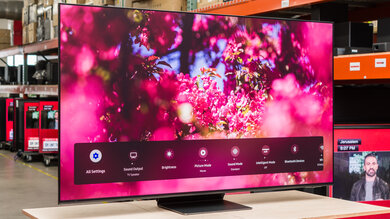
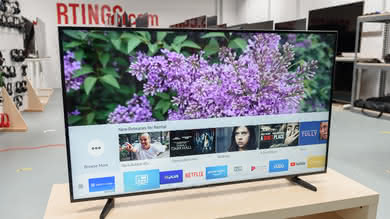
Our Verdict
The Element Fire TV is an average 4k TV with mediocre picture quality. It's not a very competitive package overall, and it doesn't particularly excel at anything. Its smart features are decent, but they are centered around Amazon's services.
- High contrast gives deep and uniform blacks
- Amazon's Alexa is a powerful assistant
- Picture quality degrades at an angle
- Input lag is high
- Ads are more intrusive than average
Mediocre TV for watching movies. The Fire TV has a decent contrast, but it lacks a calibration or local dimming feature. It also cannot play 24p content from any source without judder, which not every user can notice.
Decent TV for watching TV shows, the Amazon Fire TV interface is very responsive and intuitive and covers most streaming services. The TV gets decently bright, but it could have a better finish for handling reflections in a brighter room.
The Element Fire TV is a decent sports watching TV. Its uniformity is about average so no major dirty screen effect is present to ruin the looks of grassy fields. Its motion is good, but its picture quality degrades at an angle so it isn't the best for living rooms with a wider sitting arrangement.
Average TV for playing video games. While it has decent handling of motion blur, the Element Fire TV's input lag leaves a lot to be desired. More casual users might not have issues with it, but more demanding gamers will notice the extra "floatiness" caused by the latency.
HDR is not supported, and the TV doesn't get particularly bright. It lacks a wide color gamut and 10 bits of color depth which stops it from seeing any picture quality improvement from a future HDR supporting update.
The high input lag and no support for HDR makes the Fire TV a poor choice for HDR gaming.
High input lag, narrow viewing angles and limited resolution support makes the Fire TV a bad choice for use as a PC monitor. The input lag particularly deteriorates the experience as mouse movement become annoyingly slow.
Changelog
- Updated Mar 12, 2018: Converted to Test Bench 1.2.
- Updated Oct 05, 2017: Added BFI Frequency
- Updated Aug 10, 2017: Converted to Test Bench 1.1.
- Updated Aug 07, 2017: Review published.
Check Price
Differences Between Sizes And Variants
We tested the 55" (EL4KAMZ5517). For the most part, we expect our review to be valid for other sizes of the Fire TV.
If someone comes across a different type of panel or if their Element EL4KAMZ Fire TV doesn't correspond to our review, let us know and we will update the review.
| Size | Model |
| 43" | EL4KAMZ4317 |
| 50" | EL4KAMZ5017 |
| 55" | EL4KAMZ5517 |
| 65" | EL4KAMZ6517 |
Popular TV Comparisons

The Element Fire TV is a mediocre TV, especially compared to the very capable competition found in its price range.
The Samsung MU6300 is much better than the Element Amazon Fire TV. The MU6300 delivers better picture quality and can take advantage of most of the recent HDR formats. The MU6300 has much lower input lag, great for gaming, and can reduce the backlight flicker frequency to improve motion clarity. The Fire TV has a faster response time, so motion is a bit smoother and has less blur.
The Vizio M Series XLED 2017 is much better than the Element Amazon Fire TV. The Vizio M Series supports HDR and has a local dimming feature that improves dark room performance. It also has lower input for gaming and is more consistent in removing judder from 24p sources. The Fire TV has an optional motion interpolation feature that can make motion appear smoother by introducing some soap opera effect.
The TCL S Series/S405 4k 2018 is better than the Element Amazon Fire TV. The S405 supports HDR, while the Fire TV does not. The TCL is more consistent in its ability to remove judder from 24p sources. The S405 also has much lower input for gaming or use as a PC monitor. The Fire TV is a lot brighter and has an optional motion interpolation feature.
The Vizio E Series 2018 is much better than the Element Amazon Fire TV. The E Series 2018 delivers better picture quality, including support for the latest HDR formats. The E Series has much lower input lag, great for gaming and has an optional black frame insertion feature that can improve motion clarity. The Fire TV can interpolate lower frame rate content to help motion appear smoother.

We buy and test dozens of TVs yearly, taking an objective, data-driven approach to deliver results you can trust. Our testing process is complex, with hundreds of individual tests that take over a week to complete. Most of our tests use specially designed test patterns that mimic real content, but we also use the same sources you have at home to ensure our results match the real-world experience. We use two main tools for our testing: a Colorimetry Research CR-100 colorimeter and a CR-250 spectroradiometer.
Test Results
Older Test Bench: We tested this product using an older TV test methodology before a major update. Some of the test results below aren't directly comparable with other TVs. Learn more
for pictures & test results

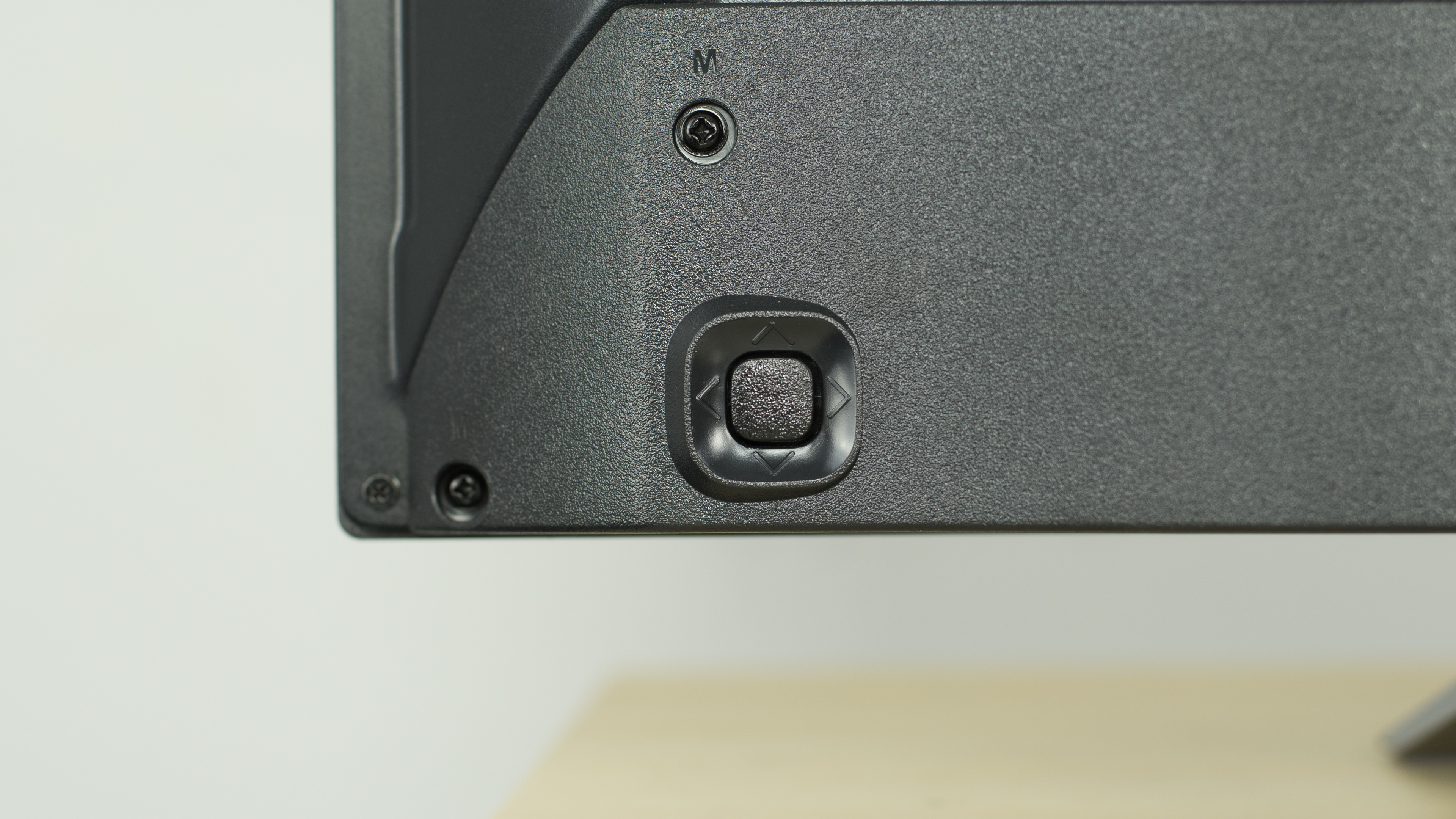
The design of the Fire Edition TV is basic, but it looks good. It appears quite sleek when viewed from the front. The stand is quite wide, but is very stable. The controls are all located under the front, and appear more like a PC monitor with buttons for each function.
for pictures & test results

The stand is quite wide, but does support the TV well and feels stable.
Footprint of the 55" TV stand: 10.2" x 35.2"
for pictures & test results

The rear of the TV is simple, and has a metallic back similar to the TCL S405. The connections are all fairly easy to access if placed close to a wall as they run parallel to the TV.
for pictures & test results

The borders have an average thickness, but look nice.
for pictures & test results

The TV is quite thick when viewed from the side. It will stick out a bit if wall mounted, but this shouldn't be too much of an issue.
for pictures & test results
The TV gets a little warm, especially in a few places on the back; however, this isn't a concern during normal use.

for pictures & test results

The Fire TV has a great native contrast ratio. With a contrast ratio above 5000:1, this means that it can display really deep blacks, which in turn is great for dark scenes in movies, especially when watching TV in a dark room.

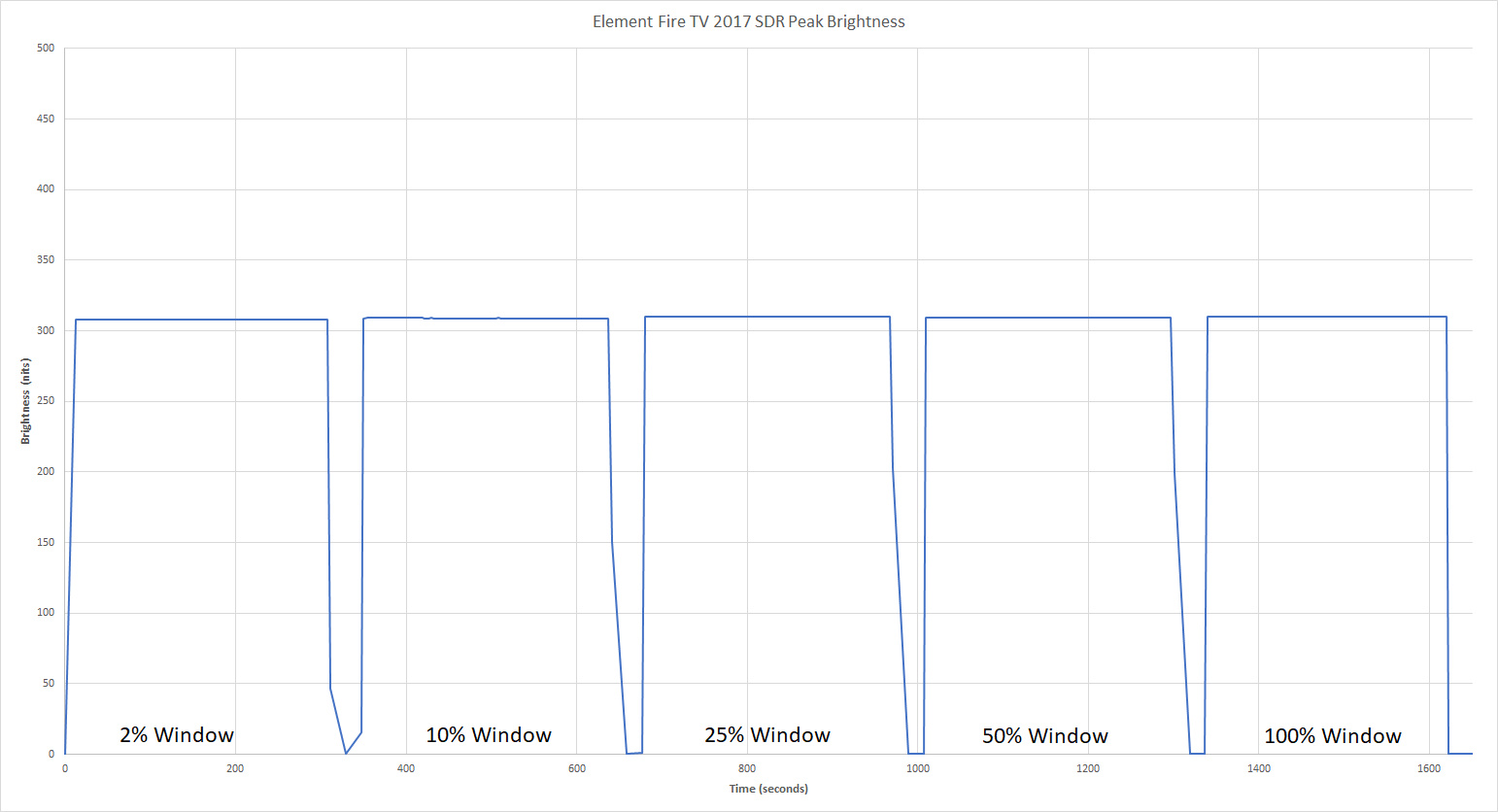
Good SDR peak brightness. The TV remains a constant ~300 cd/m² regardless of the content shown, which is good. This is brighter than many competitors like the TCL S405, but not as bright as the P607.
HDR is not supported.
for pictures & test results

for pictures & test results

The Element Fire TV has an average gray uniformity and while looking at our test picture of the 50% gray, you can see that the 4 corners are darker than the center. The top and bottom part of the screen is also a bit darker than the middle and some faint darker vertical and horizontal bands are also visible, something that we often see on direct-lit TVs.
Looking at our 5% gray test picture, not much come out and the lighter sides are not a uniformity problem but are due to the narrow viewing angle affecting the camera since, in person, it was not an issue.
for videos & test results

for pictures & test results
for pictures & test results
for pictures & test results
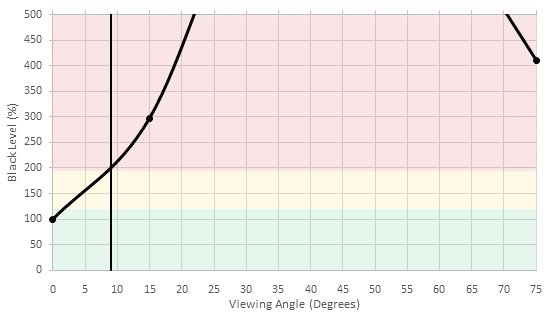
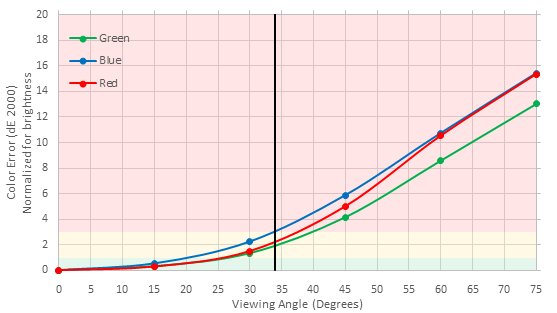
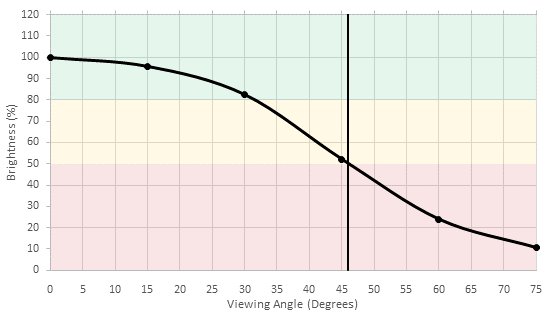
Poor viewing angle, but typical for a TV with a VA panel. Blacks turn gray when the TV is viewed from even a small angle, while colors and brightness degrade at more moderate angles. This TV is not a good fit for a room where people often view the TV from the side.
for pictures & test results

Excellent black uniformity for the Fire TV. Looking at our test picture, the screen is very uniform, even in the corners and edges, where clouding usually happens. This is a very good result and should reflect on dark scene performance.
for pictures & test results

for pictures & test results

for pictures & test results

The Fire TV is good at handling reflections. It has a semi-gloss finish which diffuses glare across the screen, reducing its intensity. It should be fine for an average room, but may present an issue in a bright room.
for pictures & test results

for pictures & test results

for pictures & test results

Out of the box, the Element Fire TV has a good picture quality. It is not as good as some other more expensive TVs, but it is still reasonable. The level of inaccuracy both in the white balance dE and color dE is high enough so that enthusiasts might notice it.
Those results are base on the 'Warm' color temperature, which we always use to start or review. We measured both the 'Standard' and 'Cool' color temperatures and found them to be both too inaccurate (white balance dE over 10 and color dE over 7 for both).


for pictures & test results

Upscaling of low-quality content such as DVDs is good. The image is a bit softer than usual, but details are preserved quite well. Only minor halo artifacts are visible along straight edges.
for pictures & test results

720p content such as cable TV is clear once upscaled.
for pictures & test results

Upscaling of 1080p content is great. The image remains sharp and detailed.
for pictures & test results

No issues can be seen with native 4k content on the TV.
Standard color gamut, only good enough for SDR (Rec 709) content, but it does cover the entire Rec 709 color gamut.
for pictures & test results

for pictures & test results

Disappointing color volume. The narrow color gamut, lack of local dimming and over-brightening of the 10% brightness colors prevent the TV from achieving a satisfying color volume.
for pictures & test results

The Fire TV has a relatively smooth gradient performance, and can show 10 bit gradients very well even though it's an SDR-only TV. Some banding is visible in the dark areas of our test photo, but this is typical for 10 bit TVs, and will pose no problems when displaying SDR content.
for pictures & test results

A perfect result on our image retention test for the Element Fire TV. After the 10 minutes burn-in scene, no remains of any of the RTINGS logos can be seen. This result is in line with other VA TVs.
We don't expect VA panels to experience permanent image retention, as the VA panel in our long-term test appears immune.



for pictures & test results

The Element Fire TV uses PWM at 220Hz to dim the backlight, starting at 99/100 backlight setting. Lowering the setting shortens the duty cycle, while amplitude remains constant. Backlights that use PWM results in duplications following moving objects, but it does help to clear up motion slightly. PWM at 220Hz is unusual, and this is the only TV we have tested so far that uses this frequency. Since it is not a multiple of the panel's refresh rate, which is 60Hz, it results in shaky duplications following fast-moving objects.
This TV has no optional black frame insertion feature to match the backlight's flicker to the frame rate of the content, so the only flicker the TV has is its 220 Hz PWM dimming. Because 220 Hz is a fairly high frequency, and it's not a multiple of 60 Hz, motion doesn't look as clear as on a TV with 120 Hz or 60 Hz flicker.
for pictures & test results

The Fire TV can interpolate lower frame rate content using its 60 Hz panel. To add the soap opera effect to 60 fps content, change 'Motion Smoothing' to any value except 'Bypass' in the Advanced Options menu. Note that any motion interpolation will introduce artifacts, so use a low setting unless you really like the soap opera effect.
The Fire TV is good at displaying content without stutter. The response time results in some blur between frames, which reduces the static image time which is good.
The Fire TV can't remove judder from 24p movies no matter the frame rate of the sources, from 24p to 60p and 60i.
The Fire TV has a native 60Hz panel and doesn't support any variable refresh rate features.
High input lag, even in the 'PC/Game' picture mode. This is fine for casual gaming, but any game that requires fast reactions will be more difficult than on other TVs with low input lag. Also in 'PC/Game' mode 4k @ 60Hz input shows visual glitches, and sharpening can't be disabled.
Only basic resolutions are supported. 4:4:4 color is not shown properly, even in the 'PC/Game' picture mode. 4k @ 60Hz @ 4:2:0 color is supported, but not at 4:4:4 or 4:2:2 because the TV does not support HDMI 2.0 full bandwidth. Also in 'PC/Game' mode 4k @ 60Hz input shows visual glitches, and sharpening can't be disabled.


for pictures & test results

The Element Fire TV's frequency response is below average. The under-emphasized treble region causes the TV to sound a bit dark, but it shouldn't cause any major issues with dialog. There is some dynamic range compression at higher volumes though.

for pictures & test results

for pictures & test results

The interface has large banner ads in a few places, and pushes a lot of suggested Amazon Video and app content on the user nearly everywhere. This can be annoying even if you do have an Amazon Prime subscription.
for pictures & test results

Only Amazon apps are installed on the TV out of the box, but many more are available on the Amazon app store, such as Netflix and YouTube. However, Amazon 1-click ordering needs to be set up before any apps can be downloaded, which requires a payment method even when downloading free apps. Navigating apps feels smooth but their stability isn't as good as on many other platforms, as Netflix crashed during testing and had to be force stopped, and casting from a phone or tablet often failed on first try. The TV can play content from a USB drive, but unfortunately it doesn't have a built in media player, so an app like VLC for Fire TV is required for USB playback.
for pictures & test results

The remote is small and comfortable, and has a great Alexa voice command feature. It has very few buttons so most things need to be changed via voice or navigating the interface, but all the navigation buttons are within easy reach which is good. Holding down on the home button brings up a quick menu with settings, inputs and apps, which is handy. The Alexa voice control can do an impressive list of things, such as switch between apps and inputs, search for content, and can even do some general purpose things like finding nearby restaurants.
for pictures & test results