The Insignia Fire TV is a decent 4k TV with a decent picture quality. It has a high native contrast ratio and produces deep blacks, but unfortunately, they are not very uniform and the lack of local dimming cannot help improve the appearance of dark scenes. The image degrades rapidly when viewed from the side so it is not a good choice for a large room with a wide seating arrangement. The TV supports HDR, but it can't deliver the creators intent. This Insignia TV integrates very well with the Amazon Alexa voice assistant.
Update 11/30/18: Changed the text a bit for clarification
Our Verdict
The Insignia Fire TV Edition is a decent choice for mixed usage. The picture quality is okay. It has a high native contrast ratio, but dark room performance is hurt by the mediocre black uniformity. The TV has bad viewing angles so you should sit directly in front to get the best possible picture. Reflection handling is okay when the room is not too bright and finally, the TVs input lag is good for some casual gaming.
- Excellent native contrast
- Powerful Alexa voice assistant
- Bad color accuracy
- Amazon Prime account is required for many functions
- Bad viewing angles
The Insignia Fire TV Edition is mediocre for watching movies in a dark room. The picture quality is okay, and the native contrast ratio is high, and although the blacks are deep, they are not very uniform when viewed in a dark room. The lack of local dimming doesn't help either. Unfortunately, this TV cannot remove 24p judder from older content and has a bad color accuracy that you can not significantly improve, due to the lack of the necessary menu options.
This is a decent TV for watching TV shows. It can handle reflections decently and this is important as TV shows are usually watched in brighter rooms with more than one light sources. Unfortunately, if you are used to walking around while watching your favorite TV show you will notice that the image degrades as you look at it from the side.
The Insignia Fire TV Edition is decent for watching sports. It has decent reflection handling for an average bright room and good response time. Fast action has some blur that helps the image look smooth, but unfortunately, there is no option to introduce flicker to make it crisper. The gray uniformity is decent, but you will see some dirty screen effect while watching hockey or football. Unfortunately, the bad viewing angles do not favor watching from the side, so this TV is not a good choice if you plan to watch a game with a group of friends.
This TV is decent for playing video games. It has a low input lag and responds quickly to your actions. The response time is good, and only a little motion blur is present on fast-action games. The TV does not have any advanced gaming features but will keep happy most casual gamers. However, it is not a good choice if you are a gaming enthusiast.
The Insignia Fire TV Edition is mediocre for watching HDR movies. It has deep blacks due to the high native contrast ratio but unfortunately, they are not uniform and this can be visible in a dark room. Also, the TV lacks local dimming that would help improve this. The HDR brightness is only decent and cannot deliver the creators intent.
This TV is decent for playing HDR Games. It has a low input lag in HDR mode and the response time is good. Blacks are deep but they are not uniform. That, along with the lack of local dimming, hurts dark room performance. where HDR games are meant to be played.
The Insignia Fire TV has a decent performance when used as a PC monitor. It is quite responsive to your actions due to the low input lag. You have to make careful adjustments to make it properly display chroma 4:4:4. Finally, the edges will have some uniformity issues due to the bad viewing angles.
Changelog
- Updated May 21, 2020: Converted to Test Bench 1.5.
- Updated Feb 21, 2020: Converted to Test Bench 1.4.
- Updated Feb 28, 2019: Converted to Test Bench 1.3.
- Updated Oct 31, 2018: Review published.
Check Price
Differences Between Sizes And Variants
We tested the 55" NS-55DF710NA19 and for the most part, we expect our review to be valid for the 43" and 50'' models.
The Insignia Fire TV is also available in smaller sizes 24,'' 32' and 39". These sizes do not support HDR and have a lower resolution. In most other aspects we expect them to be similar to the model we tested.
If someone comes across a different type of panel or if their Insignia TV NS-55DF710NA19 doesn't correspond to our review, let us know and we will update the review. Note that some tests such as the gray uniformity may vary between individual units.
| Size | US Model | Resolution | Refresh Rate | HDR Support |
| 24'' | NS-24DF310NA19 | 720p | 60 | No |
| 32'' | NS-32DF310NA19 | 720p | 60 | No |
| 39'' | NS-39DF510NA19 | 1080p | 60 | No |
| 43" | NS-43DF710NA19 | 4K | 60 | Yes |
| 50" | NS-50DF710NA19 | 4K | 60 | Yes |
| 55" | NS-55DF710NA19 | 4K | 60 | Yes |
The 55" NS-55DF710NA19 we reviewed was manufactured in July 2019.
Popular TV Comparisons

The Insignia Fire TV is well integrated with the Amazon Alexa framework. See our recommendations for the best budget TVs and the best TVs under $300.
The Toshiba Amazon Fire TV 2018 is a bit better than the Insignia Fire TV. The Toshiba has more uniform blacks, and this is great for dark room viewing. The Toshiba also has a lower input lag and better response time, which are important if you play video games. The Insignia Fire TV, on the other hand, has a better gray uniformity which is good if you watch sports.
The Samsung NU6900 is much better than the Insignia Fire TV. The Samsung NU6900 has lower input lag and better response time which is great if you play fast-action video games. The Samsung NU6900 also has better black uniformity, which is great for dark room performance, and better reflection handling, which makes it a better choice for a room with many light sources.
The TCL S Series/S405 4k 2018 is much better than the Insignia Fire TV. The TCL has better reflection handling, so it's more suitable for a room with many light sources. Also, the TCL has lower input lag and is more responsive to your actions which is great if you use the TV for gaming or a PC monitor. The Insignia Fire TV, on the other hand, has a motion interpolation feature that will please soap opera effect fans.
The LG UK6300 is better than the Insignia Fire TV. The LG has a lower input lag and better viewing angles, which are great if you wish to use the TV as a PC monitor, or you have a room with a wide seating arrangement. The LG also has better reflection handling and can accommodate for more light sources. The Insignia Fire TV, on the other hand, has better blacks and will perform better in a dark room, provided you sit directly in front.

We buy and test dozens of TVs yearly, taking an objective, data-driven approach to deliver results you can trust. Our testing process is complex, with hundreds of individual tests that take over a week to complete. Most of our tests use specially designed test patterns that mimic real content, but we also use the same sources you have at home to ensure our results match the real-world experience. We use two main tools for our testing: a Colorimetry Research CR-100 colorimeter and a CR-250 spectroradiometer.
Test Results
Older Test Bench: We tested this product using an older TV test methodology before a major update. Some of the test results below aren't directly comparable with other TVs. Learn more
for pictures & test results

The design of the Insignia Fire TV Edition is decent. It is made of plastic and metal but it does not have a premium look. The stand supports the TV well but there will be some wobbling if you accidentally nudge it. There are no issues with the build quality and although the bottom edge can get warm, you will have no problem with it.
for pictures & test results

The stand of the Insignia Fire TV Edition is plastic. It provides good support to the TV, although it won't prevent a slight back and forth wobble if the TV is pushed gently. At the same time, it does not leave a big space between the table and the lower edge of the TV. This might be an issue if you wish to place a soundbar in front of the TV.
Footprint of the 55" model: 43.0" x 10.4"
for pictures & test results

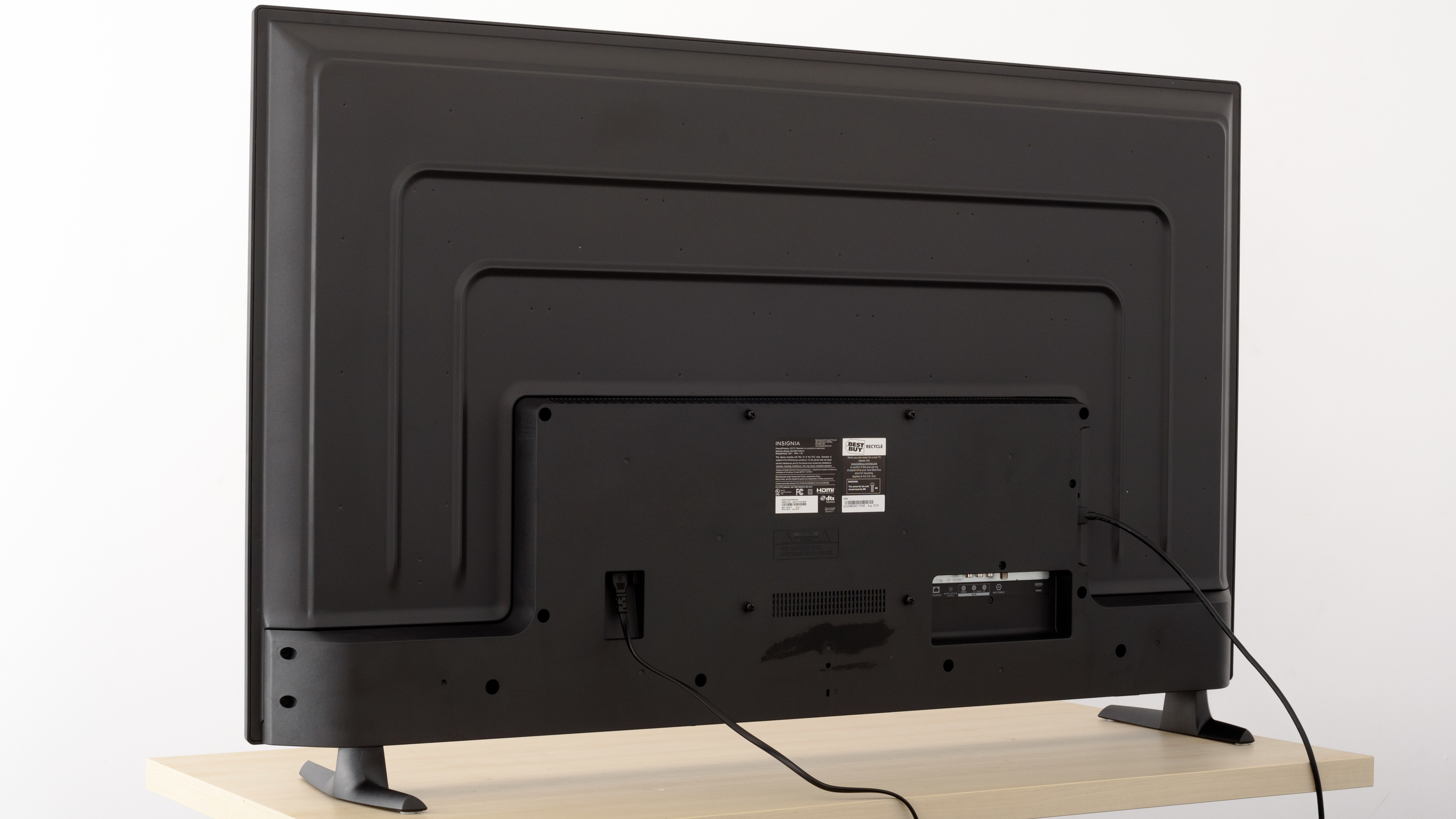
The back of the TV is metallic and looks very plain. There is not much provision for cable management.
for pictures & test results

The borders are plastic and relatively thick. The bezel that surrounds the screen is also thick.
for pictures & test results

The Insignia Fire TV looks thick from the side. It's just a little thinner than the Toshiba Fire TV Edition 2018.
for pictures & test results

The built quality is decent. The TV is a mixture of plastic and metal and does not look premium. However, there are no gaps or loose ends and you should have no issues with it.
for pictures & test results

Excellent native contrast for the Insignia Fire TV Edition. Blacks are deep in a dark room, and this is important in picture quality.
for videos & test results

The Insignia Fire TV Edition does not support local dimming. The video is for reference only.
Good SDR peak brightness for the Insignia Fire TV. It can get bright enough for an average lit room, but it can not overcome the glare of a bright room. The measured brightness remains very constant regardless of the illuminated area of the screen and this is great. The SDR brightness is slightly worse than the Toshiba Fire TV.
The menu item that controls the luminance of the backlight is called backlight.
Mediocre performance on our HDR peak brightness test. The Insignia Fire TV cannot get bright enough to deliver the brightness levels HDR is mastered for. The constant level of brightness across all window sizes is good but does not really help HDR performance in this case.
for pictures & test results

for pictures & test results

The Insignia Fire TV has decent gray uniformity. Faint clouding is visible all over the screen, and the edges look slightly darker. You should expect some dirty screen effect when you watch sports on this TV. In darker images clouding is less visible, but still present.
for videos & test results

for pictures & test results

for pictures & test results

for pictures & test results

The Insignia Fire TV Edition has bad viewing angles. Just off the center axis and blacks start to intensify rapidly. At slightly higher angles colors shift, and at about 25 degrees the picture has lost half of its brightness. You should avoid watching this Insignia TV from the side as the picture quality deteriorates rapidly.
for pictures & test results

The black uniformity is decent. You can spot some backlight bleed at both sides of the screen and around the test cross. It is less noticeable during normal use.
for pictures & test results

for pictures & test results

for pictures & test results

The Insignia Fire TV Edition has decent handling of reflections. It has a semi-gloss finish that diffuses glare across the screen and diminishes its intensity. You should be fine for an average lit room, but for a room with lots of light it will be bothersome.
for pictures & test results

for pictures & test results

for pictures & test results

The out of the box color accuracy of this TV is bad. The 'Movie' most accurate picture mode. The white balance dE and the color dE are very high and this means that most people will notice the color inaccuracies. Gamma is low at 1.93 and it does not follow the target at all, and thus shades look brighter. The color temperature is a little warm, this explains the red-yellowish tint.
for pictures & test results

for pictures & test results

for pictures & test results

The post-calibration accuracy of the Insignia Fire TV Edition is decent. Calibration was performed at the 'Custom' picture mode.
Unfortunately, the TV has a very limited number of calibration features as you can see here. These are not enough for a proper calibration and cannot help improve significantly the color accuracy.
The white balance dE is lowered below the threshold of 3 so most people will not notice any gray inaccuracies, but it is still at a level where most enthusiasts will. Unfortunately, the same is not true for color dE, where the value is well above 3 and most people will still spot color inaccuracies. Gamma is brought close to the target of 2.2, but unfortunately, it does not follow the curve. At lower luminosities, the shades are brighter and as we move to higher luminosities the shadows are crushed. Finally, the color temperature is slightly colder than the 6500 K target.
You can see our recommended settings here.
for pictures & test results

Upscaling of low-quality content such as DVDs is good.
for pictures & test results

There are no issues when upscaling 720p content.
for pictures & test results

Full-HD content such as 1080p cable, streaming, and Blu-rays looks good upscaled. The image is clear and detailed.
for pictures & test results

When the TV is displaying 4k images, you can see from up close, some sub-pixel dimming. Sometimes this can create artifacts and it may be a type of spatial dithering. It results in a checkerboard effect similar to the TCL 5 Series S517. You can see this effect up close in our pixels photo here.
for pictures & test results

When you look at this TV from a close distance, you will notice some sub-pixel dimming artifacts. This is similar to the Toshiba Fire TV and the TCL 5 series S517.
for pictures & test results

for pictures & test results

for pictures & test results

The color gamut of the Insignia Fire TV Edition is decent.
The color accuracy at our normal 75% stimulus brightness is bad, likely because the TV is prioritizing brightness over color accuracy; however at 50% stimulus brightness, the accuracy of P3 and Rec 2020 colors are vastly improved. This means that most HDR colors will have passable color accuracy, but very bright colors will be washed out.
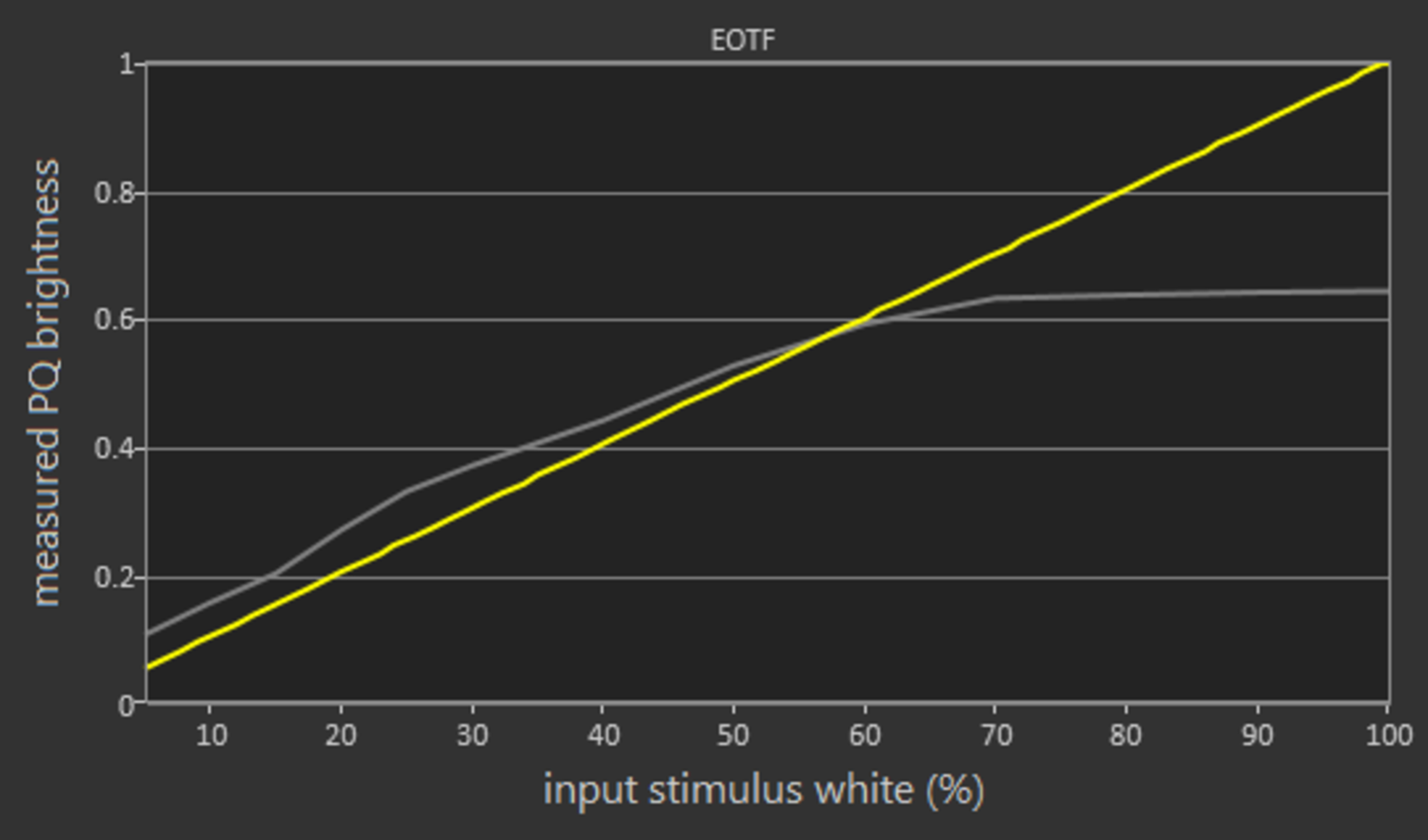
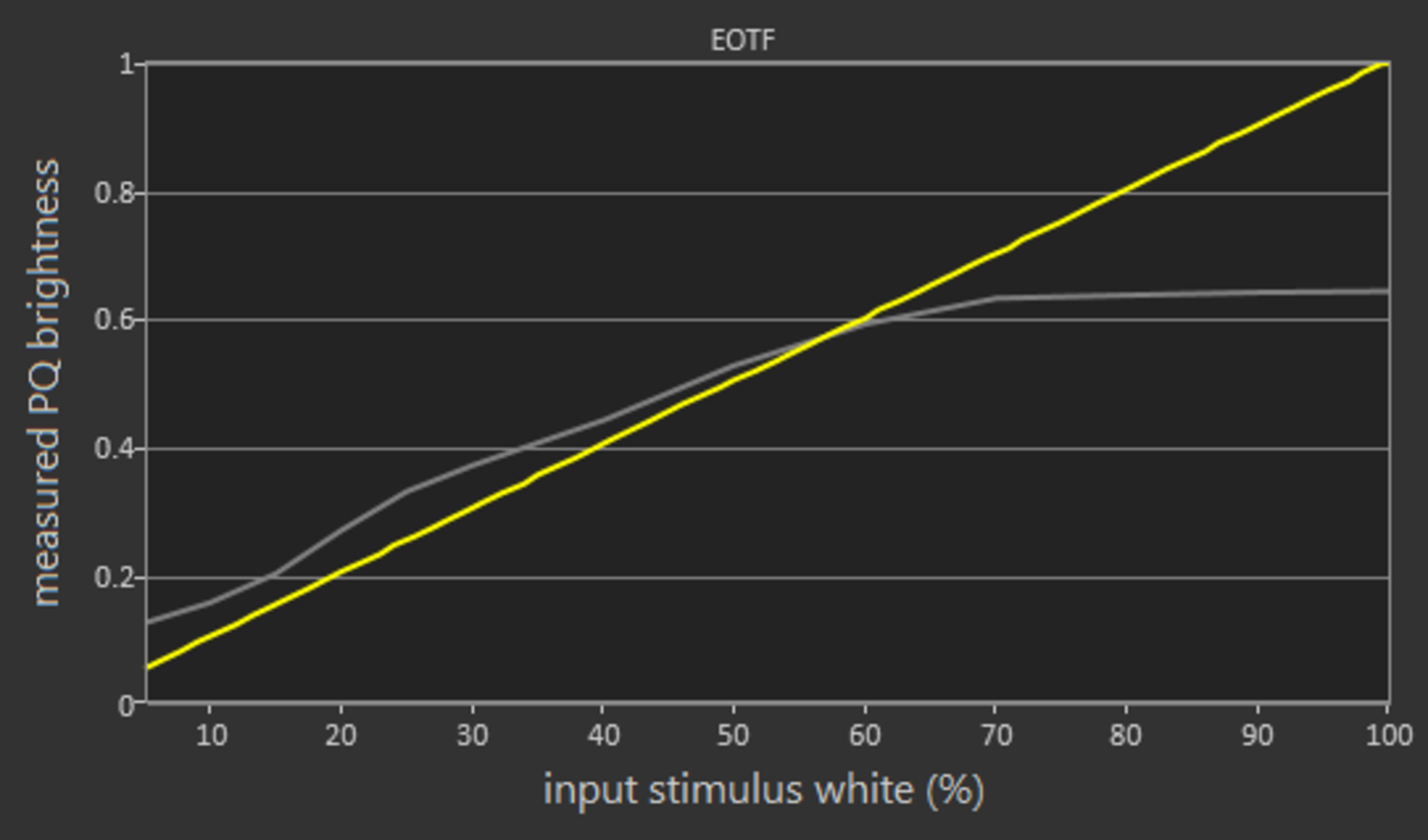
In the Custom picture mode, the TV's EOTF follows the target PQ curve fairly closely, with some over-brightening in dim shades. If you find HDR content too dark, you can set the Mid Luminance Gamma setting to -5, which raises the EOTF and brightens most of the scene.
The EOTFs in the Game mode follows the target PQ curve slightly closer, than the Custom, whereas the PC picture mode is almost identical to that of 'Custom'.
for pictures & test results

for pictures & test results

The color volume coverage is mediocre. The limited color gamut on this Insignia Fire TV Edition does not allow it to display saturated colors. This is very similar to the Toshiba Fire TV 2018.
for pictures & test results

The TV has a mediocre gradient. Unfortunately, it is the lowest score we've measured so far. Our image does not clearly capture the stepping in color shades that create the banding as you scan it from the lighter shades to the darker ones. This is partly because of the clipping that occurs in both the bright side and the dark side. This means that in real content, when the TV displays the image of a sky or images that contain skin tones, there are areas of noticeable banding. This, however, is more important in HDR than SDR.
for pictures & test results

No image retention for the Insignia Fire TV .
We don't expect VA panels to experience permanent image retention, as the VA panel in our long-term test appears immune.


for pictures & test results

The Insignia Fire TV Edition is not flicker-free. It uses PWM dimming to lower the backlight. The flicker occurs at 240Hz which might be bothersome to some people.
The Insignia Fire TV does not have a BFI option.
for pictures & test results

The Fire TV is capable of interpolating content from 30fps up to its native refresh rate of 60fps.
Set the Motion Processing to 'Enhanced' if you wish to enable motion interpolation. If you find that there are too many artifacts, then you can set it to 'Smooth' or 'Standard'.
The response time of this TV allows for some motion blur that smooths motion and it is not likely that you will notice any stutter, even in older, low fps content.
The Insignia Fire TV Edition does not remove 24p judder automatically, nor does it have any feature that allows you to do so. So when displaying 24fps content the TV will always have judder. You can try to remove it by enabling motion interpolation, but this makes motion look smoother than normal and can add artifacts.
The TV has a native 60Hz panel and doesn't support any variable refresh rate implementation.
The Insignia Fire TV Edition has a low input lag in Game mode and while it is not interpolating. Some people, however, might still find it high, so it is not a recommended TV for game enthusiasts. When you use it as a PC monitor, you might notice some lag, especially while you move the mouse around.
During testing we noticed that although the input lag is stable, it varied slightly when we retook a measurement. The variation was about 8 ms and the value reported is the average.
The Insignia Fire TV Edition does not support some common resolutions. Also, there are some resolution restrictions, and some special conditions that must be satisfied for the TV to properly display certain resolutions.
To properly display 4:4:4 chroma you must be in PC mode and you must set the signal output to RGB, as otherwise, the TV might not detect it and might not display RGB properly.
4k @ 30Hz can't have proper 4:4:4 chroma even when in PC mode.
The TV does not pass the 1440p test, as the image that is displayed when sent such a signal does not have the correct wrapping (part of the screen's right side appears on the left side).


for pictures & test results

The frequency response performance is sub-par. The LFE (low-frequency extension) of 135Hz indicates a bass that lacks thump and rumble and doesn't have much body to it either. The response above the LFE point is rather uneven and lacks a bit of detail and brightness. Also, this TV doesn't get very loud and tends to produce compression and pumping artifacts near its maximum volume.
for pictures & test results

The distortion performance is above-average. The overall amount of THD produced at 80dB SPL is low, and there is not a big jump in THD at Max SPL either. However, this TV doesn't get very loud. Also, there are a couple of spikes between 1KHz and 2KHz which could make the sound of those region a bit harsh and impure.
for pictures & test results

There are no bugs on the interface and you will have no issues. Navigating through the menu is very smooth.
The promotion of Amazon services and content is almost everywhere and this can be annoying at times.
for pictures & test results

The TV has very good Apps and Features. There were, however, some issues that you should be aware of.
You can only access YouTube through a browser as there is no native app. Once you launch Youtube through the browser, it will look exactly the same as the native app on other TVs.
We could not get Amazon Video to play in HDR or 4k through our VPN. Unlike other TVs, it seems that Amazon Video cannot play HDR when there's low internet bandwidth.
The TV allows you to pause live TV using the built-in storage. By default, it can only pause for 2 minutes, but you can expand this by connecting a USB. Depending on the USB storage size, the pause time can be extended up to 60 minutes.
for pictures & test results

The Insignia Fire TV Edition has a good remote control. It fully supports Amazon Alexa Voice Assistant and can be linked with any Amazon device.
You can execute several voice commands with Alexa like, 'Change source to HDMI 1', 'Search Netflix for Marco Polo', or even 'How's the weather in Montreal'. Oddly enough, you can not ask 'What time is it', and you cannot perform commands like 'Change backlight to 5'.
Alexa is only supported on the US version of the Fire TV OS (US account with US internet connection). Otherwise, only content search is supported for voice control.
for pictures & test results

The TV has only a single physical button located underneath the TV that only allows you to perform very basic functions like turning on and off or changing the inputs.
for pictures & test results

- Batteries
- Remote Control
- User Manual
- 60" Power Cable