
Our Verdict
The LG UK6300 is a decent TV for mixed usage. It has decent picture quality and a passable viewing angle, but it isn't able to overcome glare in a bright room and has poor dark room performance. It has a good smart interface and extraordinarily low input lag.
- Feels responsive with low input lag
- Short blur trail
- Blacks appear gray in a dark room
- Less accurate RGBW pixel structure
Not a good choice for movie lovers. It doesn't get very bright. Blacks aren't truly black and it has poor uniformity, so letterbox bars look cloudy. Subtitles don't look good due to the lack of a local dimming feature.
The LG UK6300 is good for watching TV Shows. Low frame rate content looks great. The TV isn't bright enough to be used in a bright room as it can't overcome glare, so daytime viewing is somewhat compromised. It has a good smart interface with a wide assortment of apps available for watching streaming TV.
Decent TV for watching sports. There is some dirty screen effect visible in the center of the screen, but it shouldn't be very noticeable. It has a good viewing angle great for game day parties, although it isn't very bright which might be an issue for daytime games in a bright living room. It has a good response time, so fast-paced sports don't have much motion trail.
Good TV for video games, mainly due to the excellent low input lag when game mode is used. The TV has a good response time, so there is very little motion blur. It has decent picture quality, but some games suffer from the low contrast ratio.
Disappointing HDR Movie experience. It has a poor native contrast and no local dimming feature. It doesn't support a wide color gamut and can't produce deep dark colors. There is almost no advantage to watching in HDR on the UK6300.
Decent HDR Gaming performance. Exceptional low input lag, and the response time is good, so there is very little motion trail. The mediocre peak brightness and lack of a wide color gamut means the HDR effect is not very noticeable.
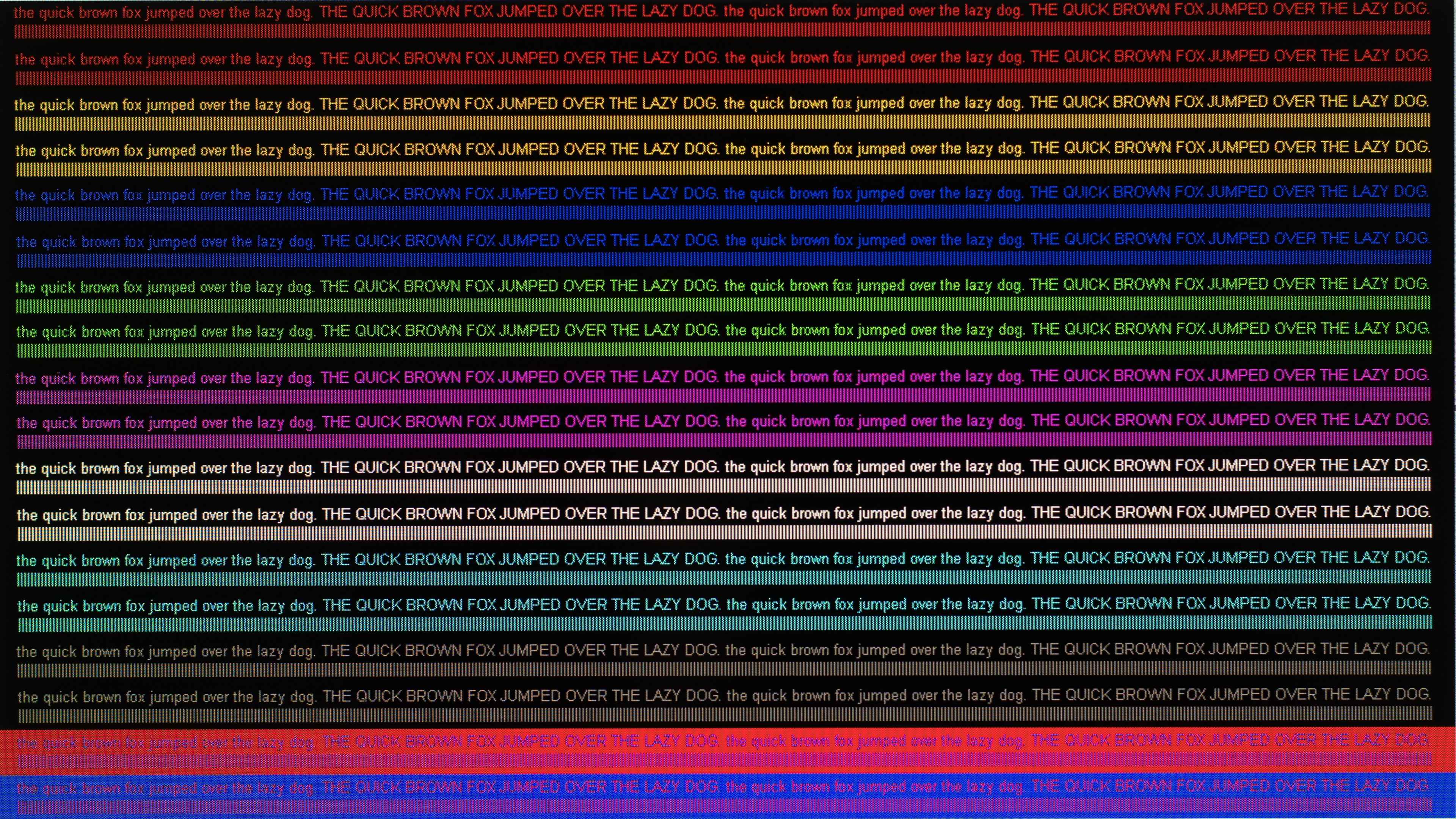
Decent PC monitor. It has excellent low input lag and a good viewing angle. The response time is good so there is little motion trail. The less accurate RGBW pixel structure means that text appears jagged as seen on the UH6500, even though the TV supports Chroma 4:4:4.
Changelog
- Updated May 21, 2020: Converted to Test Bench 1.5.
- Updated Feb 21, 2020: Converted to Test Bench 1.4.
- Updated Mar 04, 2019: The VESA mount was incorrectly listed as 400x400. It is actually 200x200.
- Updated Feb 28, 2019: Converted to Test Bench 1.3.
Check Price
Differences Between Sizes And Variants
We tested the 43" (43UK6300PUE). For the most part, we expect our review to be valid for the 49" (49UK6300), 55" (55UK6300) and 65" (65UK6300).
The UK6570 has been released in 70", 75" and 86" sizes. We haven't tested them and don't know how they perform or if they are the same panel as the UK6300. The 86" has a 120 Hz native refresh rate.
| Size | US | Canada | UK | Variant |
| 43" | 43UK6300PUE | 43UK6300BUB | 43UK6300PLB | 43UK6090PUA |
| 49" | 49UK6300PUE | 49UK6300BUB | 49UK6300PLB | N/A |
| 50" | 50UK6300PUE | 50UK6300BUB | N/A | N/A |
| 55" | 55UK6300PUE | 55UK6300BUB | 55UK6300PLB | 55UK6090PUA |
| 65" | 65UK6300PUE | 65UK6300BUB | 65UK6300PLB | 65UK6090PUA |
| 75" | N/A | N/A | N/A | 75UK6190PUB |
There is a 50" variant with a VA panel available in some areas. We expect this model to have a much better native contrast and black uniformity, but the viewing angle won't be as good.
If someone comes across a different type of panel or if their LG UK6300 doesn't correspond to our review, let us know and we will update the review.
Update 12/05/2018: LG has recently released the UK6090 (UK6090PUA), which appears to be a minor variant of the UK6300. They appear to perform similarly, but there may be some minor differences we are unaware of.
Popular TV Comparisons

The LG UK6300 is a very basic entry level 4k LED TV, but it doesn't offer great value compared to the competition. There will almost always be something better for a similar price. See our recommendations for the best budget TVs and the best TVs under $500.
If you've got a room with wide seating, then the LG UK6300 is a better choice due to the better viewing angles its IPS panel provides. If you're sitting directly in front of the TV, then the Samsung is a better choice. The Samsung NU6900 has better picture quality and is a better choice for movies in a dark room, as it displays deeper blacks due to the higher native contrast ratio and better black uniformity. The NU6900 can get brighter and is slightly better for watching TV shows. The LG UK6300, on the other hand, has better reflection handling for a room with many, but not too bright, lights.
The LG UK6300 and its replacement model, the LG UM6900, are very similar overall. The UK6300 we tested showed signs of temporary image retention but has better reflection handling. The UM6900 we tested shows no signs of temporary image retention but otherwise performs very similar to the UK6300.
The LG UM7300 is much better than the LG UK6300. The UM7300 is much brighter than the UK6300, has better black uniformity, and has a faster response time. The UK6300 uses a less accurate RGBW pixel structure, which causes some noticeable artifacts with 4k content, whereas the UM7300 has a standard RGB pixel structure.
The LG UK6300 and the TCL S325 have different panels, each with their advantages and disadvantages. The TCL has a VA panel, and it's more suitable for a dark room as it can display deeper blacks, but you have to sit straight in front to enjoy the most accurate image. The LG, on the other hand, is better for a wide seating arrangement as the image remains accurate for wider angles thanks to its IPS panel. The LG supports HDR and 4k resolution, although it has the RGBW pixel pattern, which does result in some artifacts.

We buy and test dozens of TVs yearly, taking an objective, data-driven approach to deliver results you can trust. Our testing process is complex, with hundreds of individual tests that take over a week to complete. Most of our tests use specially designed test patterns that mimic real content, but we also use the same sources you have at home to ensure our results match the real-world experience. We use two main tools for our testing: a Colorimetry Research CR-100 colorimeter and a CR-250 spectroradiometer.
Test Results
Older Test Bench: We tested this product using an older TV test methodology before a major update. Some of the test results below aren't directly comparable with other TVs. Learn more
for pictures & test results

The design of the 2018 UK6300 LED TV is very basic. It is a very functional design with no serious deficiencies, but it won't be the center of attention in a room. Some of the rear-facing inputs may be difficult to access when wall mounted, and if a component connection is required it is impossible to mount the TV flush to the wall. There is no cable management.

for pictures & test results

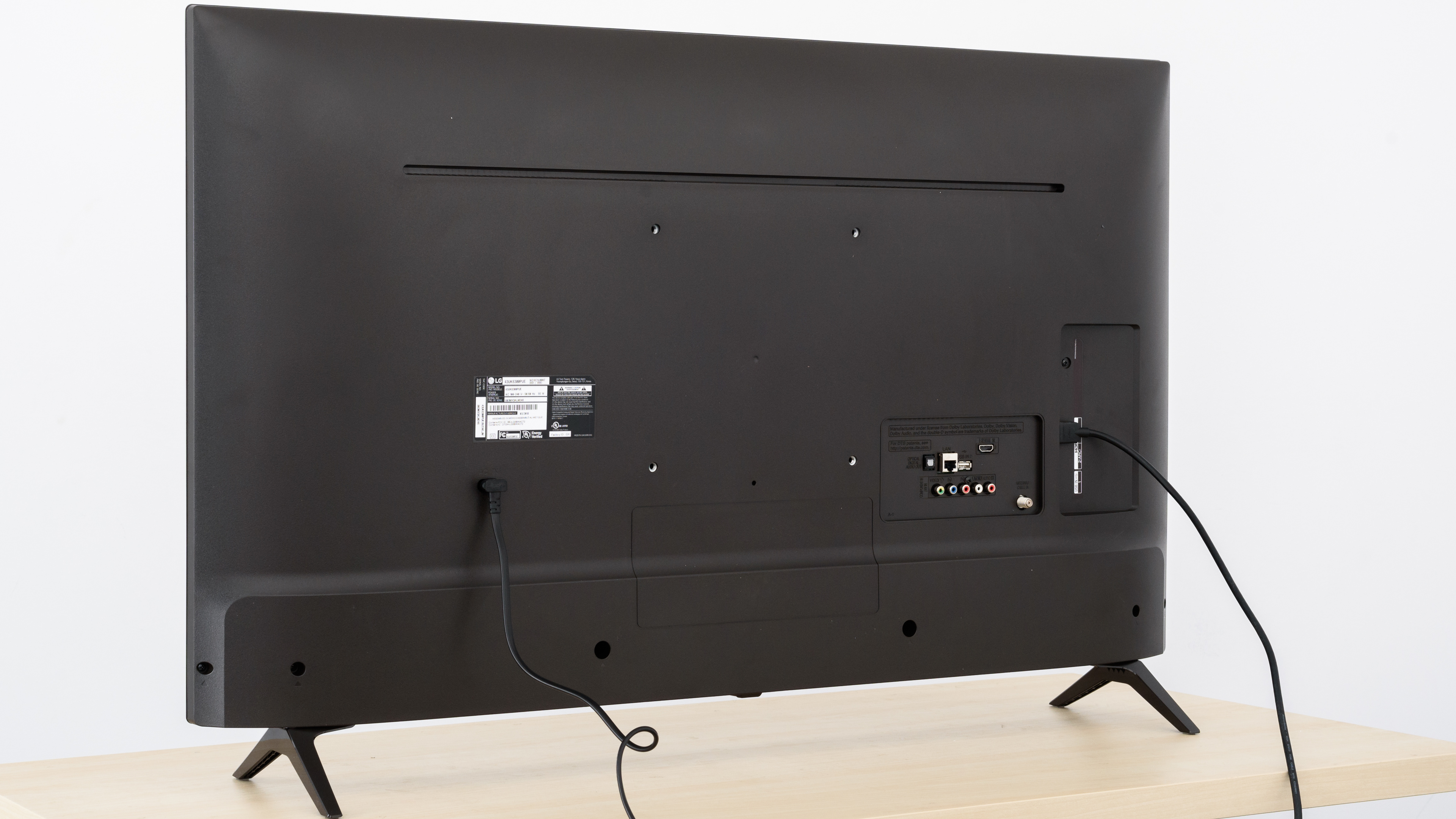
The back of the TV is very basic. There is no cable management. It is nearly identical to the UJ6300 from last year. Some of the inputs face out the back of the TV, which may be difficult to access if wall mounted.
Update 03/04/2019: The VESA mount was incorrectly listed as 400x400, it is actually 200x200 on the 43" model.
for pictures & test results

The borders of the TV are thicker than on high-end models.
for pictures & test results

The TV is quite thick and will stick out from the wall if mounted.
for pictures & test results

Decent build quality on the LG UK6300. Nothing stands out as exceptionally good, but there is nothing worrisome either.
for pictures & test results

Mediocre native contrast ratio. Blacks are not truly black, and dark room viewing is less than ideal, especially taking into account the black uniformity results.
The contrast ratio is slightly worse than last year's UJ6300.
Note: The 50" model available in some areas has a VA panel, which we expect to have a higher native contrast ratio.
for videos & test results

The UK6300 does not have a local dimming feature. This video is provided for reference only.
Mediocre peak real scene with the more accurate Expert (Dark Room) picture mode. There is almost no variation depending on content.
For a brighter room, the Standard picture mode with our recommended settings and a W30 color temperature is better, peak brightness is 286 cd/m². In Vivid mode with the default settings, the UK6300 is much brighter at 364 cd/m², although a lot of color accuracy is lost in that mode.
It is a bit brighter than the UJ6300, especially when the other picture modes are used.
Mediocre HDR peak brightness. The LG UK6300 is not bright enough to overcome glare in a bright room, but due to the poor black uniformity, it is not well suited to a very dark room. Like with SDR content, small highlights in some scenes do not really pop, brightness is very similar regardless of content.
for pictures & test results

for pictures & test results

Decent gray uniformity. There is some dirty screen effect near the center, but it is not too noticeable when watching sports. The edges of the LG are noticeably dimmer than the rest of the TV and there are some dark vertical bands.
for videos & test results

for pictures & test results

for pictures & test results

for pictures & test results

Mediocre viewing angle but better than almost all VA TVs. Black levels stay accurate regardless of angle, but colors shift noticeable at moderate angles.
Note: The 50" model has a VA panel, which we expect to have a worse viewing angle.
for pictures & test results

Poor black uniformity on the UK6300. There is no local dimming feature, and there is clouding across the entire screen when displaying the test cross. The edges of the screen are darker than the rest of the TV and there are vertical bands visible throughout.
for pictures & test results

for pictures & test results

for pictures & test results

The UK6300 has good reflection handling. The semi-gloss screen diffuses direct reflections across the screen. The screen is not very effective at overcoming glare.
for pictures & test results

for pictures & test results

for pictures & test results

Mediocre color accuracy out of the box. The Expert (Dark Room) picture mode has the most accurate colors. The white balance and color balance dE are high enough that most people would notice it. The gamma curve is mostly flat, and not too far off from our 2.2 target.
for pictures & test results

for pictures & test results

for pictures & test results

Calibration was long, but very effective. White balance is almost perfect, and color dE is low enough that most people won't be able to see any inaccuracies. Gamma follows the target curve almost perfectly, and color temperature is almost perfect.
You can see our recommended settings here.
for pictures & test results

Upscaling of low resolution content such as DVDs is good.
for pictures & test results

720p content including cable TV looks good. There are no obvious artifacts or softening of the image.
for pictures & test results

1080p content like from a Blu-ray or non-4k games looks good.


for pictures & test results

for pictures & test results

for pictures & test results

Standard color gamut, only good enough for SDR. See our recommended settings for the most accurate colors here.
The Expert (Dark Room) EOTF follows our curve perfectly, and the brightness rolls off gently as the TV approaches its peak brightness.
The PC and Game EOTF curves follow the input closely but are under the curve a bit. In these modes, the brightness rolls off gently at the peak brightness of the TV, so there is less clipping.
Update 06/29/2018: The DCI P3 xy and DCI P3 uv results were swapped when entering the data. This has now been fixed, and the score and performance are unchanged.
for pictures & test results

for pictures & test results

Poor color volume on the UK6300, similar to the UJ6300. The TV's RGBW structure cannot produce colors as bright as pure white. It also cannot produce very good dark colors.
for pictures & test results

There is small banding throughout our gradient test, especially in grayscale and the darker greens. Real-world tests show some banding in movies with large areas of similar colors, like the outside shots in The Martian.
for pictures & test results

The LG UK6300 suffers from image retention, and it is quite noticeable with our test image. These results are disappointing, almost as bad as last year's UJ6300. These results are among the worst image retention of any TV we have tested.
Although some IPS panels can suffer from temporary image retention, this doesn't appear to be permanent as the IPS panel in our long-term test appear immune.


for pictures & test results

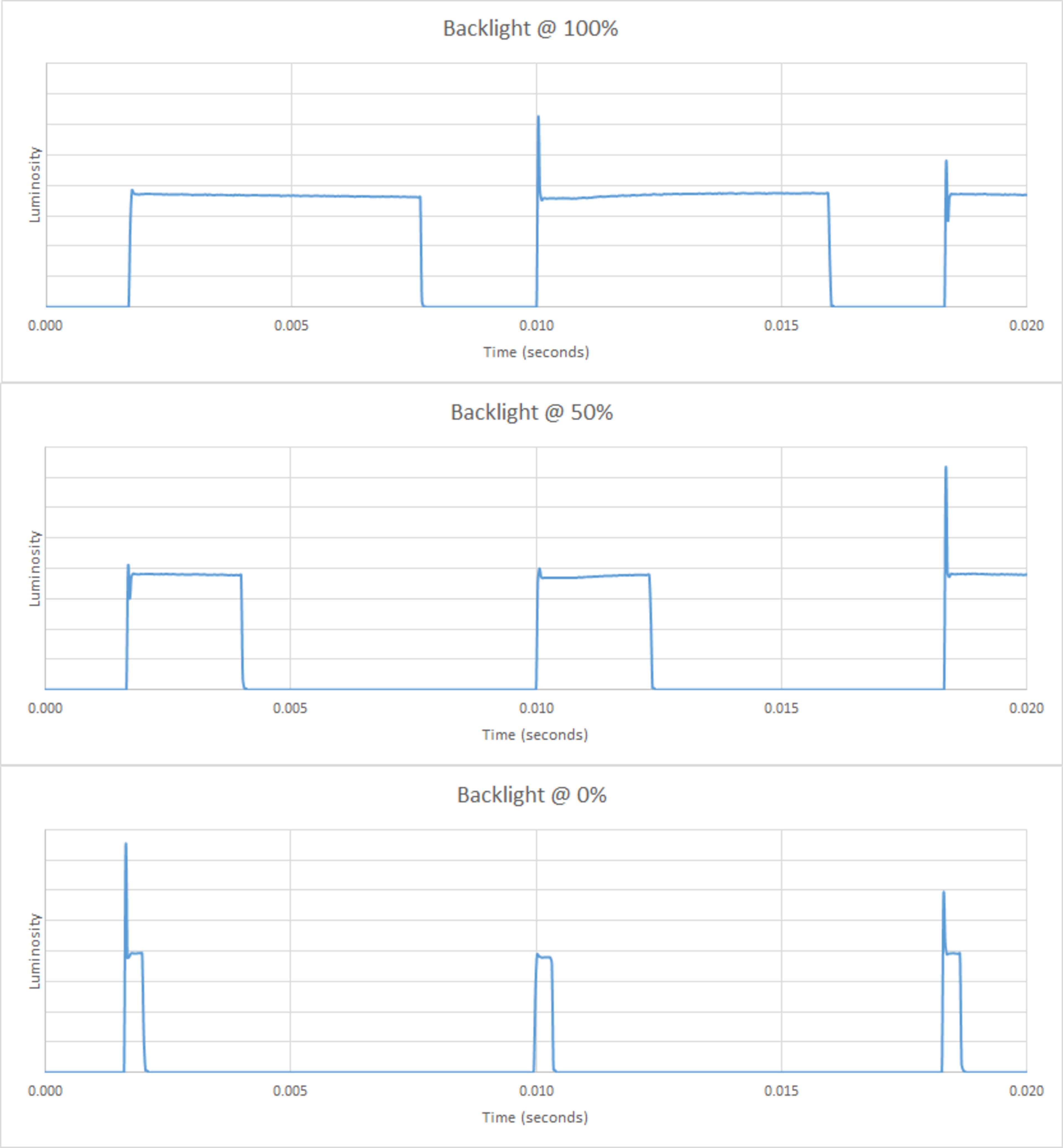
The TV uses PWM to dim the backlight, and there is flicker at all backlight levels. This flicker helps to clear up motion a little, but results in duplications in fast moving objects.
The 'Standard' picture mode is brighter. In this mode the backlight stays on longer, as shown in this plot.
Same as the UJ6300, there is no option to reduce the flicker frequency to 60Hz.
for pictures & test results

The LG UK6300 can interpolate lower frame rate content up to 60fps. As this is a 60Hz panel, it can't interpolate 60fps content. When motion interpolation is enabled there are visible artifacts.
The LG UK6300 is good at displaying content without stutter. 24p movies have less visible stutter, especially with wide-panning shots.
Only 24p content played from a true 24p source like a Blu-ray player are judder free. The UK6300 can't remove judder from 24p sources played from a 60p/60i source like a cable box.
To play 24p movies without judder when playing from a Blu-ray player, the 'Real Cinema' setting must be enabled.
The LG 43UK6300 does not support any of the variable refresh rate technologies like Freesync.
Extraordinary low input lag, as long as the 'Game' Picture Mode is selected. For use as a PC Monitor, it is recommended to set the input label to 'PC', and use the'Game' Picture Mode for the lowest input lag possible.
Chroma 4:4:4 only works properly when the input label is set to 'PC' with RGB color; it doesn't display correctly with YCbCr.
Most of the common input resolutions are supported with issue. Like most LG TVs, the input label has to be set to 'PC' for chroma 4:4:4 support. For 4:4:4 to work properly, RGB colors must be used. The less accurate RGBW pixel structure causes artifacts when used as a PC Monitor.
For 4k 60Hz, HDMI Ultra HD Deep Color must be enabled in the Additional Settings menu for the input used.
4k HDR does not work properly when in PC mode, colors appear washed out.


There is a single shared component/composite input on the back of the TV.
for pictures & test results

The LG UK6300 has a below-average frequency response performance. LFE (low-frequency extension) is at 100Hz, which is sub-par. This means that this TV will have a full and warm sound, but not a lot body or punch, and no thump or rumble to its bass either. The response above the LFE is well-balanced for the most part, which results in clear dialogs but they may lack some airiness. Also, this TV doesn't get very loud and produces considerable pumping and compression artifacts under heavy loads. Additionally, since this TV doesn't have a room correction system, it wasn't able to remove the mode of our test room which occur around 200Hz.
for pictures & test results

The distortion performance of the LG UK6300 is decent. The overall amount of harmonic distortion is within decent limits, and there is not big jump in THD under maximum loudness either, but this TV doesn't get very loud.
for pictures & test results

The WebOS interface hasn't changed much since last year. It is functional and easy to navigate, but there are some performance issues with animations.
for pictures & test results

Immediately out of the box there were ads within the LG Content Store. They cannot be removed and there is no option to opt-out. There is also suggested content in the home menu.
for pictures & test results

There is a decent selection of built-in apps, and a wide selection is available on the LG Content Store. The built-in media apps work well.
for pictures & test results

The remote included in the LG 43UK6300 is the basic LG remote. There is no voice control, and it is IR only. There are a few quick access buttons that provide access to the most common functions, including changing inputs, accessing the search function, and opening the settings menu. It does not have the virtual mouse pointer of the more advanced LG TVs, but this can be added by upgrading the remote.



for pictures & test results

- Manual
- Cable Management Strap
- Remote
- Batteries
- Warranty Information
- 60.25" Power Cable