
The Samsung Q800T is a new TV in Samsung's 2020 8k QLED lineup and it's sold as the Samsung Q850T at Costco. It has all the features found on other high-end TVs and its high resolution delivers exceptional picture quality. Its VA panel has Samsung's 'Ultra Viewing Angle' layer added to it, improving its viewing angles at the cost of a lower native contrast ratio. Luckily, there's a full-array local dimming feature that darkens any blacks. Unfortunately, it has some uniformity issues, as parts of the screen are darker and blotchy, and there are some upscaling artifacts with both 4k and native 8k content. On the upside, this TV has support for FreeSync variable refresh rate (VRR) technology to reduce screen tearing, and it has a black frame insertion feature to help improve the appearance of motion. Also, the TV comes equipped with Samsung's Tizen operating system, which is easy to use and has a ton of apps available to download.
Our Verdict
The Samsung Q800T is a great TV for most uses. It gets bright and it has impressive reflection handling if you watch TV during the day. It's a good choice for movies due to its full-array local dimming and it doesn't have any issues upscaling 480p, 720p, or 1080p content. Unfortunately, it has some uniformity issues with visible dirty screen effect, which might bother you during sports. On the upside, it's an excellent gaming TV due to its fast response time and incredibly low input lag.
- Impressive reflection handling.
- Incredibly low input lag.
- Easily gets bright enough to combat glare.
- Full-array local dimming.
- Disappointing out-of-the-box color accuracy.
- Uniformity issues.
- Low contrast ratio for a VA panel.
The Samsung Q800T is good for watching movies. Its contrast ratio is low for a VA panel, but the full-array local dimming feature helps deepen any blacks. It upscales lower resolution content, like 480p from DVDs or 1080p from Blu-rays well, but there are some artifacts with 4k content. Unfortunately, this TV also has some uniformity issues as parts of the screen are darker.
- Full-array local dimming.
- Removes judder from any source.
- Upscales 720p and 1080p content properly.
- Uniformity issues.
- Low contrast ratio for a VA panel.
The Samsung Q800T is great for TV shows. It gets bright enough to combat glare, it has impressive reflection handling, and its viewing angles are decent. It also upscales lower resolution content, such as from cable boxes, without any issues, but sadly, the screen has some uniformity issues.
- Impressive reflection handling.
- Easily gets bright enough to combat glare.
- Decent viewing angles.
- Uniformity issues.
Great for sports. The Samsung Q800T has impressive reflection handling if you place it in a bright room, and the viewing angles are wide enough if you want to watch the game with a big group of friends. Unfortunately, there's visible dirty screen effect in the center, which could be distracting. On the upside, motion looks smooth since it has a very good response time.
- Impressive reflection handling.
- Very good response time.
- Decent viewing angles.
- Uniformity issues.
Excellent for video games. The Samsung Q800T has an incredibly low input lag, a very good response time, and it has FreeSync VRR support. It's a good choice to use either in dark rooms, as it has a good local dimming feature that darkens any blacks, or in bright rooms since it gets bright and has impressive reflection handling.
- Incredibly low input lag.
- FreeSync VRR support.
- Very good response time.
- Full-array local dimming.
- Uniformity issues.
- Low contrast ratio for a VA panel.
The Samsung Q800T is good for HDR movies. It has a great wide color gamut and gets bright enough in HDR to make highlights pop. It's also able to display deep blacks thanks to its full-array local dimming, but sadly, the screen has uniformity issues.
- Full-array local dimming.
- Excellent HDR peak brightness.
- Great wide color gamut.
- Uniformity issues.
- Low contrast ratio for a VA panel.
The Samsung Q800T is great for HDR gaming. It has a very good response time, incredibly low input lag, and support for FreeSync VRR. HDR content looks great, as it displays a very wide color gamut and it gets bright enough in HDR to bring out highlights. It also performs well in dark rooms as it has a good contrast ratio.
- Incredibly low input lag.
- FreeSync VRR support.
- Excellent HDR peak brightness.
- Great wide color gamut.
- Uniformity issues.
- Low contrast ratio for a VA panel.
The Samsung Q800T is an excellent choice to use as a PC monitor. It displays proper chroma 4:4:4 at most common resolutions, which is important for reading text. The input lag is low and if you want to place it in a meeting room, it has fairly wide viewing angles. This TV also gets very bright and it has impressive reflection handling, but unfortunately, it has some uniformity issues.
- Impressive reflection handling.
- Incredibly low input lag.
- Decent viewing angles.
- Uniformity issues.
Changelog
- Updated Jul 30, 2021: We added the real content local dimming videos and retested 4k @ 120Hz VRR.
- Updated May 19, 2021: Updated the PS5's software and confirmed the TV now supports 4k @ 120Hz in HDR from it.
- Updated Apr 29, 2021: Updated the motion interpolation input lag results.
- Updated Mar 01, 2021: Converted to Test Bench 1.6.
Check Price
Differences Between Sizes And Variants
We tested the 65" Q800T (QN65Q800T), and for the most part, we expect our review to be valid for the 75" (QN75Q800T), and the 82" (QN82Q800T) variants. There's a Q850T variant sold at Costco that's available in the same sizes, and we expect it to perform the same for the most part.
If someone comes across a different type of panel or if their Samsung Q800T doesn't correspond to our review, let us know and we'll update the review. Note that some tests such as gray uniformity, and in this case the build quality, may vary between individual units.
| Size | US | Canada | UK | Italy | Germany |
|---|---|---|---|---|---|
| 65" | QN65Q800TAFXZA | QN65Q800TAFXZC | QE65Q800TATXXU | QE65Q800TATXZT | GQ65Q800TGTXZG |
| 75" | QN75Q800TAFXZA | QN75Q800TAFXZC | QE75Q800TATXXU | QE75Q800TATXZT | GQ75Q800TGTXZG |
| 82" | QN82Q800TAFXZA | QN82Q800TAFXZC | QE82Q800TATXXU | QE82Q800TATXZT | GQ82Q800TGTXZG |
Our unit was manufactured in February 2020, you can see the label here.
Popular TV Comparisons

The Samsung Q800T is a very good overall 8k TV, but for its price, there are better 4k TVs out there. Also, 8k content is very limited in 2020, so having an 8k TV doesn't add much. See our recommendations for the best TVs, the best smart TVs, and the best outdoor TVs.
The Samsung Q90/Q90T QLED is better than the Samsung Q800T 8k QLED. The Q90T is a 4k TV that has a better contrast ratio, slightly better uniformity, much better reflection handling, better out-of-the-box color accuracy, and a quicker response time. Both TVs have one HDMI 2.1 input, so they're both future-proof, but the Q800T can display 8k content.
The LG CX OLED is much better than the Samsung Q800T 8k QLED. The LG can display perfect blacks and it has very wide viewing angles. It also has a much faster response time, much better out-of-the-box color accuracy, and it handles reflections better. The Samsung is an 8k TV that gets brighter, has a lower input lag, and it doesn't have the burn-in risk associated with OLED TVs.
The Samsung Q900/Q900R 8k QLED is a bit better than the Samsung Q800T 8k QLED. The two TVs perform very similarly but the Q900R gets a bit brighter, handles reflections a bit better, has improved uniformity, much better out-of-the-box color accuracy, and much faster response time. The Q800T has a lower input lag and content stutters less on this TV.
The Samsung Q80T is better overall than the Samsung Q800T 8k QLED. The Q80T is a 4k TV with a better contrast ratio, better uniformity, improved reflection handling, a quicker response time, and much better out-of-the-box color accuracy. On the other hand, the Q800T is an 8k TV with slightly better viewing angles, and it can get much brighter. There still isn't much 8k content to really take advantage of the Q800T's 8k capability.

We buy and test dozens of TVs yearly, taking an objective, data-driven approach to deliver results you can trust. Our testing process is complex, with hundreds of individual tests that take over a week to complete. Most of our tests use specially designed test patterns that mimic real content, but we also use the same sources you have at home to ensure our results match the real-world experience. We use two main tools for our testing: a Colorimetry Research CR-100 colorimeter and a CR-250 spectroradiometer.
Test Results
Older Test Bench: We tested this product using an older TV test methodology before a major update. Some of the test results below aren't directly comparable with other TVs. Learn more
for pictures & test results

The Samsung Q800T has an outstanding design. It’s different from the Samsung Q900/Q900R 8k QLED as it doesn’t have the One Connect Box. This TV looks like the Samsung Q90T QLED with its thin bezels and a premium-looking center-mounted stand. The replacement to this TV, the Samsung QN800A 8k QLED, looks very similar but comes with a One Connect Box, which houses all the inputs.
for pictures & test results

The stand is in the center and it’s made out of metal. It supports the TV well but there’s still some wobble.
Footprint of the 65” stand: 13.4” x 10.7”
for pictures & test results

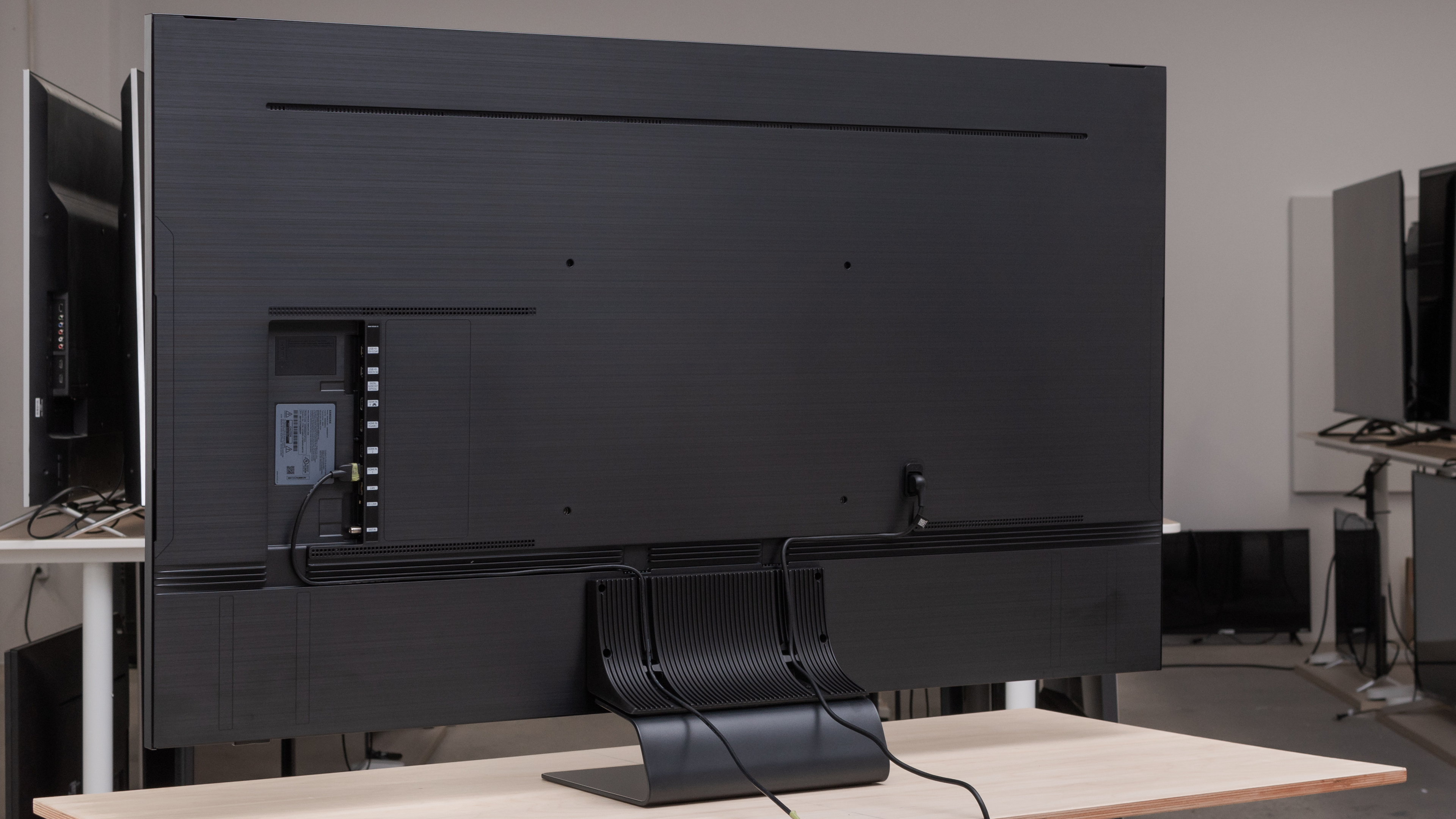
The back of the Samsung Q800T looks a lot like the Samsung Q90T QLED. It’s made out of a textured plastic and there are grooves that run along the back and stand for cable management.

for pictures & test results

The TV is fairly thin and doesn’t stick out much if wall-mounted. The plug for the power sticks out a bit, but this shouldn’t be much of a problem.
for pictures & test results

Excellent build quality, similar to most other high-end Samsung TVs. The back panel on our TV is very flimsy and it flexes quite easily. It also seems as if the panel is not connected to the TV properly and you can very easily pull it off, but we don’t know if this is a problem with our unit or a general issue. If your Q800T has the same issue, let us know in the discussions below!
for pictures & test results

Good contrast. Even though this TV has a VA panel, the native contrast is very low, mainly due to the added ‘Ultra Viewing Angle’ layer. The local dimming feature greatly improves the contrast ratio, which is an improvement over the Samsung Q900/Q900R 8k QLED.
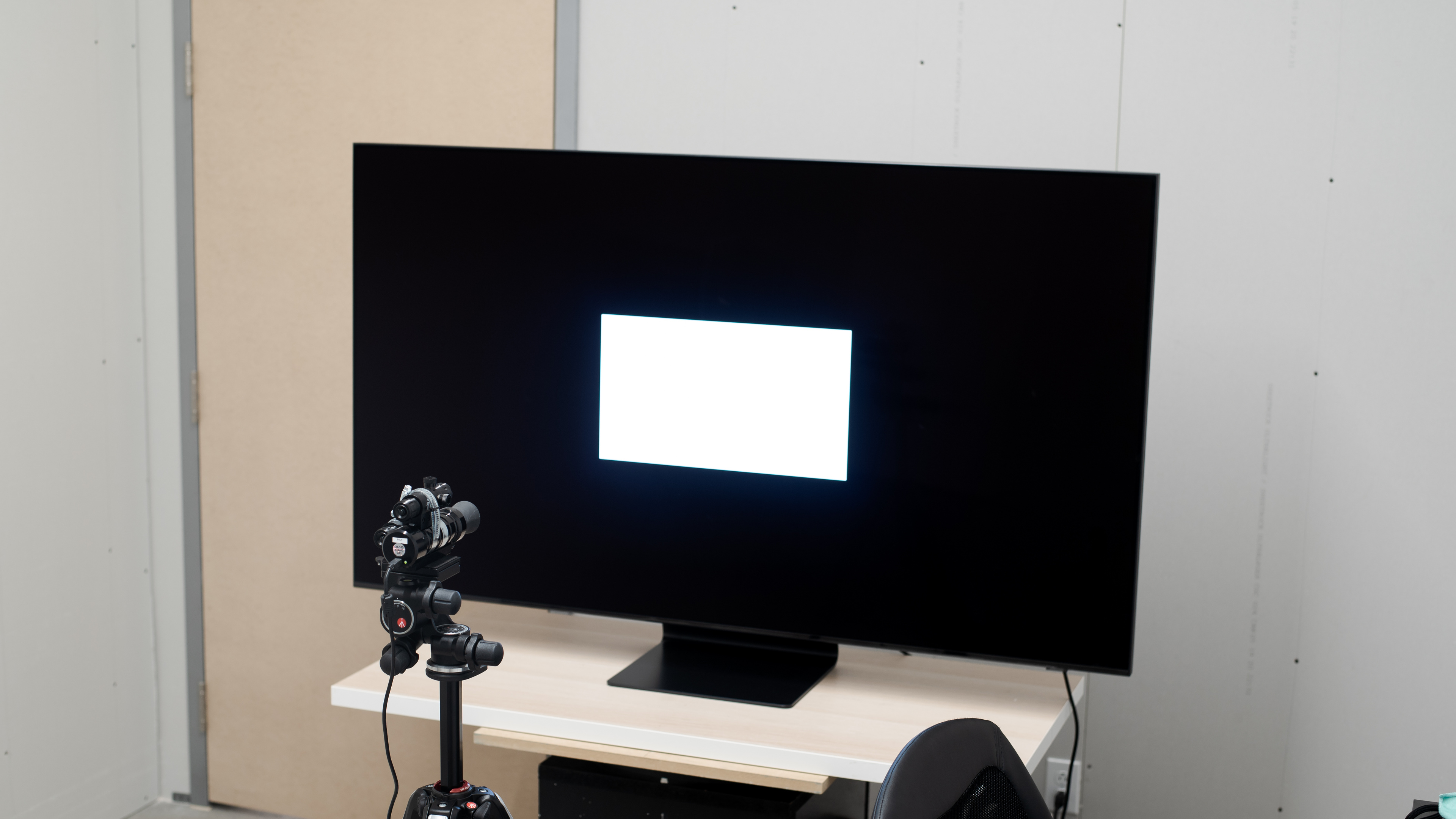
Excellent peak brightness. It easily gets bright enough to combat glare, but it’s not consistent with varied content.
We measured the peak brightness after calibration in the ‘Movie’ Picture Mode with the Color Temperature set to ‘Warm 2’, the Backlight at ‘Max’, and Local Dimming set to ‘High’.
The brightest image we got was with these settings, as seen on the ‘Peak 10% Window’ test.
for videos & test results

for videos & test results

for videos & test results

Update 07/30/2021: Added the real content local dimming videos.
The 65Q800T has a good full-array local dimming feature, but there are a few issues associated with it. When there’s a bright object flashing across the screen, the transition between the dimming zones is slow, so the zones are lighting up after the object has moved. This creates a ‘Golf Ball Effect’ on fast-moving circles, where the object has checkered dark zones, similar to the TCL 8 Series 2019/Q825 QLED, but not as obvious. Luckily, this issue isn’t very noticeable in real scenes. It crushes light sources a bit and there’s not a lot of blooming around bright objects. With subtitles, the text doesn’t light up much, which might be annoying for some people.



for pictures & test results

Excellent brightness in HDR. Highlights pop the way they should, but like the brightness in SDR, it’s not consistent across varied content.
We measured the HDR peak brightness before calibration in the ‘Movie’ Picture Mode with the Local Dimming set to ‘High’, Brightness to ‘Max’, Contrast to ‘Max’, and Picture Clarity to ‘Off’.
If you want the brightest image possible, use the default Dynamic Mode settings with Local Dimming set to ‘High’, as we were able to get 1666 nits in the 10% peak window test.
for pictures & test results
for pictures & test results

for pictures & test results

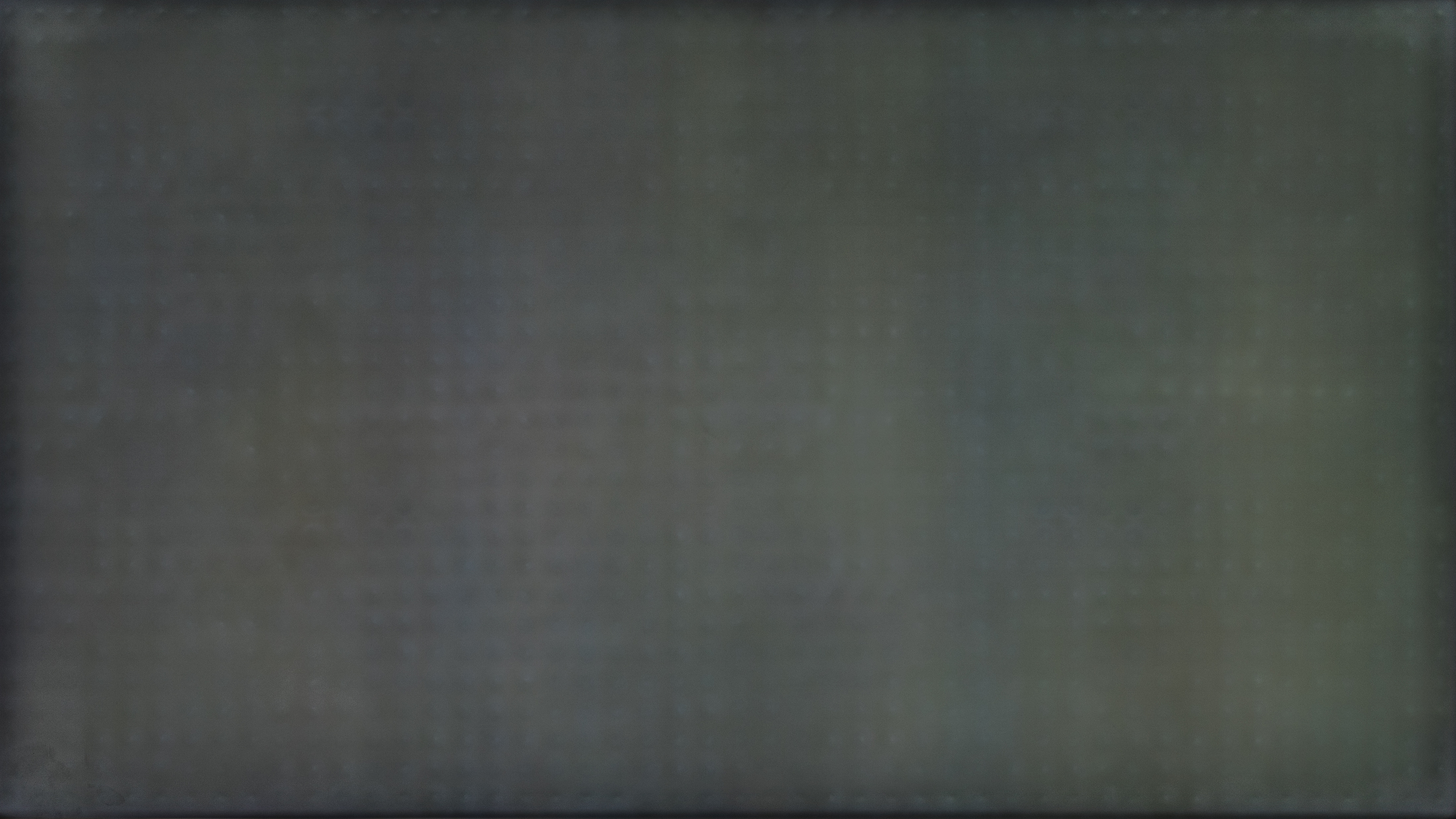
The Samsung Q800T has just okay gray uniformity. There appears to be uniformity issues where the LED zones are, as parts of the screen look botchy. It’s very noticeable on white screens, as you can see in this photo, which is heavily edited to show the effect. There’s also visible dirty screen effect in the center, which could be distracting during sports.


for videos & test results

for pictures & test results

for pictures & test results

for pictures & test results

Decent viewing angles. Despite being a VA panel, which usually has poor viewing angles, the ‘Ultra Viewing Angle’ layer added on this TV means the image remains fairly accurate when viewing from the side. We measured the viewing angle twice: once with Local Dimming off to measure the brightness, black level, and gamma. We measured it again with Local Dimming on to measure the color.
for pictures & test results

for pictures & test results

for pictures & test results

Impressive reflection handling. The Samsung Q800T handles a small amount of light well but the reflections in really bright rooms might be too distracting. Due to the 'Ultra Viewing Angle' layer, intense amounts of light scatter across the screen, creating a rainbow effect.
for pictures & test results

for pictures & test results

for pictures & test results

The Samsung Q800T has disappointing out-of-the-box color accuracy. The color temperature is quite warm, so the image has a red/yellow tint, and all colors are inaccurate because of it. Shades of gray are also inaccurate, and even though the gamma follows the target fairly well, bright scenes are over-brightened.
If out-of-the-box accuracy is important to you, consider the Samsung Q900TS 8k QLED, which performs similarly but is more accurate out of the box.
for pictures & test results

for pictures & test results

for pictures & test results

Update 09/28/2020: We listed Auto-Calibration Function as 'Undetermined' because 2020 Samsung TVs aren't officially listed as compatible with CalMAN Auto Cal.
After calibration, this TV has amazing color accuracy. Gamma follows the target almost perfectly and any color inaccuracy is almost impossible to spot with the human eye.
See our recommended settings here.
for pictures & test results

The Samsung Q800T upscales 480p content, like from DVDs, well without any issues.
for pictures & test results

720p content, like from cable boxes, is upscaled well.
for pictures & test results

1080p content, such as from Blu-rays or gaming consoles, is displayed very well.
for pictures & test results

Similar to the Samsung Q900/Q900R 8k QLED, the Samsung Q800T has some minor upscaling artifacts in 4k content, but it’s not spotted easily. There’s also some dithering in shadows.
for pictures & test results
The TV dithers a bit with 8k content, which is visible in shadows, but it’s only noticeable if you’re sitting extremely close to the screen. If you prefer something that displays 8k content properly, then look into the LG NANO99 8k.

for pictures & test results

for pictures & test results

The Samsung Q800T has a great, wide color gamut. It has excellent coverage of the DCI P3 color spaced used in most HDR content, but limited coverage of the wider Rec. 2020 color space.
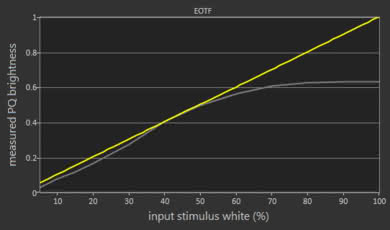
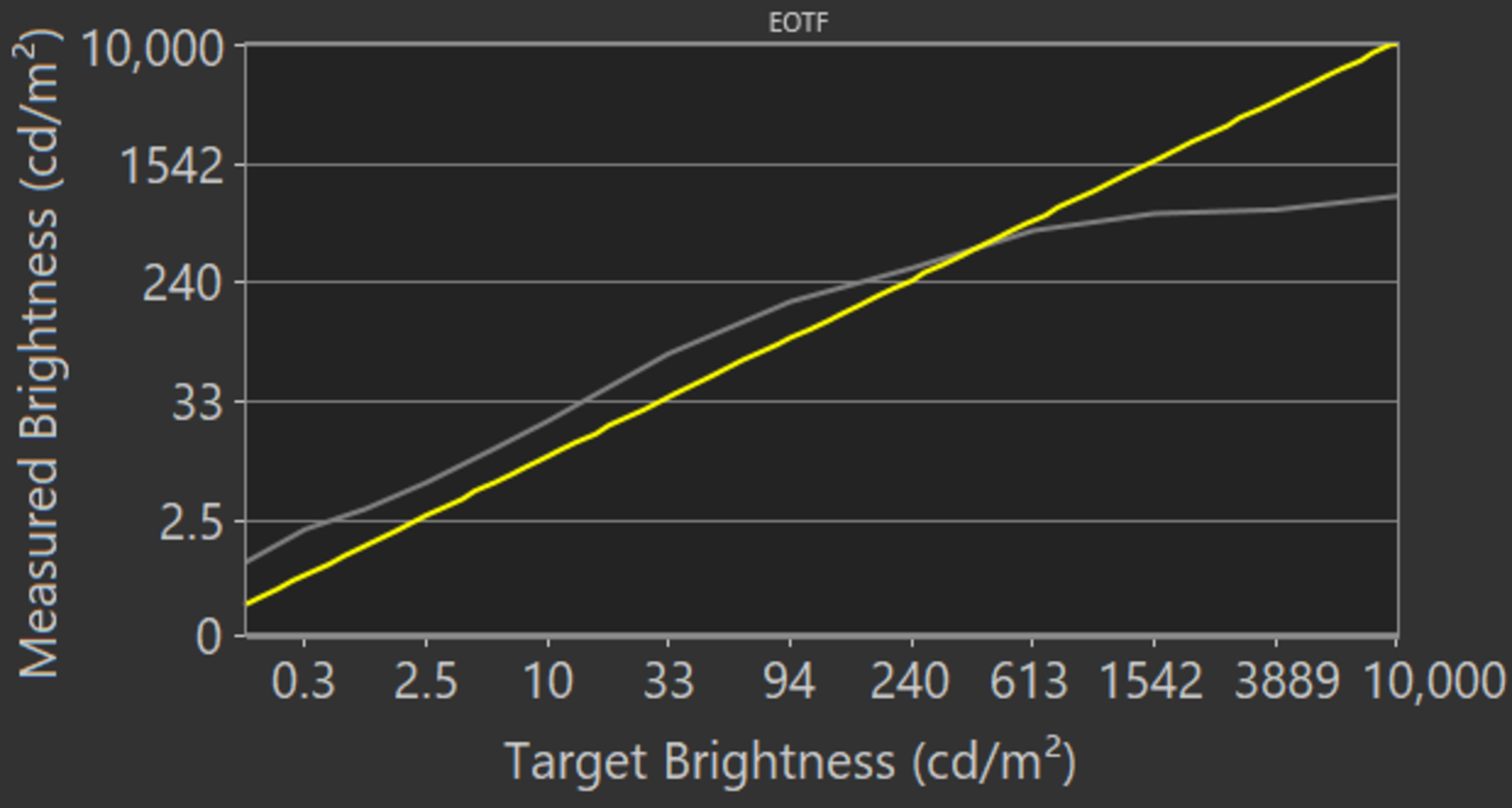
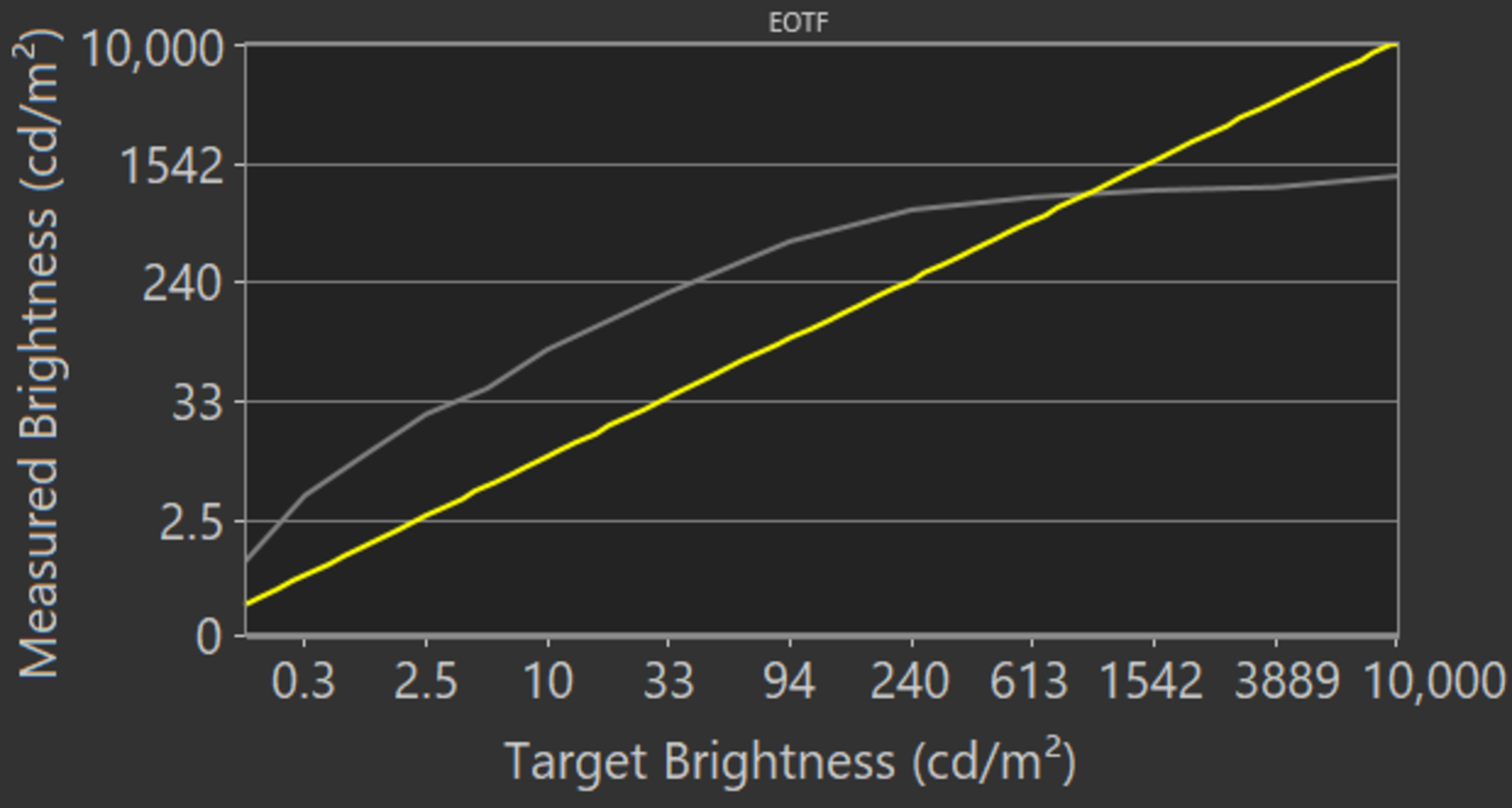
The EOTF is higher than the target until it rolls off, causing scenes to be brighter than they should. The EOTF is even brighter in ‘Game’ mode, as you can see here.
If you find HDR too dim, set Contrast Enhancer to ‘High’ and ST.2084 to ‘Max’, as seen in this EOTF.
for pictures & test results

for pictures & test results

The Samsung Q800T has a good color volume, a bit improved from the Samsung Q900/Q900R 8k QLED. It’s able to produce deep, saturated colors well, but has trouble with brighter blues, which is typical of an LED TV.
for pictures & test results

Good gradient handling. There’s a bit of banding in the greens and reds, but nothing serious. Setting Noise Reduction to ‘Auto’ helps smooth out the gradients.
for pictures & test results

There are no signs of temporary image retention, even immediately after displaying our high-contrast static test image for 10 minutes.
We don't expect VA panels to experience permanent image retention, as the VA panel in our long-term test appears immune.
for pictures & test results

for pictures & test results

The Samsung Q800T has a very good response time. There's significant overshoot in the 0-20% transition, but overall, motion looks smooth. If you want a TV with even better response time, check out the Samsung Q80T QLED, which is a 4k TV.
for pictures & test results

This TV uses pulse-width modulation (PWM) to dim its backlight. In 'Game' and 'Movie' mode it flickers at 960Hz, and at 120Hz in 'Natural', 'Dynamic', and 'Standard' modes. It flickers at 120Hz either when Picture Clarity or Game Motion Plus are enabled. When it's displaying 120fps content in 'Game' mode, or when the black frame feature is enabled in 'Game' mode while displaying 4k @ 30Hz or 8k @ 30Hz content it also flickers at 120Hz. It goes down to 60Hz with BFI enabled in 'Game' mode when displaying 4k @ 60Hz content.
for pictures & test results

for pictures & test results

The Samsung Q800T has a black frame insertion feature to help reduce motion blur. It can either flicker at 60Hz or 120Hz, depending on your content, which is explained in the Flicker-Free box.
See our recommended settings for the BFI feature here.
for pictures & test results

for pictures & test results

This TV can interpolate lower frame rate content up to 120Hz, which is known as the 'Soap Opera Effect'. To enable motion interpolation, adjust the Blur Reduction and Judder Reduction settings in the Picture Clarity settings tab.
The Samsung Q800T has no stutter with 60fps content, but there's some noticeable stutter in 24fps content.
This TV can remove judder from any source. To do so, set Picture Clarity to 'Custom' and set the Blur Reduction and Judder Reduction sliders to 0.
See our recommended settings here.
Update 07/30/2021: We retested VRR with the latest firmware. 4k @ 120Hz VRR is now working properly, but only from FreeSync sources. When we tried it with an RTX 3080 the TV wasn't even usable, the video would freeze and we would have to disconnect and reconnect the HDMI cable, and even restart the computer at times.
Update 11/09/2020: We've retested the VRR with an HDMI 2.1 source and firmware version 1115. Unfortunately, it doesn't work at this time, as it causes a black screen when VRR is enabled. The image came back after resetting the handshake to enable VRR; however, Input Signal Plus was automatically disabled, limiting the signal to 4k @ 60Hz. When enabling 'Game' mode, the screen turns black as well.
Update 08/19/2020: We changed HDMI Forum VRR to 'Unknown' because we currently don't have an accurate way to test for HDMI Forum VRR compatibility. Once we do, we'll test for it and update the review.
The Samsung Q800T has a great refresh rate. It supports FreeSync to reduce screen tearing, and unlike the Samsung Q900/Q900R 8k QLED. FreeSync VRR is automatically enabled when in 'Game' mode.
Update 04/29/2021: We updated the '4k @ 60Hz With Interpolation' input lag because the original results were incorrect. The review has been updated.
Update 11/09/2020: We've retested the input lag at 8k with an HDMI 2.1 source. The input lag at 8k is an average, as the results vary a lot from one run to another. We can't measure the input lag for 8k with VRR since it doesn't work at this time. As for 4k @ 120Hz, we can't measure it because the image keeps flickering and is unusable.
The Samsung Q800T has an incredibly low input lag. It stays low with VRR enabled and it's also low with 4k content, which is great if you own a PS4 Pro or Xbox One X. To achieve the lowest input lag, set the Picture Mode to 'Game'. There's also an Auto Low Latency Mode that automatically switches to 'Game' mode when a compatible device is connected, so you don't have to manually switch it.
Update 11/09/2020: We've retested the TV with an HDMI 2.1 source and firmware version 1115. It can now display an 8k @ 60Hz signal with chroma 4:4:4. 4k @ 120Hz doesn't work because the image keeps flickering, especially when in PC mode.
Since the Samsung Q800T is an 8k TV, it supports all common resolutions. It's able to display proper chroma 4:4:4, which is important for reading text, at all resolutions except 1440p @ 120Hz. To achieve full HDMI bandwidth, enable Input Signal Plus.
for pictures & test results

for pictures & test results

Update 05/19/2021: After a PS5 software update, Samsung TVs can now display 4k @ 120Hz in HDR.
This TV displays any signal up to 4k @ 120Hz from either the PS5 or Xbox Series X; we don't test for 8k. It has an Auto Low Latency Mode that automatically switches the TV into Game Mode when a game from a compatible device is launched. However, it feels buggy and turns itself on and off when you're in the menus.
Update 11/09/2020: We've retested the TV with an HDMI 2.1 source. We can confirm that HDMI 4 has the full bandwidth of HDMI 2.1.
HDMI 2.1 is only supported on HDMI 4, which is a bit disappointing if you want multiple future-proof inputs. Check out the LG CX OLED if you want a TV with four HDMI 2.1 ports.

The Samsung Q800T supports eARC, so you can send high-quality object-based audio like Dolby Atmos via TrueHD over an HDMI connection. To use it, eARC has to be set to 'Auto' and the Digital Output Audio must be set to 'Passthrough'. Unfortunately, it doesn't support any DTS formats.
for pictures & test results

This TV has a disappointing frequency response, and it's actually worse than the Samsung Q900/Q900R 8k QLED. Its bass only has a bit of punch to it, but overall, it has a fairly well-rounded sound profile, resulting in clear dialogue. It gets loud enough for most environments.
There's a room correction feature that's done automatically when the Intelligent Mode setting is enabled.
for pictures & test results

This TV has decent distortion performance. There's audible total harmonic distortion at moderate listening levels and it gets quite noticeable at its max level.
for pictures & test results

Like other Samsung QLED TVs, the Samsung Q800T runs on Tizen operating system. It's easy to use and the navigation is smooth.
for pictures & test results

There are ads on the home screen and app store. Sadly, there's no way to opt-out of them.
for pictures & test results

Samsung's app store has a wide selection of apps available to download and the apps are fairly smooth to use.
for pictures & test results

The Samsung Q800T has the same remote as other Samsung QLED TVs. It has shortcuts to Netflix, Amazon Prime Video, and Samsung TV Plus. It has a built-in microphone to use voice control with Bixby, Samsung's digital assistant. You can ask it to perform some basic commands, such as changing inputs, asking for the weather, and opening apps.
for pictures & test results

This TV has a D-pad as its controls and it's in the center of the TV underneath the Samsung branding. You can change channels, volume, inputs, or navigate the menu and settings.
for pictures & test results

- Remote (with batteries)
- Power cable
- User guide