Note that this is a different TV to the 2017 QLEDs such as the Q7F and Q8C. The 2018 Q8FN is also called Q8F or Q8.
Our Verdict
Great TV for a wide range of usages. The Samsung Q8F can produce deep and uniform dark scenes when viewed in a dark room. Local dimming is also decent at reducing blooming and producing bright highlights. Motion handling is great, and the response time is fast so motion is clear. It isn't perfect though, as the image loses accuracy when viewed at an angle and some dirty screen is visible, especially when watching sports.
- Excellent wide color gamut
- Feels responsive due to low input lag
- Great motion handling
- Picture quality degrades at an angle
Excellent for watching movies in a dark room. Picture quality is great due to the high native contrast ratio and decent local dimming. Blacks also appear uniform, which is great. 24p movies from most sources are also shown without any judder, which is great.
Great for watching TV in a bright room. The whole screen can get bright, which combined with the reflection handling is excellent for overcoming glare even in very bright rooms. The smart platform is also very good for browsing Netflix or watching content on YouTube. Unfortunately, the picture loses accuracy at an angle.
Great TV for sports fans. The Samsung Q8 can get bright to overcome glare in a bright room, and reflection handling is excellent. Motion handling is great, so fast-paced content remains clear and detailed. Unfortunately, the best picture quality is reserved for those directly in front of the TV, so those with wide seating may be disappointed.
Excellent for gamers. Input lag is low, so the TV feels responsive regardless of the input signal. Motion handling is also great due to the fast response time and ability to flicker the backlight to clear up motion. The TV also supports motion interpolation with low input lag in game mode, which is great for a smooth gaming experience.
Excellent TV for HDR movies in a dark room. Picture quality is great, and the TV can produce deep dark scenes with the high native contrast ratio and decent local dimming. It can also produce very bright and vivid highlights due to the wide color gamut.
Excellent choice for HDR gaming. The Samsung Q8 has a low input lag and fast response time, so the TV feels responsive and fast motion is clear. Also, the TV supports HDR well with a high peak brightness and can produce bright highlights. The TV can also interpolate games while keeping a low input lag, which is great for smooth play.
Great choice for a PC monitor. Picture quality is good. The TV supports chroma 4:4:4 for clear text across all backgrounds, and it has low input lag so the TV feels very responsive. It also has a low response time, so fast motion is clear. Unfortunately, the viewing angles are poor so the sides of the screen lose accuracy when viewed from up-close.
Changelog
- Updated May 21, 2020: Converted to Test Bench 1.5.
- Updated Feb 21, 2020: Converted to Test Bench 1.4.
- Updated Feb 28, 2019: Converted to Test Bench 1.3.
- Updated Jun 11, 2018: 1440p @ 120 Hz input lag has decreased as of firmware 1103. The review has been updated.
Check Price
Differences Between Sizes And Variants
We tested the 55" (QN55Q8FN) version FA02. For the most part, we expect our review to be valid for the 65" version (QN65Q8FN) and 75" version (QN75Q8FN).
| Size | Model | Model Short | US | Canada | UK |
| 55" | QN55Q8FN | QN55Q8 | QN55Q8FNBFXZA | QN55Q8FNBFXZC | QE55Q8FNA |
| 65" | QN65Q8FN | QN65Q8 | QN65Q8FNBFXZA | QN65Q8FNBFXZC | QE65Q8FNA |
| 75" | QN75Q8FN | QN75Q8 | QN75Q8FNBFXZA | QN75Q8FNBFXZC | N/A |
| 82" | QN82Q8FN | QN82Q8 | QN82Q8FNBFXZA | QN82Q8FNBFXZC | N/A |
In the EU, Samsung has released both a curved variant and the flat version of the Q8FN. Both of these are edge-lit TVs and will not feature Full-Array Local Dimming. While we will not be reviewing the EU variant, we expect the performance to more closely match that of the Q7FN.
If someone comes across a different type of panel or if their Samsung Q8FN doesn't correspond to our review, let us know and we will update the review.
Update 07/06/2018: We estimate our 55" model to have 40 local dimming zones. There was initially a rumor that the 65" model has many more (240) however this doesn't appear to be true, so we do expect these larger sizes to offer similar dark scene performance.
Update 08/01/2018: Samsung has announced that they will begin selling the Q8DN in Europe. The Q8DN is the European equivalent of the U.S. model, including Full-Array Local Dimming.
Update 08/20/2018: Samsung has announced that they will be releasing an 82" model.
Popular TV Comparisons

The Samsung Q8FN is a strong performer in both dark and bright rooms. It is great for any usage but comes at a very high price. See some of our comparisons below for how it compares to other TVs on the market. See our recommendations for the best TVs and the best smart TVs.
The Samsung Q8FN/Q8/Q8F QLED 2018 is a bit better than the Samsung Q7FN/Q7/Q7F QLED 2018 for most users, unless you want a cleaner wall mount installation with the One Connect box. The two TVs offer nearly identical picture quality, but the Samsung Q8FN has a better local dimming feature.
The Samsung Q8FN/Q8/Q8F QLED 2018 is better than the Samsung Q8C/Q8 QLED 2017. The Q8FN features a full-array local dimming system that delivers a better dark room experience than with the Q8C's edge-lighting. The Q8FN is much brighter, good for overcoming glare in a bright room and has new features for gamers including VRR and Auto Low Latency Mode.
The Samsung Q8FN/Q8/Q8F QLED 2018 is slightly better than the Sony X900F. The Q8FN has better reflection handling, although the Sony X900F is brighter. The Samsung Q8FN is better for gaming, as it has lower input lag, and it supports FreeSync and automatic low latency mode. The Sony X900F has a better response time, so motion is clearer with less blur, but the Q8FN is excellent as well. While both TVs have an optional black frame insertion feature, the Q8FN can flicker at a lower frequency, which is good for content with a lower frame rate.
The Samsung Q8FN/Q8/Q8F QLED 2018 is better than the Samsung NU8000. The Samsung Q8FN has full-array local dimming and can deliver a better dark room performance. Also, the Samsung Q8FN can handle reflections better, thus minimizing distractions.

We buy and test dozens of TVs yearly, taking an objective, data-driven approach to deliver results you can trust. Our testing process is complex, with hundreds of individual tests that take over a week to complete. Most of our tests use specially designed test patterns that mimic real content, but we also use the same sources you have at home to ensure our results match the real-world experience. We use two main tools for our testing: a Colorimetry Research CR-100 colorimeter and a CR-250 spectroradiometer.
Test Results
Older Test Bench: We tested this product using an older TV test methodology before a major update. Some of the test results below aren't directly comparable with other TVs. Learn more
for pictures & test results

The design of the Samsung 2018 Q8 is great. It has a very modern look with sleek lines and a nice finish. The legs are solid and wide set, but they might not fit on some tables. It includes the same excellent cable management system found in the NU8000. The TV does not include the OneConnect box found on the higher-end Q9FN. The connections are all side-facing but in the TV frame, so it is difficult to reach the connections when the TV is wall-mounted.
for pictures & test results

The stand is sleek and modern. The stand feels solid and well built. The legs are set far enough apart to put a soundbar directly in front of the screen, but they might not fit on some tables.
Footprint of the 55" TV Stand: 9.7" x 38.1"
for pictures & test results

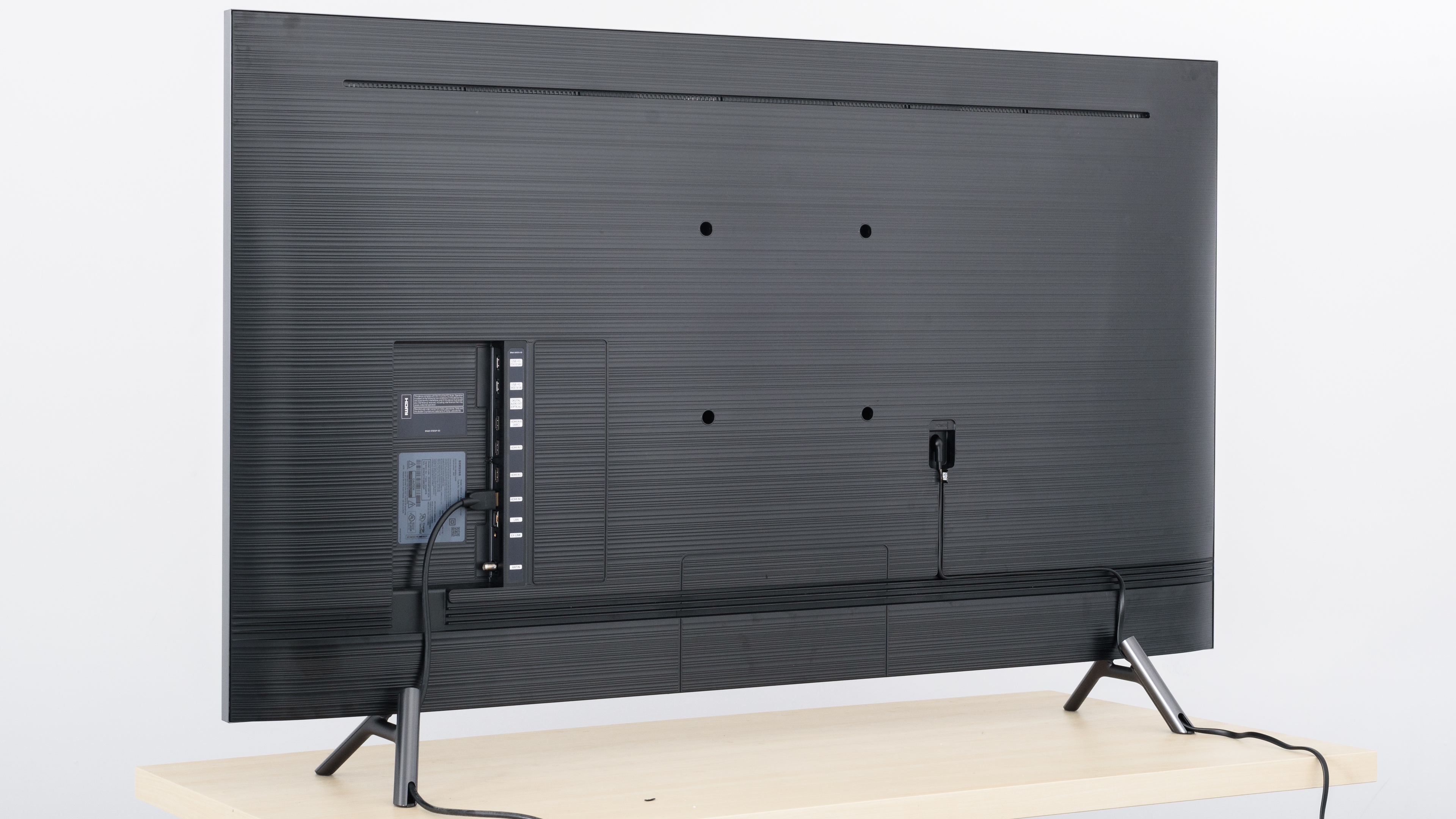
The back of the Q8FN is nearly identical to the NU8000. It has the same cable management system which works exceptionally well for guiding all of the cables either through the legs or through the bottom of the TV when wall-mounted.
The inputs are all inset into the back of the TV and are difficult to reach if wall mounted.
for pictures & test results

The frame of the TV is thin, there is a very small gap between the edge of the frame and the first pixels, but it is not noticeable.
for pictures & test results

Very uniform thickness, the TV is thicker than the LG OLEDs but still quite thin. It sits flush to the wall when wall mounted.
for pictures & test results

Excellent build quality. There are no gaps in the construction. It is mostly plastic but there are some metal parts. It feels well built and solid. The back panel has a lot of flex in the middle where the VESA mounts are located, and the corners of the bezel are slightly cracked but this should not cause any issues.
for pictures & test results

Excellent contrast ratio on the Samsung Q8F. It features a full array local dimming feature and is able to get very deep blacks. To measure the native contrast ratio without local dimming we had to disable it in the advanced service menu, as local dimming cannot be disabled in the standard menu.
for videos & test results

Decent local dimming on the Q8FN, very similar to the Sony X900F. The Q8FN does not completely turn off zones that were far away from our test dot. The Q8FN has less visible blooming than the X900F, but the black levels are not as deep.
Update 01/08/2019: The Q8FN in Europe does not have a full array local dimming feature, but is instead edge-lit. Samsung has instead released the Q8DN, which has the same full array local dimming feature as the one we have tested.
Excellent peak brightness with SDR content. Highlights are very bright and stand out. The 2018 Q8FN is much brighter than last year's Q8C. Real scenes are not as bright as our test windows, but still bright enough for most rooms.
Very good brightness with HDR content. Small highlights are hitting the target 1000 cd/m² that HDR is mastered for. The screen brightness dips considerably with very bright scenes, but is still good for a bright room. Similar brightness to the LG C8, but with brighter highlights in very dark scenes, as shown by the small window tests.
Update 04/27/2018: The text has been edited for clarification.
for pictures & test results

for pictures & test results

Decent gray uniformity, but worse than last year's Q8. The sides of the Q8FN are darker than the rest of the screen, but this isn't as noticeable as when it is in the center. The center of the screen is not uniform, this will be noticeable when watching sports like hockey or football with large areas of uniform color in the center of the screen.
for videos & test results

for pictures & test results

for pictures & test results

for pictures & test results

The Samsung Q8 has a poor viewing angle, the picture quality degrades when viewed off angle. Blacks turn gray and colors shift even with a small angle. This TV is not a good choice for a room with side seating or even with a large couch. These results are typical of VA-type panels. OLED panels like the LG C7 have much better viewing angles.
for pictures & test results

for pictures & test results

Great black uniformity. We disabled the local dimming feature in the hidden service menu to get an accurate test. Without local dimming there is some clouding visible around the cross, but dark room viewing should still be great for most people.
With local dimming on max there is less clouding around the cross. The full array local dimming is effective at turning off zones.
This is a significant improvement over the 2017 Q8F/C, as it was edge-lit and could not fully disable the dimming zones around the test cross, which causes lots of vertical blooming.
for pictures & test results

for pictures & test results

for pictures & test results

The 2018 Q8FN has excellent reflection handling. Reflections are well defined but at a much lower intensity, as such there is much less glare. The anti-reflection coating gives reflections a slight purple tint, but this isn't really noticeable. This TV is excellent even for a very bright room.
for pictures & test results

for pictures & test results

for pictures & test results

Sub-par color accuracy out of the box. The best settings pre-calibration are with the Movie picture mode. Even in this mode, the Gamma does not tracking our target, and both white balance and color dE are too high. The color temperature is too warm, colors are shifted with more of a red-yellowish tint.
Update 04/12/2019: This TV was incorrectly measured with Brightness +2, instead of at 0. This only has a small impact on the results (slightly dimmer dark scenes below about 30 IRE) and so we don't plan to retest it.
for pictures & test results

for pictures & test results

for pictures & test results

After calibrating on the Movie picture mode, with color temperature set to 'Warm1', white balance is corrected and the color temperature is much closer to our target. Gamma follows our target curve perfectly. The color space settings are not very useful and it was not possible to fully correct color accuracy, although it is good enough that most people won't notice.
You can see our recommended settings here.
for pictures & test results

Upscaling of DVDs or classic game consoles is good. Edges are smooth without any loss of detail.
for pictures & test results

720p content like from a cable box is scaled well on the Samsung Q8, there is no obvious over softening or upscaling artifacts.
for pictures & test results

1080p content from a Blu-ray player or non-4k game console looks good.


for pictures & test results

for pictures & test results

for pictures & test results

Excellent wide color gamut. The Q8FN can display nearly 100% of the P3 color space, and has the highest Rec.2020 coverage we have ever seen, although it is very close to the 2017 Q9F.
The Movie mode follows the PQ curve almost perfectly until it rolls off at the TV's peak brightness. The Game EOTF curve also follows our input closely, which is good.
Update 04/26/2018: PC mode's EOTF also follows the target fairly well, although it is a little dimmer.
for pictures & test results

for pictures & test results

The Samsung Q8F has outstanding color volume. Like other Samsung TVs, it can't produce deep, dark colors, and also can't produce overly saturated greens at a range of brightness levels. It is a definite improvement over the 2017 Q8C and the 2018 NU8000.
for pictures & test results

The Samsung Q8FN does a good job displaying our test gradient. There is some banding visible, especially in the darker colors.
for pictures & test results

Like most Samsung TVs, there is no temporary image retention on the Q8FN.
We don't expect VA panels to experience burn-in, as the VA panel in our long-term test appears immune.


for pictures & test results

The Q8FN uses PWM to dim the backlight, and it flickers regardless of backlight setting, even at 100%. The flicker changes considerably depending on settings. Normally, it flickers at 480 Hz, which shouldn't be noticeable and creates little motion duplication. This is much better than last year's Q8C, and almost as good as Sony's X900F.
When in 'Game Mode', or if 'Auto Motion Plus' is enabled, the backlight changes to a 120 Hz flicker which is more noticeable. When we sent a 1080p 120 Hz signal, the backlight changed to 360 Hz.
Here is a plot of the different backlight settings.
for pictures & test results

for pictures & test results

The Samsung Q8FN has an optional BFI mode called 'LED Clear Motion' that adjusts the flicker depending on the content to help motion appear more clear.
BFI on the Q8FN is able to flicker at a variety of frequencies, as low as 60Hz to help fluidity of motion with 60 fps content. Similarly to the NU8000, it is also available in 'Game Mode'.
When in 'Game Mode', or if 'Auto Motion Plus' is enabled, the backlight changes to a 120 Hz flicker, and with a 1080p 120 Hz signal it changed to 360 Hz. You can see a plot of the results here.
for pictures & test results

for pictures & test results

The Samsung 2018 Q8FN has a 120Hz panel, and can interpolate lower frame rate content up to 120 Hz. This helps motion appear much smoother, but it can sometimes get it wrong and cause motion artifacts. In scenes with lots of motion the TV stops interpolating, preferring to maintain quality similar to the LG C8. This effect can look strange to many people and is also known as the 'Soap Opera Effect'.
Interpolation is activated by setting 'Auto Motion Plus' to 'Custom'. The 'Judder Reduction' can be adjusted for low frame rate content, and the 'Blur Reduction' slider can be adjusted to help clear up motion on 60 fps content.
The flicker changes to 120 Hz when 'Auto Motion Plus' is enabled as seen here
Each 24 fps frame is displayed for nearly half the cycle, which can make this type of content stutter, especially with wide panning shots. 60 fps content appears smooth and is a good improvement over the 2017 Q8.
The Q8FN is almost always judder-free, but when playing 24p content through a streaming device at 60i, it was inconsistent. This result is unexpected, although we have similar results with other Samsungs we have tested. We will retest this with each firmware update. This will not be an issue for most people.
The Samsung Q8FN does not support FreeSync from our Radeon RX 580 GPU. We tried multiple combinations of 'Game Mode', 'PC Mode' and different refresh rates but FreeSync was never detected as supported.
Update 05/23/2018: Firmware version 1103 has added Freesync support. We are currently testing it and will update the review shortly.
Update 06/08/2018: FreeSync has been tested and the score has been updated. FreeSync was supported from our Xbox One S and our Radeon RX 580 GPU, in 1080p, 1440p and 4k resolutions. FreeSync is activated by enabling the TV's Game mode and FreeSync settings; PC mode is not required. We tested in Ultimate mode because it has the widest range, and we only recommend Basic mode when you experience problems with Ultimate.
1440p @ 120 Hz: 10.0 ms
Excellent low input lag across all input resolutions and refresh rates, as long as 'Game Mode' is activated. The 1080@120 Hz input lag is exceptionally low, which is great for Xbox One X gamers, as the Xbox One X will soon support 120Hz @ 1080p and at 1440p.
2018 Samsung TVs including the QLEDs and the NU8000 support 'Game Motion Plus', which interpolates lower frame rate games up to 120 Hz while in 'Game Mode'. This feature causes a small increase in input lag. When interpolating up to 60 Hz input lag is 20.8 ms, and when interpolating up to 120 Hz it is 26.6 ms. This is still low and most games should feel responsive.
The NU8000 and the Samsung 2018 QLEDs added support for Auto Game Mode. When it is enabled from the input menu, the TV will automatically switch to Game Mode when it detects a game being played on a console. We tested it on a PS4 and Xbox One S and it worked perfectly.
Update 06/08/2018: The input lag with VRR has been tested and added to the review.
Update 06/11/2018: 1440p @ 120 Hz performance has improved as of firmware version 1103. The 1440p @ 120 Hz input lag is now 10.0 ms, down from 25.0 ms.
Most common resolutions and refresh rates are supported without issue. Like the NU8000, the Q8FN does not support 1440p@60Hz, and in PC mode with a 1440p@120Hz signal the TV does not display chroma 4:4:4 properly, as colors appear washed out.
Unlike last year's Q8C and other 2017 Samsungs the Q8FN supports 120Hz input.

The Q8FN does not support DTS passthrough like the NU8000. This should not be an issue since most media provides both DTS and Dolby Digital sound streams.
for pictures & test results

The frequency response of of the Q8FN is below-average. Low-frequency extension (LFE) is at 76Hz, which is quite decent for a TV. This means that this TV will be able to produce some punch and kick, but no thump or rumble in the bass range. The response above the TV's LFE is decently flat and well-balanced, but because this TV doesn't have a room correction system, it wasn't able to remove the modes of our test room around 200Hz. The Max SPL of 85.5dB is above-average, but may not be enough for loud environments.
for pictures & test results

The Samsung Q8 has a decent distortion performance. The overall THD response is elevated, especially in the bass range. Also, there is very little difference between the amount of THD produced at 80dB SPL compared to max volume, which is good, but this TV doesn't get very loud.
for pictures & test results

The interface of the Q8FN is well organized and intuitive. The interface is inconsistent, occasionally dropping frames on animations. The 2018 Q8FN and NU8000 are worse than last year's models.
for pictures & test results

Like all Samsung TVs, the Q8FN has ads throughout the home menu, as well as suggested content within the app store. They are not always there, and there is no option to disable them.
for pictures & test results

Samsung's app store has one of the widest selections of apps, although not quite as many as the Google Play Store on Sony TVs.
The Samsung Q8 features a new Ambient Mode, which allows you to customize what the TV displays when it is inactive. There are options to display a clock, the current weather, photos, etc...
for pictures & test results

The remote is the same as the one found with the NU8000. It provides basic access to the most common functions, but for more advanced options you have to either navigate the menu or use Samsung's Bixby voice assistant.
The voice assistant works well, but is not as advanced as LG's. It can change inputs, open apps, or answer basic questions ("How's the weather in Montreal?"), but it cannot search within apps or do wider content searches.
for pictures & test results

There is a cluster of six buttons located underneath the center of the TV. They provide quick access to basic functions, including power, changing channels, volume control, and input control.
for pictures & test results

- Manual
- Remote
- VESA Mount Spacers
- Batteries
- 60.5" Power cable