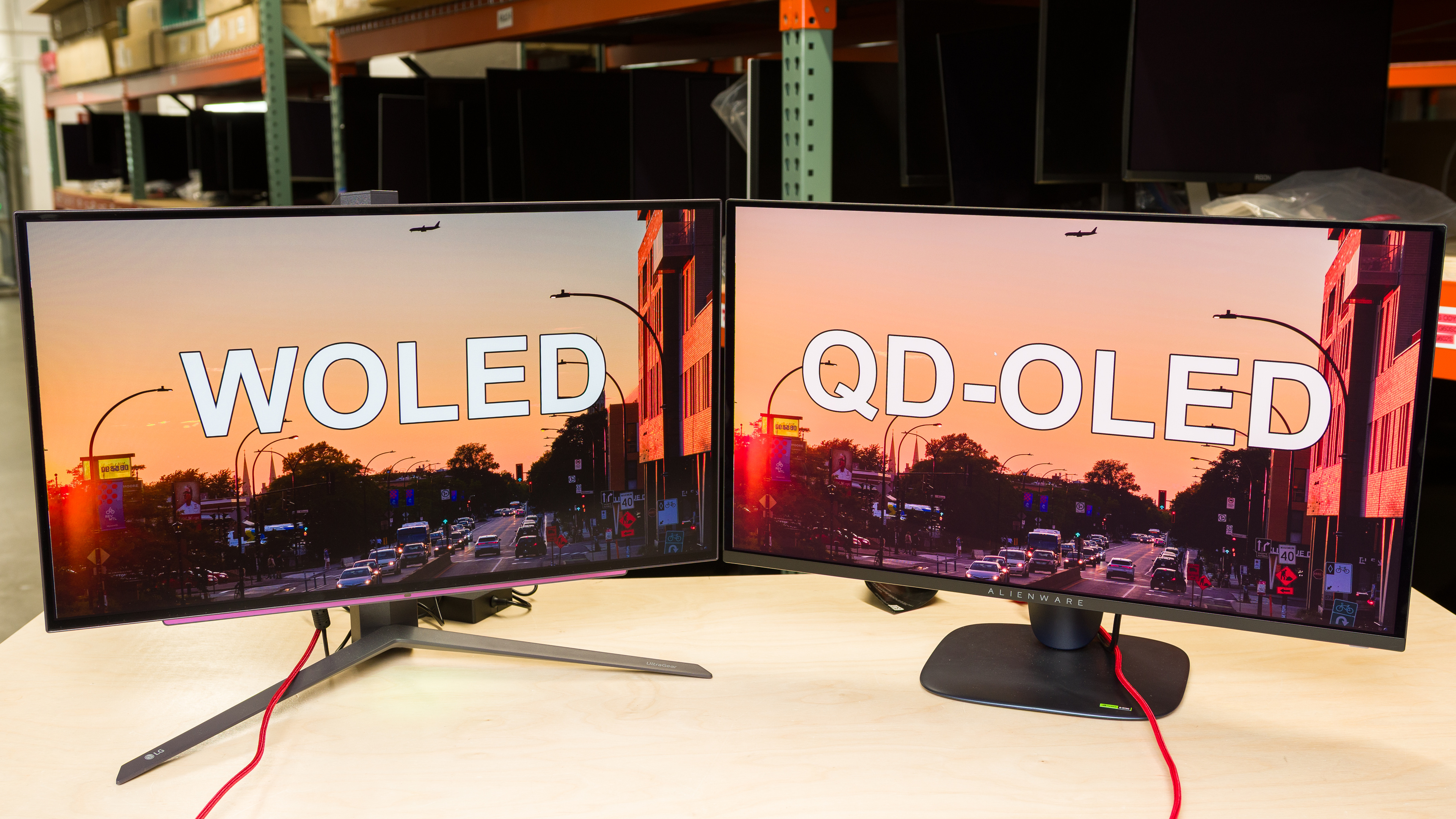
The market for OLED monitors has grown exponentially since the first dedicated OLED monitor came out in 2022. These displays bring far better motion handling and superior picture quality compared to LED-backlit monitors. That said, OLED is just an umbrella term, and there are two main types of OLEDs: QD-OLED, made by Samsung Display, and LG Display's WOLED.
While they each share many of the same characteristics, such as near-instantaneous response time and deep, inky blacks in dark rooms, there are some clear differences between QD-OLEDs and WOLEDs. Generally speaking, QD-OLEDs deliver better colors, while WOLEDs maintain low black levels better in well-lit rooms, making them the better choice if your space isn't completely dark.
In this article, we'll break down these differences between WOLED vs QD-OLED, and explain the monitor market for each panel type. This article focuses mainly on the differences in monitor usage, but you can also learn more about the differences between the two with TVs.
You can also learn more about other OLED panel types, including QD-OLED vs. Tandem OLED and WOLED vs. Tandem OLED. For the purpose of this article, the WOLEDs we're referencing are third-generation panel types and older, which don't include newer Tandem OLEDs.
Which Is Better: QD-OLED Or WOLED?
With so many marketing terms thrown around, it can be confusing to understand the different types of OLEDs available. You're probably wondering whether QD-OLED is better than WOLED, and vice versa. For the most part, QD-OLEDs do have the advantage because of their more vivid colors. However, they only have this advantage in dark rooms because of the black level raise in bright rooms. So, if you want a monitor for bright rooms, WOLEDs have the advantage because they retain their black levels better in well-lit spaces. There are some other small differences, like text clarity and uniformity, but factors beyond the panel type also affect them.
Essentially, go for a QD-OLED for use in a dark room, but get a WOLED if you have a bright room and you can't control the lighting.
However, before buying a new OLED monitor and deciding which panel type you want, it's also important to understand the technical differences between the two.
If you want a buying recommendation, check out the best OLED monitors.
What Is OLED?
OLED, which is an acronym for organic light-emitting diode, is a type of display that doesn't require an LED backlight. Instead, it consists of an organic light-emitting layer beneath filters that let light pass through. Each pixel in an OLED display is self-emitting, so it produces its own light and can turn on and off. The main advantage of this is that OLEDs have a near-infinite contrast ratio for perfect blacks in dark rooms, and there isn't any haloing around bright objects or backlight bleed in dark scenes.
Burn-In
There are drawbacks to OLEDs, though. The biggest concern with them is the risk of burn-in with constant exposure to the same static elements over time. This can happen if you use an OLED only for work and leave taskbars or windows open on it all day, every day. However, changing what you display on the OLED monitor, such as switching from browsing the web to gaming, already reduces the risk of burn-in by a lot. The real danger is that the same elements remain on the screen without change.
There are no significant differences between QD-OLEDs and WOLEDs in terms of burn-in, so if this concerns you, neither panel type offers a clear advantage.
Brightness
Another downside of OLEDs has to do with brightness. They don't get nearly as bright as many LED monitors, even if OLEDs have gotten brighter over the past few years, including with newer Tandem OLED panels. They're particularly dim with full-screen windows, like if you have a web browser open. You can also learn more about OLEDs vs brighter Mini LED monitors.
Types Of Panels: WOLED vs. QD-OLED
OLED is a blanket term that consists of two main panel types made by different manufacturers: Samsung Display's QD-OLED and LG Display's WOLED. Although all OLEDs have an organic light-emitting layer beneath the pixels, the exact structure and subpixel layout differ between them.
What Is WOLED?
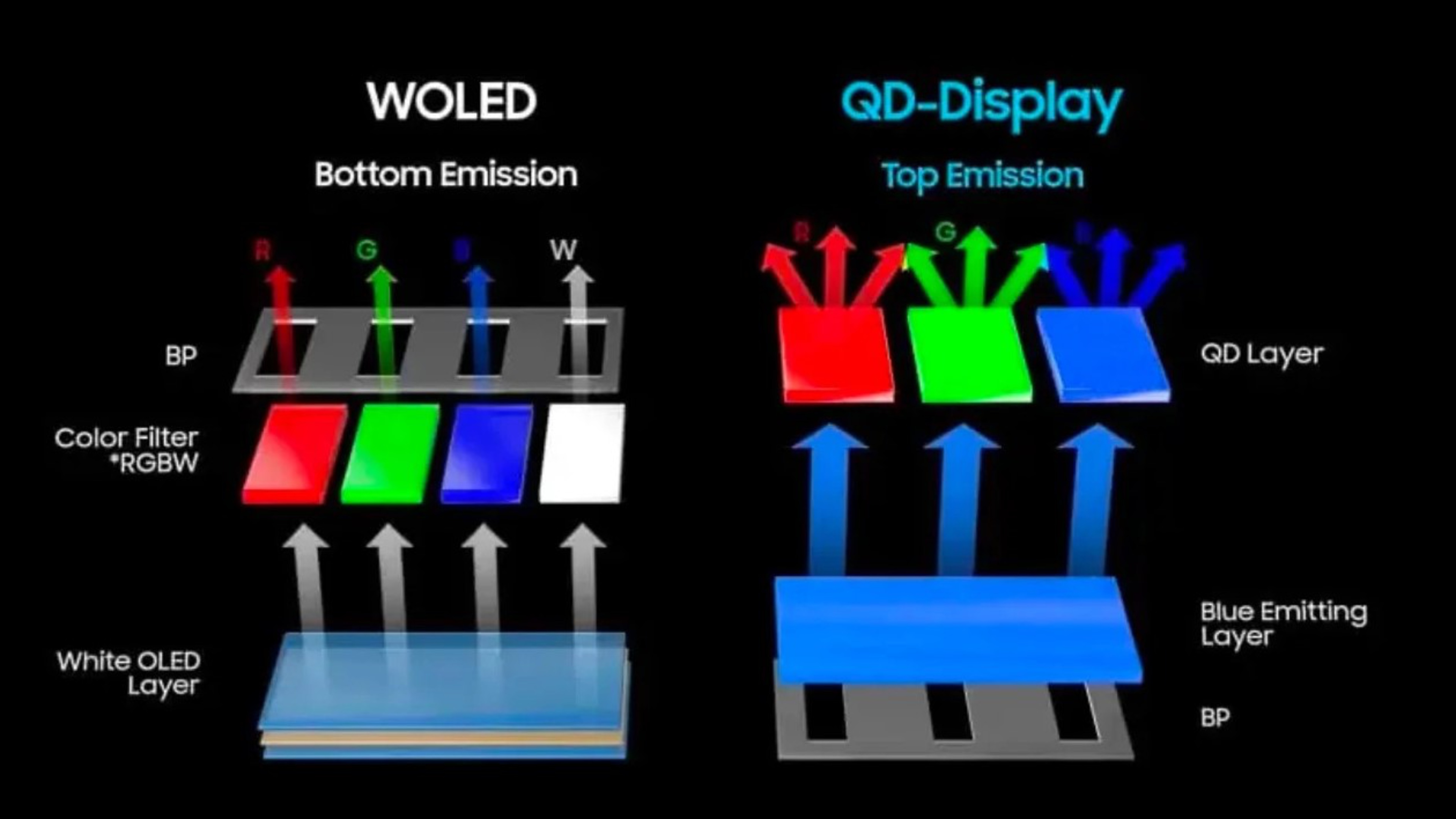
Starting with LG Display's WOLED panel, they feature a white OLED layer beneath four subpixels: red, green, blue, and white. None of the subpixels is on at the same time, since the display uses only the white subpixel to produce white. The other pixels help produce other colors.
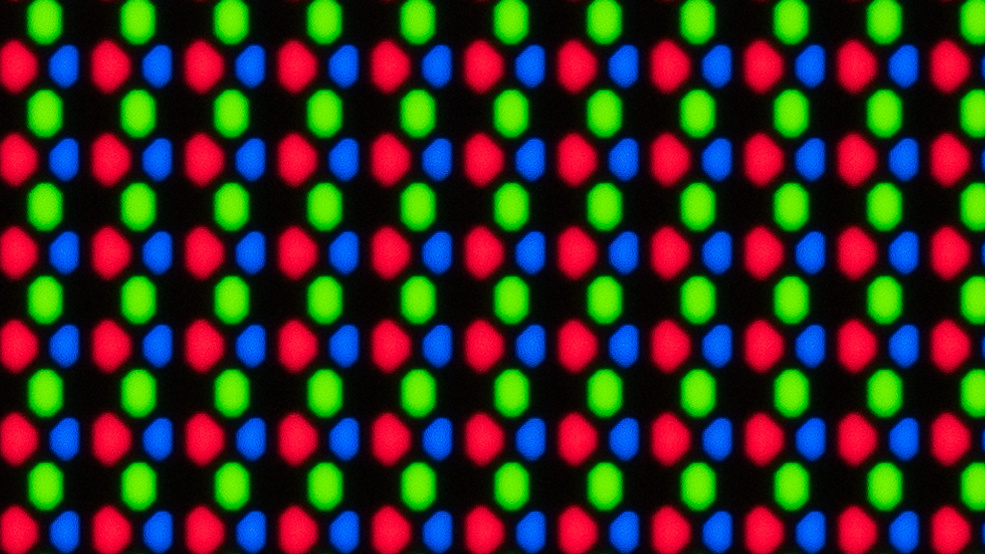
The exact order of the subpixels has changed over time, too. Originally, WOLED monitors were made with an RWBG subpixel layout, meaning the pixels started with red, then had white, blue, and green. However, more recent third-generation WOLEDs have RGWB subpixel layouts, so the green pixel is next to the red. You can see examples of these below.
| RWBG | RGWB |
|---|---|
 |
 |
A successor to WOLED panels, known as Tandem OLED, was released in late 2025. The first panels of this newer Tandem WOLED technology use the same white subpixel, so they're a type of WOLED. However, they're technically different because they have a different structure with a four-layer stack below the subpixels instead of a three-layer stack on traditional WOLEDs.
What Is QD-OLED?
The biggest drawback with WOLEDs is their color purity, and this is where QD-OLEDs come in. Samsung Display created this panel without a white OLED layer beneath the pixels; instead, it uses a blue layer. And instead of four subpixels, it uses three subpixels with a quantum dot layer, which displays a wider range of colors than WOLEDs.
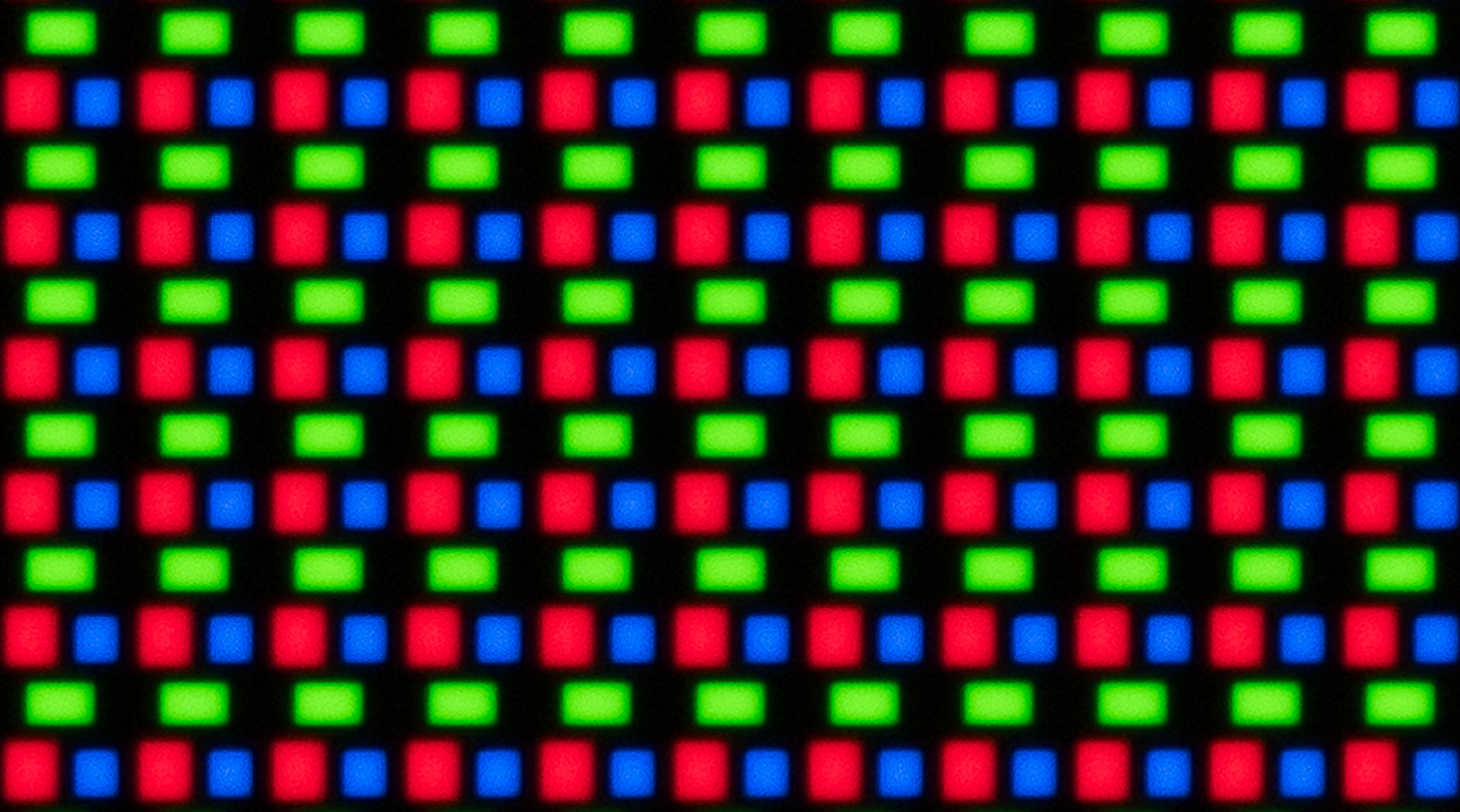
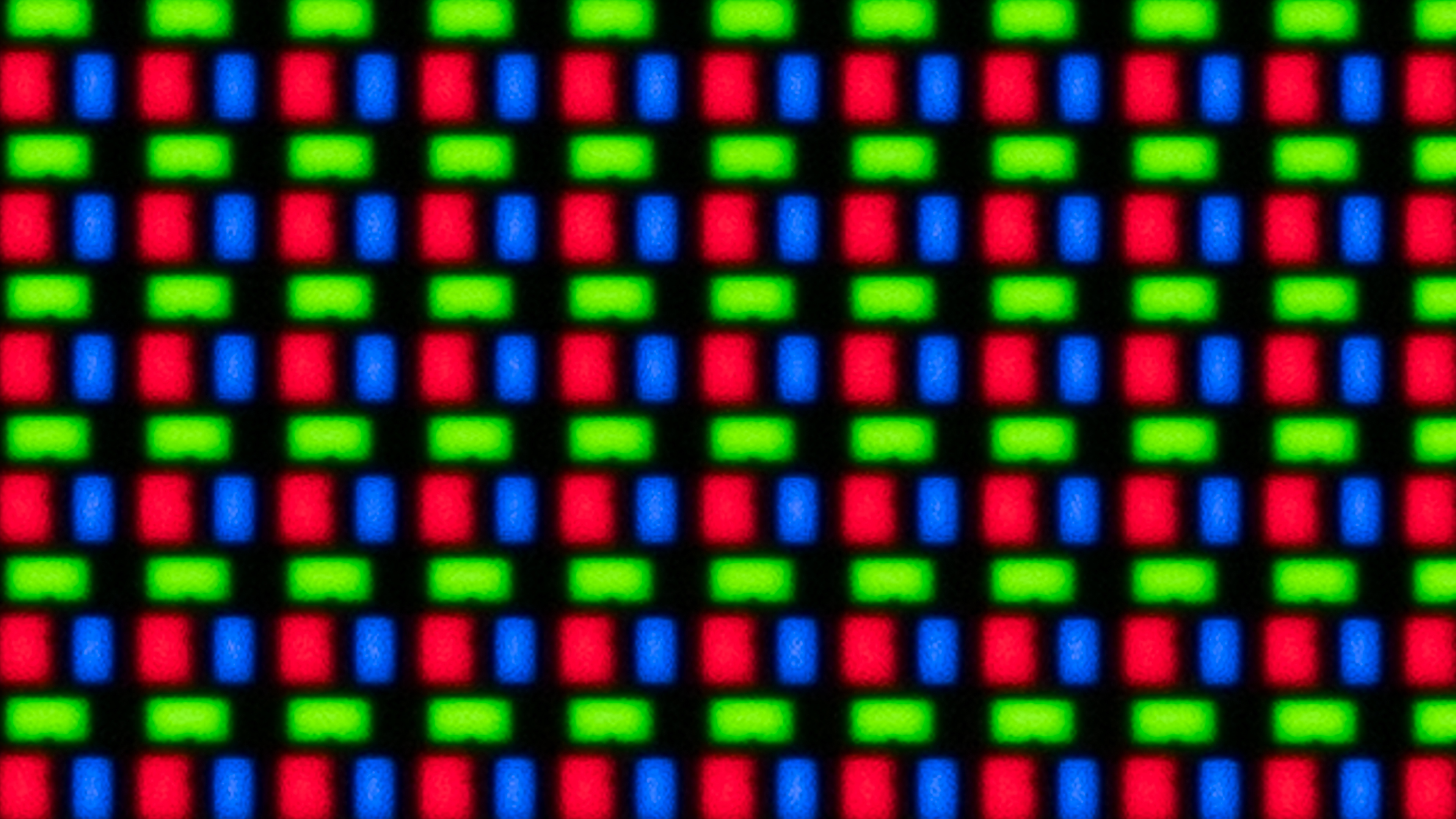
Another difference with WOLED is that the subpixels are arranged in a triangular subpixel layout. The green pixels are on top, with the red and blue pixels below them. Unlike WOLEDs, the order of these subpixels doesn't change between panels, but the shape of the subpixels changes between the generations of each QD-OLED panel:
| 1st & 2nd Gen | 3rd Gen | 4th Gen |
|---|---|---|
 |
 |
 |
While QD-OLEDs improve on a few aspects of WOLEDs, they still have drawbacks. One of the more well-known drawbacks is the fact that black levels rise in bright rooms due to a lack of a polarizer. This makes blacks look purple, so you need to use them in a dark room to get the perfect black levels that OLEDs are known for.
Another downside of QD-OLEDs with this triangular subpixel layout is that there's fringing around text or at the edges of windows. For example, you'll see a thin green line at the bottom edge and a thin purple line at the top edge of a window that's open on your monitor. Newer QD-OLED panels set to come out in 2026 will feature a V-Stripe layout that has all three subpixels aligned vertically. This is meant to improve text clarity even further with less fringing. Stay tuned with our Review Pipeline to see when we'll test these newer monitors.
Differences Between WOLED vs. QD-OLED
While WOLEDs and QD-OLEDs are made very differently, they still share many of the same characteristics that any OLED is known for. This includes a near-infinite contrast ratio, perfect black uniformity, and incredible motion handling. Other issues that are known with OLEDs, like VRR flicker and burn-in, happen on both panel types equally. However, below are some of the main differences between the two panel types and how they affect picture quality and performance on your monitor.
Text Clarity
One of the bigger differences when it comes to monitor usages is the fact that text looks different on WOLEDs than QD-OLEDs. This is because Windows ClearType doesn't properly render text with either of their subpixel layouts.
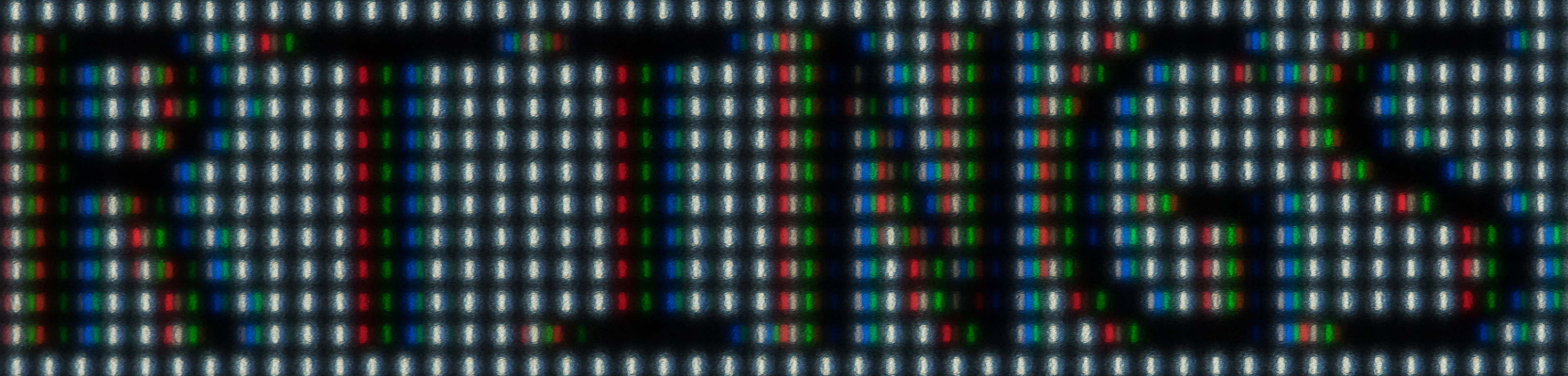
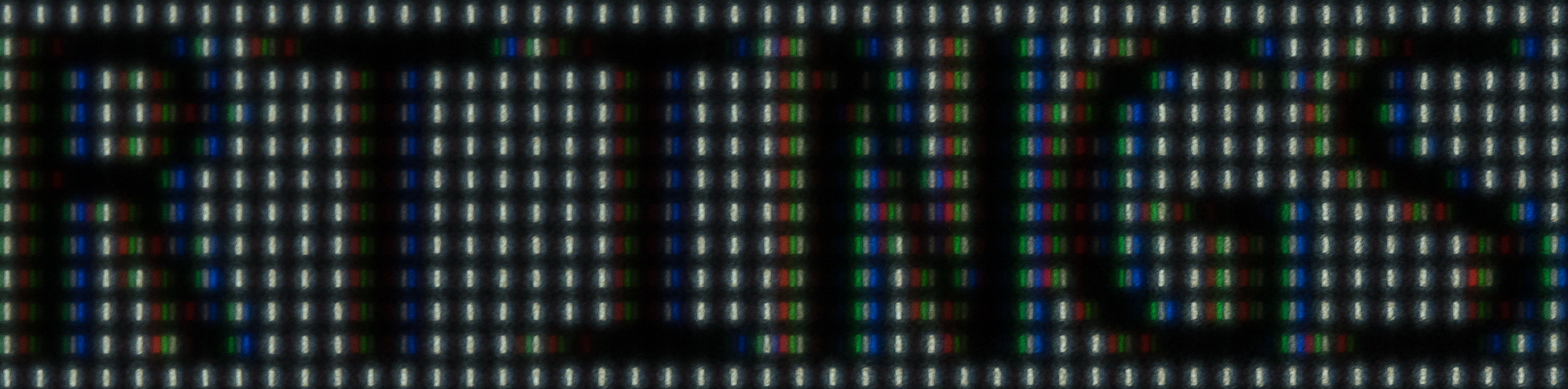
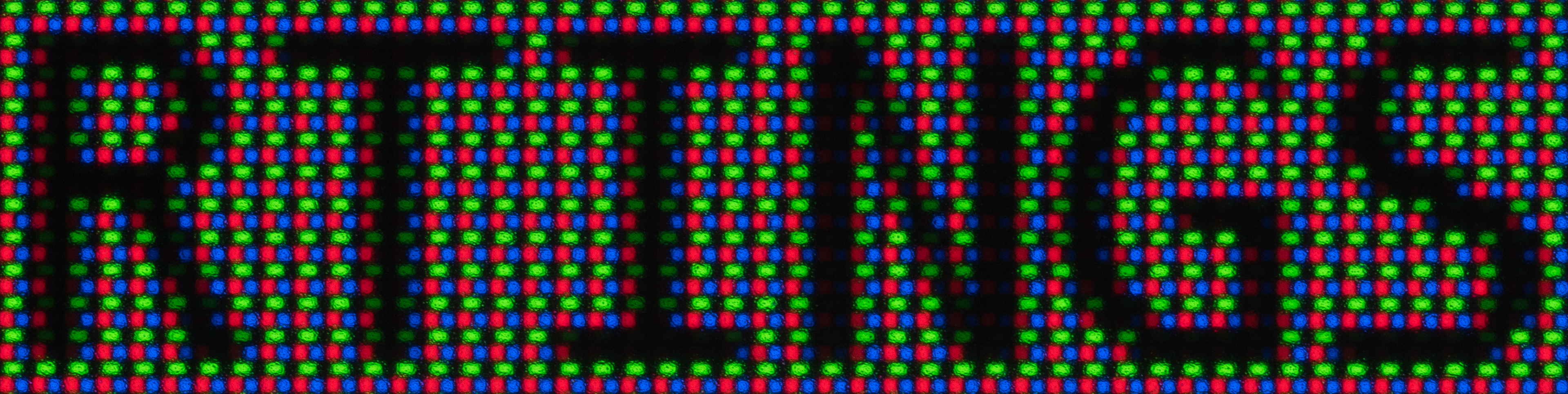
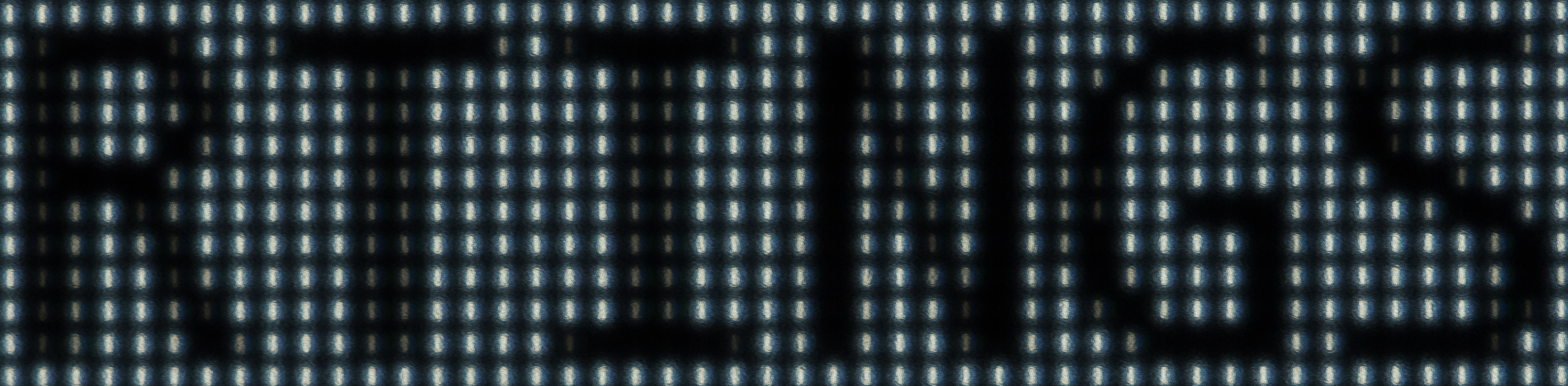
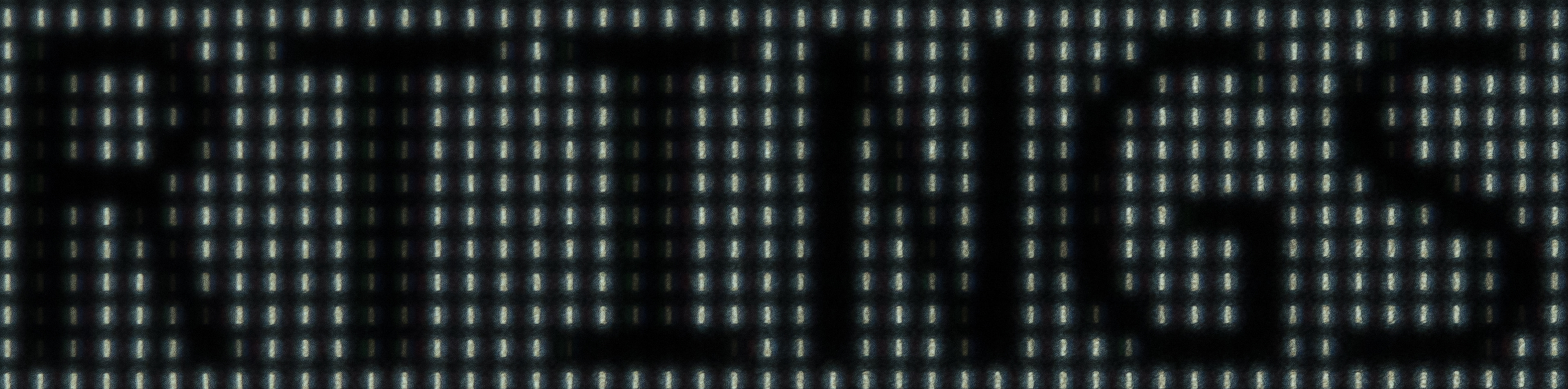
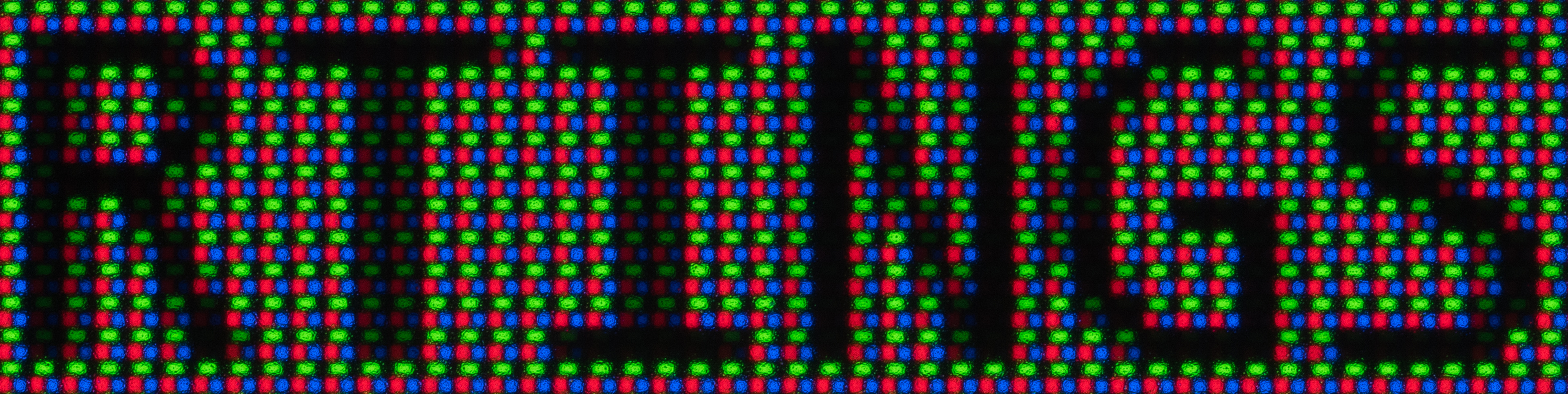
Below you can see examples from three monitors that all have a 27-inch screen size, 1440p resolution, and matte screen coating, so the only variable with text clarity is their subpixel layouts. You can see that the QD-OLED has the sharpest text clarity out of the three with ClearType on. While the WOLEDs exhibit some letter fringing, the RGWB subpixel layout is a bit better at rendering text than the RWBG layout. You may prefer not using ClearType with a WOLED monitor if this bothers you.
QD-OLEDs with a triangular subpixel layout have different types of fringing around letters than WOLEDs. You may notice this at the top and bottom edges of straight letters, like with the T and I in the photos. This happens regardless of ClearType. However, it's harder to notice this fringing on QD-OLEDs with higher pixel density, like those with a 4k resolution and 27-inch screen. Whether or not this bothers you at all changes from person to person.
| Type | WOLED | WOLED | QD-OLED |
|---|---|---|---|
| Subpixel Layout | RWBG | RGWB | Triangular RGB |
| Monitor | Corsair XENEON 27QHD240 | Sony INZONE M10S | Samsung Odyssey OLED G60SD S27DG602S |
| ClearType On Windows 11 |
 |
 |
 |
| ClearType Off Windows 11 |
 |
 |
 |
Black Level Raise
Another of the biggest differences between the two panel types is that black levels rise much more quickly in bright rooms on QD-OLEDs than on WOLEDs. This is mainly because QD-OLEDs lack a polarizer, so blacks look purple in bright rooms. Although the black levels don't remain perfect in bright rooms on WOLEDs either, they do a much better job at maintaining their low black levels.
Other factors may impact the ambient black level raise, like the type of screen coating, but generally speaking, there's a clear difference between any QD-OLED and any WOLED. Another drawback is that dark colors desaturate more quickly in bright rooms on QD-OLEDs than WOLEDs, so they look washed out.
| WOLED | QD-OLED |
|---|---|
 |
 |
Gamma Shift At Low Refresh Rates
A downside to WOLEDs is that they tend to have a gamma shift at low refresh rates, causing raised black levels and a loss of details in dark scenes. This is different than black level raise in bright rooms on QD-OLEDs, but it's still something to consider if you game at low refresh rates.
Colors
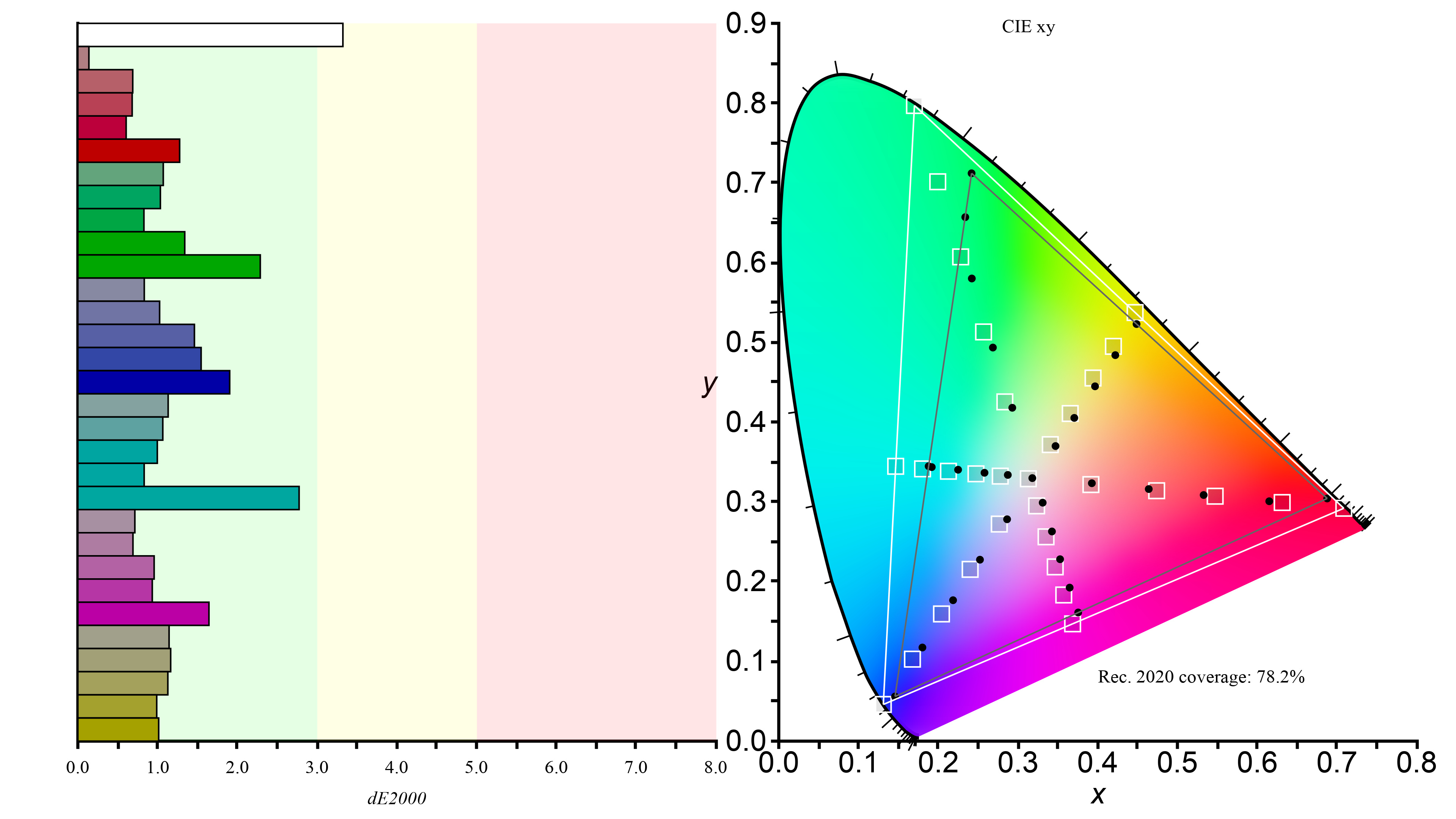
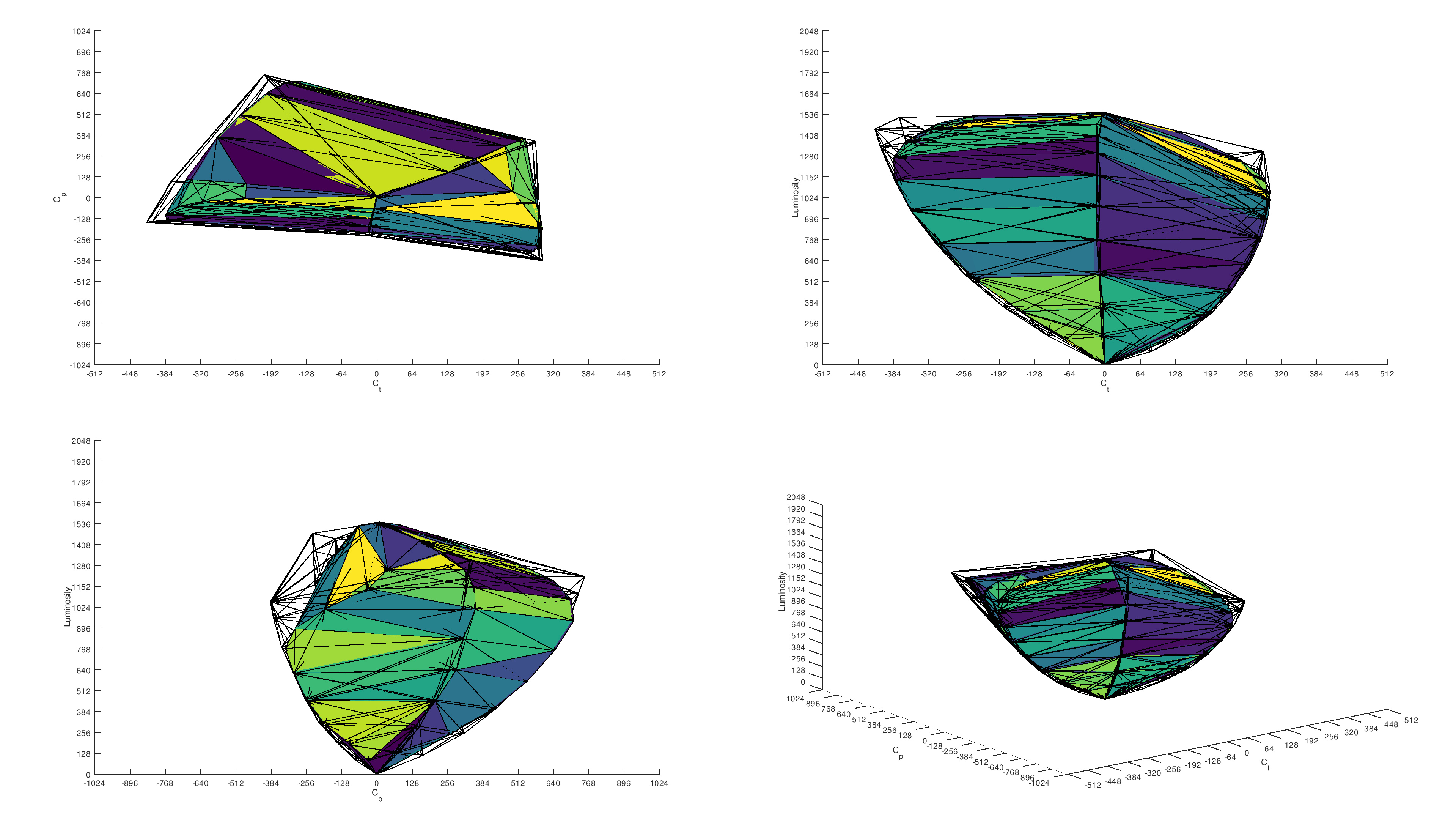
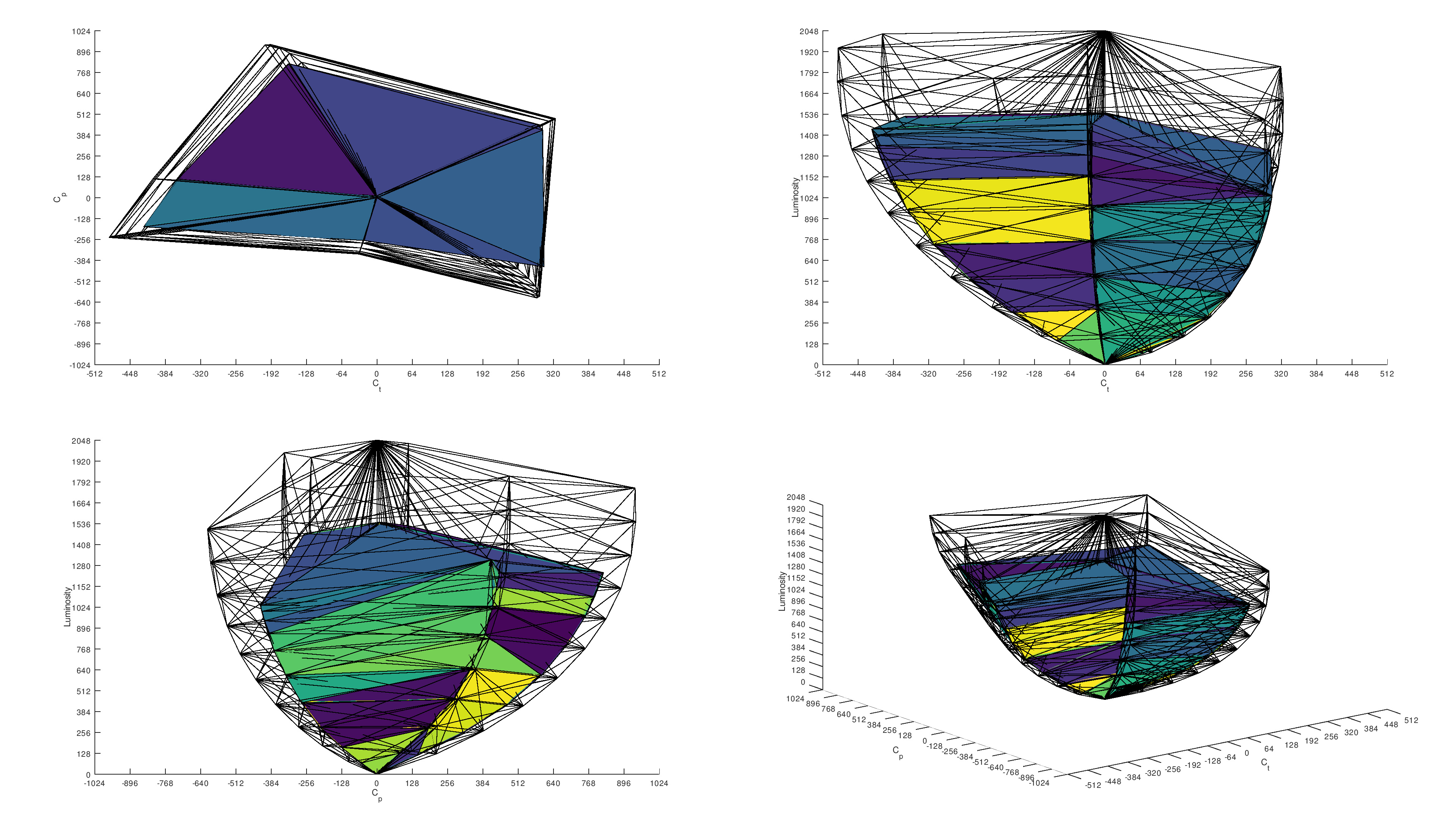
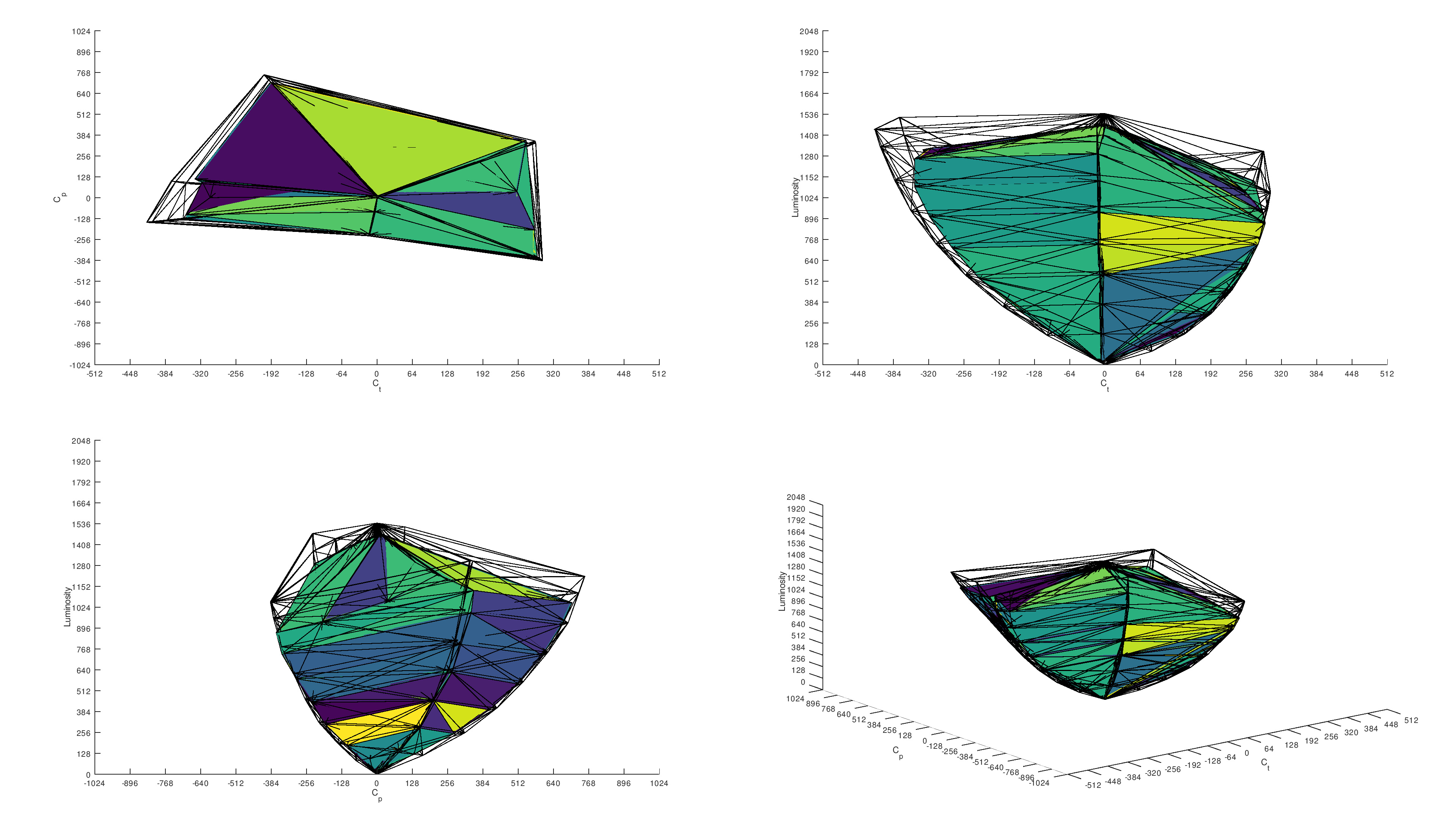
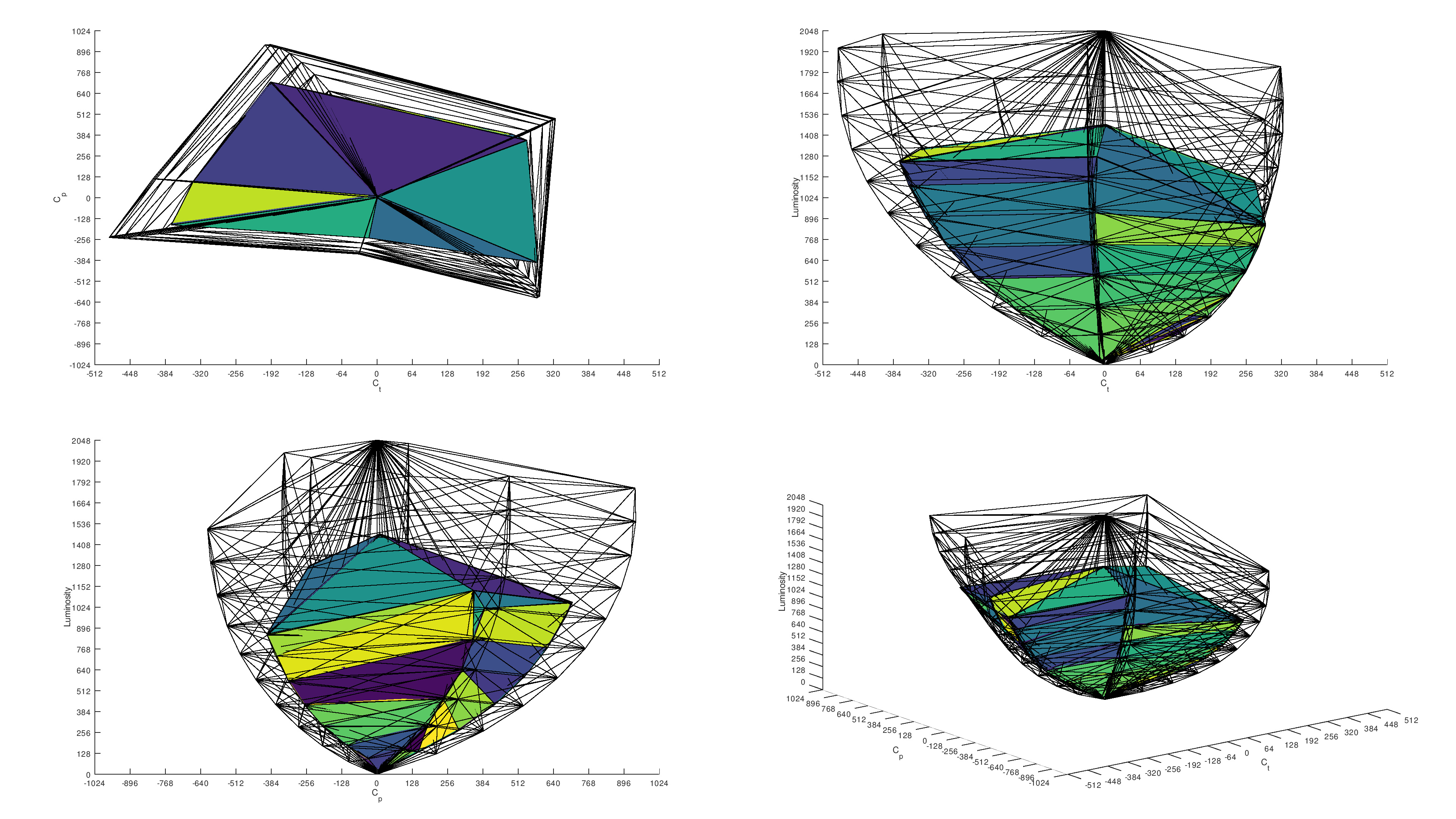
While the biggest drawback with QD-OLEDs is their black level raise in bright rooms, the biggest advantage has to do with colors, and in particular their color volume. They do a much better job at displaying a wide range of vivid colors, making your favorite content look punchy and life-like. Generally speaking, QD-OLEDs have a better HDR color gamut and volume than WOLED monitors. Newer Tandem WOLEDs bridge that gap, though, with better color volume than traditional WOLEDs, but they still aren't as good as QD-OLEDs.
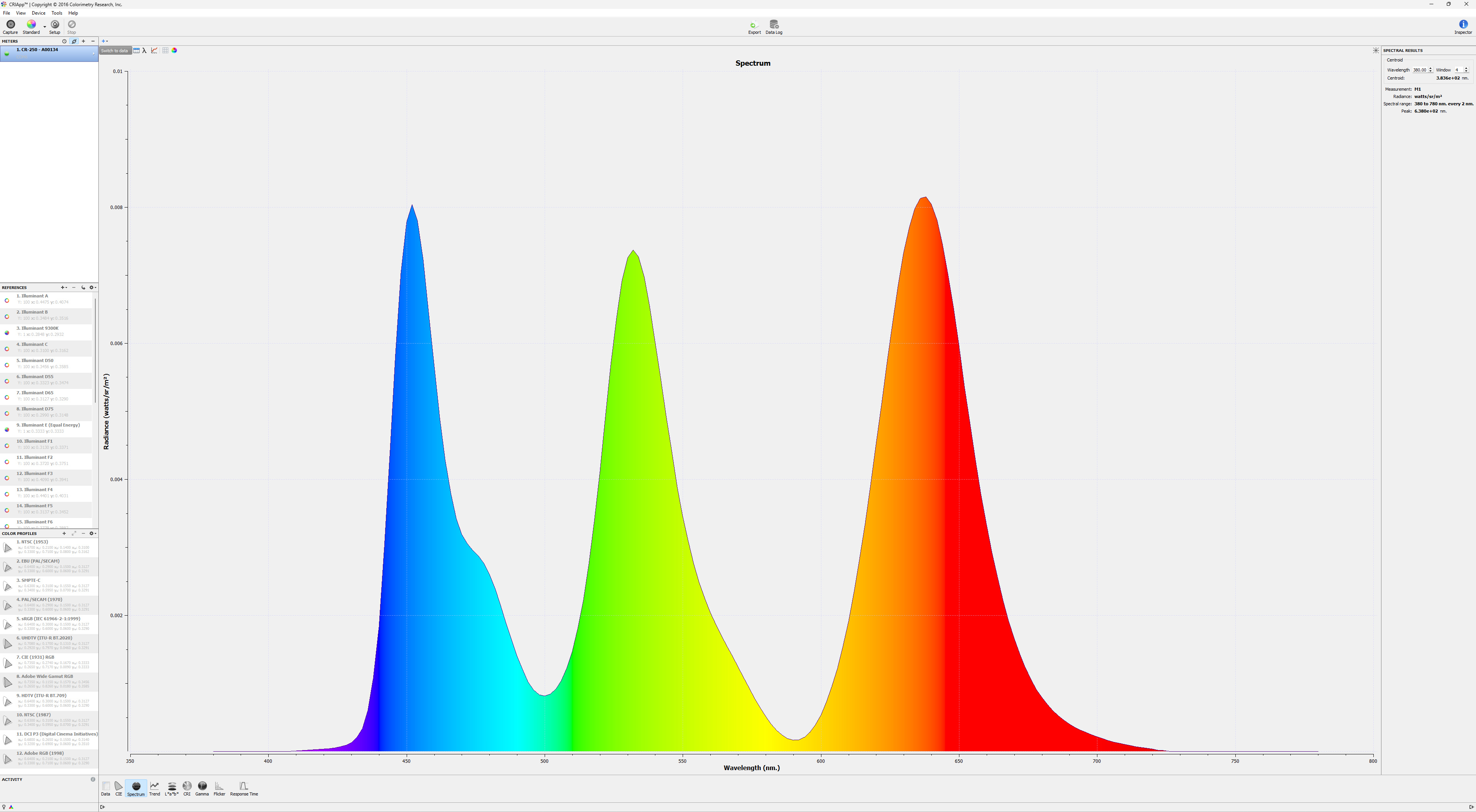
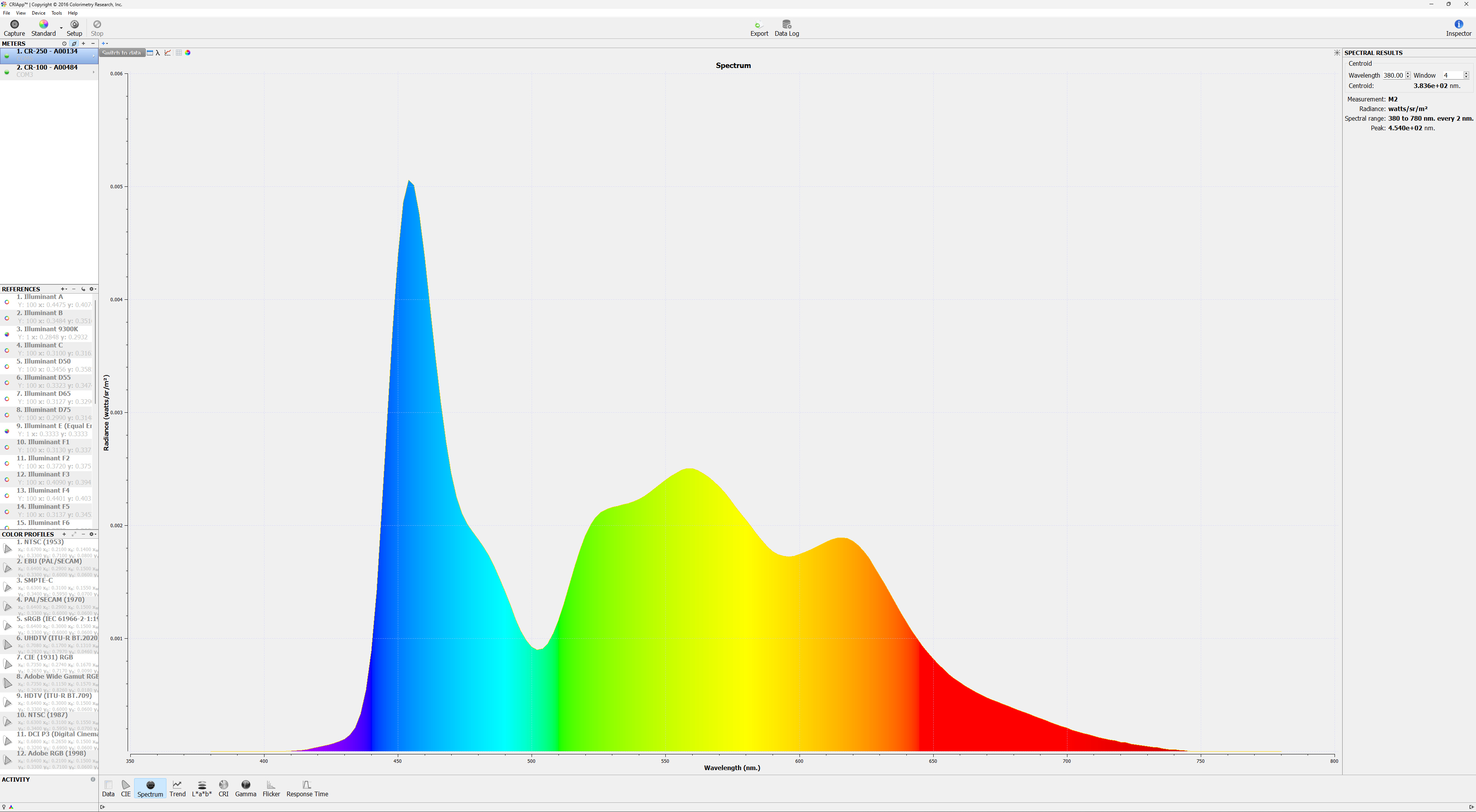
Below you can see the color gamut and volume graphs from two 4k, 32-inch monitors: the QD-OLED MSI MPG 322URX QD-OLED and the WOLED ASUS ROG Swift OLED PG32UCDP. While the WOLED is close to the QD-OLED in terms of the DCI-P3 color gamut, there's a clear difference in their color volumes. You can also see each of their Spectral Power Distribution (SPD) graphs, which show the intensity of light at different wavelengths. With this alone, you can see that the QD-OLED is much better at displaying certain colors like green and red.
| Type | HDR Color Gamut | HDR Color Volume | SPD | ||
|---|---|---|---|---|---|
| QD-OLED |  |
 |
 |
 |
 |
| WOLED | 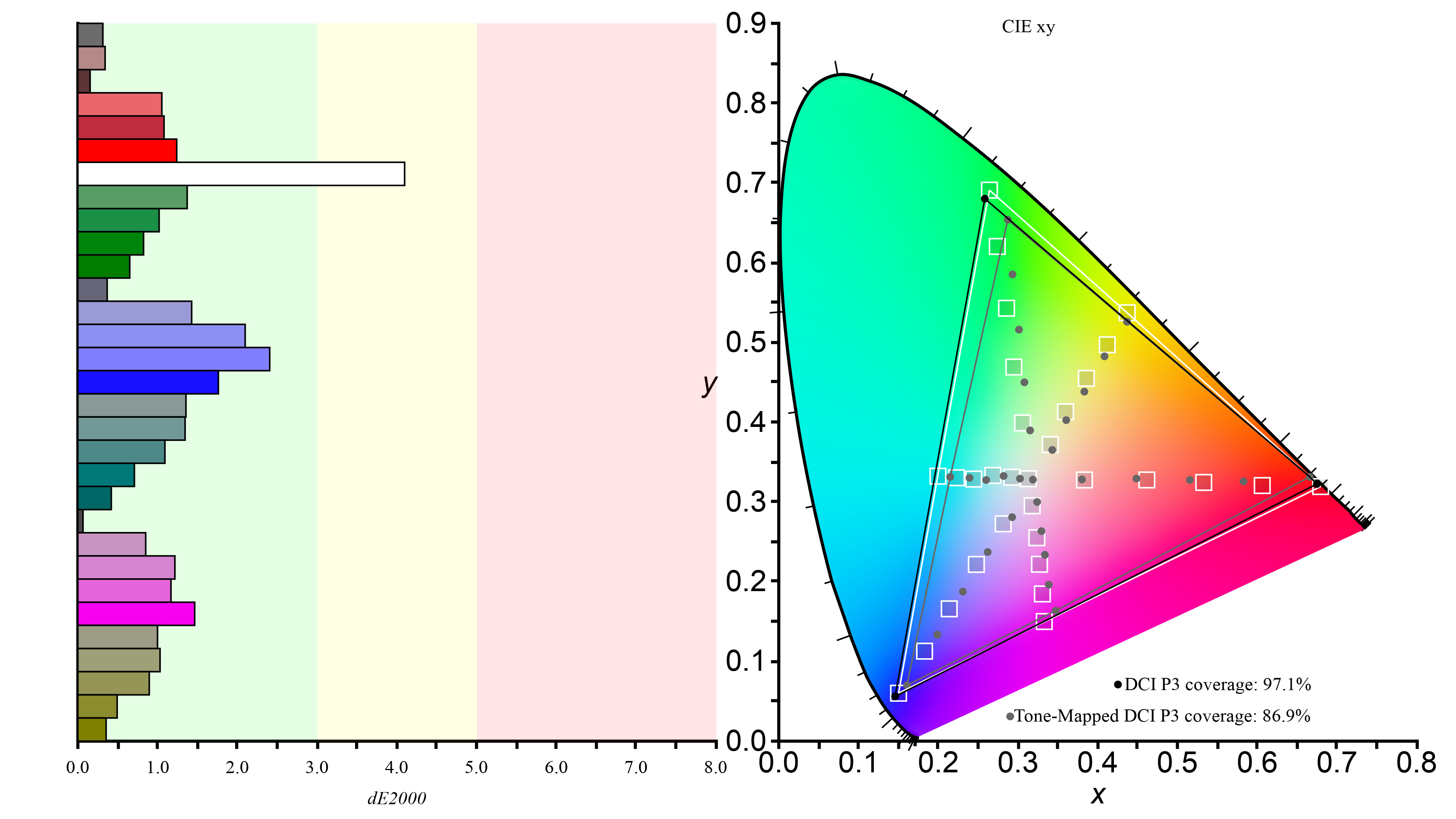 |
 |
 |
 |
 |
Brightness
Although QD-OLEDs have a clear advantage when it comes to bright colors, the difference in luminosity isn't so clear. Below you can see the mean and average deviation of various brightness tests from 21 QD-OLEDs and 15 WOLEDs that we've independently bought and tested. Each panel type has its own strengths and weaknesses, but generally speaking, QD-OLEDs are better at displaying small highlights in HDR, WOLEDs are better with medium-sized highlights, and the two are more even with full-sized highlights. You can also see how much dimmer they each get with full-sized windows, particularly in HDR.
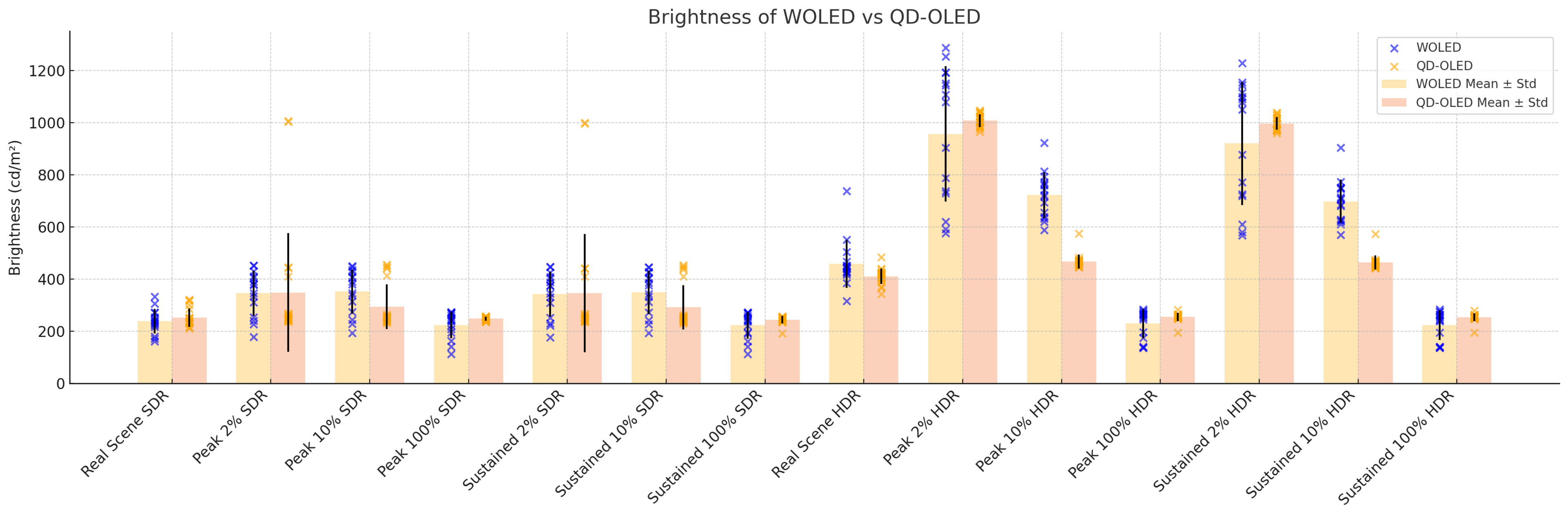
You can see the brightness results of all OLED monitors we've bought and tested. You'll also notice here that the newer Tandem OLEDs are brighter than both older QD-OLEDs and WOLEDs.
Uniformity
Another factor that can vary a bit between WOLEDs and QD-OLEDs is gray uniformity. As you can see in the table below, using data from 36 OLEDs that we bought and tested, QD-OLEDs do have an advantage, but it isn't significant, and uniformity can also vary between units.
There are some issues that our testing doesn't cover. For example, there are reports of WOLED displays having a pink tint, but this isn't something that our tests capture. Some WOLEDs also have vertical banding in near-dark scenes, but QD-OLEDs aren't immune to this issue, and it's something that can change between units.
| Type | 50% Std. Dev. | 50% DSE | |
|---|---|---|---|
| QD-OLED (21 units) |
Mean | 0.836% | 0.113% |
| Standard Deviation | 0.455 | 0.015 | |
| WOLED (15 units) |
Mean | 1.62% | 0.124% |
| Standard Deviation | 0.541 | 0.009 | |
 50% Std. Dev.: 0.704% 50% DSE: 0.105% |
 50% Std. Dev.: 1.644% 50% DSE: 0.151% |
OLED Monitor Market
Of course, you also need to consider the monitor market for each panel type before buying a new one. The sizes, resolutions, and refresh rates vary between the two panel types, and below are lists of each of the common panels available on the consumer market.
| QD-OLED | WOLED |
|---|---|
|
|
As of 2026, there won't be any new traditional WOLED monitors released. Instead, LG released its fourth-gen OLED panel in late 2025, known as Tandem OLED, as the successor to these older WOLED panels. This newer technology includes panels with an RGB subpixel layout, like the 4k, 240Hz ASUS PG27UCWM, which is meant to have better text clarity than traditional WOLEDs. There will also be newer QD-OLED panels with different subpixel layouts set to be released in 2026, including Tandem QD-OLED panels that get brighter than older generation displays.
It will be interesting to see how these newer panels perform, particularly with text clarity and brightness. If you want to see us buy and test a certain model, you can vote for it.
Conclusion
WOLED and QD-OLED monitors are among the best on the market, offering better picture quality and superior motion handling than LED-backlit displays. The market for them has grown in the past few years, too, with a wide range of options for each panel type. Despite their similarities, there's still a difference between WOLED and QD-OLED displays, though. Generally speaking, QD-OLEDs are better at displaying bright colors, while WOLEDs have the advantage for gaming in bright rooms because they retain lower black levels better in a bright environment. Because of this, QD-OLEDs are the better choice if you're going to use a monitor in a dark room, while WOLEDs are better in bright rooms. That said, there are other factors to think about, like the size, resolution, and refresh rate, each of which is available in.