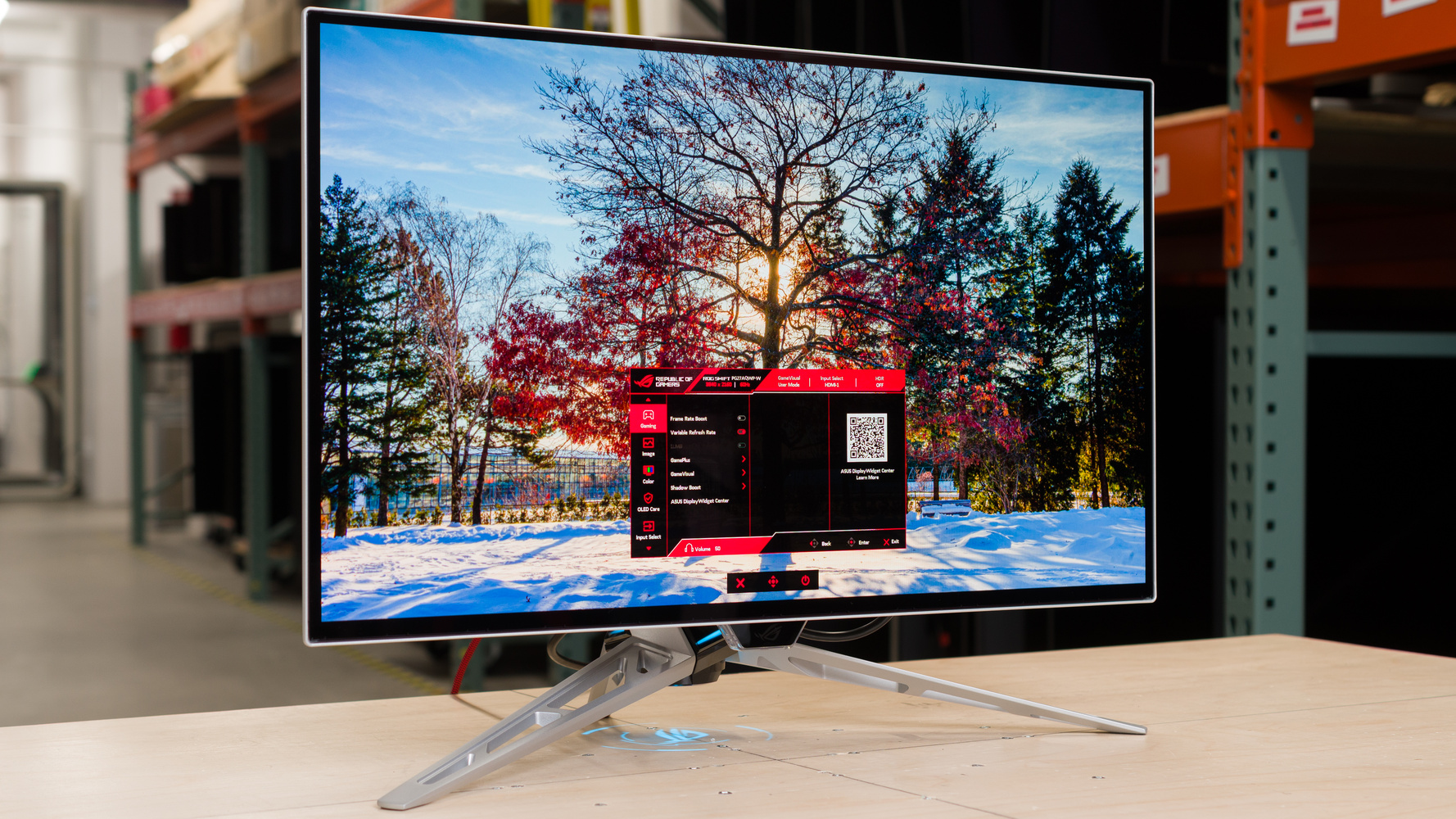
The ASUS ROG Swift OLED PG27AQWP-W is a 27-inch, 1440p OLED gaming monitor. It's higher-end than the ASUS ROG Strix OLED XG27AQWMG, offering a higher 540Hz native refresh rate with a 720p @ 720Hz Frame Rate Boost feature. The new Tandem OLED panel is meant to deliver higher brightness and improved color purity compared to older-generation WOLEDs. Competing against other monitors that use the same panel, it's different because it uses a TrueBlack Glossy coating, making it an alternative to other matte options, like the LG 27GX790B-B. It has typical gaming features otherwise, like DisplayPort and HDMI 2.1 bandwidth, and FreeSync Premium Pro and G-SYNC Compatibility. It also has a few perks to reduce its panel's risk of burn-in, like a custom heatsink and OLED Care settings, including a Neo Proximity Sensor.
Our Verdict
The ASUS PG27AQWP-W is fantastic for PC gaming. It has a high 540Hz refresh rate with its native 1440p resolution, which you can switch to 720Hz with a lower 720p resolution. This gives you the versatility of playing different types of games. Motion looks sharp at any refresh rate, and it also has low input lag for a responsive feel. Plus, it has high-bandwidth HDMI and DisplayPort inputs and supports all common VRR formats to fully utilize the latest graphics cards. It also delivers superb picture quality with deep blacks, bright highlights, and a wide range of colors. There are downsides, though: noticeable VRR flicker at changing frame rates and uniformity issues.
1440p, 540Hz & 720p, 720Hz modes.
Incredibly sharp motion at any refresh rate.
Low input lag at any refresh rate.
HDMI and DisplayPort 2.1 ports.
Near-infinite contrast for deep blacks.
Glossy coating results in clear images.
Noticeable VRR flicker.
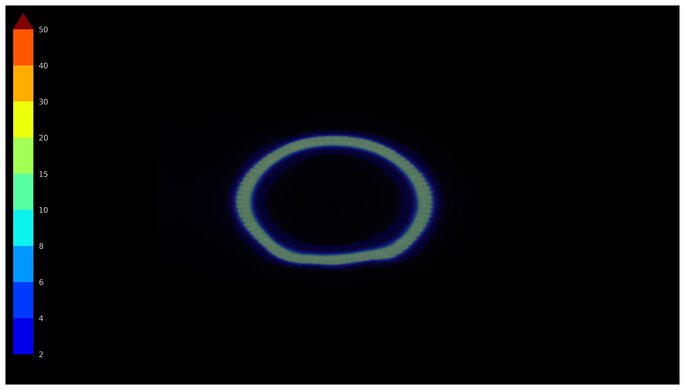
Uniformity issues with dark grays.
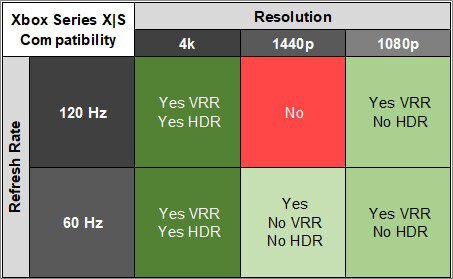
The ASUS PG27AQWP-W is incredible for console gaming. It supports almost any signal from modern gaming consoles, including downscaled 4k @ 120Hz signals. It also supports VRR with a PS5 and Xbox Series X|S. Motion looks sharp at any refresh rate, and it has low input lag for a responsive gaming experience, too. Your games also look incredible, thanks to the monitor's high contrast ratio for deep blacks, which makes highlights pop, and its wide color gamut. Unfortunately, it has some uniformity issues that you may notice in dark games.
Incredibly sharp motion at any refresh rate.
Low input lag at any refresh rate.
Near-infinite contrast for deep blacks.
Glossy coating results in clear images.
Supports most signals from consoles.
Not a native 4k monitor.
Uniformity issues with dark grays.
The ASUS PG27AQWP-W is decent for office use, with some limitations. It gets bright enough to fight glare in most well-lit rooms, but reflections in sunny environments are distracting. Its wide viewing angle and ergonomic stand are also useful if you need to share the screen with someone next to you. Unfortunately, there's fringing around letters, so text isn't the sharpest when browsing the web or reading through documents. It also risks burn-in with constant exposure to the same static elements over time.
Bright enough to fight glare in most well-lit rooms.
Glossy coating results in clear images.
Ergonomic stand.
Wide viewing angle.
Distracting mirror-like reflections in sunny rooms.
Fringing around letters.
Risk of burn-in.
The ASUS PG27AQWP-W is excellent for content creation. It's accurate for the most part before any sort of calibration, but you may prefer to fix white balance and gamma issues with a full calibration. It offers superb picture quality, thanks to its high contrast ratio, bright highlights, and wide range of colors. It also has a wide viewing angle that keeps the image consistent as you view it from the sides. Sadly, though, it risks burn-in with constant exposure to the same static elements over time. Images and text aren't the sharpest either, as there's fringing around letters.
Near-infinite contrast for deep blacks.
Bright enough to fight glare in most well-lit rooms.
Glossy coating results in clear images.
Excellent out-of-the-box accuracy.
Wide viewing angle.
Distracting mirror-like reflections in sunny rooms.
Fringing around letters.
Risk of burn-in.
Gamma and white balance issues before calibration.
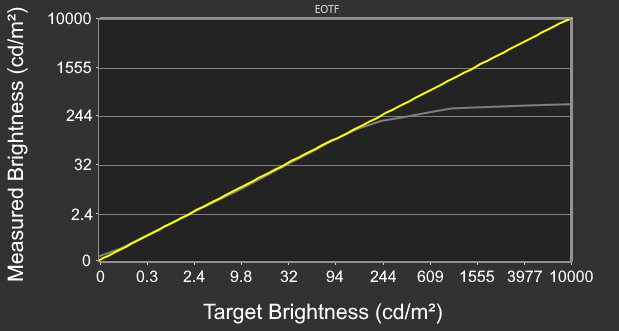
The ASUS PG27AQWP-W has good brightness. It fights glare well in most well-lit rooms, except for sunny ones. It also makes highlights pop in HDR.
Bright enough to fight glare in most well-lit rooms.
Highlights pop in HDR.
The ASUS PG27AQWP-W has a near-instantaneous response time for very sharp motion.
Incredibly sharp motion at any refresh rate.
The ASUS PG27AQWP-W has remarkable HDR picture quality. Thanks to its high contrast ratio, it displays deep blacks without haloing in any environment. It also displays a wide range of colors, but colors aren't as bright as pure white.
Near-infinite contrast for deep blacks.
Displays wide range of colors.
Colors aren't as bright as pure white.
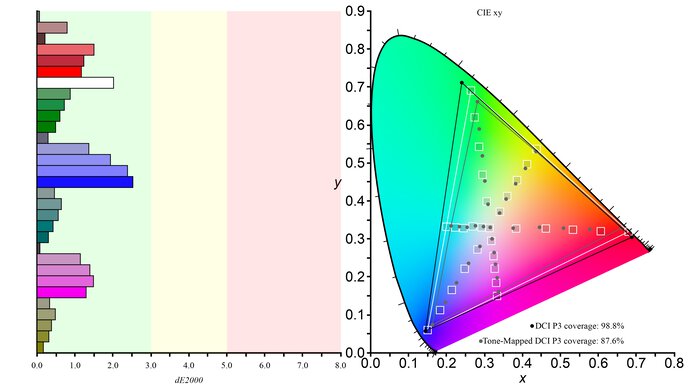
The ASUS PG27AQWP-W has remarkable SDR picture quality. Blacks are deep and inky, and the monitor displays a wide range of colors.
Near-infinite contrast for deep blacks.
Displays wide range of colors.
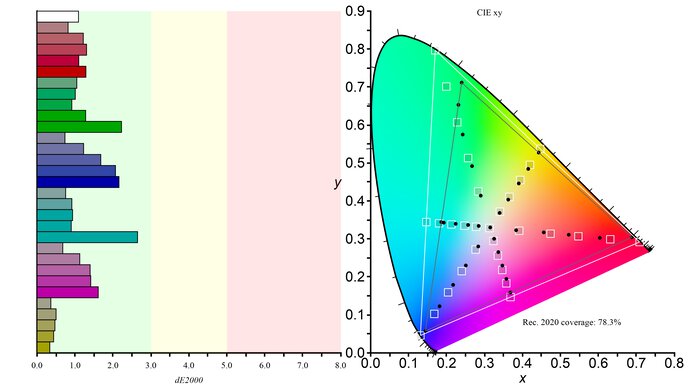
The ASUS PG27AQWP-W has excellent accuracy. It's accurate out of the box, and it locks colors well to the sRGB color space. However, there are white balance and gamma issues that you may want to fix with a full calibration.
Excellent out-of-the-box accuracy.
Gamma and white balance issues before calibration.
Performance Usages
Changelog
- Updated Oct 07, 2026: We converted this review to Test Bench 2.2. With this update, we've added a new test box for the Longevity 3.0 test.
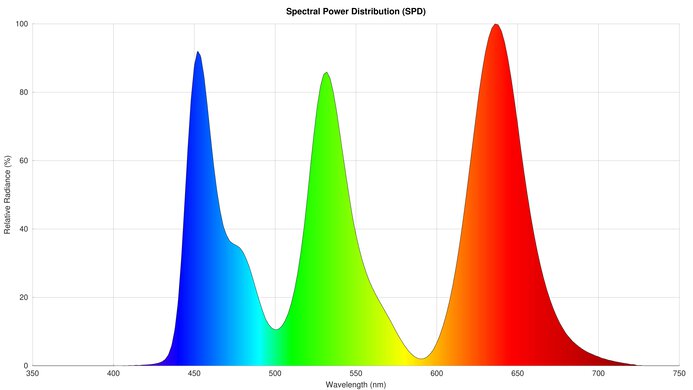
- Updated Mar 17, 2026: We've converted this review to Test Bench 2.1.2. We added a new Panel Technology box, including the Spectral Power Distribution (SPD) graph.
- Updated Mar 17, 2026: Review published.
- Updated Mar 13, 2026: Early access published.
Check Price
Differences Between Sizes And Variants
The ASUS ROG Swift OLED PG27AQWP-W is a high-end OLED gaming monitor. With a native 1440p resolution and 540Hz refresh rate, it has a Frame Rate Boost mode to increase the refresh rate to 720Hz with a lower 720p resolution. This means it offers versatility for playing different types of games. Alongside the LG 27GX790B-B, it offers the highest refresh rates you can get on any OLED monitor at the time of its release. The main advantage of this versus the competition is that its glossy coating makes images look clear, at the cost of having more mirror-like reflections.
Another plus is how bright its Tandem OLED panel gets. It's an improvement over older models, like the ASUS ROG Swift OLED PG27AQDP, and fights glare well in most bright rooms. Colors are also brighter on this newer panel, but aren't as bright as on a QD-OLED, like the Gigabyte AORUS FO27Q3. Overall, though, it's a fantastic gaming monitor that's worth getting if it's within your budget.
Also see our recommendations for the best high refresh rate monitors, the best OLED monitors, and the best HDR gaming monitors.
Popular Monitor Comparisons
We bought and tested the 27-inch ASUS ROG Swift OLED PG27AQWP-W, which is the only size available. These results are only valid for this model. It's higher-end than the ASUS ROG Strix OLED XG27AQWMG, which also uses a Tandem OLED panel, but has a lower 280Hz refresh rate without a dual-mode feature.
| Model | Panel Type | Refresh Rate | Resolution |
|---|---|---|---|
| PG27AQWP-W | Tandem OLED |
540Hz 720Hz Frame Rate Boost |
1440p 720p Frame Rate Boost |
Our unit's label indicates it was manufactured in October 2025 in China. We tested it on firmware MCM102.
The ASUS ROG Swift OLED PG27AQWP-W and the LG 27GX790B-B are competing 1440p gaming monitors with the same Tandem OLED panel. They each have a native 540Hz refresh rate with a 1440p resolution and a 720Hz refresh rate with a lower 720p resolution. The main difference comes down to their screen coatings, as the ASUS has a glossy screen while the LG has a matte screen. This means images are clearer on the ASUS, whereas the LG absorbs light better. There are some other minor differences, as the ASUS has higher DisplayPort bandwidth, but the LG has a USB-C port to quickly connect a laptop.
The ASUS ROG Swift OLED PG27AQWP-W is higher-end than the ASUS ROG Strix OLED XG27AQWMG. As such, the PG27AQWP-W has extra perks, like a higher native refresh rate and a dual-mode feature to boost its refresh rate and give you versatility for playing different types of games. The PG27AQWP-W also has DisplayPort 2.1 bandwidth, which the XG72AQWMG doesn't have. However, because they use the same Tandem OLED panel type, picture quality is similar between them.
The ASUS ROG Swift OLED PG27AQWP-W is newer than the ASUS ROG Swift OLED PG27AQDP. The PG27AQWP-W has a higher 540Hz refresh rate, and it has a dual mode to boost it to 720Hz with a lower 720p resolution. This makes it more versatile than the PG27AQDP for playing different types of games. The PG27AQWP-W also gets brighter, particularly in HDR, and its glossy coating has clearer images. However, the matte coating of the PG27AQDP has fewer mirror-like reflections. The PG27AQWP-W also has some extra perks that the PG27AQDP doesn't have, like DisplayPort 2.1 bandwidth.
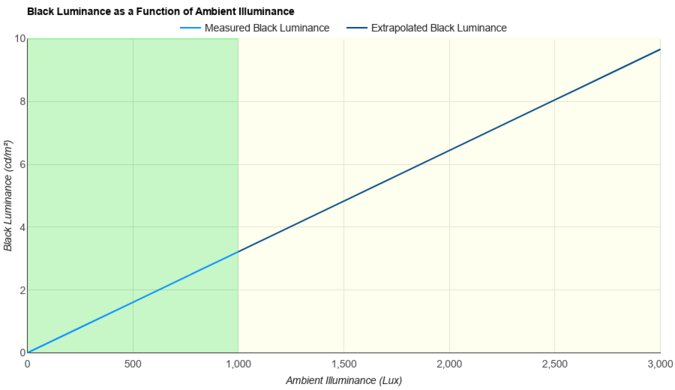
The ASUS ROG Swift OLED PG27AQWP-W and the Gigabyte AORUS FO27Q3 are both high-end 1440p OLED gaming monitors. The ASUS boasts a higher 540Hz refresh rate with a versatile 720p, 720Hz dual mode. The main differences come down to their panel types, as the Tandem OLED panel of the ASUS gets brighter and maintains lower black levels in well-lit rooms. This makes the ASUS a better choice if you have a bright gaming space. However, the QD-OLED panel of the Gigabyte has more vivid colors, and it has fewer uniformity issues. There are some differences in perks, too, as the ASUS has DisplayPort 2.1 bandwidth, and the Gigabyte has a USB-C port with a KVM switch.

We buy and test more than 30 monitors each year, all of which we purchase ourselves, without cherry-picked units or samples. We put a lot into each unbiased, straight-to-the-point review, and there's a whole process from purchasing to publishing, involving multiple teams and people. We do more than just use the monitor for a week; we use specialized, custom tools to measure various aspects and deliver objective, data-driven results. We also consider multiple factors before making any recommendations, including the monitor's cost, its performance compared to the competition, and whether it's easy to find.
Test Results






for pictures & test results





for pictures & test results


for pictures & test results

for pictures & test results

for pictures & test results

for pictures & test results

for pictures & test results

for pictures & test results





for videos & test results

for pictures & test results

for pictures & test results

for pictures & test results




























for pictures & test results