LG UltraFine 4k  Monitor Review

Reviewed Jul 16, 2019 at 09:22am
Tested using Methodology v1.0 
LG UltraFine 4k
7.4
Mixed Usage 
7.8
Office 
7.4
Gaming 
7.3
Multimedia 
7.3
Media Creation 
5.5
HDR Gaming 
 0
The LG UltraFine 4k is a decent 23.7 inch, 4k monitor. It delivers decent overall picture quality, with very good low input lag and decent motion handling. Like most IPS monitors, it has great wide viewing angles. This monitor has outstanding peak brightness and excellent gray uniformity, but it has mediocre reflection handling and doesn't look as good in a really bright room. Unfortunately, the backlight has a strange flicker frequency, which results in noticeable duplications in motion. It also doesn't look as good in a dark room, which is typical of IPS monitors.

This monitor is marketed towards Mac computers and only has USB-C inputs, which might be an issue for some PC users. This monitor doesn't have any controls, either, and no on-screen display, which is a bit strange.

How We Test Monitors

We buy and test more than 30 monitors each year, with units that we buy completely on our own, without any cherry-picked units or samples. We put a lot into each unbiased, straight-to-the-point review, and there's a whole process from purchasing to publishing, involving multiple teams and people. We do more than just use the monitor for a week; we use specialized and custom tools to measure various aspects with objective data-based results. We also consider multiple factors before making any recommendations, including the monitor's cost, its performance against the competition, and whether or not it's easy to find.

Our Verdict

7.4
Mixed Usage 

The LG UltraFine 4k 23.7 is a decent monitor for most uses. It's best suited for office use, with wide viewing angles, a high-resolution screen, and excellent uniformity. It isn't as well-suited for gaming, due to the simple 60Hz refresh rate and lack of advanced gaming features.

Pros
  • Great peak brightness.
  • Image remains accurate when viewed at an angle.
Cons
  • Strange backlight flicker, which causes noticeable duplications.
  • No HDMI or DisplayPort connections.
7.8
Office 

This is a very good monitor for office use. The 24", 4k screen delivers great screen real-estate and has wide viewing angles and excellent gray uniformity. The stand has bad ergonomics, though; it can't swivel, and can't rotate to portrait orientation.

7.4
Gaming 

Decent monitor for gaming. It has a fast response time, but the strange backlight flicker causes noticeable duplications. Unfortunately, it has a simple 60Hz refresh rate and doesn't support any advanced gaming features, like FreeSync.

7.3
Multimedia 

This is a decent choice for multimedia. The 4k resolution is great for watching the latest 4k movies, and it has wide viewing angles and great peak brightness. Unfortunately, it doesn't look quite as good in a dark room, and the strange backlight flicker causes noticeable duplications in motion.

7.3
Media Creation 

This is a decent monitor for media creation. The 24", 4k screen is great and allows you to see more of your work at once. It also has very good viewing angles, low input lag, and a fast response time. Unfortunately, the stand has bad ergonomics, so it might be difficult to place in an ideal viewing position.

5.5
HDR Gaming 

This monitor doesn't support HDR. For a good 4k gaming monitor with HDR, check out the LG 27UK650.

  • 7.4
    Mixed Usage
  • 7.8
    Office
  • 7.4
    Gaming
  • 7.3
    Multimedia
  • 7.3
    Media Creation
  • 5.5
    HDR Gaming
  • Changelog

    1.  Updated Jul 16, 2019: Review published.
    2.  Updated Jul 14, 2019: Early access published.
    3.  Updated Jul 12, 2019: The product has arrived in our lab, and our testers will start evaluating it soon.
    4.  Updated Jun 13, 2019: We've purchased the product and are waiting for it to arrive in our lab.

    Check Price

    23.7"UltraFine 4k
    SEE PRICE
    Amazon.com
    23.7"UltraFine 4k
    SEE PRICE
    BestBuy.com
    23.7"UltraFine 4k
    SEE PRICE
    Walmart.com
    23.7"UltraFine 4k
    B&H
    23.7"UltraFine 4k
    LG.com

    Differences Between Sizes And Variants

    We tested the 23.7" LG UltraFine 4k, which is the only size currently available.

    If someone comes across a different type of panel or if their LG UltraFine 4k doesn't correspond to our review, let us know and we will update the review. Note that some tests such as the gray uniformity may vary between individual units.

    Model Size Resolution Refresh Rate Notes
    UltraFine 4k 23.7" 4k 60Hz  

    Popular Monitor Comparisons

    Comparison picture

    Left: LG 27UD58-B. Middle: LG UltraFine 4k. Right: BenQ EW3270.
    Unlike our other photographs, this picture wasn't taken under a controlled environment, so do not draw conclusions from it.

    The LG UltraFine 4k is a decent monitor for most uses, but there are much better monitors for less. See our recommendations for the best monitors, the best 4k monitors, and the best monitors for MacBook Pro.

    Apple Studio Display

    The LG UltraFine 4k and the Apple Studio Display are different types of monitors meant for MacBooks. The Apple monitor has a higher 5k resolution, resulting in sharper text and more detailed images. It also has more accurate colors thanks to its sRGB mode, which you can only use with macOS devices. The Apple monitor has more variants, so you can choose which stand type or screen finish you want. The main advantage of the LG monitor is that it has two Thunderbolt 3 USB-C ports, while the Apple only has Thunderbolt 3 on one USB-C port.

    LG 27UK650-W

    The LG 27UK650-W is much better than the LG UltraFine 4k. The 27UK650 has better ergonomics, better reflection handling, a flicker-free backlight, and it supports HDR. The 27UK650 also has better gaming performance, with less input lag and support for FreeSync variable refresh rate technology.

    BenQ EL2870U

    The LG UltraFine 4k is a bit better than the BenQ EL2870U for most uses. The LG has better viewing angles, better uniformity, and slightly better ergonomics. The BenQ, on the other hand, supports HDR, has better reflection handling, and has a flicker-free backlight.

    LG 27UD68-B

    The LG 27UD68 is a bit better than the LG UltraFine 4k for most users. The 27UD68 has better ergonomics, better reflection handling, and a flicker-free backlight. The 27UD68 also delivers better gaming performance, with less input lag and FreeSync variable refresh rate support.

    Samsung Space SR75

    Overall, the LG UltraFine 4k is a bit better than the Samsung Space SR75, but the SR75 is much better for gaming. The UltraFine has a higher native resolution and much better viewing angles. The SR75 has better contrast, so it's a better choice for a dark room, and it has much better gaming performance. The SR75 has a higher refresh rate, it supports AMD's FreeSync variable refresh rate technology, and it has much lower input lag, for a more responsive gaming experience.

    Test Results

    Sort:
    RATINGS
    Category:
    All
    Design
    Style
    Size24"
    CurvedNo
    Curve radiusN/A
    Weight (without stand)
    11.5 lbs (5.2 kg)
    Weight (with stand)
    15.4 lbs (7.0 kg)

    The LG UltraFine 4k has a good, simple, yet relatively bulky design, similar to the Samsung Space SR75. The stand has a good height adjustment and tilt range, but lacks a swivel feature and can't be rotated to portrait orientation. The stand is good quality and supports the monitor well, with very little wobble.

    Stand
    Width
    7.7" (19.6 cm)
    Depth
    9.1" (23.1 cm)

    The stand is very basic, but solid, and supports the monitor very well, with almost no wobble.

    4.7
    Ergonomics
    Height Adjustment
    4.3" (10.9 cm)
    Switch portrait/landscapeNo
    Swivel RangeN/A
    Tilt Range-25° to 5°

    Unfortunately, the stand has bad ergonomics. It has a decent height adjustment and excellent tilt range, but it can't swivel, and can't rotate to portrait orientation.

    Back
    Wall MountVESA 100x100

    The back is very simple. The inputs are all grouped together, but aren't very accessible if the monitor is wall-mounted. There is absolutely no cable management.

    There is a quick release for the stand, and there is an included panel that hides the monitor's internals.

    Borders
    Borders
    0.7" (1.8 cm)

    The borders are thicker than most recent monitors, but they look good and aren't very distracting.

    Thickness
    Thickness (with stand)
    5.7" (14.5 cm)
    Thickness (without stand)
    2.0" (5.1 cm)

    This monitor is a bit thicker than most monitors, mainly due to the thickness of the stand. When VESA mounted, it's quite a bit thinner and looks good.

    7.5
    Build Quality

    Good build quality overall, with no obvious concerns. Most of the external shell is made of plastic, but the stand is metal and supports the monitor well.

    Picture Quality
    6.6
    Contrast
    LCD Type
    IPS
    Native Contrast
    1,445 : 1
    Contrast with local dimming
    N/A

    The LG UltraFine 4k has a decent contrast ratio and is one of the better IPS monitors we've tested. Although it still can't display true blacks in a dark room, there are no issues in a bright or medium-lit room.

    0.0
    Local Dimming
    Local Dimming
    No
    Backlight
    Edge

    The LG UltraFine 4k does not support local dimming. The above video is for reference only.

    8.6
    SDR Peak Brightness
    SDR Real Scene
    554 cd/m²
    SDR Peak 2% Window
    563 cd/m²
    SDR Peak 10% Window
    563 cd/m²
    SDR Peak 25% Window
    563 cd/m²
    SDR Peak 50% Window
    563 cd/m²
    SDR Peak 100% Window
    562 cd/m²
    SDR Sustained 2% Window
    562 cd/m²
    SDR Sustained 10% Window
    562 cd/m²
    SDR Sustained 25% Window
    562 cd/m²
    SDR Sustained 50% Window
    561 cd/m²
    SDR Sustained 100% Window
    561 cd/m²
    SDR ABL
    0.000

    Excellent peak brightness on this monitor. There is very little variation in brightness with different content. These results are very close to LG's posted specs.

    0.0
    HDR Peak Brightness
    HDR Real Scene
    N/A
    HDR Peak 2% Window
    N/A
    HDR Peak 10% Window
    N/A
    HDR Peak 25% Window
    N/A
    HDR Peak 50% Window
    N/A
    HDR Peak 100% Window
    N/A
    HDR Sustained 2% Window
    N/A
    HDR Sustained 10% Window
    N/A
    HDR Sustained 25% Window
    N/A
    HDR Sustained 50% Window
    N/A
    HDR Sustained 100% Window
    N/A
    HDR ABL
    N/A

    This monitor does not support HDR.

    7.3
    Horizontal Viewing Angle
    Color Shift from Left
    37°
    Color Shift from Right
    40°
    Brightness from Left
    45°
    Brightness from Right
    48°
    Black Level from Left
    75°
    Black Level from Right
    75°
    Curve RadiusN/A

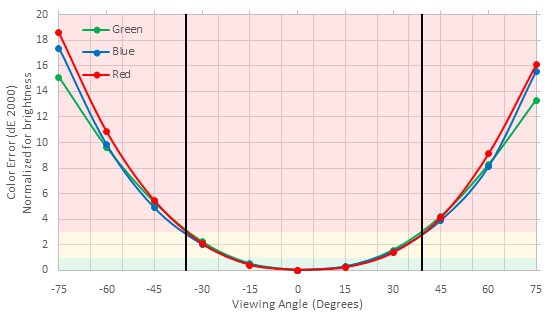
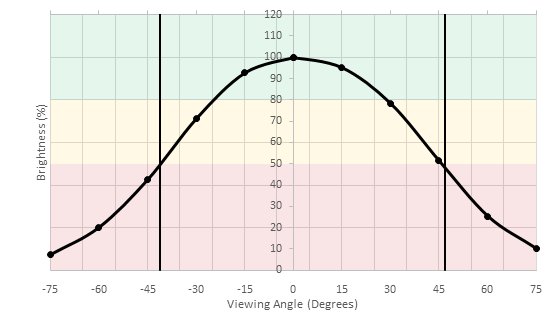
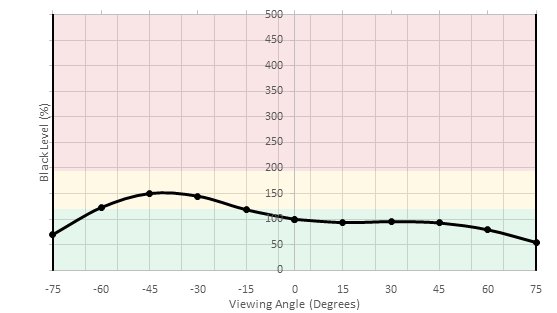
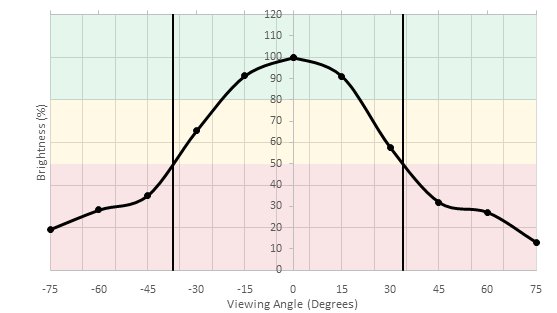
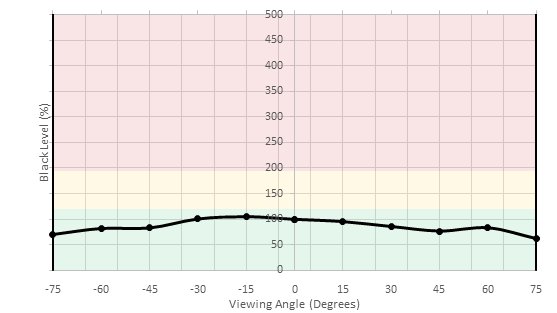
    The LG UltraFine 4k has decent horizontal viewing angles. Black levels remain constant, even at wide angles, but the brightness fades gradually off-of-center, and colors shift and gradually lose accuracy. The angles are wide enough though that most people shouldn't have any issues.

    8.3
    Vertical Viewing Angle
    Color Shift from Below
    29°
    Color Shift from Above
    29°
    Brightness from Below
    37°
    Brightness from Above
    37°
    Black Level from Below
    75°
    Black Level from Above
    75°

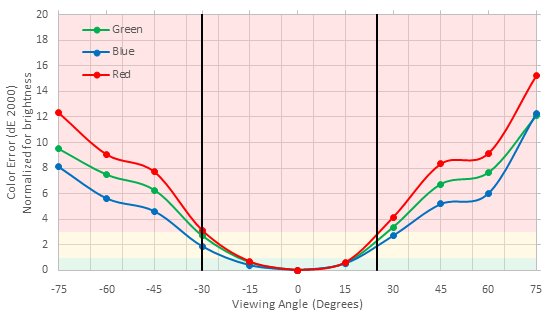
    The vertical viewing angles are great, and there shouldn't be any issues sharing your screen with someone standing beside you. Colors shift a bit quicker than on the horizontal axis, but otherwise, there are no serious issues.

    8.7
    Gray Uniformity
    50% Std. Dev.
    2.882%
    50% DSE
    0.109%
    5% Std. Dev.
    0.396%
    5% DSE
    0.053%

    Excellent gray uniformity. There is only minor vignetting, and almost no noticeable dirty-screen effect, which is great. In near-dark scenes, the uniformity is significantly better.

    6.3
    Black Uniformity
    Native Std. Dev.
    1.805%
    Std. Dev. w/ L.D.
    N/A

    Mediocre black uniformity. There is some noticeable backlight bleed on the right-hand side; this can vary between units, though.

    7.7
    Pre Calibration
    Picture Mode
    N/A
    Luminance
    292 cd/m²
    Luminance Settings
    50
    Contrast Setting
    N/A
    RGB controls
    N/A
    Color Temperature
    6,427 K
    White Balance dE
    2.02
    Color dE
    3.54
    Gamma
    2.24

    Out of the box, the LG UltraFine 4k has good accuracy. The white balance is excellent, and there are no noticeable issues. Color accuracy is decent, but the primaries are noticeably over-saturated, as the monitor is targeting DCI-P3 out of the box. Gamma doesn't follow the sRGB target curve at all. Note that this monitor has no settings on the monitor itself.

    9.7
    Post Calibration
    Picture Mode
    N/A
    Luminance
    103 cd/m²
    Luminance Settings
    18
    Contrast Setting
    N/A
    RGB Controls
    N/A
    Color Temperature
    6,455 K
    White Balance dE
    0.51
    Color dE
    0.29
    Gamma
    2.18

    After calibration, the UltraFine 4k 23.7 has outstanding accuracy. Any remaining inaccuracies in colors and the white balance are unnoticeable, and gamma follows the target sRGB curve almost perfectly.

    You can download our ICC profile calibration here. This is provided for reference only and should not be used, as the calibration values vary per individual unit even for the same model due to manufacturing tolerances.

    9.3
    SDR Color Gamut
    sRGB xy
    99.6%
    Adobe RGB xy
    84.9%

    sRGB Picture Mode: Max backlight, (calibrated)
    Adobe RGB Picture Mode: Max backlight

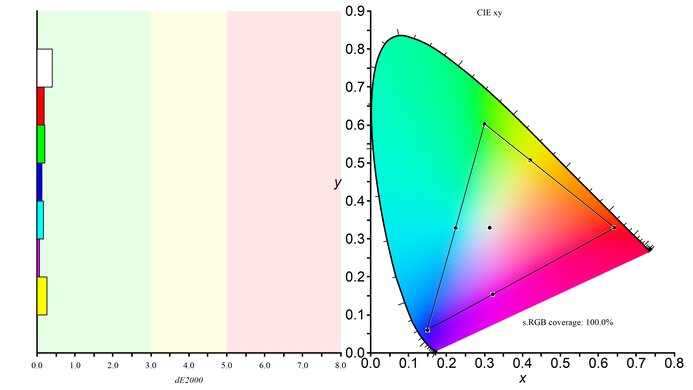
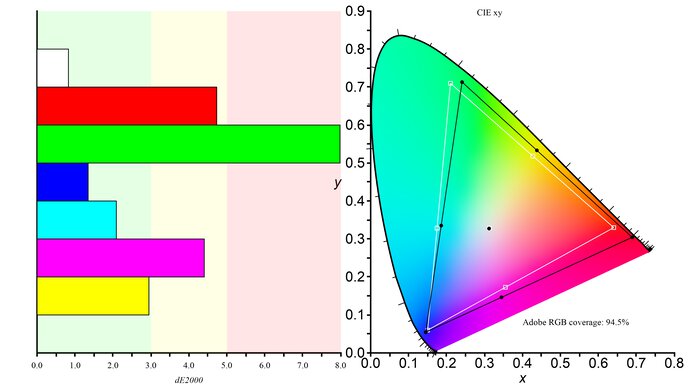
    Excellent SDR color gamut, with perfect coverage of the sRGB color space, and great coverage of the wider Adobe RGB color space.

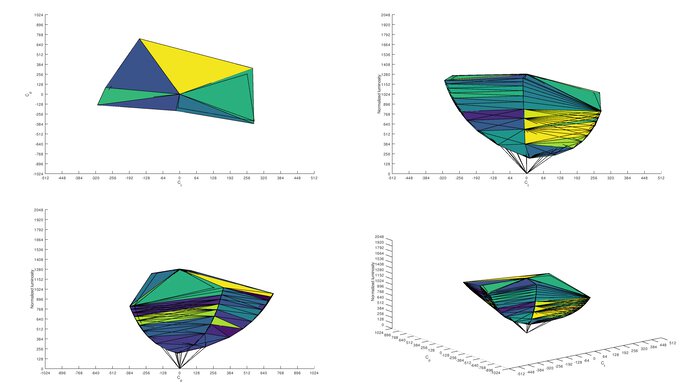
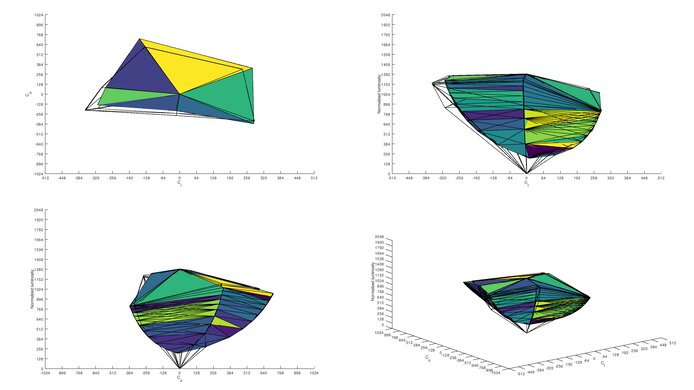
    9.4
    SDR Color Volume
    sRGB in ICtCp
    97.8%
    Adobe RGB in ICtCp
    89.5%

    sRGB Picture Mode: Max backlight
    Adobe RGB Picture Mode: Max backlight

    Excellent SDR color volume. Due to the low contrast ratio, this monitor can't display dark, saturated colors very well.

    0.0
    HDR Color Gamut
    Wide Color Gamut
    N/A
    DCI P3 xy
    N/A
    Rec. 2020 xy
    N/A

    This monitor does not support HDR, but it targets the DCI-P3 color space out of the box. It can display 95.9% of the DCI-P3 color space, which is excellent.

    0.0
    HDR Color Volume
    DCI-P3 in ICtCp
    N/A
    Rec. 2020 in ICtCp
    N/A

    This monitor does not support HDR.

    5.6
    Image Retention
    IR after 0 min recovery
    0.37%
    IR after 2 min recovery
    0.10%
    IR after 4 min recovery
    0.00%
    IR after 6 min recovery
    0.00%
    IR after 8 min recovery
    0.00%
    IR after 10 min recovery
    0.00%

    Unfortunately, there are some signs of temporary image retention, and it takes a few minutes for the retained image to dissipate. This is after displaying our high-contrast, static test image for 10 minutes. With varied enough content, this shouldn't be an issue for most people.

    9.9
    Gradient
    Color Depth
    10 Bit

    Outstanding gradient handling on the UltraFine 4k. There is almost no banding noticeable in any shade.

    10
    Color Bleed
    Pixel row error
    0.004%
    Pixel column error
    0.004%

    The UltraFine 4k has no noticeable color bleed, which is great.

    6.0
    Reflections

    Unfortunately, the glossy finish is mediocre for reflection handling, as any nearby light sources are reflected directly off the screen, and aren't diffused across it.

    Motion
    8.5
    Motion Blur
    80% Response Time
    5.6 ms
    100% Response Time
    13.9 ms
    Best Overdrive Setting
    N/A

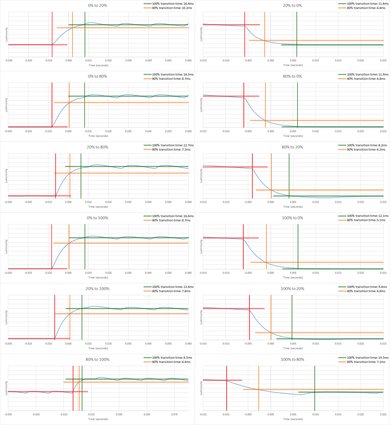
    This monitor has a great response time, about average for 60Hz monitors. Most transitions are about the same speed, and there is no noticeable over/undershoot, which is great. Unlike the vast majority of monitors, the overdrive can't be changed.

    Unfortunately, there are noticeable duplications in motion due to the backlight flicker.

    5.7
    Image Flicker
    Flicker-freeNo
    PWM Dimming Frequency
    700 Hz
    Black Frame Insertion (BFI)
    No
    BFI Maximum Frequency
    N/A
    BFI Minimum Frequency
    N/A

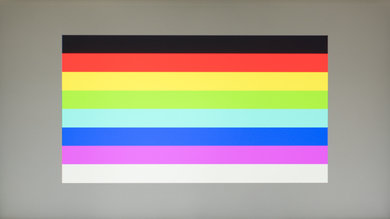
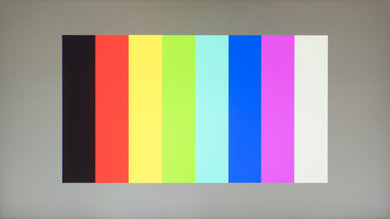
    Unfortunately, at any setting other than maximum or minimum, there is flicker in this monitor's backlight. There appear to be multiple flicker frequencies interfering with one another, resulting in the strange interference pattern shown here. The overall flicker frequency appears to be about 700Hz, which isn't very noticeable, but duplications can be seen in some content.

    6.7
    Refresh Rate
    Variable Refresh Rate
    No
    Native Refresh Rate
    60 Hz
    Factory Overclock
    N/A
    Variable Refresh Rate
    No
    G-SYNC Compatible
    No
    VRR Maximum
    N/A
    VRR Minimum
    N/A
    VRR Maximum With OC
    N/A
    VRR Supported ConnectorsN/A

    This monitor has a basic 60Hz refresh rate and doesn't support any variable refresh rate technologies, like FreeSync or G-SYNC.

    Inputs
    8.4
    Input Lag
    Native Resolution
    13.2 ms
    Non-Native Res @ Native Refresh
    11.3 ms
    Native Resolution @ 60 Hz
    13.2 ms
    Variable Refresh Rate
    N/A
    10 bit HDR
    N/A
    Black Frame Insertion (BFI)
    N/A

    The LG UltraFine 4k has very good low input lag, but it's a bit higher than most 60Hz monitors. The non-native input lag is lower than the native resolution input lag, which is unexpected, but we don't know why this is.

    8.9
    Resolution and Size
    Native Resolution3840 x 2160
    Aspect Ratio16:9
    Megapixels8.3 MP
    Pixel Density186 PPI
    Screen Diagonal23.7"
    Screen Area240 in²

    The 4k resolution is great and offers the highest pixel density of any monitor we've tested so far.

    Some people have reported issues with scaling on this monitor, as the pixel density is lower than the 220 PPI (pixels-per-inch) target for retina displays. In normal usage, we didn't see any issues with this monitor, but for some users, it might be best to run this monitor at its native resolution, which does result in some UI elements appearing very small.

    Inputs
    Total Inputs
    DisplayPortNo
    Mini DisplayPortNo
    HDMINo
    DVINo
    VGANo
    DisplayPort OutNo
    USBNo
    USB C5 (2x Thunderbolt 3 with PD, 3x USB-C)
    Analog Audio Out 3.5mmNo
    Microphone In 3.5mmNo
    Digital Optical Audio OutNo
    Analog Audio Out RCANo
    Power SupplyInternal

    The LG UltraFine 4k has 3 USB-C ports and two Thunderbolt 3 ports, but no HDMI or DisplayPort connections. The two Thunderbolt ports support power delivery up to 85W, which is enough to charge even a 15" MacBook Pro at full speed. One of the Thunderbolt 3 ports can also be used to daisy-chain a second monitor.

    Features
    Additional Features
    Speakers
    Yes
    HDR10No
    Multiple input display
    No

    This monitor has very few additional features. It has built-in speakers and an impressive USB-C hub, which includes 2 Thunderbolt 3 ports which can be used to charge almost any MacBook at full speed.

    On-Screen Display (OSD)

    There is no on-screen display on this monitor.

    Controls

    The LG UltraFine 4k 23.7 has no physical controls, not even a power button. It's designed to interface directly with a Mac and automatically turns on when the Mac is on. Brightness and volume are controlled directly on the Mac.

    In The Box

    • USB-C cable
    • Thunderbolt 3 cable
    • VESA design cover
    • Manual
    • Power cable